Qwen-Image 2.1 Local on M1 Max vs Anima: 10 min/Image, Faces Kept in i2i
 Contents
Update (2026-09-22): The TaylorSeer cache in Diffusers cut about 10 minutes per image on M1 Max to about 3.5 → Qwen-Image 2.1 on M1 Max: TaylorSeer Cache Cut 10 min/Image to 3.5 min
Update (2026-09-22): Measuring whether partial edits such as expression changes hold their position, plus a one-character outfit change and a transparent background → Qwen-Image 2.1 Edits: One Argument Cut Position Drift to About 0.1px
Previously, in my ambassador early-access test, I used Qwen-Image 2.1 on ModelScope Studio to try camera composition prompts such as overhead shots, and to edit a standing image of my original character Kana-chan.
The weights (the trained model data) were released on September 20, so I checked whether the same compositions work locally on my M1 Max 64GB.
I also generated the prompts from my April article comparing Anima, WAI-Anima, and WAI-Illustrious, and put the outputs side by side.
Conditions used for the comparison
Qwen was run at 832×1216, 40 steps, seed 42. Steps are the number of iterations that update the image; the seed is the starting number for the random noise. Each condition was generated once.
Generation time covers reading the prompt, the iterative computation, and decoding back to an image. Model loading time is not included.
Computation used BF16, a 16-bit floating-point format, on MPS, which lets PyTorch use the Mac GPU. CFG, which controls how strongly the model follows the prompt, was 1.0, and no negative prompt (a list of things you don’t want) was used.
The prompts follow the same form I sent on Studio and in the April article: a list of Danbooru tags starting with 1girl, solo, with Anima quality tags still at the front.
The examples in the official README are descriptive English phrases and instructions such as Change the background to a sunset beach; no tag lists appear there. The README also recommends expanding short prompts into detailed English with the official prompt rewriting models first. The text encoder that processes the prompt is Qwen3-VL 8B.
I did not rewrite the tag lists into sentences, and I did not use the rewriting models. Every Qwen output in this post comes from a tag list.
832×1216 was also chosen to match the earlier outputs. It is smaller than the 2K sizes the README recommends, such as 2048×2048.
The sampler is the method that turns noise into an image, and the scheduler is how that computation is stepped. For Qwen I used whatever Diffusers, the image-generation library, loaded from the published weight config.
| Comparison | Kept the same | Different |
|---|---|---|
| Studio vs local | Prompt text, reference image, resolution, seed number | Implementation, negative prompt, Studio’s unknown internal settings |
| Kana-chan composition and pose changes | Input standing image, local generation settings | Requested orientation and limb positions |
| April Anima/Illustrious outputs | Prompt text, resolution, seed number | Model, steps, CFG, sampler, generation date |
| April i2i (WAI-IL → Anima models) | Source image, resolution, seed number | Anima models used i2i at denoise 0.5; Qwen used a reference image plus a text instruction |
Python environment for M1 Max
| Item | This setup |
|---|---|
| Machine | MacBook Pro, Apple M1 Max |
| Memory | 64GB |
| OS | macOS 27.0, build 26A428 |
| Python | 3.12.12, dedicated environment created with uv |
| PyTorch / Torchvision | 2.14.0 / 0.29.0 |
| Transformers / Accelerate | 5.17.0 / 1.15.0 |
| Diffusers | 0.41.0.dev0, commit 80c7ed262aeffbeb43ef13ae04baeb9b84515a69 |
| ModelScope | 1.40.1 |
The official example uses QwenImage21Pipeline from Diffusers.
I changed the device from CUDA to MPS and installed it in a Python environment separate from my existing ComfyUI.
I first built the environment with PyTorch 2.13.0, but model loading stopped with this error.
Qwen3VLVideoProcessor requires the Torchvision libraryTransformers needed Torchvision when loading the processor, the component that prepares the inputs.
Installing Torchvision also bumped PyTorch to 2.14.0, so all timing measurements were done on the updated environment.
Install the versions used for generation into a dedicated folder.
uv venv --python 3.12 .venv
uv pip install --python .venv/bin/python \
  'torch==2.14.0' 'torchvision==0.29.0' \
  'transformers==5.17.0' 'accelerate==1.15.0' \
  'modelscope==1.40.1' 'pillow==12.3.0' \
  'git+https://github.com/huggingface/diffusers@80c7ed262aeffbeb43ef13ae04baeb9b84515a69'
Downloading the weights from ModelScope
The September 20 announcement in the official repository lists ModelScope and Hugging Face as download locations.
I downloaded the weights listed on ModelScope’s file page with the ModelScope SDK from the environment above.
import os

os.environ["MODELSCOPE_DOWNLOAD_PARALLEL_WORKERS"] = "4"
from modelscope import snapshot_download

snapshot_download(
    "Qwen/Qwen-Image-2.1",
    revision="master",
    endpoint="https://modelscope.ai",
    local_dir="model",
    cache_dir="cache",
    max_workers=4,
)
The image generator, the text encoder that reads the prompt and reference images, and the VAE that converts between images and the internal representation came to 7 weight files.
The total was 33,115,613,408 bytes, about 33.1GB. The official 7B (7 billion parameters) counts only the image generator; the text encoder and VAE come on top of that.
After downloading, I checked the size and SHA-256 (used to detect corruption) of all 7 files against the published list, and they all matched.
The license is the Qwen Research License: non-commercial research and evaluation use, with a separate license required for commercial use.
Smoke test with a small image
First I checked that a 512×512 image could be saved with a short neon-sign prompt.
Seed 42, BF16, and MPS were the same as the main runs; steps were reduced to 4.
A neon shop sign that reads "QWEN IMAGE 2.1", rainy night, reflections on wet pavement| Resolution / steps / seed | Generation time | Output |
|---|---|---|
| 512×512 / 4 steps / 42 | 24.99 s | Blue and red lines over a dark background; the sign text is unreadable |
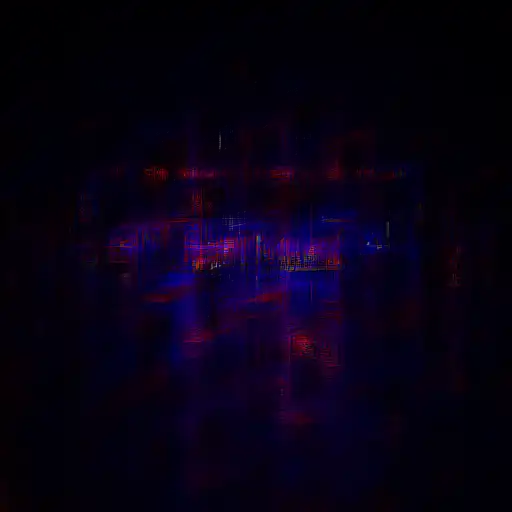
Even at 4 steps, the PNG saved fine.
Same overhead prompt as Studio
From here, I raised the steps to 40 to match the official example.
I reused the overhead prompt I sent on Studio, copied straight from the earlier run log. It looks down on the subject from above and has her lift her face toward the camera.
masterpiece, best quality, high quality, newest, year 2025, year 2024,
1girl, solo, long blonde hair, blue eyes, school uniform, white shirt, navy skirt,
strong high-angle overhead view, camera clearly above the subject looking steeply downward, visible top surfaces and pronounced top-down perspective. The subject is seen from the head toward the legs with the head visually nearer and larger than the lower body; the ground fills most of the background. The subject tilts her face upward and looks up into the camera.
Code used for local generation
The model was loaded only from the downloaded files. To rerun it, save the prompt above as prompt.txt.
from pathlib import Path
import torch
from diffusers import QwenImage21Pipeline

prompt = Path("prompt.txt").read_text()
pipe = QwenImage21Pipeline.from_pretrained(
    "./model", torch_dtype=torch.bfloat16, local_files_only=True,
).to("mps")

image = pipe(
    prompt=prompt,
    width=832,
    height=1216,
    num_inference_steps=40,
    true_cfg_scale=1.0,
    use_kv_cache=True,
    generator=torch.Generator("cpu").manual_seed(42),
).images[0]
image.save("local-from-above.png")
KV cache, which reuses already-computed values, was enabled. I did not use CPU offloading of the model or VAE tiling (splitting the step that turns the internal data back into an image).
In the Diffusers code used here, negative-prompt guidance does not run when true_cfg_scale=1.0.
| Item | Studio (previous) | Local (this time) |
|---|---|---|
| Prompt | The prompt above | Same prompt |
| Resolution / seed | 832×1216 / 42 | 832×1216 / 42 |
| Prompt auto-enhancement | Off | None |
| Steps / CFG | Internal settings unknown | 40 / 1.0 |
| Negative prompt | Set | Not used |
| Random number implementation | Unknown | PyTorch CPU generator |
Each condition is a single run at seed 42, so I can’t tell whether differences are normal variation or come from the runtime environment.
The Studio timing last time was a rough impression, so it can’t be compared with the measured local speed.
| Where | Instruction | Result |
|---|---|---|
| Studio (previous) | Overhead view of a blonde, blue-eyed girl in a school uniform, looking up | The ground fills the background and the head appears closer and larger |
| M1 Max (this time) | Same prompt | The ground fills the background and the head appears closer and larger. The ribbon color and standing position differ |
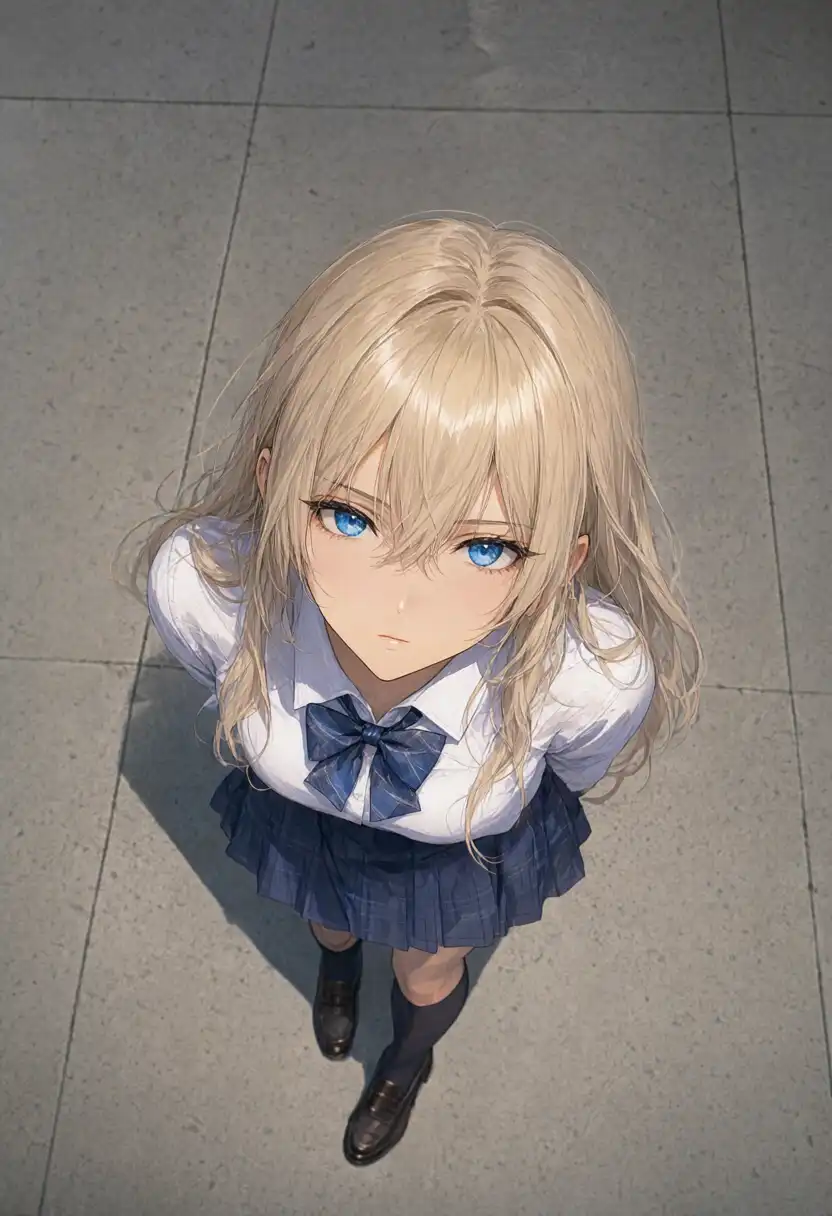
The overhead composition came out locally just as it did on Studio.
For detail, the Studio version was finer when I compared the original PNGs at the same size: thin hair strands and highlights, shirt wrinkles, and a plaid skirt. The local version had smoother hair and clothing surfaces.
Generation time and memory on M1 Max
I recorded time and memory for the overhead generation above. At 832×1216, each step took about 15 seconds.
To check the effect of other processes, I stopped the Astro dev server (used to preview this blog) running on the same Mac after step 25. Its CPU usage was already close to 0% before stopping.
| Range | Average time per step |
|---|---|
| Before stopping the server, steps 2–25 | 15.177 s |
| After stopping, steps 27–40 | 15.040 s |
Step times were measured as the difference between step end times, averaging from step 2 using the first end time as the reference.
Step 26, which spans the stop, was excluded. Each step still took about 15 seconds after stopping.
| Measurement | Text-to-image, 832×1216 |
|---|---|
| Model load on CPU | 1.59 s |
| Transfer to MPS | 16.83 s |
| Generation | 614.71 s, about 10 min 15 s |
| From model load start to PNG save | 633.24 s, about 10 min 33 s |
| Average of steps 2–40 | 15.12 s |
| GPU-side allocated memory, recorded peak | About 45.8GB |
| System swap, start → end | About 0.5MB → about 0.5MB |
Generation includes reading the text, 40 iterations, and VAE decoding back to an image.
Model loading and PNG saving were timed separately, and Python import time is not included anywhere in the table. Timestamps were taken after waiting for the GPU work to finish.
Memory was recorded as the MPS driver allocation: about 33.9GB during the iterations and about 45.8GB after the VAE step.
The GPU allocation that PyTorch reports includes caches as well as model data.
I sampled once per second and at stage boundaries, so short peaks in between may have been missed.
Swap (temporarily moving memory contents to the SSD) stayed at about 0.5MB system-wide from start to end.
Editing Kana-chan’s standing image into an overhead shot
With text-to-image working, I fed in the same standing image of Kana-chan that I used for the Studio edit.
| Keep from the reference image | Change |
|---|---|
| Face, hairstyle, outfit | Turn the front-facing standing pose into a view from above with her looking up |
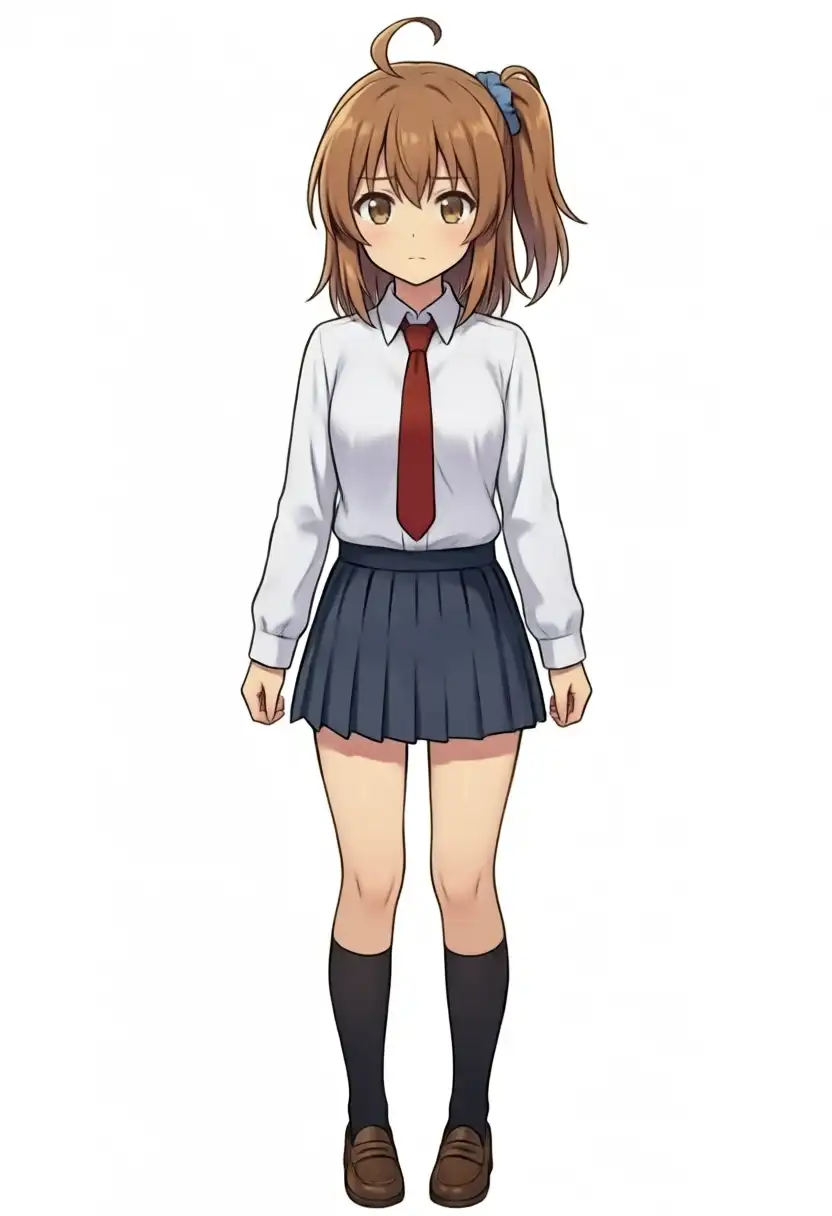
The prompt is the following, the same one I sent for the Studio edit.
masterpiece, best quality, high quality, newest, year 2025, year 2024,
1girl, solo, the girl from image 1, keep her face, hairstyle and outfit exactly as in image 1,
strong high-angle overhead view, camera clearly above the subject looking steeply downward, visible top surfaces and pronounced top-down perspective. The subject is seen from the head toward the legs with the head visually nearer and larger than the lower body; the ground fills most of the background. The subject tilts her face upward and looks up into the camera.
I swapped this into prompt in the generation code and passed image=[Image.open("kana-front-arms-down-normal-s42.png").convert("RGB")].
Image comes from Pillow via from PIL import Image. Resolution 832×1216, 40 steps, seed 42, and BF16 were the same as text-to-image.
Locally, CFG was 1.0 with no negative prompt. On Studio I had also set a negative prompt for the edit, and its internal steps and CFG remain unknown.
| Where | Instruction | Result |
|---|---|---|
| Studio (previous) | Keep face, hairstyle, and outfit; change to overhead | Looks up with side ponytail and uniform kept. Gray ground as background |
| M1 Max (this time) | Same prompt and reference image | Looks up with side ponytail, blue scrunchie, and uniform kept. White background with a shadow at her feet |
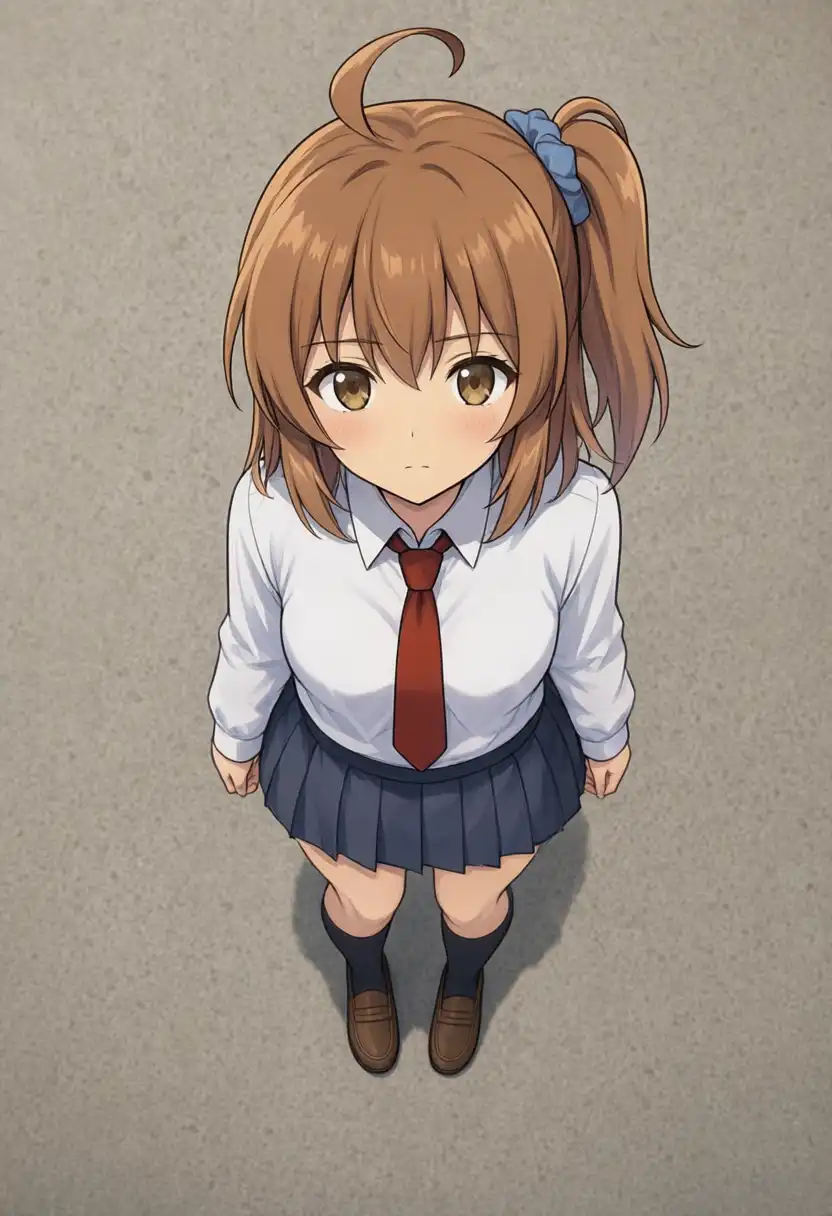
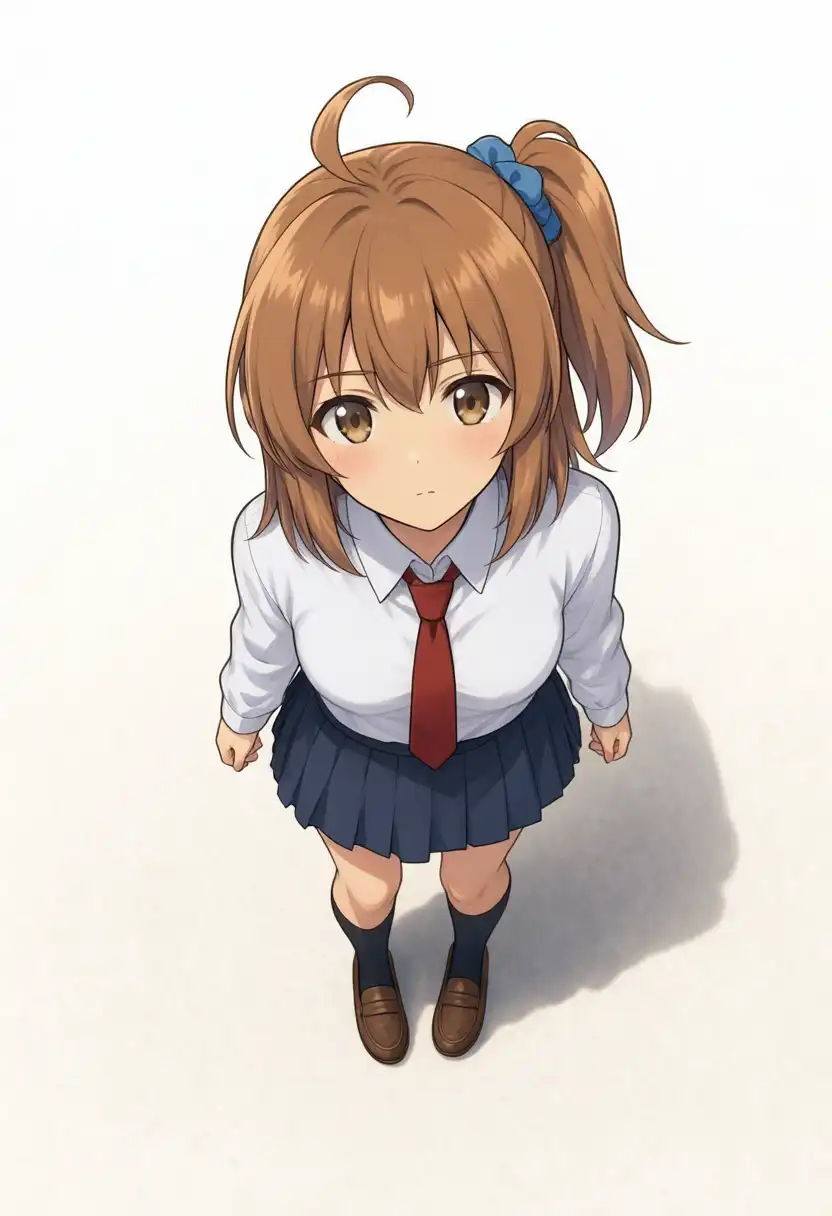
In the Kana-chan edit, the local version also came out as a view from above, with the head drawn closer and larger.
Studio’s shirt wrinkles and ground texture stand out, but the local version also has thin hair lines and eye highlights, and the detail gap was smaller than in the text-to-image pair.
Time and memory were recorded the same way as in the previous section.
| Measurement | Edit with reference image, 832×1216 |
|---|---|
| Model load on CPU | 1.64 s |
| Transfer to MPS | 16.01 s |
| Generation | 721.22 s, about 12 min 1 s |
| From model load start to PNG save | 739.00 s, about 12 min 19 s |
| Average of steps 2–40 | 17.36 s |
| GPU-side allocated memory, recorded peak | About 49.0GB |
| System swap, start → end | About 0.5MB → about 0.5MB |
The MPS driver allocation was about 38.2GB during the iterations and about 49.0GB after the VAE step. Swap stayed at about 0.5MB.
Does Kana-chan’s asymmetric hairstyle survive?
Kana-chan ties her hair on her own left side. In the front-facing source, the side ponytail is on the right of the frame; I tested whether it stays on her left when the orientation and pose change.
The input was the same front-facing standing image used for the overhead edit. The main question was whether the asymmetric hairstyle holds, and I also checked the limb instructions.
I used the position of the blue scrunchie to check whether the hair is tied on the same side as in the source.
832×1216, 40 steps, seed 42, BF16, CFG 1.0, no negative prompt. One run per condition, so run-to-run variation is unknown.
The three composition changes used a prompt that keeps the face, hairstyle, and outfit from the source. The two pose changes also asked to keep the side ponytail, the blue scrunchie, and the ahoge (the strand sticking up from the top of the head).
For the right-side view, I fixed an on-screen direction that contradicted itself in the prompt. The corrected prompt is in the collapsed section at the end.
Every prompt starts with the tag list, and the viewing direction is given as tags like from side, profile plus short phrases. I did not rewrite them into editing instructions like the README examples.
| Requested change | Hair side / knot (expected → result) | Orientation / limbs |
|---|---|---|
| Exact side view (from her left). Whole body facing screen left, face and gaze not turned back to the camera | Expected: the knot on her left is on the near side. Result: the knot moved toward the back of the head and looked more like a regular ponytail than a side ponytail | Side view facing screen left; neither face nor gaze turned toward the camera |
| Exact side view (from her right). Whole body facing screen right, face and gaze not turned back to the camera | Expected: the knot on her left is on the far side. Result: the side ponytail shape stayed, but it was tied on her right side instead | Side view facing screen right; neither face nor gaze turned toward the camera |
| Directly behind. No face, turned away from the camera | Expected: knot on screen left. Result: the blue scrunchie and side ponytail moved to screen left, staying on her left side | Full body from head to shoes seen directly from behind, no face |
| Jump. Facing forward. Right knee up, left leg down, right fist straight up, left arm out to the side | Expected: facing forward, knot on screen right. Result: the knot stayed on screen right, on her left side. The hair bundle flew outward | Jump pose with right fist and right knee raised. Left arm extended diagonally down; left leg slightly bent |
| Running at an angle. Running 45 degrees toward screen left. Right knee up, left leg kicking back, left arm forward, right arm back | Expected: even with the hair flowing, it stays tied on her left. Result: the blue knot is on screen right but looks closer to the back of the head than in the source. The hair flowed backward. I couldn’t tell from this image whether it’s tied on her left | Leaning forward and running toward screen left, but the knee isn’t raised high. Left arm back and right arm forward, the reverse of the instruction |
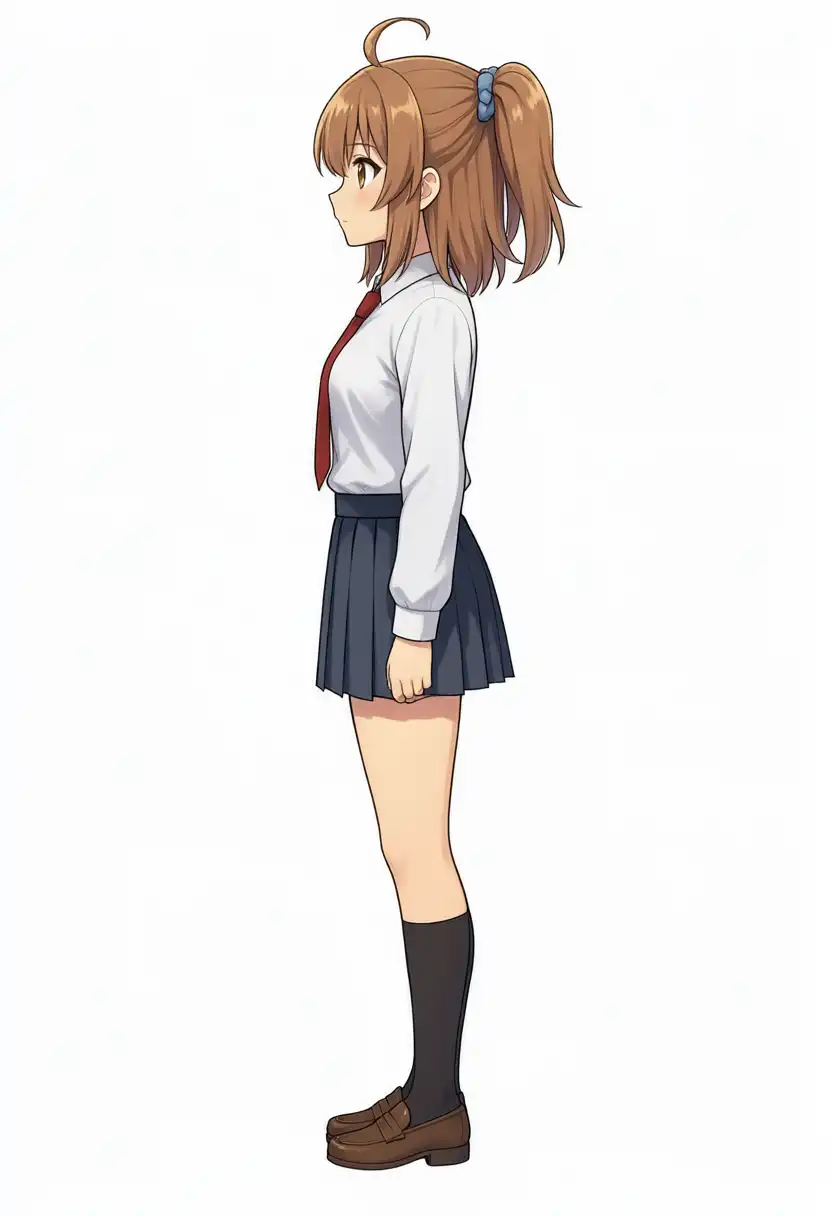
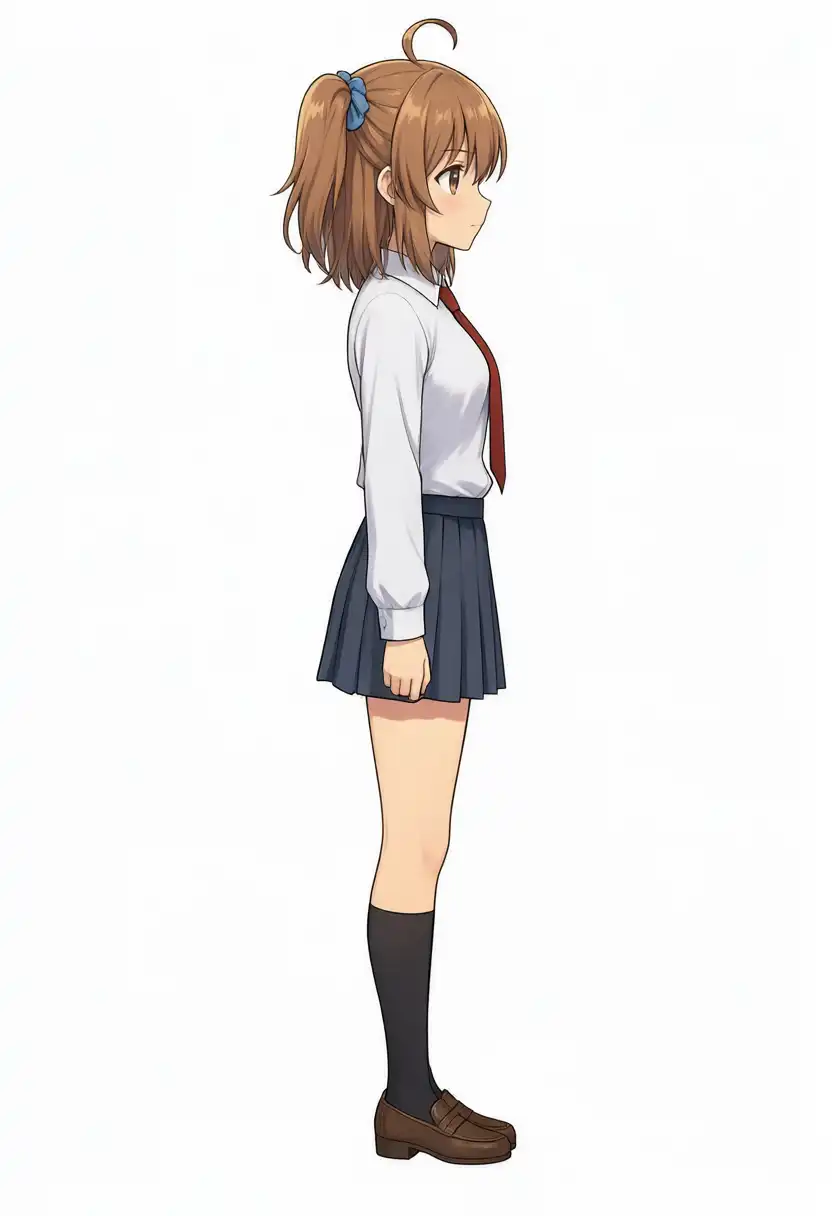
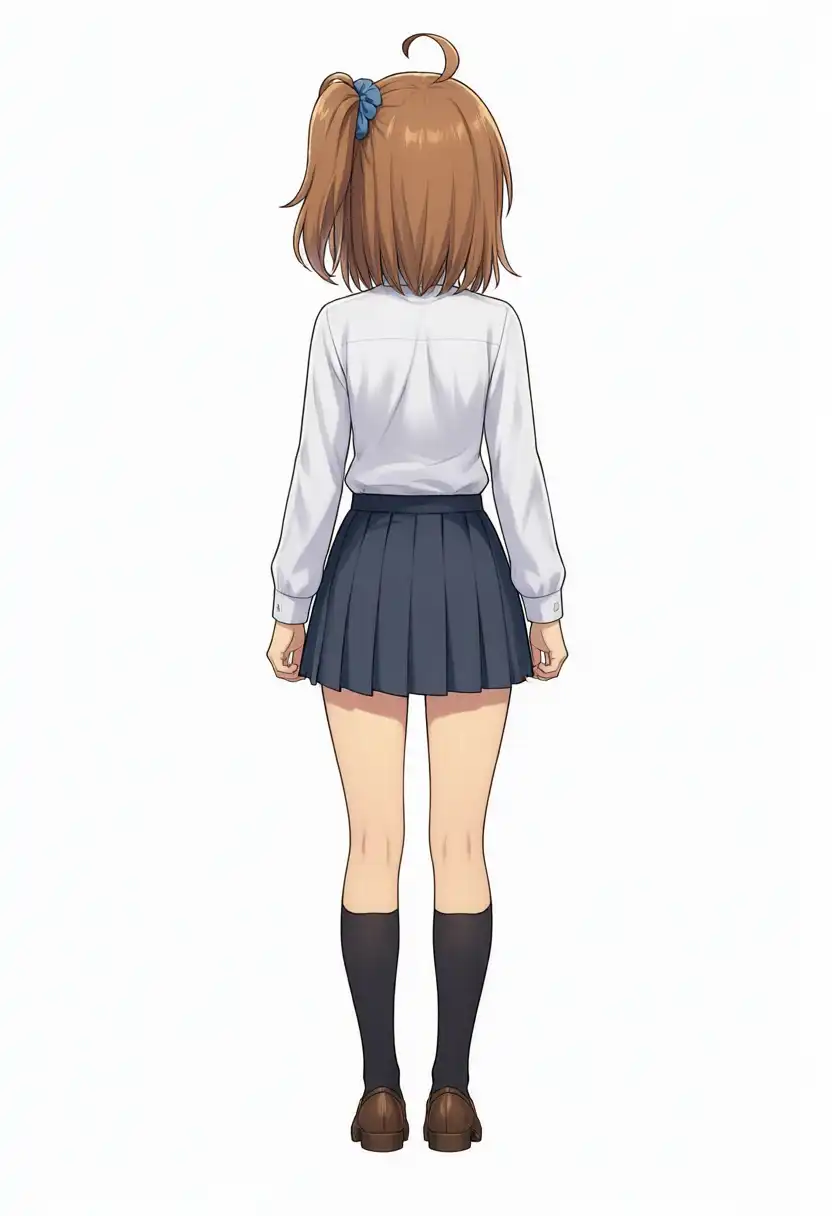
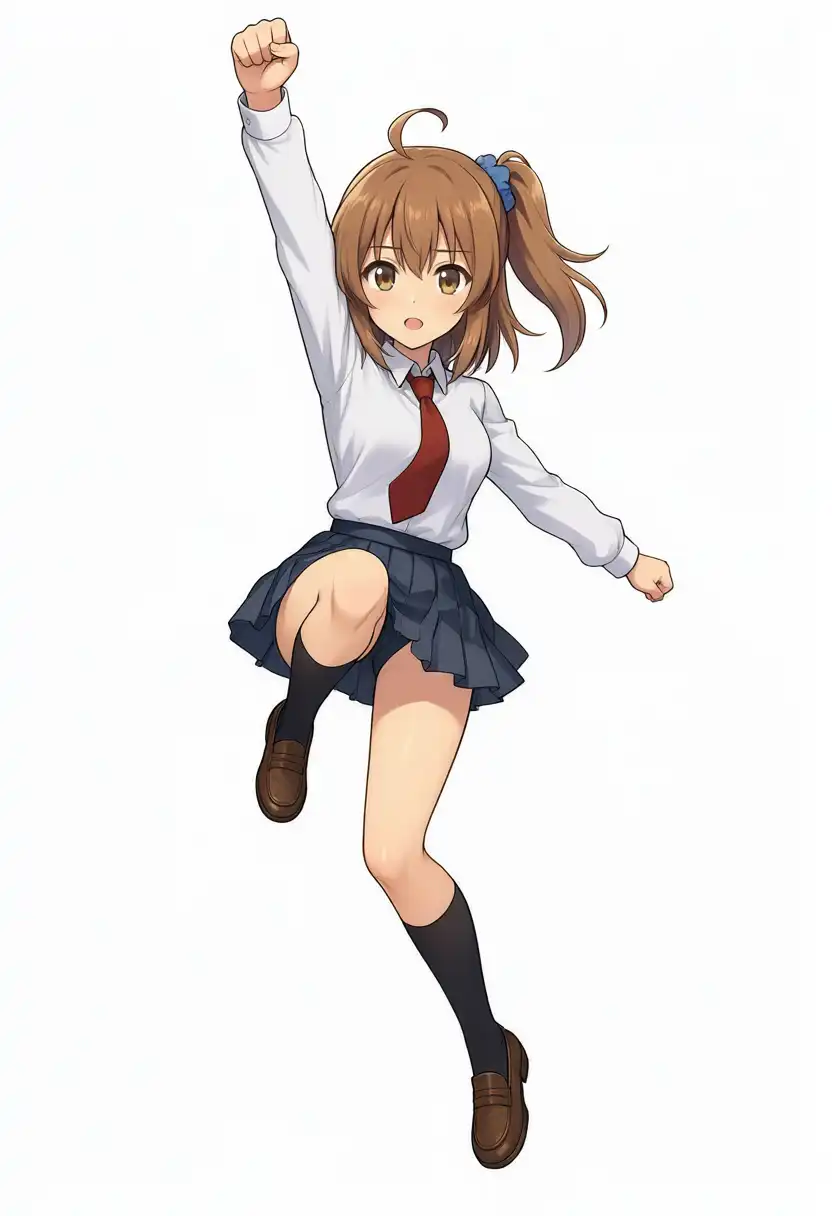
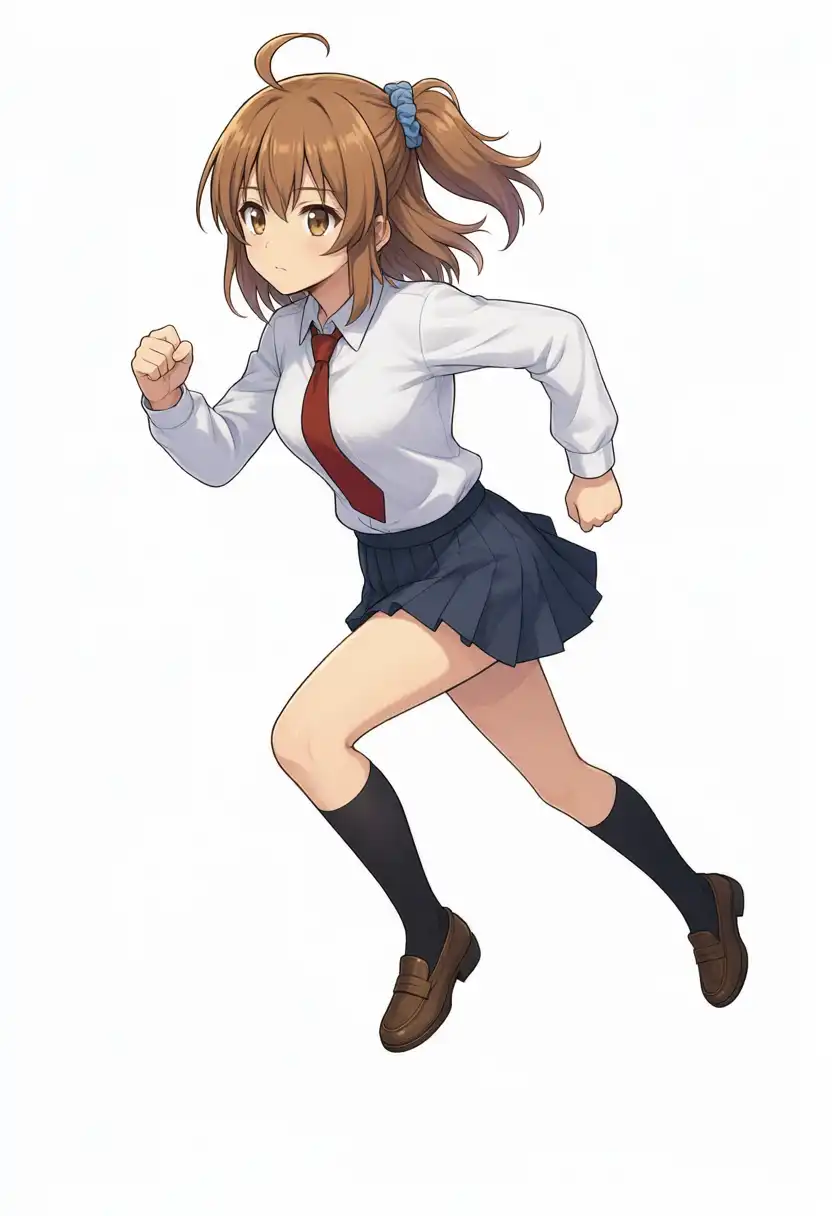
The rear view and the front-facing jump kept the hair tied on her left side.
In the two side views, the view from her right flipped the tie side, and the view from her left turned it into something close to a regular ponytail. In the angled run, the knot moved toward the back of the head and the arm swing was reversed.
Both side views come from a direction given as tags and short phrases.
| Condition | Generation | GPU-side allocated memory, recorded peak |
|---|---|---|
| Side view (from her left) | 719.15 s | About 48.4GB |
| Side view (from her right) | 707.13 s | About 48.4GB |
| Directly behind | 721.98 s | About 49.0GB |
| Jump | 710.83 s | About 48.4GB |
| Running at an angle | 712.18 s | About 48.4GB |
Prompts sent for the composition and pose changes
Side view (from her left)
masterpiece, best quality, high quality, newest, year 2025, year 2024,
1girl, solo, the girl from image 1, keep her face, hairstyle and outfit exactly as in image 1,
from side, profile, exact orthographic 90-degree eye-level side view, camera at the subject's left side. Full body head to toe, flat left-facing silhouette. No head, body or gaze turn toward camera; no eye contact. Exact profile, never front or three-quarter.
Side view (from her right)
In the prompt I sent on Studio, placing the camera on her right side contradicted the left-facing silhouette. This time I changed the silhouette from left-facing to right-facing.
masterpiece, best quality, high quality, newest, year 2025, year 2024,
1girl, solo, the girl from image 1, keep her face, hairstyle and outfit exactly as in image 1,
from side, profile, exact orthographic 90-degree eye-level side view, camera at the subject's right side. Full body head to toe, flat right-facing silhouette. No head, body or gaze turn toward camera; no eye contact. Exact profile, never front or three-quarter.
Directly behind
masterpiece, best quality, high quality, newest, year 2025, year 2024,
1girl, solo, the girl from image 1, keep her face, hairstyle and outfit exactly as in image 1,
direct rear view, eye-level camera positioned directly behind the subject, with zero camera roll. Full body from head to toe in a centered rear-view composition. Show only the back of the head, torso, arms, legs and shoes; do not show the face. The subject looks straight ahead away from the camera.
Jump
masterpiece, best quality, high quality, newest, year 2025, year 2024,
1girl, solo, the girl from image 1, keep her face, hairstyle, side ponytail with the blue scrunchie, ahoge, eye color, outfit and white background exactly as in image 1,
change only her pose: a dynamic mid-air jump facing the viewer. Both feet are high off the ground, her right knee is pulled up high and her left leg stretches down, her right fist punches straight up toward the sky and her left arm swings out to the side. Full body from head to toe.
Running at an angle
masterpiece, best quality, high quality, newest, year 2025, year 2024,
1girl, solo, the girl from image 1, keep her face, hairstyle, side ponytail with the blue scrunchie, ahoge, eye color, outfit and white background exactly as in image 1,
change only her pose: three-quarter view, not frontal. Her body and face are turned about 45 degrees toward the viewer's left, so her left side is visible. She is sprinting toward the viewer's left: her body leans far forward, her right knee is driven up high, her left leg pushes off behind her with only the toes touching the ground, her left arm swings forward and her right arm swings back with bent elbows. Full body from head to toe.
Same prompts as Anima and Illustrious
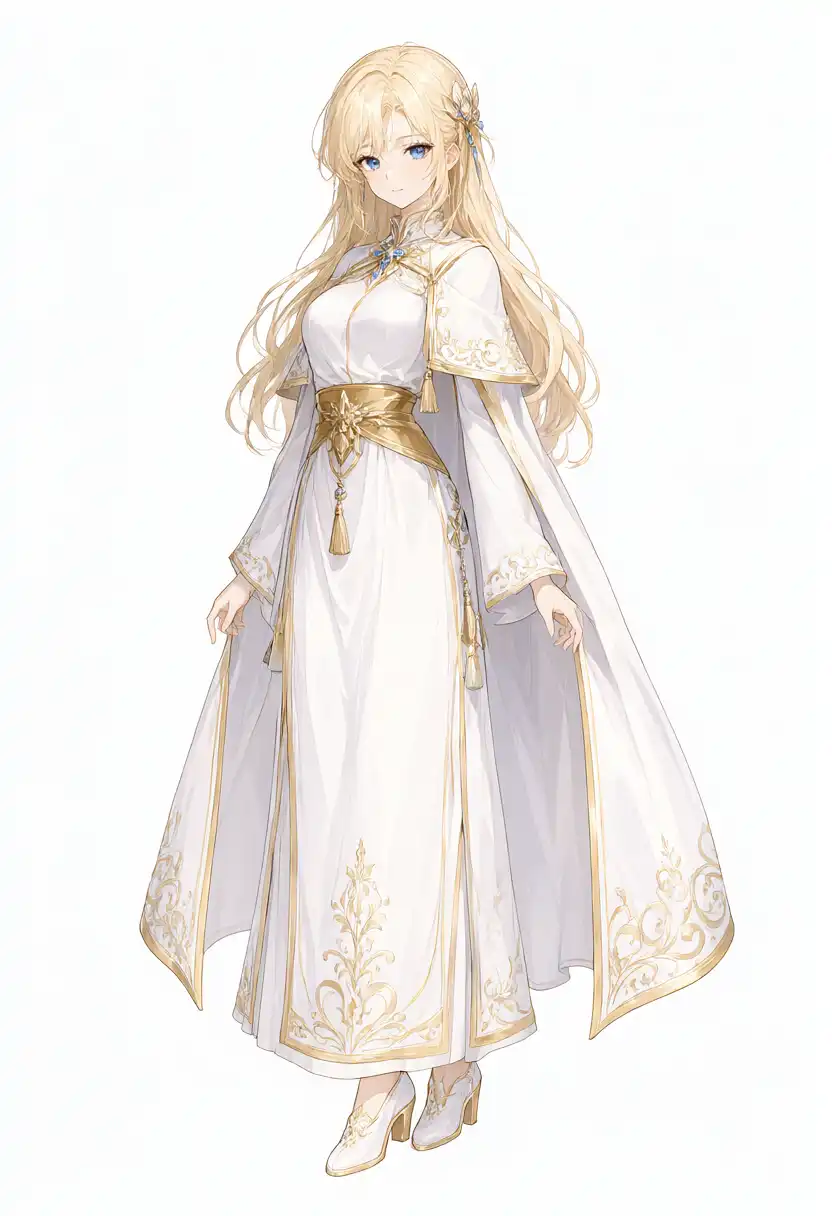
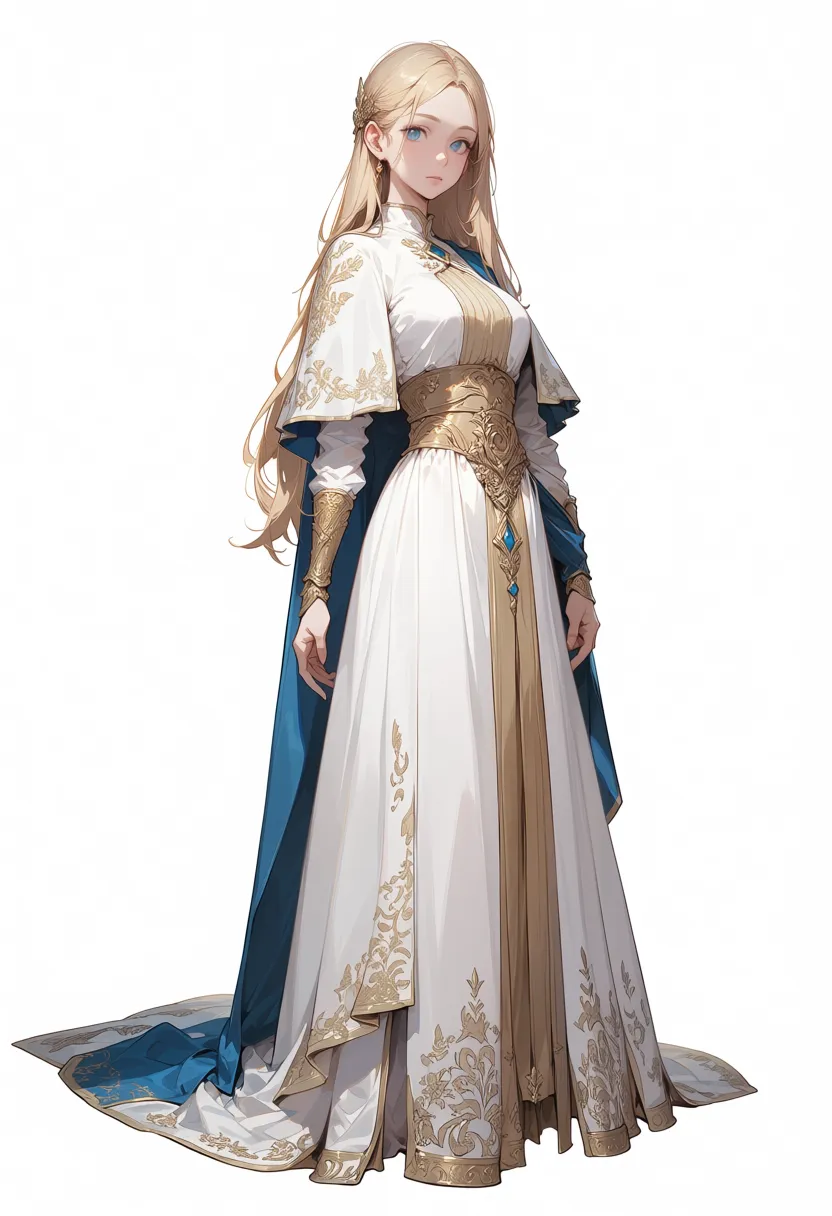
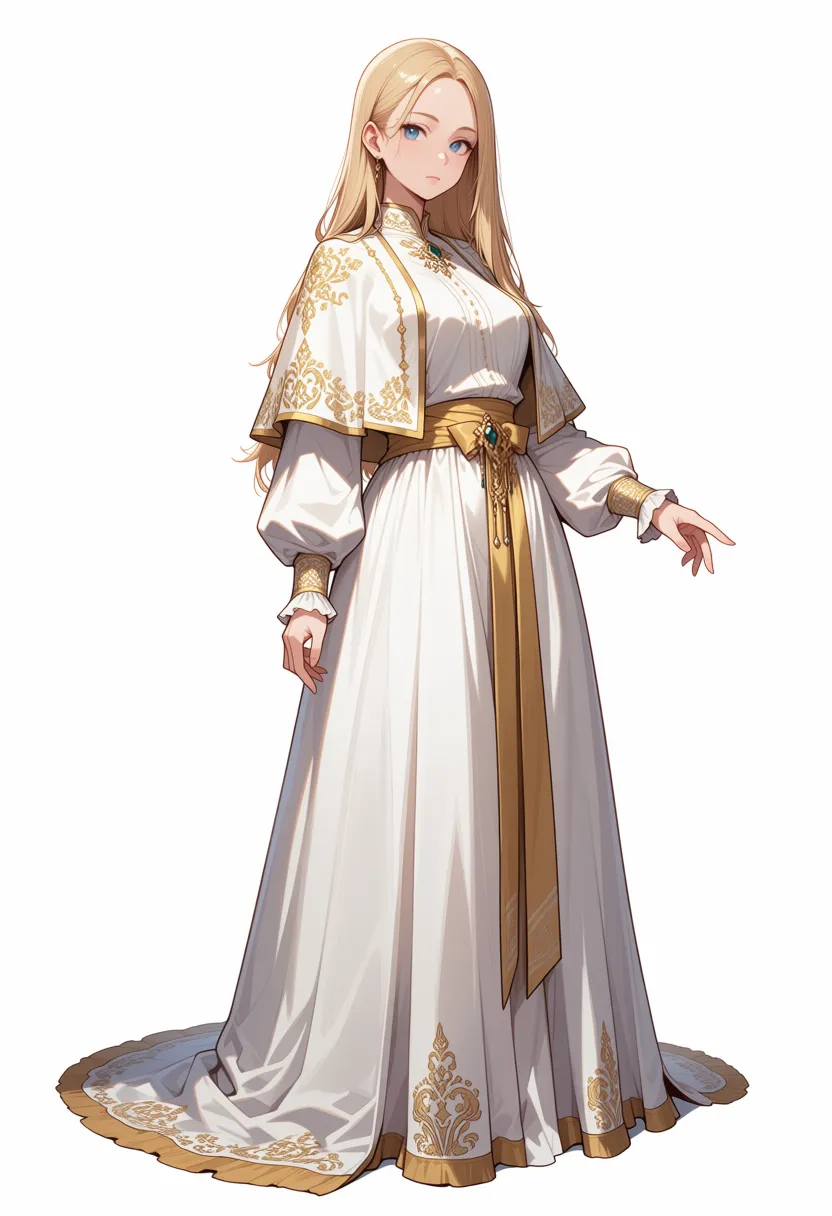
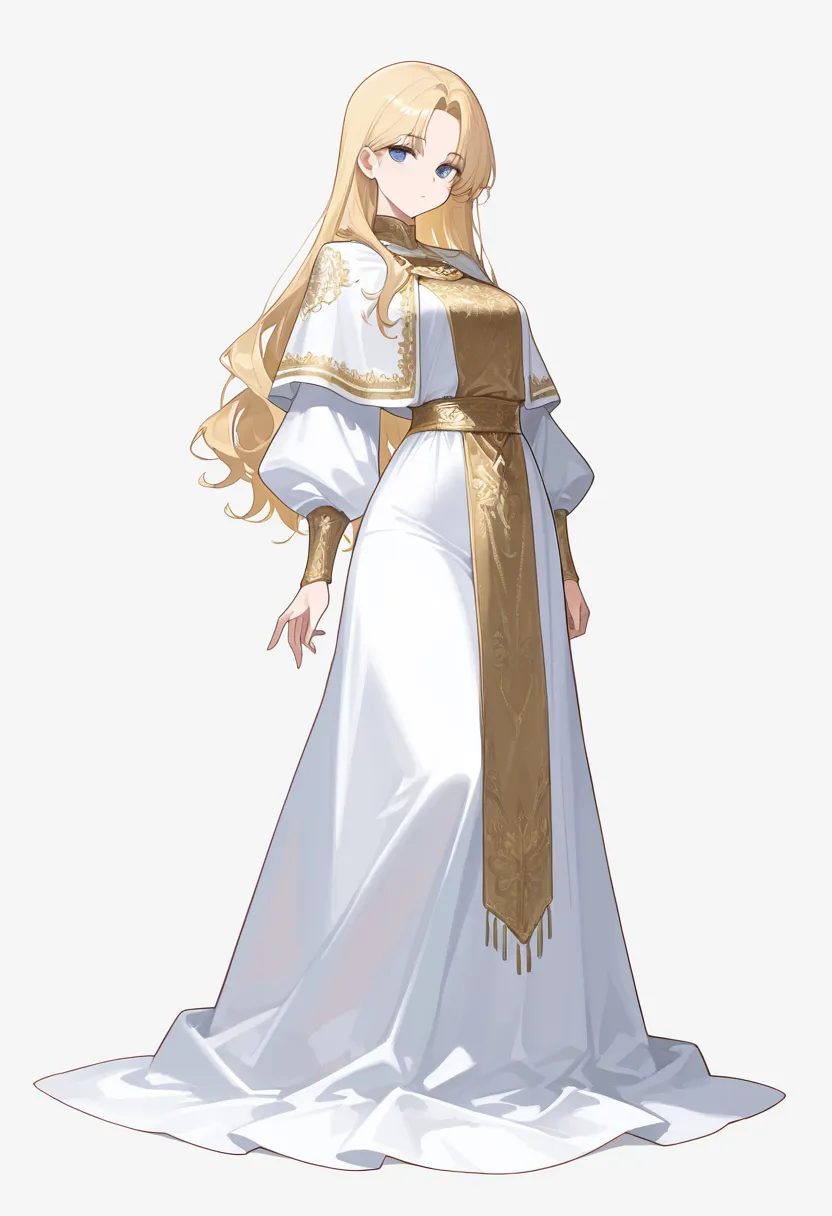
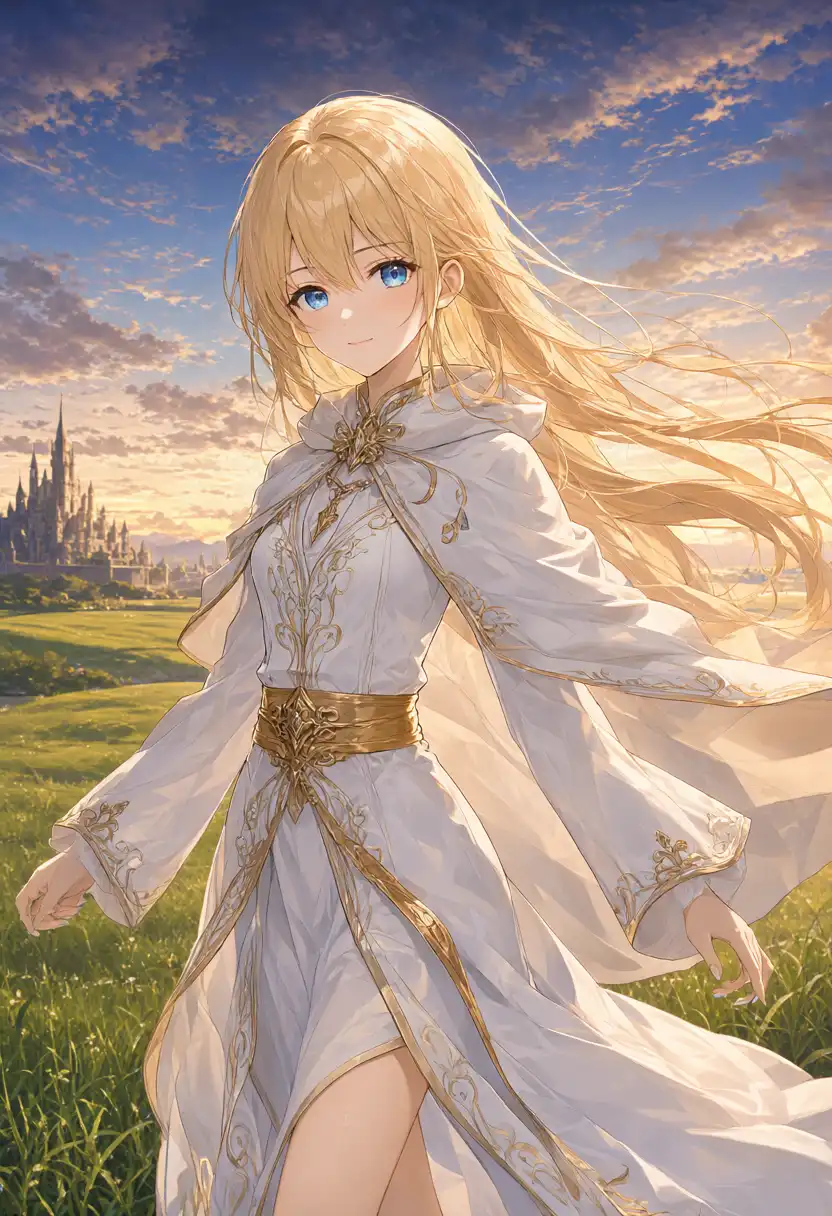
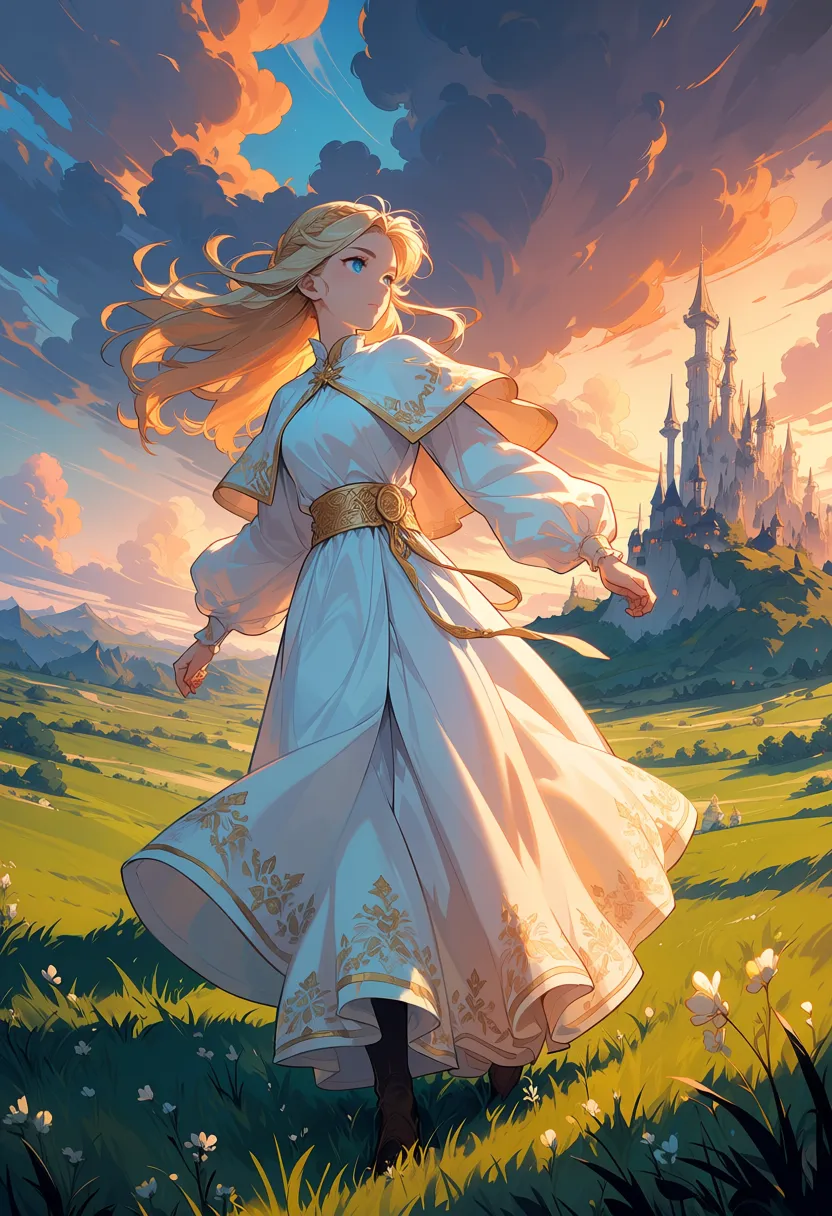
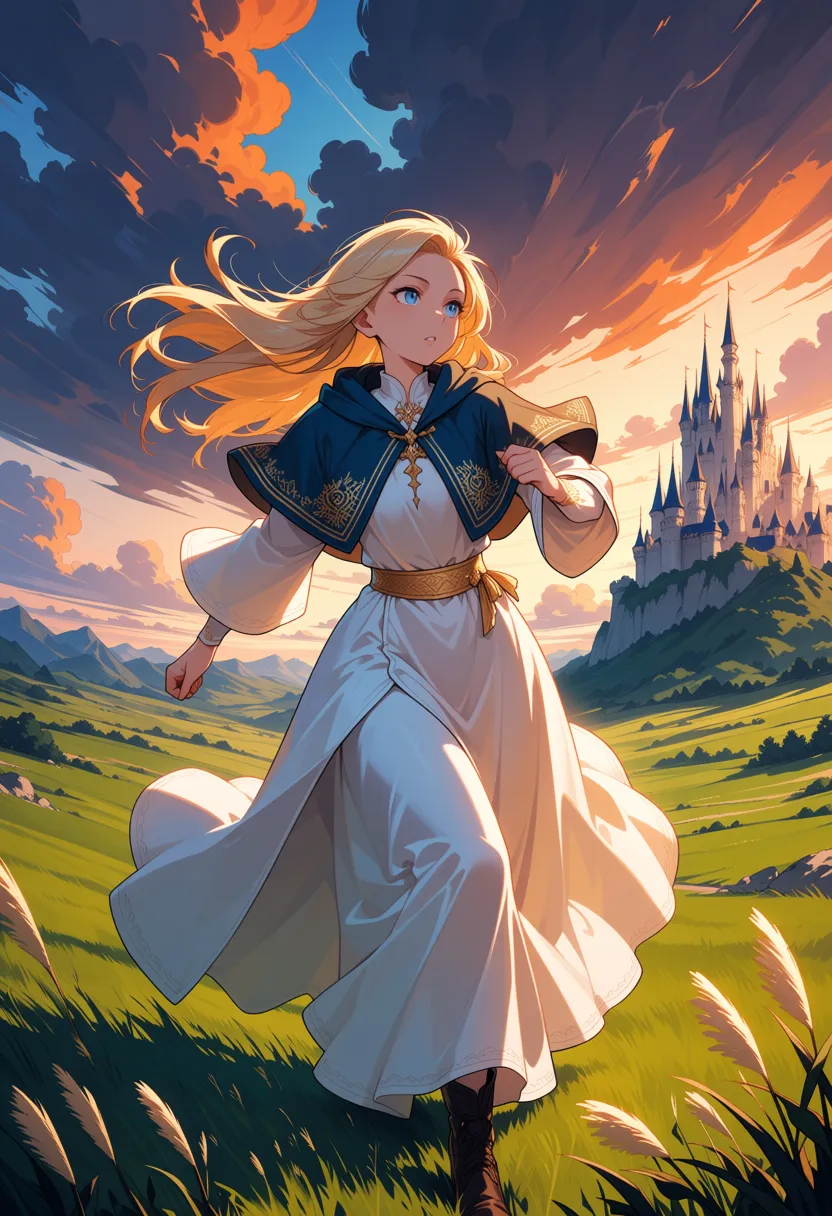
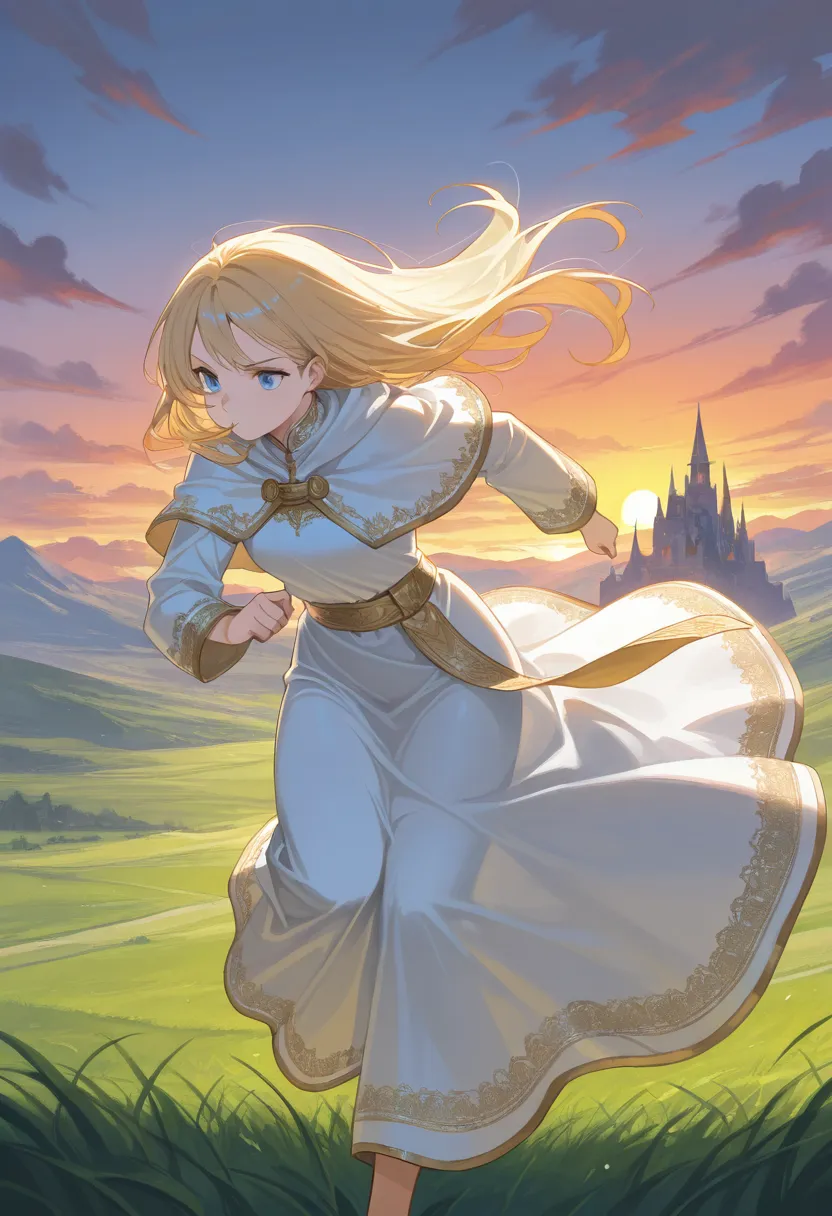
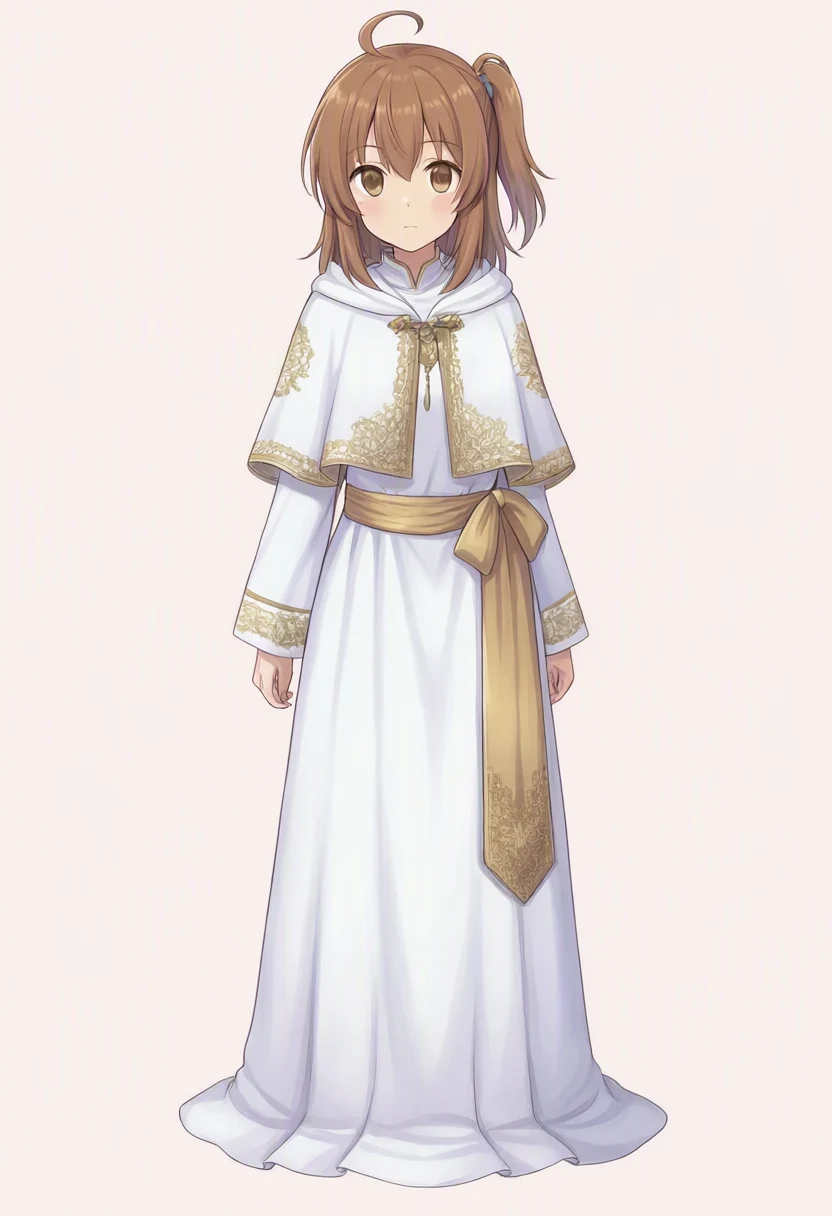
Using the same English prompts, 832×1216, and seed 42 as my WAI-Anima article, I generated the white-and-gold robe standing image and the running scene with a castle at sunset on Qwen-Image 2.1.
These prompts are tag lists written for Anima and Illustrious, and I sent them to Qwen-Image 2.1 without rewriting them. The Qwen column shows the output for the tag lists sent as-is.
For Anima preview3-base, WAI-Anima v1, and WAI-Illustrious v160, I reused the outputs from the April 16 article as-is. They were not regenerated.
The Qwen row lists the Diffusers class name; the other three list sampler and scheduler.
| Model | Output date | Steps / CFG | Sampler / scheduler |
|---|---|---|---|
| Qwen-Image 2.1 | This time | 40 / 1.0 | FlowMatchEulerDiscreteScheduler |
| Anima preview3-base | April 16 article | 30 / 4.0 | er_sde / simple |
| WAI-Anima v1 | April 16 article | 30 / 4.0 | er_sde / simple |
| WAI-Illustrious v160 | April 16 article | 25 / 5.0 | euler_ancestral / karras |
The April article did not record negative prompts for those three models. Steps and CFG also differ by model.
Standing image on a white background
(this time)
(April output)
(April output)
(April output)
| Model | What the image shows |
|---|---|
| Qwen-Image 2.1 | White-and-gold robe with fine embroidery on the capelet, cuffs, and hem. Hair split into thin strands, with a blue hair ornament and a neck ornament. The hem sits above the ground, so the shoes are visible. |
| Anima preview3-base | White-and-gold outfit with unrequested blue fabric added inside and at the hem. Fine gold embroidery and waist ornaments. |
| WAI-Anima v1 | White-and-gold robe with embroidery on the capelet and hem. Teal ornaments at the neck and waist. |
| WAI-Illustrious v160 | White-and-gold robe with a long gold front panel. Flatter color blocking than the two Anima images, with light shading on the clothes. |
Qwen’s standing image has lighter shading on the face and clothes than the two Anima images, and thinner hair lines. WAI-Illustrious is also lightly shaded, but Qwen’s patterns on the capelet, sleeves, and hem are finer, and the outfit shape differs from Illustrious’s large gold front panel.
Same prompt used for all four models
1girl, solo, long blonde hair, blue eyes, white robe, gold embroidery, capelet, gold sash, long sleeves, long dress, standing, looking at viewer, full body, white backgroundRunning with a castle at sunset
(this time)
(April output)
(April output)
(April output)
| Model | What the image shows |
|---|---|
| Qwen-Image 2.1 | White-and-gold robe with hair and fabric blowing widely. Even thin grass and small clouds are drawn. The figure is large and cut off below the knees. Arms stay down, so it doesn’t read as running. |
| Anima preview3-base | Sunset clouds, rolling grassland, and a distant castle. Hair and hem blow, but with arms down it doesn’t look much like running. |
| WAI-Anima v1 | Running with bent arms, with detailed sunset and grass shading. The capelet, white in the standing image, turned navy. |
| WAI-Illustrious v160 | Leaning forward and running, keeping the white-and-gold colors. Hem and hair blow widely; the castle and grass are less detailed than in the Anima images. |
For the running pose, WAI-Anima swinging its arms and WAI-Illustrious leaning forward look more like running than Qwen with its arms down.
Same prompt used for all four models
1girl, solo, long blonde hair, blue eyes, white robe, gold embroidery, capelet, gold sash, long sleeves, long dress, running, wind, hair blowing, dynamic pose, fantasy landscape, castle in background, sunset sky, dramatic clouds, grass fieldi2i (WAI-IL → Qwen)
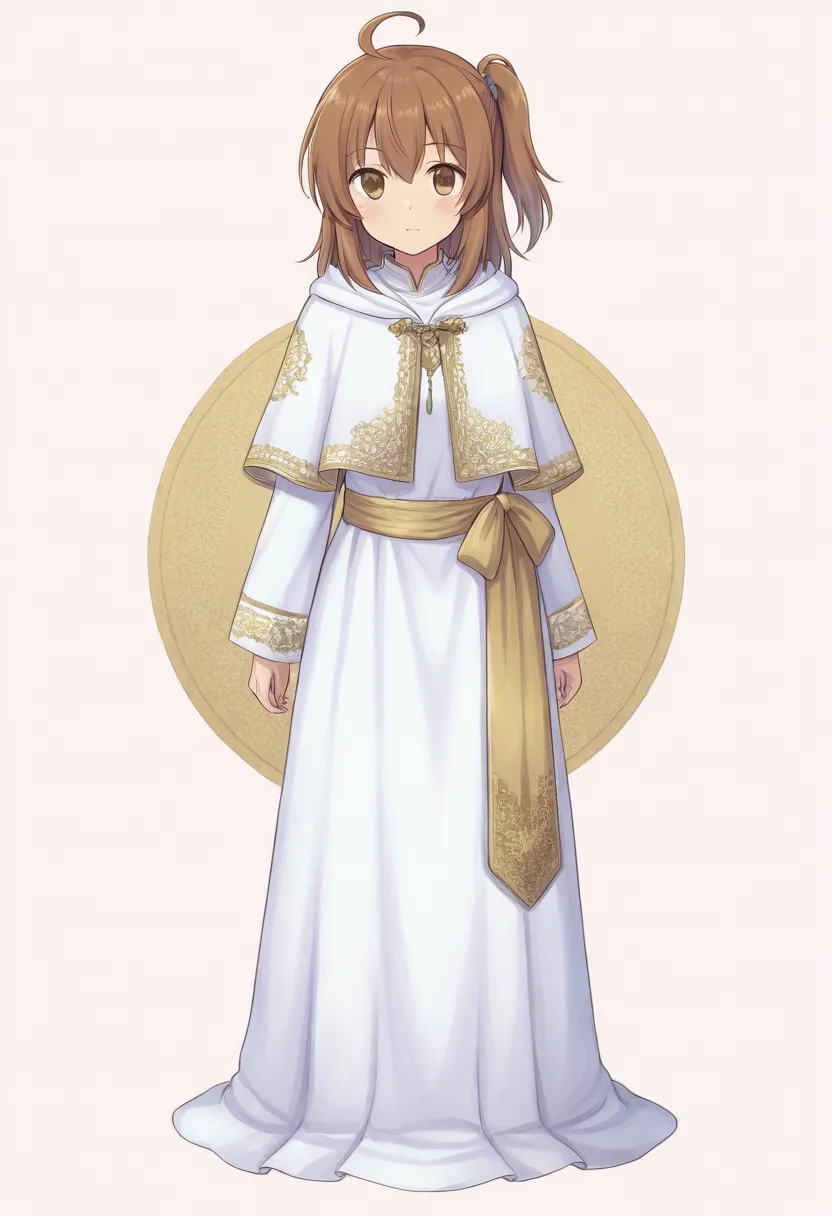
In the April article, I ran a standing image made with WAI-Illustrious v160 and my Kana-chan LoRA through the Anima models with i2i at denoise 0.5.
I fed the same source image into Qwen-Image 2.1.
The Diffusers QwenImage21Pipeline used here has no denoise (strength) argument, which sets how much of the source image gets changed.
It is an edit driven by a reference image and a text instruction, so I asked in English to redraw it keeping the face, hairstyle, outfit, pose, composition, and background.
This is a different mechanism from the Anima models’ denoise 0.5.
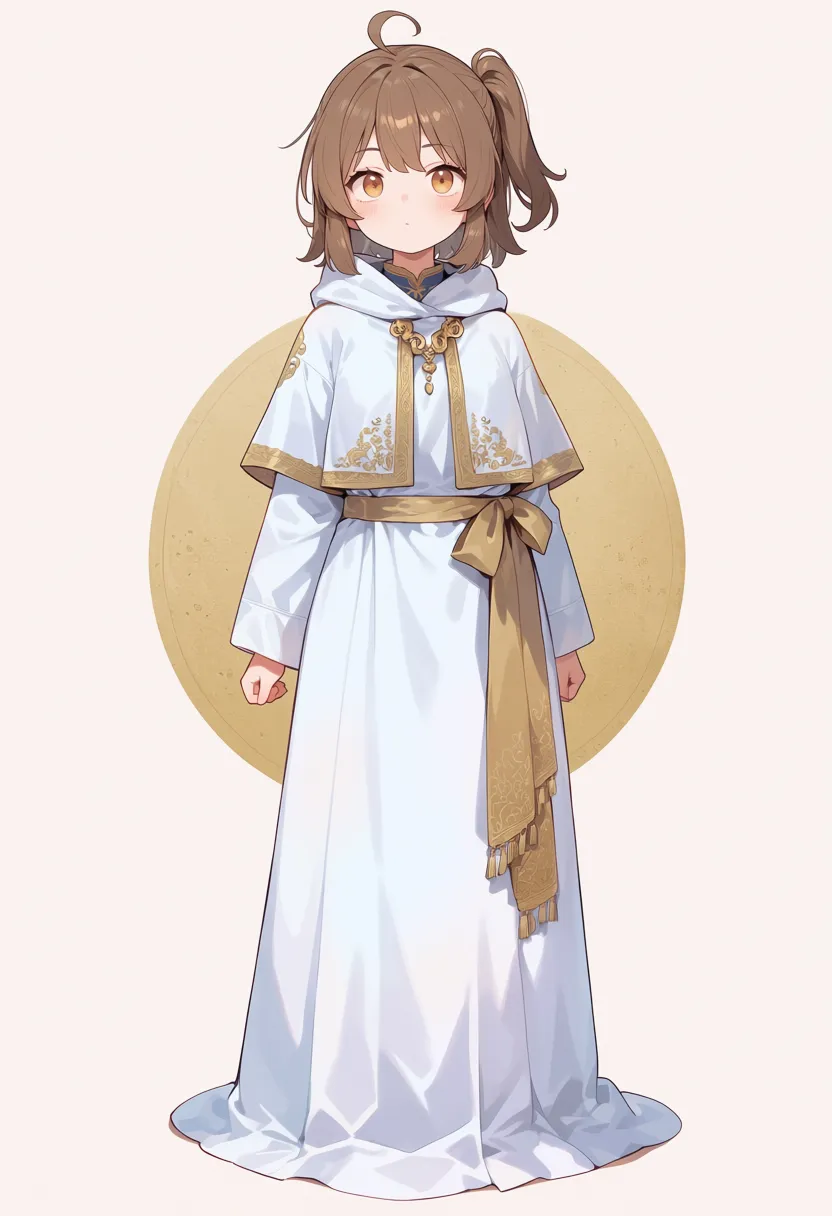
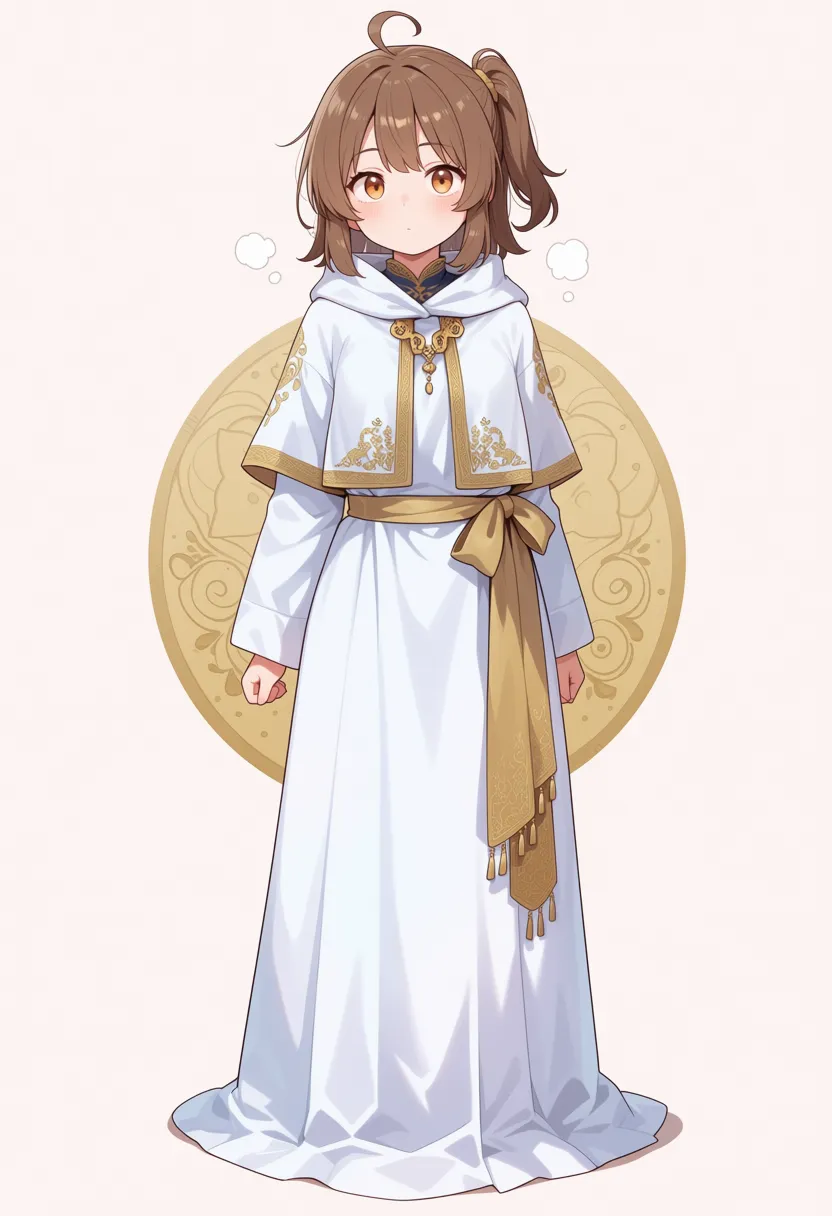
The source is a standing image with a gold circle in the background and a side ponytail tied with a blue scrunchie.
(this time)
(April output)
(April output)
| Model | What the image shows |
|---|---|
| Qwen-Image 2.1 | Face roundness, eye style, hair color, and the blue scrunchie are nearly identical to the source. The gold circle in the background disappeared into a plain background despite the instruction to keep it. |
| Anima preview3-base | The face became rounder and looks younger. Fringe was added to the sash, and the scrunchie almost disappeared. The circle’s pattern faded. |
| WAI-Anima v1 | The face became rounder, as with preview3-base. The scrunchie came back in a different color, and a clear pattern appeared in the circle. White puffs appeared on both sides of the mouth. |
The two Anima images have rounder faces and look younger than the source. Qwen’s face was almost the same as the source.
On the other hand, only Qwen’s output lost the gold circle in the background. Generation took 672.00 seconds.
Prompt sent to Qwen-Image 2.1
Redraw image 1 as a new illustration. Keep the same girl, her face, brown hair with the side ponytail and blue scrunchie, the white robe with gold embroidery, capelet and gold sash, the standing pose, the composition and the background exactly as in image 1.Generation speed of the four models
I added a Qwen-Image 2.1 row to the April speed table.
It’s the same M1 Max, but the three April models ran on ComfyUI while Qwen ran on Diffusers, and the step counts differ.
| Model | Steps | Standing | Running | Per step (standing) |
|---|---|---|---|---|
| Qwen-Image 2.1 | 40 | 588 s | 584 s | About 14.7 s |
| Anima preview3-base | 30 | 275 s | 277 s | About 9.2 s |
| WAI-Anima v1 | 30 | 277 s | 274 s | About 9.2 s |
| WAI-Illustrious v160 | 25 | 217 s | 337 s | About 8.7 s |
Per image, Qwen took a bit over twice as long as the Anima models.
Scaling the generation time linearly by step count, it would still be about 440 seconds at Anima’s 30 steps.
Related articles
My other Qwen-Image 2.1 posts.
- Testing Qwen-Image 2.1 Early Access: Composition Prompts and Multi-Reference Limits: Early access on ModelScope Studio: 10 composition presets, a 4-member band, and edits of Kana-chan’s orientation, outfit, and pose
- Qwen-Image 2.1 on M1 Max: TaylorSeer Cache Cut 10 min/Image to 3.5 min: The TaylorSeer cache in Diffusers cut about 10 minutes per image on M1 Max to about 3.5
- Qwen-Image 2.1 Edits: One Argument Cut Position Drift to About 0.1px: Measuring whether partial edits such as expression changes hold their position, plus a one-character outfit change and a transparent background
Appendix: NSFW output test
The images below are blurred since the test outputs may be sensitive. If you want to see the actual results, try them in your own environment.
I generated the same two prompts from the April article’s appendix on Qwen-Image 2.1. Settings match the standing and running tests, with no negative prompt.
The rows for the three April models in the tables are copied from the April article’s notes.
Without the nsfw tag
First, a nude instruction without the nsfw tag.
(this time)
(April output)
(April output)
(April output)
| Model | What the image shows |
|---|---|
| Qwen-Image 2.1 | Sitting on a wooden plank by the water, facing forward, not covering the chest or crotch. It came out photorealistic. |
| Anima preview3-base | Nude, but posed to cover the chest and crotch. |
| WAI-Anima v1 | Nude, but posed to cover the chest and crotch. |
| WAI-Illustrious v160 | Nude, but posed to cover the chest and crotch. |
The standing and running tests, which also start with the 1girl tag, came out as anime art. None of the prompts include a style tag, but this one image came out photorealistic.
This is the result of a tag list that names no style. Generation took 555.78 seconds.
Same prompt used for all four models
1girl, solo, long blonde hair, blue eyes, completely nude, naked, bare skin, sitting on edge of spring, feet in water, forest, natural light, serene, full body, looking at viewerWith the nsfw tag (front, full body)
Next, the nsfw tag added, with a front-facing full-body pose.
(this time)
(April output)
(April output)
(April output)
| Model | What the image shows |
|---|---|
| Qwen-Image 2.1 | Anime style, nude and standing facing forward. The chest is drawn on the large side, and the crotch is a smooth shape with the lines omitted. No text appeared. |
| Anima preview3-base | Front nude. The face and body shifted toward an American-comics look, reading as a different person from the standing image. |
| WAI-Anima v1 | Front nude. Looks like the same character as the standing image, but with a large chest and a @Pagex.com watermark in the lower right. |
| WAI-Illustrious v160 | Front nude. Looks like the same character as the standing and running images. |
In the April article, WAI-Illustrious and WAI-Anima v1 kept the same face between the clothed standing image and the nude one.
Qwen’s white-background standing image had narrow eyes and a mature face, while this one has large eyes and a round face, a different art style. Generation took 557.42 seconds.
Same prompt used for all four models
1girl, solo, long blonde hair, blue eyes, completely nude, naked, bare skin, nsfw, straight-on, full body, standing, white background