Testing MOSS-Image Base and SFT on an M1 Max Mac
 Contents
I tested the public weights of MOSS-Image-Base and MOSS-Image-SFT locally on a 64GB M1 Max MacBook Pro using PyTorch’s MPS backend for the Apple GPU. OpenMOSS released the Base model and its supervised fine-tuned (SFT) variant on October 16, 2026.
Both models can draw text inside an image and accept experimental layout coordinates for placing objects. I tested the official examples alongside the character portraits and sunset scenes from my April Anima comparison and September Qwen-Image 2.1 evaluation. Base and SFT received identical inputs in each paired test; I show the earlier model images for reference.
MOSS-Image Base, SFT, and Recommended Settings
The official MOSS-Image repository provides download links for both Base and SFT weights. I evaluated character portraits, dynamic running scenes, in-image text rendering, and JSON layout conditioning on both models with identical prompts and parameters for each pair.
| Item | Evaluated setup |
|---|---|
| Developer | OpenMOSS Team |
| Models | MOSS-Image-Base, MOSS-Image-SFT. The image generation backbone is a 5B (~5 billion parameter) DiT (Diffusion Transformer) |
| Downloaded Base weights | 8 files, 27,199,664,580 bytes (~25.33 GiB). Includes text encoder and VAE for image decoding |
| Downloaded SFT replacement weights | 3 DiT files, 10,164,664,216 bytes (~9.47 GiB). Text processing and VAE are shared with Base |
| Release date | October 16, 2026 |
| Distribution | Hugging Face, ModelScope |
| License | Apache 2.0 |
The Base weights and bundled pipeline were pinned to revision 5f40f07a304541840b6019d2d34d30f966756787, and the SFT weights to fc5de0d56fc910cbca6f6625a70f5f582b26deb1. The reference official GitHub repository was at commit 9d799c1e98a72d9f4e7c3d211072fd94cf365dee.
The file sizes across all 8 files matched the Hugging Face distribution manifest.
“5B” refers to the approximately 5 billion parameters in the image generation backbone. The text encoder converts the prompt into embeddings, the DiT progressively denoises the latent representation initialized from seed 42, and the VAE decodes the final latent into pixel space. In the downloaded weights, the text encoder took up more storage than the image generation backbone itself.
| Component | Weight size |
|---|---|
| Text encoder | 15.63 GiB |
| Image generation backbone (DiT) | 9.47 GiB |
| VAE (image decoding) | 0.23 GiB |
The table below summarizes the recommended settings from the official user guide. CFG controls how strongly the generation adheres to the prompt.
The model accepts natural language sentences, comma-separated tag lists, and JSON layout prompts. In JSON layout mode, positions for text and objects are specified with bounding box coordinates.
| Setting | Official recommendation |
|---|---|
| Resolution | Around 1.0M, 1.5M, or 2.0M pixels. Width and height must be multiples of 16 |
| Steps | 50 or more |
| CFG | 3.0. Can be increased for shorter prompts |
shift | 5.0 |
| Sampler | Euler |
| Skip Layer Guidance | Skip layer 22 on the unconditional branch |
The step count determines how many times the noise is iteratively updated. Euler is a single-step numerical update method, and shift adjusts the timestep schedule distribution. I used the official defaults for both. With CFG, the model computes a conditional branch guided by the prompt and an unconditional branch (unconditioned if the negative prompt is empty, or conditioned on negative prompt tokens if provided). Skipping layer 22 was applied to the latter unconditional branch.
Comparison Baseline Models
The four baseline models use images previously published in the April and September articles, without re-generating them for this run. The comparison covers two main scenes: a full-body character portrait against a white background, and a dynamic figure running with a castle at sunset in the background. Both figures have blonde hair and wear white and gold robes. Because each model produced only a single image per condition, differences between individual samples cannot be generalized as an absolute ranking of model capability.
| Comparison label | Model | Image source |
|---|---|---|
| MOSS Base | MOSS-Image-Base | Current M1 Max tests. Tested with model card defaults versus UI preset prompts |
| MOSS SFT | MOSS-Image-SFT | Current M1 Max tests. Fed identical inputs to Base |
| Qwen | Qwen-Image 2.1 | September technical article |
| Anima | Anima preview3-base | April technical article |
| WAI-Anima | WAI-Anima v1 | April technical article |
| WAI-IL | WAI-Illustrious v160 | April technical article |
Generation Settings and Experimental Conditions
The MOSS character samples were generated at 832×1216, while the text rendering and poster samples were generated at 1024×1024. Both resolutions correspond to the officially recommended ~1-megapixel bracket. All MOSS runs shared 50 steps, CFG 3.0, shift 5.0, and seed 42. The seed is the starting point for the random values used in generation. I generated one sample per model for each condition. LoRA refers to auxiliary adapter weights trained for specific visual styles or subjects; no LoRA was used for MOSS in these tests. NSFW denotes adult content prompts.
The “UI initial prompt” in the table below means the quality and negative-tag strings prefilled in the official Gradio interface. I passed those strings to the Python API rather than generating through the interface.
| Model | Resolution | Steps | CFG | Sampler / Scheduler | Seed / LoRA | Prompt |
|---|---|---|---|---|---|---|
| MOSS-Image-Base (Primary comparison) | 832×1216 | 50 | 3.0 | Euler, shift 5 | 42, None | UI initial prompt + April tag list |
| MOSS-Image-SFT (Primary comparison) | 832×1216 | 50 | 3.0 | Euler, shift 5 | 42, None | Identical input to Base |
| MOSS-Image-Base & SFT (Text-described source image) | 832×1216 | 50 | 3.0 | Euler, shift 5 | 42, None | UI initial prompt + English description of source appearance. No image input |
| MOSS-Image-Base & SFT (Fridge & Poster) | 1024×1024 | 50 | 3.0 | Euler, shift 5 | 42, None | Official guide sample prompt / JSON |
| MOSS-Image-Base & SFT (NSFW) | 832×1216 | 50 | 3.0 | Euler, shift 5 | 42, None | English sentence specifying adult. Negative prompt left empty |
| MOSS-Image-Base & SFT (Initial test) | 832×1216 | 50 | 3.0 | Euler, shift 5 | 42, None | April tags converted to concise English sentence |
| Qwen | 832×1216 | 40 | 1.0 | FlowMatchEulerDiscreteScheduler | 42, None | Identical tag list to April |
| Anima | 832×1216 | 30 | 4.0 | er_sde, simple | 42, None | April tag list |
| WAI-Anima | 832×1216 | 30 | 4.0 | er_sde, simple | 42, None | April tag list |
| WAI-IL | 832×1216 | 25 | 5.0 | euler_ancestral, karras | 42, None | April tag list |
The model cards for Base and SFT leave the default negative prompt empty in their Python code snippets. Conversely, the user guide recommends populating the negative prompt with quality-degrading terms, and the official Gradio UI pre-fills both positive quality tags and negative tags by default.
The MOSS guide notes that the model also accepts comma-separated tags. In my initial run, I translated the original tag list into natural English prose and explicitly added anime illustration. For those two initial Base/SFT samples, the negative prompt was left empty per the model card defaults, while uncond_skip_layers=[22] remained enabled. In subsequent tag-list tests, I incorporated the UI preset strings.
The UI preset strings went into the Python API arguments prompt and negative_prompt.
| Evaluated sample | Input provided to Base and SFT | Negative prompt |
|---|---|---|
| Standing character portrait on white background | Gradio UI quality tags prepended to original tag list | UI preset 5 terms |
| Running scene with castle in background | Gradio UI quality tags prepended to original tag list | UI preset 5 terms |
| Standing character portrait from text-described source | Same quality tags prepended to English description. Source image was not fed | UI preset 5 terms |
| Chinese note on refrigerator | Official guide sample prompt, including line breaks | Empty, per official example |
EXPLORE poster | Official guide JSON verbatim | Empty |
| NSFW without tag | English prose explicitly specifying adult. No quality tags added | Empty for testing purposes |
| NSFW with tag | NSFW. prepended to English prose specifying a distinct pose | Empty for testing purposes |
Across the seven conditions above, image resolution, 50 steps, CFG 3.0, shift 5.0, layer 22 skipping, and seed 42 were kept identical between Base and SFT. Only the two NSFW conditions were kept free from official UI quality and negative presets to observe how the model handled the prompt content directly.
Comparison images can be clicked to view full-size.
Base and SFT generate initial latent noise from seed 42 using the exact same pipeline. However, the four baseline models used different runtime implementations, step counts, and CFG values. Even with the same numeric seed, the initial noise in MOSS does not match the baseline models.
Furthermore, the official UI quality tags and negative prompt applied to MOSS cannot be retroactively applied to the previously generated Qwen and Anima outputs. The three April Anima-family models had no recorded negative prompt. Differences seen when comparing with baseline models therefore include variations in input conditions.
Test Environment and Launching on MPS
The test machine was a MacBook Pro with an Apple M1 Max and 64GB of unified memory running macOS 27.0. While the official documentation targets NVIDIA CUDA GPUs, I set up a dedicated Python 3.12.12 environment using Apple Silicon MPS (Metal Performance Shaders).
Execution was run with PYTORCH_ENABLE_MPS_FALLBACK=1 so that operations unsupported on MPS would fall back to the CPU.
| Library | Version used |
|---|---|
| PyTorch | 2.14.1 |
| Diffusers | 0.41.0 |
| Transformers | 5.20.1 |
| Accelerate | 1.15.0 |
The DiT and text encoder were loaded in bfloat16, while the VAE used float32. These settings represent values in 16-bit and 32-bit precision, respectively.
PyTorch handled GPU acceleration, and Diffusers invoked the official pipeline. Transformers was used to tokenize and encode text prompts. Swap refers to virtual memory written to disk storage when active memory demand exceeds physical RAM.
During the initial run, prompt processing halted because the manually downloaded files lacked the official tokenizer/chat_template.jinja. This file formats prompts for the text encoder. I added the Qwen3.5-9B template to chat_template in the local tokenizer_config.json. I later confirmed it was identical to the official Jinja template. Execution then halted on an unsupported float64 operation on MPS.
| Failure point | Error and workaround |
|---|---|
| Prompt processing | apply_chat_template() failed because chat_template.jinja had been missed during manual download. Added the official Qwen3.5-9B template to the local tokenizer_config.json |
| Timestep embedding | Failed during float64 tensor creation in this MPS environment. Handled that specific computation in float64 on CPU, then cast and transferred the result to MPS as float32 |
Timestep embedding tells the model which denoising stage the process is currently in. float64 and float32 are double-precision and single-precision floating-point formats, respectively. Because this error occurred even with fallback enabled, I applied the same patch to local working copies for both Base and SFT. The modification was strictly limited to routing that calculation through CPU; no model weights were altered. I did not generate images under identical conditions on CUDA, so I cannot determine whether MPS or the patch affected visual quality.
I compared the added template with the prompt formatting in the official ComfyUI node. For natural prose, tag lists, and JSON layout prompts, it produced the same <|im_start|>user format.
After transferring to the GPU, torch.mps.driver_allocated_memory() reported approximately 27.75GB allocated by the MPS driver.
Sending A cat at 512×512, 4 steps, CFG 3.0, shift 5.0, and seed 42 successfully saved a PNG file. Generation took 25.40 seconds, and model transfer to MPS took 9.00 seconds. MPS driver memory allocation was 27.75GB post-transfer and 30.14GB post-generation, with 0 swap usage measured after generation.
The 4-step image was blurry.
Official In-Image Text Rendering Prompt
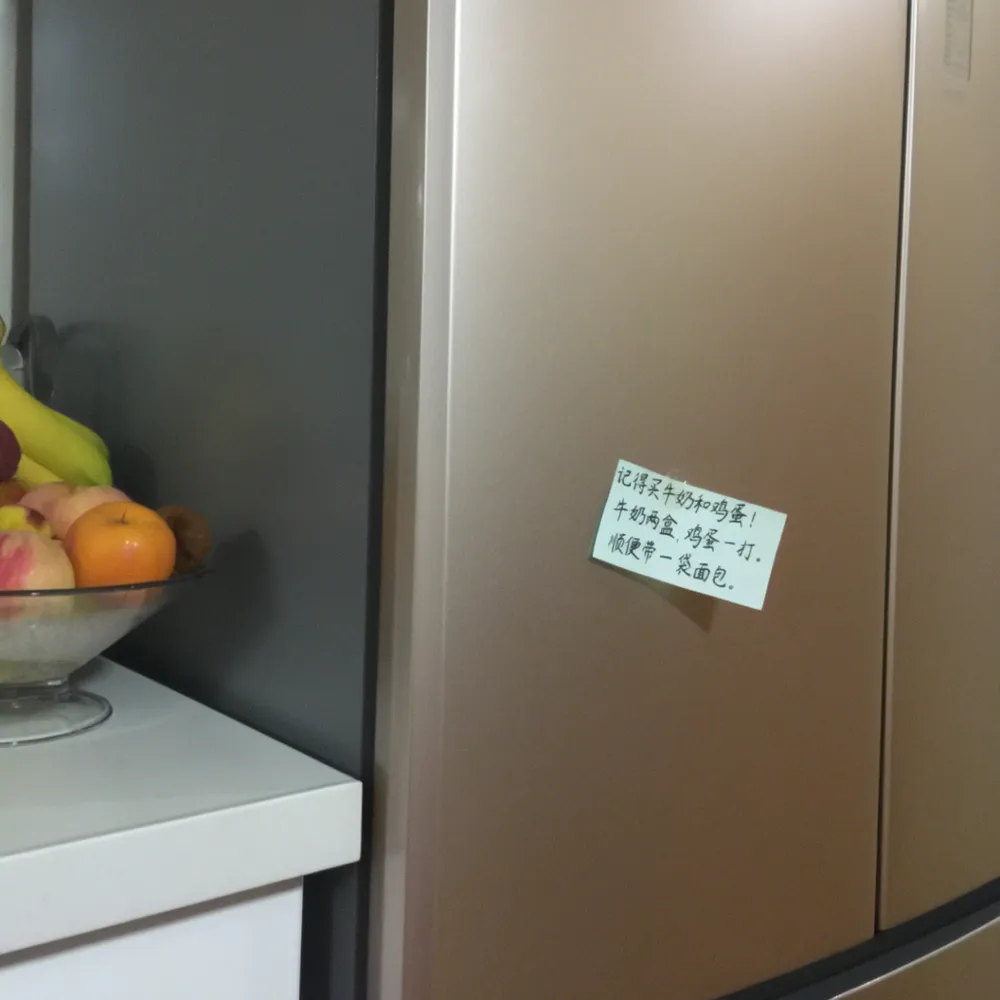
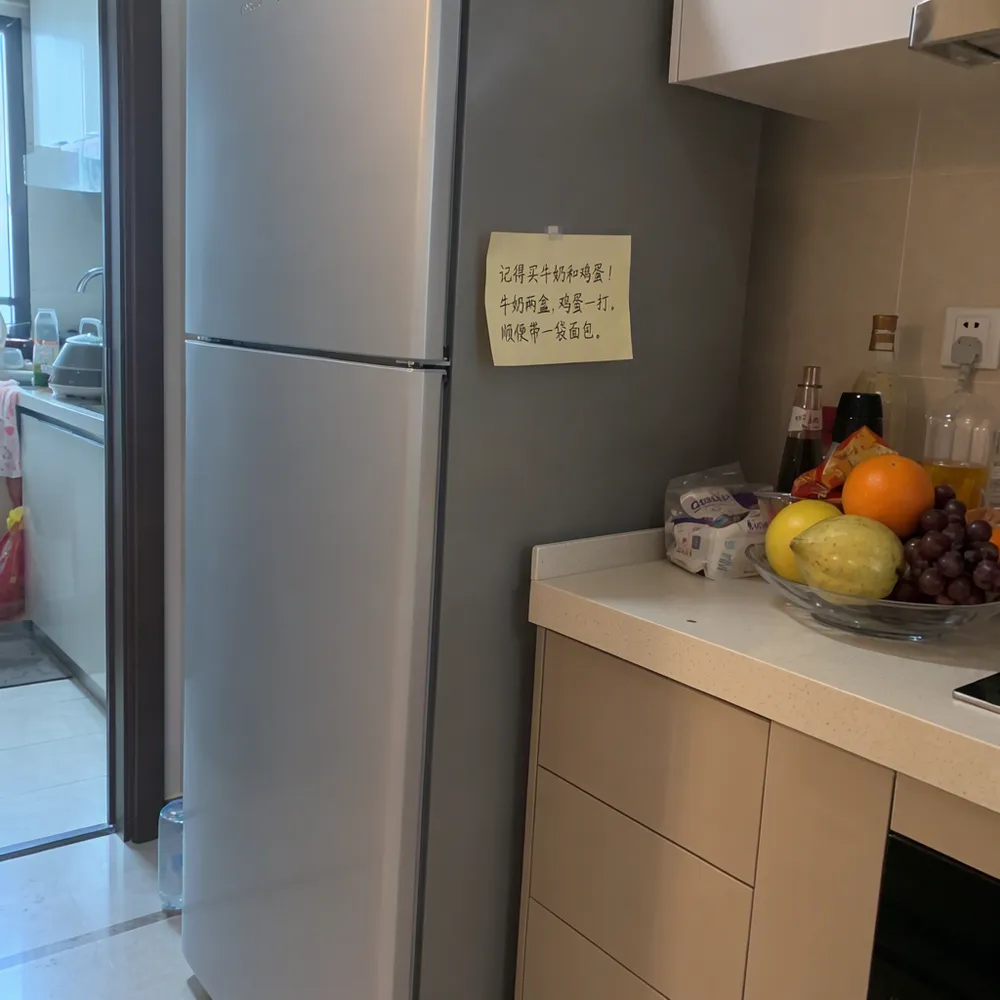
I sent the sample prompt from the official user guide to both Base and SFT with the same line breaks. It asks for a refrigerator with a handwritten Chinese sticky note.
Settings were 1024×1024, 50 steps, CFG 3.0, shift 5.0, Euler, layer 22 skip, seed 42, and an empty negative prompt.
1024×1024 is within the guide’s recommended ~1-megapixel range and matches the resolution in the Python examples on the Base and SFT model cards.
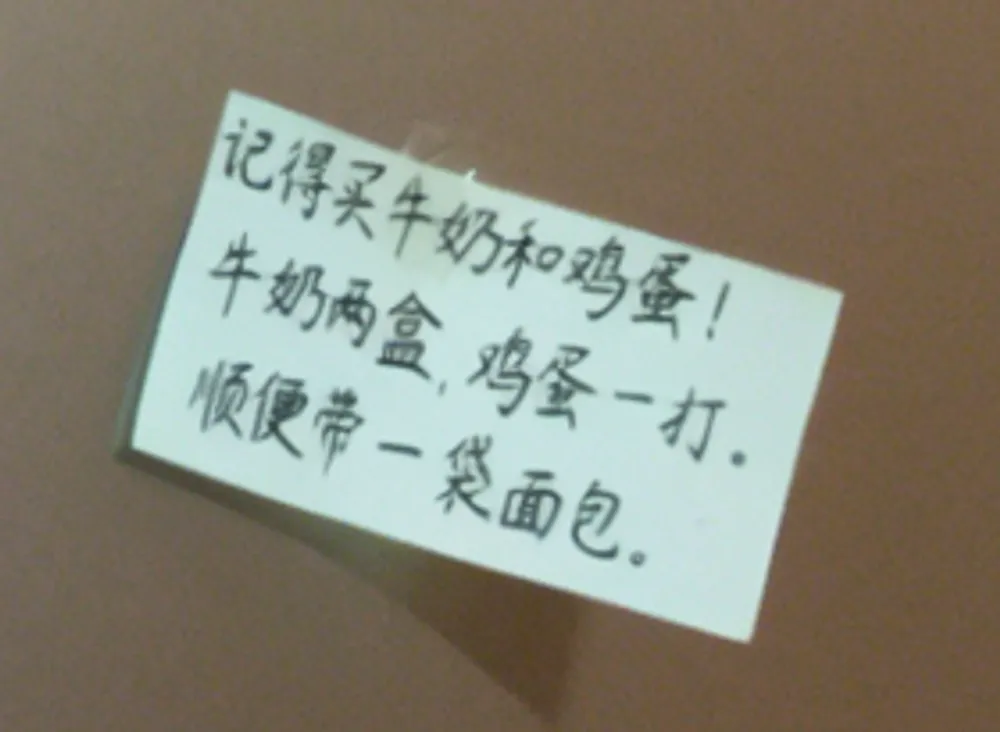
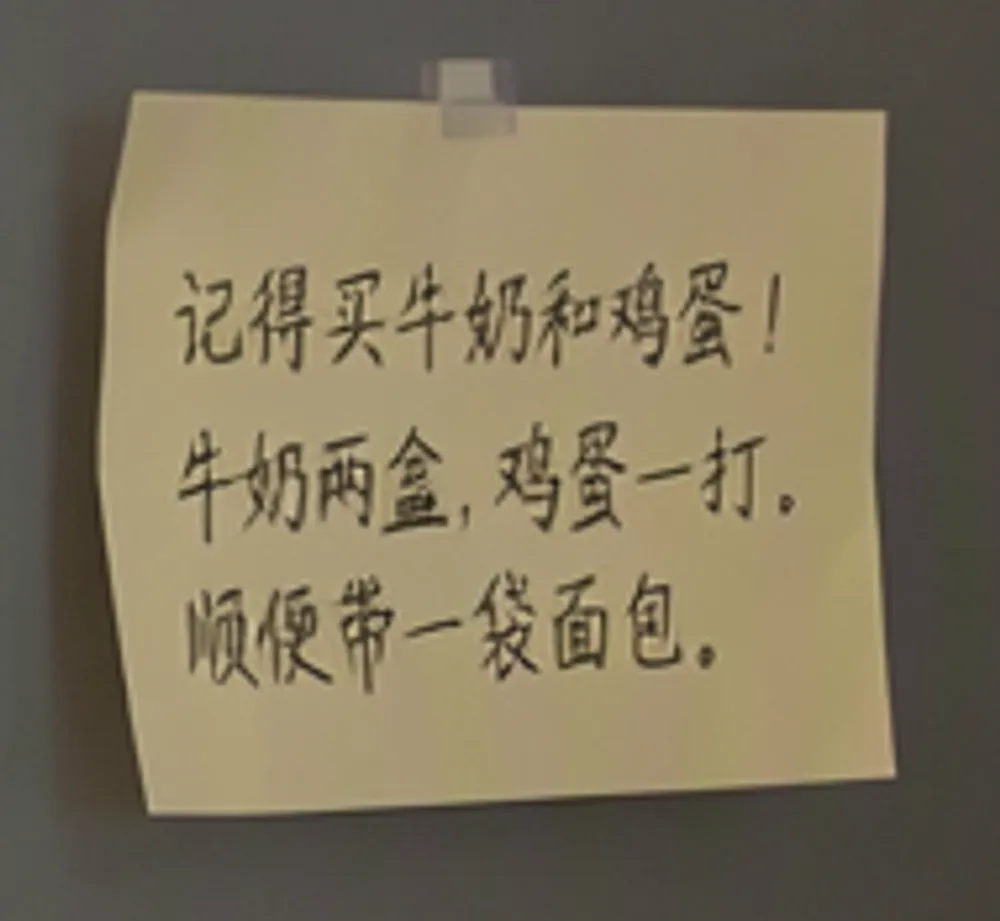
Beneath each full image, I have included a 1:1 crop of the note magnified from the original full-resolution PNG, as the note text in the overview image is too small to read clearly.
(User guide prompt)
Note crop
(Identical prompt)
Note crop
| Model | Observed in image |
|---|---|
| MOSS-Image-Base | Attached a sticky note to the refrigerator door and rendered the counter and fruit bowl. The magnified note is legible across all three requested lines. |
| MOSS-Image-SFT | Rendered the refrigerator, counter, fruit bowl, and three lines of text. However, the note was placed on the adjacent grey panel rather than on the refrigerator door itself. |
macOS OCR recognized the three requested Chinese lines from the full-resolution PNGs of both Base and SFT. Its confidence score is an estimate assigned to each line: the second Base line scored 0.50, while all three SFT lines scored 1.00.
A score of 1.00 does not guarantee that glyph shapes or punctuation marks match the prompt with complete fidelity. While the SFT note is readable across all three lines, it was not placed on the refrigerator door.
Generation time was 1,189.91 seconds for Base and 1,189.43 seconds for SFT, with 0 swap usage measured after both runs.
Official guide sample prompt sent to Base and SFT
A wide view of a refrigerator beside a kitchen counter with a fruit bowl. A small sticky note on the refrigerator door is handwritten in Chinese:
“记得买牛奶和鸡蛋!
牛奶两盒,鸡蛋一打。
顺便带一袋面包。”
Negative prompt was left empty. Line breaks and quotation marks were matched to the user guide sample prompt.
Base output from initial README prompt test
The Python example in the official README places quotation marks immediately after the colon (Chinese:“), whereas the user guide inserts a line break after the colon before the quotes. The initial Base image below used the README example. Other generation settings were identical to the Base run above.
An initial attempt at the README’s 1456×1456 resolution took approximately three minutes to complete just three steps. Because 50 steps would take excessively long, I generated at 1024×1024, the resolution used in the Python example on the model card. Generation took 1,275.48 seconds, MPS driver allocated memory was 38.79GB post-generation, and swap usage was 0.
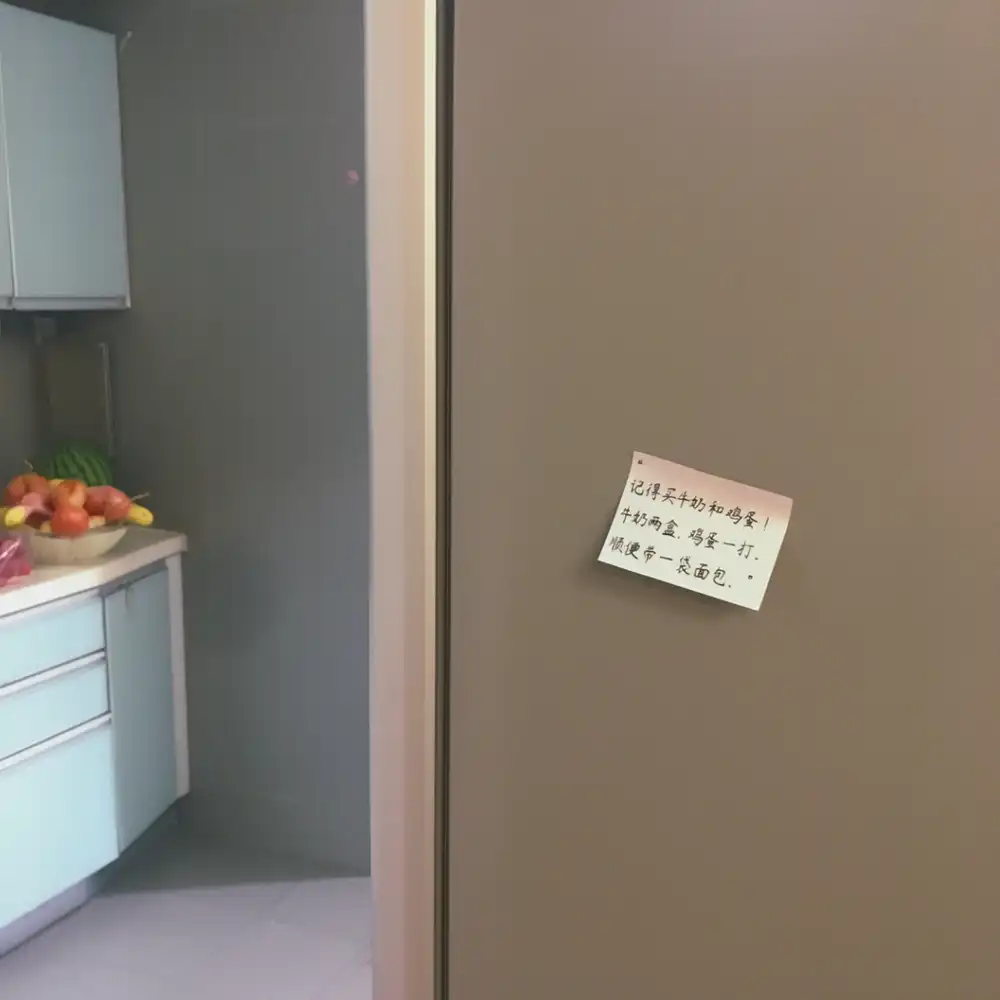
In the enlarged full-resolution PNG, lines 1 and 2 were readable as requested. One character in line 3 was difficult to distinguish from the target prompt, and the closing punctuation looked like a Western period with an extra dot visible on the far right. macOS OCR transcribed line 3 as “顺便常一袋面包.” with a confidence score of 0.30.
Specifying Poster Layout with JSON Bounding Boxes
I evaluated the JSON layout example from the official user guide on both Base and SFT.
The prompt specifies a 1024×1024 poster with a blue mountain illustration on a cream background and EXPLORE centered at the top. Bounding box coordinates are assigned separately to the text and mountain; the user guide notes this conditioning as experimental.
Identical JSON strings were sent to both models, and the negative prompt was left empty.
(Official JSON)

(Identical JSON)

| Model | Observed in image |
|---|---|
| MOSS-Image-Base | Spelled EXPLORE correctly at the top and placed a rounded blue mountain in the lower center. The background is cream-colored. |
| MOSS-Image-SFT | Spelled EXPLORE correctly at the top and rendered multiple angular blue mountain peaks along with a horizontal blue band at the bottom. The background is cream-colored. |
Measuring the text and mountain regions on the full-resolution PNGs using identical blue color threshold masks revealed that the deviation from the requested bounding boxes was at most 6 pixels for the text and at most 4 pixels for the mountain on both models. The guide’s bbox format is [top, left, bottom, right] with each axis spanning -512 to 512 around the center of a 1024×1024 image. I added 512 to each value to obtain the pixel coordinates measured from the image’s top-left corner in the table below. Because boundary values vary depending on how color thresholds are sampled, this is not a formal object detection metric.
SFT rendered a horizontal blue band across the bottom in addition to the mountain. Generation time was 1,228.94 seconds for Base and 1,236.49 seconds for SFT.
| Element | Specified bounding box (x, y) | Base color mask region (x, y) | SFT color mask region (x, y) |
|---|---|---|---|
EXPLORE | x=128–896, y=96–224 | x=134–896, y=100–220 | x=134–893, y=99–219 |
| Blue mountain | x=224–800, y=320–896 | x=223–800, y=324–895 | x=221–804, y=321–894 |
Coordinates and settings for the submitted JSON layout
The keys and coordinates were used directly from the official guide JSON example without modification.
The original bbox values from the official JSON are listed below.
| Element | bbox |
|---|---|
Top EXPLORE | [-416, -384, -288, 384] |
| Lower blue mountain | [-192, -288, 384, 288] |
Color mask measurements used the top-left corner of the image as the origin. Text pixels were filtered within the top 300 pixels using R<80, G<120, B<180, B>R+20; mountain pixels were sampled below y=250 using R<180, B>R+25, B>G+10. I then computed the outer bounding box of all matching pixels. Because no connected-component segmentation or object detection was performed, the lower blue band may be included in the mountain region’s bounding box.
The single-line string passed to the model was as follows, serialized with ensure_ascii=False:
{"summary": {"meta": ["poster"], "canvas": "single", "caption": "A minimalist travel poster with a cream background, a blue mountain illustration, and the title EXPLORE at the top."}, "items": [{"label": "text", "caption": "Large dark-blue uppercase title centered at the top.", "text": "EXPLORE", "bbox": [-416, -384, -288, 384]}, {"label": "object", "caption": "A flat blue mountain illustration in the lower center.", "bbox": [-192, -288, 384, 288]}], "bbox_coord_space": "abs_centralized", "bbox_format": "yxyx"}1024×1024, 50 steps, CFG 3.0, shift 5.0, Euler, uncond_skip_layers=[22], seed 42. Negative prompt was empty.
Comparing MOSS Character Portraits and Sunset Scenes with Four Baseline Models
In earlier comparisons, LoRAs were used to keep character identities and cafe backgrounds consistent. With no character LoRAs on hand for MOSS, these tests compared base foundation outputs directly.
Full-Body Standing Portrait on White Background
The initial concise English prompt with an empty negative prompt is shown later. For the primary comparison here, I prepended the official UI quality tags to the April tag list and used the five UI preset negative terms for both Base and SFT.
(UI preset input)
(Identical input)
(September output)
(April output)
(April output)
(April output)
| Model | Observed in image |
|---|---|
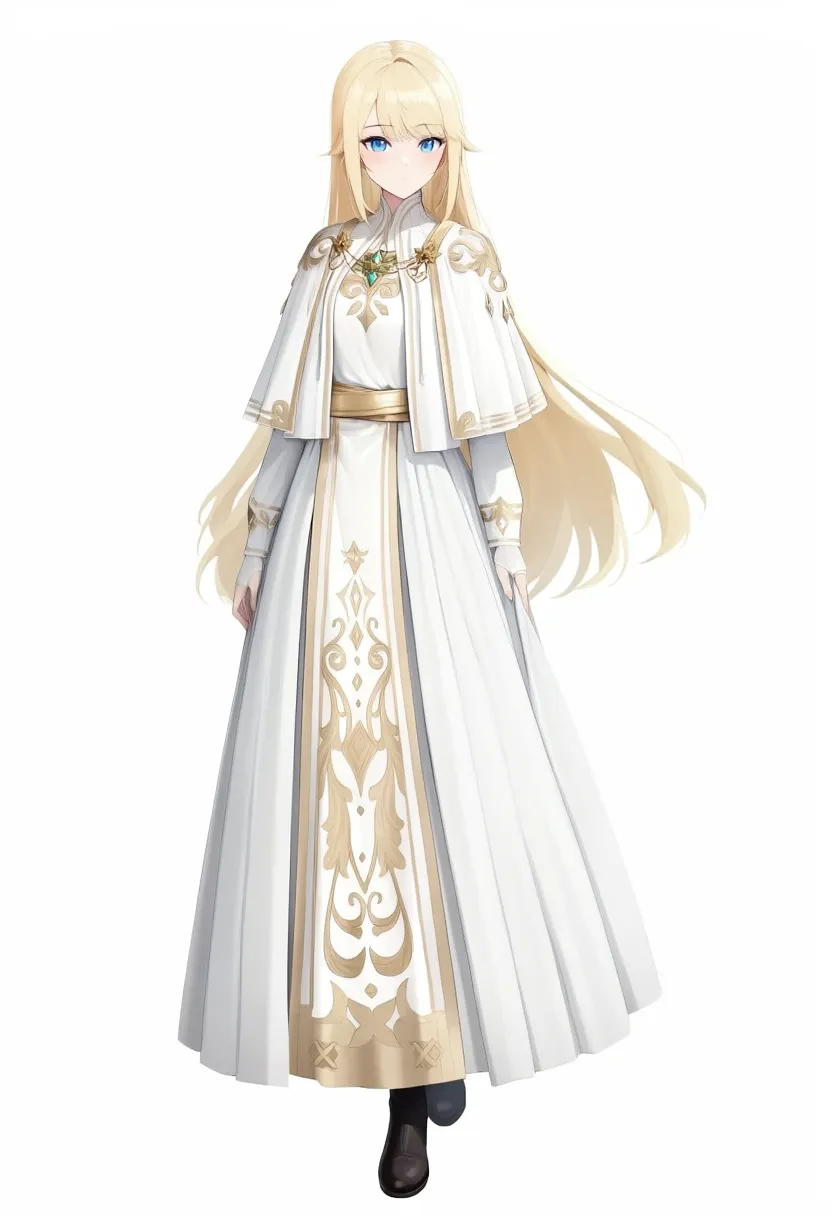
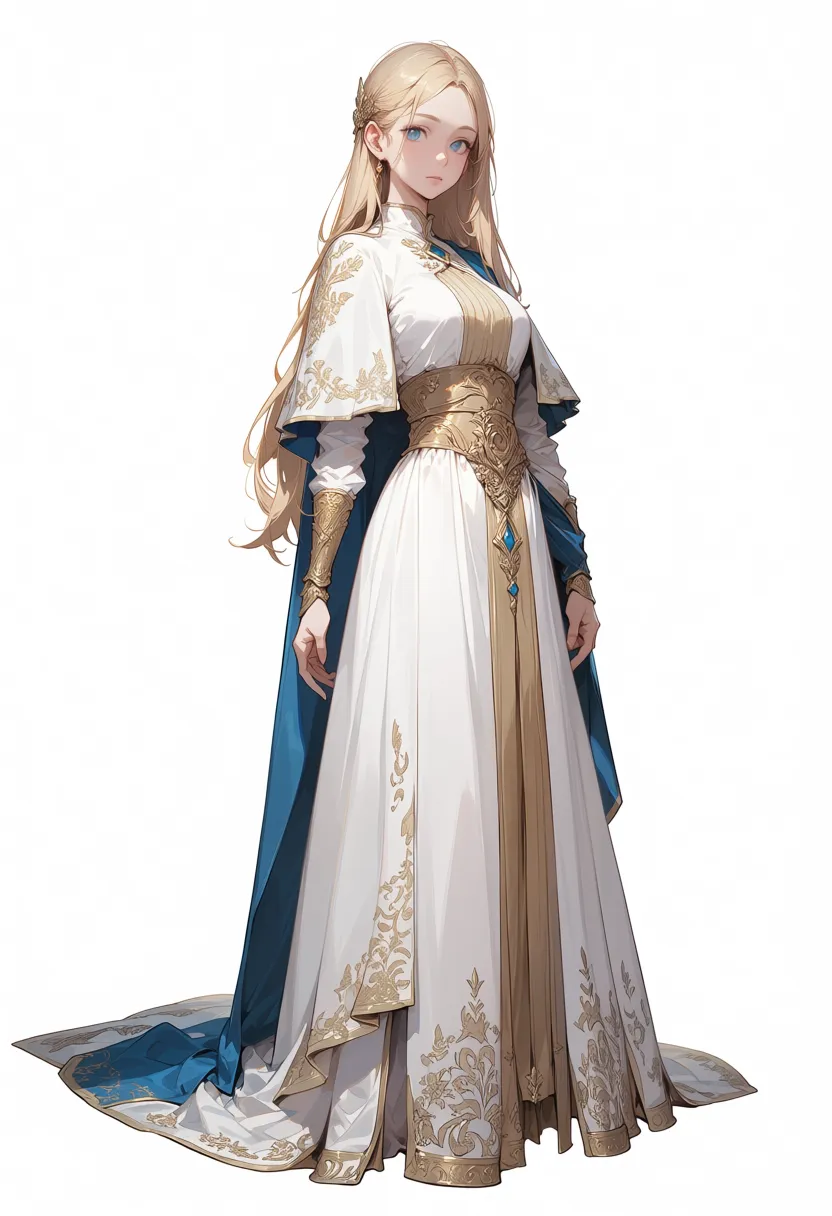
| MOSS-Image-Base (UI preset input) | Rendered blonde hair, blue eyes, white background, and a white and gold robe. Gold patterns appear on shoulders, chest, and front sash; one black shoe is primarily visible. |
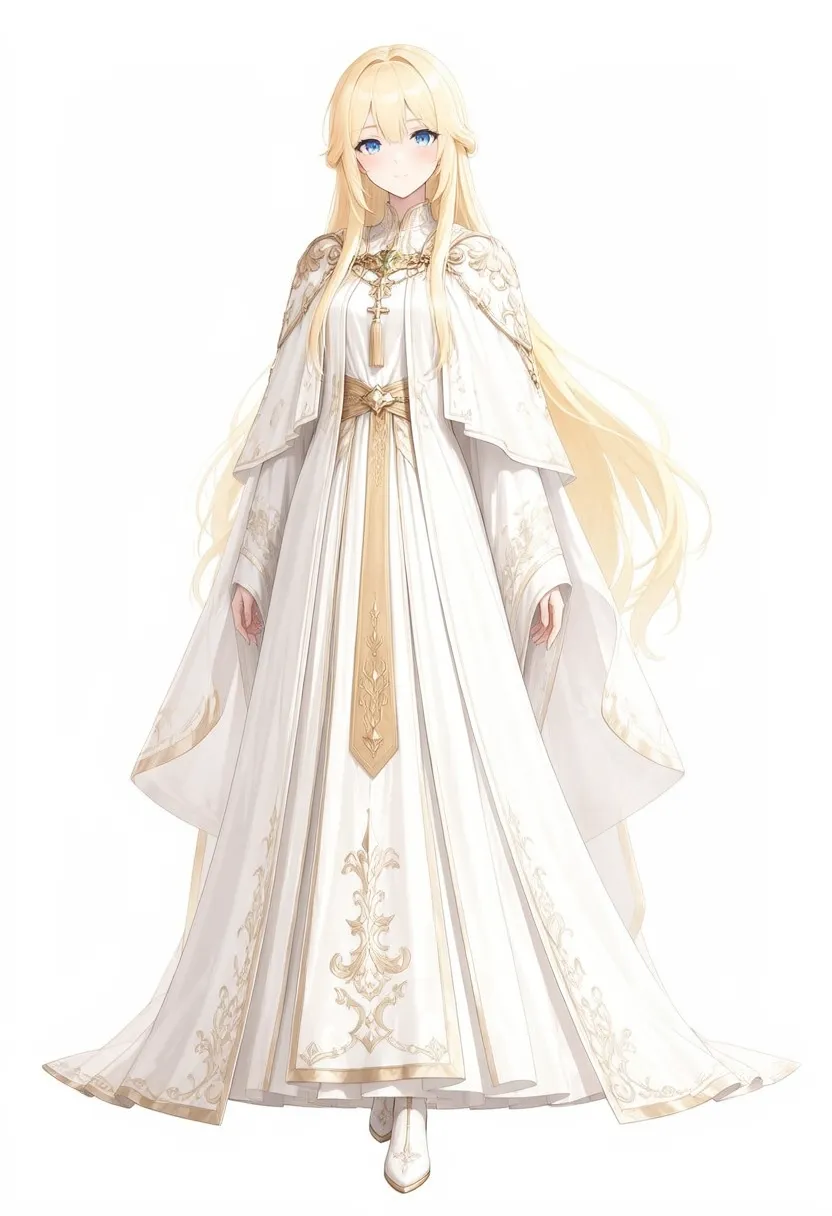
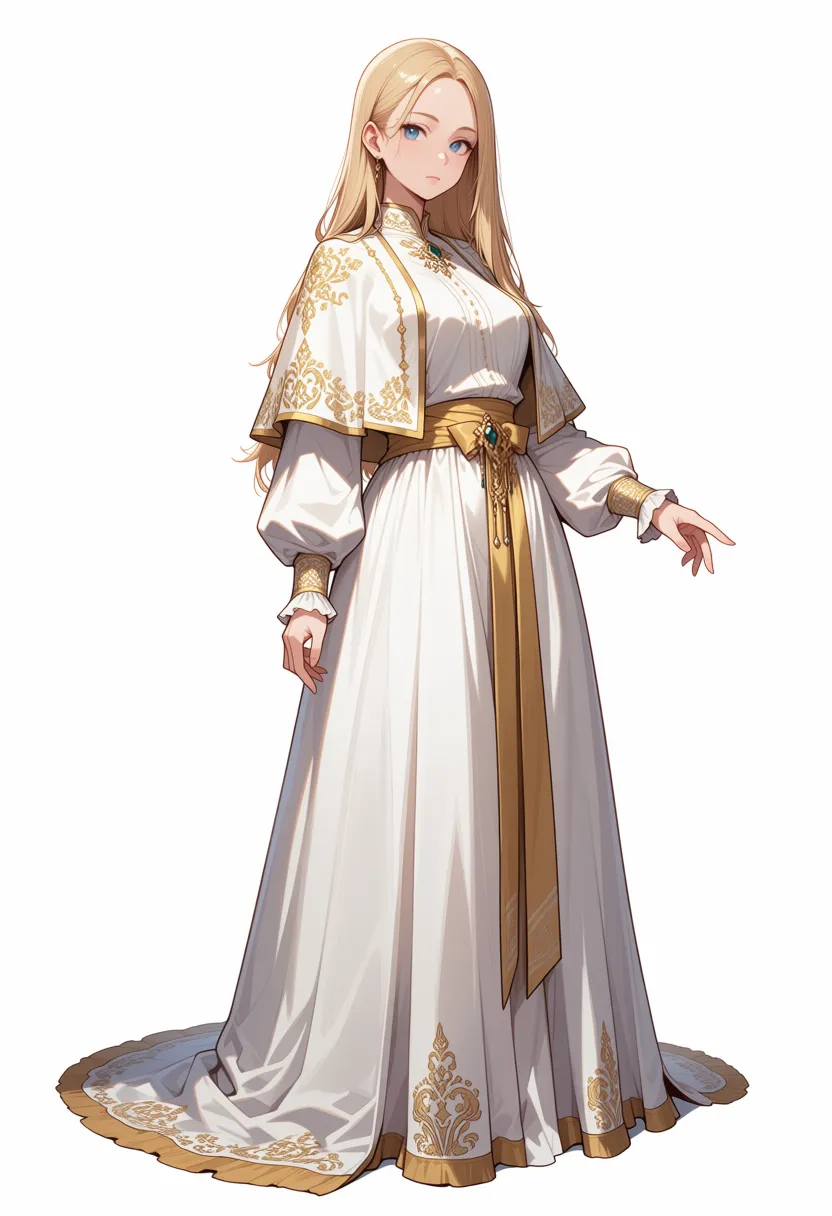
| MOSS-Image-SFT (Identical input) | Gold embroidery extends across shoulder capelet, sleeves, and down to the hem. Only one white shoe is primarily visible at the feet. |
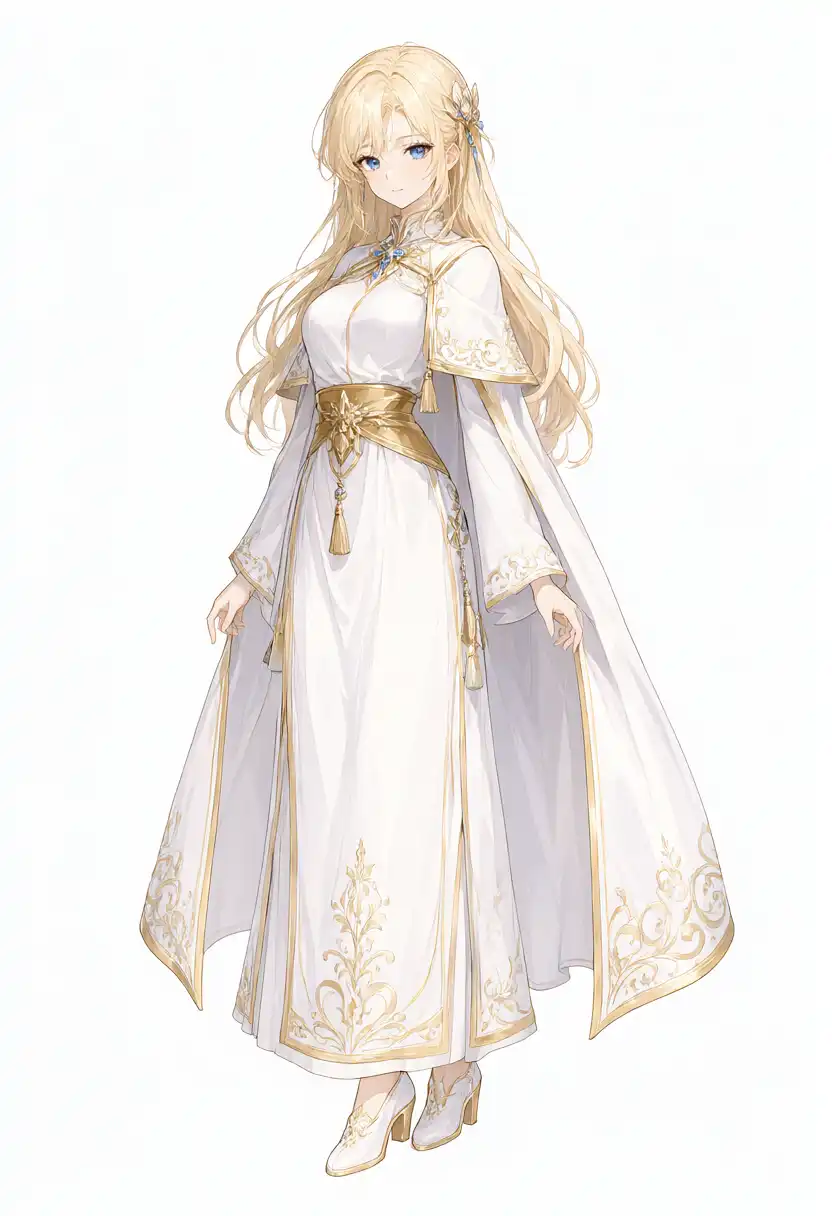
| Qwen-Image 2.1 | Fine embroidery on a white and gold robe, with footwear visible. |
| Anima preview3-base | Added unprompted blue cloth accents alongside white and gold. |
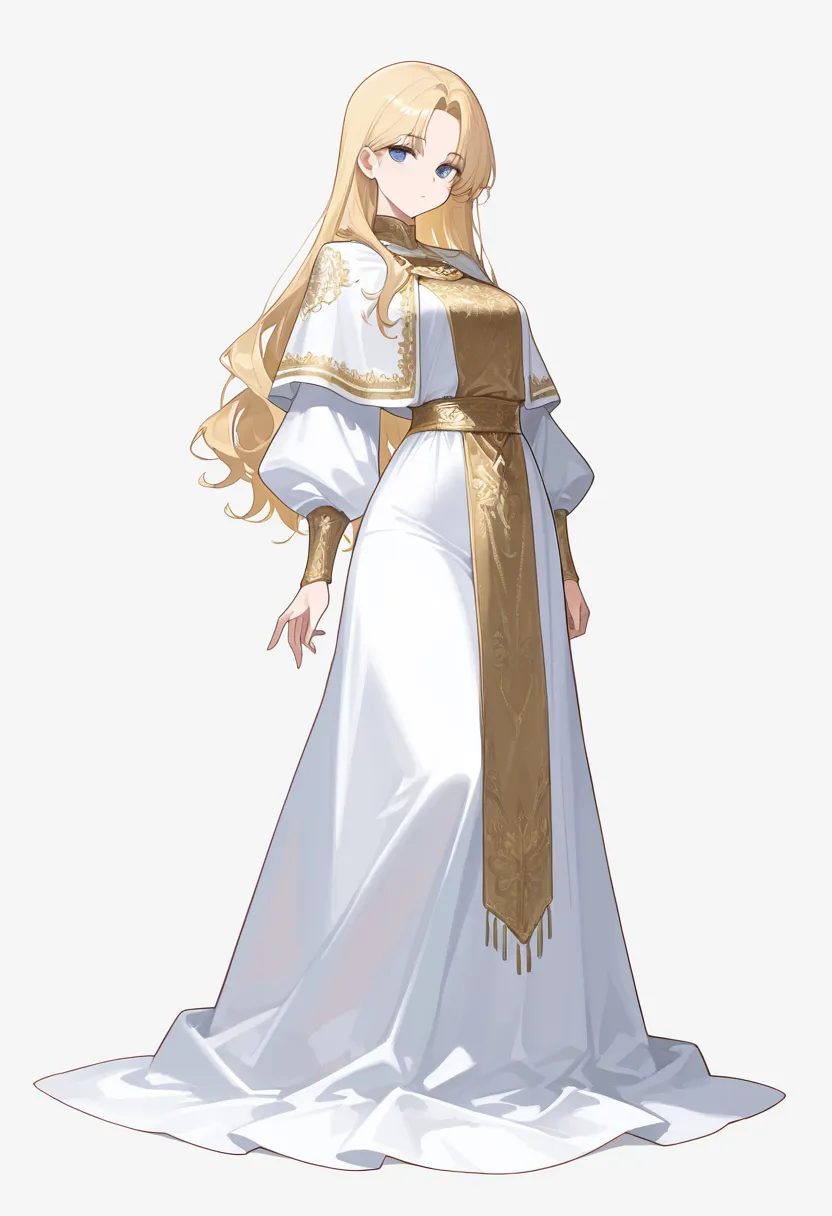
| WAI-Anima v1 | Embroidery along shoulder capelet and hem, with teal ornamental accents. |
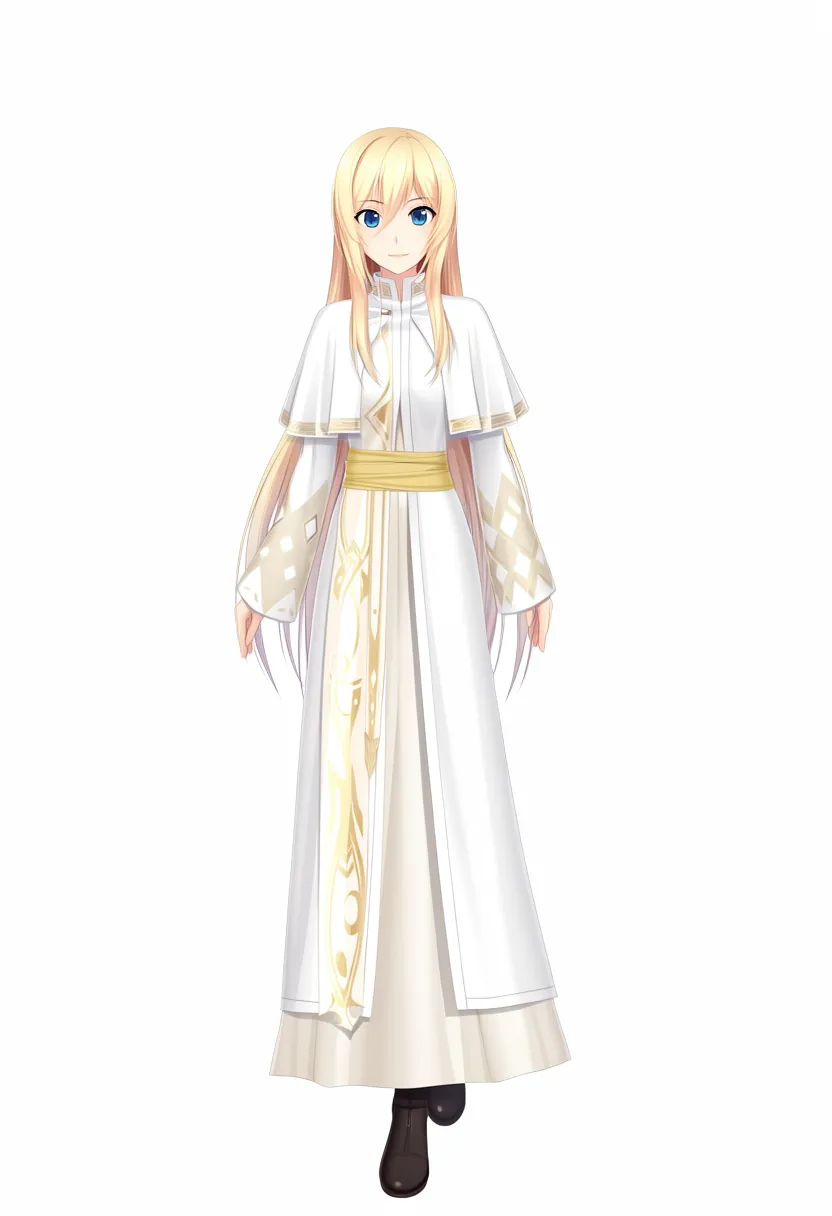
| WAI-Illustrious v160 | Broad cel-shaded blocks with a prominent, long golden front sash. |
Given identical tags, quality prefixes, and negative prompts, the SFT version distributed embroidery patterns all the way down to the hem compared to Base. However, both models showed predominantly only one shoe.
Compared to the previously published Qwen and Anima samples, both MOSS outputs had flatter shading across the face and white fabric. This is a reference comparison based on a single sample per model.
Original character tags and UI conditions sent to MOSS
Original comparison prompt:
1girl, solo, long blonde hair, blue eyes, white robe, gold embroidery, capelet, gold sash, long sleeves, long dress, standing, looking at viewer, full body, white backgroundTag list sent to MOSS Base and SFT:
best quality, masterpiece, 1girl, solo, long blonde hair, blue eyes, white robe, gold embroidery, capelet, gold sash, long sleeves, long dress, standing, looking at viewer, full body, white backgroundNegative prompt was nsfw, worst quality, bad anatomy, watermark, jpeg artifact.
Initial Test with Concise English Prose and Empty Negative Prompt
Prior to the primary comparison, I passed an identical concise English sentence to Base and SFT and left the negative prompt empty according to the model card defaults. Because the text encoder, tokenizer, VAE, and inference pipeline code were identical files in both distributions, they were shared across local working copies.
Expand initial Base and SFT outputs
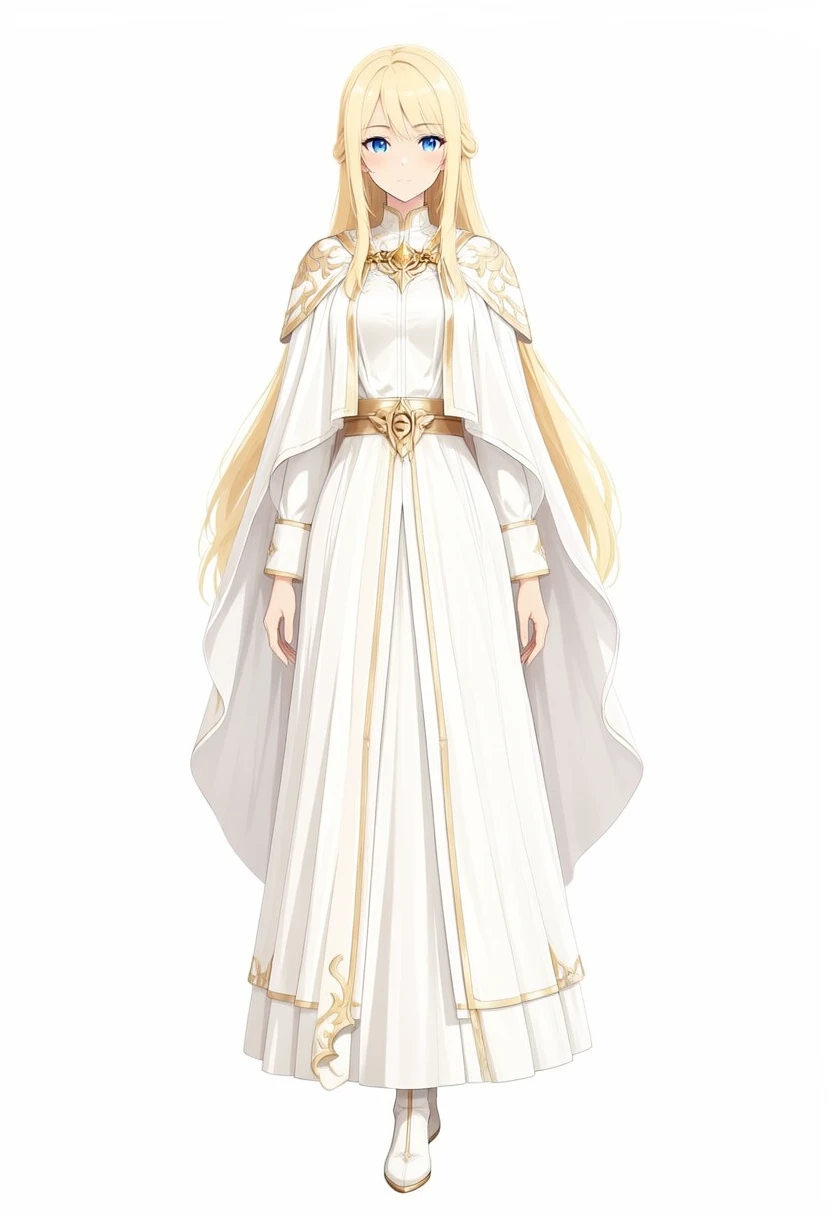
The English prompt sent to both models is below. The negative prompt was empty.
An anime illustration of one young adult woman, shown full body standing and looking at the viewer against a plain white background. She has long blonde hair and blue eyes. She wears a long white robe with gold embroidery, a capelet, a gold sash, long sleeves, and a long skirt.In the initial test, Base showed sparser ornamentation on the shoulders and hem, whereas SFT added more intricate patterns to the shoulder capelet and waist sash. In both outputs, only one shoe was clearly visible. In the Base image generated with UI preset inputs, patterns further increased across the shoulders, chest, and front sash. Because prompt format, quality tags, and negative prompts were changed simultaneously, it is impossible to isolate which specific factor drove the increased patterning from comparing these two conditions alone. Generation times were 1,151.64 seconds for the initial Base run, 1,154.18 seconds for the initial SFT run, 1,159.20 seconds for Base with UI presets, and 1,156.02 seconds for SFT with UI presets.
Retrying SFT with Detailed English Prose
Using the same SFT model, I modified only the prompt. Following the detailed-description advice in the official Prompt Enhancer, I retained the core elements—blonde hair, blue eyes, white and gold robe, white background—while explicitly directing the model to render embroidery on the collar, capelet, sleeves, and hem, fabric folds and shadows, and both feet. Rather than running the skill’s JSON generation and compilation workflow, I wrote the English prose directly. Resolution at 832×1216, 50 steps, CFG 3.0, shift 5.0, layer 22 skip, seed 42, and an empty negative prompt were kept identical to the concise-prose SFT test.
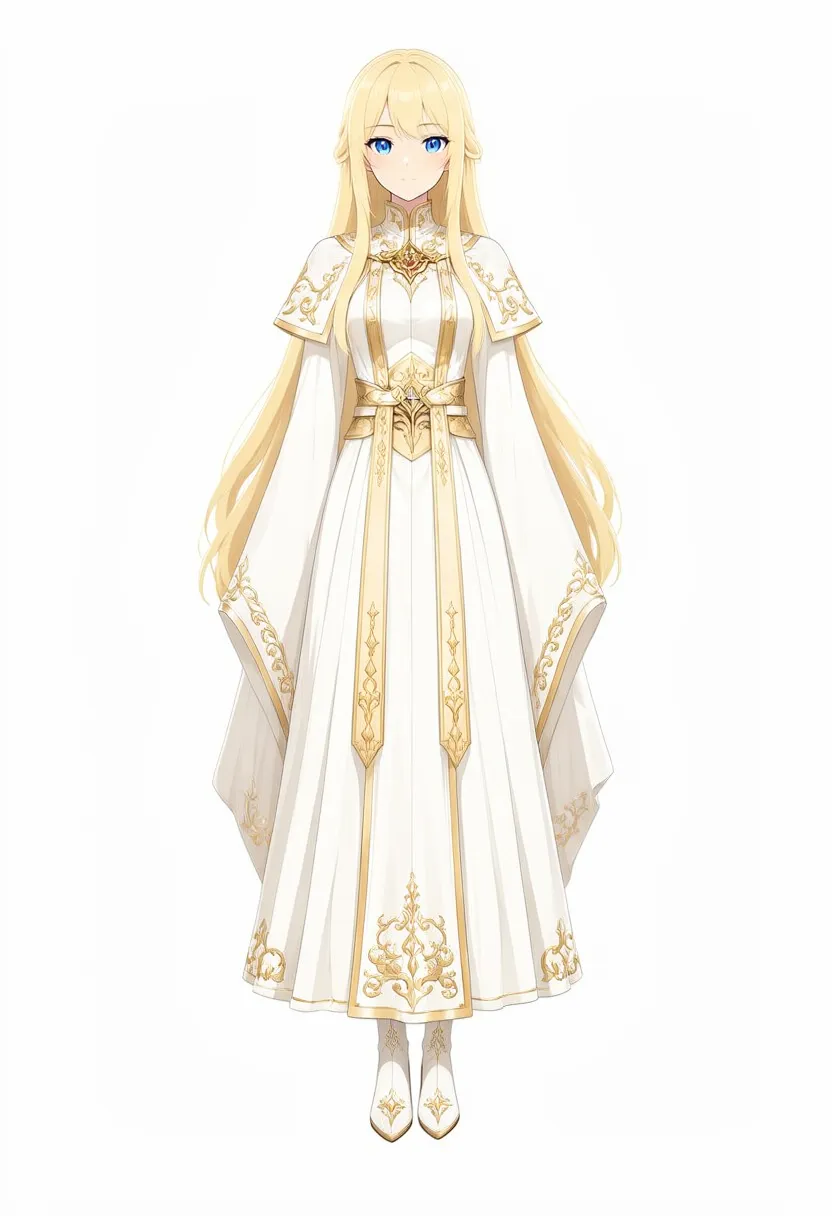
While the concise-prose SFT sample clustered ornamentation primarily at the waist sash and capelet, this output extended gold filigree embroidery across the collar, capelet, sleeves, front panels, and hem, with both shoes clearly depicted. Shading across the face and fabric remains relatively subtle compared to the Qwen and Anima samples. I did not send the same detailed prompt to Base, so this difference cannot be attributed specifically to SFT. Generation time was 1,193.96 seconds (19 minutes 54 seconds).
Detailed English prompt sent to SFT
A full-body anime character illustration of one young adult woman standing straight and facing the viewer against a seamless plain white background. Center the figure with her head and both shoes fully visible. She has long flowing blonde hair, blue eyes, and a calm expression. She wears an elaborate ankle-length white ceremonial robe made of layered ivory cloth, with a short shoulder capelet, wide long sleeves, a long skirt, and a patterned gold sash with a central clasp. Fine gold filigree embroidery follows the collar, capelet, cuffs, front panels, and hem. Show the individual ornamental motifs, layered fabric folds, and soft shadows that separate the white cloth from the white background. Clean, precise anime linework, restrained cel shading, warm highlights on the gold, even studio lighting. No props or scenery.Figure Running with Castle and Sunset Background
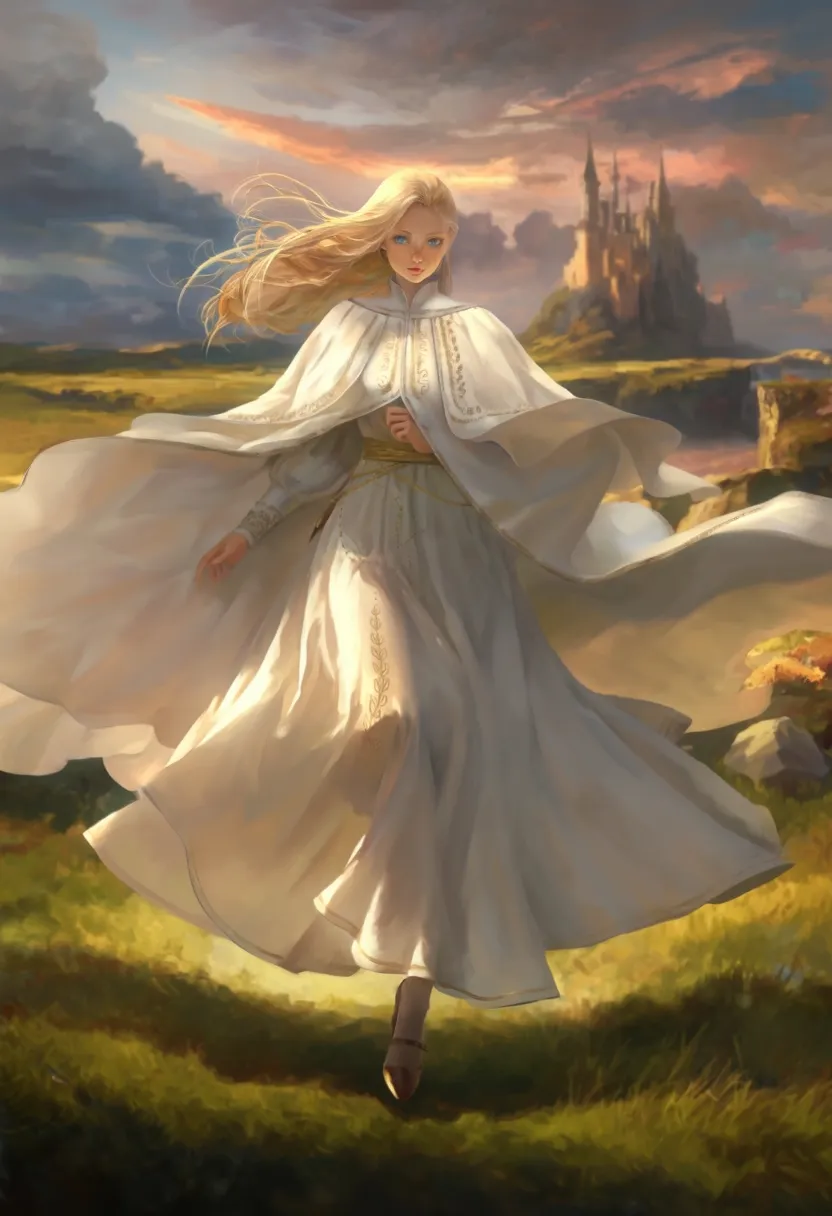
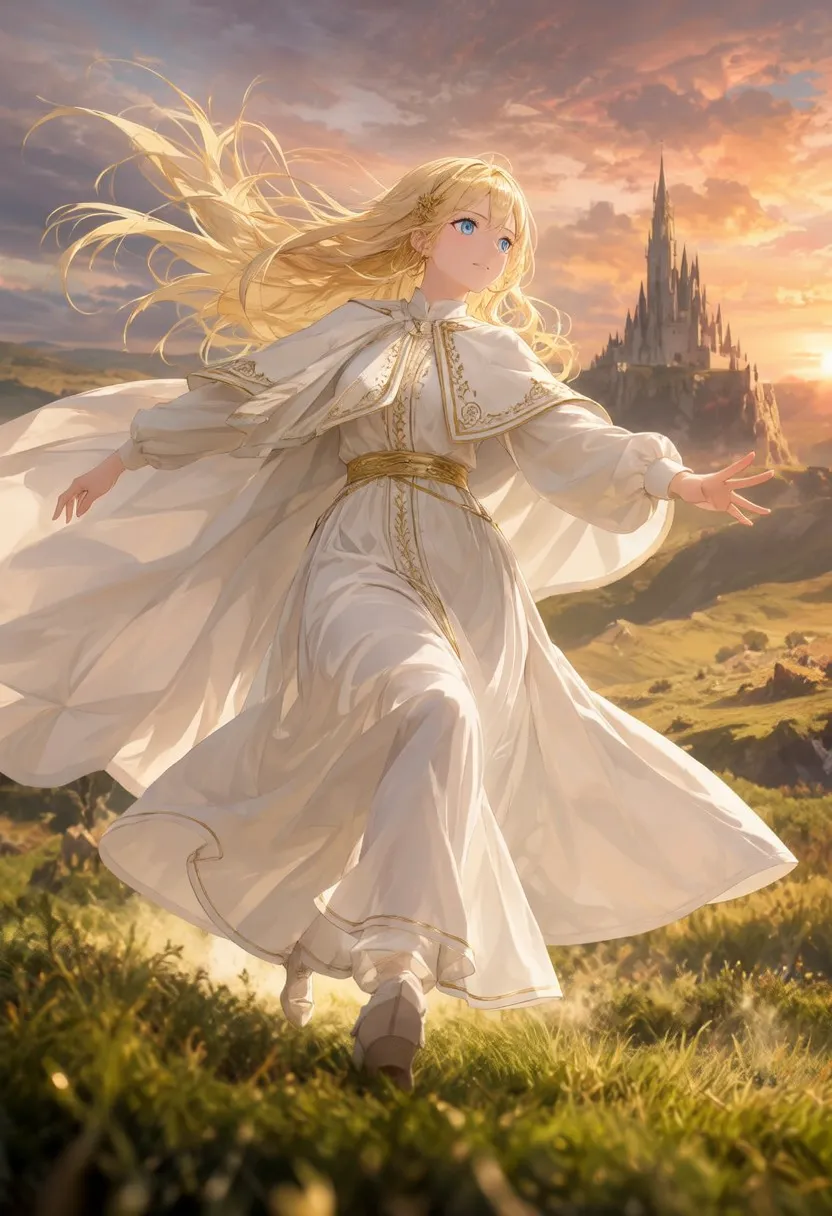
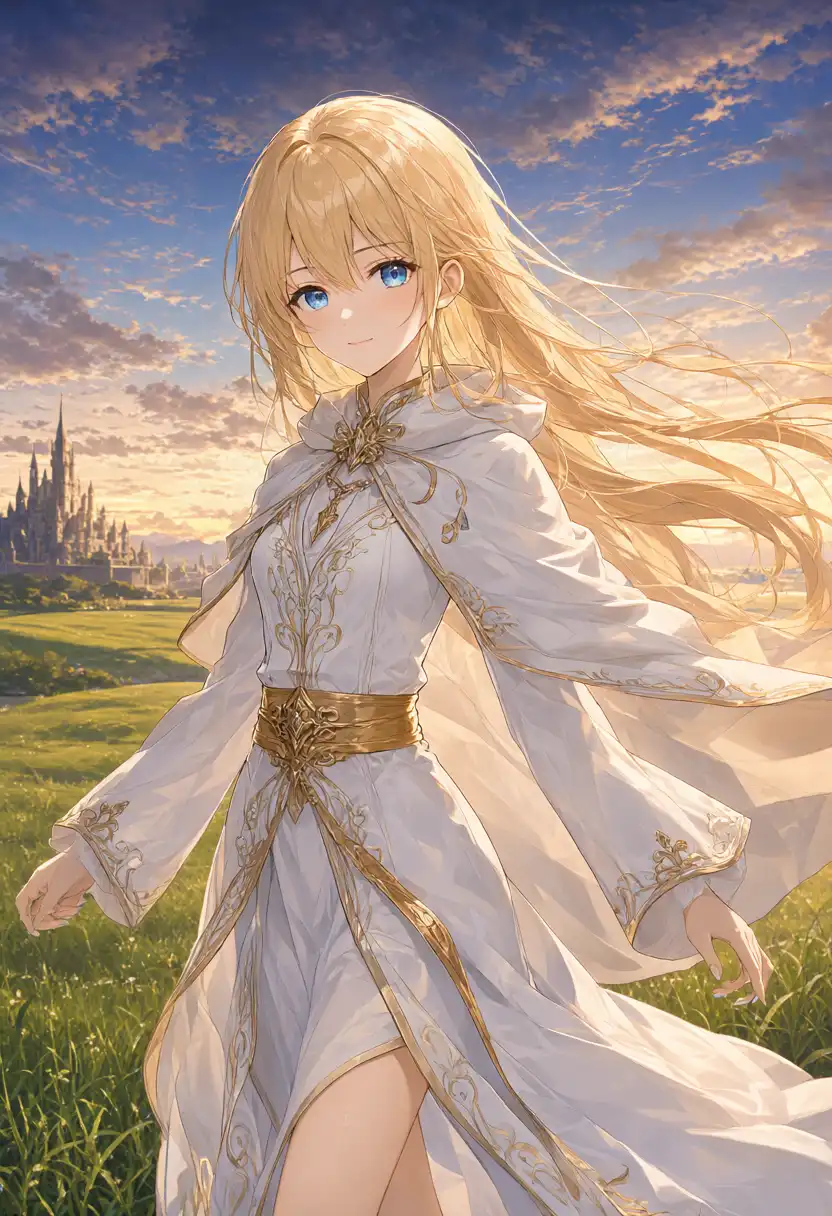
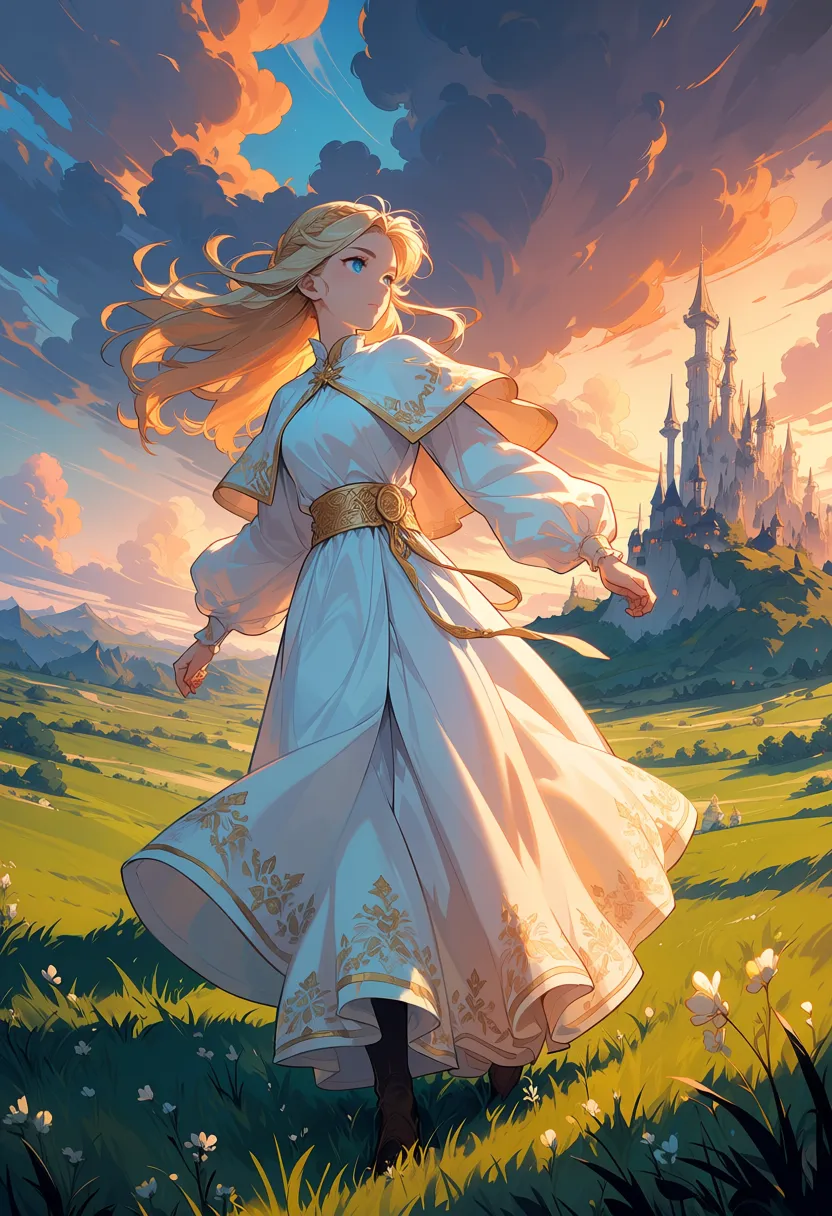
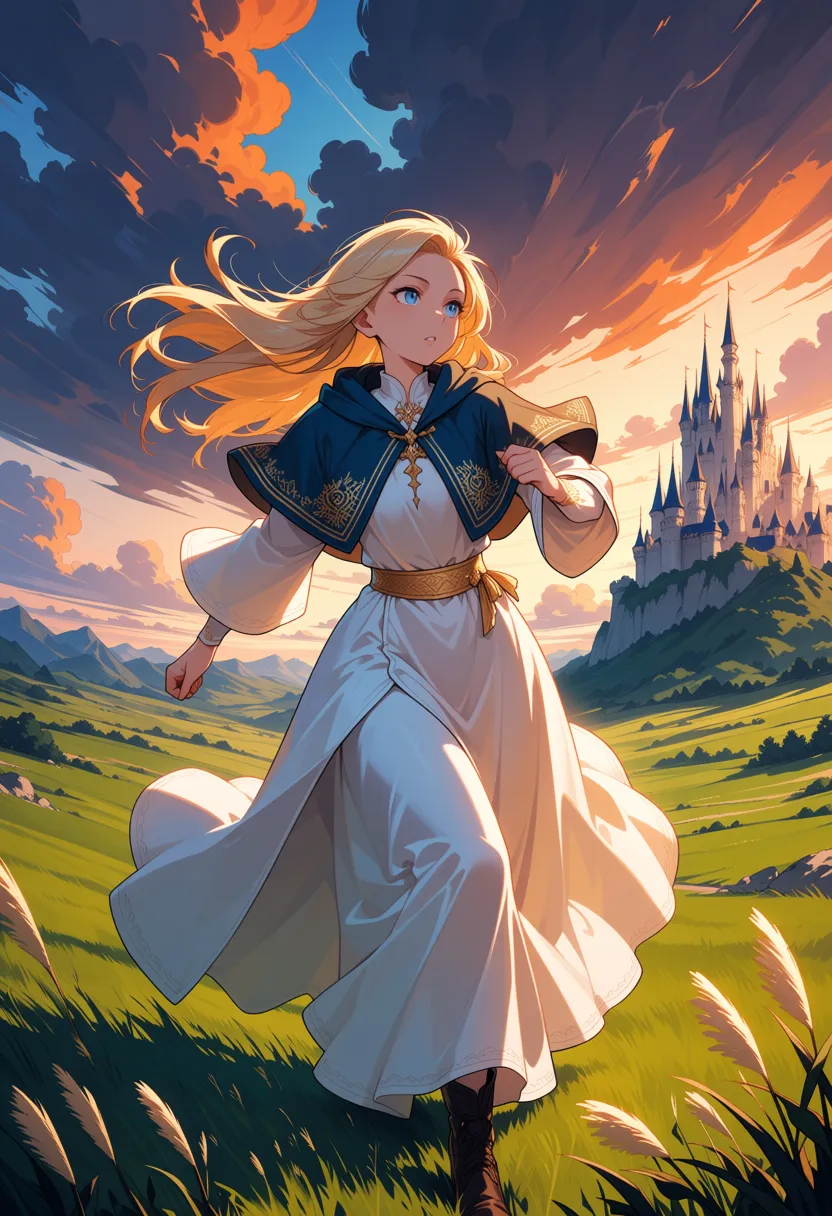
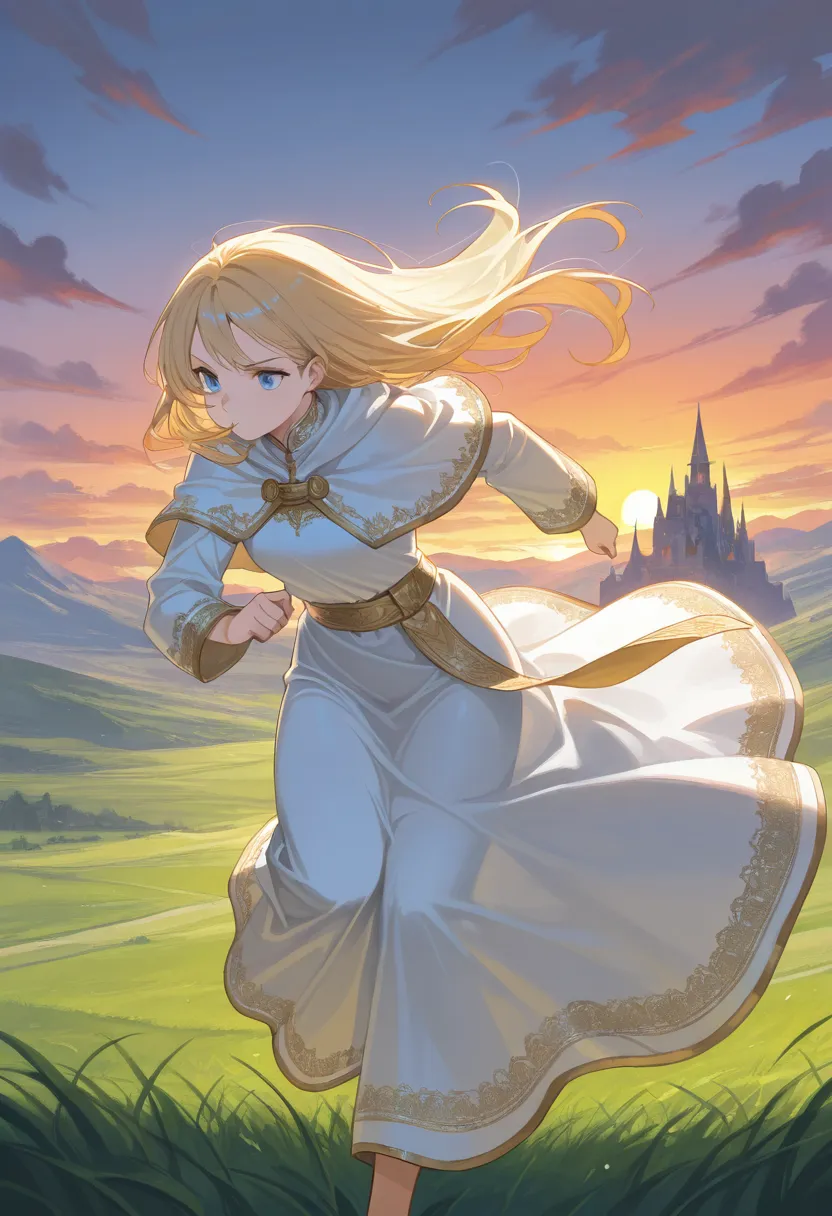
I prepended the official UI quality tags to the April tag list and sent the same result to Base and SFT. The negative prompt used the five preset terms from the UI.
(UI preset input)
(Identical input)
(September output)
(April output)
(April output)
(April output)
| Model | Observed in image |
|---|---|
| MOSS-Image-Base (UI preset input) | Depicted castle, sunset, grass field, and wind-blown blonde hair and white robe. One hand is near the chest and the other is beneath a wide sleeve; legs are mostly obscured by the dress hem. |
| MOSS-Image-SFT (Identical input) | Depicted castle, sunset, grass field, and white robe. Both arms are extended outward, and one shoe is stepped forward. Gold border accents on the collar and hem are more distinct than on Base. |
| Qwen-Image 2.1 | Hair and cloth blow in the wind, with intricate grass and cloud details. Legs below the knees fall outside the frame, so the running motion is hard to discern. |
| Anima preview3-base | Depicted castle, sunset, and grass field. The arms hang down, and the running motion is hard to discern. |
| WAI-Anima v1 | Depicts a running pose with bent arms. The shoulder capelet shifted from white to navy. |
| WAI-Illustrious v160 | Forward-leaning posture against sunset backdrop. Clothing maintained original white and gold palette. |
Both Base and SFT captured the castle and sunset, but neither image clearly conveyed the arm swing or leg movement of a running stride. While SFT brought one shoe forward, both arms were outstretched sideways.
In contrast, the April WAI-Anima output showed a running posture with bent arms. MOSS generation times were 1,160.42 seconds for Base and 1,149.25 seconds for SFT.
Original dynamic scene tags and UI conditions sent to MOSS
Original comparison tags:
1girl, solo, long blonde hair, blue eyes, white robe, gold embroidery, capelet, gold sash, long sleeves, long dress, running, wind, hair blowing, dynamic pose, fantasy landscape, castle in background, sunset sky, dramatic clouds, grass fieldTags sent to MOSS Base and SFT:
best quality, masterpiece, 1girl, solo, long blonde hair, blue eyes, white robe, gold embroidery, capelet, gold sash, long sleeves, long dress, running, wind, hair blowing, dynamic pose, fantasy landscape, castle in background, sunset sky, dramatic clouds, grass fieldNegative prompt was nsfw, worst quality, bad anatomy, watermark, jpeg artifact.
Expand initial Base version
Prior to comparing with UI presets, I converted the same scene into natural English prose and sent it to Base with an empty negative prompt per the model card defaults. That output raised one leg while spreading both arms outward. Because the subsequent UI run changed the prompt syntax, quality tags, and negative prompt together, the cause of the visual differences cannot be isolated. Generation time was 1,143.31 seconds.
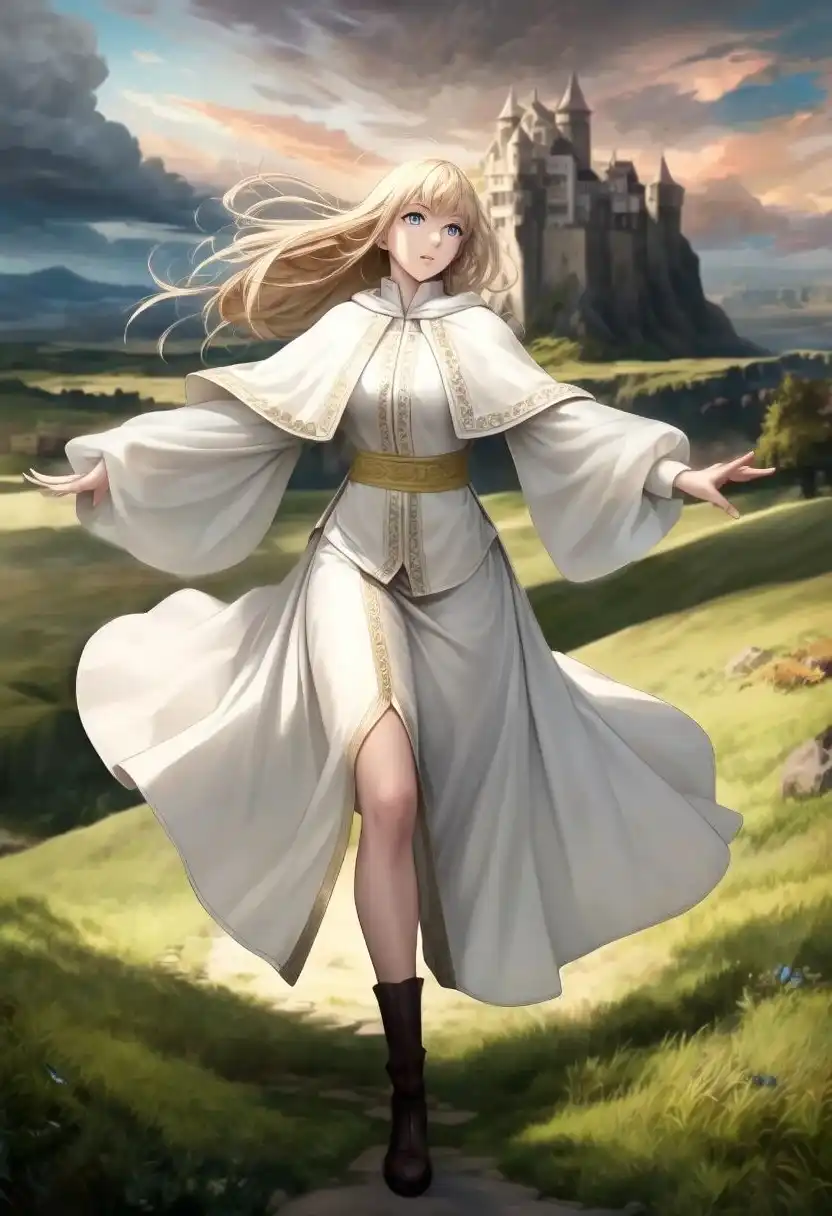
An anime illustration of one young adult woman with long blonde hair and blue eyes, running through a grassy field in a dynamic full-body pose. Wind blows her hair and the long sleeves of her white robe. Her robe has gold embroidery, a capelet, a gold sash, and a long skirt. A castle stands in the background beneath dramatic clouds and a sunset sky in a fantasy landscape.Recreating Source Image Appearance Using Only Text Conditioning
In the April article, I evaluated image-to-image (i2i) generation at a denoise strength of 0.5 based on a character portrait generated with WAI-Illustrious v160 and the Kana-chan LoRA. Denoising strength controls how significantly the source image is transformed.
In the September article, I fed the same source image into Qwen-Image 2.1 to redraw it.
The source character has brown hair in a side ponytail tied with a blue scrunchie, amber eyes, a white and gold robe, and a large golden circle in the background.
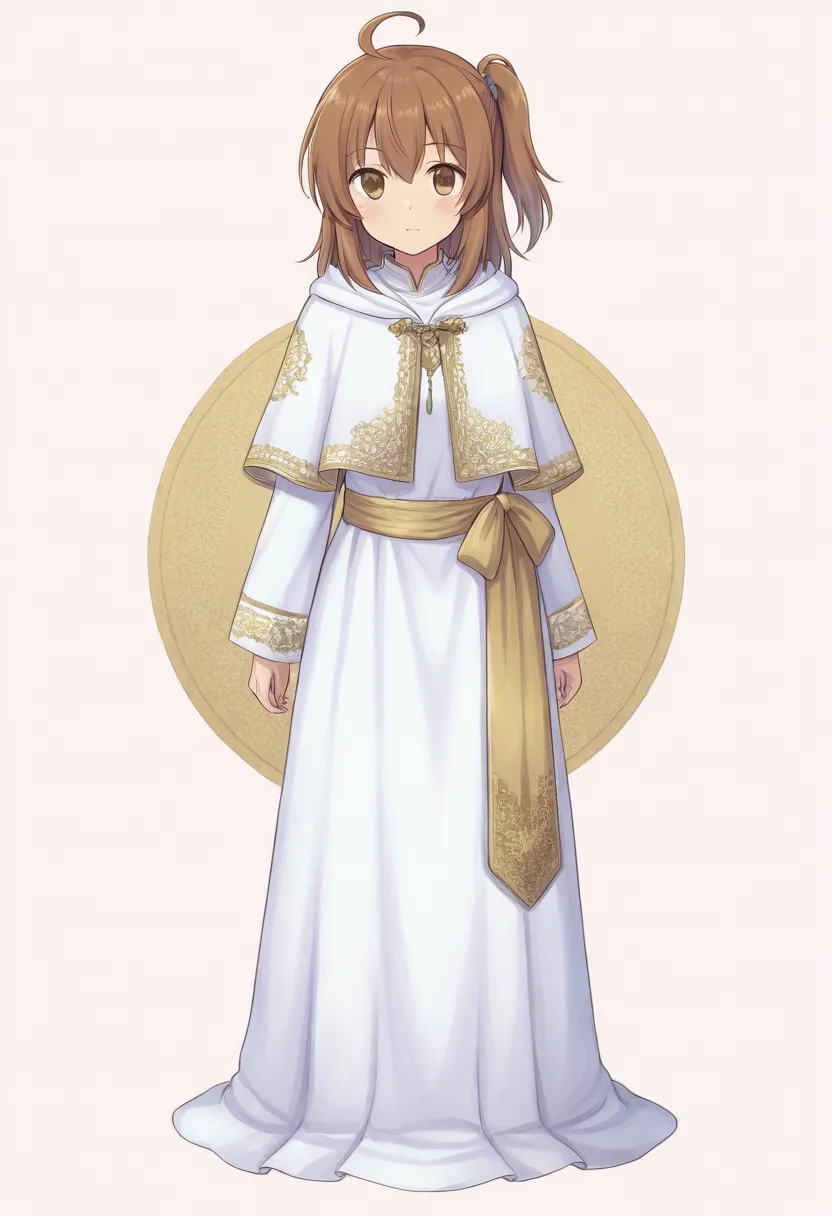
Before attempting the same experiment, I checked the call arguments of the official Diffusers pipeline. The pipeline’s __call__ does not accept an input image or a strength parameter; this call generates images from text.
Instead of providing the image, I described the hairstyle, blue scrunchie, costume, and background circle in English prose and generated a new image from text alone.
In this primary comparison, I prepended official UI quality tags to the descriptive English prompt and sent the same input to Base and SFT without passing the source image.
The earlier i2i outputs conditioned on the source image are displayed alongside for context, but this is not a direct comparison of identity retention.
(Text only, UI preset input)
(Identical text)
(Fed source image)
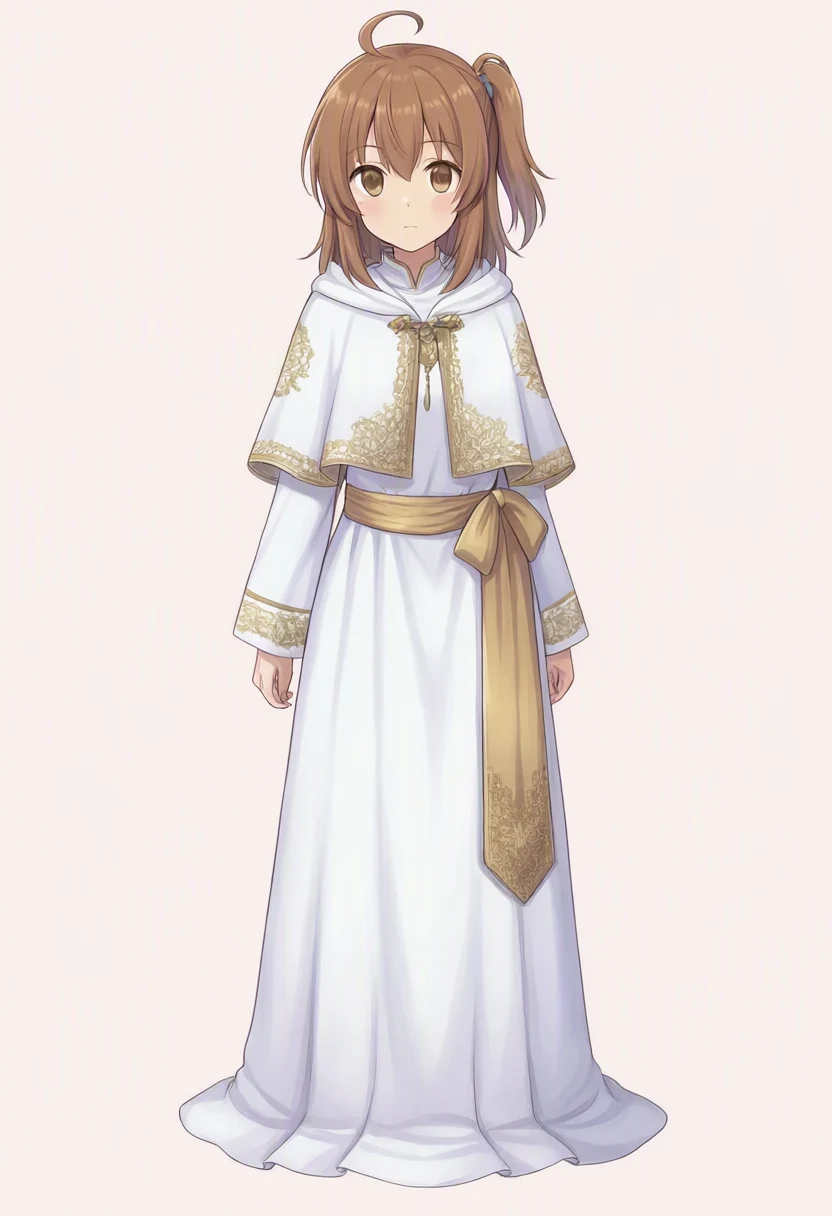
(denoise 0.5)
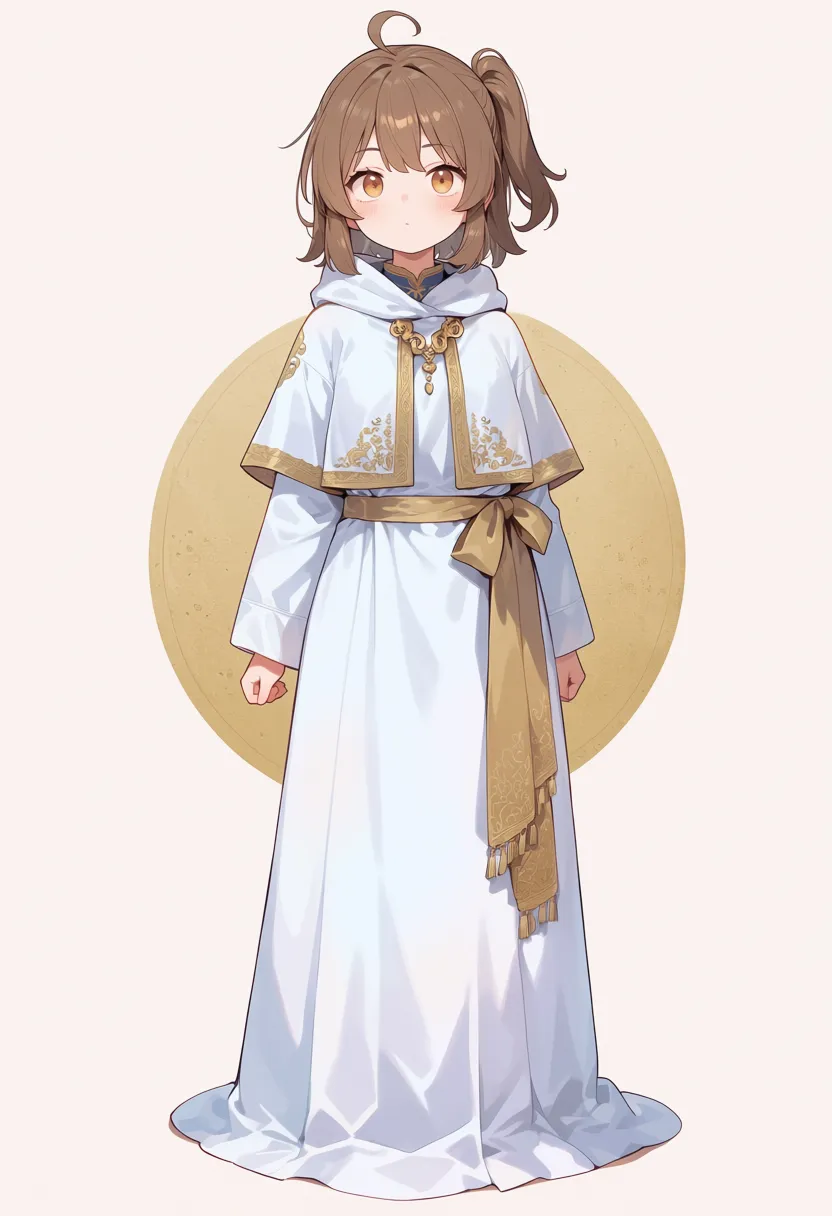
(denoise 0.5)
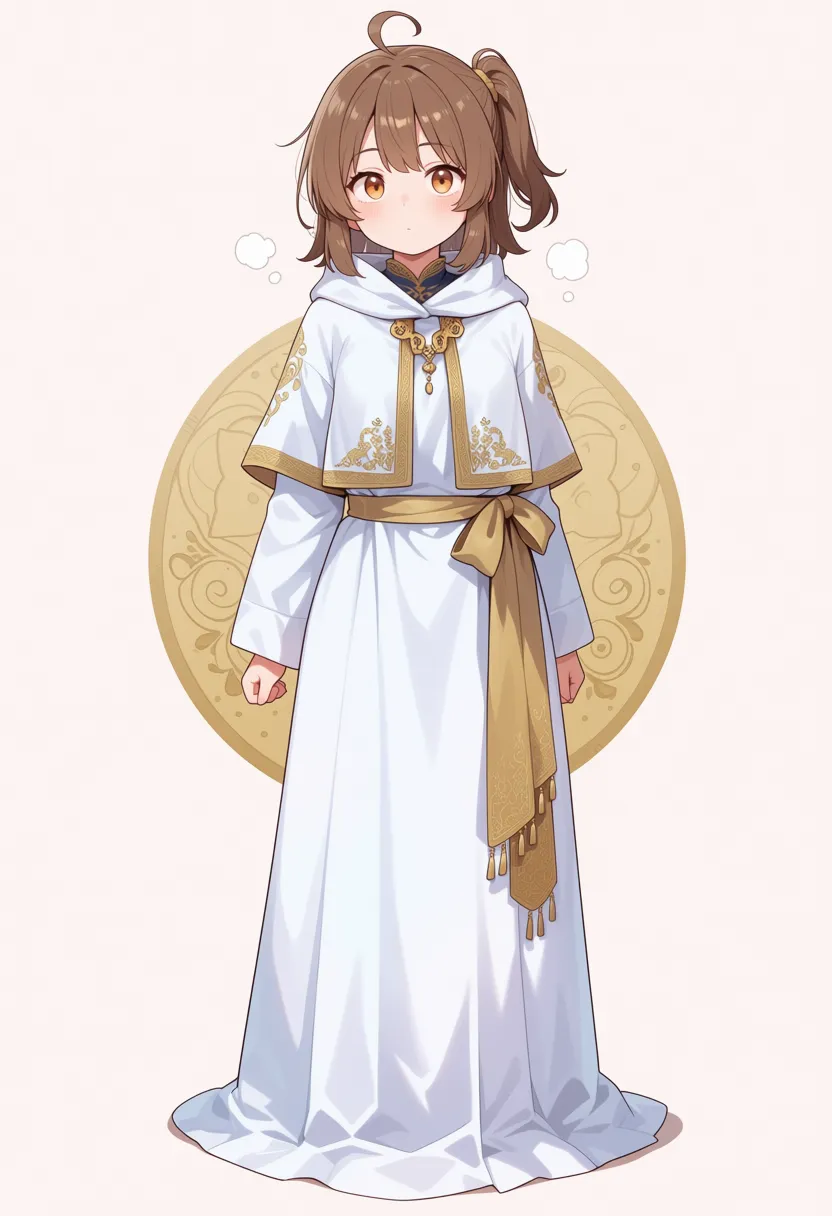
| Model | Observed in image |
|---|---|
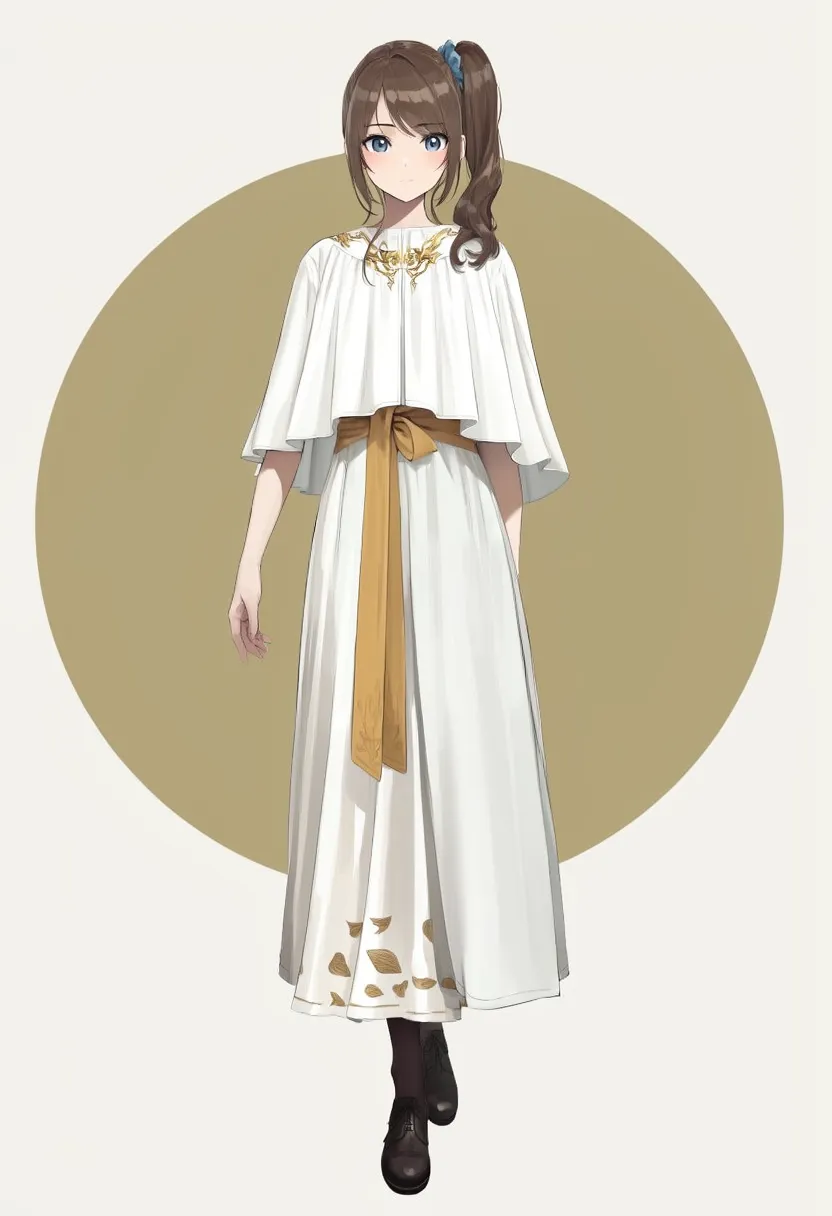
| MOSS-Image-Base (Text only) | Brown side ponytail, small blue hair tie, white and gold attire, and gold circle all rendered. Eyes are blue, and black shoes are visible. |
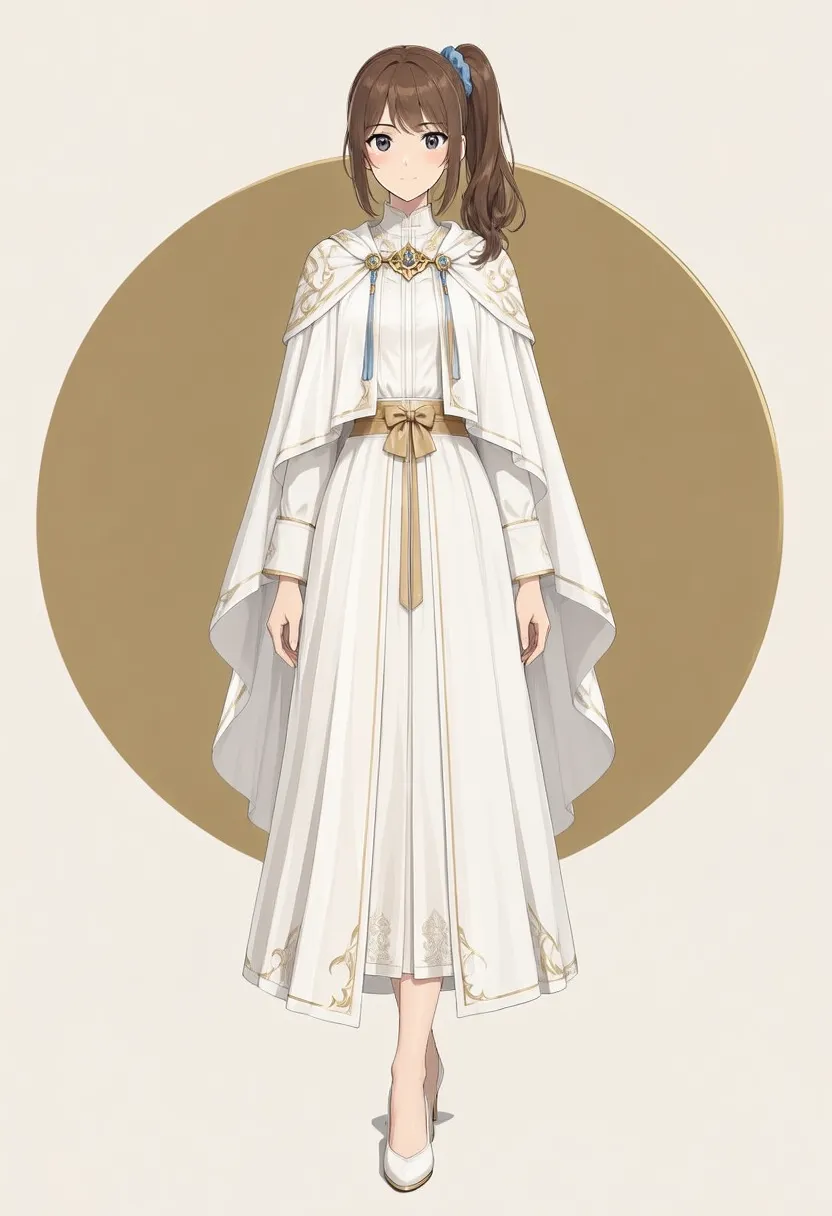
| MOSS-Image-SFT (Identical text) | Brown side ponytail, blue hair tie, and gold circle rendered. Gold patterning on shoulder capelet and hem is denser; one white shoe is primarily visible. |
| Qwen-Image 2.1 | Preserved the facial features, hairstyle, and scrunchie of the source image closely, while the background circle disappeared. |
| Anima preview3-base | Face became rounder, and scrunchie largely vanished. |
| WAI-Anima v1 | Face became rounder, and ornamental detail was added inside the background circle. |
Both Base and SFT rendered the elements specified in the text: the brown side ponytail, blue hair tie, white and gold costume, and golden circle. SFT showed denser patterning on the shoulder capelet and hem.
The facial structure and clothing silhouette differ from the source image, but this does not measure i2i retention because no source image was passed to the pipeline. The prompt also did not specify the amber eye color of the original image.
Generation time was 1,147.47 seconds for Base and 1,143.18 seconds for SFT.
English prompt and negative prompt sent to MOSS Base and SFT
best quality, masterpiece, An anime illustration of a young adult woman with brown hair in a side ponytail tied with a blue scrunchie, standing full body facing the viewer. She wears a long white robe with gold embroidery, a capelet and a gold sash. A large muted gold circle is behind her against a pale background.Negative prompt was nsfw, worst quality, bad anatomy, watermark, jpeg artifact.
Expand initial Base version
Prior to the primary comparison, Base was run using the English prose above without quality tags and with an empty negative prompt per model card defaults. While the blue scrunchie and golden circle appeared, the face and costume differed from the UI condition tested here. Because prompt phrasing and negative conditioning were modified at the same time, the causes of the differences cannot be disentangled. Generation time was 1,132.34 seconds.
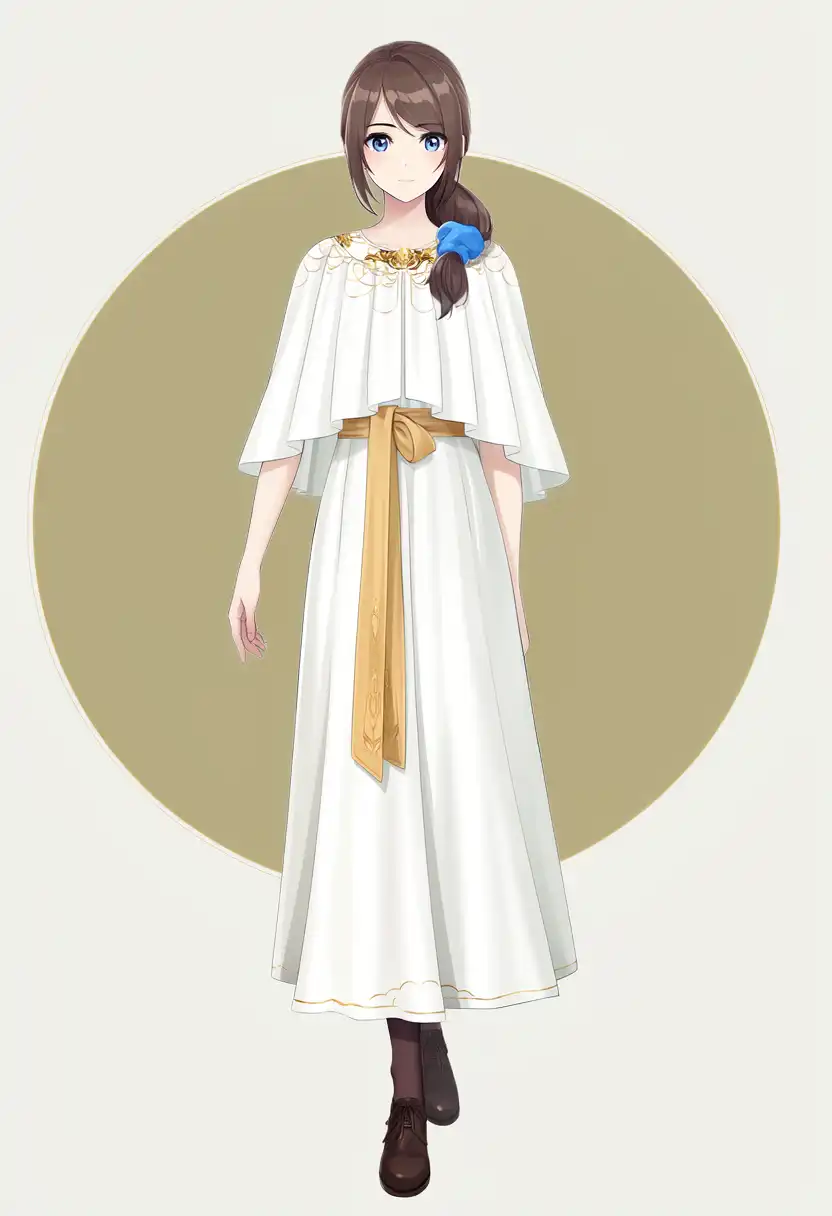
Generation Speed Benchmarks
I compared generation timing logged on the same M1 Max machine. The recorded seconds for MOSS measure the official pipeline’s generation call, which includes prompt encoding, iterative latent denoising, and VAE decoding. They exclude model loading, MPS device transfer, and PNG disk writes. Below are the measured timings across the seven conditions where Base and SFT received identical inputs.
According to the MOSS model card, the CFG 3.0 setting used here runs the image generation backbone twice per step. The earlier Qwen article used CFG 1.0.
| Evaluated sample (identical conditions) | Base | SFT |
|---|---|---|
| Character portrait on white background (UI preset input) | 1,159.20 s | 1,156.02 s |
| Castle at sunset (UI preset input) | 1,160.42 s | 1,149.25 s |
| Text-described source image (UI preset input) | 1,147.47 s | 1,143.18 s |
| Chinese refrigerator note (Official guide) | 1,189.91 s | 1,189.43 s |
EXPLORE poster (Official JSON) | 1,228.94 s | 1,236.49 s |
| NSFW without tag | 1,132.28 s | 1,133.58 s |
| NSFW with tag | 1,131.51 s | 1,132.87 s |
The standing portraits, sunset scenes, text-described source tests, and NSFW runs were generated at 832×1216, while the refrigerator note and poster runs were at 1024×1024. Each row used 50 steps, CFG 3.0, and seed 42, with zero swap usage observed post-generation. Timings for the initial concise-prompt tests and the detailed-prompt SFT run are documented in their respective sections.
The speed comparison against earlier baseline models focuses on the white background standing portrait and dynamic running scene. MOSS and Qwen were run via Diffusers, whereas the other three models were executed in ComfyUI, with step counts and CFG values differing across models.
| Model | Steps | Standing portrait | Running scene |
|---|---|---|---|
| MOSS-Image-Base (UI preset input) | 50 | 1,159.20 s | 1,160.42 s |
| MOSS-Image-SFT (UI preset input) | 50 | 1,156.02 s | 1,149.25 s |
| Qwen-Image 2.1 | 40 | 588 s | 584 s |
| Anima preview3-base | 30 | 275 s | 277 s |
| WAI-Anima v1 | 30 | 277 s | 274 s |
| WAI-Illustrious v160 | 25 | 217 s | 337 s |
Model Choices for These Samples
These choices apply only to the single sample generated for each condition, not to an overall model ranking. The earlier models also used different prompts, LoRA settings, step counts, and CFG values.
| Use case | Preferred model in these tests | Rationale |
|---|---|---|
| Text and object spatial layout | MOSS-Image-Base and SFT | Both models spelled EXPLORE correctly and placed text and mountain color regions close to specified bounding coordinates. SFT also rendered a lower blue band. |
| Chinese note text and placement | MOSS-Image-Base | Both Base and SFT guide outputs were legible across all three lines, but SFT placed the note outside the refrigerator door. |
| Full-body standing portrait on white background | Qwen-Image 2.1 | While the detailed-prompt SFT run increased embroidery and showed both feet, Qwen rendered more dimensional shading across the face and fabric in these tests. |
| Figure running with castle background | WAI-Anima v1 | Successfully rendered a running posture with bent arms in these tests. The MOSS Base/SFT pair did not produce distinct running arm swings or leg strides. |
| Preserving face identity in redraws | Qwen-Image 2.1 | The September i2i test retained the facial identity and hairstyle of the source image. The tested MOSS pipeline does not accept image inputs. |
Reference Links
- Official MOSS-Image repository (Release date, Base/SFT, Python examples)
- MOSS-Image-Base User Guide (Recommended settings and JSON layout)
- MOSS-Image-Base Model Card (Weights and license)
- MOSS-Image-SFT Model Card (Fine-tuned weights)
- Official Prompt Enhancer (Guidance for detailed descriptive prompts)
- Technical article comparing WAI-Anima with Anima and Illustrious (April portraits, running scenes, and i2i outputs)
- Technical article evaluating Qwen-Image 2.1 on M1 Max (September comparison images and generation timings)
Supplementary NSFW Output Tests
From this point forward, generated test images may contain sensitive material and have been blurred for publication. If you wish to examine unfiltered generation outputs, please test them in your own local environment.
I tested the same two content themes as in the April and September articles. For each theme, MOSS Base and SFT received the same English prose explicitly stating that the subject was an adult, age 25. Resolution, 50 steps, CFG 3.0, shift 5.0, and seed 42 matched the earlier character portrait runs.
Because the nsfw token in the official UI default negative prompt directly conflicts with the prompt content, the negative prompt was left empty for these two test runs. This is an explicit exception separate from the primary comparison using official UI quality presets. For the four baseline models, the previously published blurred images are shown.
The prompts also differ in pose and background, so these two images cannot isolate the effect of NSFW..
Without NSFW Tag
A full-body figure sitting at the edge of a forest spring with feet in the water, without passing the nsfw token.
(This test)
(Identical input)
(September output)
(April output)

(April output)

(April output)
| Model | Observed in image |
|---|---|
| MOSS-Image-Base | Depicted a seated figure with no visible clothing against a forest and waterside background. Leg position is difficult to confirm through the blur filter. |
| MOSS-Image-SFT | Depicted a seated figure against the same forest and waterside background, with one leg extended toward the lower right. Whether feet are submerged in water is difficult to confirm through the blur filter. |
| Qwen-Image 2.1 | Realistic rendering, seated facing forward by the water. |
| Anima preview3-base | Nude figure composed with chest and groin occluded. |
| WAI-Anima v1 | Nude figure composed with chest and groin occluded. |
| WAI-Illustrious v160 | Nude figure composed with chest and groin occluded. |
Generation time was 1,132.28 seconds for Base and 1,133.58 seconds for SFT. The blurred images confirm the seated posture and forest background.
Original tag list and English prose sent to MOSS
Original comparison tags:
1girl, solo, long blonde hair, blue eyes, completely nude, naked, bare skin, sitting on edge of spring, feet in water, forest, natural light, serene, full body, looking at viewerEnglish prose sent to MOSS:
An anime illustration of one adult woman, age 25, with long blonde hair and blue eyes. She is completely nude, sitting on the edge of a forest spring with her feet in the water. Natural light, a serene mood, full-body view, looking at the viewer.With NSFW Tag (Frontal Full Body)
A frontal full-body view against a plain white background, with NSFW. prepended to the English prompt.
(This test)
(Identical input)
(September output)
(April output)
(April output)
(April output)
| Model | Observed in image |
|---|---|
| MOSS-Image-Base | Rendered a figure standing facing forward from head to toe against a white background. Fine details are obscured by the publication blur filter. |
| MOSS-Image-SFT | Rendered a figure standing facing forward from head to toe against the same white background. Fine facial and anatomical details cannot be compared through the publication blur filter. |
| Qwen-Image 2.1 | Anime-style frontal full-body nude portrait, with facial features differing from the clothed portrait. |
| Anima preview3-base | Frontal full-body nude portrait, though face and proportions differ from the April portrait. |
| WAI-Anima v1 | Face similar to the clothed portrait, with a visible watermark in the lower right. |
| WAI-Illustrious v160 | Frontal full-body nude portrait with facial features similar to the clothed portrait. |
Generation time was 1,131.51 seconds for Base and 1,132.87 seconds for SFT. While both outputs adhered closely to the requested composition, fine details of faces and artistic rendering remain filtered in the publication images.
Original tag list and English prose sent to MOSS
Original comparison tags:
1girl, solo, long blonde hair, blue eyes, completely nude, naked, bare skin, nsfw, straight-on, full body, standing, white backgroundEnglish prose sent to MOSS:
NSFW. An anime illustration of one adult woman, age 25, with long blonde hair and blue eyes. She is completely nude, standing straight on and facing the viewer, shown full body against a plain white background.