WAI-Anima v1 vs WAI-Illustrious on M1 Max ComfyUI: brings Anima's atmospheric backgrounds but loses on tag control and character consistency
 Contents
When I wrote about Anima in February, my takeaway was “true to its ‘preview’ label, there’s almost nothing it can do better than SDXL-based models in practice.” Two months later, I was browsing CivitAI looking for a new version of WAI-Illustrious and noticed a link to something called “WAI-Anima.”
WAI0731, the creator of WAI-Illustrious, had released a derivative model based on Anima. And v1 was published on April 15, 2026 — yesterday.
Curious, I dug in and found the Anima landscape had changed quite a bit since February. I ran some hands-on comparisons too.
What is WAI-Anima?
A derivative model fine-tuned by WAI0731 on top of Anima preview3-base.
| Item | Details |
|---|---|
| Author | WAI0731 (same as WAI-Illustrious) |
| Base | Anima preview3-base |
| Size | 3.9 GB |
| Version | v1 (explicitly noted as exploration stage) |
| Release date | 2026-04-15 |
| Available at | CivitAI, Tensor.Art |
The author writes “still in the exploration stage,” so this is an early evaluation build, not a finished product.
Recommended settings
| Setting | Value |
|---|---|
| Environment | ComfyUI or Forge Neo |
| Steps | 20—30 |
| CFG | 4—5 |
| Sampler | Euler A Normal or ER SDE BETA |
| Text Encoder | qwen_3_06b_base.safetensors |
| VAE | qwen_image_vae.safetensors |
Prompts use Danbooru tag style just like SDXL models, and like WAI-Illustrious, it aims for score-tag-based control.
Hands-on comparison
I compared Anima preview3-base, WAI-Anima v1, and WAI-Illustrious v160 on ComfyUI running on an M1 Max (64 GB unified memory), using the same prompt and same seed.
Generation settings
| Item | Anima (shared) | WAI-Illustrious |
|---|---|---|
| Resolution | 832x1216 | 832x1216 |
| Steps | 30 | 25 |
| CFG | 4.0 | 5.0 |
| Sampler | er_sde | euler_ancestral |
| Scheduler | simple | karras |
| Seed | 42 (fixed) | 42 (fixed) |
| Text Encoder | Qwen3 0.6B | CLIP (built-in) |
Settings follow each model’s recommended values.
Test 1: Standing pose (white background)
Prompt: 1girl, solo, long blonde hair, blue eyes, white robe, gold embroidery, capelet, gold sash, long sleeves, long dress, standing, looking at viewer, full body, white background
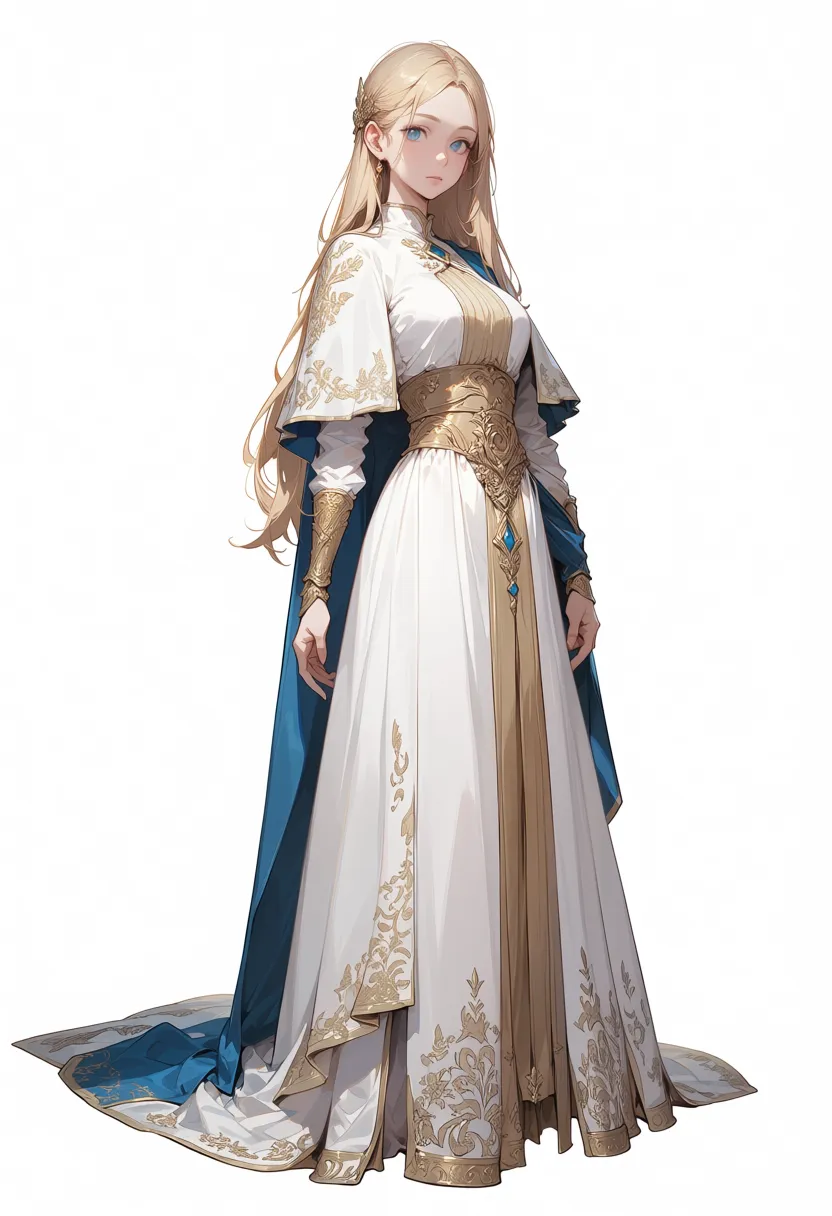


All three output an angled pose. Since I didn’t include straight-on in the prompt, not getting a front-facing shot is expected. preview3-base added blue fabric that wasn’t in the prompt at all. WAI-Anima v1 was more faithful to the white + gold color scheme.
WAI-Illustrious delivered its usual precision. It reproduced the white robe with gold sash almost exactly as prompted. The maturity gap in tag control is clear.
Test 2: Dynamic scene (with background)
Prompt: 1girl, solo, long blonde hair, blue eyes, white robe, gold embroidery, capelet, gold sash, long sleeves, long dress, running, wind, hair blowing, dynamic pose, fantasy landscape, castle in background, sunset sky, dramatic clouds, grass field



This is where the Anima models’ strengths show. Both preview3-base and WAI-Anima produce atmospheric, painterly lighting. The depth in the castle, sunset, and grass field is a step above WAI-Illustrious.
WAI-Illustrious has high costume accuracy but the background is flat and stays in its usual “anime cel shading” mode. The mouth is hidden, and both legs are unnaturally stuck together despite running — the physics break down in dynamic compositions. The Anima models produced a more natural running pose.
Test 3: i2i (WAI-IL to Anima)
What happens if you generate a character with LoRA on WAI-Illustrious and then run it through Anima via img2img? I wanted to see if I could lock down the character with IL’s tag control and layer Anima’s textures on top.
The source image was generated with WAI-Illustrious v160 + Kana-chan LoRA (kanachan-waiv16-05.safetensors, strength_model: 1.0, strength_clip: 0.8). i2i denoise was 0.5.



Character identity is more or less preserved, but running through the Anima models makes her look younger overall. The body proportions haven’t actually changed, but the rounder face and different eye/mouth rendering give a different age impression. Anima’s default style bias kicks in even in i2i.
Looking at the details, there are quite a few differences. The sash gained fringe details and the robe has a more realistic sheen. Hair color shifted subtly — less red than the IL version. The side-ponytail scrunchie was already faint in IL, but in preview3-base it’s nearly gone, and in WAI-Anima it seems to have been re-drawn in a different color.
The background changed too. The IL source has faint circular decorative patterns; preview3-base stripped them to near-blank, while WAI-Anima added slightly more defined patterns. The WAI-Anima version also has a white haze-like effect near the mouth — unclear whether it’s meant to be breath or just an artifact.
At denoise 0.5, the result is less “Anima’s expressiveness layered on top” and more “textures shift subtly + body-type bias gets applied.” There’s room for tuning if you want a pipeline that preserves the character while changing only the texture.
NSFW output tests are in the appendix. I found that behavior changes depending on the nsfw tag, and character consistency varies between models.
Generation speed
| Model | Standing | Dynamic |
|---|---|---|
| preview3-base (Anima) | 275s | 277s |
| WAI-Anima v1 | 277s | 274s |
| WAI-Illustrious v160 | 217s | 337s |
Anima models are stable at around 275 seconds regardless of composition. WAI-Illustrious is faster on standing poses but took 337 seconds on the dynamic scene.
What the comparison revealed
Tag control is where WAI-Illustrious dominates. It reproduces costumes faithfully, and the character’s face and body type stay consistent across compositions. The Anima models change costume colors on their own and the character can look like a different person from one composition to the next.
For atmosphere and lighting in dynamic scenes, the Anima models win. WAI-Illustrious dynamic output has flat backgrounds and physics breakdowns in the running pose. The Anima models render background depth and light wrapping naturally — they’re better suited for atmospheric single illustrations.
WAI-Anima has better tag fidelity and character consistency than preview3-base. The WAI tuning direction is right, but there’s still a big gap with WAI-Illustrious. It’s v1, so I’m curious to see where it goes.
Changes since February
preview3-base arrived
The official Anima project progressed from preview2 to preview3-base.
- Significantly more training at 1024 resolution compared to preview2
- Reinforced training on minor artists (50—100 posts)
- Step efficiency improvements (RDBT derivative reported 40% step reduction)
There were reports of regressions from preview2 (backgrounds tending to go flat), but in this test the dynamic scene backgrounds were quite good.
Derivative models surged
In February, Anima derivatives basically didn’t exist. As of April, here’s what I could find:
| Model | Characteristics |
|---|---|
| WAI-Anima v1 | Tag control reinforcement by WAI0731 |
| CottonAnima | Fixed art style via merged style LoRAs |
| Kirazuri v1.0 | Trained on 15,420 manually curated images. Strong on 2025/07—2026/03 characters and styles |
| RDBT p3 v0.24f | DMD2 distillation (fast generation with fewer steps) |
| Cat Tower v0.5 | Anime-style-focused fine-tune |
| AnimaYume v0.4 | Derivative checkpoint |
| Anima Real Anime CAT | Cross-model between Anima and Illustrious |
Small compared to the SDXL ecosystem, but a clear shift from “zero ecosystem” two months ago.
LoRA toolkit appeared
In February’s article I mentioned LoRA training was confirmed working, but tooling was nonexistent. Now AnimaLoraToolkit is available.
- YAML-configured LoRA/LoKr training
- Direct output in ComfyUI format (no conversion needed)
- sd-scripts also has Anima training scripts implemented
Official recommendation is rank 32, learning rate 2e-5 as a baseline. However, including the LLM adapter (the 6-layer Transformer bridging text encoder and DiT) in training tends to cause degradation.
Text encoder upgrade
The “0.6B is fundamentally too limited in expressive power” issue I noted in February got an answer from the community.
A Qwen 3.5 4B text encoder has been released.
| Item | Qwen3 0.6B (standard) | Qwen 3.5 4B (community) |
|---|---|---|
| Parameters | 0.6B | 4B |
| Architecture | Transformer | SSM/Attention hybrid |
| Vocabulary | Standard | 248K tokens |
| Prompt understanding | Tag-focused | Handles long/complex instructions |
The 4B version has an unusual architecture: 24 of 32 layers are SSM (Selective State Space Model) and 8 are Self-Attention, with an Attention layer every 4 layers. Output converts 2560-dimensional hidden states to 1024 dimensions via a trained projection (Linear -> ExpRMSNorm -> SiLU -> Linear) before passing to Anima’s adapter.
Worth trying if the 0.6B limitations bother you, but note that it’s community-made and not officially supported by Anima.
Architecture overview
SDXL and Anima are fundamentally different in structure.
SDXL (Illustrious, NoobAI, etc.)
CLIP Text Encoder -> UNet (3.5B) -> SDXL VAEUNet-based diffusion model. CLIP handles text embedding, UNet handles denoising. The Danbooru tag culture maps directly onto it.
Anima
Qwen3 TE -> 6-layer Adapter (Self-Attn + Cross-Attn + MLP) -> DiT (2B) -> Qwen Image VAEDiT (Diffusion Transformer) based. Derived from Cosmos-Predict2. A 6-layer adapter sits between the text encoder and DiT, and artist styles are also interpreted through this adapter.
Parameter count is lower for Anima 2B than SDXL 3.5B, but DiT is ViT-based with more computation per step, so it’s not simply “lighter.” In practice, generation time on M1 Max was about 275 seconds at 832x1216.
Danbooru tag support
Explicitly stated in the official README:
The model is trained on Danbooru-style tags, natural language captions, and combinations of tags and captions.
Trained on tags, natural language, and combinations of both. Tags are space-separated (spaces, not underscores), with only score tags using underscores.
That said, as confirmed in this test, the text encoder’s capacity constraint (0.6B) holds things back. Even precise costume color and composition instructions tend to get reinterpreted.
Does it run locally?
Yes. I ran it without issues on M1 Max (64 GB unified memory).
Requirements
| File | Size | Location |
|---|---|---|
| Checkpoint | 3.9 GB | ComfyUI/models/diffusion_models/ |
| Qwen3 0.6B Text Encoder | - | ComfyUI/models/text_encoders/ |
| Qwen Image VAE | - | ComfyUI/models/vae/ |
You need all three. Unlike SDXL where you can just drop in a single checkpoint, the setup is more involved.
Measured performance (M1 Max)
| Item | Value |
|---|---|
| Generation time | ~275s/image (832x1216, 30 steps) |
| Memory usage | No issues (plenty of headroom within 64 GB) |
| VRAM requirement | Official: 8 GB. M1 Max unified memory handles it easily |
Slower than SDXL at the same resolution. The DiT architecture’s computation cost is the bottleneck. For low-VRAM setups, DiffSynth-Studio has a low-VRAM script for Anima.
When to use Illustrious vs Anima
| Use case | Recommended |
|---|---|
| Character locking / LoRA workflows | Illustrious |
| Precise tag control | Illustrious |
| Batch generation | Illustrious (speed difference is significant) |
| Atmospheric single illustrations | Anima (stronger dynamic scene expression) |
| Trying new art styles | Anima |
Illustrious is fully mature with an overwhelming accumulation of LoRAs, ControlNets, and merge models. There’s no reason to switch your main workflow to Anima right now.
But unlike February, “it’s now in a usable state.” This test confirmed that dynamic scene backgrounds and composition naturalness can hold their own against SDXL. WAI-Anima’s improved tag responsiveness is also heading in the right direction.
Status update from the previous article
| February observation | April status |
|---|---|
| Zero ecosystem | 7+ derivative models, LoRA toolkit, TE upgrade |
| Slow inference (10x SDXL on V100) | 275s/image on M1 Max. Slow but practically usable |
| Weak text encoder (0.6B) | 4B version from community |
| No ControlNet support | Still unresolved |
| Non-commercial license only | Unchanged (commercial licensing inquiry channel now open) |
| Hands collapse | No major collapse in this test |
| Blurry backgrounds | Improved in preview3. Dynamic scene backgrounds look good |
Structural positioning
graph TD
    A["Cosmos-Predict2<br/>NVIDIA"] --> B["Anima<br/>CircleStone Labs x Comfy Org"]
    B --> C["preview2"]
    C --> D["preview3-base"]
    D --> E["WAI-Anima v1<br/>WAI0731"]
    D --> F["CottonAnima"]
    D --> G["Kirazuri"]
    D --> H["RDBT p3"]
    C --> I["Cat Tower"]
    C --> J["AnimaYume"]
Follow-ups
After this model comparison, I tested LoRA training for WAI-Anima and running it on other hardware.
- WAI-Anima LoRA training, all the experiments in one place (AnimaLoraToolkit + RunPod)
- Running WAI-Anima v1 on an RTX 4060 Laptop via ComfyUI API
References
- WAI-Anima v1 (CivitAI)
- Anima Official preview3-base (CivitAI)
- Anima (HuggingFace)
- AnimaLoraToolkit (GitHub)
- Anima 2B Qwen 3.5 4B Text Encoder (CivitAI)
- DiffSynth-Studio Anima low-VRAM script (GitHub)
- Anima Style Explorer (GitHub)
Appendix: NSFW output test
The images below are blurred since the test outputs may be sensitive. If you want to see the actual results, try them in your own environment.
Without nsfw tag
What happens when you give full-nude instructions without the nsfw tag.
Prompt: 1girl, solo, long blonde hair, blue eyes, completely nude, naked, bare skin, sitting on edge of spring, feet in water, forest, natural light, serene, full body, looking at viewer


All three models produce nudity, but every one of them defaults to compositions that hide the chest and groin. Without the nsfw tag, they lean toward “nude but not showing.”
With nsfw tag (straight-on)
What happens when you add the nsfw tag and request a front-facing full body.
Prompt: 1girl, solo, long blonde hair, blue eyes, completely nude, naked, bare skin, nsfw, straight-on, full body, standing, white background

With the nsfw tag, all three models produce front-facing full nudity. Since the same composition hid everything without the tag, the nsfw tag clearly controls the behavior.
The most interesting finding here was character consistency. WAI-Illustrious and WAI-Anima v1 look like “the same character in a different composition” whether clothed or nude. Lining up standing, dynamic, and NSFW outputs, you can recognize them as the same person.
preview3-base, on the other hand, shifts character impression when the composition changes. In the NSFW output especially, the face rendering and body type get pulled in an American comic direction — it feels different from Japanese anime style. This might be due to American comic-style images mixed into the training data.
WAI-Anima v1 tends toward large bust sizes and has a watermark (@Pagex.com) in the bottom right. Likely from the training data.