WAI-Anima LoRA trained on its own generations: ep20 sweet spot, 7.5x faster
 Contents
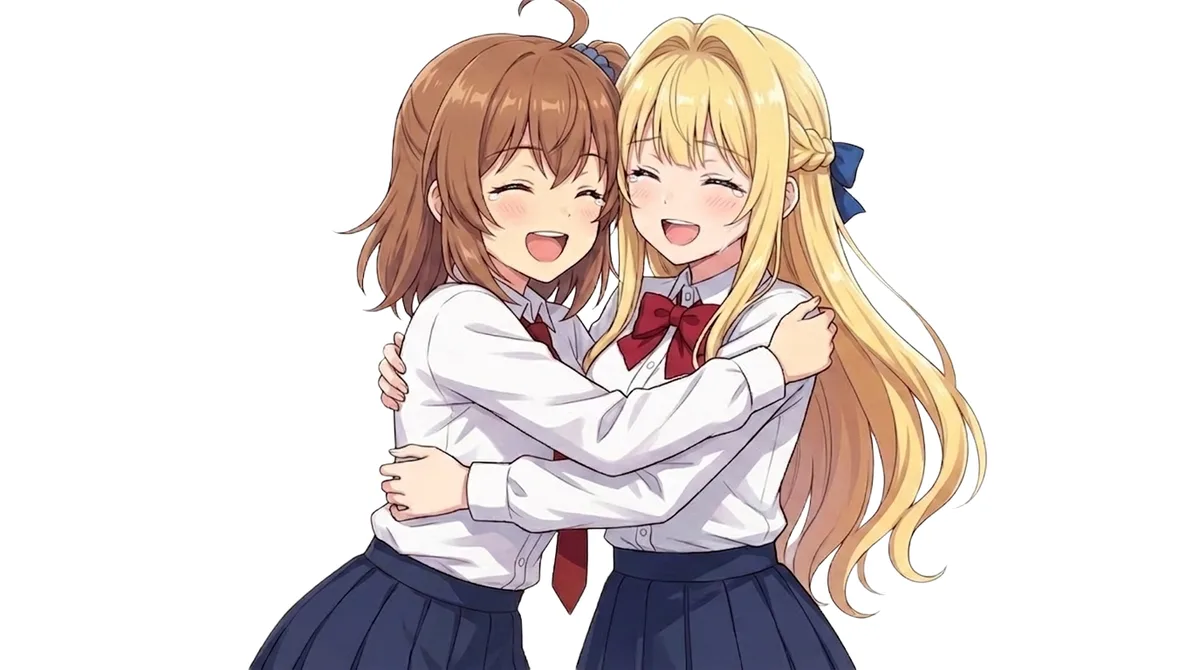
Update 2026-06-03: A follow-up rebakes the same character LoRA with only the base swapped to upstream Anima-Base, compared against this v1 → Character LoRA on Anima-Base vs WAI-Anima
I trained a second original-character LoRA on WAI-Anima, and this time the entire training set was generated by WAI-Anima itself. The headline result: the sweet spot moved from epoch 150 (my previous character) down to epoch 20, about 7.5x faster, because the training data and the base model share the same distribution, so distribution shift is essentially zero.
In the previous run I spent four articles tuning kanachan’s LoRA for Anima. The recipe I landed on — “600–720 exposures per image (= repeats × epochs) is the sweet spot, always include an NL block, fold color into the trigger” — hit 100% direction accuracy at ep150/180. But that was only validated on a single character (kanachan), so the next question is whether the same recipe holds for a different character.
This time I bake a second character, “Keichan.” The material is 91 images, pre-generated and then hand-selected. kanachan used 53, so this is 1.7x the volume.
Why Keichan
Keichan is this kind of character.
- Blonde hair
- Strong air intakes (the forward-facing scoops on both sides of the bangs) are the identifying key
- Those intakes are long (reaching below the shoulders)
- The bangs are blunt, but because the intake sections are long, the result doesn’t read as a hime cut
- From the sides to the back it’s a half-braided updo
- The back hair is gathered with a blue ribbon
- Nationality is deliberately ambiguous (a line that could read as either foreign or Japanese)
Air intakes don’t fire in Anima from a standalone tag or NL description. In a separate article on transplanting Anima hair intakes I built a 3-layer recipe that fires them by referencing Minase Nayuki, but that’s an inference-time technique: every time you have to put minase nayuki in the positive and strip her identity elements in the negative.
If I can bake it into the LoRA, that whole recipe gets tied to the character, and the intakes should come out stably from just the keichan trigger. Escaping the routine of hand-assembling the recipe every time is the practical motivation for baking a LoRA.
Training material
91 images, sorted into 3 framing categories.
| Folder | Count | Framing |
|---|---|---|
| 01_bust_front | 39 | Bust-up, front |
| 02_clothed_pose | 47 | Clothed, full body, various poses |
| 03_nude_angles | 5 | Nude, various angles |
Each image was generated with WAI-Anima v1.0 (the same base model used to train keichan). There’s some concern about same-model autophagy, but kanachan’s material was IL-generated images baked back into IL too, so I proceed on the same premise here.
Each image has a JSON sidecar that preserves the English prompt used at generation time. The contents are a list of Danbooru tags with no natural-language description. A representative positive looks like this.
1girl, solo, teenager, blonde hair, long hair, blue eyes, blunt bangs,
(hair intakes:1.5), long sidelocks, half updo, braid, blue ribbon,
bare shoulders, nude, bust shot, head and shoulders, face focus,
close to head, front view, looking at viewer,
simple background, white background, flat color, even lighting,
ambient lighting, plain lighting, studio lighting,
official art style, clean lineart
(hair intakes:1.5) was emphasized because Anima won’t produce it on its own, and even then generation was unstable. Since I already hand-selected “the ones where intakes are showing,” I proceed on the premise that all 91 remaining images show them.
The negative is structured as minase nayuki, blue hair, navy hair, black hair, dark hair, (ahoge:1.5), antenna hair, (hime cut:1.3), (crossed bangs:1.4), parted bangs, swept bangs, short sidelocks, short hair, (mature:1.3), (adult:1.3), milf, .... The intake-transplant recipe first uses minase nayuki as a positive reference, then strips Nayuki’s identity elements (blue hair, mature look, different bang shapes) in the negative. After baking into the LoRA, this negative tactic should no longer be needed.
Caption design policy
Built on the lessons from the four kanachan articles, structured as follows.
Trigger word
keichan. Like kanachan, a single lowercase word with no space.
Character core → absorbed into the trigger (removed from captions)
blonde hair,blue eyes— following the lesson where deleting kanachan’sbrown hair/brown eyesstabilized hair color to match the training materialhair intakes— this is Keichan’s biggest identifying key, so I make the trigger absorb it- Facial structure, age impression, basic body type — tied to the trigger
The decision to not leave hair intakes on the tag side was made on operational symmetry. If absorbed into the trigger, it comes out from keichan alone; if it comes out weak, I can add hair intakes by hand at inference. Conversely, leaving the tag in the caption leaves the risk that “intakes are weak with keichan alone.” Precisely because it’s a hard-to-fire tag, keeping the option to add it at inference time as a guideline makes operation easier.
Kept as independent tags
blunt bangslong sidelockshalf updobraidblue ribbon
Natural-language block
Two or more sentences per image, with framing and hair structure written in separate sentences.
Common structure
Sentence 1: framing / pose / expression / gaze description
Sentence 2: hair structure (intakes + braid + ribbon) description
Subject expression is aligned with kanachan as a young girl. Concrete age tags like teenage/high school student/16 years old were in the original prompts, but I got by without them for kanachan, so I leave them out this time too.
Variation examples
Front bust-up
A close-up portrait of a young girl with a {expression} expression looking at the viewer. Her long, thick hair intakes hang down past her shoulders on both sides of her face below her blunt bangs, and a half-up braid wraps around the back of her head, tied with a blue ribbon.Front full body
A standing front view of a young girl {pose}, with a {expression} expression. Her long hair intakes fall on both sides of her face below her blunt bangs, and her hair is gathered into a braided half-updo at the back, secured with a blue ribbon.Three-quarter
A three-quarter view of a young girl with her body turned slightly. Her long hair intakes are visible on both sides of her face below her blunt bangs, and the half-up braid wraps around the side of her head toward the back where it is tied with a blue ribbon.Side profile
A side profile of a young girl, her body facing {left/right}. One of her long hair intakes is visible falling beside her cheek below her blunt bangs, and the half-up braid runs along the side of her head to the back, tied with a blue ribbon.From behind
A view from behind of a young girl. Her braided half-updo runs along the back of her head, secured with a blue ribbon at the nape, and the ends of her long hair flow below.Key points of the NL design
| Issue | Approach |
|---|---|
| Risk of hime-cut interpretation creeping in | Emphasize length with “long, thick hair intakes hang down past her shoulders” |
bound hair misread as “a bound person” | Avoid it; describe with half-up braid / secured with a blue ribbon |
| Instability of intake firing | Always state it in NL to bake it into the trigger (tag omitted, can be added at inference when needed) |
| Color leakage | Don’t mention blonde / blue eyes in NL |
| Direction control | Symmetric hairstyle, so the direction problem is small. Only the viewpoint (front/side/back) is specified |
Breast-size tag policy A (following kanachan)
Add medium breasts only when the breast silhouette is visible in the image.
| Folder | Treatment |
|---|---|
| 01_bust_front 39 images | Bust-up / to the shoulders, so generally none |
| 02_clothed_pose 47 images | Only those with a visible silhouette in tight outfits / swimsuits, etc. |
| 03_nude_angles 5 images | All medium breasts |
Putting a tag on a loosely-clothed image just creates “a caption that contradicts the image” (a muddying risk like kanachan’s bikini/nude swap incident), so I stick to “only write what is actually shown in the image.”
Body-silhouette tags omitted (policy A1)
The silhouette-emphasis tags that were abundant in the original prompts — developed body, slim figure, curved waist, proportional body, womanly figure — are all removed from captions. They’re attributes that come out normally even at the base default, so there’s little need to train them.
Drop all emphasis weights
Weighted tags like (hair intakes:1.5) are inference-time operations; flat tags are enough for training captions. I didn’t use weights for kanachan either.
Quality prefix
masterpiece, best quality, score_7, [safe/sensitive/explicit],Use safe (not general). The rating is assigned per image among safe / sensitive / explicit (clothed → safe, nude → explicit, others → sensitive).
Final caption template
masterpiece, best quality, score_7, [safe/sensitive/explicit],
1girl, solo, keichan,
{2 NL sentences}
blunt bangs, long sidelocks, half updo, braid, blue ribbon,
{expression/pose/outfit/framing tags},
[medium breasts (applicable images only)],
white background, simple background
Training-volume plan
The formula established with kanachan is repeats × epochs ≈ 600–720 (exposures per image).
With 91 images, that works out to this.
| repeats | epochs | total steps (effective) | exposures per image |
|---|---|---|---|
| 4 | 150 | 91 × 150 = 13,650 | 600 |
| 4 | 180 | 91 × 180 = 16,380 | 720 |
Fix repeats at 4 (same as kanachan), target epochs 150–180, save the LoRA for each epoch with save_every: 1, and validate locally in ComfyUI.
The officially recommended absolute step count of “12,000+” turned out to be excessive for kanachan’s 53 images, so even at 91 images I think in terms of “exposures per image” divided by the image count. The total step count is just a consequence at 13,650–16,380.
Training config (planned YAML)
Only the diff from kanachan v4’s YAML.
- output_dir: "/workspace/output/rework-v4"
- output_name: "kanachan-waianima-rework-v4"
+ output_dir: "/workspace/output/keichan-v1"
+ output_name: "keichan-waianima-v1"

- # dataset path (for kanachan)
+ # dataset path (keichan 91 images)

  epochs: 150  # or 180
  learning_rate: 2.0e-5  # same as kanachan v4, Anima official recommendation
  save_every: 1
  sample_every: 1
  flip_augment: false
  shuffle_caption: false
  keep_tokens: 1
  rank: 32
  repeats: 4
The sample prompt is aligned to the N format used in sweet-spot validation.
masterpiece, best quality, safe, 1girl, solo, keichan,
A close-up portrait of a young girl looking at the viewer.
Her long hair intakes hang down past her shoulders on both sides of her face,
and a half-up braid wraps around the back of her head, tied with a blue ribbon.
blunt bangs, half updo, braid, blue ribbon,
upper body, looking at viewer, white background, simple background
Remaining decisions
- repeats 4 / epochs 150 or 180 (starting wide at 180 to include the sweet spot is the safe call)
- Whether to carry over ahoge / hime cut / minase nayuki etc. in the (sample-generation) negative prompt
- Resolution-bucket settings for training images (should work as-is from kanachan)
Validation plan
After training, I run the same 3-format matrix as kanachan v4. What I’m watching this time isn’t direction but intake firing rate.
| Format | What to check |
|---|---|
| K (trigger only) | Whether intakes come out from the single word keichan (the main event) |
| N (with NL) | Whether adding the NL “long hair intakes hang down…” raises the firing rate |
KT (trigger + hair intakes tag as a guide) | Whether adding the guide at inference raises the firing rate |
A matrix of each format × 3 seeds × multiple epochs = 9–27 images sweeps “the epoch range where intakes come out stably.” The highlight is whether it matches kanachan’s sweet-spot range of ep150–180. If format K comes out stably, the trigger absorption succeeded; if not, check whether format KT’s guide brings it out; if that still fails, revisit the caption design.
Secondary things I want to see.
- Whether the nationality feel (foreign-leaning / Japanese-leaning) stabilizes with the
keichantrigger - Whether the half-braided updo wraps correctly to the back (validation of the independent-tag choice)
- Whether I can avoid the
minase nayukireference technique at inference (the main motivation of this article)
That settles the training-data design. Next comes implementing captions for all 91 images.
Caption implementation
Bulk generation from JSON sidecars
The JSON sidecar attached to each image contains the original English prompt (a list of Danbooru tags, no natural language). I wrote a Python script to parse it and reassemble it into a caption matching the design policy.
The extraction and classification logic works like this.
- Normalize weighted
(tag:1.5)to flat tags - Determine framing type from framing keywords (
bust shot/three quarters view/full profile/from behind/cowboy shot/upper body/full body) - Determine direction from orientation keywords (
body turned to the left/right,looking to the left/right,body facing left/right) - Map expression tags via a priority list (angry > annoyed > frown > smile > calm > neutral …)
- Select one representative outfit label from the outfit tag cluster (nude / school_swimsuit / bikini / gym / leotard / tshirt / dress / yukata / preppy / uniform)
- Derive rating from the outfit label (nude → explicit, bikini/swimsuit/leotard/gym → sensitive, others → safe)
- Add
medium breastsonly for the combination of visible body type + revealing outfit (following kanachan v3)
The NL is fixed by filling {expression} {facing} into per-framing templates, guaranteeing 2+ sentences per image. Bust-ups use “A close-up portrait of a young girl with a {expression} expression…”, three-quarter framing uses “A three-quarter view of a young girl with her body turned slightly to the {facing}…”, and so on per framing.
Running the script wrote out .txt for all 91 images in one shot.
The 39 bust-ups vary only in expression
Aggregating the original prompts of the 39 images in 01_bust_front/available, all of them are front view, looking at viewer, bust shot, head and shoulders, face focus, close to head — completely identical. Only 4 have sideways glance; the framing variance is zero.
The caption is therefore the same template for all 39 images, with only one variable expression slot. I dumped the expression decisions into a single table and checked all 39 at once next to Finder’s thumbnail view. No mis-assigned expressions; the 39 are confirmed.
The 5 03_nude_angles images are visually checked
With only 5 images, I looked at each one by hand to directly confirm the full body / three quarters view / side profile / from behind decisions were correct. All show toes-to-head and meet Danbooru’s full_body definition; the direction decisions match too. No corrections.
The 47 clothed poses are framing-verified with Codex CLI
The problem is the 47 images in 02_clothed_pose/available. They have the most variation (8 outfits, mixed framing). The original prompts say “shot with full body,” but diffusion models cheerfully drop a full body spec into a cowboy shot (cut at waist/thigh), so it’s uncertain whether the actual images came out as instructed.
I first tried image-checking with Gemini CLI, but a concern arose that swimsuit images would be stopped by the safety filter, so I switched to Codex CLI. The setup attaches the image with the -i option and sends it to codex exec.
The verification prompt looks like this (I had to explicitly say “only write FIX for things that don’t match” to keep the output from drifting in wording).
Verify this LoRA caption against the attached anime-style image of a single girl.
Caption: ---{caption}---
The original generation prompts often requested poses the model didn't deliver,
so judge from the IMAGE, not from caption assumptions.

Check ONLY these aspects:
A. FRAMING — bust / upper body / cowboy shot / full body / three quarters / side profile / from behind
B. BODY FACING (viewer's perspective) — left / right / forward / back
C. EXPRESSION — does the caption's expression tag match the face?

Output format — exactly one line:
- All match: "OK"
- Any mismatch: "FIX: <letter>=<what image actually shows> (caption says <claim>), ..."
47 images sent at parallelism 6 took 1m48s. The result was 18 OK / 29 FIX. The FIX breakdown was this.
| Type | Count |
|---|---|
| A=cowboy shot (caption says full body) | 22 |
| A=three quarters view (caption says full body) | 5 |
| B=forward (caption says left/right) | 4 |
| B=left (caption says right) | 1 |
| C=neutral (caption says softly smiling) | 1 |
Almost all are the “specified full body but came out as a cowboy shot” pattern. The data point I got this time: even with (three quarters view:1.5) at 1.5x emphasis, Anima’s base default framing tendency (converging on waist-up) often wins.
Codex’s strict Danbooru judgment vs. visual impression
“29 FIX” from Codex felt like a bit much, so I opened 1–2 actual images. 010800 (judged cowboy) was indeed cut above the knees, with no ankles visible. 011541 (judged OK) was a seated pose with toes visible.
Codex judges strictly by Danbooru’s full_body definition (feet visible), which is a different yardstick from a human’s “almost the whole body is in frame.” Anima/Qwen3 TE is trained on Danbooru tags, so caption efficiency is better if the LoRA captions lean Danbooru too. If you train the concept full_body tied to “ankle-cropped images,” you risk a LoRA where specifying full body at inference still comes out waist-up.
That said, for borderline cases (cut below the knee but reads as almost full body), human judgment is more trustworthy, so I switched from mechanically applying Codex’s results to sorting into folders with my own eyes.
Settled by folder sorting
I created 3 subfolders directly under 02_clothed_pose/available/ — full_body/ / cowboy_shot/ / upper_body/ — and sorted the 47 by hand. The result was this.
| Folder | Count |
|---|---|
full_body/ | 21 |
cowboy_shot/ | 24 |
upper_body/ | 2 |
Treating this as ground truth, I wrote a script to update the framing tag in each .txt. The rewrite logic is simple.
- The 21 in
full_body/already have thefull bodytag, so no change - For the 24 in
cowboy_shot/, 22 hadfull bodyso replace withcowboy shot; the remaining 2 were already correctlycowboy shot - The 2 in
upper_body/were already correctlyupper body
The NL describes direction per framing type — “three-quarter view of a young girl,” “side profile of a young girl,” “view from behind of a young girl” — and doesn’t touch framing info (whether feet are visible). So I don’t touch the NL; replacing one word in the tag list is enough.
Final state
| Category | Count | State |
|---|---|---|
| 01_bust_front (front bust-up) | 39 | Fixed template, expression-only variable |
| 02_clothed_pose full_body | 21 | full body tag |
| 02_clothed_pose cowboy_shot | 24 | cowboy shot tag |
| 02_clothed_pose upper_body | 2 | upper body tag |
| 03_nude_angles | 5 | All full body |
All 91/91 captions are aligned with their image content. Following the trigger-absorption policy, hair intakes is not in the tag list; it’s stated in each image’s NL as “Her long, thick hair intakes hang down past her shoulders…” to double-bake it (not on the tag side, so I keep the option to add it as a guide in the inference prompt when it doesn’t come out).
Byproduct findings
- Diffusion models often lose to the default cowboy-shot convergence even when you specify
full body. Even at(full body:1.5)1.5x weight, 24 of 47 (51%) of this material’s images came out as cowboy. It’s dangerous to assume “I shot withfull bodyso it’s allfull body” at the training-material stage — especially with Anima-family models - Gemini CLI stops on swimsuit images at the safety filter (within what I tried). Codex CLI (via ChatGPT auth) passed the same images. If you’re using it for a verification pipeline of NSFW-leaning material, the Codex side seems to snag less
- Codex’s strict Danbooru judgment diverges from everyday human sense. The
full_bodyboundary is cut mechanically by “are the ankles visible,” so use the machine judgment when you want training material aligned Danbooru-style, and human judgment when you want it aligned by visual naturalness — choose by purpose
RunPod training
Survey of new tools and recipes
It had been a month since I wrote kanachan v4, and I was aware that new things were happening around Anima, so I reviewed before running.
| New element | Released | Useful for our 91-image character-LoRA task? |
|---|---|---|
kohya-ss/sd-scripts Anima support (networks.lora_anima / anima_train_network.py) | Spring 2026 | ❌ The tool-switch cost outweighs it. Per-layer rank control was implemented but there’s no character-LoRA guidance |
neme-anima (3-step LoRA builder) | Active development | ❌ Assumes video → crop. Ours is 91 still images |
| Anima-LoRA-Factory v2.2 | 2026-04-25 | ❌ Its selling points are GUI + Blackwell sm_120 support. Little benefit for a CLI user on RTX 6000 Ada |
| LoKr added to AnimaLoraToolkit | Recent | ❌ No track record yet for Anima × LoKr × character LoRA. Adding variables breaks the kanachan comparison |
Community implementation of Differential Output Preservation (Anima Discussion #60, by cpbmc) | Recent | △ The promising route against catastrophic forgetting, but needs 600+ regularization images + a patch + 3x slower |
| Anima official consensus “degradation starts at 3000–4000 steps” | Same Discussion #60 | ❌ Contradicts kanachan v4’s measurements (ep100=5,300 steps still hadn’t taken off, ep150=7,950 steps was 100% sweet spot). A generic claim with no resolution per image count |
A lot of new stuff is out, but for the concrete task of baking one character from 91 images, there’s no option with stronger evidence than the measurement-based baseline I produced with kanachan v4 — that’s the survey conclusion. The evidence just doesn’t line up, honestly.
DOP alone looks like the real path, so I leave it for future consideration. But to confirm “adding DOP improves things,” I first have to show that the no-DOP baseline (= a kanachan v4 replay) reproduces on the same data; otherwise I can’t isolate the improvement contribution. This article is positioned to capture that baseline.
For that matter, the DOP prerequisite — being told to prepare “600+ unrelated images” for regularization — is itself beyond the level of doing it alongside baking one character LoRA, and it reads as a message from the “this is how much you have to do to beat Anima’s base bias” side. Conversely, it means you can’t overpower Anima’s directionality without a lot of material.
That said, as a practical observation, in a separate article using kanachan together with the Anima Turbo LoRA, kanachan’s features come out fine even with the Turbo LoRA (a fast 8-step, CFG 1.0 LoRA) applied. The Turbo LoRA may be acting to smooth out fine deviations from catastrophic forgetting, and if it holds up in practice at inference, you can operate without going as far as DOP — that practical answer is already available. This article also validates with the Turbo LoRA, so if the base “no-DOP character LoRA × Turbo LoRA” combo reaches a practical line, that’s enough as a conclusion.
So: keep the toolchain and YAML from kanachan v4, change only the data and output name.
GPU is the RTX 6000 Ada again
The hardware also continues from kanachan v4: RTX 6000 Ada (48GB). Naturally I considered the RTX 5090 (Blackwell, sm_120) since it could be 1.5–2x faster, but the basis for betting on it is currently weak.
| GPU | Rate/h | VRAM | Est. time | Total cost | Risk |
|---|---|---|---|---|---|
| RTX 6000 Ada (48GB) | $0.77 on-demand | Plenty (needs 10.8GB) | ~14.7h | ~$11 | Almost none, kanachan v4 track record |
| RTX 5090 (32GB) | $0.99 on-demand / $0.69 spot | Plenty (same) | ~8h | $8 / $5.5 | torch + AnimaLoraToolkit cu128 setup is an unknown |
The main snag points are these.
- PyTorch’s sm_120 support hasn’t reached a stable release as of May 2026. There’s talk of cu128 builds or 2.9.0 working, but a plain
pip install torchblows up withno kernel image is available for execution on the device - AnimaLoraToolkit’s Blackwell track record isn’t written in the official README or issues. Within the same Anima family, the more GUI-leaning Anima-LoRA-Factory v2.2 explicitly advertises Blackwell support, so the Anima ecosystem itself is making progress, but when AnimaLoraToolkit will follow is unconfirmed
- I still avoid xformers as before, since kanachan v4 hit the cu130 landmine, and the same judgment applies on Blackwell
Furthermore, from an experiment-design standpoint, using the same hardware as kanachan v4 narrows the result difference down to “data/character differences.” With the 5090 the it/s differs, leaving room for interpretations like “the training speed differed and shifted the sweet-spot position.” The main question of this article is “does the kanachan v4 recipe hold for a different character,” so I want hardware fixed.
The cost difference is $5–6 at most. That’s cheap as the price of keeping the experimental condition “don’t make hardware a variable.”
Blackwell validation is a topic for a separate article; for now I plan to step in once I observe either “a Blackwell-support PR landed in AnimaLoraToolkit” or “a validation log of stable cu128 operation.”
YAML diff (actual values)
Only the diff from AnimaLoraToolkit’s v4 YAML.
- # Kanachan LoRA on WAI-Anima v1 - Caption rework v4 (long training: 12k+ steps at 2e-5)
+ # Keichan LoRA on WAI-Anima v1 - First training pass (replicating v4 recipe on 91 images)

- output_dir: "/workspace/output/rework-v4"
- output_name: "kanachan-waianima-rework-v4"
+ output_dir: "/workspace/output/keichan-v1"
+ output_name: "keichan-waianima-v1"

- # Dataset: kanachan 53 images
+ # Dataset: keichan 91 images (39 bust + 47 clothed + 5 nude)

- epochs: 227
+ epochs: 180  # target sweet spot range (exposures per image = repeats 4 × ep 180 = 720)

  learning_rate: 2.0e-5     # same as above
  repeats: 4                 # same as above
  rank: 32                   # same as above
  save_every: 1              # same as above
  sample_every: 1            # same as above
  flip_augment: false        # same as above
  shuffle_caption: false     # same as above
  keep_tokens: 1             # same as above
I set epochs to 180 because the kanachan v4 results had the sweet spot at 100% for both ep150 and ep180, so I target the deeper ep180, also save the ones before it (ep120/150) and ep200/215 with save_every: 1 for a post-run sweep. Extending to 227 is excessive, as kanachan v4 already proved, so I don’t go there.
repeats × epochs = 720 keeps exposures-per-image at the same condition as kanachan v4. With 91 images, effective steps are 91 × 180 = 16,380. Cost is kanachan v4 (12,031 steps, ~$10) × 1.36 ≈ $13–14.
Sample prompt (N format)
The trainer’s built-in sampler generates one image per epoch. The prompt is aligned to the N format used in validation.
masterpiece, best quality, safe, 1girl, solo, keichan,
A close-up portrait of a young girl looking at the viewer with a calm expression.
Her long, thick hair intakes hang down past her shoulders on both sides of her face below her blunt bangs,
and the half-up braid wraps around the back of her head, tied with a blue ribbon.
blunt bangs, long sidelocks, half updo, braid, blue ribbon,
upper body, looking at viewer, white background, simple background
hair intakes isn’t in the tag list; it’s mentioned only in NL. With the same thinking as kanachan v4’s sample prompt, I want to observe “how far it comes out from the single trigger word” each epoch, so I don’t put the potentially-guiding hair intakes tag in the output.
The seed is fixed at seed: 42 (same as kanachan v4).
Negative prompt
The original prompts for the training data had negatives like minase nayuki, blue hair, navy hair, black hair, dark hair, (ahoge:1.5), (hime cut:1.3), but those are recipe-style negatives for generation, separate from the sampler negative during LoRA training. The sample negative is a simplified reuse from kanachan v4.
worst quality, low quality, blurry, jpeg artifacts, text, watermark, signature,
ahoge, antenna hair, hime cut, multiple views, split view, cropped,
nipples, areola, blood
minase nayuki is dropped. It’s a reference technique for generating training material, so it shouldn’t be needed for sample validation after baking the LoRA. If it stayed in, I couldn’t separate “did the LoRA learn hair intakes, or is the minase nayuki reference implicitly working.”
Transferring the dataset
I scp the contents of the LoRA folder (91 PNG + 91 TXT, ~50MB) to /workspace/datasets/keichan/ on the Network Volume. The Volume I made for kanachan v4 is still around, so the WAI-Anima body, VAE, TE, AnimaLoraToolkit, and dependency environment are all alive.
# From local to the Volume via a RunPod CPU Pod
scp -r "/Users/hide3tu/projects/Antigravity/金髪の子/LoRA/" \
  cpu_pod:/workspace/datasets/keichan/
Receive on a CPU Pod ($0.08/h) and write to the Volume. Leaving a GPU Pod ($0.77/h) running to wait for scp is wasteful, so I keep the GPU Pod stopped during transfer.
Environment
If I re-create the Pod’s container, the Python environment is from zero. To avoid the xformers dependency landmine I hit in kanachan v4 (cu130 blows away torch), I don’t pip install requirements.txt directly; I install only the needed dependencies by hand.
pip install einops safetensors transformers diffusers accelerate peft \
  lycoris-lora omegaconf tqdm Pillow numpy lpips pytorch-fid pytorch-msssim \
  scipy scikit-image matplotlib pandas pyyaml psutil rich tiktoken sentencepiece \
  protobuf
pillow-jxlpy has no wheel, so skip it (for JPEG-XL, not needed this time).
Confirm torch is alive at cu124.
python -c 'import torch; print(torch.__version__, torch.cuda.is_available())'
# → 2.4.1+cu124 True (expected)
tmux launch
Watching an 11-hour training run while keeping an SSH connection is unrealistic; launch with tmux so it keeps running after disconnect.
cd /workspace/AnimaLoraToolkit
tmux new-session -d -s train \
  "python anima_train.py --config ./config/train_keichan_v1.yaml \
   2>&1 | tee /workspace/output/keichan-v1/train.log"
Check progress via monitor_data/state.json.
python3 -c 'import json; d=json.load(open("/workspace/AnimaLoraToolkit/monitor_data/state.json")); \
  print("step:", d["step"], "/", d["total_steps"], "speed:", d["speed"])'
Expected values: training speed 0.31 it/s (same GPU, same rank as kanachan v4, so it shouldn’t change), 91 steps/epoch × 180 epochs = 16,380 steps, time 16,380 / 0.31 ÷ 3600 ≈ 14.7 hours. Adding sample generation (30s/run × 180 = 1.5 hours), total around 16 hours.
On first launch, no CPU Pod available, so I share an A100 PCIe
When I actually launched, two things didn’t go as planned.
The CPU Pod isn’t available. On the RunPod account screen, CPU Pods were grayed out in every region. Reason unknown (I’ve heard they’ve been leaning toward GPU-only lately, so maybe an account-tier issue, or CPU Pods themselves are being scaled down). And for GPU selection, RTX 6000 Ada / L40S were out of stock in every region, while A100 (PCIe / SXM) had stock in ca-mtl-3. If I’m paying the Volume-recreation cost, the A100 PCIe’s speed advantage offsets it, so I switched to a config that rents a single A100 PCIe 80GB and shares transfer and training on the same Pod.
scp from home was 25x slower than expected. For kanachan v4 I uploaded “WAI-Anima 3.9GB in 5 minutes” (≈100Mbps), but this time the same home, same scp gives only 4Mbps (reason unknown, ISP-side or RunPod-side bandwidth limit). 3.9GB would take 2 hours, adding $2.78 of extra A100 idle time.
→ I switched to downloading directly to the Pod from CivitAI and HuggingFace. With data-center bandwidth, 240Mbps (60x my home), WAI-Anima 3.9GB landed in 2 minutes, VAE 243MB in 8 seconds.
# Parallel DL on the Pod
tmux new-session -d -s dl_anima \
  "curl -L -o /workspace/waiANIMA_v10.safetensors \
   https://civitai.com/api/download/models/2859702"
tmux new-session -d -s dl_vae \
  "hf download circlestone-labs/Anima \
   split_files/vae/qwen_image_vae.safetensors \
   --local-dir /workspace/anima_split"
CivitAI direct DL needs no API token (it’s a public model, just a 307 redirect). For kanachan v4 I wrote “issuing a token is a hassle so I uploaded from home,” but in reality I could fetch it with a single curl, no token needed. From now on, this way.
The same install command as kanachan v4 doesn’t work (dependency drift)
Setup done, I launched python anima_train.py, the Transformer load (7 min) and VAE load (10s) finished, and at the text-encoder load stage it crashed twice in a row.
First crash
File "/usr/local/lib/python3.11/dist-packages/transformers/generation/continuous_batching/distributed.py", line 19, in <module>
    from torch.distributed.tensor.device_mesh import DeviceMesh
ModuleNotFoundError: No module named 'torch.distributed.tensor.device_mesh'
pip install transformers pulled 5.9.0 (the latest as of May 2026). It requires torch.distributed.tensor.device_mesh, a module that only exists with torch 2.5+. The Pod’s base image is torch 2.4.1+cu124, so it died immediately.
Thinking “pinning transformers older should work,” I downgraded to transformers==4.45.2 and restarted. Transformer load (another 7 min) → second crash.
ValueError: The checkpoint you are trying to load has model type `qwen3`
but Transformers does not recognize this architecture.
transformers 4.45.2 was a version before Qwen3 support (Qwen3 support was added in 4.51+). Downgrading to a half-old version got stuck on architecture detection.
Root cause
The install command I wrote in the kanachan v4 article was this.
pip install einops safetensors transformers diffusers accelerate peft ...This is unversioned, so pip always pulls the latest. It worked at the time of kanachan v4 (April) because the then-latest transformers was torch 2.4 compatible. A month later, the transformers installed by the same command now requires torch 2.5.
In short, “the same install command as kanachan v4 ≠ the same stack as kanachan v4.” pip install foo is not a reproducible command — I stepped right into that obvious fact.
The correct fix path
The on-the-spot answer was upgrade to torch 2.5.1+cu124 first, then install the latest transformers. This passes.
- Satisfies transformers 5.9.0’s
torch.distributed.tensor.device_meshrequirement - Has Qwen3 support
- Stays on cu124, so A100 sm_80 compatibility doesn’t break
pip install --upgrade torch==2.5.1 torchvision==0.20.1 torchaudio==2.5.1 \
  --index-url https://download.pytorch.org/whl/cu124
pip install --upgrade "transformers>=4.51,<5.0"
But by this point I’d burned 40 minutes of Pod time / $0.93, with no guarantee the third launch would succeed, so I decided to abort for the day and regroup.
Reflection
- I should have kept a
pip freezesnapshot for reproduction, not the install command. If I’d pinned the exact versions from kanachan v4 inrequirements.txt, it would have worked on the first try - It was naive to assume “the same install = the same stack as a month ago.” pip’s default behavior destructively pulls the latest, so in an ecosystem like AI/ML where versions bump weekly, it breaks down in a month
- Next time, split into 3 stages: lock dependency versions first → smoke test (run everything up to
AutoModelForCausalLM.from_pretrained) → real training. The time lost from waiting 7 minutes for the Transformer load only to crash, twice, was big
Cost at abort
| Item | Amount |
|---|---|
| A100 PCIe ~40 min | $0.93 |
| Network Volume 50GB (kept, no re-DL needed on resume) | $0.005/h × remaining time |
| Spent today | ~$0.93 |
I keep the Volume instead of discarding it. If I mount the same Volume in the same region on the next Pod launch, WAI-Anima / VAE / TE / AnimaLoraToolkit / dataset / YAML are all alive. Next time I can start from torch 2.5.1 upgrade → latest transformers → smoke test → real launch, taking 5–10 minutes.
Next-time procedure (key points)
- Launch an A100 PCIe Pod in the same region (ca-mtl-3), mount the existing Volume
- First upgrade torch with
pip install --upgrade torch==2.5.1+cu124 torchvision==0.20.1+cu124 torchaudio==2.5.1etc. pip install --upgrade "transformers>=4.51,<5.0"to get a Qwen3-capable transformers- Smoke test: run
python -c "from transformers import AutoModelForCausalLM; AutoModelForCausalLM.from_pretrained('/workspace/AnimaLoraToolkit/models/text_encoders', torch_dtype='auto')"and confirm the TE load passes - Launch
anima_train.pyin tmux → monitor - Once training is running, loop a periodic rsync locally to pull the LoRA + sample image per epoch
Second launch enters real training with the reflection in mind
Rechecking the RunPod dashboard overnight, the RTX 6000 Ada was back in stock in another region. I can return to exactly the same hardware as kanachan v4, so I avoid the A100 PCIe and grab the Ada again. I also re-create the Volume as a fresh 50GB in the same region and discard the previous Pod’s Volume.
This time, with the previous failure in mind, I launched in a reordered sequence.
# 1. Upgrade torch to 2.5.1+cu124 first
pip install --upgrade torch==2.5.1 torchvision==0.20.1 torchaudio==2.5.1 \
  --index-url https://download.pytorch.org/whl/cu124

# 2. Pin transformers to the Qwen3-capable range (>=4.51, <5.0)
pip install --upgrade "transformers>=4.51,<5.0" \
  einops safetensors diffusers accelerate peft lycoris-lora omegaconf \
  tqdm Pillow numpy lpips pytorch-fid pytorch-msssim scipy scikit-image \
  matplotlib pandas pyyaml psutil rich tiktoken sentencepiece protobuf

# 3. Run the smoke test "before actually loading the Transformer"
python -c "
import torch
from transformers import AutoModelForCausalLM, AutoTokenizer, T5Tokenizer
from transformers.models.auto.configuration_auto import CONFIG_MAPPING
print('torch:', torch.__version__)
print('qwen3 in CONFIG_MAPPING:', 'qwen3' in CONFIG_MAPPING)
"
The result was torch: 2.5.1+cu124 / transformers: 4.57.6 / qwen3 in CONFIG_MAPPING: True. Before entering the 7-minute Transformer load that took so long last time, I could confirm there were no blockers in the dependency layer.
Establishing the CivitAI direct-DL workflow
The lessons I brought back from the previous misstep are these.
- Uploading WAI-Anima 3.9GB on my home uplink takes (just today?) about 2 hours
- Meanwhile, curling to CivitAI from the Pod is 240Mbps, done in 2 minutes
- CivitAI public models need no API token; get the modelVersionId at
https://civitai.com/api/v1/models/<modelId>and direct-DL via a 307 redirect
Run in the background with tmux new-session -d at 3-way parallelism.
# WAI-Anima (3.9GB) from CivitAI
tmux new-session -d -s dl_anima \
  "curl -sL -o /workspace/waiANIMA_v10.safetensors \
   https://civitai.com/api/download/models/2859702"

# Qwen3 TE (1.2GB) from HuggingFace
tmux new-session -d -s dl_te \
  "cd /workspace/AnimaLoraToolkit && hf download Qwen/Qwen3-0.6B-Base \
   tokenizer.json vocab.json model.safetensors \
   --local-dir models/text_encoders"

# Qwen Image VAE (243MB) from HF (in the Anima official repo)
tmux new-session -d -s dl_vae \
  "hf download circlestone-labs/Anima \
   split_files/vae/qwen_image_vae.safetensors \
   --local-dir /workspace/anima_split"
Even at 3-way parallelism the Pod’s outbound bandwidth wasn’t the bottleneck; everything landed in 2–3 minutes total. In parallel I scp’d keichan-package.tar.gz (80MB) from local (80MB uploads in a few minutes even on my slow home uplink).
The hf command’s new spec is also a tripwire. Last time I wrote huggingface-cli download and it spat a deprecation warning and whiffed. hf download <repo> <files> --local-dir <path> is the current correct form.
tar xzf returning a non-zero exit code on a macOS xattr warning, which set -e catches, was also a minor snag. The extraction itself succeeds, so either drop set -e or write it to tolerate the error.
Confirm the TE load first via smoke test
Right after swapping dependencies, before waiting for the Transformer’s heavy 7-minute load, I ran the same call that crashed last time (TE load) as a smoke test.
import torch
from transformers import AutoModelForCausalLM, AutoTokenizer, T5Tokenizer
m = AutoModelForCausalLM.from_pretrained(
    "/workspace/AnimaLoraToolkit/models/text_encoders",
    torch_dtype=torch.bfloat16,
    device_map="cpu"
)
tok = AutoTokenizer.from_pretrained("/workspace/AnimaLoraToolkit/models/text_encoders")
t5 = T5Tokenizer.from_pretrained("/workspace/AnimaLoraToolkit/models/t5_tokenizer")
print(">>> SMOKE TEST PASSED <<<")
If this passes, I get confidence that the real launch won’t crash even after the 7-minute Transformer load reaches the TE load. I crushed the “wait 7 min → crash at TE” loop I’d burned twice before.
Real launch and ramp-up
cd /workspace/AnimaLoraToolkit
mkdir -p /workspace/output/keichan-v1
tmux new-session -d -s train \
  "python anima_train.py --config ./config/train_keichan_v1.yaml \
   2>&1 | tee /workspace/output/keichan-v1/train.log"
About 2 minutes to reach step 1 (Transformer 6 min → VAE 10s → TE a few seconds → dataset / latent cache → step 1). Compared to the previous “wait 7 min for Transformer → crash at TE,” I reached the point you can only get to if the TE load runs, without issue.
State at step 5 looked like this.
| Metric | Value |
|---|---|
| GPU usage | 100%, 295W/300W, 53℃ |
| VRAM | 10.89GB / 49GB (same condition as kanachan v4) |
| Speed | 0.335 it/s (within margin of kanachan v4’s 0.31) |
| Total steps | 16,380 (= 91 × repeats 4 × epochs 180 / batch_size×grad_accum 4) |
| Est. wall time | ~14 hours |
| Est. total cost | RTX 6000 Ada $0.77/h × 14h ≈ $11 |
On the local side I set up sync_loop.sh, detach-launched with nohup, and pull sample images + LoRA checkpoints every 5 minutes with rsync -av --partial a100_pod:/workspace/output/keichan-v1/. It auto-terminates when it detects training completion. Everything comes down to local while I sleep.
Diff from the first run
| Item | 1st run (crash) | 2nd run (success) |
|---|---|---|
| GPU | A100 PCIe ($1.39/h) | RTX 6000 Ada ($0.77/h) ← same as kanachan v4 |
| Region | ca-mtl-3 | (another region with Ada stock) |
| Launch order | install deps → launch → wait 7 min → crash | torch upgrade → pin deps → smoke test → real launch → step 1 |
| Smoke test | None | Yes (confirmed passing the previous crash point first) |
| Failed epochs | 0 (didn’t even reach step 1) | 0 (stepping along smoothly) |
| Cost spent | Burned $0.93 and retreated | (ongoing) |
Training samples are done by ep1 and plateau at ep20
With sample_every: 1, every epoch’s sample (fixed seed 42, fixed N-format prompt) comes out. Following the in-training samples from ep0 (baseline), a completely different curve from kanachan v4 emerged.
| epoch | Sample state |
|---|---|
| Baseline (LoRA not applied) | Brown hair, brown eyes, kimono-ish. The concept keichan isn’t in the base, so it’s just an ordinary girl from a young girl + blue-ribbon description |
| ep1 | Suddenly blonde, light-blue eyes, blunt bangs, blue ribbon on both sides. The character core landed in 1 epoch |
| ep2-3 | Face refines toward the training material, coloring settles. The outfit wavers since the sample prompt doesn’t strongly specify one |
| ep5 | Side hair strands start hanging below the shoulders (the sprout of long intakes) |
| ep10 | Side strands become thick and three-dimensional. But it doesn’t reach a “strong forward scoop,” staying closer to long thick sidelocks |
| ep20 | Nearly identical to ep10. Plateaus here |
| ep50 / ep90 / ep125 | Differences from ep20 are at margin level. It’s just re-baking nearly the same picture for 100 epochs |







Lining them up, the plateau is obvious at a glance: from baseline (brown hair, brown eyes, kimono-ish) it jumps to blonde, blue eyes, blue ribbon at ep1, then barely changes from ep5 on. The built-in sampler uses N format (with NL), so blonde shows from ep1, but as noted later, with the trigger alone the story changes.
In kanachan v4 it was “ep10 and below had zero character feel, ramp-up at ep30-50, sweet spot at ep100-180.” This time, the character core is complete at ep1 and fully plateaus at ep20. The curve’s shape is entirely different.
Why is it this fast (autophagy = data distribution match)
The cause is the origin of the training material.
- kanachan’s material was mostly Gemini-generated (some Grok / Qwen Image Edit i2i). Gemini is a completely separate lineage from Anima, so from the base’s (Anima’s) view the material is an entirely different distribution, and the distribution gap is extremely large. So the base strongly resisted, and it took a lot of steps to bake in (ep150 sweet spot)
- keichan’s material is all images generated by WAI-Anima v1.0 itself. The base and material distributions nearly match, so the base shifts in an instant. The LoRA only reinforces “pictures it can already produce,” so it lands at ep1 and saturates at ep20
In other words, the formula I produced with kanachan v4 — “600-720 exposures per image is the sweet spot” — only holds on the premise that the material has a distribution gap. With same-model-generated material (an autophagy dataset), it peaks in a tiny fraction of those steps and then plateaus forever. The sweet-spot theory of training volume changes completely with the data’s origin. That came out clearest this time.
(Conversely, if you bake with material that has a distribution gap, generated with Gemini or Qwen Image, does convergence slow down but the face tighten up? That paired validation is a natural next question, but I omit it here and defer it to a separate article.)
The practical implications are these.
- If you bake a character LoRA on same-model-generated material, running to ep180 is a complete waste. ep20-30 is enough; beyond that you’re just throwing away electricity and RunPod billing
- This time I ran to ep125 for validation (to confirm the plateau + see whether overtraining collapse comes), but in the end the plateau continued to ep125 without collapse. Autophagy data is unlikely to even cause overtraining collapse (it can’t break since it doesn’t leave the base distribution)
Intakes only reach “long sidelocks,” not a strong scoop
The character core (blonde, blue eyes, bangs, ribbon, body type) landed perfectly, but Keichan’s supposed biggest identifying key, the “strong air intakes,” stayed weak in the training samples. Long thick strands hang at the sides, but they don’t become a forward-curling scoop shape.
This is the same root as the structural constraint seen in the Anima hair-intake transplant article (“the Anima base doesn’t produce hair intakes readily”) and kanachan v4’s side-ponytail direction problem. Anima/Qwen3 TE resists certain hair-structure signals, and baking with a LoRA can’t fully exceed that resistance. With the trigger-absorption policy, the core comes out from keichan alone, but the intake’s assertion is weak under the single condition of the trainer’s built-in sampler (N format, fixed seed 42).
That said, the built-in sampler is one prompt, one seed, so it’s thin as a basis for judgment. Whether intakes are truly baked / whether changing tags or seeds brings them out is separated in the local K/N/KT matrix test (next section).
Cost and time
| Item | Value |
|---|---|
| GPU | RTX 6000 Ada (re-acquired at the same condition as kanachan v4) |
| Training speed | 0.323-0.335 it/s (matches kanachan v4’s 0.31) |
| Range run | ep1–125 (didn’t run to ep180, cut off at plateau confirmation) |
| Training time | ~10.5 hours (at ep125) |
| Spent | RTX 6000 Ada $0.77/h × |
| Acquired | All LoRAs ep1–125 (97MB each, 12GB total) + 125 samples |
With save_every: 1, the LoRA is saved for every epoch, so I can pull whatever epoch I want locally for validation.
Result validation
Locally (M1 Max + ComfyUI + genserver), I run the same 3-format matrix as kanachan v4. Since the material is autophagy and plateaus at ep20, I pick validation epochs early-leaning: ep5 / ep10 / ep20 / ep50 / ep125.
Definitions of the 3 formats (corresponding to kanachan v4’s T/N/TN; this time K/N/KT due to the trigger-absorption policy).
| Format | Content |
|---|---|
| K (trigger only) | Just keichan + framing tags. Gives no hint for intake firing. The main event, “how far it comes out from a single trigger word” |
| N (with NL) | Adds the same natural language as the training caption (“Her long, thick hair intakes hang down…”) |
KT (trigger + hair intakes tag as a guide) | Explicitly states the hair intakes tag at inference as a guideline |
Each format × seed 42/100/200 × 5 epochs = 45 images. Via genserver, Anima Turbo LoRA combined, 8-step, 832×1216.
Note that in kanachan v4 the side ponytail was left-right asymmetric, so the “leans toward the viewer’s left” direction control was the biggest point, but Keichan’s intakes are symmetric, so the axis of direction itself doesn’t exist. In place of kanachan’s “direction” axis, what matters for Keichan is the presence/strength of intake specification.
- Axis 1 is presence/absence (K/N/KT matrix). How intake firing changes with trigger-only (K) / NL description (N) / explicit tag (KT)
- Axis 2 is strength (the phase 2 weight sweep). Fixing the epoch where color stabilizes, swing the
hair intakesemphasis weight at 1.0 / 1.3 / 1.5 / 1.8 and see whether you can reach a strong forward scoop, or whether it plateaus under Anima base resistance. Also look at the ahoge side effect. The Anima hair-intake transplant article recorded that “strongly specifying intakes leaks ahoge, and puttingahogein the negative doesn’t get through,” suggesting the intake and ahoge concepts are coupled within the Anima base. Keichan didn’t include ahoge on the training side ((ahoge:1.5)in the original prompt negative, none in captions), so I check whether raising intake strength at inference summons this coupling and produces ahoge, and if so, at what weight is the threshold
In addition, secondary: (a) whether hair color stabilizes from the trigger (ep5 trigger-only wavered between brown/blonde/orange), (b) character fidelity.
One more: whether crossed bangs (a mysterious single cross line in the bangs) appears. This is an artifact the Anima base tends to put in bangs, and Keichan’s original generation prompts also suppressed it with (crossed bangs:1.4) in the negative. The training material was selected from images without this cross, so no cross in test images = evidence the LoRA neutralized the base’s cross bias and baked clean bangs. If it appears, it’s a sign of base bias leaking. “Not appearing” being a positive signal is the opposite-direction judgment from usual.
Another validation axis is angle controllability (phase 3)
What I noticed while progressing was that Anima/IL strongly converge on a particular 3/4 angle. The body turned slightly, an almost-frontal face, ribbon coming to the viewer’s left — that staple “cute” composition is overwhelmingly common.
This is probably a tendency rooted in a lot of right-handers among the layers making the original training data + this angle being generally considered cute, and both Anima and IL share it.
Keichan’s intakes are symmetric, so the “hair direction” problem doesn’t exist, but body / camera-angle lock can remain as a separate issue. The same kind of phenomenon as kanachan’s side-ponytail direction lock could happen at the composition level rather than the hair.
Once I’ve picked up the sweet-spot epoch, I confirm in phase 3 whether a reverse 3/4 angle comes out when explicitly specified. If it does, composition is controllable; if not, it’s “locked to front + this staple 3/4.”
Success criteria
I cut the “full success” line first. Success = the following 6 come out from just the character keyword (trigger keichan).
- Blonde hair
- Blunt bangs but not a hime cut (sides aren’t chopped short to the chin)
- Long hair flowing from large intakes
- Half-braided updo
- Blue ribbon
- Blue eyes
Conversely, I acknowledge the structural limits not counted against it upfront.
- Body-type wobble. Breast size / style wobble always comes out in both Anima and IL; it’s a separate issue from the LoRA’s quality
- Face stability below kanachan. This isn’t a LoRA failure but the origin of the training material. kanachan’s material was mainly Gemini-generated, and Gemini has high character consistency, so the tight-faced material was uniform. Keichan’s material is WAI-Anima autophagy, and Anima has weak character consistency to begin with. So the LoRA is learning “a distribution of wobbly Anima faces,” and the output faces wobble too. Autophagy data converges fast at the cost of inheriting the source model’s weak character consistency as-is. There’s room to improve by aligning faces from a more consistent external source (clean Gemini generations, etc.), but that’s out of scope here
- Outfit variance. This caption design makes the outfit an independent variable tag and doesn’t bake it into the trigger (deliberately, to avoid pinning the character to one outfit). So clothes changing per generation isn’t a deduction but the intended correct behavior. A LoRA you can dress in any clothes is more useful as a character LoRA than one pinned to a single outfit, and this is the proper behavior. Only when you want to pin one outfit, state that outfit tag at inference
K format (trigger only): core locks at ep10-20, rebound at ep125
I look at the main event “how far keichan alone comes out” per epoch.
| epoch | Hair color | Long maintained | Intakes | Ahoge | Overall |
|---|---|---|---|---|---|
| ep5 | Unstable (brown/blonde/orange by seed) | ○ | None | None | Weak |
| ep10 | Mostly locked blonde | ○ | None | Starting to appear | Medium |
| ep20 | Blonde stable | ○ | Weak–medium (appears front) | Sometimes | Good |
| ep50 | Blonde stable | ○ | Weak–medium | Sometimes | Good |
| ep125 | Blonde (darker by seed) | △ (shortens at seed42) | None | Sometimes | Unstable |
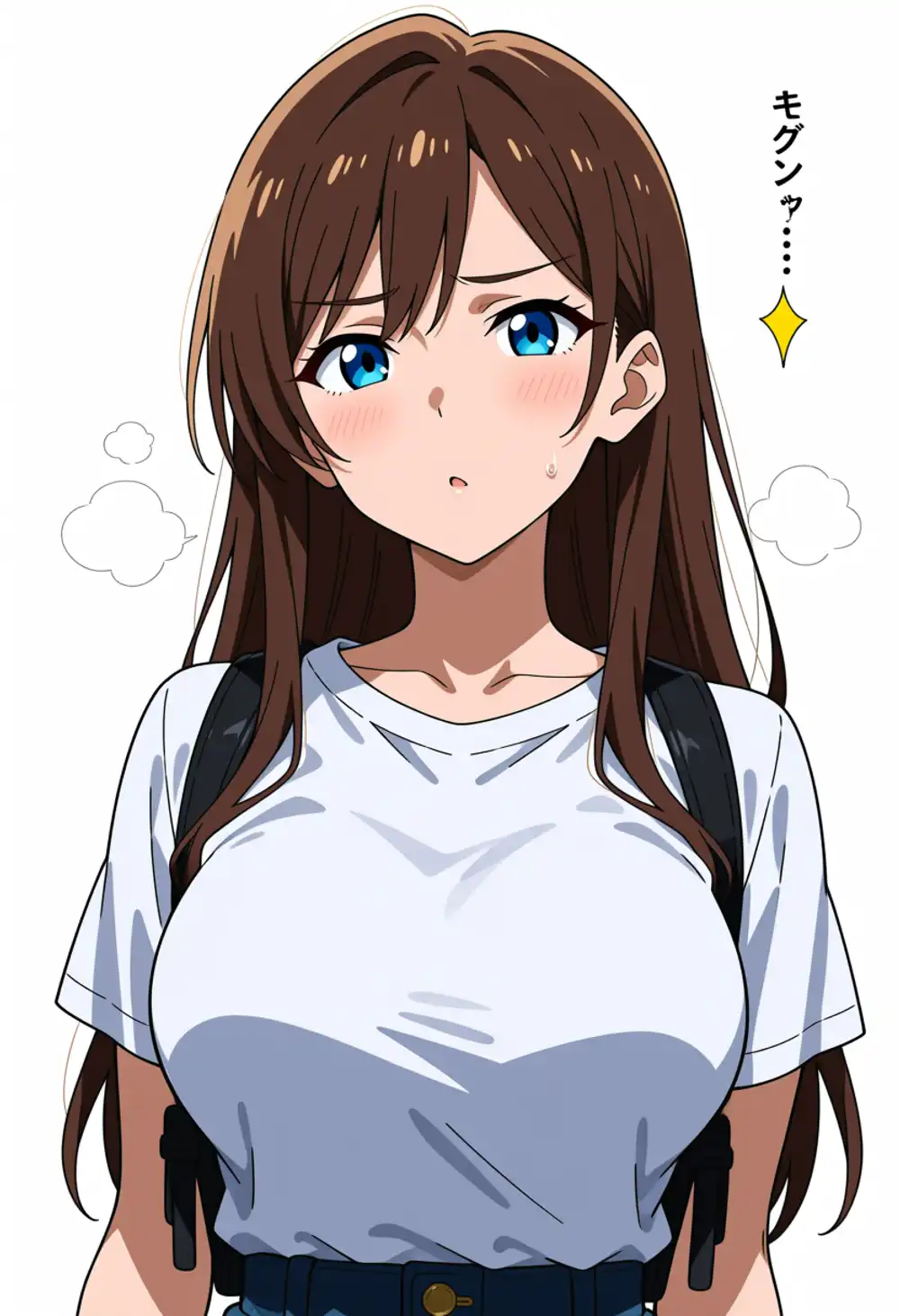
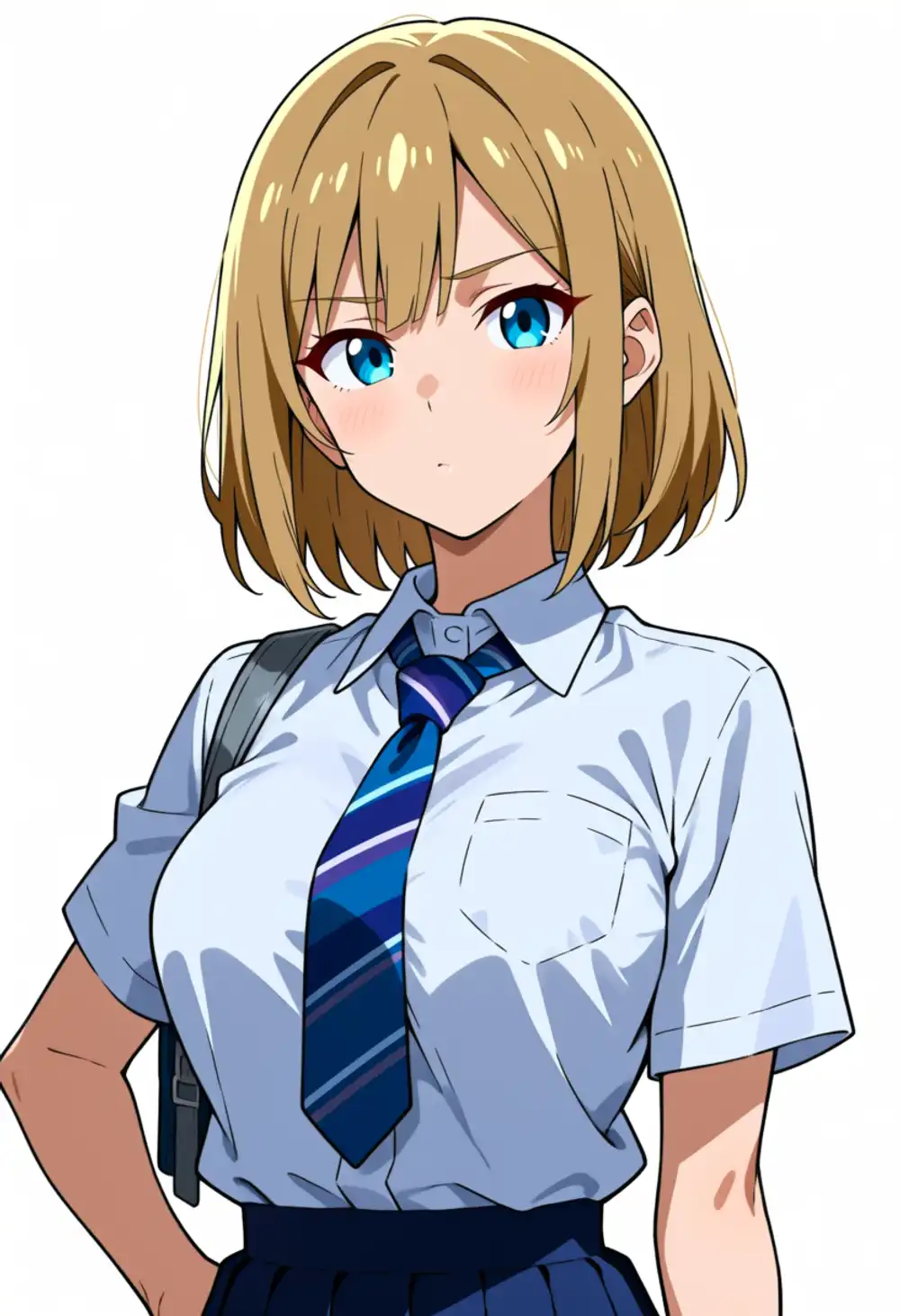
Trigger-only: ep5 is hair-color seed gacha (brown/blonde/orange), ep10 mostly locks blonde, ep20-50 stable. At ep125, individuals collapsing to short hair appear at seed 42, showing a mild overtraining rebound. In the in-training samples (built-in sampler is N format) it looked stable as blonde-long to ep125, but the trigger-only K format first exposed ep125’s instability. The built-in sampler’s N prompt was hiding the degradation.
ep5 trigger-only seed gacha (same prompt, only seed varied: brown/blonde/orange).


And the short-hair individual that came out trigger-only at ep125 (overtraining rebound).
Estimated sweet spot
From this K-format behavior, I judge the sweet spot to be ep20 (ep20-50 are effectively equivalent anywhere). The basis is this.
- ep5/ep10 don’t have hair color fully locked yet (especially trigger-only)
- At ep20, color / long / core stabilize, and quality doesn’t change to ep50 (autophagy data, so it saturates at ep20)
- ep125 shows mild overtraining that shortens depending on seed
Whereas kanachan v4’s sweet spot was “ep150,” Keichan’s sweet spot is ep20. About 7.5x faster. The power of same-model-generated material (zero distribution gap) shows here. Subsequent format comparisons and angle validation use this ep20-50 LoRA.
And “how output accuracy at that sweet spot changes with prompt format” is the next format comparison. Trigger-only (K) brings the core but weak intakes; adding N/KT lands the intakes — I look at that accuracy difference at ep50.
What’s baked in with just 1girl, keichan
Even the K format included quality/framing/background tags. Stripping all of those too and generating with just the 2 words 1girl, keichan reveals the boundary of what’s truly baked into the trigger.

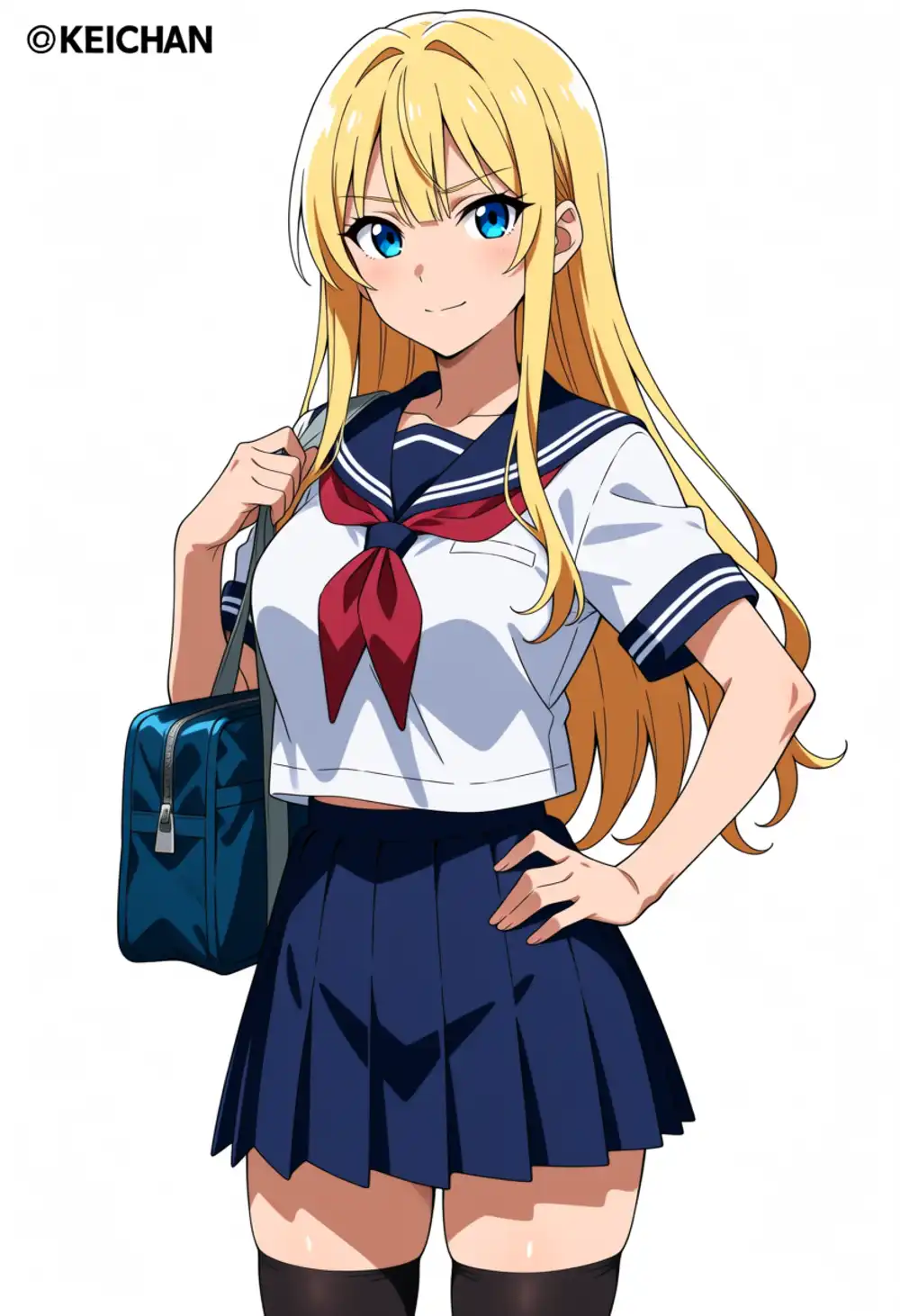
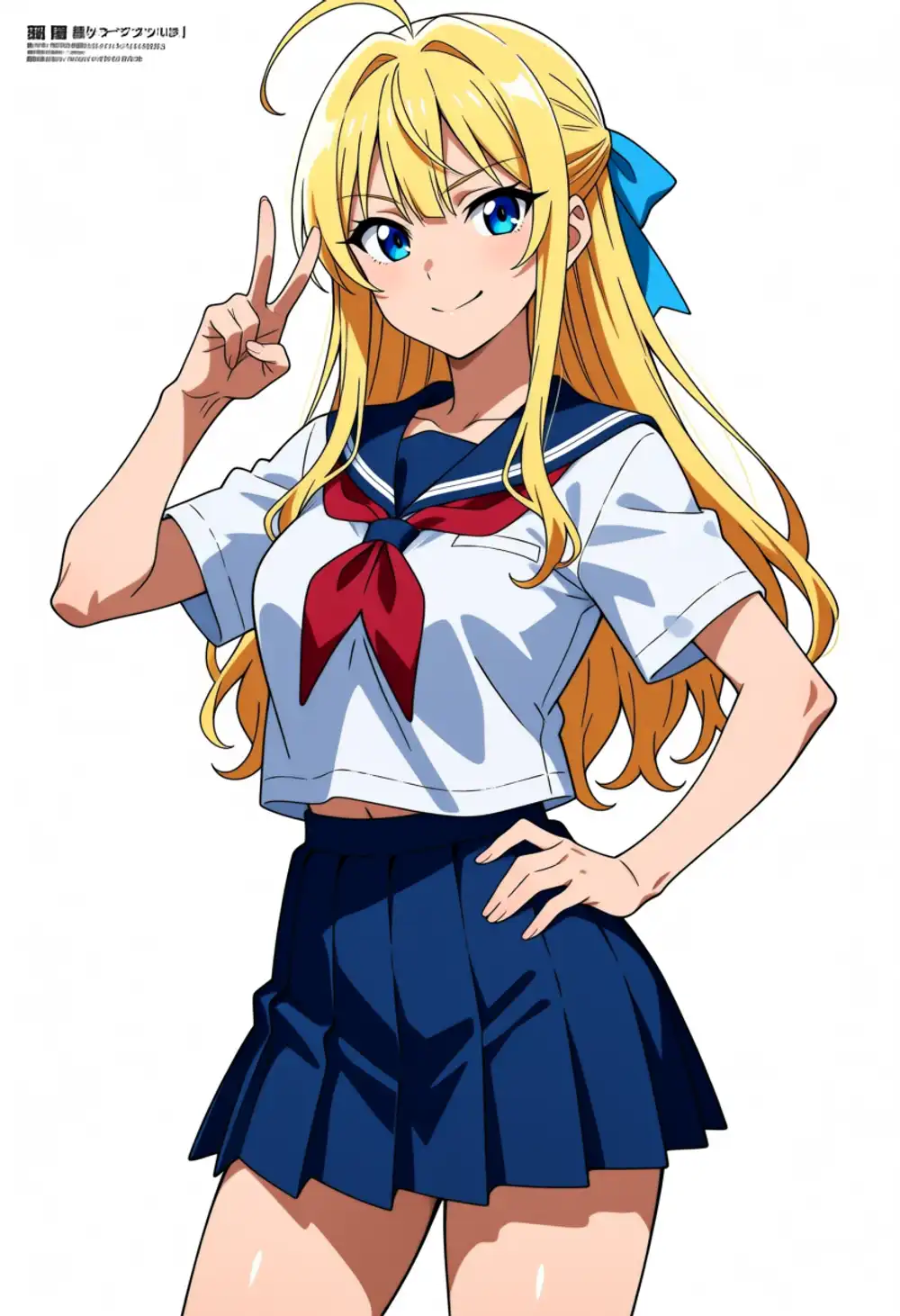
All 3 came out as blonde-blue-eyed long hair + larger breasts + gal-leaning face. On the other hand,
- ❌ Blunt bangs don’t appear (parted / swept bangs instead)
- ❌ Intakes don’t appear (curled long hair)
- ❌ Half-braid + blue ribbon structure is weak
In other words, what’s baked into the trigger is “the lineage of color / body type / face.” The hairstyle structure (blunt/intakes/braid/ribbon) is not baked. Producing the hairstyle requires structure tags. The K format got 5 of 6 because it included structure tags, so I could isolate that the structure tags are not redundant but required. This is exactly why the two-stage approach “core from the trigger, compensate the spilled features with description” is needed.
And all 3 came out in sailor uniforms. The training data has almost no sailor uniforms (school uniforms). The material is swimsuits, gym clothes, T-shirts, leotards, dresses, yukata, etc., with uniform types deliberately thin. Yet sailor uniforms appear with no outfit spec because the base Anima’s tendency of “a schoolgirl’s default outfit = sailor uniform” wins, completely overwriting even the training data’s actual outfit distribution. By design (outfit not baked into the trigger, made an independent tag), the base default appears when unspecified.
Fake-signature artifacts like @ducha ©keichan also appear, a byproduct of the base learning that “character art comes with a signature.” The output is again a blonde-blue-eyed busty gal who could be in the battle-action manga Ikkitousen, which is also within the gravity field of blonde-and-blue-eyed.
In format comparison, intakes go K < N < KT, but KT costs ahoge
Lining up the 3 formats at the same ep50 / seed 42, the intake appearance differed cleanly.
| Format | Hair color | Intakes | Ahoge | Notes |
|---|---|---|---|---|
| K (trigger only) | Blonde | Weak | Sometimes | Core appears but weak intake assertion |
| N (with NL) | Blonde | Medium (clean) | None | Thick side strands framing the face, most balanced |
KT (hair intakes tag) | Blonde | Strong (most forward) | Appears | Maximum scoop feel, but ahoge leaks |



Adding the hair intakes tag produces the strongest forward scoop, but as predicted, ahoge leaked (look at the top of KT’s head and one strand stands up). Proof that the “intakes and ahoge are coupled within the Anima base” phenomenon recorded in the hair-intake transplant article remains even with the LoRA applied. Even though I put ahoge in the negative on the training side, explicitly stating the intake tag at inference resurfaces the coupling.
The practical answer is the N format (intakes come out cleanly, no ahoge). Use KT only when you want to maximize intake sharpness, and erase the ahoge in post — that’s the operation. An example that came out cleanly in front-facing N format is this.

Strength sweep (phase 2): raising the weight doesn’t make it a scoop
If KT with hair intakes brings out intakes most, can raising its weight push it to a “strong forward scoop”? At ep20, front-facing, I swung (hair intakes:1.0 / 1.3 / 1.5 / 1.8).




The result is clear: the intake strength barely changes from weight 1.0 to 1.8. It plateaus at “medium” with the side strands flowing beside the face, and never becomes a dramatic forward scoop. Anima’s intake suppression can’t be muscled through with emphasis weight; the strength ceiling is low. This is consistent with the earlier hypothesis “intakes are an old-fashioned design that Anima underrates.” A form the base doesn’t have won’t well up no matter how much you push with weight.
The side-effect ahoge appears from weight 1.0 (the moment you add the tag), and raising the strength neither increases nor decreases it. So the intake⇄ahoge coupling is decided binarily by “the presence of the hair intakes tag,” independent of weight. If you want to avoid ahoge, don’t use KT; produce it in N format (NL description) — that’s the settled conclusion.
Intake firing is anisotropic: appears front, weak at 3/4 and profile
An important finding. Intakes clearly appear at the front angle and weaken as the body turns to 3/4. This is doubly determined by two factors.
Factor 1: framing and intake-rendered size were correlated
- The 39 in
01_bust_frontwere all chosen as “front bust-up + intakes rendered clearly large” 02_clothed_pose’s angled framing is full body / cowboy shot, where the character is rendered smaller, so the intakes were also small within the frame
That bias, “front = intakes learned large” / “angled = intakes learned small,” rode straight into the LoRA. The weakness at angles is less the angle itself and more a reflection that intakes were rendered small in that angle’s training images.
Factor 2: intakes lack the base default of “render large” (the decisive difference from kanachan)
This is the biggest difference from kanachan.
- kanachan’s feature is “side ponytail.” Both Anima and IL produce a largish tuft by default when you say
ponytail/side ponytail. So it comes out large just by adding the tag — “if it exists, recognition holds; size is automatic.” kanachan’s “as long as the left side ponytail showed, character recognition was OK, and ponytail size never became an issue” is because of this - Keichan’s “intakes” have no such large default in the base. Even saying
hair intakes, the base produces only small and weak, so it gets buried unless pushed hard
As a result, kanachan’s feature (large default ponytail, win just by existing) is robust, and Keichan’s intakes (no base default + small in angled training images) are fragile. Whether a feature point is “something the base renders large by default” decisively changes how easy a character LoRA is to make. That split clearly in the contrast with kanachan.
There’s actually a favorable practical implication: “if you want to show Keichan’s intakes, generate front-facing” becomes an operational guideline. Front is the most-used angle anyway. Conversely, at Anima’s preferred staple 3/4 angle, intakes are weak + it’s near the blonde-blue-eyed gravity field, so it’s prone to tipping into the “looks like another character” discussed later.
crossed bangs don’t appear = clean-training confirmed
The crossed bangs (mysterious single cross line in the bangs) I put on the evaluation axis never appeared once across all 45 images. Since the training material was uniform in images without this artifact, the LoRA cleanly neutralizes the base’s cross bias. The reverse-direction judgment “not appearing is a positive signal” held. As intended.
phase 3 result: framings included in training data are controllable
“The front portrait is clean” alone doesn’t make it “a usable LoRA.” I swung reverse angle / from-below / from-above / full body / various poses at ep20 to see whether they come out without breaking.



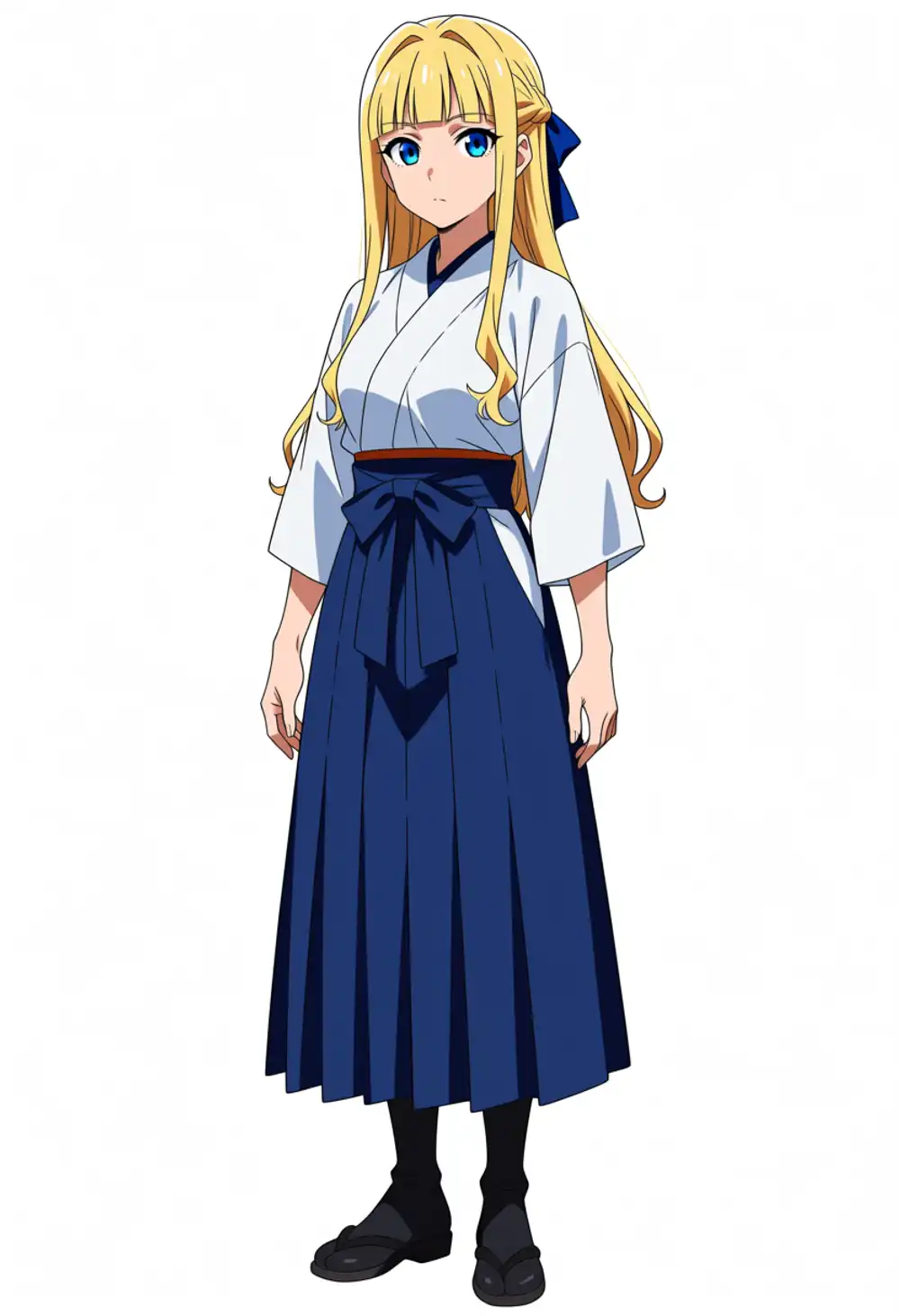

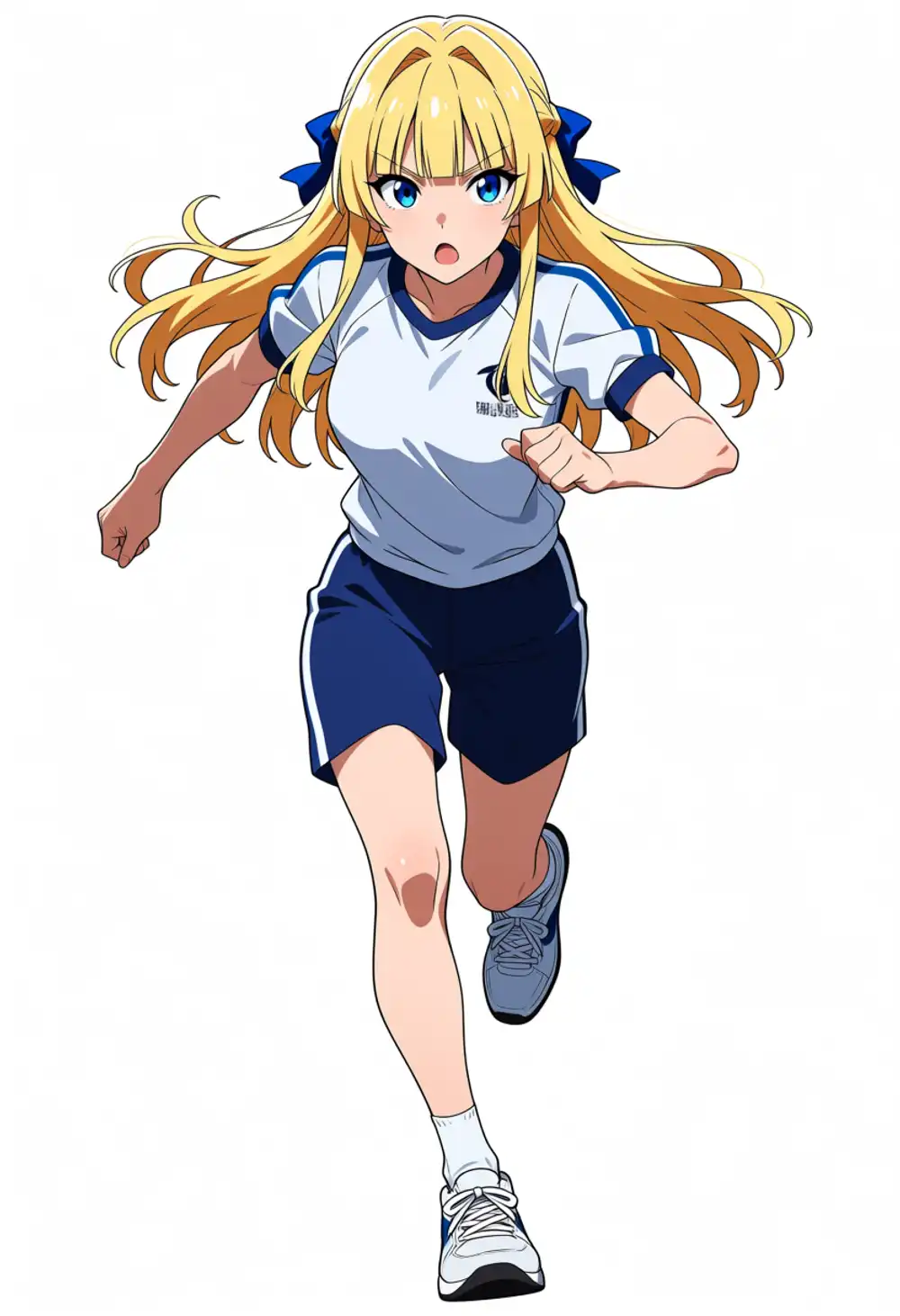
The framings included in the training data (left/right 3/4, profile, looking back, full body, sitting, running) all come out cleanly. The body doesn’t break either. In “looking back,” the half-braid + blue ribbon on the back of the head are correctly visible, confirming the hair structure is learned even to the rear. It’s not locked to front + staple 3/4 = composition is controllable = a usable LoRA.
On the other hand, from-below / from-above only work modestly. But this isn’t a deduction. From-below/from-above were not included in the training data to avoid body-break risk. It’s an angle the LoRA hasn’t learned, so it falls to base Anima and being weak is natural. As behavior for out-of-distribution requests, it’s exactly as expected.

Anima’s strongest attractor is 3/4; escaping it means putting it in the training data
What became visible through phase 3 is that Anima’s composition tendency is strongest at 3/4. From-below / from-above / extreme-angle requests are pulled back toward 3/4–front. This probably comes from a lot of right-handers among the original data authors + this angle being generally considered cute.
And looking-back / profile / full body came out properly because I explicitly included them in the training data. So “the framings you want to escape Anima’s 3/4 tendency for won’t come out unless you put them in the training data.” The data design (the decision to include left/right, looking-back, various poses) functioned correctly.
Direction control: ambiguous with weak spec, consistent with strong spec
For the reverse direction (facing right), a weak spec like (three quarters view:1.3) gave only “head turned right in a 3/4,” with weak direction commitment. Swinging it harder with (facing right:1.5), (body turned to the right:1.5) and running multiple seeds, all of seed 42/100/200 stably faced right.

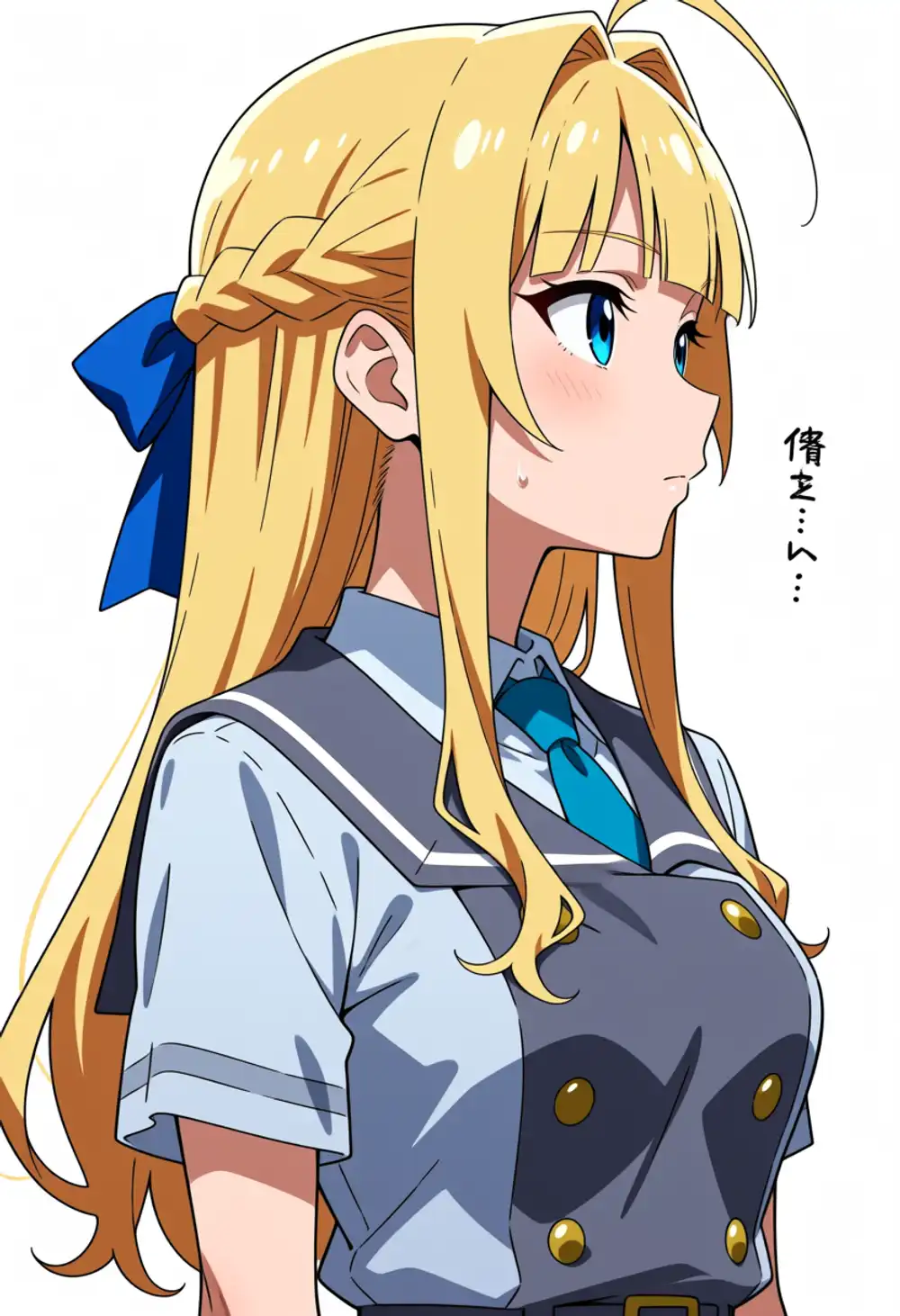

Incidentally, the training data includes both left and right orientations. Even so, with a weak spec the output stubbornly wouldn’t face right, and running under loose conditions yielded at most about 2 right-facing images. Anima’s left/3-4 tendency works strongly at the inference stage. Specify it strongly and it stably faces right, so direction itself is within a controllable range.
And the decisive thing: since Keichan’s intakes are symmetric, if the direction is wrong you can just horizontally flip in the end. kanachan had an asymmetric side ponytail, so flipping reversed the position and horizontal flip wasn’t usable, leaving no choice but to hit the direction at generation, which was annoying. Keichan being symmetric, horizontal flip is lossless. “Want right-facing → generate left-facing → flip” and you’re done. As long as there are no hand poses or asymmetric outfit details, the weakness of direction control does zero practical harm.
Landscape aspect is mostly fine, but lying down risks duplication
Since it had been all portrait (832×1216), I also swung landscape (1216×832). Even in compositions that exploit landscape, like lying down, the character itself holds (seed 42 below is clean).
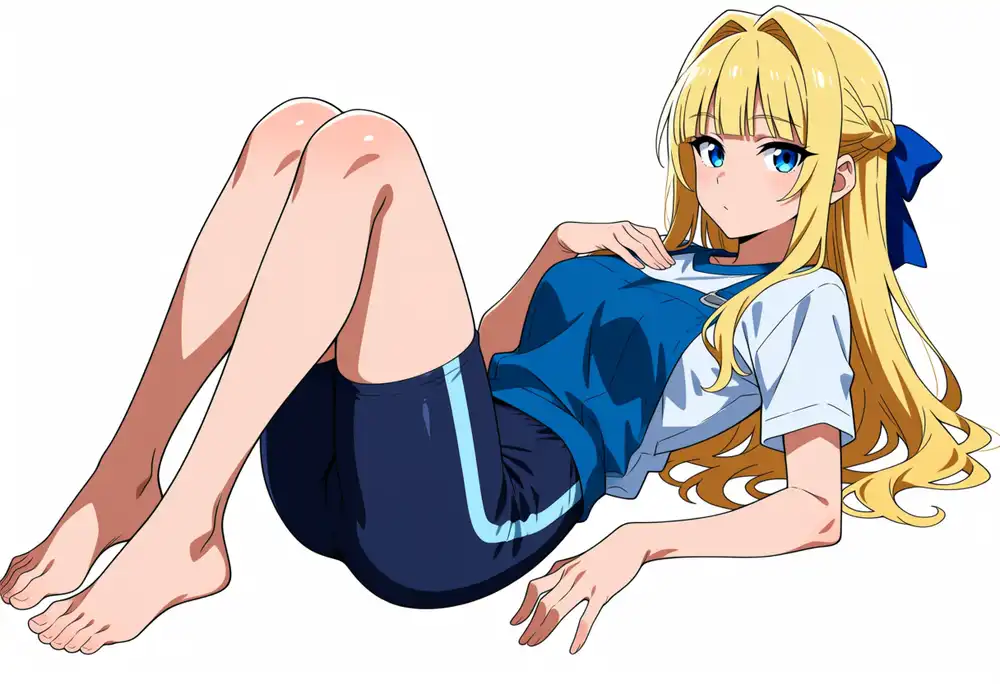
But running the same landscape lying-down at a different seed, one image duplicated the body and collapsed (two faces, fused body). This isn’t specific to this LoRA but a typical diffusion-model failure mode where landscape aspect + lying pose makes the model draw a second person to fill the wide blank. Landscape itself is usable, but in “compositions stretched wide” like lying down, duplication is prone to appear, so seed gacha or shooting portrait is safer.
Intake strength is proportional to the face’s apparent size within the composition
Summarizing the intake appearance so far into one principle: intake strength is proportional to “how large the face (= intakes) is rendered within the composition.”
| Composition | Face rendering | Intakes |
|---|---|---|
| Front bust-up (39 training images) | Large | Learned dense → comes out strong |
| Full-body standing | Small | Learned thin → weak |
| Crouching, etc. (poses where the face ends up large) | Medium | Comes out medium |
It’s not “front vs. angled” but “the face’s apparent size” that’s the governing variable. Because I included diverse poses where the face is rendered large in the training data, there are non-frontal compositions where intakes still ride.
Intakes are an “old-fashioned” feature that Anima underrates (hypothesis)
From here it’s speculation (a model’s aesthetic intent can’t be directly proven). That intakes are hard to bake in Anima, and shrink especially in Anima’s “cute” staple 3/4, is consistent with the theory that large hair intakes are a design from the 2000s gal-game/anime heyday, sparse in Anima trained on mid-2020s illustrations.
Supporting evidence is the hair-intake transplant article, where producing intakes on a generic character required borrowing Minase Nayuki (Kanon, 2002) as a reference. Having to summon a 2000s character to produce intakes is circumstantial proof that large intakes are underrated in Anima’s modern tendency. Keichan’s weak intakes likely also have their root in this temporal gap, more than insufficient LoRA tuning.
When intakes die, it falls to “generic blonde-blue-eyed”
During validation, seeing the weak/non-firing intake individuals, I kept thinking of known characters at first — “looks like Yui Ohtsuki from Cinderella Girls,” “looks like Sena Kashiwazaki from Haganai.” Both Yui and Sena are blonde-blue-eyed, completely overlapping Keichan’s color identity.
But actually generating Yui and Sena in base Anima and lining them up, Keichan’s collapse didn’t resemble either. Below is the comparison: the left two are the base’s Yui (ohtsuki yui) and Sena (kashiwazaki sena), the right is intake-non-firing keichan.




Yui has an energetic smile, Sena a cool haughty face — each its own distinct face. Keichan’s collapse, meanwhile, is neither: just generic blonde-blue-eyed long hair. So “looks like Yui / looks like Sena” was an illusion of the brain pattern-matching a commonplace picture to known characters (apophenia); the reality was not even a specific character, just genericization.
And “can’t be identified as any character” itself proves the proposition.
Keichan = blonde-blue-eyed long hair (a generic, commonplace archetype) + intakes (the only differentiator)
Blonde-blue-eyed long hair is crowded with famous characters (Yui, Sena, and many more) while simultaneously being a generic zone that blurs individuals. The one thing pulling Keichan up out of it is intakes alone. Yet those intakes are the hardest thing to bake in Anima. So this happens.
- Intakes fire → Keichan
- Intakes don’t fire → generic blonde-blue-eyed long hair (could “kind of look like” Yui or Sena, but is none of them)
It oscillates between these per seed. The structural weakness — the LoRA’s identity entirely depends on the single hardest-to-fire feature — was laid bare. The very fact that multiple blonde-blue-eyed characters keep coming to mind is living proof of this archetype’s genericness = “buried without intakes.”
As an operational countermeasure, putting ohtsuki yui etc. in the negative to push back from the gravity field is theoretically possible, but since they’re characters sharing blonde-blue-eyed, negating them hard cuts the color too, and since the collapse destination isn’t a specific character anyway, the effect is limited. It’s more sensible to push back by describing intakes in N format.
It’s cute, and comes out as Keichan from the trigger alone, so it’s practical enough
Against the success criteria (6 from the trigger alone), it comes out like this.
| Criterion | Verdict |
|---|---|
| Blonde hair | ✅ Locked from ep10+ |
| Blunt bangs, non-hime-cut | ✅ |
| Long hair flowing from large intakes | △ Comes out front-facing, weak at angles |
| Half-braided updo | ✅ |
| Blue ribbon | ✅ |
| Blue eyes | ✅ |
Only intakes are conditional, “comes out front-facing only,” but 5 of 6 are stable from the trigger alone, and intakes also assert enough front-facing + N format. When it collapses it falls into the blonde-blue-eyed generic zone, but that’s also evidence “the color is coming out properly.”
And in phase 3 I confirmed the framings included in the training data (left/right 3/4, profile, looking back, full body, sitting, running, landscape) are all controllable. Not locked to front + staple 3/4, with freedom of pose/angle = “usable” in a practical sense. Only from-below/from-above are weak since they weren’t in training, but that’s a hole anticipated by design.
Overall, the landing is “well, it’s cute, and it comes out as Keichan even without an intake spec (especially front-facing), so it’s practical enough.” There was none of kanachan v4’s struggle with direction control; thanks to autophagy data it bakes at ep20, a cheap success.
A note on realistic expectations: “comes out perfect every time from one trigger word” isn’t even achieved by kanachan. Even with kanachan, when features were about to vanish, I added a description prompt (writing the character out in natural language) to compensate. So demanding “perfect from the trigger alone” of keichan is unrealistic; the normal operation is to add description in N format to push back in compositions/seeds where features fade. This isn’t a LoRA defect but the standard way to use a character LoRA. This time’s “blonde-blue-eyed other characters (Yui/Sena) showing up when intakes don’t fire” is exactly what should be pushed back with a description prompt, and it’s absorbable in operation if you drop excessive expectations of the trigger alone. In short, the realistic answer is the two-stage approach: produce the core from the trigger, compensate the spilled features with description.
The remaining weaknesses (intake anisotropy, face wobble, being pulled into the blonde-blue-eyed gravity field) are structural and come from the Anima base, and improve only by changing the material origin (using a high-consistency source with a distribution gap), not by LoRA-side tuning. But that’s for a separate article.
Recommended operation recipe
| Item | Recommendation |
|---|---|
| Epoch | ep20-50 (no need to run to ep125, which is mildly overtrained) |
| Format | N (describe intakes in natural language), no ahoge |
| Angle | Intakes come out most front-facing. Strength rises the more “the face is rendered large within the frame” |
| When you want strong intakes | KT (hair intakes tag), but ahoge is a post-processing premise |
| When you want to change direction | Strong specs like (facing right:1.5) work. If unstable, it’s symmetric so horizontal flip suffices (a privilege kanachan didn’t have) |
| Aspect | Both portrait and landscape OK |
| Speed | Practical quality with Turbo LoRA combined, 8-step |
The remaining homework is deferred to a separate article: “bake with a distribution-gap source like Gemini and does the face tighten up.” The intake strength ceiling (plateaus even raising weight in phase 2) is also confirmed, so within this article’s scope, ep20 + N format + Turbo for a practical line is enough as a conclusion.
Lining up Keichan and kanachan in matching uniforms
Finally, at the sweet-spot ep20, I confirmed whether a specified uniform comes out full-body. Neither character has a default uniform, so I specify matching uniforms in the inference prompt.
| Character | Uniform parts |
|---|---|
| Keichan | White dress shirt, red ribbon, dark-navy pleated skirt, white knee-highs, black shoes |
| kanachan | White dress shirt, red necktie, dark-navy pleated skirt, black knee-highs, black shoes |
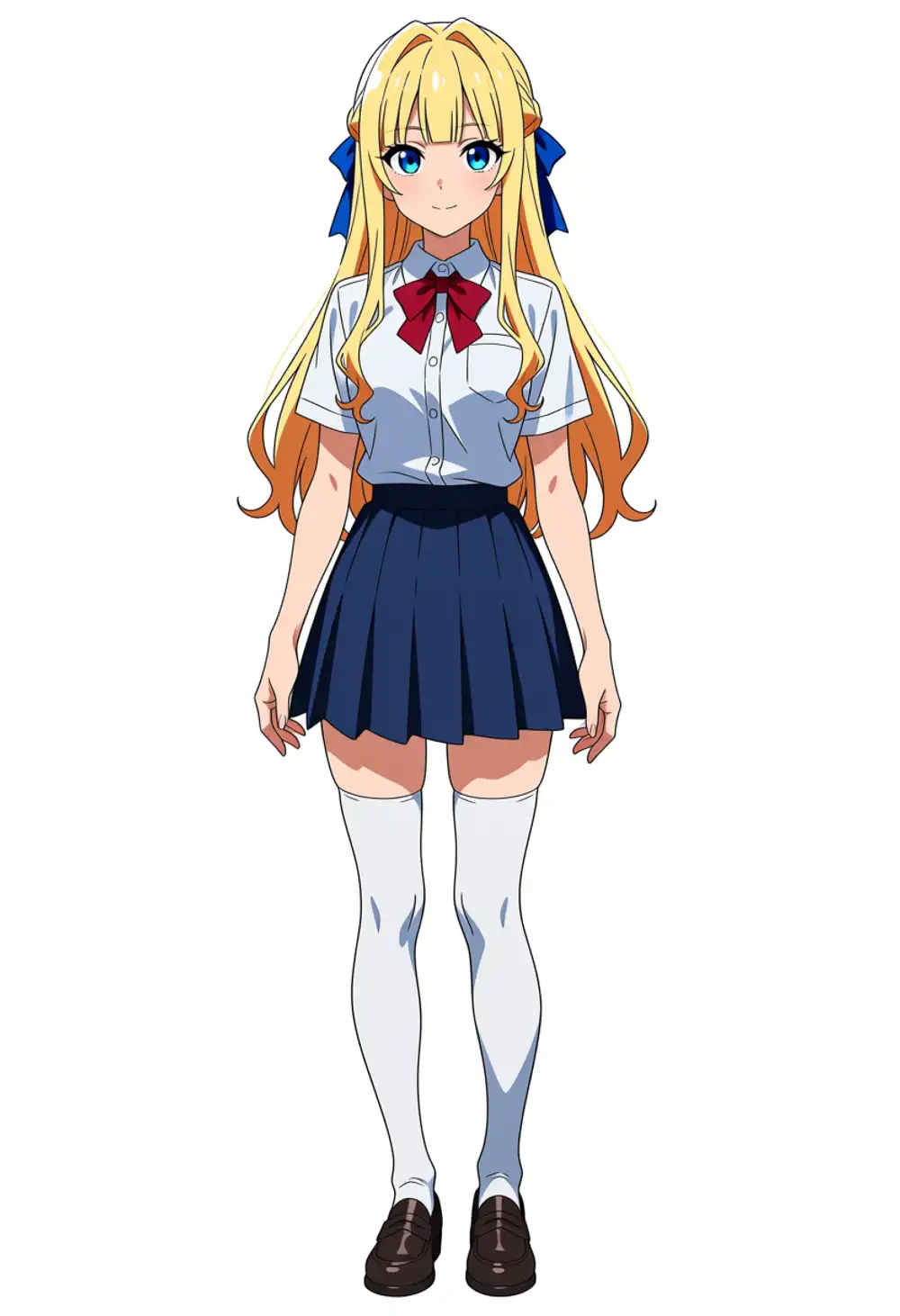
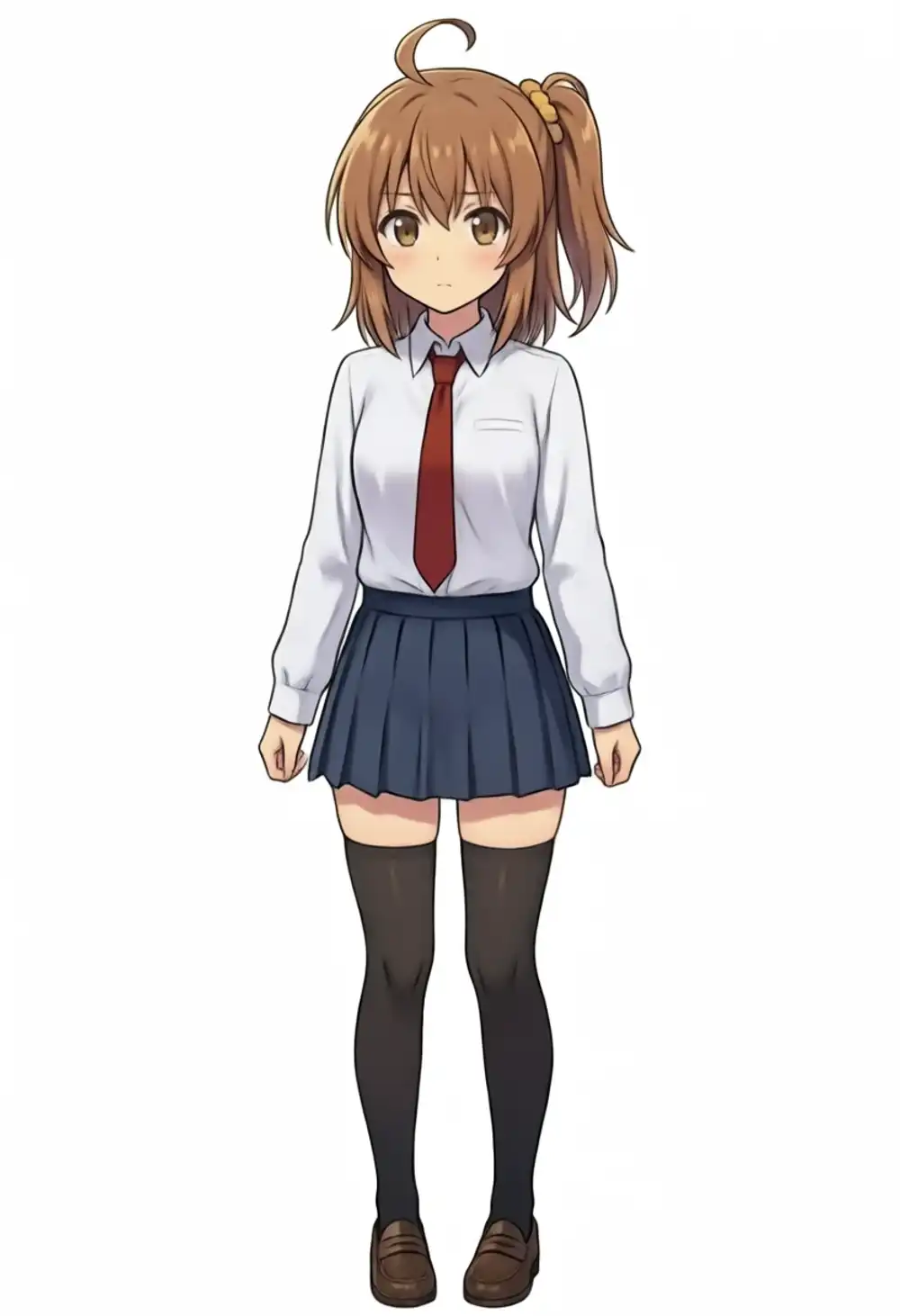
Both characters produce all specified uniform parts, with full body and anatomy unbroken. Keichan is blonde-blue-eyed + blue ribbon, kanachan is brown-haired side ponytail + red necktie, and while wearing matching uniforms the characters’ distinctiveness is preserved.
However, full-body makes Keichan’s intakes recede. This isn’t “doesn’t come out at all” but “comes out as much as was learned, just less than the amount expected.” Even raising the weight to (hair intakes:1.5), even trying to pull in with cowboy shot, the face’s smallness at full body doesn’t produce the expected intakes.
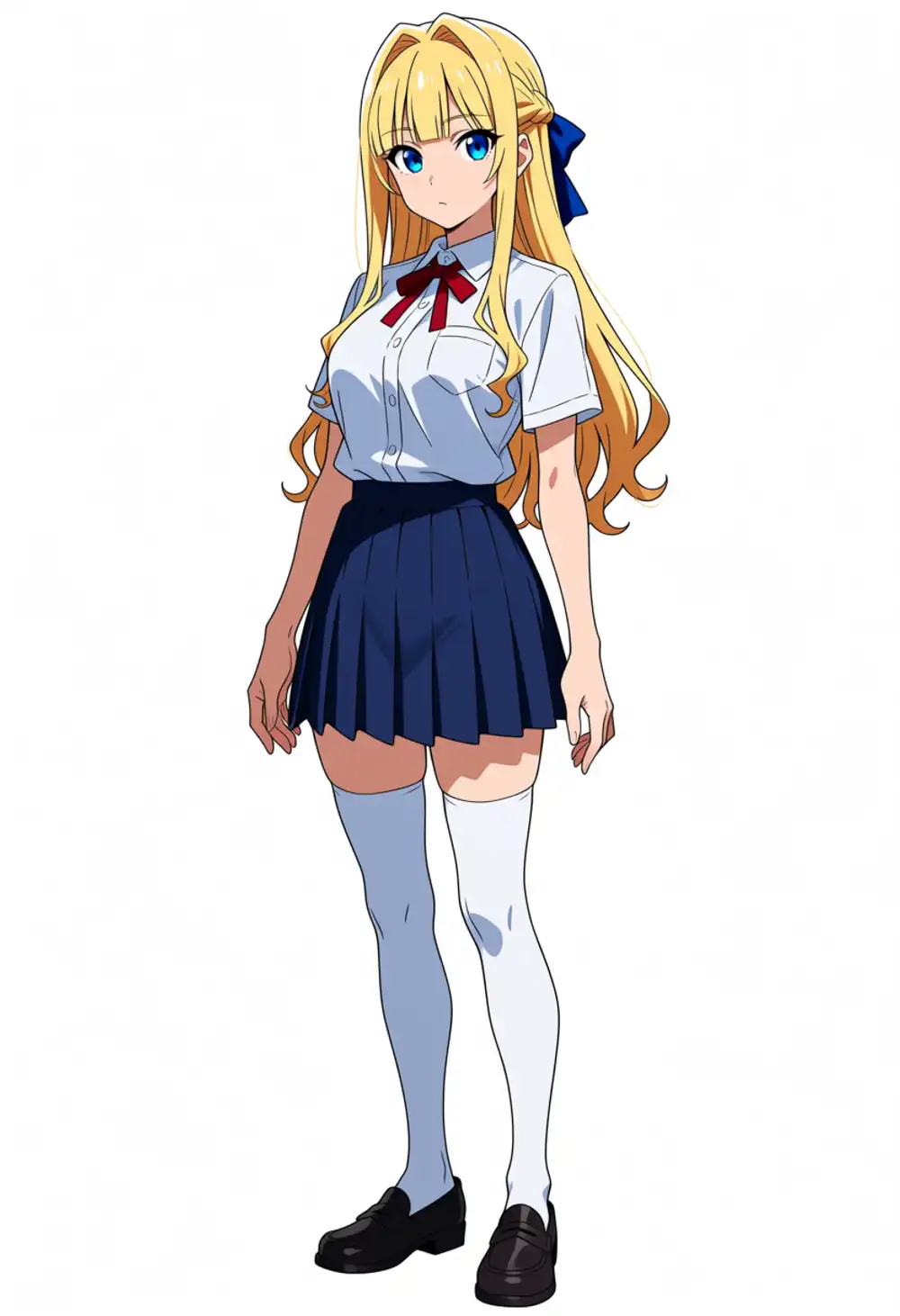

What’s interesting is that the face itself doesn’t break even at full body. Since I trained on plenty of bust-ups, the face comes out robustly even from afar. The hairstyle other than intakes (blunt bangs, braid, ribbon) comes out fine too. Only the intakes fall short of the expected amount, and this stems not from the inference prompt but from the training material’s intake feature being weak (= it wasn’t exaggerated that much to begin with). The amount by which Anima structurally underrates intakes wasn’t pushed back by exaggerating the material. The fact that hitting it with (hair intakes:1.5) doesn’t increase it is backup that it can’t be fixed prompt-side = the only fix is to beef up the material (draw intakes even more excessively in v2 and train on that).
One more thing I notice lining them up: the two characters’ proportions don’t match. Keichan is long-legged and glamorous, kanachan is shorter and stockier. This too inherits the material origin as-is: Keichan is Anima-generated (Anima’s proportions), kanachan is Gemini-generated (Gemini’s proportions). Not just face consistency but proportions ride on the source model’s tendencies too. The body-type lineage differs even in matching uniforms because of this origin difference.
Having confirmed Keichan’s sweet spot (ep20) runs properly even for a specified outfit at full body, this article reaches a pause point. Next time I’m planning a little experiment using these two images.