Two Anima LoRAs in one image: side-by-side works, overlap breaks the design
 Contents
Kana and Kei — I now have two original-character LoRAs for WAI-Anima. Kana and Kei each come out stably on their own. The next thing you want is “both of them in one image.”
On an M1 Max 64GB ComfyUI, applying two character LoRAs to WAI-Anima v1.0 at once and firing 2girls gives this: the hairstyle structure separates if you assign left/right tags, but the hair color bleeds.
Kana’s brown hair plus Anima’s own brown-leaning default win out, so Kei’s blonde drifts toward a dull light brown.
So I switched to generating each character cleanly on its own and merging them into one image with an image-edit model.
Qwen-Image-Edit can build the layout and the pose, but it redraws both characters, so Kana’s side ponytail breaks and the design isn’t preserved.
What finally held the design was a sequential approach: fix one character as a clean solo, then inpaint the rest of the empty space with that LoRA.
Kana isn’t redrawn, so the side ponytail doesn’t shift and there’s no color bleed.
Overlapping interaction poses are ControlNet’s job, and for Anima there’s ControlNet-LLLite. Single-subject pose control worked, but two overlapping bodies can’t be separated at the skeleton-extraction stage; the bake-the-halves + QIE merge gets the composition, yet because QIE redraws, Kana’s side ponytail never fully stabilized.
For acceleration I pair the Anima Turbo LoRA v0.1 (8 step, CFG 1.0). There’s a separate 4-step Lightning on the Qwen-Image-Edit side, but the Anima generation side runs on Turbo.
Solo baselines (good LoRA + fixed outfit)
To judge whether they mix or not, you have to fix each character’s outfit and keep them in different families. Matching uniforms would hide the mixing when it happens.
| Character | Fixed outfit |
|---|---|
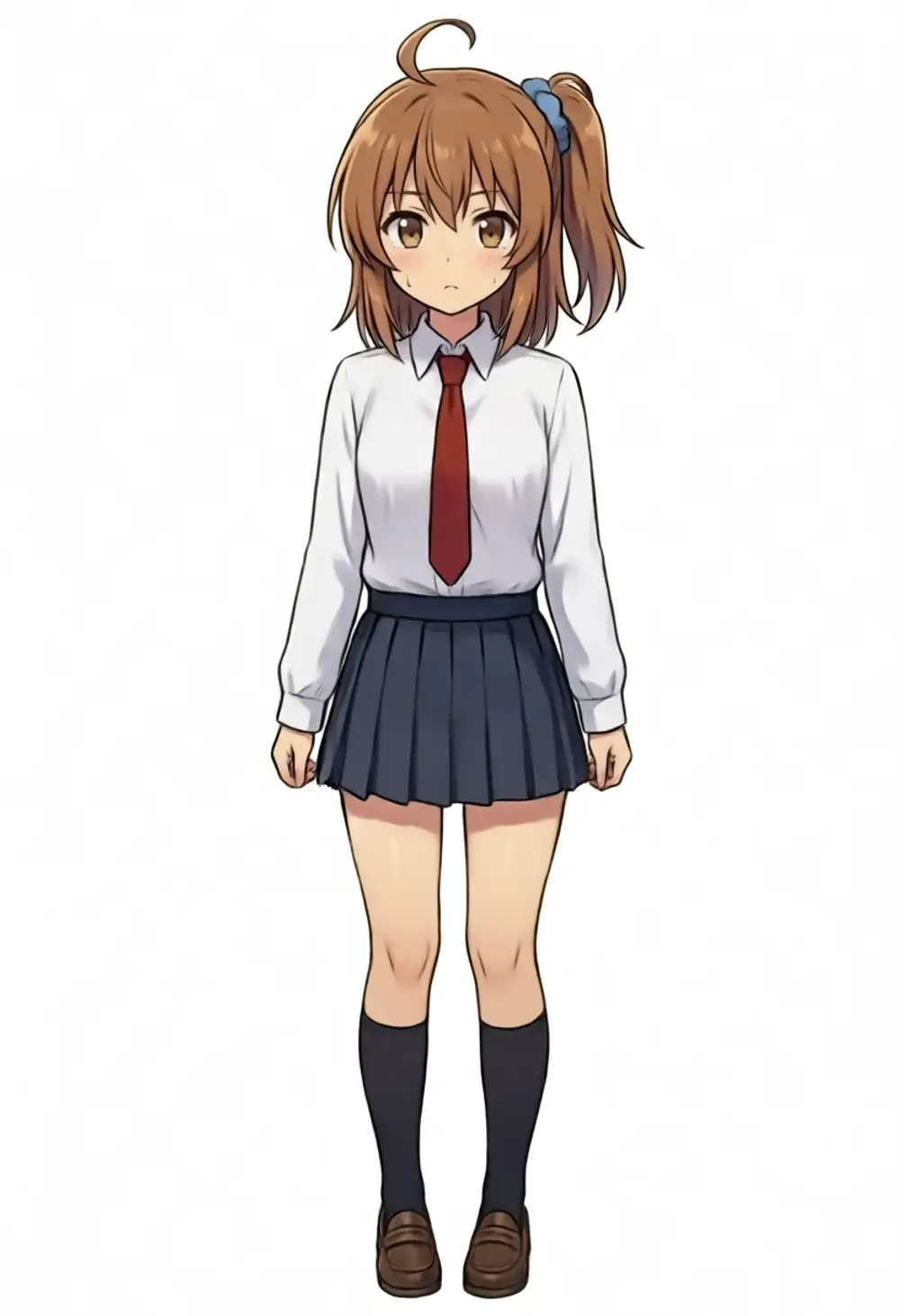
| Kana | white dress shirt + red necktie + dark navy pleated skirt + black socks + black shoes |
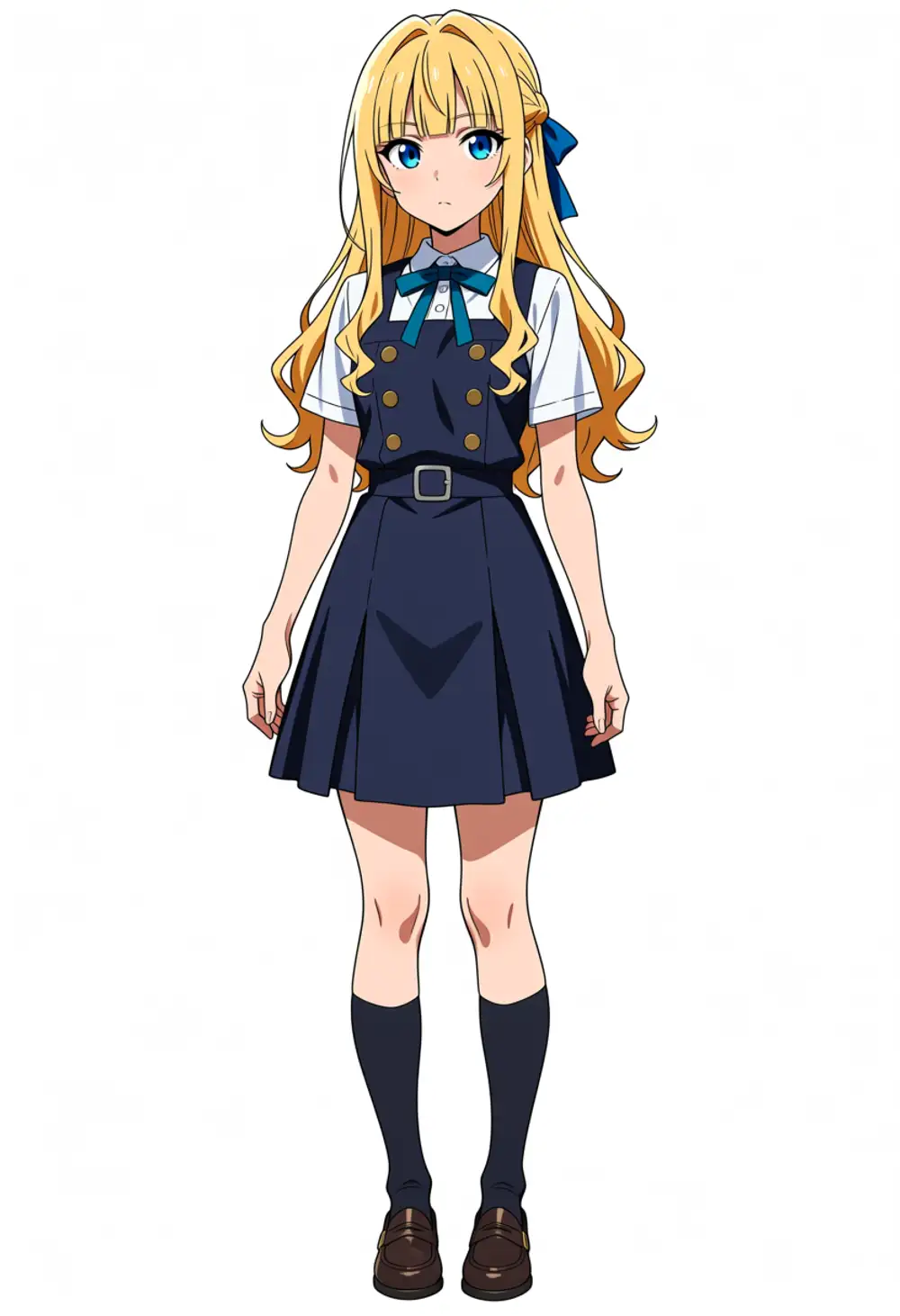
| Kei | white short-sleeve shirt + teal ribbon tie + dark navy pinafore (gold buttons) + blue hair ribbon |
The sweet spots are the values I dialed in past articles, reused as is.
| Character | LoRA | Sweet spot | Weight |
|---|---|---|---|
| Kana | kanachan-waianima-rework-v4 | ep150 | model 1.0 / clip 0.8 |
| Kei | keichan-waianima-v1 | ep20 | model 1.0 / clip 0.8 |
Kei converges at ep20 because all the training material was self-generated with WAI-Anima, which made the distribution shift nearly zero (7.5× faster convergence than Kana’s ep150 in the earlier work).
The positive prompt leads with the Anima-official-ish masterpiece, best quality, score_7, safe, and the negative uses the short official negative + NSFW guard. To avoid getting filtered by Google, I always put safe in the positive and nsfw, explicit, nipples, pubic hair in the negative to keep exposure down.
Kei’s hairstyle won’t appear from the trigger word alone
I tripped on this first. Generating Kei with just the keichan trigger + outfit gave the blonde hair, blue eyes, and face, but the hairstyle came out as a plain two-side-up.
Kei’s identifying key — blunt bangs + long sidelocks (intakes) + a half-braid updo in back + blue ribbon — didn’t appear at all.
This is exactly the conclusion from Kei’s LoRA training article: the keichan trigger bakes in hair color, face, and body type, but not the hairstyle structure.
With just 1girl, keichan, you get a generic blonde-with-blue-eyes gal plus the base default hairstyle.
You have to spell out the structure tags.
keichan, blonde hair, long hair, blunt bangs, long sidelocks, half updo, braid, blue ribbonThen in natural language I add “Her long, thick hair intakes hang down past her shoulders on both sides of her face below her blunt bangs, and the half-up braid wraps around the back of her head, tied with a blue ribbon.”
Adding hair intakes as a tag leaks the ahoge (intake and ahoge are binarily coupled by tag presence), so I keep it out of the tags and bake it in via natural language.
I add ahoge, antenna hair, hime cut, twintails, two side up, side ponytail to the negative to suppress misfires.
With this, both Kana and Kei come out solo without their identifiers or fixed outfits breaking. As an Anima quirk, an upper body instruction sometimes spills into full body, but that’s not a character break.
Applying two LoRAs at once (text2img)
Starting from the prompts that work solo, I set 2girls, split left/right, and chain the two LoRAs in series.
Turbo too. Weights are the same as solo, model 1.0 / clip 0.8.
In the first version (omitting the hairstyle structure tags), Kana’s side ponytail and ahoge migrated into Kei’s slot. In the version where I spelled out the hairstyle structure tags for each side, this structural mixing went away. Kei keeps the blunt bangs + long sidelocks + a half-up with a blue ribbon on one side, and doesn’t turn into twintails.
What remains is the color bleed. Kei’s originally vivid blonde drifts to a dull light brown or dark blonde. On top of Kana’s brown hair, Anima’s “a young girl” default is brown, so Kei’s blonde — only lightly baked at ep20 — loses out. This matches what I saw in Kana’s color-bleed article: shape learning and color learning act on different layers, and color bleeds more easily.
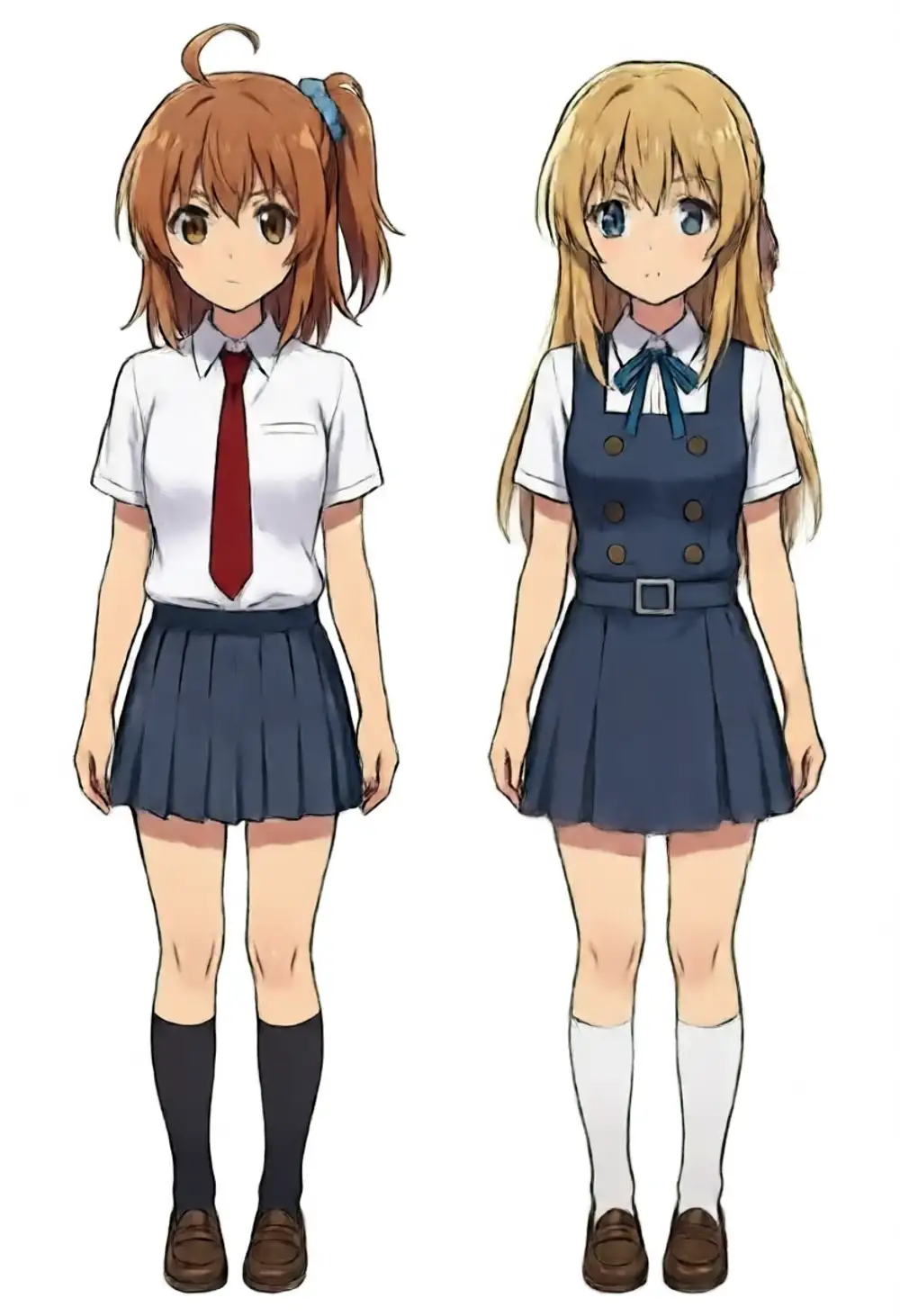
So as long as you apply two in text2img, the structure can separate but the color mixes. There are workarounds — sweeping weights, tightening with name tokens, cutting masks with regional splitting — but they all make the setup heavier. Here I change tack. Generate each character cleanly on its own, then composite into one image with an image-edit model.
Compositing two images with Qwen-Image-Edit (they line up, but Kana’s hairstyle changes)
The cause of the mixing is “two characters’ LoRAs riding the same latent space in one diffusion pass,” so it disappears if you split the generation. I bake Kana and Kei separately and cleanly, then hand the two images to an image-edit model to merge into one. The edit model I have locally is Qwen-Image-Edit 2511. I use Qwen-Rapid-AIO (QIE AIO, with 4-step Lightning built in), which packs MODEL/CLIP/VAE into one file.
The workflow passes the reference images to TextEncodeQwenImageEditPlus as image1 and image2.
This node runs through Qwen2.5-VL, so the prompt goes through in Japanese as is.
The sampler is 4 step, CFG 1.0, sa_solver, beta, and the output size comes from EmptyLatentImage.
2人の女の子を1枚のアニメ調イラストにまとめる。
1枚目の女の子が左、2枚目の女の子が右に並んで立っている。
全身、白背景。それぞれの髪型・髪色・目の色・服装は元画像のまま一切変えない。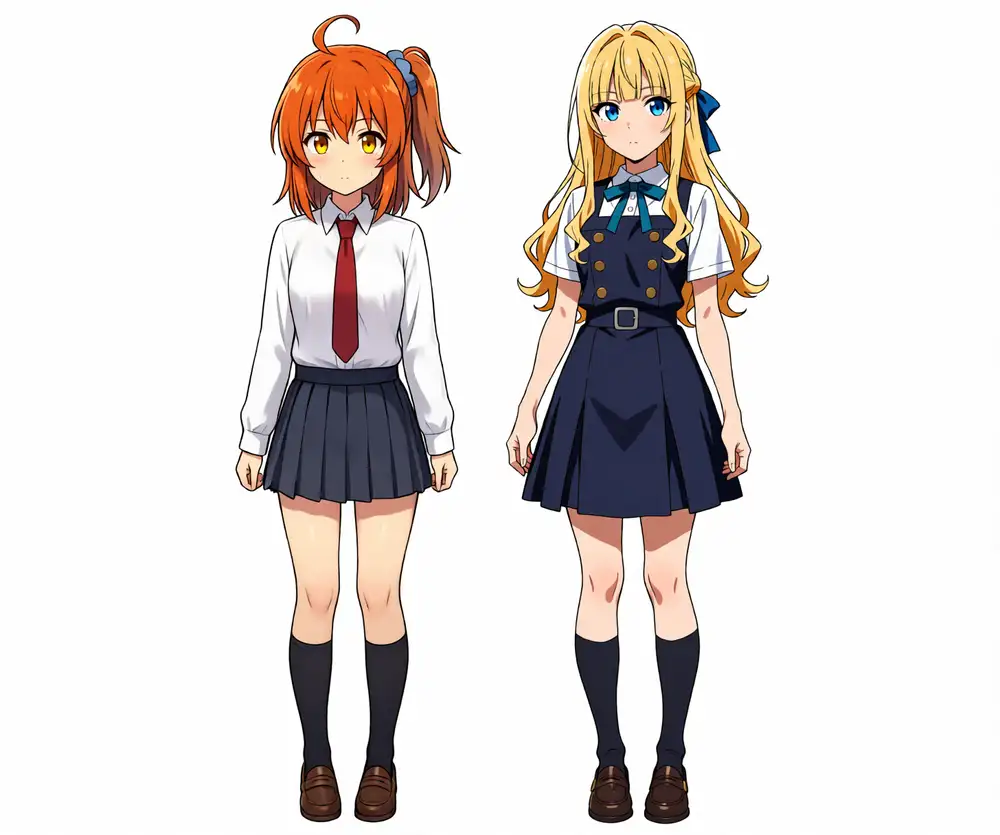
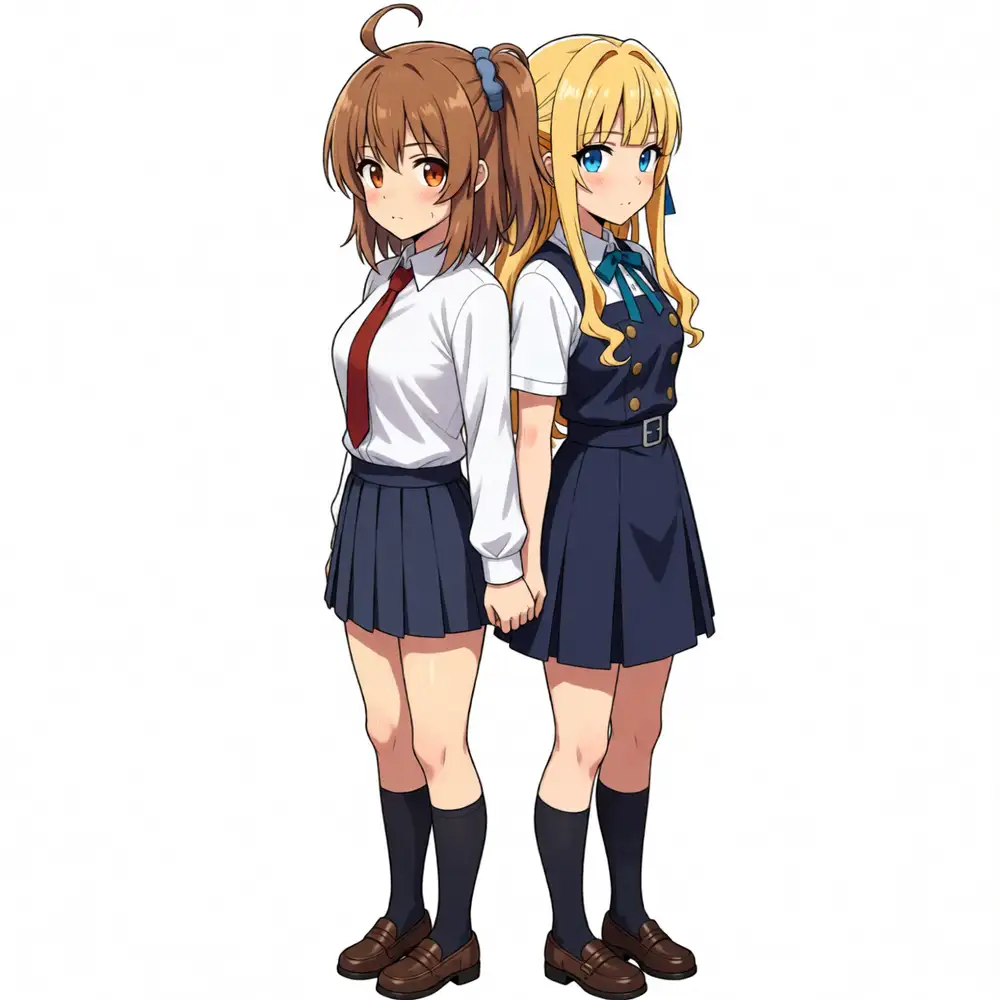
The side-by-side layout comes out. Kei’s blonde is preserved too (no color bleed, since it references separately baked images). Interaction poses are also doable depending on the prompt — not just face-to-face hand-holding and hugs, but I could even stand them back to back. A piggyback broke the picture entirely with legs floating in midair, but within the range of front-to-back standing poses QIE can build the composition.
The problem is Kana’s hairstyle. When QIE reassembles the two images it redraws both characters, so the position and knot of Kana’s side ponytail change. Kana’s identifying key is “a single side ponytail tied with a blue band + ahoge,” but after compositing this isn’t stable.
Strengthening the instruction doesn’t fix it. Even with a strong Japanese instruction “do not move the side, position, or count of the side ponytail from the original image,” the output turned the side ponytail into a braid. Codex, which I had read the image, also came back with “position is on the right but it’s a braid, a different knot.”
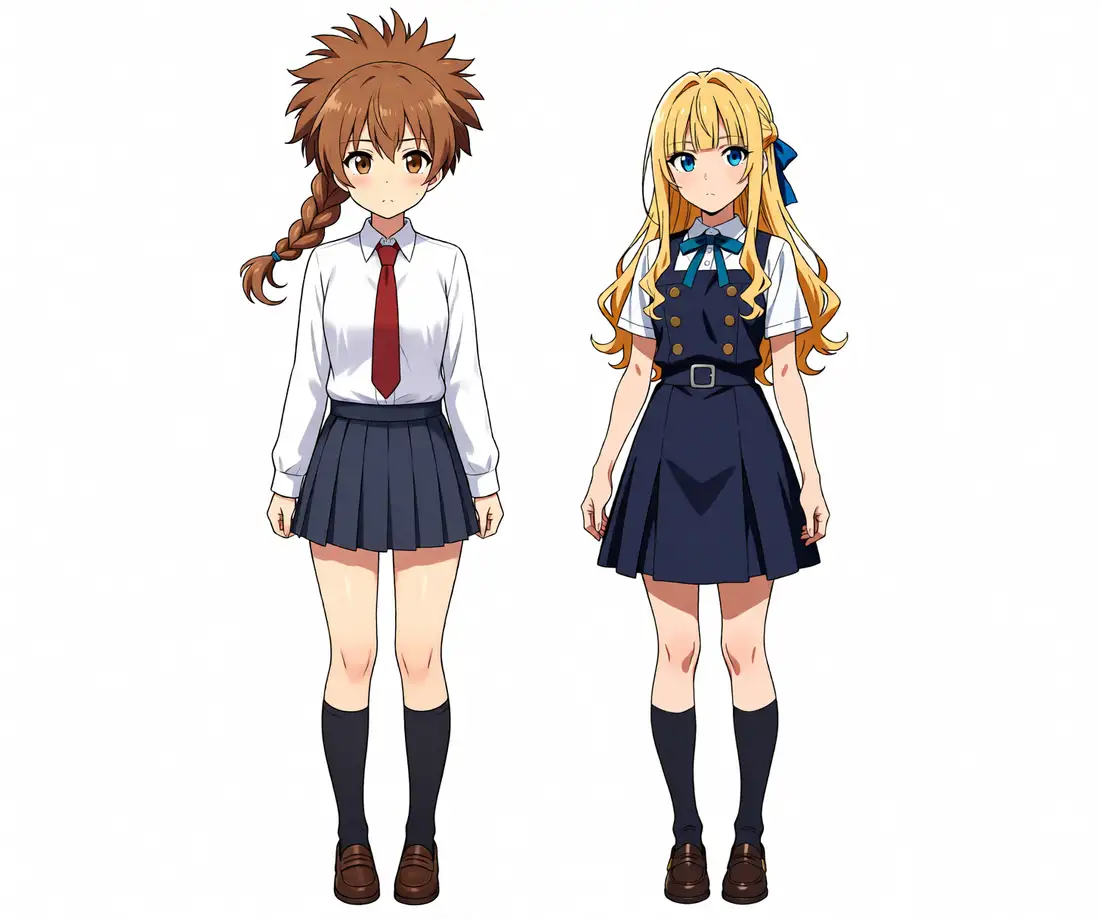
So QIE compositing can build the layout and pose and even looks good, but it can’t keep Kana’s hairstyle as designed. If the side ponytail shifts, however good the result looks, it’s unacceptable as character art. And the compositing step is just editing two finished images — Kana’s and Kei’s LoRAs aren’t involved at all. It’s drifted off the main line of “making one image out of LoRA-built characters.”
Switching the edit model can preserve it (Flux Kontext)
If QIE is no good, what about another edit model? I tried Flux.1 Kontext dev.
M1 Max (MPS) can’t run fp8, so I loaded the GGUF (Q4_K_M) with UnetLoaderGGUF, used a dual CLIP of t5xxl + clip_l, and chained the two reference images in via ReferenceLatent.
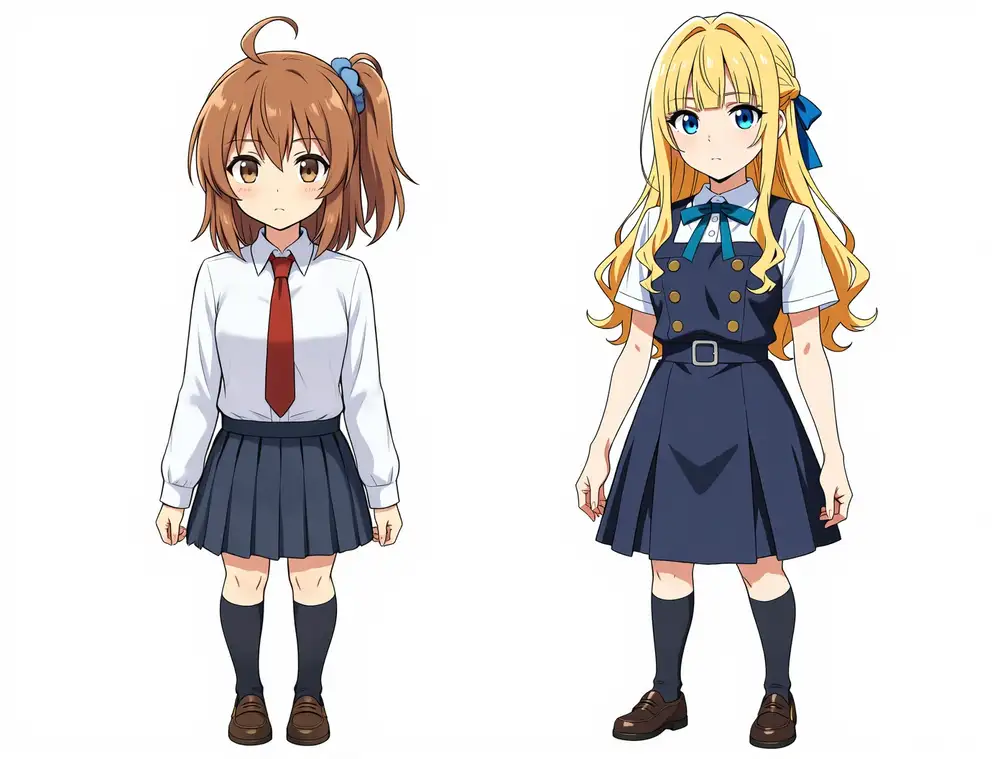
On hair it was better than QIE. Kana’s side ponytail stayed as a single tail + ahoge, Kei’s blonde and blue ribbon held, and the identifiers QIE turned into a braid don’t break under Flux Kontext.
But the proportions dropped. The original solo is about 7 heads tall, but after compositing the head grows and it leans toward a 5–6-head chibi body. Even when the hairstyle and color hold, the body proportions get pulled toward Flux and drift from the design. It redraws both characters, same as QIE, so it’s not the original pixels. Even with GGUF, M1 Max takes a few minutes per image. It keeps the hair but changes the proportions — a different way of breaking. If you don’t want the design moved by a single pixel, the next sequential inpaint is more reliable.
Fix one side, inpaint the other with its LoRA
There is a way to keep Kana’s design completely intact while still using a LoRA. Paste Kana’s clean solo on the left of a wide canvas, leave those pixels untouched, and inpaint only the empty space on the right with the kei LoRA.
| Effect | Reason |
|---|---|
| Kana’s side ponytail doesn’t shift | Kana’s region isn’t redrawn, so it stays the original pixels |
| No color bleed | The only LoRA acting in the pass is kei |
The workflow is waiANIMA + kei LoRA + Turbo, masking only the right region with SetLatentNoiseMask and running KSampler (denoise 1.0; Kana’s region on the left is outside the mask, so it’s preserved).
When I first took the right region too wide, Kei doubled and I got three people total.
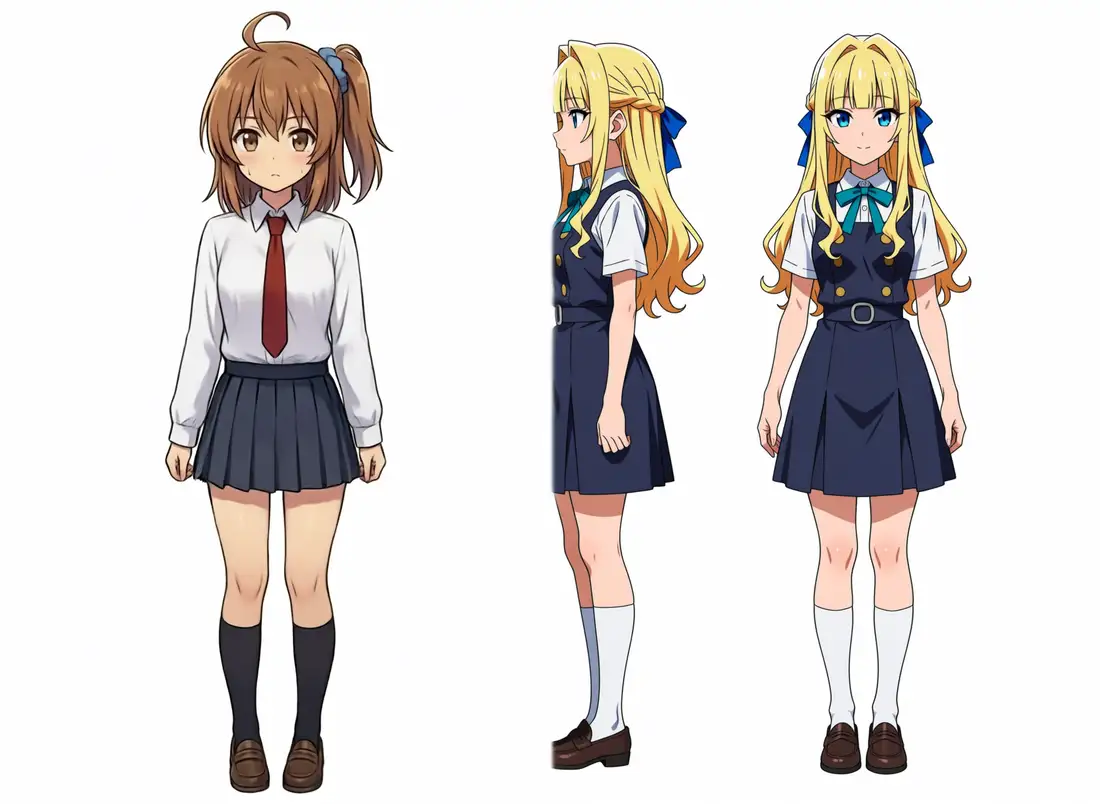
Adding 2girls, multiple girls, crowd, duplicate to the negative and narrowing the inpaint region to one body’s width got Kei down to one.
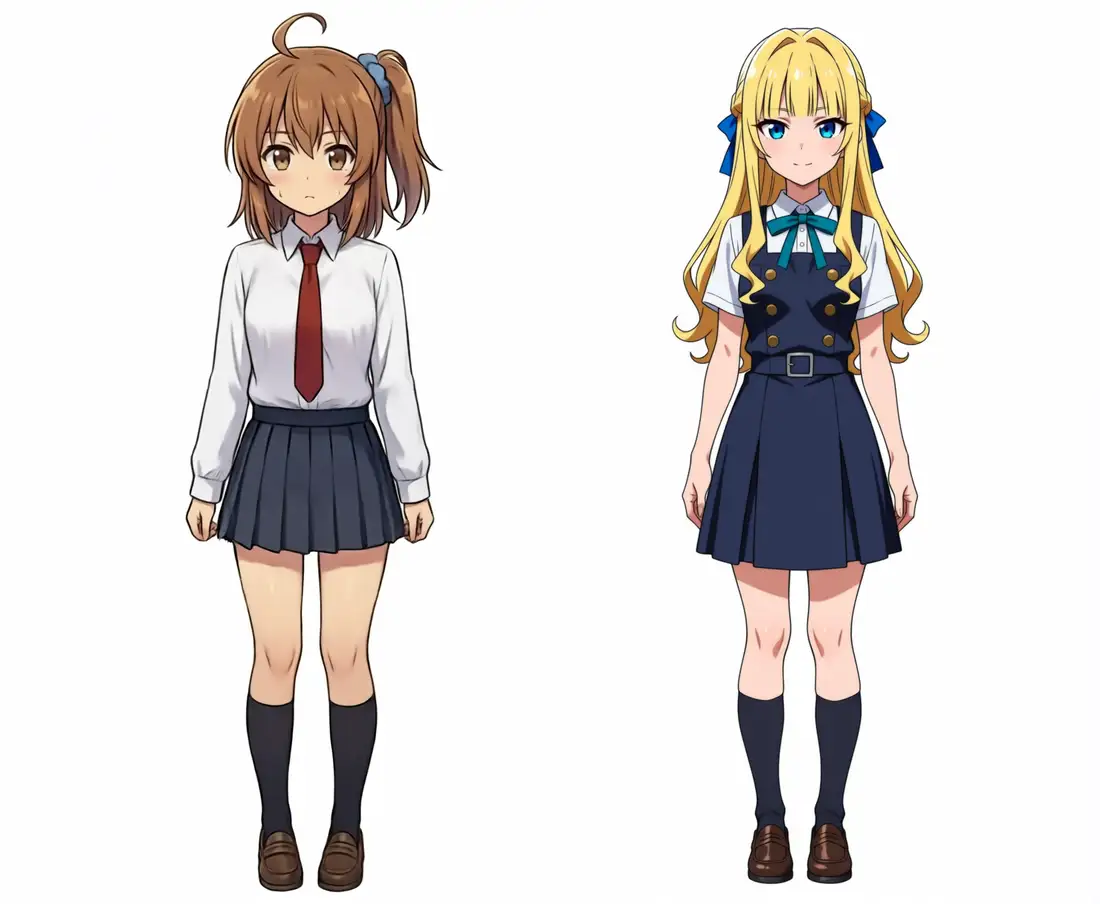
Codex’s check came back: two girls, Kana on the left with no shift or break in her side ponytail + ahoge, Kei on the right with long hair + blunt bangs + half-up. I placed two characters in one image without breaking Kana’s design. This is the decisive difference from QIE compositing.
But this works only because the two don’t overlap. Poses where the bodies overlap front-to-back (piggyback, embrace) can’t be made by inpainting empty space. From there you hand a skeleton to ControlNet.
Overlapping interaction poses are ControlNet’s (Anima-LLLite) job
Side-by-side comes out with sequential inpaint, but poses where the bodies overlap front-to-back — piggyback, embrace — can’t be made by inpainting empty space. To force such poses, the right move is to hand an OpenPose skeleton to ControlNet.
First I tried applying the local qwen_controlnet_union to waiANIMA, but with both ControlNetApplySD3 and ControlNetApplyAdvanced it died at KSampler with a normalized_shape=[3584] ... got [1, 512, 1024] shape mismatch.
That’s for the base Qwen-Image; it doesn’t fit waiANIMA’s 3584 hidden dimension.
There’s a dedicated one for the Anima family: kohya-ss’s ControlNet-LLLite for Anima (weights on Hugging Face, with pose, depth, lineart, scribble, and inpaint sample weights).
LLLite is a ControlNet variant that injects a low-rank correction into the DiT’s attention/MLP, applied to the waiANIMA MODEL via the AnimaLLLiteApply node. Unlike qwen_controlnet_union it throws no shape error and KSampler runs.
Get the recipe wrong and no pose goes in
LLLite is finicky; get it wrong and you land in a state of “it runs but no pose goes in.” The conditions to make it take:
- The base is
anima-base-v1.0(LLLite’s training base), notwaiANIMA_v10 - Insert
ModelSamplingAuraFlowshift 3.0 afterAnimaLLLiteApply(Anima is a flow model; without it, it breaks) - Don’t pair the Turbo LoRA. KSampler is euler / cfg 3.5 / steps ~30
- Feed each purpose-specific weight the control image for that purpose
Getting the last one wrong is the worst trap. Feeding a raw image to the pose weight (anima-lllite-pose-1) split the screen into two panels and broke it. What the pose weight should take is a skeleton, not a photo.
The general any weight, conversely, copies the raw image wholesale. With the character LoRA removed and only a raw image fed, the output was just the reference image re-rendered in grayscale — a copy. The any weight isn’t OpenPose control; it acts as an adapter that transfers the whole reference image.
Pose control works on a single subject
Rebuilt with the right correspondence, pose control took cleanly.
I generate one image of Kana standing with both arms spread straight out to the sides, then extract an OpenPose skeleton with DWPreprocessor.
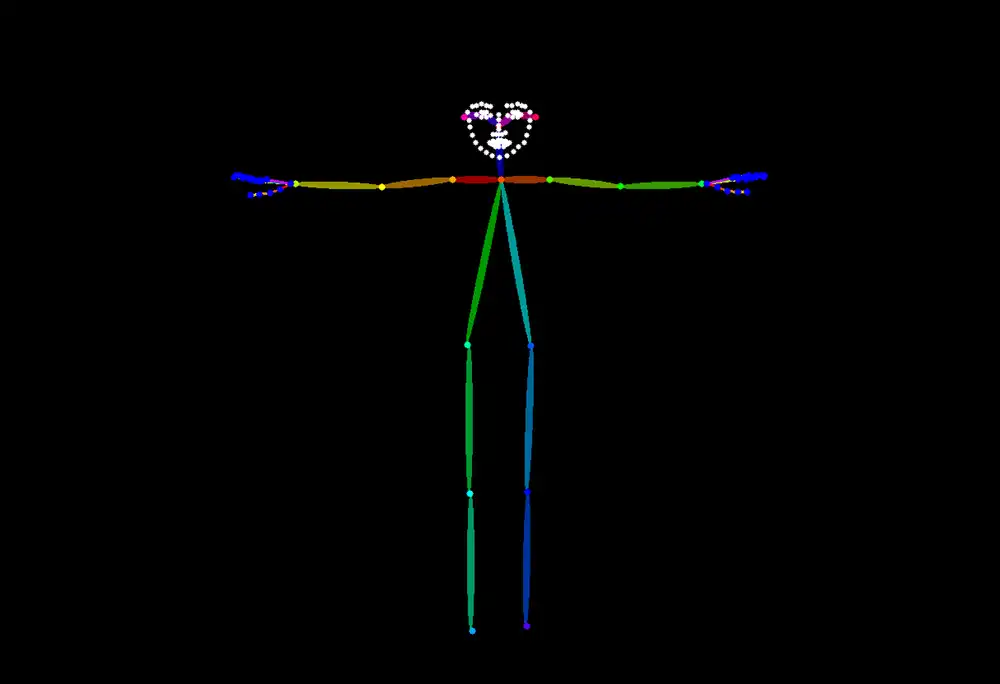
Handing this skeleton to the pose weight and generating with no pose specified on the prompt side, at strength 1.5 Kana spread both arms straight out exactly as the skeleton.
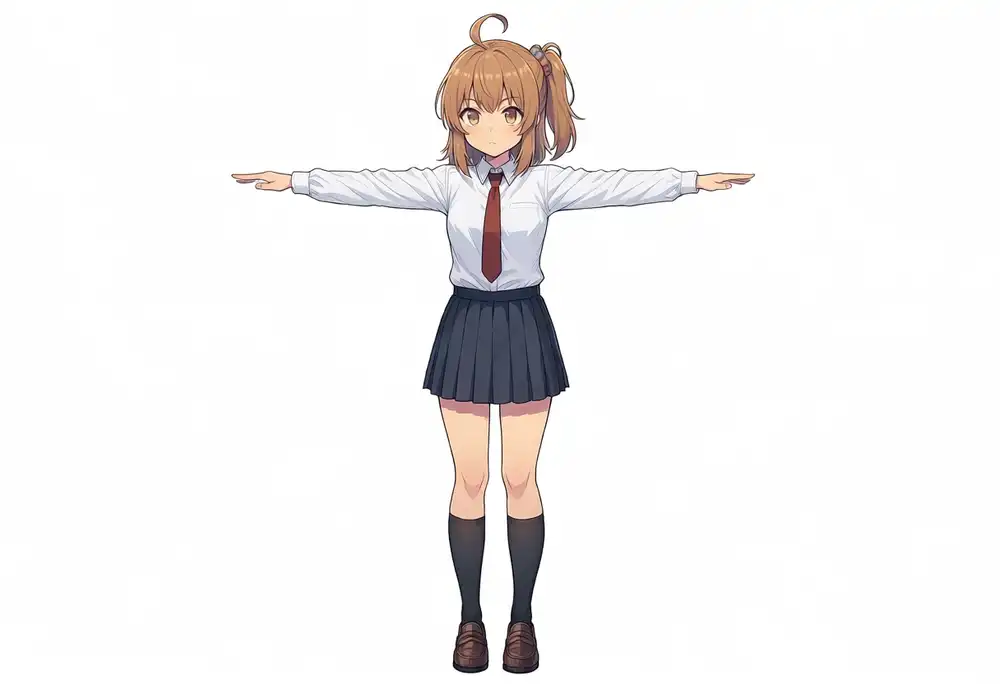
The effect is soft. At strength 1.0, or in a version where the prompt explicitly said “stand with arms down,” the prompt beat the skeleton and the arms dropped.
Push to strength 3.0 and the arms spread but the joints melt.
Leaving the pose unspecified in the prompt, handing it to the skeleton, and sitting around strength 1.5 was the most stable.
The reason the earlier version wrote “pose doesn’t take on Anima” is that it used waiANIMA_v10 as the base, dropped ModelSamplingAuraFlow, and fired with a front-facing standing skeleton (which matched the prompt, so whether the control worked was invisible) — it wasn’t an Anima-side limit.
Overlapping interaction poses jam at skeleton extraction
Single-subject poses go through. But the goal — two overlapping bodies in an interaction pose — jams one step earlier.
Running a princess-carry reference image through DWPreprocessor, the carrier and the carried overlap, so the skeleton can’t be separated and it came out as a tangled clump of limbs.
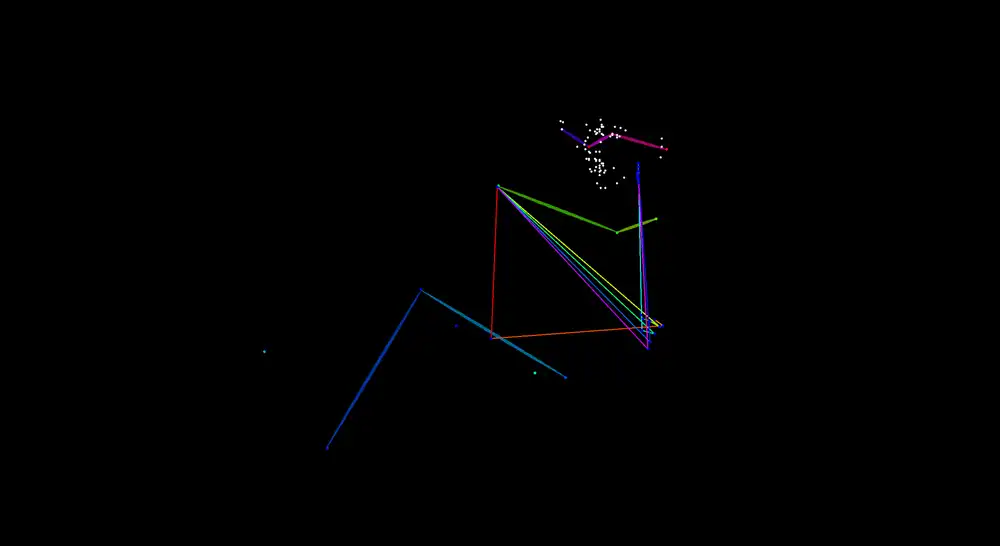
Hand this garbage skeleton to the pose weight and, with no pose information in it, the two just stand there. DWPose is an estimator trained on real human bodies; when bodies overlap it can’t separate the front and back people. A standing pose or a T-pose, where the bodies are apart, extracts cleanly, but a tightly entangled pose jams at the skeleton stage. The reason overlapping interaction poses don’t come out isn’t “Anima can’t” — it’s the extraction-side wall of “you can’t get a skeleton out of two overlapping bodies.”
Two characters’ identities mix
If the bodies are apart in a non-overlapping pose, you can get a skeleton. Taking a skeleton of two figures standing side by side and generating it with the pose weight plus the two kana/kei LoRAs gives this.
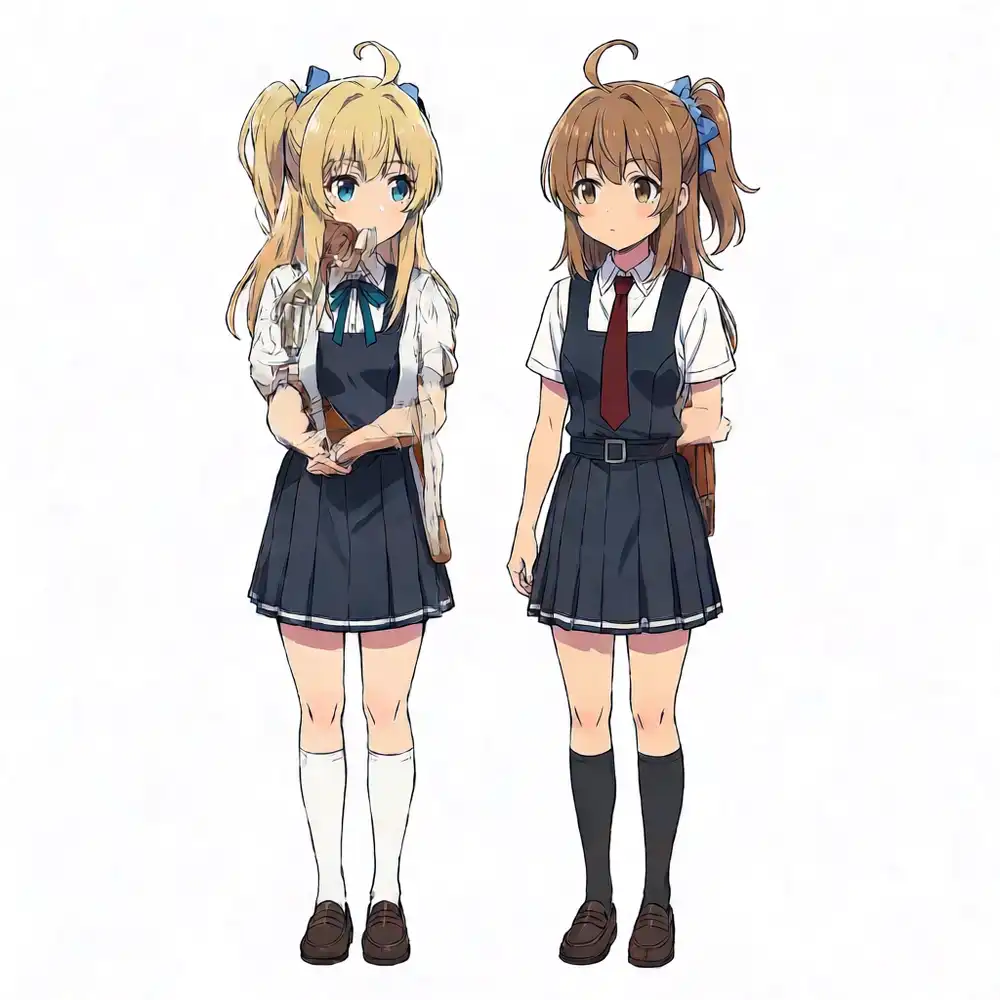
The placement follows the skeleton, two figures side by side, and the color even split blonde on the left, brown on the right. But the identities mix. Brown-side-ponytail Kana is wearing not her own pleated skirt but Kei’s dark navy pinafore, and on Kei’s side the blunt-bangs half-up is broken. The two LoRAs are applied globally to the whole model, so both characters’ features act over the entire frame. LLLite controls the pose, but it has no per-region identity assignment of “the left skeleton is Kana, the right is Kei.” To split them you’d cut regions with regional prompting, bake each character separately and then composite, or wait for pose weights retrained for v1.0.
Overlapping poses: bake the halves separately and merge with QIE
LLLite can’t get a skeleton from overlapping bodies, and handing two images to QIE to merge in one shot redraws both characters and breaks the hairstyle. Both jam at “making two overlapping people at once.” So I stopped overlapping them from the start. I generate each character solo in “the pose for their role,” then merge with QIE at the end.
For a princess carry, I bake Kana as the “carrier” and Kei as the “carried” one at a time. Kana standing with her arms spread wide to carry, Kei in a carried pose. Solo generation means one LoRA each, so each character’s identity can be locked in clean.
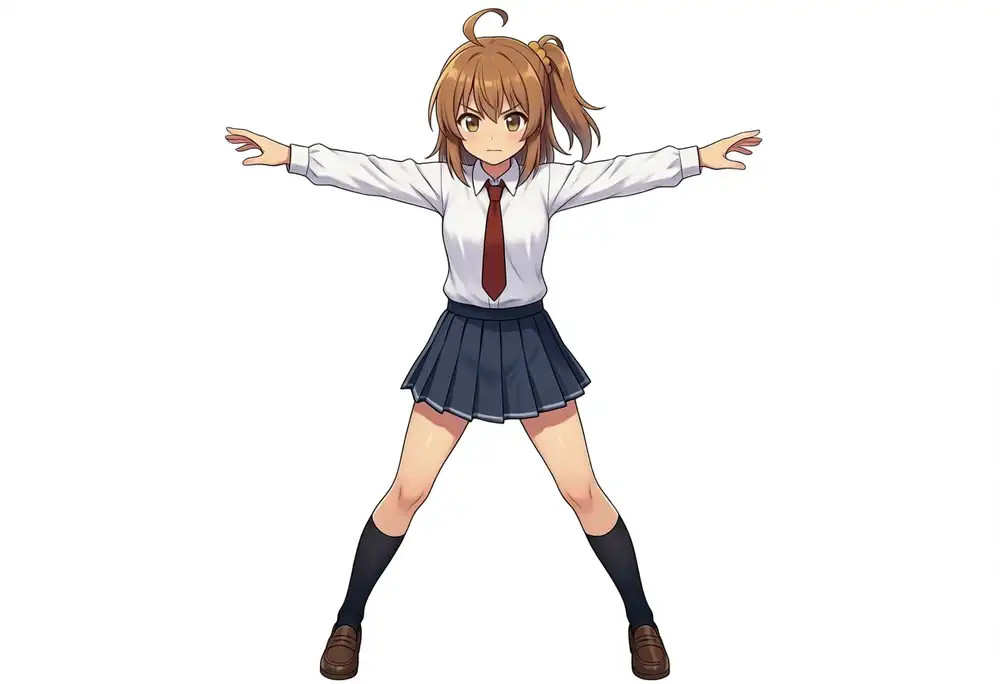
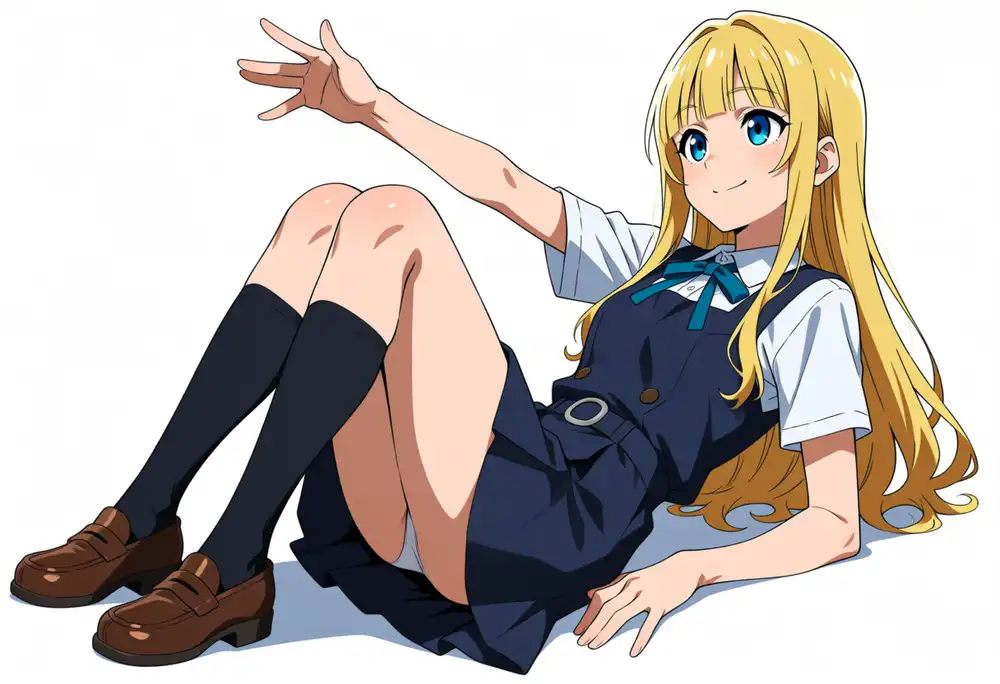
I hand these two to QIE to merge into one. The composition came out. The princess-carry layout — Kana spreading her arms and carrying Kei sideways — shows up properly.
The problem is Kana’s hairstyle; QIE redraws both characters every composite, so it can’t be kept. Writing the prompt in Japanese, Kana’s knot flips left/right, splits into twintails, or the scrunchie shifts from blue to teal. Switching to English reduced the flips, the twintail splits, and the color shifts somewhat. QIE’s text encoder is Qwen2.5-VL trained on booru tags, so a more tag-like English phrasing goes through better.
But the crucial part doesn’t fix. Kana is medium hair — medium length, with the back hair worn down and only a side section tied — yet QIE lengthens her hair and gathers it high.
Even handing it the exact training-data tags (left side ponytail, medium hair, double parted bangs, ahoge + blue scrunchie), medium hair doesn’t take and it becomes a long high ponytail.
left side ponytail, left side up, medium hair, double parted bangs, ahoge, blue scrunchie, do NOT make a high ponytail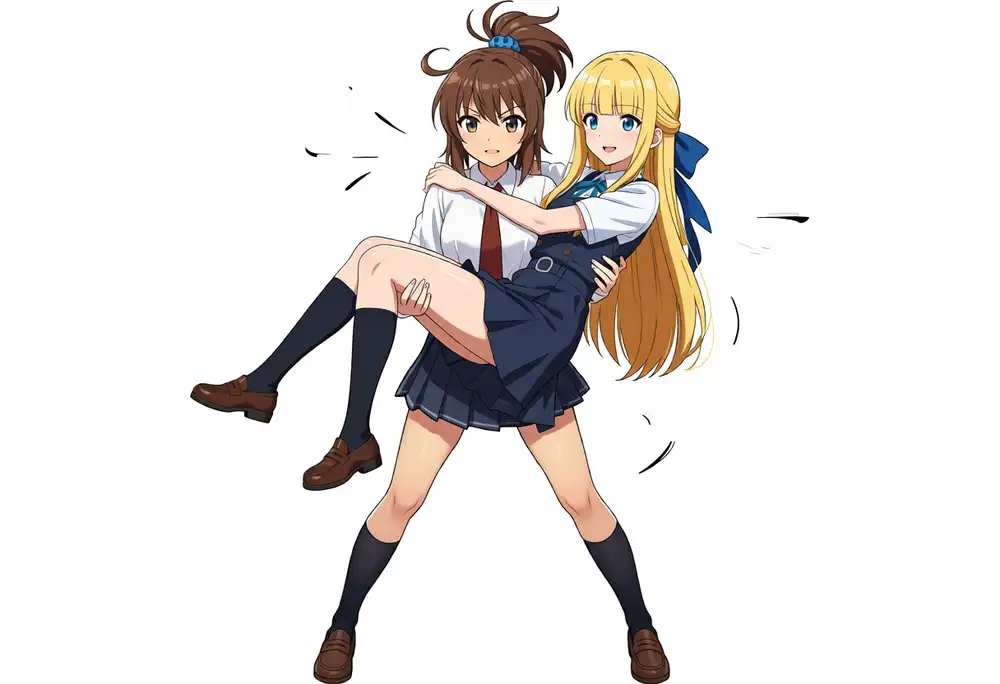
This is the same symptom as QIE making Kana’s hair long on its own. I changed the prompt language and the tags, but as long as QIE redraws, Kana’s medium-length side ponytail couldn’t be kept.
Tried other interaction poses too
I ran the same procedure for a hug and a piggyback. The pose category itself can be built either way. For the piggyback, baking Kana in a forward-leaning carrying pose and Kei in an arms-around pose separately and then merging got Kei properly onto the back.
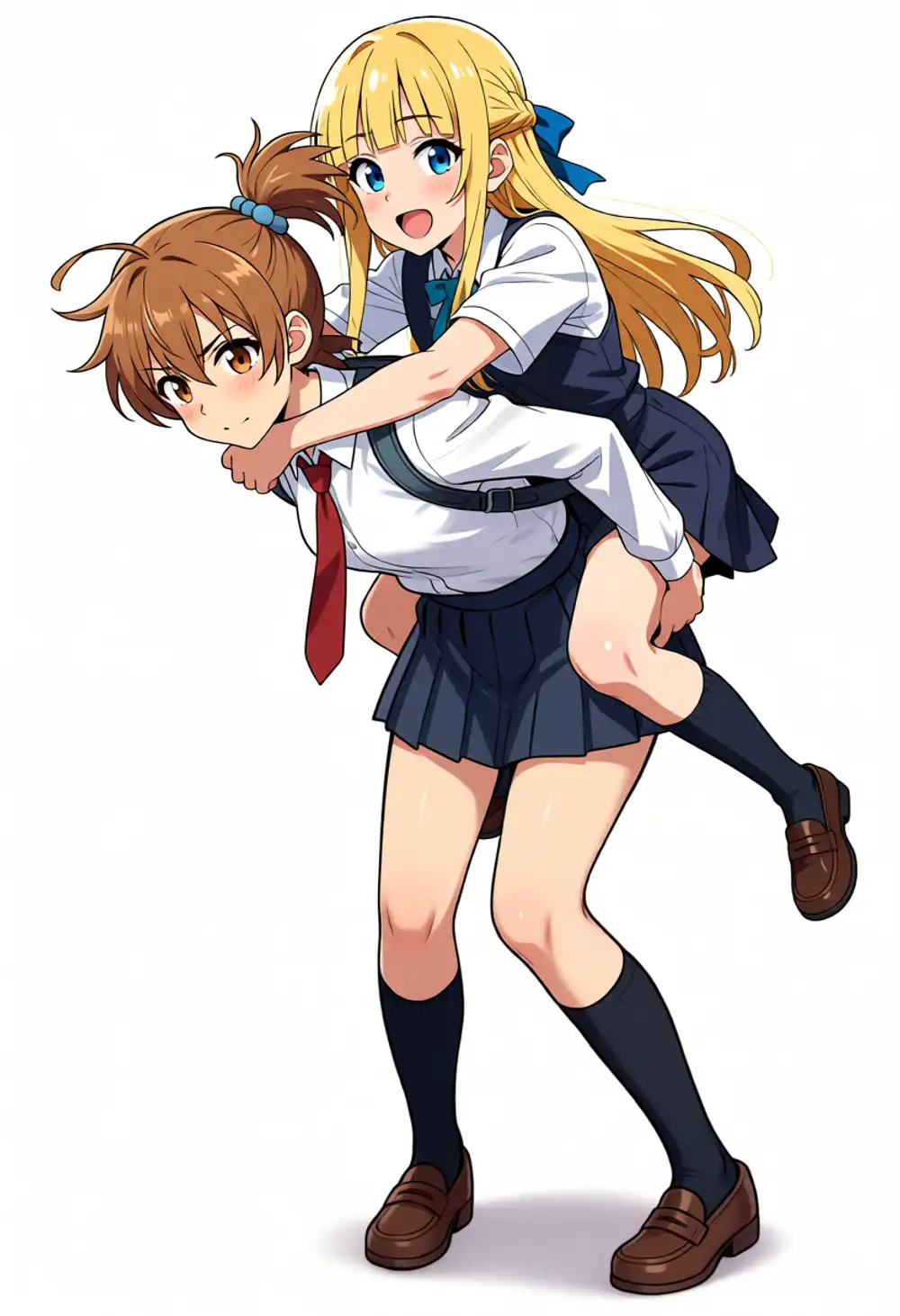
But the larger the rearrangement, the more Kana’s side ponytail breaks. In the hug it moves to the opposite side; in the piggyback it rises to the crown. Back-to-back alone doesn’t break, but that’s because the bodies barely overlap and there’s little for QIE to redraw — it’s not a test of an interaction pose.
The composition is buildable multi-step. If you don’t want the design moved by a single pixel, in the end you fall back to a non-overlapping layout and sequential inpaint.
Conclusion
| Method | Two characters | Kana’s design | Color bleed | Pose freedom |
|---|---|---|---|---|
| Two LoRAs at once (text2img) | △ structure separates by tag | ✗ | ✗ blonde drifts to brown | side-by-side only |
| Edit composite (QIE AIO) | ◯ | ✗ side ponytail breaks | ◯ | side-by-side + front/back poses |
| Edit composite (Flux Kontext) | ◯ | ◯ side ponytail kept | ◯ | side-by-side + front poses |
| Fix one + inpaint the other | ◯ | ◯ untouched, not redrawn | ◯ | non-overlapping side-by-side only |
| ControlNet (Anima-LLLite) | △ lines up but mixes | ✗ outfit mixes | △ color separates | single ◯, overlap = no skeleton |
| Bake halves + merge with QIE | ◯ | ✗ side ponytail breaks | ◯ | interaction composition possible (multi-step) |
qwen_controlnet_union was incompatible with waiANIMA, but Anima-LLLite loads and runs.
“Two LoRAs into one image” is impossible in a single text2img pass because of color bleed. The bake-separately-and-edit-composite route depends on the model: QIE broke Kana’s side ponytail with vague instructions, but Flux Kontext held it. That said, both redraw the two characters, so it’s not the original pixels, and the LoRAs themselves aren’t involved in the composite. If you don’t want the design moved by a single pixel, fixing one character as a clean solo and inpainting the rest of the empty space with that LoRA was the most reliable. This is limited to non-overlapping side-by-side.
Overlapping interaction poses are Anima-LLLite’s (ControlNet’s) job, and handing a skeleton to the pose weight, single-subject pose control did work on Anima too. But two overlapping bodies can’t be separated at the skeleton-extraction stage, and applying two LoRAs globally mixes the identities.
Baking each character separately in its pose and merging with QIE multi-step got the princess-carry composition.
Writing the prompt in English reduces the left/right and twintail breaks, but QIE’s habit of lengthening Kana’s medium hair and gathering it high remains, and handing it the training tag medium hair didn’t fix it.
Whether the next-gen Qwen-Image 2.0 (QI2.0) weakens the redraw is unconfirmed.
If you don’t want the design moved by a single pixel in an overlapping pose, in the end you fall back to a non-overlapping layout and sequential inpaint.