ChatGPT Dots Repeated GitHub Approval Loop: Boundary Tests, Local Access, and Controls
 Contents
When delegating GitHub operations to Dots, ChatGPT’s agentic feature, the same approval card repeatedly appears.
Even after selecting “Always allow,” new confirmation prompts keep appearing, halting work every time.
Initially, it seemed like the prompt was triggered by pushing changes to GitHub, but the prompt read “Allow GitHub to create a Git blob?”.
This was a prompt asking to create a Git blob (an object that stores file contents), which occurs before any git push (GitHub documentation).
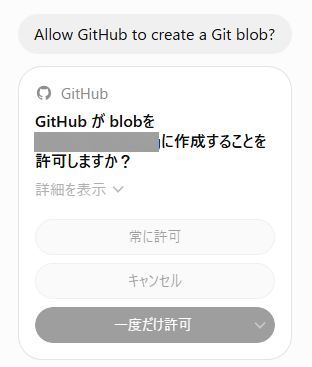
Dots Configuration Explanations and Corrections
When asked why it prompted every time, Dots replied that it checked the GitHub configuration:
Looking at the settings, GitHub is currently set to “Follow default,” inheriting “Allow low-risk actions” from global settings.
Later, after reviewing a screenshot of the approval card, Dots corrected its explanation:
Looking only at app-wide settings does not indicate whether approval from this button was saved.
Stating that “settings were missing” was incorrect.
Currently, we cannot resolve this confirmation loop from our end.
Repeated Prompts After Selecting “Always allow” (Issue #52503)
In OpenAI’s Codex repository, Issue #52503 describes repeated approval prompts in Dots.
The reporter, running Safari on macOS, noted that selecting “Always allow” multiple times did not prevent subsequent approval prompts.
The report also documents older approval cards displaying “This request is no longer pending,” making them unclickable, while tasks halted at the create_blob step when saving file contents to GitHub.
Both this issue and #52714 were filed on October 9, 2026, and remained open as of October 15.
File Size Boundary for Approvals (Issue #52714)
In Issue #52714, a user set GitHub integration permissions to “Allow all actions” and tested different file sizes.
They tested two methods: modifying trailing whitespace while preserving JSON contents, and minifying whitespace and line breaks.
| Test | File size | Approval prompt |
|---|---|---|
| Adjust trailing whitespace | 719,687 bytes | Did not trigger |
| Adjust trailing whitespace | 720,000 bytes | Triggered |
| Before JSON minification | 874,365 bytes | Triggered |
| After JSON minification | 645,251 bytes | Did not trigger |
The reporter did not pinpoint the exact threshold byte between 719,687 and 720,000 bytes.
The underlying logic and whether the same threshold applies to other GitHub operations remain unknown.
Dots also stated in its reply that it used global “Allow low-risk actions,” which differs from the “Allow all actions” setting used in this test.
Workarounds and Setting Limitations
Configuring permissions to “Allow all actions” does not prevent the issue, as recurring prompts have been reported under that setting as well.
What succeeded in #52714 was minifying JSON or writing smaller split files first and referencing them later.
Splitting writes to the same large file into two steps caused the second step to transmit the full file, triggering the approval prompt again.
According to Dots documentation, connected app permissions apply directly to Dots.
Automatic approval checks evaluate instructions, permissions, custom rules, and built-in safety requirements to determine whether an action can execute or requires user confirmation.
Custom rules cannot override built-in safety requirements. Dots’s reply did not clarify which safety check triggered the repeated approval.
Running unattended GitHub tasks without a reliable workaround requires waiting for fixes from OpenAI.
Whether the resolution requires a client app update or server-side fixes remains unannounced.
Another approach is to bypass the GitHub integration and run native Git commands.
However, #52503 noted an instance where a cloud task had GitHub integration access but lacked authentication for native Git pushes, causing the push to fail.
Manually approving each step or handling git pushes directly defeats the goal of leaving the task to Dots.
Issue Reports of Data Loss and Disconnects Beyond GitHub
Public issues are reports from individual user environments. They do not confirm OpenAI’s root cause or imply universal reproducibility.
Missing Working Files in Cloud Workspaces (#52217)
Issue #52217 on October 8 reported recurring loss of source code and documents within Dots cloud workspaces.
Artifacts saved in the Library remained intact, but ongoing work was only partially recoverable.
The cause remains unconfirmed, with possibilities ranging from environment recycling to volume mount failures, though the report noted that files on a separately connected Mac remained unaffected.
Archived Local Tasks Resuming on New Turns (#50338)
Issue #50338 on October 2 reported that a task running on a connected Mac resumed after being archived, following a follow-up prompt from Dots.
The task continued running while remaining listed under archived tasks, leaving conflicting status displays.
The issue was not an unprompted spontaneous restart, but rather that archived tasks still accepted instructions sent through Dots.
Persistent Active Status After Disconnects (#54024)
Issue #54024 on October 14 reported that repeated cloud task disconnects left the interface showing an active running status, though whether execution actually continued remained unconfirmed.
Some operations succeeded during the disruption, and the report did not indicate that all operations stopped for the entire day.
Local Computer Access and Work/Codex Integration
The tasks and memory documentation states that Dots can create new Work and Codex tasks on a connected computer and resume existing local Codex tasks.
This architecture coordinates work from the cloud while executing tasks using files and tools on the local machine.
Connecting a computer is enabled in Dots profile under “Computers” → “Your computer” → “Allow access”.
This permission is distinct from connecting a computer to Codex or enabling Work Sync; enabling those features does not automatically grant Dots access to the computer.
Access permissions persist after a task completes.
As long as the computer is online with the ChatGPT app open, instructions sent to Dots from another device, such as a smartphone, can interact with the local machine.
Reports of Local Workspace File Loss (#34698)
Separate from Dots-specific issues, Issue #34698 on July 22 documented local workspace file deletions in Work/Codex on Windows.
Running app version 26.715.8383.0, generated HTML and Markdown files disappeared from the managed workspace folder following a ChatGPT Project sync error and app restart.
This report does not prove that current versions of Dots have identical issues or that files across the entire computer are at risk.
However, because local workspace loss has been documented, GitHub prompts do not prevent write errors or data loss on the local machine.
Allowing write operations and command execution introduces the possibility of damaged files or environments through misoperation or bugs.
Additionally, enterprise documentation notes that cloud-coordinated tasks running on a local computer do not support local hooks, such as pre-commit validation scripts.
Automated checks that run during ordinary local development do not apply under this setup.
Stopping Operations and Revoking Access
The controls documentation separates stopping controls into the main Dot, delegated tasks, and recurring schedules.
| Target | Action |
|---|---|
| Current Dots main task | Select Pause |
| Delegated individual task | Open in Activity and stop |
| Future scheduled runs | Disable or delete in Scheduled |
| Local computer connection | Select Revoke access |
Selecting Pause stops only the current main task; it does not stop delegated tasks or cancel future scheduled runs.
Taking the computer offline leaves access permissions intact; fully disconnecting access requires selecting Revoke access.
Stopping execution does not revert changes already made.
Ongoing tasks, delegated workers, scheduled runs, and computer connections need to be stopped individually.
That completely defeats the purpose of Dots.