A FastAPI wrapper that takes Japanese, runs it through Ollama, and routes to ComfyUI or mflux to drive Anima, WAI-IL, and FLUX.2 Klein from one WebUI
 Contents
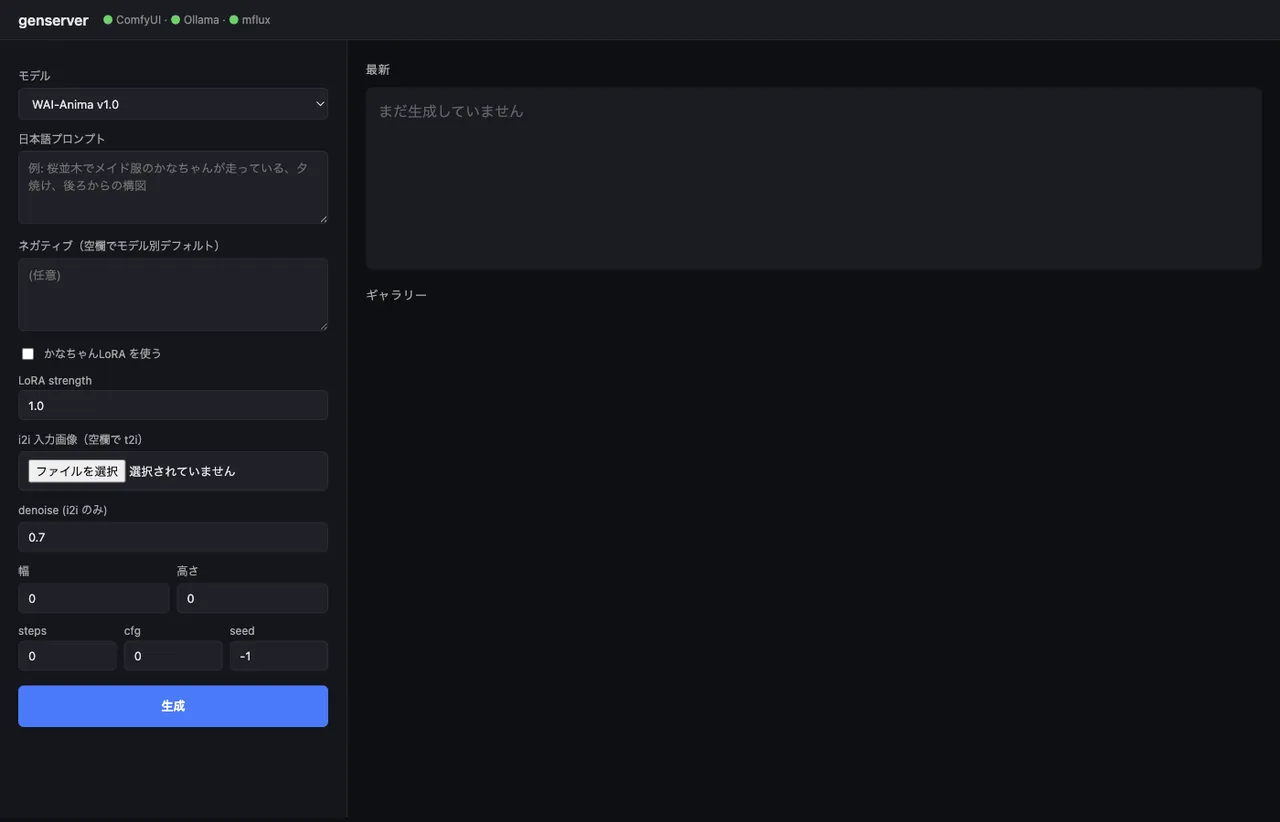
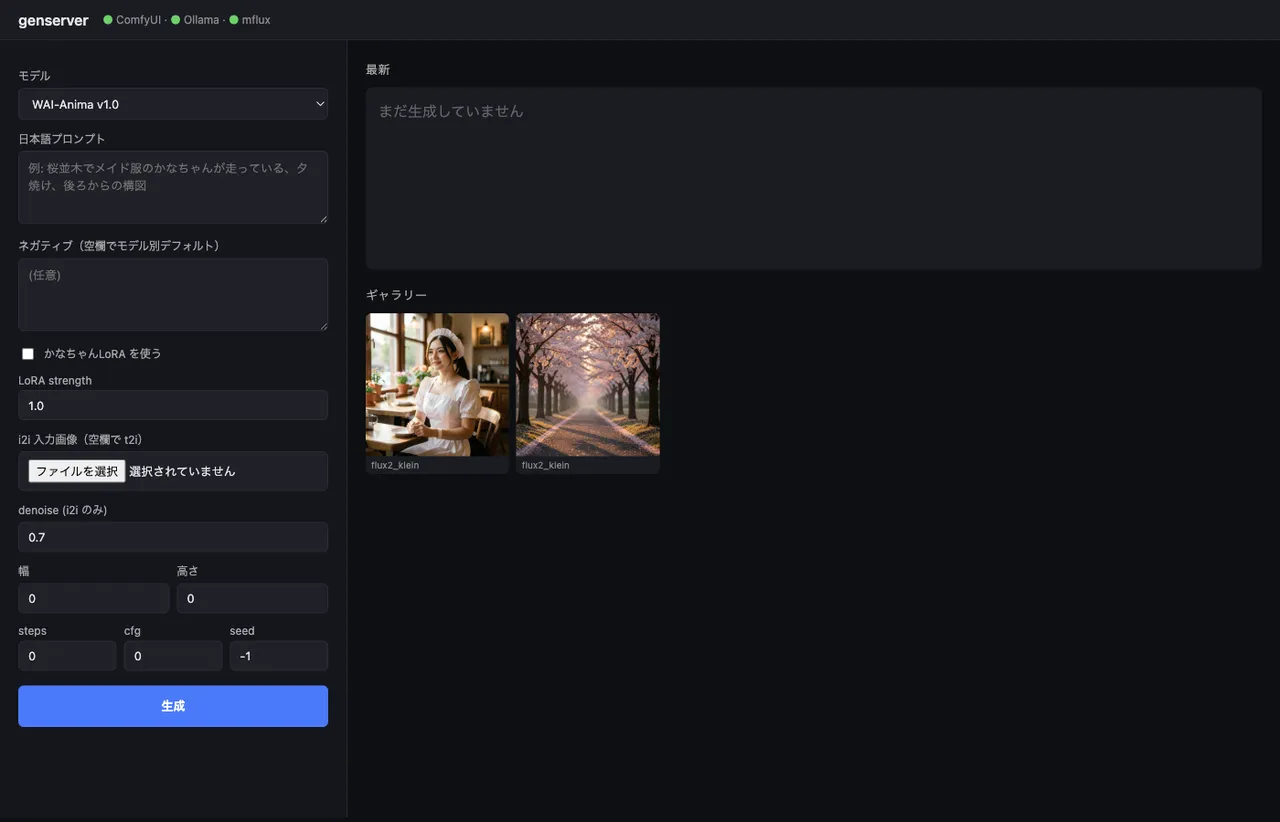
I barely use image generation for work — just light stuff, illustrations for my diary or test assets. Even so, I noticed I had three engines sitting on disk: waiANIMA_v10, waiIllustriousSDXL_v170, and flux2-klein-4b. And ComfyUI alone doesn’t cover all of them (FLUX.2 needs the mflux CLI). Every time I wanted to generate something it was “open the ComfyUI UI”, “think up an English prompt”, “remember the mflux CLI flags” — annoying enough to want to fix even if the use is light. So I just unified the entry point. A 350-line FastAPI app that takes Japanese and gives back an image. Reachable from iPhone via Tailscale (though I usually end up typing at the Mac anyway).
The two articles this builds on are running WAI-Anima v1 over the ComfyUI API and the FLUX.2 Klein 4B benchmark on M1 Max with mflux vs iris.c. This one ties them together.
Architecture
flowchart LR
    Browser[Browser<br/>iPhone / Mac] -->|Tailscale<br/>:7860| FastAPI[FastAPI<br/>genserver]
    FastAPI -->|/api/chat| Ollama[Ollama<br/>gemma3:12b<br/>JP→EN]
    FastAPI -->|model type<br/>branching| Branch{type?}
    Branch -->|comfy_anima<br/>comfy_sdxl| ComfyUI[ComfyUI :8188<br/>API endpoint]
    Branch -->|mflux| MFlux[mflux-generate-flux2<br/>subprocess]
    ComfyUI --> Out[(outputs/<br/>YYYY-MM-DD/)]
    MFlux --> Out
    Out -->|/outputs/...| Browser
The thing that matters: I didn’t try to fold mflux into ComfyUI. They run side by side. Putting mflux on a ComfyUI custom node is doable but adds dependencies and version-management headaches, so I just call it as a subprocess. ComfyUI already exposes an API server, so I use that as-is.
Model config in a single dict
All three models’ differences live in one place. Look here in the code and you know what’s where.
MODELS = {
    "anima": {
        "type": "comfy_anima",
        "checkpoint": "waiANIMA_v10.safetensors",
        "text_encoder": "qwen_3_06b_base.safetensors",
        "vae": "qwen_image_vae.safetensors",
        "lora": "kanachan-waianima-rework-v4_epoch150.safetensors",
        "lora_trigger": "kanachan",
        "default_steps": 30, "default_cfg": 4.0,
        "sampler": "er_sde", "scheduler": "simple",
        "default_w": 832, "default_h": 1216,
    },
    "wai_il": {
        "type": "comfy_sdxl",
        "checkpoint": "waiIllustriousSDXL_v170.safetensors",
        "lora": "kanachan-waiv16-05.safetensors",
        "lora_trigger": "kanachan",
        "default_steps": 30, "default_cfg": 5.5,
        "sampler": "euler_ancestral", "scheduler": "normal",
        "default_w": 832, "default_h": 1216,
    },
    "flux2_klein": {
        "type": "mflux",
        "default_steps": 4, "default_cfg": 1.0,
        "default_w": 1024, "default_h": 1024,
    },
}
The only LoRA in play is “kanachan” — separate ones for Anima (rework-v4 ep150 was the sweet spot) and WAI-IL (waiv16-05). I don’t have a kanachan LoRA trained for FLUX.2 Klein, so the toggle disables itself in the UI when FLUX.2 is selected.
Translating Japanese to a model-appropriate prompt with Ollama
This was the part I thought about most.
Anima was trained on natural-language captions, so flowing English fits.
WAI-IL is SDXL-family and behaves better with Danbooru-style tags (1girl, solo, long hair, school uniform).
FLUX.2 Klein leans photographic and prefers natural-language framing.
In other words, the same Japanese description should turn into different English shapes depending on the model. I absorb that by switching style hints in the system prompt sent to Ollama.
async def translate_to_prompt(text: str, model_key: str) -> str:
    style_hint = {
        "anima": "Use natural English with comma-separated descriptive phrases. The model is an anime DiT trained with natural language captions.",
        "wai_il": "Use Danbooru-style comma-separated English tags (e.g., '1girl, solo, long hair, school uniform').",
        "flux2_klein": "Use natural English describing the scene, subject, lighting, and style as flowing comma-separated phrases.",
    }[model_key]
    sys_prompt = (
        "You convert a Japanese image description into an English prompt for an image diffusion model. "
        + style_hint +
        " Output ONLY the prompt, no explanation, no quotes."
    )
    payload = {
        "model": "gemma3:12b", "stream": False,
        "messages": [
            {"role": "system", "content": sys_prompt},
            {"role": "user", "content": text},
        ],
        "options": {"temperature": 0.4},
    }
    async with httpx.AsyncClient(timeout=120) as cli:
        r = await cli.post("http://127.0.0.1:11434/api/chat", json=payload)
        return r.json()["message"]["content"].strip()
gemma3:12b answers in 1–3 seconds on M1 Max 64GB. A 3B-class model (qwen2.5vl:7b) works too, but it tends to drop compositional details, so I went with the 12B.
A real round-trip. The Japanese input メイド服を着た女性、カフェの店内、自然光、ボケ味、写真風 (a woman in a maid outfit, inside a café, natural light, bokeh, photographic) gets fanned out into denser English than I’d write by hand.
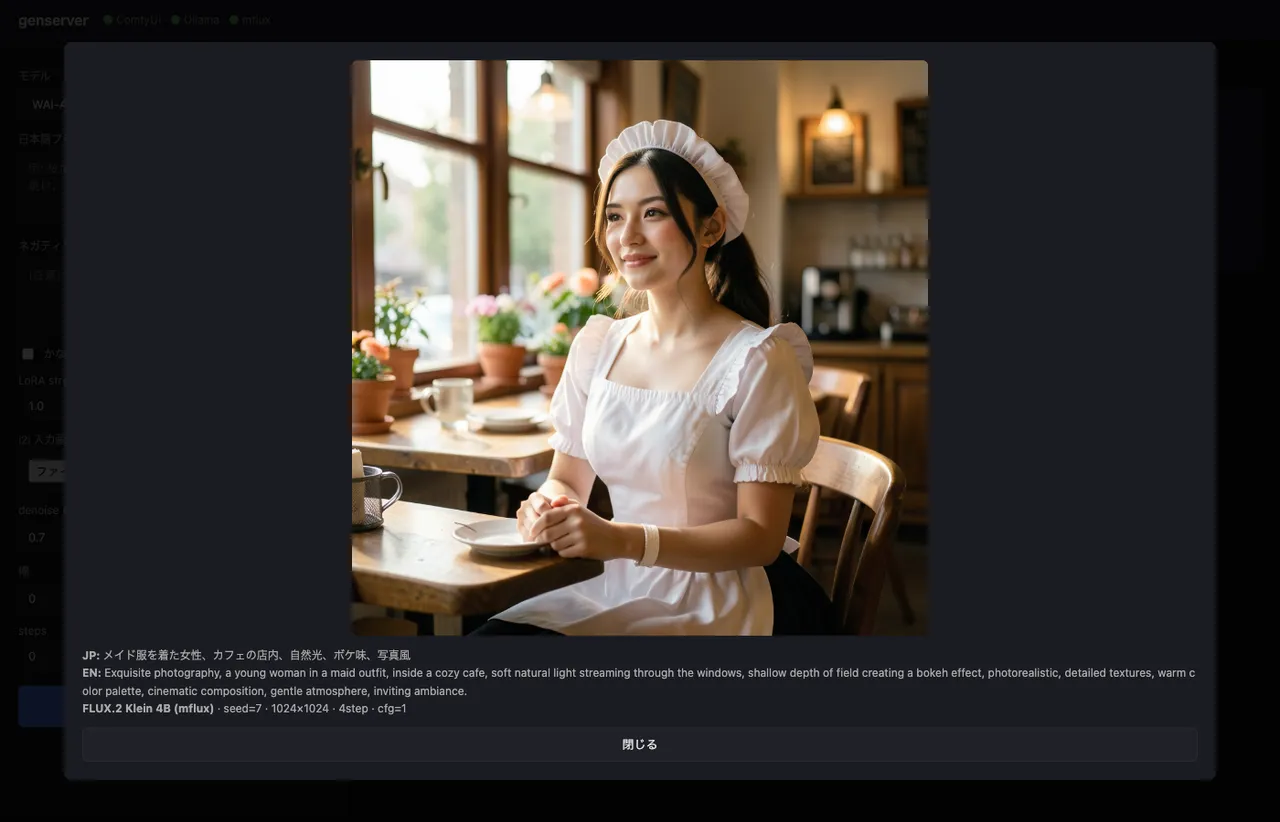
The way shallow depth of field creating a bokeh effect opens up the Japanese term “ボケ味” into full photographer vocabulary is exactly what gemma3:12b earns its keep on. Pasting bokeh alone (a literal direct translation) doesn’t always trigger FLUX.2’s photographic mode cleanly.
If the LoRA toggle is on, the trigger word (kanachan) gets prepended automatically. That way I don’t depend on the LLM to remember it.
if use_lora and cfg.get("lora_trigger"):
    trig = cfg["lora_trigger"]
    if trig.lower() not in en_prompt.lower():
        en_prompt = f"{trig}, {en_prompt}"
Building ComfyUI API workflows from Python
ComfyUI’s /prompt endpoint takes a dict of {node_id: {class_type, inputs}}. The common pattern is to save a workflow as a JSON file and load it, but I’d need four templates to cover (t2i / i2i) × (LoRA on / off), which I didn’t want, so I build them in Python.
def build_anima_workflow(cfg, prompt, negative, seed, width, height,
                         steps, cfg_scale, use_lora, lora_strength,
                         init_image=None, denoise=1.0):
    nodes = {}
    nodes["loader_unet"] = {"class_type": "UNETLoader",
        "inputs": {"unet_name": cfg["checkpoint"], "weight_dtype": "default"}}
    nodes["loader_clip"] = {"class_type": "CLIPLoader",
        "inputs": {"clip_name": cfg["text_encoder"], "type": "qwen_image"}}
    nodes["loader_vae"] = {"class_type": "VAELoader",
        "inputs": {"vae_name": cfg["vae"]}}

    model_node, clip_node = ["loader_unet", 0], ["loader_clip", 0]
    if use_lora:
        nodes["lora"] = {"class_type": "LoraLoader", "inputs": {
            "lora_name": cfg["lora"],
            "strength_model": lora_strength,
            "strength_clip": min(lora_strength, 0.8),
            "model": model_node, "clip": clip_node,
        }}
        model_node, clip_node = ["lora", 0], ["lora", 1]

    nodes["pos"] = {"class_type": "CLIPTextEncode",
                    "inputs": {"text": prompt, "clip": clip_node}}
    nodes["neg"] = {"class_type": "CLIPTextEncode",
                    "inputs": {"text": negative, "clip": clip_node}}

    if init_image:  # i2i
        nodes["loadimg"] = {"class_type": "LoadImage",
                            "inputs": {"image": init_image}}
        nodes["enc"] = {"class_type": "VAEEncode",
                        "inputs": {"pixels": ["loadimg", 0],
                                   "vae": ["loader_vae", 0]}}
        latent = ["enc", 0]
    else:  # t2i
        nodes["empty"] = {"class_type": "EmptyLatentImage",
                          "inputs": {"width": width, "height": height,
                                     "batch_size": 1}}
        latent = ["empty", 0]

    nodes["sampler"] = {"class_type": "KSampler", "inputs": {
        "model": model_node, "positive": ["pos", 0], "negative": ["neg", 0],
        "latent_image": latent, "seed": seed, "steps": steps,
        "cfg": cfg_scale, "sampler_name": cfg["sampler"],
        "scheduler": cfg["scheduler"], "denoise": denoise,
    }}
    nodes["decode"] = {"class_type": "VAEDecode",
                       "inputs": {"samples": ["sampler", 0],
                                  "vae": ["loader_vae", 0]}}
    nodes["save"] = {"class_type": "SaveImage",
                     "inputs": {"images": ["decode", 0],
                                "filename_prefix": "genserver"}}
    return nodes
The node IDs are arbitrary strings. The workflow JSON the ComfyUI browser exports uses numeric IDs, but for direct API submission anything goes. Connections are [node_id, output_index], e.g., ["loader_unet", 0].
WAI-IL is similar but simpler: CheckpointLoaderSimple returns model/clip/vae from a single node, so it’s just a small variation on the same shape.
Pushing i2i source images through /upload/image
For i2i, the workflow assumes the source image already lives in ComfyUI’s input/ directory. The /upload/image endpoint accepts multipart uploads and the result is visible to LoadImage.
async def comfy_upload(image_path: Path) -> str:
    async with httpx.AsyncClient(timeout=60) as cli:
        with open(image_path, "rb") as f:
            files = {"image": (image_path.name, f, "image/png")}
            r = await cli.post("http://127.0.0.1:8188/upload/image",
                               files=files, data={"overwrite": "true"})
            return r.json()["name"]
The name in the response is exactly what LoadImage’s image parameter wants.
Polling /history for results
/prompt returns a prompt_id, but generation runs asynchronously. ComfyUI also exposes a WebSocket for progress events, but polling is simple enough and fast enough.
async def comfy_run(workflow: dict, timeout: int = 600) -> Path:
    async with httpx.AsyncClient(timeout=timeout) as cli:
        r = await cli.post(f"{COMFYUI_HOST}/prompt",
                           json={"prompt": workflow,
                                 "client_id": uuid.uuid4().hex})
        prompt_id = r.json()["prompt_id"]

        deadline = time.time() + timeout
        while time.time() < deadline:
            await asyncio.sleep(1.0)
            data = (await cli.get(f"{COMFYUI_HOST}/history/{prompt_id}")).json()
            if prompt_id in data:
                for node_out in data[prompt_id].get("outputs", {}).values():
                    for img in node_out.get("images", []):
                        src = COMFYUI_OUTPUT_DIR / img.get("subfolder", "") / img["filename"]
                        if src.exists():
                            return src
        raise HTTPException(504, "ComfyUI generation timed out")
FLUX.2 Klein via mflux CLI as a subprocess
mflux doesn’t expose an API, so I drive the CLI directly. The traps from the previous article (mflux-generate-flux2 instead of mflux-generate, the separate -edit CLI for i2i, the plural --image-paths) are all encoded in this one branch.
async def mflux_run(prompt, seed, width, height, steps, init_image, dest):
    if init_image:
        cmd = [MFLUX_I2I, "--model", "flux2-klein-4b",
               "--prompt", prompt, "--steps", str(steps),
               "--seed", str(seed), "--output", str(dest),
               "--image-paths", str(init_image)]
    else:
        cmd = [MFLUX_T2I, "--model", "flux2-klein-4b",
               "--prompt", prompt, "--steps", str(steps),
               "--width", str(width), "--height", str(height),
               "--seed", str(seed), "--output", str(dest)]
    proc = await asyncio.create_subprocess_exec(
        *cmd, stdout=asyncio.subprocess.PIPE,
        stderr=asyncio.subprocess.STDOUT,
    )
    stdout, _ = await proc.communicate()
    if proc.returncode != 0 or not dest.exists():
        raise HTTPException(500, f"mflux failed: {stdout.decode()[-2000:]}")
    return dest
Using asyncio.create_subprocess_exec keeps other requests from being blocked while this one runs. mflux owns the GPU though, so concurrent requests don’t run faster — they just queue cleanly.
i2i actually behaves quite differently per model
All three engines support i2i, but the behavior differs enough that I expose the same UI (“upload a source image and pick a denoise”) while accepting that the result categories are different.
| Model | What i2i actually does |
|---|---|
| Anima | At denoise 0.5–0.75, only outfit details shift. Composition jumps are weak. No ControlNet support. |
| WAI-IL (SDXL) | Standard SDXL i2i. denoise 0.4–0.6 for style transfer, 0.7+ to actually move composition. |
FLUX.2 Klein (-edit) | Omni-model territory — composition can be rewritten wholesale. A prompt like “running through a cherry blossom path” can flip a standing-pose input into a full running pose. |
The denoise field in the UI is the same input across all three, but the FLUX.2 -edit path is in-context image editing, not latent-space denoising — the number doesn’t really mean the same thing. I just treat it as a generic “strength” slider and accept the divergence.
Hitting it from iPhone via Tailscale
Tailscale was already running, so binding the FastAPI process with uvicorn --host 0.0.0.0 is enough — the rest of the Tailnet can reach it.
python -m uvicorn app:app --host 0.0.0.0 --port 7860tailscale ip -4 gives the IPv4 (100.x.y.z); open http://100.x.y.z:7860 in iPhone Safari and the same UI shows up. Type the prompt on iPhone, generate on the M1 Max, get the result back on iPhone. “Queue one up before bed” is now a thing I can do.
No firewall holes needed (Tailscale sits on top, so the port is never publicly exposed). Nothing reachable from WAN.
zsh aliases for start/stop
Standing up three processes by hand every time is annoying, so I bundled it into zsh functions. Each one checks whether the service is already up and skips re-launching if so. Ollama gets used by other things (the multimodal Japanese RAG for one), so down doesn’t kill it.
genserver-up() {
  # ComfyUI
  if ! lsof -iTCP:8188 -sTCP:LISTEN >/dev/null 2>&1; then
    ( cd "$GENSERVER_COMFYUI" && \
      nohup "$GENSERVER_PY" main.py --listen 0.0.0.0 --port 8188 \
        > /tmp/comfyui.log 2>&1 & echo $! > /tmp/comfyui.pid )
  fi
  # Ollama
  pgrep -x ollama >/dev/null || \
    (nohup ollama serve > /tmp/ollama.log 2>&1 & echo $! > /tmp/ollama.pid)
  # genserver (FastAPI)
  if ! lsof -iTCP:7860 -sTCP:LISTEN >/dev/null 2>&1; then
    ( cd "$GENSERVER_DIR" && \
      nohup "$GENSERVER_PY" -m uvicorn app:app --host 0.0.0.0 --port 7860 \
        > /tmp/genserver.log 2>&1 & echo $! > /tmp/genserver.pid )
  fi
  echo "  tailnet: http://$(tailscale ip -4 | head -1):7860"
}

genserver-down() {
  for f in /tmp/genserver.pid /tmp/comfyui.pid; do
    [ -f "$f" ] && kill "$(cat $f)" 2>/dev/null && rm "$f"
  done
  lsof -tiTCP:7860 -sTCP:LISTEN 2>/dev/null | xargs -r kill 2>/dev/null
  lsof -tiTCP:8188 -sTCP:LISTEN 2>/dev/null | xargs -r kill 2>/dev/null
}

genserver-down-all() {
  genserver-down
  [ -f /tmp/ollama.pid ] && kill "$(cat /tmp/ollama.pid)" && rm /tmp/ollama.pid
}

genserver-status() {
  lsof -iTCP -sTCP:LISTEN 2>/dev/null | grep -E '7860|8188|11434'
}

genserver-logs() { tail -f /tmp/genserver.log /tmp/comfyui.log; }
genserver-up brings up the three processes → open the browser, generate → genserver-down shuts them off. ComfyUI grabs 5GB+ of VRAM at startup, so I want it explicitly down when I’m not using it.
Booby traps from previous articles, encoded into the wrapper
Working on this wrapper, I found I was just turning past mistakes into avoidance logic. Worth writing down so they don’t bite again.
- CLIPLoader’s
typeisqwen_image: Anima’s text encoder is Qwen3 0.6B-based, and ComfyUI internally identifies it asqwen_image(source article). Passinganimagets rejected. - mflux needs the
-flux2-suffixed CLI:mflux-generate --model flux2-klein-4bblows up becausetext_encoder_2doesn’t exist. FLUX.2 Klein uses Qwen3 alone, and the CLIs are split for that reason. - mflux i2i is a different CLI (
-edit) with a plural--image-paths: the regular--image-pathruns the weak latent-denoise i2i and the background just won’t change. - Run ComfyUI with the GUI, hit the API: headless launch hits an
[Errno 22]from tqdm’sflush()going through ComfyUI’sLogInterceptor(source article). Keep the browser UI alive with--listen 0.0.0.0and have the wrapper hit the API only.
The actual three-engine glue could fit in 200 lines, but getting it to a state where none of these traps fires costs real time. This time I got to recover all of it from past articles.
Things I considered keeping out
- WebSocket progress bar: ComfyUI’s
/wsexposes step-level progress events, so it’s possible to put a real progress indicator in the UI. I built it, then took it back out — it wasn’t worth the simplicity hit on top of polling. Generations finish in tens of seconds to a few minutes; a spinner is enough. - Externalizing model config to YAML: I was tempted to pull
MODELS = {...}out intomodels.yaml, but it’s for me, so the Python dict stays. When I add a model, opening one file shows me everything. - LoRA selection in the UI: kanachan-only is fine. If I ever need multiple LoRAs I’ll add a dropdown.