Wiring Up a Multimodal Japanese Local RAG with FastAPI, Chroma, Open WebUI, and Ollama on M1 Max
 Contents
I wrote about where this stack fits in Reading an Article on Building a Local PDF RAG with FastAPI, llama.cpp, Chroma, and Open WebUI, but the gotchas don’t really show up until you sit down and wire it. This is the log of getting it to run end-to-end on M1 Max 64GB.
If you’d rather not eat the gotchas yourself (CLIP modality gap, dual inference server crash, LLM-jp’s empty chat template), there’s a runner kit at the bottom of the page that has all of this fixed.
Goal
Drop PDFs into a folder and ask “tell me about X in this document” through Open WebUI.
The original architecture is still:
- llama.cpp
llama-server(OpenAI-compatible, GGUF model) - Chroma (persistent vector DB)
- FastAPI (ingestion + OpenAI-compatible
/v1/chat/completions) - Open WebUI (chat UI)
Four processes.
Environment
- M1 Max 64GB / macOS
- Python 3.13 (miniconda)
- uv 0.10
- Docker 29
- Existing Ollama:
gemma3:12b,qwen3.6:35b,bge-m3,qwen2.5vl:7b
The GGUF model gets pulled from Hugging Face. I went with gemma-3-12b-it-Q4_K_M.gguf (7.3GB).
I happened to already have the same file in ComfyUI’s text encoder folder, so I reused it.
The Wiring
flowchart LR
  PDF[PDF folder<br/>data/pdfs/] --> Ingest[FastAPI /admin/reload]
  Ingest --> Chroma[(Chroma<br/>data/vector_store/)]
  UI[Open WebUI<br/>:3001] -->|OpenAI-compat| API[FastAPI<br/>:8088]
  API -->|retrieve| Chroma
  API -->|/v1/chat/completions| Llama[llama-server<br/>:8081]
  Llama --> API
  API --> UI
FastAPI sits in the middle as both an OpenAI-compatible server (to Open WebUI) and an OpenAI-compatible client (to llama-server). Putting the boundary here means swapping the model server (Ollama, LM Studio, vLLM) is a single-piece change instead of a refactor.
Installing llama.cpp
llama-cpp-python works too, but the build flags and runtime options are kind of opaque, so I went with the CLI build via Homebrew.
brew install llama.cpp/opt/homebrew/bin/llama-server lands. Metal backend is built-in, no extra work.
Pulling the GGUF
bartowski/google_gemma-3-12b-it-GGUF at Q4_K_M.
mkdir -p ~/models
huggingface-cli download bartowski/google_gemma-3-12b-it-GGUF \
  google_gemma-3-12b-it-Q4_K_M.gguf \
  --local-dir ~/models
7.3GB, so 5–15 minutes depending on bandwidth.
A different quant or model is just a llama-server -m <path> away.
Starting llama-server
llama-server \
  -m ~/models/google_gemma-3-12b-it-Q4_K_M.gguf \
  --host 127.0.0.1 --port 8081 \
  -c 4096 -ngl 999
-ngl 999 ships every layer to Metal. M1 Max 64GB swallows a 12B Q4 with room to spare.
curl -s http://127.0.0.1:8081/v1/chat/completions \
  -H "Content-Type: application/json" \
  -d '{"model":"gemma","messages":[{"role":"user","content":"Hello in 5 words"}],"max_tokens":40}'
Timing info comes back too. Generation hits about 30 tok/s. Q4_K_M on a 12B at that speed feels responsive once you’re chatting through a UI.
Project Layout
uv to bootstrap. FastAPI, Chroma, Sentence Transformers, pypdf, langchain-text-splitters.
mkdir -p ~/projects/local-pdf-rag && cd $_
uv init --python 3.12 --name local-pdf-rag
uv add fastapi uvicorn pydantic httpx 'chromadb>=0.5' \
       sentence-transformers pypdf langchain-text-splitters python-multipart
Tree:
local-pdf-rag/
├── app/
│   ├── config.py    # env vars and paths
│   ├── store.py     # Chroma client
│   ├── ingest.py    # PDF → chunks → Chroma + search
│   └── server.py    # FastAPI (OpenAI-compatible)
├── data/
│   ├── pdfs/        # input PDFs
│   └── vector_store/# Chroma persistent dir
└── pyproject.toml
Persisting Chroma
PersistentClient(path=...) writes a SQLite + HNSW index into the directory you point at.
# app/store.py
import chromadb
from chromadb.utils import embedding_functions

client = chromadb.PersistentClient(path="data/vector_store")
embedder = embedding_functions.SentenceTransformerEmbeddingFunction(
    model_name="sentence-transformers/all-MiniLM-L6-v2"
)
coll = client.get_or_create_collection(
    name="pdf_kb",
    embedding_function=embedder,
    metadata={"hnsw:space": "cosine"},
)
The DEV article wired Chroma through langchain_community.vectorstores.Chroma with an explicit persist(). Newer Chroma persists automatically with PersistentClient, so I dropped the LangChain layer and talk to Chroma directly.
PDF Ingestion
pypdf.PdfReader for per-page text extraction → RecursiveCharacterTextSplitter for chunks → coll.upsert() with metadata.
Chunk IDs are {file_id}:p{page}:c{idx}. Re-ingesting the same PDF overwrites by ID, so no duplicates.
Replacing a file: coll.delete(where={"file_id": file_id}) first, then upsert.
Metadata: source (filename), page (page number), path, file_id.
Page numbers in metadata make it easy to coerce the model into citing [handbook.pdf p.3] in the response.
For a test, I generated a 3-page English PDF with reportlab. A made-up cat cafe handbook:
[Page 1] Lilting Cat Cafe Handbook
The Lilting Cat Cafe opened in Kyoto on March 14, 2024.
It was founded by chef Hideko Mori and her three rescue cats:
Mochi, Anko, and Daifuku. Mochi is a tortoiseshell.
Anko is a black short-hair. Daifuku is a white long-hair.

[Page 2] Menu Highlights
The signature drink is the Hojicha Cloud Latte, served at 62C.
The seasonal dessert in May is the Yuzu Anko Roll, available
Tuesday through Saturday only.

[Page 3] House Rules
1. Do not pick up the cats. Let them approach you.
2. The orange wing-back chair belongs to Daifuku after 3pm.
3. Allergies: peanut-free kitchen, but eggs and dairy are used.
Filled with fictional names, dates, and rules that the LLM can’t possibly know from pretraining. Makes it easy to tell whether the answer leaked from world knowledge or actually came out of Chroma.
ingest: [{'file': 'fictional-cat-cafe-handbook.pdf', 'chunks': 3}]Who founded the cafe and when? puts the page-1 chunk on top with cosine distance around 0.66, which is reasonable.
Making FastAPI an OpenAI-Compatible Gateway
Three endpoints, that’s it.
| Endpoint | Role |
|---|---|
GET /v1/models | Returns the virtual model local-pdf-rag to Open WebUI |
POST /v1/chat/completions | Search Chroma → embed in system prompt → forward to llama-server |
POST /admin/reload | Re-ingest the PDF folder |
Stuffing context into the system prompt is the actual RAG part.
SYSTEM_PROMPT = (
    "You answer using the provided context excerpts from PDF documents. "
    "Cite the source filename and page like [source.pdf p.3] when you use a fact. "
    "If the context does not contain the answer, say you do not know."
)
Forcing the citation format means [handbook.pdf p.1] shows up inline in Open WebUI. Not a real link, but having the source on the same line as the claim cuts verification cost.
Smoke Test
curl -s -X POST http://127.0.0.1:8088/v1/chat/completions \
  -H "Content-Type: application/json" \
  -d '{"model":"local-pdf-rag",
       "messages":[{"role":"user",
         "content":"Who founded the Lilting Cat Cafe and when did it open? Cite the source."}],
       "max_tokens":200}'
Response (excerpt):
The Lilting Cat Cafe was founded by chef Hideko Mori and her three rescue cats:
Mochi, Anko, and Daifuku [fictional-cat-cafe-handbook.pdf p.1].
It opened on March 14, 2024 [fictional-cat-cafe-handbook.pdf p.1].
Filename and page number cited as instructed.
416 prompt tokens, 76 generated, ~3 seconds round trip.
Connecting Open WebUI
Docker. pip install open-webui works but pulls a heavy dependency tree and yanks models from Hugging Face on first run, so the container is the path of least resistance.
docker run -d --name open-webui-rag -p 3001:8080 \
  -e OPENAI_API_BASE_URL=http://host.docker.internal:8088/v1 \
  -e OPENAI_API_KEY=dummy \
  -e ENABLE_OLLAMA_API=false \
  -e DEFAULT_USER_ROLE=admin \
  ghcr.io/open-webui/open-webui:main
The env vars worth calling out:
OPENAI_API_BASE_URLpoints at FastAPI’s/v1. Usehost.docker.internal, notlocalhost.OPENAI_API_KEYis unused but Open WebUI insists on something non-empty. Dummy is fine.ENABLE_OLLAMA_API=falseturns off the Ollama auto-discovery you don’t need.
I tried WEBUI_AUTH=false first, but if there’s already a user in the DB that flag breaks both signup and signin. Reusing the container is easier without that flag — just sign up the first time and the new account gets admin via DEFAULT_USER_ROLE.
Connectivity check
You can verify without opening a browser.
TOKEN=$(curl -s -X POST http://127.0.0.1:3001/api/v1/auths/signup \
  -H "Content-Type: application/json" \
  -d '{"name":"admin","email":"admin@local.test","password":"localadmin123","profile_image_url":""}' \
  | python3 -c 'import json,sys; print(json.load(sys.stdin)["token"])')

curl -s http://127.0.0.1:3001/api/models \
  -H "Authorization: Bearer $TOKEN"
If local-pdf-rag shows up in the model list, Open WebUI is reading FastAPI’s /v1/models correctly.
End-to-end chat
curl -s -X POST http://127.0.0.1:3001/api/chat/completions \
  -H "Authorization: Bearer $TOKEN" \
  -H "Content-Type: application/json" \
  -d '{"model":"local-pdf-rag","stream":false,
       "messages":[{"role":"user",
         "content":"What is the cafe house rule about Daifuku and the orange chair? Cite source and page."}]}'
Response:
The orange wing-back chair belongs to Daifuku after 3pm
[fictional-cat-cafe-handbook.pdf p.3].
The UI’s question pulls page 3 from Chroma, llama.cpp answers with the citation. Each layer is its own process, so swapping the UI for LM Studio Chat, the model for Ollama, or the search for Qdrant is a one-piece change every time.
Stopping Here Would Just Be Retracing the DEV Article — Add Images
The original article is text-PDF RAG. Stopping here is just running the same recipe on real hardware.
In the earlier write-up I noted “I’d want images in the same Chroma,” so let me actually try it.
The plan:
- Switch the embedding to
clip-ViT-B-32(text and image land in the same 512-dim space) - Put images into the same Chroma collection (distinguish via metadata
kind: "image") - Image hits go through
qwen2.5vl:7b(Ollama) for captioning before being passed to the LLM
llama.cpp’s GGUF chat models can’t take images directly, so a VLM has to sit in between as a text converter.
Multimodal Wiring
flowchart LR
  PDF[PDF] --> Ingest
  IMG[Images<br/>PNG/JPG] --> Ingest
  Ingest -->|CLIP embedding<br/>same text/image space| Chroma[(Chroma)]
  Q[Text query] --> Search
  Chroma --> Search
  Search -->|kind=text| Text[Text chunks]
  Search -->|kind=image| VLM[Qwen2.5-VL<br/>image → description]
  Text --> LLM[Gemma 3 12B]
  VLM --> LLM
  LLM --> Ans[Answer]
Embedding and Chroma stay single-track. Only the image path picks up a VLM stage.
Three Test Images
Generated with PIL.
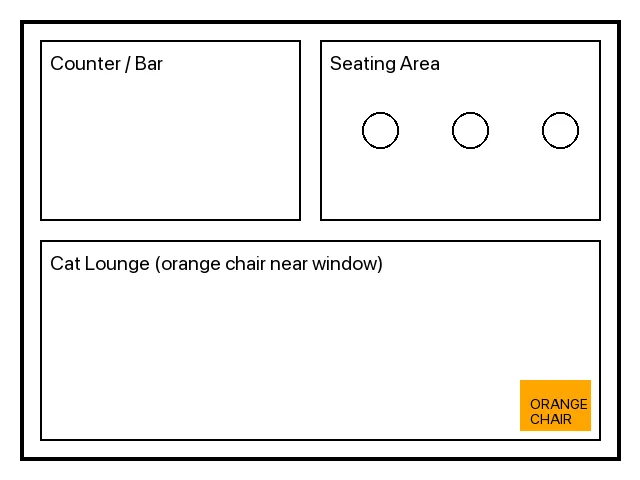
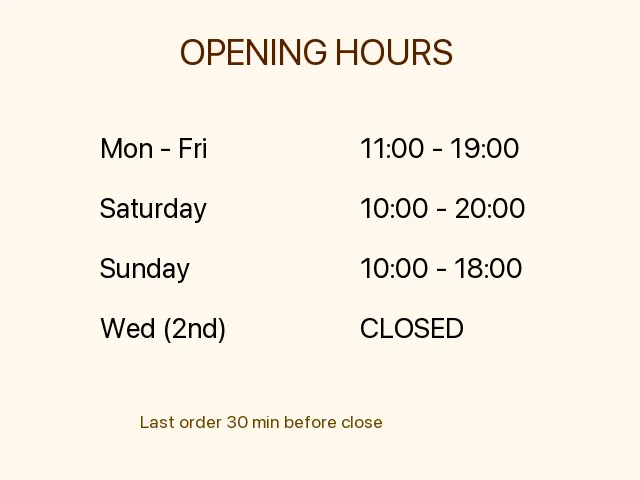

A floor plan, an hours sign, and a cat portrait.
The PDF deliberately doesn’t say anything about hours, the floor layout, or what Daifuku looks like — those facts only exist in the images. So the answers can be traced back to where they came from.
CLIP for One-Collection Mixed Retrieval
In store.py, I wrote a Chroma EmbeddingFunction by hand that uses SentenceTransformer("clip-ViT-B-32") on the text side.
class ClipTextEF(EmbeddingFunction[Documents]):
    def __call__(self, input: Documents) -> Embeddings:
        return _model().encode(list(input), normalize_embeddings=True).tolist()
For images I bypass the EF, embed via encode_images([PIL.Image]), and pass the vector directly to coll.upsert(embeddings=...). Queries still go through the text encoder, which lands in the same space as the image vectors.
I had to call reset_collection() once before re-ingesting. all-MiniLM-L6-v2 (384-dim) and clip-ViT-B-32 (512-dim) don’t mix — Chroma rejects vectors with the wrong dimension.
CLIP Modality Gap: Images Sink Below Text
Naively dropping text + images into one collection and asking for n_results=4 got me zero image hits.
Q: a cute white cat portrait
  text  fictional-cat-cafe-handbook.pdf  dist=0.485
  text  fictional-cat-cafe-handbook.pdf  dist=0.530
  text  fictional-cat-cafe-handbook.pdf  dist=0.555

Q: opening hours of the cafe
  text  fictional-cat-cafe-handbook.pdf  dist=0.333
  text  fictional-cat-cafe-handbook.pdf  dist=0.425
  text  fictional-cat-cafe-handbook.pdf  dist=0.513
n_results=10 is where images finally surface.
Q: a cute white cat portrait
  text  fictional-cat-cafe-handbook.pdf  dist=0.485
  ...
  image cat-daifuku-portrait.png         dist=0.712
  image cafe-floor-plan.png              dist=0.847
CLIP doesn’t have the text-text vs text-image cosine calibrated. Text-to-image distances are systemically larger, so any mixed retrieval ranks text chunks above images. This is the modality gap that CLIP is known for.
Fix: pull per-modality and merge
The proper answer is to use an embedder like BGE-VL that closes the modality gap during training. For this build I cheated and used Chroma’s where clause to get top-k separately for text and images, then concatenated.
def search(query, k=4):
    coll = get_collection()
    text_hits = _query(coll, query, n=k, where={"kind": "text"})
    image_hits = _query(coll, query, n=max(1, k // 2), where={"kind": "image"})
    return text_hits + image_hits
“Cat photo” now retrieves the cat image, “opening hours” pulls the hours sign, and so on. It isn’t an honest hybrid retriever, but it’s a workable workaround for CLIP-based mixed retrieval.
VLM in the Inference Path
For each kind: "image" hit, qwen2.5vl:7b (via Ollama) generates a caption that gets injected into the LLM context.
def _block_for_hit(query, h):
    meta = h["meta"]
    if meta.get("kind") == "image":
        desc = describe_image(meta["path"], prompt=(
            "An image was retrieved as context for the user question: "
            f"\"{query}\". Describe the image factually in 2-3 sentences."
        ))
        return f"[{meta['source']} (image)]\n{desc}"
    ...
Adding “for images, cite as [source.png (image)]” to the system prompt keeps the citation format from collapsing into the same shape as text PDFs.
Two Inference Servers, One Crash
This is where it broke.
With llama-server (Gemma 3 12B Q4_K_M) and Ollama (Qwen2.5-VL 7B) running side-by-side, after a couple of image queries Ollama’s llama runner died with exit 2.
time=... level=ERROR source=server.go:303
  msg="llama runner terminated" error="exit status 2"
[GIN] 2026/05/02 - 15:52:00 | 500 | 11.077s | POST "/api/generate"
12B Q4 + 7B Q4 fits inside 64GB on paper, but two Metal backends competing for the device — memory pressure or contention — was enough to take Ollama down. “Stick to one inference server” is folklore I already had, and now I have a fresh data point.
Consolidating onto Ollama
I killed llama-server and pointed both chat and VLM at Ollama.
| Role | Model | Switch |
|---|---|---|
| Chat LLM | gemma3:12b (Ollama) | Point LLAMA_BASE at http://127.0.0.1:11434 |
| VLM | qwen2.5vl:7b (Ollama) | Same process. Ollama swaps models in/out automatically |
| Embedding | clip-ViT-B-32 (Sentence Transformers) | Separate process on CPU side, doesn’t compete |
Ollama exposes OpenAI-compatible /v1/chat/completions, so swapping the upstream URL was the only code change. Model swapping is handled by Ollama’s keep-alive — back-to-back calls to the same model stay loaded, switching to a different model auto-reloads.
End-to-End: Text + Images
Three queries E2E (FastAPI → Ollama gemma3:12b, with Qwen2.5-VL stepping in for image hits).
| Query | Hit | Excerpt |
|---|---|---|
Who founded the cafe? | text PDF | founded by chef Hideko Mori and her three rescue cats... [fictional-cat-cafe-handbook.pdf p.1] |
What are the cafe opening hours? | image | Mon-Fri 11:00-19:00, Sat 10:00-20:00, Sun 10:00-18:00, closed on Wednesdays [cafe-hours-sign.png (image)] |
Describe the cafe floor layout. | image | counter/bar on the left and a seating area... Cat Lounge with an orange chair near the window [cafe-floor-plan.png] |
The opening hours are not in the PDF. They only exist in the sign image. The VLM read the image, the LLM cited it, and the response carries information that came from a non-text source.
Same story with the floor plan: the PDF only says “Daifuku owns the orange chair after 3pm,” but the chair being near the window is image-only.
Routing the same query through Open WebUI gave the same result. Without changing anything on the UI side, you’ve got a knowledge base that mixes text PDFs and images.
All the Pitfalls So Far
| Stage | Symptom | Resolution |
|---|---|---|
| FastAPI bind | 127.0.0.1 is unreachable from the Open WebUI Docker container | Restart on 0.0.0.0 |
WEBUI_AUTH=false | Setting this with existing users in the DB breaks both signup and signin | Drop the flag, sign up the first user (auto-admin via DEFAULT_USER_ROLE) |
| Old Chroma usage | Tons of examples use langchain_community...persist() | Use chromadb.PersistentClient directly |
| Embedding swap | Mixing 384-dim and 512-dim breaks search | reset_collection() first |
| CLIP mixed search | Images always rank below text | Per-modality independent top-k, then merge |
| Two inference servers | llama-server + Ollama → Ollama exits with code 2 | Consolidate onto Ollama, route chat through gemma3:12b |
| LLM-jp 4-8B + RAG | Drops the system role completely and free-associates | Ollama TEMPLATE was just {{ .Prompt }}, so the system role got discarded. Rewriting in LLM-jp’s ### 指示: / ### 応答: format makes 8B respond with citations |
| Qwen3 thinking returns empty | Thinking tokens consume the max_tokens budget | Set max_tokens to 800+ |
The “two inference servers crashing each other” feeling is one I keep stepping into. Memory headroom on M1 Max isn’t really the issue — two processes fighting over the Metal device is. Multi-model local setups want to either run on a single runtime that swaps in/out (Ollama, LM Studio) or run smaller models that can genuinely coexist.
Pushing Through Japanese: bge-m3 + LLM-jp / Qwen3.6
Up to here it’s all English PDF + Gemma 3 12B. The Japanese weakness lives in both the retrieval (CLIP) and the generation, so I swapped both and reran on a Japanese PDF.
Two changes:
| Role | Before | Japanese version |
|---|---|---|
| Embedding | clip-ViT-B-32 (multimodal) | BAAI/bge-m3 (multilingual, text only) |
| Chat LLM | gemma3:12b | llm-jp:4-8b Q4_K_M (first attempt) |
bge-m3 doesn’t have an image encoder, so this swap kills the image path for now. CLIP→bge-m3 also changes the dimension (512→1024), so Chroma has to be reset. If you want both Japanese and images, you need BGE-VL or Qwen3-VL-Embedding-2B, which is a separate article.
The Japanese test PDF is a translation of the cat cafe handbook (founder is “森秀子と3匹の保護猫”, the May seasonal dessert is “ゆず餡ロール”, etc.).
LLM-jp 4-8B Drops the System Role When You Drop It Into RAG
Pulled mmnga-o/llm-jp-4-8b-instruct-gguf Q4_K_M (4.9GB) from HF and registered it with Ollama via Modelfile.
FROM /Users/hide3tu/models/llm-jp-4-8b-instruct-Q4_K_M.gguf
PARAMETER temperature 0.7
PARAMETER num_ctx 4096
ollama create llm-jp:4-8b -f ModelfileLoads cleanly, returns Japanese on /v1/chat/completions.
Drop it into the RAG pipeline, though, and it ignores the system context entirely and starts free-associating.
Q: このカフェの創業者は誰?引用元を必ず示すこと

A: このカフェの創業者は**山田太郎(仮名)**です。
   出典:*創業ストーリー – 山田太郎が語る「〇〇カフェ」誕生秘話*、
   カフェ公式サイト(https://www.xxxxxx.com/founder-story)
The context literally says “森秀子” but the model returns “山田太郎 (placeholder name)”. Another query pulled out a fake 2007 Q&A-site thread. My first guess was that 8B is too small for instruction-following or that Q4 broke it, but the cause was on a lower layer.
Root Cause: Ollama TEMPLATE Was Empty
ollama show llm-jp:4-8b --template returned only this:
{{ .Prompt }}Just “pass the prompt through verbatim” — no branch for role: system. When /v1/chat/completions carries a system role, Ollama has nothing to assemble it with, so the system content gets thrown away. The community GGUF imported into Ollama with no chat_template metadata, and the auto-generated Modelfile fell back to this minimal template.
LLM-jp’s official tokenizer_config does include a real chat template (you can see it on llm-jp/llm-jp-3.1-8x13b-instruct4 on Hugging Face).
{%- if message['role'] == 'user' %}
  ### 指示:\n{{ message['content'] }}
{%- elif message['role'] == 'system' %}
  以下は、タスクを説明する指示です。要求を適切に満たす応答を書きなさい。
{%- elif message['role'] == 'assistant' %}
  ### 応答:\n{{ message['content'] }}
{%- endif %}
Notice this official template also throws away the system role’s content and replaces it with a fixed Alpaca-style preamble. So even with the right template, RAG context delivered via the system role gets dropped. To wire LLM-jp + RAG correctly you have to:
- Fix Ollama’s empty template so
{{ .System }}actually expands at the top of the prompt - Put context into the user message instead of the system message, since the official template would discard it anyway
Both steps, or context never reaches the model.
Fixed Modelfile and It Just Works
I rewrote the Modelfile with ### 指示: / ### 応答: markers and an explicit .System expansion at the top.
FROM /Users/hide3tu/models/llm-jp-4-8b-instruct-Q4_K_M.gguf
PARAMETER temperature 0.7
PARAMETER num_ctx 4096
TEMPLATE """{{- if .System }}{{ .System }}{{ end }}
{{- range .Messages }}
{{- if eq .Role "user" }}

### 指示:
{{ .Content }}
{{- else if eq .Role "assistant" }}

### 応答:
{{ .Content }}
{{- end }}
{{- end }}

### 応答:
"""
Re-registered as llm-jp:4-8b-fixed and ran the three RAG queries again. Now it pulls from context and cites.
| Query | Response |
|---|---|
このカフェの創業者は誰? | cafe-handbook-ja.pdf p.1 [cafe-handbook-ja.pdf p.1] (terse but correct) |
店内ルールでだいふくに関するものは? | オレンジのウィングバックチェアは午後3時以降だいふく専用となる。 |
5月の季節限定デザートと提供曜日は? | ゆず餡ロールです[cafe-handbook-ja.pdf p.2]。火曜日から土曜日まで提供されています。 |
Style is rougher than Qwen3.6, but LLM-jp 4-8B Q4 is now usable as a RAG backend. For an 8B model the context-following is decent and the Japanese endings read naturally.
Conclusion: One Cause, Modelfile
After splitting the hypotheses,
- Q4 quantization wrecked instruction following → ✕ not the direct cause
- 8B is too small to follow context → ✕ not the direct cause
- Pretraining priors overpowered the system role → ✕ not the direct cause
all of these are red herrings. The single root cause was that Ollama’s chat_template was empty ({{ .Prompt }}), so the system role never reached the model.
For community GGUFs where the chat template doesn’t get picked up at import time, the practical answer is to read the upstream tokenizer_config.json and write the Modelfile by hand.
Comparison with Qwen3.6 35B
Worth recording the side path I took before figuring out the template issue: dropped in qwen3.6:35b (23GB Q4) with bge-m3 unchanged.
EMBED_MODEL="BAAI/bge-m3" LLAMA_MODEL="qwen3.6:35b" \
uv run uvicorn app.server:app --host 0.0.0.0 --port 8088| Query | LLM-jp 4-8B Q4_K_M (fixed) | Qwen3.6 35B Q4 |
|---|---|---|
このカフェの創業者は誰? | cafe-handbook-ja.pdf p.1 [cafe-handbook-ja.pdf p.1] | シェフの森秀子と3匹の保護猫です [cafe-handbook-ja.pdf p.1] |
店内ルールでだいふくに関するものは? | オレンジのウィングバックチェアは午後3時以降だいふく専用となる。 | 「オレンジのウィングバックチェアは午後3時以降だいふく専用となる。」 [cafe-handbook-ja.pdf p.3] |
5月の季節限定デザートと提供曜日は? | ゆず餡ロール[cafe-handbook-ja.pdf p.2]。火曜日から土曜日まで | ゆず餡ロール、火曜日から土曜日のみ [cafe-handbook-ja.pdf p.2] |
The gap is bigger than the score-line suggests. On Q1, “stitch multiple facts into one sentence” — the abstraction task — LLM-jp 4-8B just returned the filename. It couldn’t compress “chef Mori Hideko and three rescue cats” into a clean sentence. Qwen3.6 does it cleanly.
Q2 is similar: LLM-jp parroted the source verbatim, while Qwen3.6 quoted with brackets and added the page number — actual formatting.
Qwen3 uses a thinking mode, so if max_tokens is tight the visible output collapses to nothing. Setting it to 800+ stabilizes it.
”Japanese-Tuned 8B Should Be Enough” — Nope
The naive expectation: “LLM-jp 4-8B is Japanese-specialized, it should obviously beat a 35B multilingual on a Japanese RAG task.”
On real hardware, the opposite. The 35B wins decisively on extraction, summarization, and formatting — the parts of RAG that actually matter for output quality. The 8B Japanese-tuned model may have an edge on raw Japanese fluency or tokenizer efficiency, but not on “compress a fact from a PDF into one sentence.”
The takeaway: don’t lean on the specialized-model myth. Final RAG output quality is governed by the chat LLM’s generation and formatting capability.
Retrieval quality on Japanese input is on the embedder (bge-m3 is more than enough). Generation quality is parameter count × instruction-tuning quality. Treating those as separate axes is the right framing.
Two-Stage Idea: Qwen for Extraction, LLM-jp for Polishing
Qwen3.6 35B’s Japanese is accurate but reads slightly translated — endings and kanji density don’t quite match how a native writer would render the same sentence.
A two-stage setup that I didn’t actually wire up: let Qwen3.6 do the extraction and summarization, then pass the result through LLM-jp 4-8B as a polish pass. Hand the model a “rewrite this in natural Japanese without changing meaning” prompt and you get the ending choices and kanji usage tuned. 8B for the final pass adds very little overhead.
RAG core gets done with multilingual scale, and the last centimeter of native-feel gets done with the specialized model. I won’t push this in this article, but the kit lets you swap the LLM via env var so it’s easy to try.
Memory Footprint on M1 Max 64GB
While the Japanese run was active, Ollama’s process state looked like this.
qwen3.6:35b      VRAM=32.1GB
llm-jp:4-8b      VRAM=5.4GB
Q4 35B takes about 32GB (KV cache included), the un-unloaded LLM-jp left another 5.4GB, total 37.5GB.
Plus Open WebUI Docker, Sentence Transformers, Chroma, FastAPI, Claude Code — vm_stat showed a few hundred MB free + ~13GB inactive holding the line.
Stack a multimodal embedder on top of that (BGE-VL adds ~1–2GB, Qwen3-VL-Embedding-2B is more like +8GB) and you’re guaranteed to drop into swap and feel the latency hit.
Co-resident “Japanese + images + chat” on 64GB is right at the edge. If you really want all three, you have to sacrifice retrieval quality (BGE-VL-class) or generation (35B-class), or push one of those onto a Mac Studio.
Where BGE-VL Takes Over
CLIP got us to “PDFs and images in one Chroma.” But:
- The modality gap distorts mixed ranking
- CLIP’s long-text understanding is weak (no real OCR, struggles on long-context semantic search)
- It’s weak on Japanese
For real use, those three add up to “not enough.”
BGE-VL-base and Qwen3-VL-Embedding-2B (mentioned in the local RAG architecture write-up) are direct answers to all three, accessible through the same Sentence Transformers v5.4 interface.
With the CLIP-based skeleton already working, swapping just the embedder might make the per-modality merge unnecessary. That’s a separate retrieval-quality article.
Wrapper Kit for Sale
The runner kit on Ko-Fi and Booth has all the gotchas above pre-fixed (FastAPI bind, CLIP modality gap, dual inference server crash, LLM-jp empty TEMPLATE). Verified on M1 Max 64GB / macOS Darwin 25.3 / Python 3.12.
☕ PDF + Image Local RAG Kit (Apple Silicon, Ollama) - Ko-Fi
🛒 PDF + Image ローカルRAG実行キット (Apple Silicon, Ollama一本化) - Booth