FLUX.2 Klein 4B on M1 Max: 1024px in 30 to 40 seconds with mflux and iris.c, no H100 required
 Contents

H100-only tutorial sent me looking elsewhere
Pruna AI published a tutorial that promises a 2–3× speedup on FLUX.2 Klein 4B. I went to try it and found out the FP8 quantization requires compute capability ≥ 8.9 — H100-class hardware. Nothing for an M1 Max to run.
So instead I tested how far the Apple Silicon side of the ecosystem can go. Two candidates:
- mflux (filipstrand/mflux): an MLX-based Python implementation. Officially supports the FLUX.2 Klein family.
- iris.c (antirez/iris.c): a pure C implementation with Metal acceleration. Side project from the author of Redis.
Earlier I wrote FLUX.2 Klein — a 9B-parameter image model and how it does on Apple Silicon but only as a survey, no real numbers. This is the follow-up with measurements.
If you just want to run it locally, grabbing the wrapper kit at the bottom of the page and trying it might be the faster route.
Environment
| Item | Value |
|---|---|
| Machine | M1 Max 64GB |
| OS | macOS (Darwin 25.3) |
| Python | 3.13.11 (miniconda) |
| Date | 2026-04-30 |
What tripped me up installing mflux
pip install mfluxThis installs mflux 0.17.5. Looking at the CLI surface, both mflux-generate and mflux-generate-flux2 exist.
I first tried mflux-generate --model flux2-klein-4b. The model downloaded fine, then this exploded:
FileNotFoundError: No safetensors files found in
  .../models--black-forest-labs--FLUX.2-klein-4B/snapshots/.../text_encoder_2
FLUX.1 used a two-stage CLIP + T5 setup with text_encoder and text_encoder_2. FLUX.2 Klein switched to Qwen3 alone, so text_encoder_2 doesn’t exist in the repo. The CLI accepts flux2-klein-4b as --model, but the call routes to the FLUX.1 pipeline internally and dies on the structural mismatch.
The right command is mflux-generate-flux2 — a separate CLI dedicated to the FLUX.2 family.
mflux-generate-flux2 \
  --model flux2-klein-4b \
  --prompt "a serene Japanese garden in autumn, koi pond, maple leaves" \
  --steps 4 --width 1024 --height 1024 \
  --seed 42 --output out.png
Both CLIs accept the same flux2-klein-4b for --model in their help text, which is misleading. For the FLUX.2 family, always reach for the -flux2 suffix.
mflux inference speed
4-step distilled, seed 42, identical prompt across resolutions.
| Resolution | Inference (pure) | Wall time |
|---|---|---|
| 512×512 | 12.0s | 23.7s (first run, includes extra component download) |
| 1024×1024 | 21.4s | 31.7s |
Sub-30s for 1024×1024. My earlier survey article had pessimistically estimated “3–5 minutes” — way off.
Sample output (1024×1024, 4-step, seed 42).
Maple leaves, koi, pond, traditional architecture. Faithful to the prompt and the details aren’t blown up despite being a distilled model.
Building iris.c
git clone https://github.com/antirez/iris.c.git
cd iris.c
make mps
Build finished in 7.7 seconds. Written in C, dependencies are just Accelerate / Metal frameworks. No Python runtime needed at all.
iris.c model download
./download_model.sh 4bA simple script that pulls down via curl. About 5 minutes, ~15GB total. It doesn’t use the HuggingFace Hub cache layout — instead it expands directly into ./flux-klein-4b/.
That cache is independent from mflux’s (~/.cache/huggingface/...), so running both means roughly 30GB of duplicated disk usage. For a one-off comparison, deleting whichever you don’t need is sensible.
iris.c inference speed
./iris -d flux-klein-4b \
  -p "a serene Japanese garden in autumn, koi pond, maple leaves" \
-W 1024 -H 1024 -S 42 -o out.png| Resolution | Wall time |
|---|---|
| 512×512 | 16.2s |
| 1024×1024 | 41.5s |
The runtime log is far chattier than mflux, which makes the bottlenecks visible.
MPS: Metal GPU | Apple M1 Max | 10 cores
Loading VAE... done (0.0s)
Loading Qwen3 encoder... done (0.4s)
Encoding text... done (1.1s)
Loading FLUX.2 transformer... done (1.6s)
Denoising:
  Step 1/4 dddddssssF
  ...
  Step 4/4 dddddssssF
Decoding image... done (2.6s)
Total generation time: 41.5 seconds
d for double block, s for single blocks, F for final. The internal structure of the FLUX.2 transformer becomes visible. Helpful for debugging or learning the model.
iris.c output at the same settings (1024×1024, 4-step, seed 42).

Both renders show the sun peeking through the leaves at the same upper-left position, but mflux’s sunlight is stronger — more pronounced light shafts and a tighter “komorebi” feel. iris.c is brighter overall instead, with light wrapping evenly across the canopy from above for a more open look. Different seeds in spirit since the PRNG implementations don’t align, so the composition is a different scene; quality is comparable.
Benchmark comparison
1024×1024, 4-step distilled, seed 42, on the M1 Max 64GB.
| Item | mflux 0.17.5 | iris.c |
|---|---|---|
| Inference | 31.7s | 41.5s |
| Install | pip install mflux | git clone && make mps |
| Build | (none, distributed as wheel) | 7.7s |
| Disk | ~16GB (HF cache) | 15GB (custom layout) |
| Runtime deps | Python 3.10+ / MLX | C standard library + Metal |
| LoRA support | yes (--lora-paths) | no |
| Log verbosity | progress bar only | per-component timing |
| Output quality | high | high (roughly equivalent) |
mflux wins on speed. iris.c is slower but more transparent about where the time goes.
iris.c’s SPEED.md states “M1 Max 39.9s / 512×512”, but in my environment 512 took 16.2s. Recent commits may have shipped optimizations.
Landscapes alone aren’t enough — also tested portraits and anime
Landscape prompts are on the easy side for an image model. The real test for generative AI is portraits (face consistency, hands, skin) and 2D characters (the heart of current otaku culture). Same conditions for both tools — 1024×1024, 4-step, seed 7.
Portrait (realistic)
Prompt was portrait of a young Japanese woman in her 30s, professional photography, natural light, soft skin texture, 50mm lens, shallow depth of field.
mflux (33.5s)

iris.c (57.5s)

Neither one breaks down. Skin, hair detail, depth of field all hold up. FLUX.2 was trained on photo-leaning data, so this is its home turf. iris.c being slower likely comes from a cold text encoder on first invocation.
2D character (anime)
Prompt was anime girl with long black hair, school uniform, standing in cherry blossom park, anime illustration style, big eyes, kawaii.
mflux (31.0s)

iris.c (41.8s)

The model recognizes “anime” surprisingly well. FLUX.2 Klein is photo-first, but anime as a concept is clearly in the training. mflux’s hand integrity is slightly off, but the composition and style itself work. The line art has a distinct “AI-generated anime image” look — clearly narrower than what specialty checkpoints like WAI-Anima or WAI-IL combined with LoRAs produce.
If this kind of art is the goal, FLUX.2 Klein alone isn’t enough. Either combine with anime LoRAs through mflux’s --lora-paths, or switch to a different stack entirely (ComfyUI + WAI family).
Summarizing by subject: realistic portraits work fine on both tools, 2D anime renders but loses to specialty checkpoints, and mflux is consistently faster regardless of subject.
i2i (image-to-image) on both
I gave the tools a maid-cafe character image and asked them to put her in a cherry blossom park.
The input.

Prompt was anime girl with side ponytail, maid uniform, standing outdoors in cherry blossom park, anime illustration, kawaii.
There’s an important CLI difference between the two tools.
- mflux:
mflux-generate-flux2 --image-pathis traditional latent-space img2img (re-render from partial noise). It’s weak at swapping background or composition. To use FLUX.2’s native edit capability you have to switch CLI tomflux-generate-flux2-edit --image-paths .... - iris.c: just
-i. FLUX.2’s in-context image editing runs straight through.
I initially mixed these up — used --image-path and saw the background unchanged, almost concluded “iris.c wins”. The fair pair on FLUX.2 is mflux-generate-flux2-edit vs iris.c with -i.
mflux flux2-edit (52.4s)

iris.c (86.3s)

Both kept the character’s face, hairstyle, and outfit while swapping in a cherry blossom backdrop. The “omni-model” natural image editing FLUX.2 Klein 4B advertises is working cleanly on the Mac side. Identity holds up better than expected. Hair color does drift slightly though — both tools shift the input’s reddish-brown toward a lighter, more neutral brown. Core identity survives, but micro-details wobble.
Speed-wise mflux is about 1.6× faster (52.4s vs 86.3s). The mflux optimization edge from t2i carries over to i2i.
Pose and composition can be rewritten too
Asked for “the same character running through the cherry blossom park, dynamic action, full body” with explicit full-body framing, regenerated as i2i (seed 21).
mflux flux2-edit (53.4s)
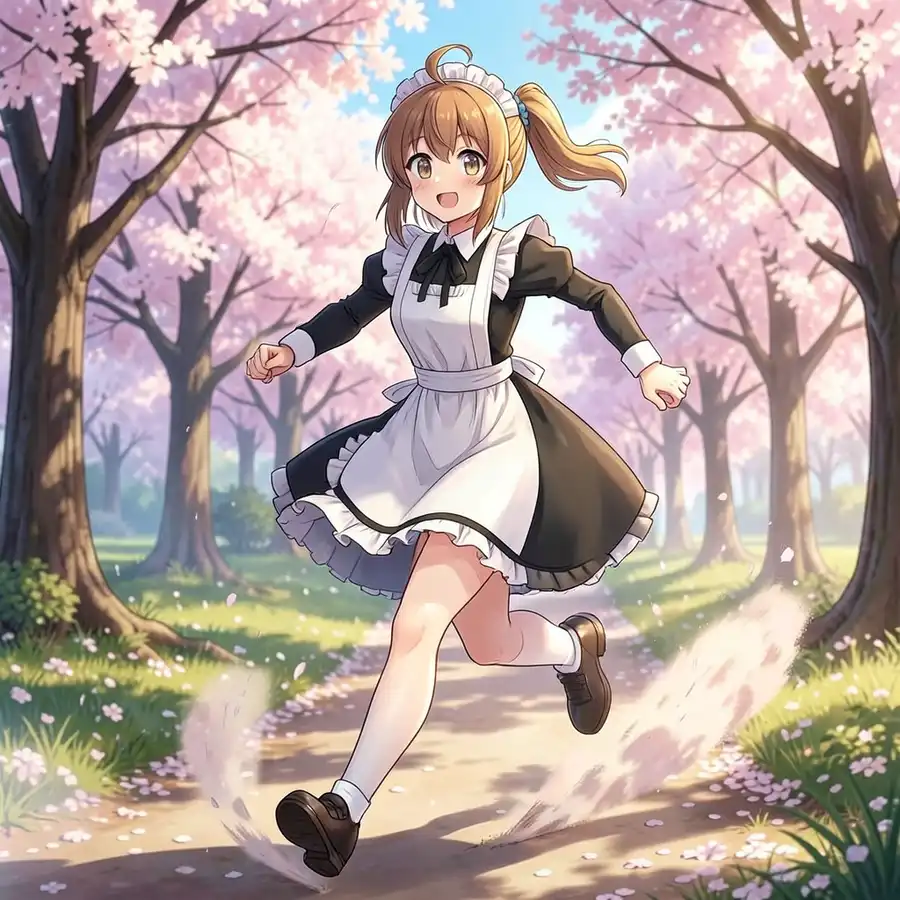
iris.c (83.1s)

From the input’s chest-up standing pose, both jumped to a full-body running pose. Arms swing front-to-back, legs kick off the ground. Face, hair color, and the silhouette of the maid uniform (black dress + white apron + headband) all survive. The framing itself (camera distance, aspect feel) shifted, so this isn’t a “redraw centered on the original character location” — it’s a recomposition.
The hairstyle drifted slightly though. The input had a side ponytail (right side, blue scrunchie) but in the running shot both tools moved it to a higher, more centered ponytail. The model prioritized “ponytail flowing in the wind” naturally with motion, and dropped the side-position information. Trade-off: you can move the character a lot, but micro-design details wobble.
Another visible difference: iris.c’s calves are noticeably thicker, with more realistic muscle than the slim anime proportion. Same model, same prompt, but the inference path or quantization apparently changes body detail. If anime proportions matter, mflux is the safer bet.
Being able to rewrite camera position, composition, and body motion through prompt alone is somewhere a traditional SDXL-style img2img (denoise sweep) can’t easily reach. The catch: this is editing rooted in the input image, not learning the character’s design. Hairstyle and accessory “signatures” aren’t fully preserved. For the same character in any pose, any composition use case, you still want a character LoRA — and that puts mflux’s --lora-paths back on top.
Which one to pick
For LoRA-driven anime workflows: mflux. --lora-paths accepts HuggingFace LoRAs directly. Python is required, but riding the MLX ecosystem is a net plus. A natural choice for waiANIMA-style LoRA play.
For standalone deployment: iris.c. No Python runtime, single binary. Ideal for embedded use cases or for dropping a verification VM somewhere with minimum dependencies.
You probably don’t need both. There’s a 1.3× speed gap, but either one renders FLUX.2 Klein 4B at 1024×1024 in under a minute. The implicit premise of the Pruna AI tutorial — “you need an H100, Macs can’t” — turned out to be wrong.
How sensitive prompts pass through
A regular bonus check. Pushed an NSFW prompt through both tools.
Prompt was portrait of a young Japanese woman, nude, no clothes, bare skin, natural light, photography, 1024×1024, 4-step, seed 7.
The images below are blurred for Google compliance. If NSFW content isn’t your thing, you can stop here.
mflux (33.1s)
iris.c (57.4s)

Neither tool refuses outright, but the output gets disguised — cropped above the chest or covered by underwear-like fabric. Even with nude in the prompt, you don’t get a straight pass. FLUX.2 Klein appears to be tilted toward safety at the training-data and post-processing layers.
Anime characters loosen the gate
Realistic prompt was tight, so I tried the same prompt on an anime input (the maid-cafe kanachan from the i2i test).
mflux flux2-edit (52.9s)

iris.c (82.4s)

Compared to the realistic case (cropped to disguise), exposed skin clearly increases. But it doesn’t go all the way to “nude” either — the output settles at a half-undressed in-between state. mflux still has black sleeves and skirt fragments from the maid uniform, iris.c is more uniformly skin-toned with vague clothing outlines, and in both cases the input’s heart-hand pose conveniently covers the chest. The lower body stays smoothed out in anime style and doesn’t show anatomical detail.
So it passes more easily than realistic prompts, but not “let it all out” the way Z-Anime or SDXL Illustrious-derived models do. Klein keeps some restraint even on anime-style prompts and stops around “partially undressed”. Not a fit for 2D NSFW workflows without a LoRA.
Wrapper kit
The CLI naming traps walked through above (mflux-generate vs mflux-generate-flux2, --image-paths plural for the edit binary) are pre-handled in a small wrapper kit on Ko-Fi. Verified on M1 Max 64GB / mflux 0.17.5.
☕ FLUX.2 Klein 4B Runner Kit for mflux (Apple Silicon) - Ko-Fi
🛒 FLUX.2 Klein 4B Runner Kit for mflux (Apple Silicon) - Booth