Z-Anime tested on M1 Max ComfyUI with t2i, i2i and NSFW results
 Contents
I came across SeeSee21/Z-Anime on Hugging Face.
From the name alone it’s hard to tell whether it belongs to the Z-Image family or is a separate Z-Image-flavored model.
Z-Anime is an anime-focused full fine-tune of the Z-Image Base architecture.
It is not a derivative checkpoint made by merging a LoRA — it’s a model family trained from Z-Image Base toward anime generation.
Following the framing from the Z-Image overview and the RunPod feasibility check, this is a case of “a full anime model riding on Z-Image’s lightweight body and natural-language prompt flow.”
Unlike the Z-Image i2i pixel-art conversion experiment, this one is leaning more toward txt2img anime generation than style transfer.
Not a LoRA merge — a full fine-tune of Z-Image Base
The model card describes Z-Anime as a “full fine-tune of Alibaba’s Z-Image Base architecture.”
The base is S3-DiT, the same Single-Stream Diffusion Transformer family as Z-Image. The parameter count is also treated as Z-Image Base–derived 6B-class.
This is a fairly big point.
SDXL-based anime models are not what was brought into Z-Image, so SDXL LoRAs and Illustrious-family assets are not compatible.
On the other hand, it sits squarely on the Z-Image LoRA training and ComfyUI workflow flow.
Z-Anime ships in the following lineup.
| Variant | Role | When to use |
|---|---|---|
| Z-Anime Base | High-quality version | Final-pass generation, negative prompts, fine control |
| Z-Anime Distill-8-Step | 8-step version | Daily use, balance of speed and quality |
| Z-Anime Distill-4-Step | 4-step version | Bulk trials, rough drafts |
| GGUF | Quantized version | Low VRAM, CPU, AMD-friendly setups |
| AIO | Single-file version | Quick load in ComfyUI |
| Diffusers | For Python | Use with ZImagePipeline.from_pretrained() |
Base recommends 28–50 steps, CFG 3.0–5.0.
Negative prompts are effective.
Distill-8-Step and Distill-4-Step are meant to be used at CFG ~1.0.
Negative prompt effectiveness is limited.
This matches the character of distilled models seen in the Z-Image-Distilled article — speed comes at the cost of fine control range.
For local use, pick AIO or GGUF
If you’re running locally, the first decision is AIO or the standard configuration.
| Format | Placement | Pros | Notes |
|---|---|---|---|
| AIO FP8 | models/checkpoints/ | Single file, easy | About 10.5GB |
| Standard FP8 | models/diffusion_models/ + models/clip/ + models/vae/ | Closer to ComfyUI’s normal layout | Splits model, text encoder, VAE |
| GGUF Q8_0 | models/unet/ | Quality-leaning quantization | Requires ComfyUI-GGUF |
| GGUF Q4_K_S | models/unet/ | About 4.5GB, light | Possible quality and speed degradation |
| Diffusers | Loaded from Python | Easy to script | Detour for ComfyUI use |
The full Z-Anime repo is 203GB.
You’re not supposed to download all of it.
For a quick look in ComfyUI, picking one of AIO FP8 8-step or Base is the easiest route.
The “8GB VRAM compatible” wording does not mean “load everything into VRAM with room to spare without thinking.”
The Z-Image family uses Qwen 3 4B as its text encoder, so where the encoder and VAE live matters in addition to the model itself.
With an 8GB GPU, pick FP8 or GGUF and assume ComfyUI’s low-VRAM settings or offloading.
A 16GB+ NVIDIA GPU makes FP8 setups practical.
24GB+ puts Base BF16 on the table.
On an Apple Silicon environment like an M1 Max 64GB, the memory capacity is enough. Actual measurements are in the run log section below.
Where to place files in ComfyUI
The AIO version is a single file, so it’s simple.
ComfyUI/models/checkpoints/
├── z-anime-base-aio-fp8.safetensors
└── z-anime-distill-8step-aio-fp8.safetensors
The standard version follows Z-Image’s normal layout.
ComfyUI/models/
├── diffusion_models/
│   └── z-anime-base-fp8.safetensors
├── clip/
│   └── qwen_3_4b-fp8.safetensors
└── vae/
    └── ae.safetensors
The GGUF version uses ComfyUI-GGUF.
ComfyUI/models/
├── unet/
│   └── z-anime-base-q4_k_s.gguf
├── clip/
│   └── qwen_3_4b-fp8.safetensors
└── vae/
    └── ae.safetensors
The model card also includes an official workflow workflows/Z-Anime-Workflow-v1.json.
It has switches for Base, Distill, GGUF, and AIO, so loading it as-is is the fastest start.
Prompts lean natural-language, not Danbooru tags
Z-Anime recommends natural-language prompts.
Rather than tag strings like 1girl, silver hair, shrine maiden, it’s better to write outfit, lighting, background, expression, and composition as sentences.
This is a bit different from the SDXL anime model feel.
Illustrious and WAI-family models have strong tag-string assets, but Z-Anime is better viewed as a model that uses Z-Image-derived natural-language understanding.
If you’re tightening the result with Base, the direction is as below.
| Adjustment | Base | Distill-8 / Distill-4 |
|---|---|---|
| Steps | 28–50 | 8 / 4 |
| CFG | Centered around 3.0–5.0 | Centered around 1.0 |
| Negative prompts | Effective | Limited effect |
| Trial count | Fewer | Can run more |
| Use | Final pass | Roughs, bulk, candidate generation |
If you want to nail down faces or hands in anime, don’t judge solely from the 4-step output.
4-step is fast, but there’s little room to fix breakdowns.
Looking at style and composition with Base or 8-step, then going back to Base when needed, is the safer flow.
What’s interesting about it as a Z-Image derivative
The first time I looked into the Z-Image family, the strongest impression was “an open image-generation model lighter than FLUX.”
Then Z-Image-Distilled, BEYOND_REALITY_Z_IMAGE, pixel-art LoRAs, and manga-style workflows came out, and now we have an anime-focused full fine-tune.
The asset depth is not as thick as SDXL, but on the Z-Image side, fine-tunes and quantizations turn over quickly.
What’s interesting about Z-Anime is not just “anime images come out” — it’s that the Z-Image Base lineage now has Base, distilled, AIO, GGUF, and Diffusers all lined up for anime, all at once.
To try it locally, start with z-anime-distill-8step-aio-fp8.safetensors to get the feel.
When you want to tighten quality, move to Base FP8 or Base BF16.
For 8GB GPUs or AMD-leaning environments, starting from GGUF makes sense as the order.
ComfyUI workflow for the AIO version
The AIO version packs the model body, text encoder (Qwen 3 4B), and VAE into a single safetensors file.
In ComfyUI, a single CheckpointLoaderSimple node loads everything.
In the standard configuration, you wire UNETLoader + CLIPLoader + VAELoader separately, but AIO doesn’t need that.
You can build the workflow with the minimum number of nodes.
graph TD
    CKP["CheckpointLoaderSimple<br/>z-anime AIO FP8"]
    POS["CLIPTextEncode<br/>positive prompt"]
    NEG["CLIPTextEncode<br/>negative prompt"]
    LAT["EmptyLatentImage"]
    KS["KSampler"]
    DEC["VAEDecode"]
    SAVE["SaveImage"]

    CKP -->|MODEL| KS
    CKP -->|CLIP| POS
    CKP -->|CLIP| NEG
    CKP -->|VAE| DEC
    POS -->|CONDITIONING| KS
    NEG -->|CONDITIONING| KS
    LAT -->|LATENT| KS
    KS -->|LATENT| DEC
    DEC -->|IMAGE| SAVE
CheckpointLoaderSimple emits three lines: MODEL, CLIP, and VAE.
MODEL goes to KSampler, CLIP goes to the two CLIPTextEncode nodes, VAE goes to VAEDecode.
Then EmptyLatentImage decides the size and feeds KSampler, and KSampler’s output is decoded into an image by VAEDecode.
Seven nodes, nine connections.
Distill-8-Step AIO KSampler settings
steps: 8
cfg: 1.0
sampler_name: euler
scheduler: normal
denoise: 1.0
It’s a distilled model, so step count is fixed at 8.
CFG is meant to sit near 1.0 — pushing it up adds noise.
Negative prompts barely register even if you put them in.
Leave it blank, or keep it to about low quality, blurry.
Base AIO KSampler settings
steps: 30
cfg: 4.0
sampler_name: euler
scheduler: normal
denoise: 1.0
Steps are recommended in the 28–50 range.
Start around 30, raise it if the finish is weak.
CFG is in the 3.0–5.0 range. Too low and the prompt isn’t reflected well; too high and it overfits and becomes unnatural.
The Base version reacts to negative prompts.
To avoid hand breakdowns, including things like extra fingers, bad hands, deformed is meaningful.
Resolution
1024x1024 is the base.
For a tall standing-portrait shot, use something like 768x1024 or 832x1216.
Plug those into EmptyLatentImage’s width and height.
ComfyUI accepts any multiple of 8, but extreme aspect ratios fall outside the model’s training distribution.
Wide panoramas like 2048x512 tend to break.
AIO is fast to set up but isn’t suited for situations where you want to swap text encoder or VAE individually.
If you want to lighten things by using a quantized Qwen 3 4B, or want to swap only the VAE to change tone, use the standard configuration.
If you don’t expect to touch those, AIO with no risk of miswiring is plenty.
Downloading the AIO FP8
Use huggingface-cli to grab a single file.
pip install -U huggingface_hub

huggingface-cli download SeeSee21/Z-Anime \
  z-anime-distill-8step-aio-fp8.safetensors \
  --local-dir ./z-anime-download
Distill-8-Step AIO FP8 is about 10.5GB.
Once downloaded, move it to ComfyUI/models/checkpoints/.
mv ./z-anime-download/z-anime-distill-8step-aio-fp8.safetensors \
  /path/to/ComfyUI/models/checkpoints/
If you also want to try the Base version, grab z-anime-base-aio-fp8.safetensors the same way.
First confirm the style with the 8-step version, then add the Base version when you want to tighten things — that’s a fine flow.
Grab the official workflow JSON too.
huggingface-cli download SeeSee21/Z-Anime \
  workflows/Z-Anime-Workflow-v1.json \
  --local-dir ./z-anime-download
Downloading directly from the Files and versions tab on Hugging Face’s web UI works the same way.
Starting ComfyUI on Apple Silicon
On M1/M2/M3, ComfyUI runs on the MPS (Metal Performance Shaders) backend.
With 64GB+ unified memory, AIO FP8 loads with room to spare.
Launch with python main.py as usual.
MPS doesn’t natively support FP8 ops, so internally things are upcast to FP16.
Specifying --force-fp16 doesn’t change the substance, but in some cases it silences warnings.
On NVIDIA GPU environments you’d use --lowvram to control VRAM allocation, but on Apple Silicon with unified memory the offloading story is different.
With enough memory, default startup is fine.
From workflow load to first generation
Once ComfyUI is open, drag-and-drop the downloaded Z-Anime-Workflow-v1.json onto the screen.
The official workflow has switches between Base, Distill, GGUF, and AIO.
There are a lot of nodes, but it’s useful for grasping the overall structure.
If you’re building the minimum yourself, just lay out the seven nodes from the Mermaid diagram above.
Pick z-anime-distill-8step-aio-fp8.safetensors in CheckpointLoaderSimple, and configure KSampler with the Distill-8-Step settings above.
Write the test prompt as natural language.
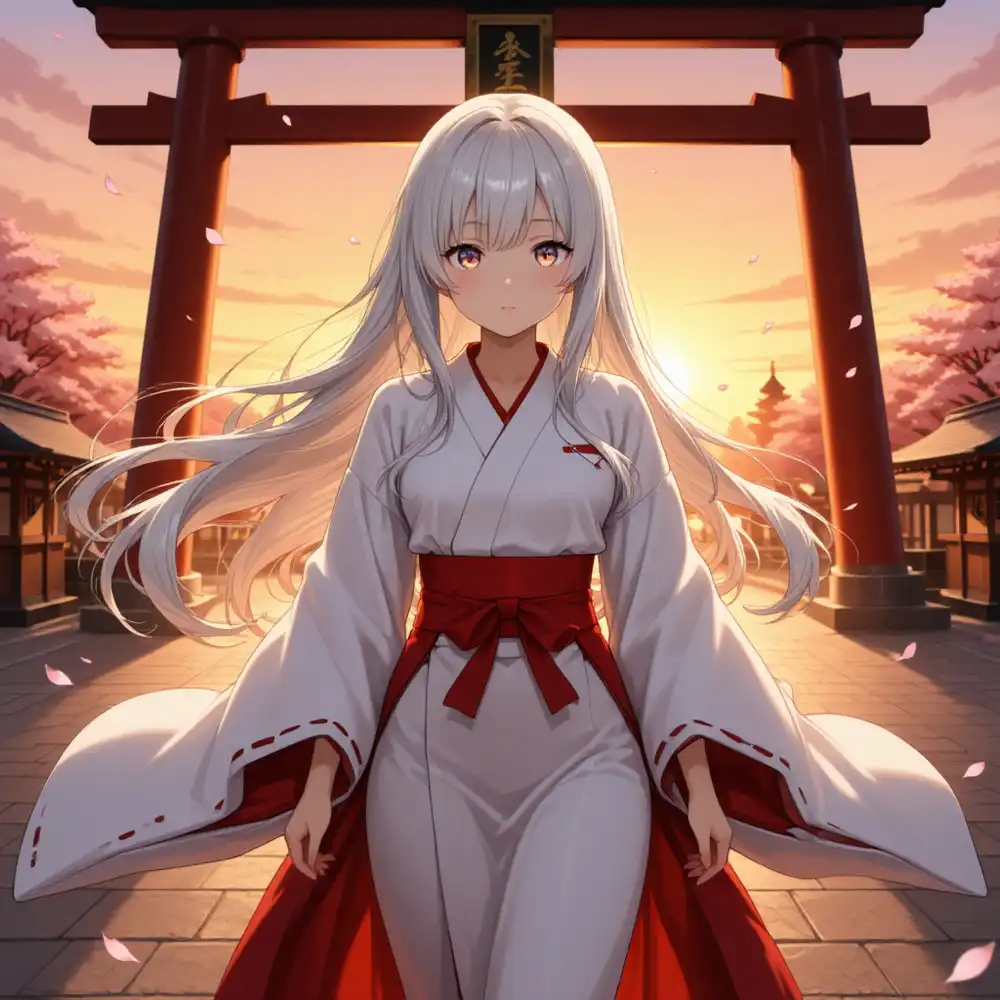
A girl with long silver hair standing in a shrine at sunset,
wearing a white and red shrine maiden outfit,
cherry blossom petals floating in the warm golden light,
detailed anime style
For Distill-8-Step, the negative prompt can be left blank.
Hit Queue Prompt and generation runs.
Apple Silicon generation is slower than on NVIDIA GPUs.
For 1024x1024 at 8 steps on M1 Max, expect somewhere in the tens of seconds to a few minutes.
The first run includes model loading so it takes longer, but from the second run onward the cache kicks in and only the generation portion remains.
Actually running it on M1 Max 64GB
I generated on M1 Max 64GB / ComfyUI 0.16.4 / PyTorch 2.10.0 / MPS backend.
- Model:
z-anime-distill-8step-aio-fp8.safetensors(9.8GB) - Resolution: 1024×1024
- KSampler: steps=8 / cfg=1.0 / sampler=euler / scheduler=normal / denoise=1.0
- Negative prompt: blank
- Positive: the test prompt above (shrine maiden outfit, silver hair, shrine at sunset, cherry blossoms)
The first run, including model load, took about 135 seconds.
RAM had about 41GB free right after ComfyUI startup, and there was no sign of running short during generation.
From the second run onward, the checkpoint sits in cache so it should be a bit shorter.
Just adding “detailed anime style” produces the anime feel you’d expect from a full fine-tune of Z-Image Base.
Specifying torii, cherry blossoms, sunset, and shrine maiden outfit purely in natural language — the composition and color came out cleanly on the first try.
Producing 1024×1024 cleanly without assembling tag strings feels different from the SDXL anime workflow.
If Distill-8-Step AIO produces a 1024×1024 image in 135 seconds on an M1 Max 64GB, that’s a workable range for vibe checks.
When you switch to Base AIO FP8 (30–50 steps) to tighten the style, expect roughly 4–6× the time.
Trying i2i to pass an existing character through
Existing character LoRAs (waiANIMA / SDXL-based) cannot be reused on the Z-Image family. The architecture is a different beast.
So I tried throwing things into i2i without a LoRA to see how much identity survives.
For the input I used a standing portrait generated previously with waiANIMA + my own kanachan LoRA.
The workflow just adds LoadImage → VAEEncode to the minimum setup above and lowers KSampler’s denoise below 1.0.
graph TD
    CKP["CheckpointLoaderSimple<br/>z-anime AIO FP8"]
    LI["LoadImage<br/>kana_input.png"]
    VE["VAEEncode"]
    POS["CLIPTextEncode<br/>positive"]
    NEG["CLIPTextEncode<br/>negative"]
    KS["KSampler<br/>denoise=0.5/0.7/0.85"]
    DEC["VAEDecode"]
    SAVE["SaveImage"]

    CKP -->|MODEL| KS
    CKP -->|CLIP| POS
    CKP -->|CLIP| NEG
    CKP -->|VAE| VE
    CKP -->|VAE| DEC
    LI -->|IMAGE| VE
    VE -->|LATENT| KS
    POS -->|CONDITIONING| KS
    NEG -->|CONDITIONING| KS
    KS -->|LATENT| DEC
    DEC -->|IMAGE| SAVE
Input image (generated with waiANIMA + kanachan LoRA on SDXL — side ponytail with blue scrunchie, ahoge, school uniform, standing pose).
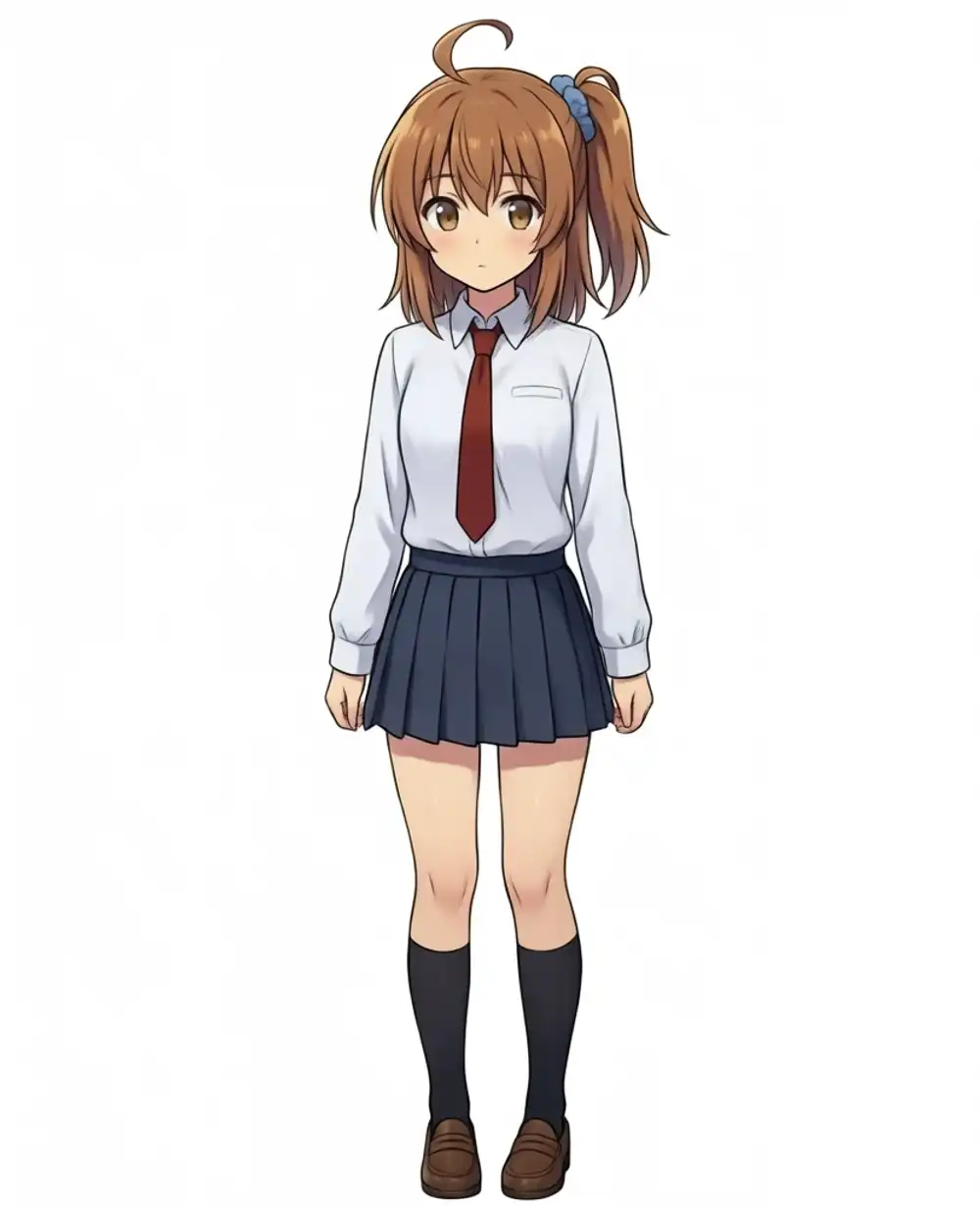
I generated three patterns with only denoise changing. The prompt was natural-language: “side ponytail, blue scrunchie, ahoge, white shirt, red necktie, navy pleated skirt, standing pose.”
denoise=0.5: barely changes
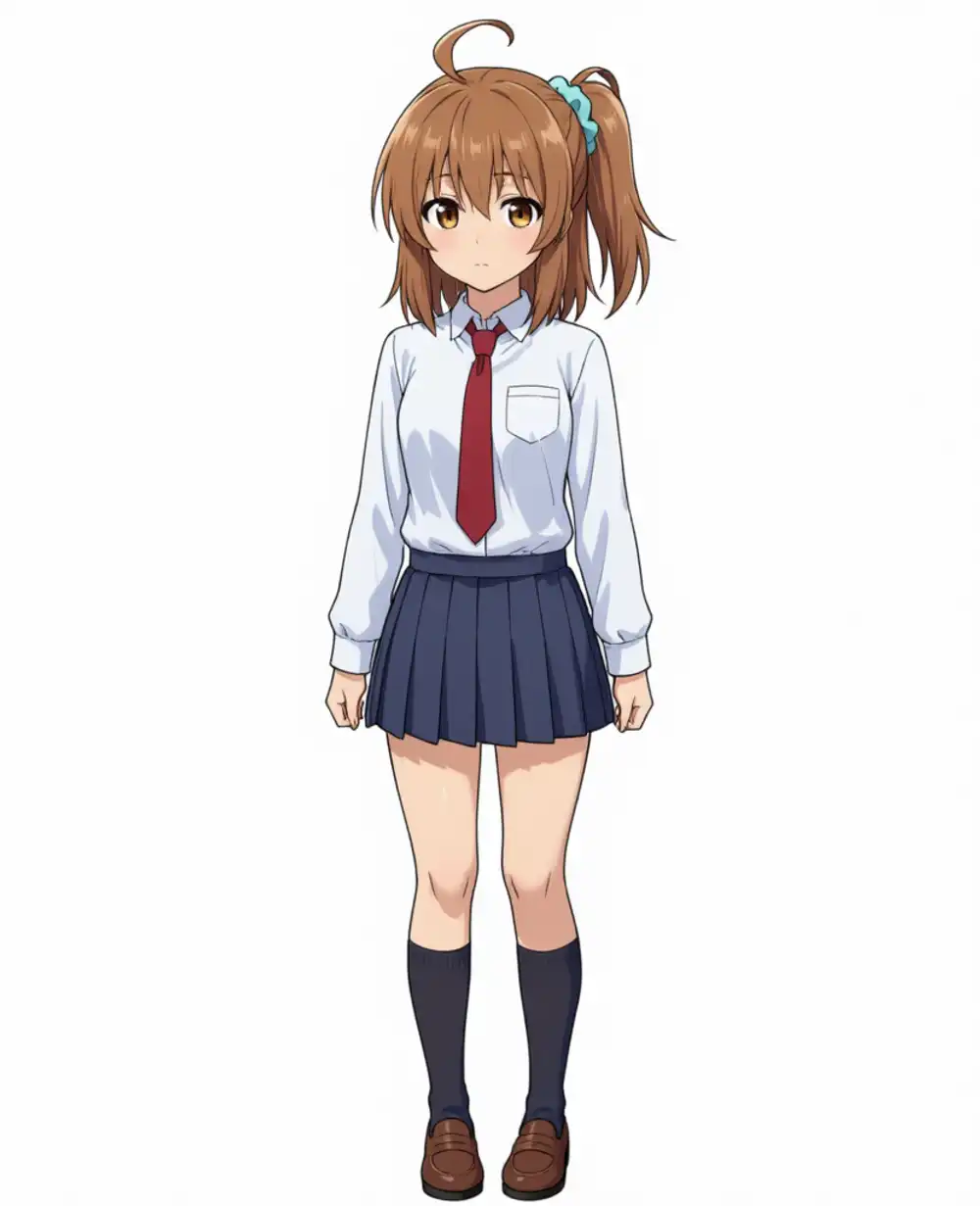
The output is nearly identical to the input. Z-Anime’s style is not riding on it.
Insufficient if you want to “change only the style” via i2i. The difference is roughly what you’d get from a round trip through the VAE.
denoise=0.7: face and hairstyle both break down
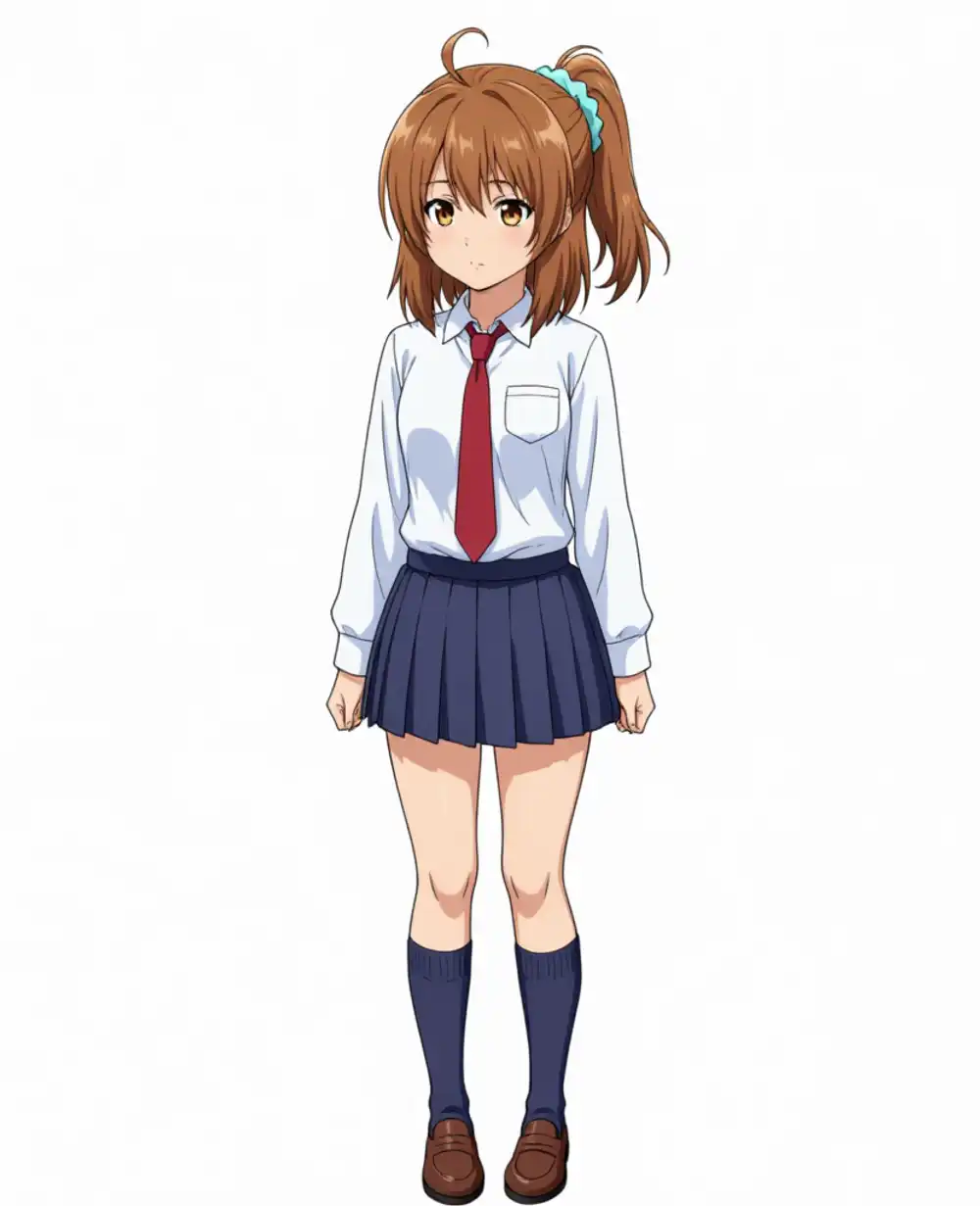
Already at this point the side ponytail collapses, transforming into hair flowing to the side. The blue scrunchie is also gone.
The face goes the same direction — eye shapes and outlines are pulled toward Z-Anime’s distribution, ending up as a different person from the input kanachan.
The clothing (white shirt, red necktie, navy pleat) survives, but the hairstyle and face can no longer claim identity.
denoise=0.85: ponytail shape returns, but the position and face are off
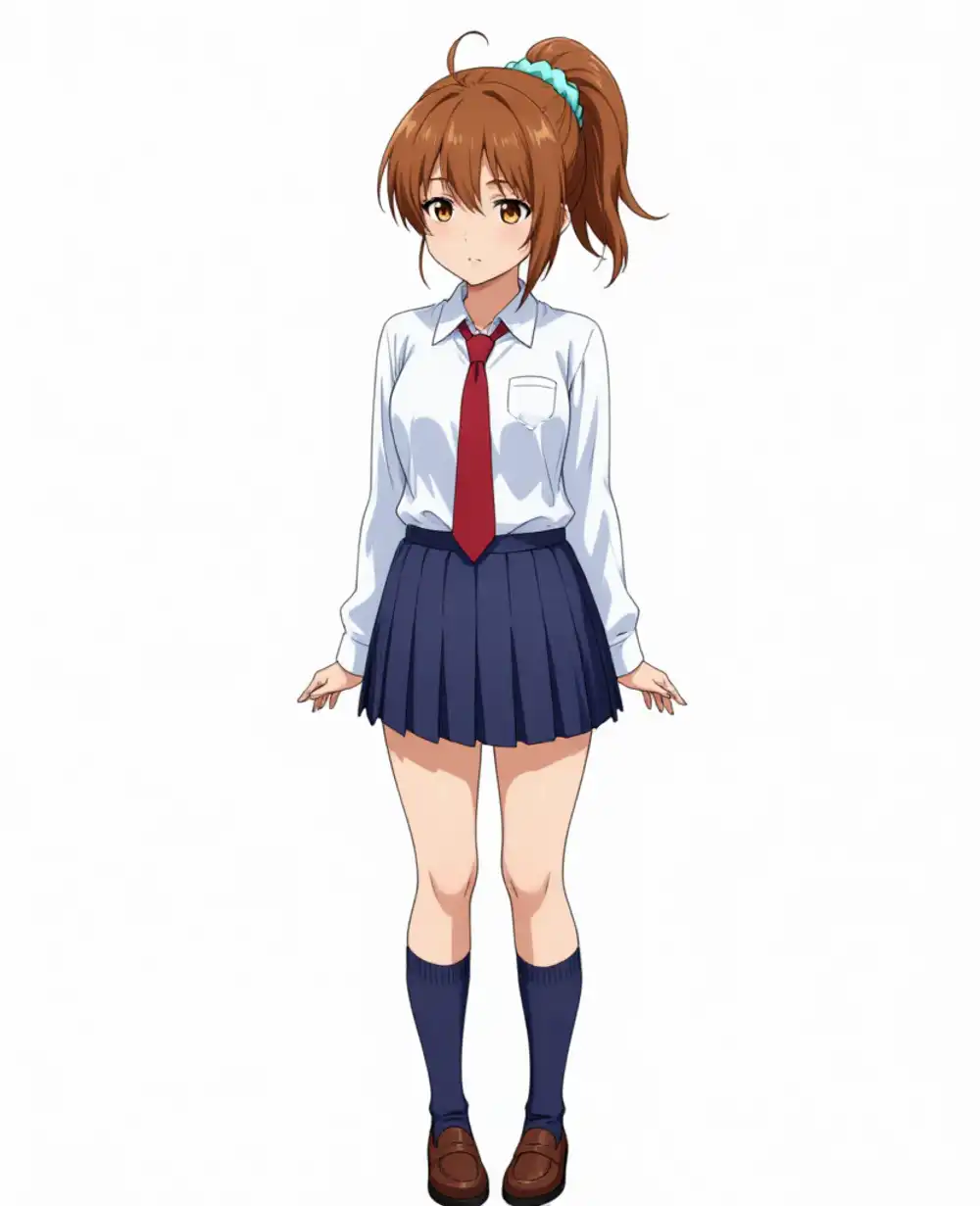
What’s interesting is that the ponytail that broke at d07 comes back here.
But the position is not on the side — it’s higher and toward the back of the head, with no blue scrunchie. The tying point itself is shifted.
The face has shifted further toward Z-Anime’s direction — a different character.
Not writing side ponytail in the prompt likely contributed, but in any case, at denoise=0.85 the input image’s pull on the hairstyle is weak.
With LoRA-free i2i, sweeping denoise didn’t yield a sweet spot that satisfies both “Z-Anime style × kanachan’s face/hairstyle.” Too low and the style doesn’t ride; at 0.7 the hair and face break; at 0.85 the ponytail shape returns but both the position and face become a different character. The realistic use ends up being “borrow the input image’s silhouette and composition to produce a new character.”
To seriously produce kanachan in Z-Anime, the right path is to retrain the LoRA for Z-Image. The SDXL-side kanachan LoRA assets cannot be used on Z-Anime.
How sensitive content passes through
I also wanted to see what happens when NSFW prompts are passed through AIO Distill-8-step.
The prompt included nude, no clothes, bare skin as a txt2img run.
The image below is blurred for Google’s sake.
If NSFW isn’t your thing, you can stop here.
The output came out cleanly with no blocking. It just follows the prompt direction — there’s no built-in safety filter or black-bar processing.
Same treatment as the SDXL Illustrious-family or waiANIMA-family anime model groups. Z-Image Base felt comparatively measured, but on Z-Anime’s anime full fine-tune, the tuning leans toward bypassing the restrictions — that’s what I observed locally.
This is on the assumption of local use. If you’re using shared environments or the cloud, you have to consider service terms separately from this.