WordPress MCP Adapter on M4 Mac: Qwen post summarization
 Contents
I tried WordPress MCP Adapter to see whether an AI could summarize a post and save the result as a draft.
I set up a separate WordPress installation on an M4 Mac mini, using a fictional article and the Qwen AI model.
The experiment ran on October 13, 2026, with WordPress 7.1.3 and MCP Adapter 0.7.0.
Calling Qwen from WordPress
MCP is a common protocol that lets AI applications use external functions and data.
I registered operations such as retrieving an article and saving its summary as WordPress Abilities.
An Ability specifies a name, description, input format, execution function, and permission-checking function.
The Abilities API handles registration and execution, while MCP Adapter makes the operations callable by an external MCP client.
A client is an application that communicates over MCP; I wrote this one in Python.
The Python client sends a natural-language instruction to Qwen, which returns the names and arguments of the functions to run. Python then executes those functions through MCP. This is called tool calling.
Separately, an Ability inside WordPress sends article text to Qwen for summarization.
Both operations use the same model, with separate API requests and messages.
WordPress has an example that uses WordPress AI Client, but I sent requests directly to ModelScope’s Qwen API through the WordPress HTTP API.
| Component | Role in this experiment |
|---|---|
| MCP Adapter | Receives MCP requests from an external client |
| Abilities API | Checks the inputs and permissions of registered operations, then runs them |
| Experiment plugin | Retrieves posts, asks Qwen for summaries, and saves the results as drafts |
| Python client | Sends the AI’s tool calls through MCP and returns the results to the AI |
flowchart TD
    A[Natural-language request] --> B[Qwen chooses a tool]
    B --> C[Python MCP client]
    C --> D[WordPress MCP Adapter]
    D --> E[Experiment Ability]
    E -->|Sends article text| F[Qwen API summarizes it]
    F -->|Returns summary| E
    E -->|When the save Ability runs| G[WordPress draft]
Setting up WordPress in Docker
Using one Docker Compose configuration file, I started WordPress and its MariaDB database in separate containers.
WP-CLI, a command-line interface for WordPress, handled post creation and plugin activation.
| Item | Version or setting used locally |
|---|---|
| Host | M4 Mac mini, 16 GB RAM, macOS 26.5.2 |
| WordPress | 7.1.3 |
| PHP | 8.3.35 |
| MariaDB | 11.4.13 |
| MCP Adapter | 0.7.0 |
| WP-CLI | 2.12.0 |
| AI model | Qwen-Ambassador/Qwen3.8-Flash-Next |
| AI API | ModelScope |
| WordPress URL | http://localhost:8889/ |
I used the MCP Adapter plugin ZIP from the 0.7.0 release. The Compose file pins Docker images by digest, a hash that identifies their contents.
WordPress listens on 127.0.0.1:8889, accepting connections from the host only, while the database runs on Docker’s internal network.
The source article is a fictional announcement for a library repair event.
The Compose configuration, plugin, Python client, and execution logs are available in LiltingChannelLabo’s experiment directory.
Docker was initially stopped, so the Docker CLI could not connect. After starting Docker, I tried setting up WordPress from the experiment directory:
export MODELSCOPE_API_KEY='your-ModelScope-API-key'
python3 lab.py prepare
python3 lab.py start
The first Compose run received HTTP 500 from the Docker API. I checked that the API was responding and retried the same startup procedure, which succeeded. I did not identify the cause.
prepare downloads the Adapter and writes the local configuration files.
start initializes WordPress, activates the plugins, and creates the experiment users and fictional article. In this run, the article received post ID 4. The Python code uses only the standard library.
The scripts default to Qwen-Ambassador/Qwen3.8-Flash-Next, which is available through my ambassador account.
For a different model, add --model to both the prepare and agent commands, replacing the placeholder with a model ID available to your account. The agent model must support tool calling.
python3 lab.py prepare --model 'model-available-to-your-account'
python3 lab.py agent --model 'model-available-to-your-account'
The first command replaces python3 lab.py prepare above; run start after it as before. The second replaces the agent command in the natural-language test below.
Abilities in the custom plugin
I restricted post retrieval and summarization to experiment posts with _labo_fixture=1 in their post metadata.
| Ability name | Input | Returns |
|---|---|---|
labo/get-post | Post ID | Article title and body |
labo/summarize-post | Post ID | Qwen’s summary and an ID identifying it |
labo/save-summary-draft | Summary ID | The saved draft’s post ID and status |
The plugin registers the Ability category first, then registers the post-retrieval Ability as follows.
labo_mcp_get_post() retrieves the article, while labo_mcp_can_read() checks the target post and the user’s read permission.
input_schema declares the accepted input, which here is a positive integer post ID.
wp_register_ability('labo/get-post', [
    'label' => 'get-post',
    'description' => 'Read a sandbox fixture post.',
    'category' => 'labo',
    'input_schema' => [
        'type' => 'object',
        'properties' => [
            'post_id' => ['type' => 'integer', 'minimum' => 1],
        ],
        'required' => ['post_id'],
        'additionalProperties' => false,
    ],
    'execute_callback' => 'labo_mcp_get_post',
    'permission_callback' => 'labo_mcp_can_read',
    'meta' => ['mcp' => ['public' => true]],
]);
The code above runs on the wp_abilities_api_init hook, when WordPress initializes Abilities.
Following the Ability registration guide, I set meta.mcp.public to true.
This exposes the Ability through the default MCP server supplied with the Adapter.
Authentication and permission checks still apply, and the summary operation checks edit_posts, the permission to edit posts.
I put the Qwen request inside the implementation of labo/summarize-post.
WordPress’s wp_remote_post() sends the article body to the ModelScope API and receives the generated text.
Each summary gets a temporary ID and is retained for 15 minutes.
The save Ability checks that the ID belongs to a summary generated by the same user. It then creates a draft from the stored text without calling the AI again.
Summarizing through MCP from Python
The Python MCP client connects to this WordPress endpoint:
http://localhost:8889/wp-json/mcp/mcp-adapter-default-serverThe experiment user, labo_agent, connects with a WordPress Application Password and has read and edit_posts permissions.
Python and WordPress both use the same ModelScope API key when calling Qwen. That key is separate from the WordPress password and is not included in MCP requests.
I requested MCP revision 2025-11-25 and initialized the connection with initialize, following the default server documentation for 0.7.0.
The returned Mcp-Session-Id identifies the session for subsequent requests. After saving it, the client sends the notifications/initialized readiness notification before requesting the tool list.
initialize
  → Receive Mcp-Session-Id and use it in subsequent requests
  → notifications/initialized
  → tools/list
  → tools/call
The first tools/list response contained meta-tools for discovering and executing Abilities.
The individual Abilities created above are accessed through them.
| MCP tool name | Purpose |
|---|---|
mcp-adapter-discover-abilities | Finds available Abilities |
mcp-adapter-get-ability-info | Gets an Ability’s input format and other details |
mcp-adapter-execute-ability | Executes an Ability by name with the supplied arguments |
A custom server can expose individual Abilities directly as tools, but I used the default server. The client discovers Abilities, checks their input formats, and then executes them.
In a tools/call request, params.name identifies the Adapter’s execution tool. Inside arguments, ability_name identifies the WordPress Ability, and parameters supplies its input: the post ID in this example.
{
  "jsonrpc": "2.0",
  "id": 8,
  "method": "tools/call",
  "params": {
    "name": "mcp-adapter-execute-ability",
    "arguments": {
      "ability_name": "labo/get-post",
      "parameters": { "post_id": 4 }
    }
  }
}
I first specified labo/get-post directly in Python, without asking the AI to choose an operation, and received the article body.
I then called labo/summarize-post with the post ID. WordPress retrieved the article body and sent it to the Qwen API. The Ability returned the summary text and its temporary ID; the AI API call took 5.51 seconds.
Letting Qwen choose the operations
Next, I let Qwen choose the operations through the Python client.
Python supplies the MCP tool list to Qwen, executes the tool calls Qwen returns, and sends the results back.
The instruction sent by lab.py agent is written inside the script. Translated from Japanese, it reads:
Read the fictional event article with post ID 4, summarize it using the AI summary function inside WordPress, and save the result as one new draft. Do not modify the source article. Finally, report the saved post ID and status in Japanese.
I ran it with the default model:
python3 lab.py agentIt made seven tools/call requests in this order.
| Order | MCP tool | Operation and result |
|---|---|---|
| 1 | mcp-adapter-discover-abilities | Found the experiment’s Abilities |
| 2–4 | mcp-adapter-get-ability-info | Retrieved arguments for the post, summary, and save Abilities |
| 5 | mcp-adapter-execute-ability | labo/get-post retrieved the body of post ID 4 |
| 6 | mcp-adapter-execute-ability | labo/summarize-post called Qwen from WordPress and received a summary |
| 7 | mcp-adapter-execute-ability | labo/save-summary-draft saved post ID 5 with status draft |
The AI returned calls 2–4 together, but Python processed them sequentially.
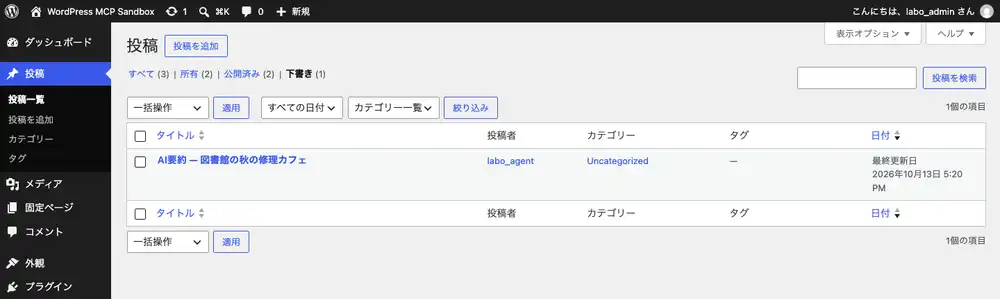
WordPress’s stored data confirmed that the generated post was a draft.
The source article’s SHA-256 hash, a value calculated from its text, matched the hash of the fictional article supplied at setup.
I added this admin page to the experiment plugin to display its Abilities and saved draft.
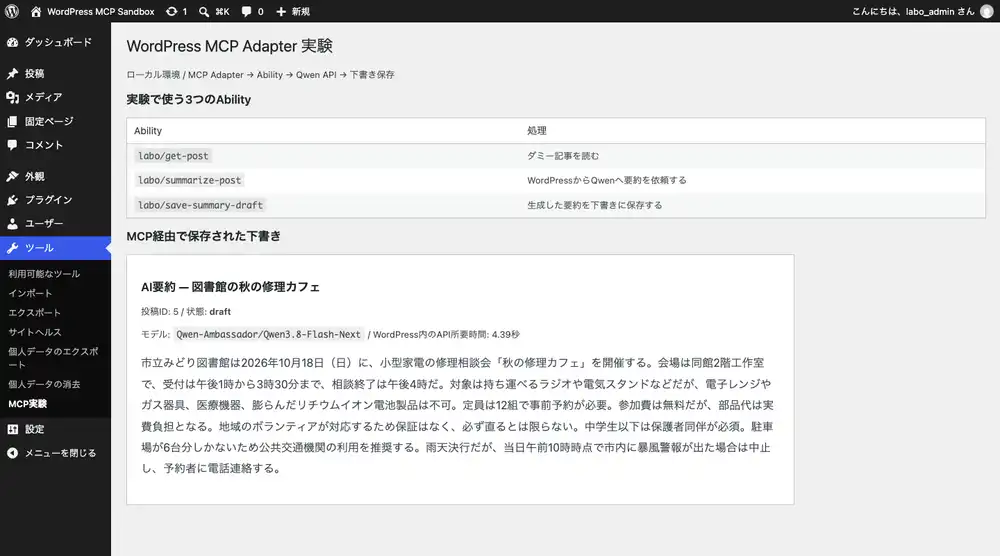
The standard post list also contained exactly one draft authored by labo_agent.
I ran the natural-language sequence once; the times and character count below come from that run.
| Measurement | Result in this run |
|---|---|
| Natural-language request to the AI’s final response | 25.603 seconds |
| Summary API call inside WordPress, within the 25.603-second run | 4.39 seconds |
| Saved summary length | 305 characters |
The earlier direct call was a separate run:
| Measurement | Result in the direct call |
|---|---|
| Summary API call inside WordPress | 5.51 seconds |
The saved summary omitted the source article’s one-device-per-person limit.
| Condition in the source article | Saved summary |
|---|---|
| October 18, 2026; check-in from 1:00 to 3:30 p.m.; consultations end at 4:00 p.m. | Included |
| Capacity of 12 groups | Included |
| Participants pay the cost of parts | Included |
| Canceled if a storm warning is in effect in the city at 10:00 a.m. that day | Included |
| One device per person | Omitted |
Permission and API failure checks
As the permission guide describes, the Adapter checks permissions both at connection time and when an Ability runs.
I gave the experiment user only read and edit_posts.
It has no publish_posts permission, and the experiment plugin’s save operation fixes the post status to draft.
I ran the failure checks with:
python3 lab.py negative| Condition tested | MCP HTTP status | Error in this environment |
|---|---|---|
| Connect without authentication | 401 | Authentication rejected at connection time |
| Run summarization as a subscriber | 200 | isError: true, Permission denied |
| Supply a string instead of a numeric post ID | 200 | isError: true, Permission denied |
| Summarize with a nonexistent AI model ID | 200 | isError: true; the AI API called by WordPress returned HTTP 400 |
| Save a draft with a nonexistent summary ID | 200 | isError: true; error asking for a valid summary to be generated first |
The HTTP requests succeeded in four cases, but isError: true reported failure in the MCP tool results.
I triggered the AI API’s HTTP 400 by temporarily setting an invalid model ID and making a real request.
The model setting was restored afterward. The plugin’s error message reported that no draft had been created.
The draft count was one both before and after the failure checks.
Errors during development
The first HTTP request immediately after a plugin edit failed with a syntax error.
php -l passed on both the host and container, and the copies of the plugin file had matching hashes. Retrying without any changes succeeded; the cause remains unidentified.
The API key was stored in a read-only file, which prevented lab.py prepare from overwriting it on a subsequent run.
The reproduction code now grants owner write permission during the update and restores read-only permission after writing.