Startup Error in Codex Caused by Daemon and CLI Version Mismatch
 Contents
When launching Codex CLI on an M4 Mac mini, a warning prompt occasionally appeared stating Background server has incompatible feature settings.
The prompt requested disabling api_key_model_discovery and offered choices to run without the daemon or restart it with modified settings.
A similar issue was reported in GitHub Issue #51758.
The CLI and the background server updated independently, and default feature flags diverged. The warning on standard startup was fixed in Codex CLI 0.162.1.
Warning Prompt Displayed at Startup
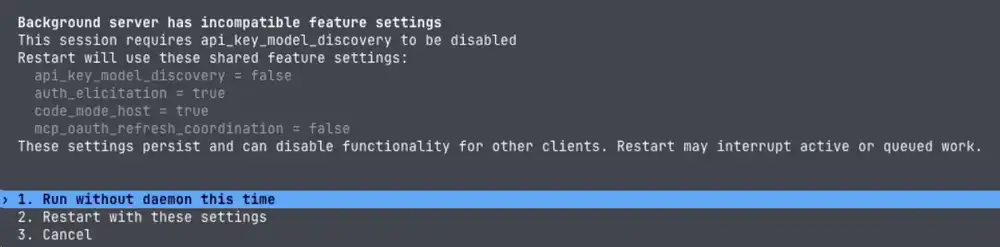
The error message consisted of two lines:
Background server has incompatible feature settings
This session requires api_key_model_discovery to be disabled
api_key_model_discovery is an internal feature flag in Codex, which this session required to be disabled.
The background server referenced here is not a remote endpoint, but the local background process (app-server) running on the machine.
Three options appeared at the bottom of the screen, each with different implications for the shared server.
| Option | Behavior |
|---|---|
| Run without daemon this time | Launch this session without using the shared daemon |
| Restart with these settings | Save displayed feature flags and restart the shared daemon |
| Cancel | Abort startup |
The prompt notes that selecting the second option saves settings and may disable features for other clients or interrupt ongoing tasks.
To start work immediately without altering shared configurations, selecting the first option bypasses the issue.
How CLI and Daemon Update Independently
The CLI is the terminal interface, while app-server is Codex’s interface handling conversation history, approvals, and agent execution events.
Locally, this app-server runs in the background as a resident daemon process.
Updating the CLI does not automatically synchronize running servers or the package versions selected for the daemon.
Issue #51758 contains reports where the daemon updated first, as well as cases where the CLI updated first.
| Report | CLI | Running app-server | Startup Requirement |
|---|---|---|---|
| Issue Description | 0.160.1 | 0.161.0 | Disable api_key_model_discovery |
| Linux Follow-up | 0.160.1 | 0.161.0 | Disable api_key_model_discovery |
| macOS Follow-up | 0.162.0 | 0.160.1 | Enable api_key_model_discovery |
In the Linux report, without explicit settings in configuration files, the flag defaulted to disabled in CLI 0.160.1 and enabled in daemon 0.161.0.
The daemon update log showed 0.161.0 being selected via scheduled updates.
The macOS follow-up described the reverse scenario, where a newer CLI connected to an older daemon; settings mismatches resulted in startup errors.
Compatibility Check Changes in 0.162.1
The 0.162.1 release notes include a fix for startup failures caused by mismatched default feature flags between the background server and CLI.
This release was published on October 10, 2026, at 04:44 JST.
In the resolving pull request, PR #52648, shared server feature settings are treated as retained by the server until explicitly restarted.
Instead of demanding restarts for differences in configuration files or CLI defaults, the check now evaluates only feature settings explicitly overridden via command-line flags.
On October 11, 2026 (JST), maintainers referenced the 0.162.1 fix in Issue #51758 and closed the issue.
They clarified that pairings of newer CLIs with older daemons were also addressed.
When this screen appears during normal startup, updating the CLI to 0.162.1 or newer and restarting resolves the issue.
Because checks remain active for explicit overrides, inspecting launch arguments and versions on both sides helps identify persistent issues.
Local Versions and Auto-Update Logs
Versions can be checked from the terminal:
codex --version
codex app-server daemon version
The first command outputs the CLI version executing the command, while the second returns the managed daemon package version along with the running app-server version.
Items evaluated in the 0.162.1 implementation include the following:
| Field | Target Inspected |
|---|---|
| cliVersion | CLI binary executing this check |
| managedCodexVersion | Package version selected for the daemon |
| appServerVersion | Running app-server instance connected to |
On the local M4 Mac mini on October 12, 2026, all versions matched at 0.162.1.
With paths omitted, the output format appears as follows:
{
  "status": "running",
  "backend": "pid",
  "managedCodexVersion": "0.162.1",
  "cliVersion": "0.162.1",
  "appServerVersion": "0.162.1"
}
The CLI was launched via /opt/homebrew/bin/codex, symlinked to the npm package @openai/codex/bin/codex.js.
The daemon ran from an independent package located in ~/.codex/packages/app-server-daemon/releases/.
In the local ~/.codex/app-server-daemon/daemon-updater.stderr.log, scheduled updates and restarts were recorded:
| Timestamp (JST) | Update Log Entry |
|---|---|
| October 9, 2026, 04:44 | Scheduled update selected 0.162.0, server restarted |
| October 10, 2026, 05:49 | Scheduled update selected 0.162.1, server restarted |
This confirmed that the daemon updates independently in this environment as well.
Other Reports of Failed Daemon Updates
The 0.162.1 fix suppresses startup warnings caused by mismatched default settings.
However, separate reports describe scenarios where older servers linger after CLI updates and guided daemon update commands fail.
| Issue | Reported Combination | Error Encountered on Update / Restart |
|---|---|---|
| #46468 | npm CLI 0.155.0, server 0.154.0 | Update unsupported, restart rejected as unmanaged server |
| #47482 | Standalone CLI 0.156.0, server 0.155.0 | Guided daemon update unsupported, warnings persist across CLI relaunches |
Both issues remained open as of October 12, 2026. These represent distinct failure modes from Issue #51758.
To align the managed daemon package with the current CLI package, 0.162.1 provides the following command:
codex app-server daemon update --from-cliThe CLI source code indicates this pins the daemon to the copied version and warns that restarts may interrupt ongoing work.
To return from a pinned version to standard auto-updates, run codex app-server daemon update.
Following updates, running codex app-server daemon version verifies both the selected package and the active server instance.