DeepSeek Harness with Qwen vs DeepSeek: Six Code-Fix Runs
 Contents
I tried DeepSeek Harness (DSH) on an M4 Mac mini. It edits files and runs commands at an AI model’s request. Although DeepSeek makes the tool, its official model configuration guide also describes connections to other providers’ APIs.
For this experiment, I used ModelScope’s hosted model API to connect DSH to Qwen and DeepSeek and asked both models to fix the same program.
DSH and the model
The model decides what to do next. DSH carries out its requests, such as editing a file or running a command, then sends the results back to the model. This repeats as needed. Software that manages these exchanges between a model and its tools is called a harness.
According to the DSH architecture documentation, model connections, tools, conversation history, and even the loop that repeats the process are implemented as plugins.
The official website offers desktop versions for Apple Silicon Macs and 64-bit Windows.
A DSH profile groups the features and settings to use. For these repeated runs, I used the headless profile, which runs a single task without a graphical interface and then exits.
M4 Mac mini and ModelScope setup
I took the measurements on October 13, 2026. Model inference ran on ModelScope’s side; the Mac ran DSH and the Node.js program being repaired.
I set an output limit in tokens, the units a model uses to process text. Token counts differ from character counts.
| Item | Setting |
|---|---|
| Local machine | Apple M4, 16 GB memory |
| Node.js | 22.22.0 |
| DSH | @deepseek-ai/dsh@0.2.0-rc.2 |
| API URL | https://api-inference.modelscope.ai/v1 |
| Qwen | Qwen-Ambassador/Qwen3.8-Flash-Next |
| DeepSeek | deepseek-ai/DeepSeek-V4.1-Flash |
| Execution | headless, with standard tool calls (native) |
| File permissions | workspace-write, allowing writes to the working directory |
| Output limit per response | 8,192 tokens for both models |
I installed DSH version 0.2.0-rc.2 in the local .dsh-work/runtime directory:
npm install --prefix .dsh-work/runtime --save-exact @deepseek-ai/dsh@0.2.0-rc.2The package.json for this release specifies a Node.js range of ^22.19.0 || >=24.0.0. I kept DSH’s configuration and conversation history in a dedicated directory. I also disabled agent-instructions and skill-filesystem, which load instruction files and skills, to keep unrelated instructions out of the experiment.
Connecting to ModelScope
DSH has an adapter for APIs that use OpenAI’s request and response format. I registered ModelScope as modelscope-experiment with the following Qwen configuration.
- id: llm-pi-ai
  config:
    providers:
      modelscope-experiment:
        apiKeyEnv: DSH_EXPERIMENT_API_KEY
        api: openai-completions
        baseURL: https://api-inference.modelscope.ai/v1
        compat:
          supportsDeveloperRole: false
          maxTokensField: max_tokens
        models:
          - id: Qwen-Ambassador/Qwen3.8-Flash-Next
baseURL is the API address DSH sends model requests to.
apiKeyEnv names the environment variable containing the API key. Environment variables pass values to a program when it starts. I used a Python script to start DSH and set this variable to keep the key out of the configuration file. The compat section adjusts the request format: it disables the developer role for instructions and uses max_tokens as the output-limit field. These settings were the same for both models.
The runner in the reproduction code contains the full configuration, including model selection and permissions. I used a Qwen Ambassador API key; the model IDs available depend on the key.
Three bugs in an article-list program
For the task, I prepared a 15-line JavaScript program that builds an article list from publication dates and filenames, then added bugs to test DSH.
| Operation | Deliberate bug | Expected behavior |
|---|---|---|
| Publication-date check | Excludes articles dated exactly at the current time | Includes articles at that time |
| Newest-first sorting | Compares dates as strings | Compares actual times, accounting for time zones |
| Filename extraction | Handles only / as a path separator | Also handles Windows \ separators |
I wrote the specification in README.md and prepared nine tests. Before any fixes, six passed and three failed. I also checked that a reference implementation with the correct fixes passed all nine.
Before asking for repairs, I tried a summary request with Qwen. It read the README.md and implementation, ran the tests, and replied in Japanese. This preliminary task took 55.9 seconds from startup to exit.
For each repair run, I copied the program from its original state and sent the same prompt in a new conversation. This excerpt is in Japanese, as used in the experiment:
このプロジェクトのREADME.mdを読んで仕様を確認し、npm testを実行して不具合を調べてください。
src/catalog.jsを修正して、既存のテストをすべて成功させてください。
既存のテストファイルやpackage.jsonは変更しないでください。
It asks the model to check the specification in README.md, run npm test, and fix src/catalog.js so all existing tests pass, without changing the test files or package.json. The full prompt also asks for another test run after the fix and a report in Japanese, says no external packages are needed, and specifies the working directory. It is saved as task.txt in the reproduction code.
After DSH exited, I independently reran the nine tests. I also checked three additional cases with different dates or filenames that had not been placed in the model’s working directory. I compared README.md, package.json, and the existing tests against the original files.
Results from three runs per model
I started with Qwen, then DeepSeek, and continued alternating between them. Temperature and seed affect output variation, while reasoning effort controls how much reasoning a model does. I left these settings unspecified and used the endpoint’s defaults.
In the table, a model call asks the model what to do next; a tool call performs an operation such as accessing a file or running a command. Each prompt led to several rounds of model decisions and tool use.
| Model | Run | Startup to exit | Model calls | Tool calls |
|---|---|---|---|---|
| Qwen3.8 Flash-Next | 1 | 76.9 s | 8 | 10 |
| Qwen3.8 Flash-Next | 2 | 91.9 s | 10 | 12 |
| Qwen3.8 Flash-Next | 3 | 67.3 s | 8 | 10 |
| DeepSeek V4.1 Flash | 1 | 48.5 s | 8 | 11 |
| DeepSeek V4.1 Flash | 2 | 47.9 s | 7 | 10 |
| DeepSeek V4.1 Flash | 3 | 37.3 s | 6 | 10 |
All six runs passed the nine existing tests and the three additional cases. Only src/catalog.js changed. No files were added, and README.md, package.json, and the existing tests were unchanged.
I calculated the mean time and sample standard deviation, which describes the spread of the measurements, for the three runs of this task per model. Qwen took 78.7 s ± 12.4 s, and DeepSeek took 44.5 s ± 6.3 s. These times include DSH startup, API waits, tool execution, and the final response.
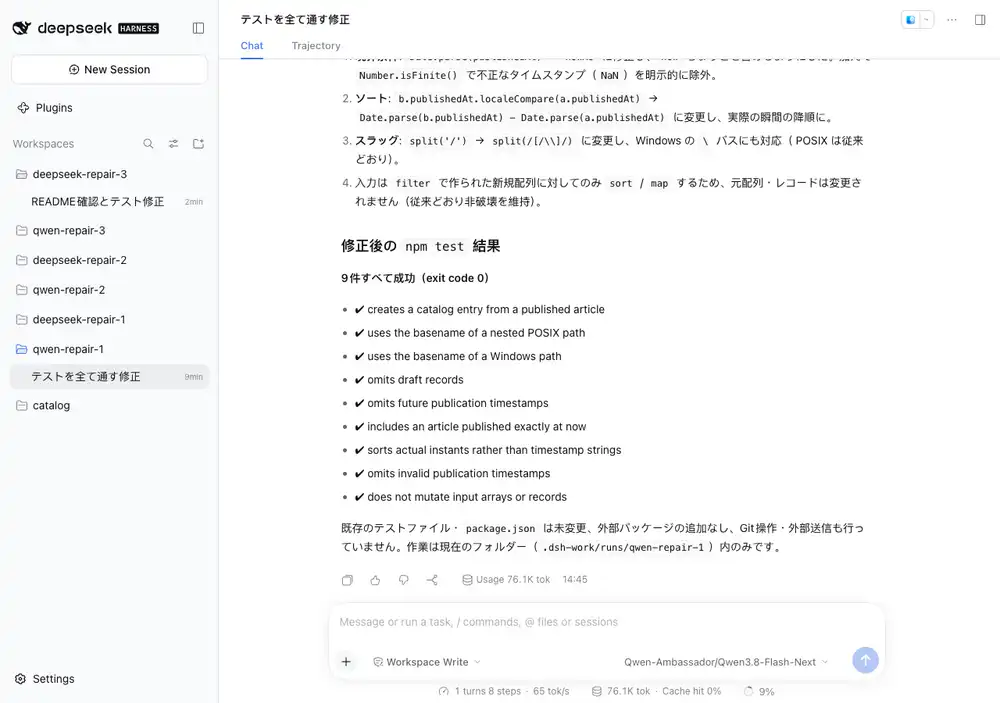
On its first run, Qwen read the files, ran the tests before making changes, and rewrote the implementation using the write tool. DeepSeek’s first run used the edit tool to change the relevant sections. Both ran npm test after editing and before answering.
The code changes from Qwen and DeepSeek
Here is the diff from Qwen’s first run. A - marks an original line, and a + marks its replacement or an added line.
+  const nowMs = Date.parse(now);

-    .filter((record) => Date.parse(record.publishedAt) < Date.parse(now))
-    .sort((a, b) => b.publishedAt.localeCompare(a.publishedAt))
+    .filter((record) => {
+      const publishedMs = Date.parse(record.publishedAt);
+      return Number.isFinite(publishedMs) && publishedMs <= nowMs;
+    })
+    .sort((a, b) => Date.parse(b.publishedAt) - Date.parse(a.publishedAt))

-      const slug = record.source.split('/').at(-1).replace(/\.md$/, '');
+      const filename = record.source.split(/[/\\]/).at(-1);
+      const slug = filename.replace(/\.md$/, '');
Qwen stored the converted current time in a variable and used Number.isFinite to exclude invalid dates.
DeepSeek’s first run changed the comparison expressions and path separator handling:
- .filter((record) => Date.parse(record.publishedAt) < Date.parse(now))
- .sort((a, b) => b.publishedAt.localeCompare(a.publishedAt))
+ .filter((record) => Date.parse(record.publishedAt) <= Date.parse(now))
+ .sort((a, b) => Date.parse(b.publishedAt) - Date.parse(a.publishedAt))

- const slug = record.source.split('/').at(-1).replace(/\.md$/, '');
+ const slug = record.source.split(/[\\/]/).at(-1).replace(/\.md$/, '');
Both use Date.parse to convert date strings, including their time zones, into numbers and use subtraction to sort newest first. Changing < to <= includes articles dated exactly at the current time. The patterns passed to split match either / or \ as a path separator.
The reproduction code and per-run records include the original program, shared prompt, evaluation tests, implementation diffs, and DSH tool-call logs.
Opening the command-line session in a browser
DSH also has a browser interface. After the measurements, I started it with the same conversation storage directory and could open the Qwen conversation from the command-line run.