Renumbered keys bring Anima-Base LoRAs back on 40-layer Anima-2.9B, 0/3 to 3/3
 Contents
Update (2026-08-24): On Anima-3.8B, which goes to 52 blocks and adds a Qwen3.5-4B encoder, I re-ran the key remap and the composition prompts that never worked → Anima 3.8B with Qwen3.5-4B passes from-behind, gets worse at out-of-frame crops
Anima-2.9B showed up on my timeline. The weights didn’t match what I knew, so I looked it up, and it turned out to be a community build.
It isn’t from CircleStone Labs. A user named Gazingstars123 took Anima-Base, grew the DiT from 28 layers to 40, and trained only the 12 added layers on 1.7M images.
In the post sorting 20 Anima derivatives and the one putting the same character LoRA on 6 derivatives, I left it at an Anima LoRA loading on any derivative as is, but every one of those was still 28 layers.
A bigger model might draw better, and I wanted to know what happens to my character LoRAs, so I checked.
Test setup
| Item | Value |
|---|---|
| Machine | M1 Max 64GB MacBook Pro (macOS 26.5) |
| ComfyUI | v0.33.3 (the build that counts Anima-2.9B’s num_blocks from the state_dict). Installed in a separate directory from my everyday v0.30.1, sharing only the model folder and running on another port |
| Baseline | Anima-Base v1.0 (anima-base-v1.0.safetensors, 4.18GB) |
| Target | Anima-2.9B-preview-v1 (bf16, 5.84GB) and its int8_convrot variant (3.08GB) |
| Text encoder | Qwen3-0.6B (qwen_3_06b_base), shared by both models |
| VAE | Qwen-Image VAE, shared by both models |
| LoRAs | 4-character LoRA anima-4char-v1_epoch100 (rank 256), pair LoRA keikana-animabase-v2_epoch140 (rank 128), Turbo LoRA anima-turbo-lora-v0.1 |
The 2.9B config.json still lists Qwen3-0.6B and Qwen-Image VAE for the text encoder and VAE, so the only thing that changed is the DiT.
What’s inside Anima-2.9B
This table is just what the model card and the bundled expand_manifest.json say.
| Item | Anima-Base v1.0 | Anima-2.9B preview v1 |
|---|---|---|
| DiT blocks | 28 | 40 |
| Parameters | ~2B | ~2.9B |
| Trained layers | all | only the 12 new ones (the original 28 are frozen) |
| Extra training data | - | 1.7M anime/illustration images, knowledge cutoff July 2026 |
| Captions | tags | mixed tags and natural language (Gemini 3.1/3.5 Flash-Lite, Claude Sonnet 5), no score tags |
| Optimizer | not published | Muon (the one I looked at in the Muon-for-LoRA post), 8× RTX 5080 |
| License | CircleStone non-commercial | treated as a derivative model under the same license |
| Released | - | August 12, 2026. ComfyUI merged PR #15555 the next day, and v0.33.1 on the 14th can load it |
| Downloads | - | 30,000+ in the first 10 days |
The layers were added the LLaMA Pro way: copy a neighboring block, slot the copy in between, and zero the copy’s output weights (self_attn.output_proj, cross_attn.output_proj, mlp.layer2, and the outputs of adaLN, the normalization that feeds the timestep condition into each layer).
With zero outputs the copy adds nothing to the residual stream, so the untrained 2.9B draws exactly what Anima-Base draws.
The training after that is where it differs from a normal fine-tune. A normal fine-tune moves the original weights, so the same layer ends up with different contents in the base and the derivative. 2.9B doesn’t do that. The original 28 layers are never touched, and only the 12 inserted layers get trained. Which leaves the original 28 layers exactly as they are in Anima-Base.
The samples on the model card have a glossy, saturated, commercial-illustration look, with little of the rim light and ambient light that Anima derivatives usually have, and a lot of them look flat.
Since the original 28 layers are untouched, the lighting may still be sitting in the Base layers and come back with an artist tag or a higher CFG.
The 12 inserted layers and block numbers
insertion_positions in expand_manifest.json is 2, 5, 8, 11, 14, 17, 21, 24, 27, 30, 33, 36. Of the new 40 layers, those 12 slots are the copied blocks and the other 28 are the originals.
Here is how the original block numbers map to the new ones.
| Old | New | Old | New |
|---|---|---|---|
| 0 | 0 | 14 | 20 |
| 1 | 1 | 15 | 22 |
| 2 | 3 | 16 | 23 |
| 3 | 4 | 17 | 25 |
| 4 | 6 | 18 | 26 |
| 5 | 7 | 19 | 28 |
| 6 | 9 | 20 | 29 |
| 7 | 10 | 21 | 31 |
| 8 | 12 | 22 | 32 |
| 9 | 13 | 23 | 34 |
| 10 | 15 | 24 | 35 |
| 11 | 16 | 25 | 37 |
| 12 | 18 | 26 | 38 |
| 13 | 19 | 27 | 39 |
Only blocks 0 and 1 keep their numbers. The other 26 blocks shift.
An Anima LoRA stores its deltas under key names that include the DiT block number, and ComfyUI looks up the model weight by that name and adds the delta.
A LoRA trained on Anima-Base holds a delta for “block 2”. On 2.9B that gets added to the new block 2, which is the freshly trained copy of the original block 1.
The original block 2 has moved to block 3, so it receives the delta meant for the original block 3.
2.9B has every block from 0 to 39, so there is no “key not found” warning either. The load goes through without a warning and 26 blocks’ worth of deltas get added to the wrong layers.
In the post splitting the 4-character LoRA by module, the DiT side was what made the character identities and the art style.
The LLMAdapter passes Qwen3-0.6B’s output to the DiT, and it is unchanged in 2.9B, so that part of the LoRA still lands on the same weights.
What shifts is the DiT side, the part that makes the characters.
So I had a rough guess before running anything.
Loading as is, most of the deltas land on the wrong layers, so the characters I want won’t show up. Not the art-style runaway that turned RDBT into beast ears and military uniforms in the 6-derivative post, more likely the 4-character LoRA’s people just not appearing.
With the block numbers renumbered, the original deltas go back onto the original 28 layers, so the characters should come back. The 12 inserted layers get no LoRA though, so the output won’t match Anima-Base v1.0.
The Turbo LoRA uses block numbers too, so loading it as is should fail to produce an image at 8 steps. Turbo can be loaded on its own, so that one goes first.
LoRAs and generation settings
Both LoRAs are my own characters, trained on Anima-Base v1.0.
| LoRA | Setup | Identifying keys |
|---|---|---|
anima-4char-v1_epoch100 | rank 256, Kei / Kana / Koharu / Kurara | 6/6 four-girl lineups with the full prompt from the 4-character LoRA post |
keikana-animabase-v2_epoch140 | rank 128, Kei / Kana | the version where ahoge bleed and fusion went away in the 2-character LoRA v2 post |
Since I didn’t know whether the Turbo LoRA would work on 2.9B, I kept everything at full steps for now.
The model card recommends euler + sgm_uniform, 28 to 50 steps, CFG 3.5 to 5.
| Item | Value |
|---|---|
| Resolution | 832×1216 (solo), 1344×768 (four-girl lineup) |
| Steps | 28 |
| CFG | 4.0 |
| Sampler | euler / sgm_uniform |
| Seeds | 42 / 1234 / 9999 |
| LoRA strength | model 1.0 / clip 1.0 |
| Turbo LoRA | checked separately on 2.9B; off on both models for the comparisons |
The prompts are the usual two tiers: a light prompt with just the trigger, and the full prompt with trigger + position line + identifying anchors + outfit line.
# light prompt (solo, Kana)
kanachan, 1girl, solo, standing, looking at viewer, full body, white background

# full prompt (four-girl lineup) is the full prompt from the anima-4char-lora post, unchanged
For timing, Anima-Base v1.0 took 275 to 285 seconds on M1 Max, so with 1.43× the layers I figured around 400 seconds.
Plain output next to v1.0 first
Before touching any LoRA, I lined up the plain output of both models with the same prompt and seed.
Same “blonde + white robe + gold embroidery” standing prompt as the 6-derivative post, seed 42.
| Model | Time (28 steps, including first load) |
|---|---|
| Anima-Base v1.0 | 253.0s |
| Anima-2.9B | 353.4s |
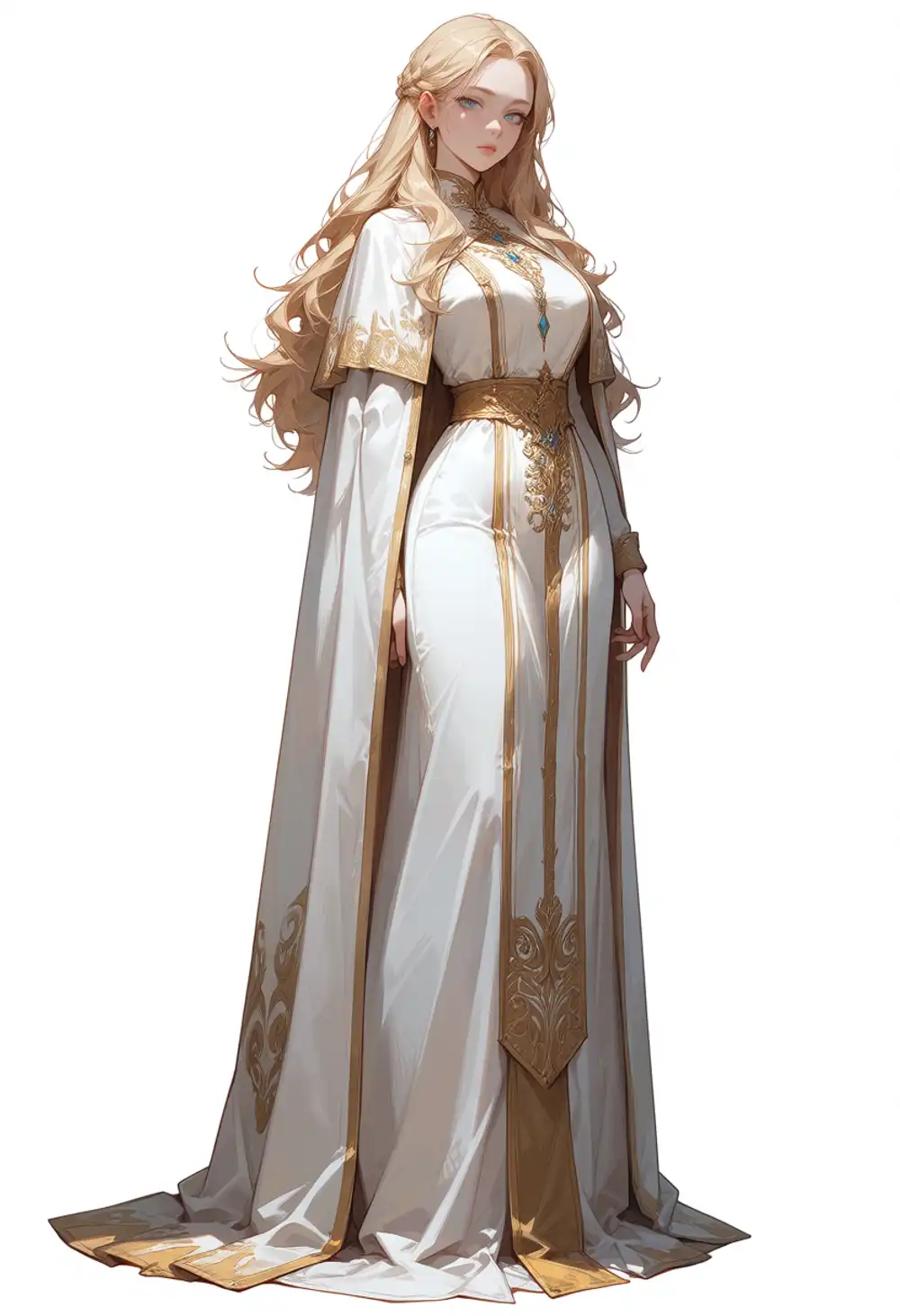
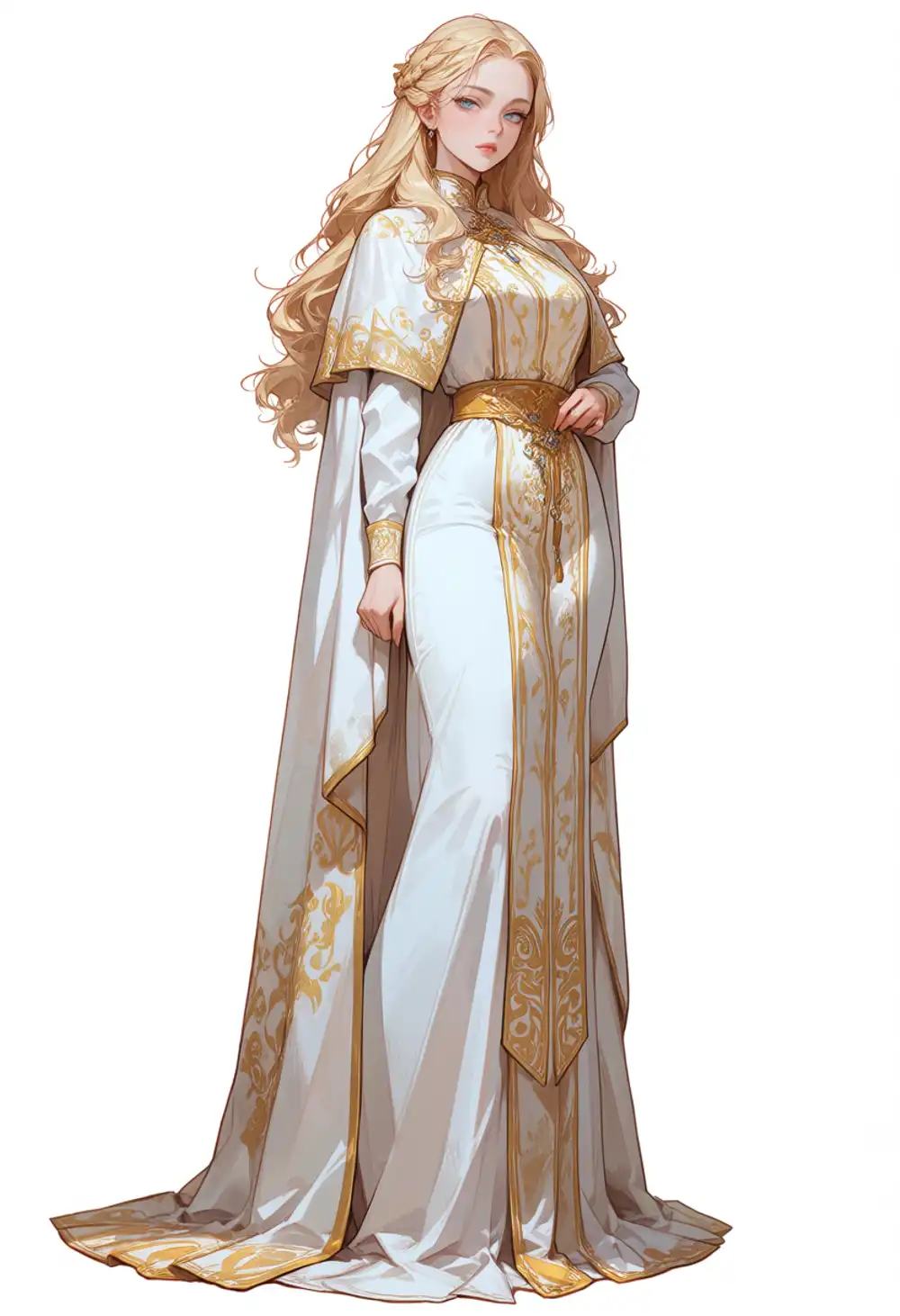
Same seed, nearly the same composition.
The pose, the flow of the hair, the way the capelet hangs, the spread of the hem are all the same, with only the right hand and the body angle a little different.
It looks like the untouched 28 layers decide the composition and the new 12 just add a delta on top.
What differs is the amount of ornament and the shading. 2.9B has more gold embroidery with finer patterns, the gold leans toward a bright yellow, and the shadows on the cloth are faint, so the whole image is brighter.
The flatness I noticed in the samples shows up here as thinner shadows, while the glossy highlights are still there.
Time is 1.40×, close to the 1.43 layer ratio. Step speed was about 8 s/it on v1.0 and about 12 s/it on 2.9B. ComfyUI’s log shows v1.0 putting 3988MB on MPS and 2.9B putting 5572MB.
I tried the same seed with CFG raised from 4.0 to 5.0 and 6.0, and with one artist tag added, to see whether the flatness changes.
| Condition | Time |
|---|---|
| CFG 5.0 | 347.4s |
| CFG 6.0 | 345.4s |
CFG 4.0 + @nnn | 347.4s |



Raising CFG from 4 to 6 didn’t change much.
The gold and the embroidery get a bit stronger and the shadow from the left shoulder down the sleeve widens a little, but it never gets to v1.0’s clearly split light and dark planes.
The artist tag changed the whole style. The lines got thin and soft like watercolor, the gold ornament turned into a lace-like fine pattern, and even the composition changed.
The shading didn’t come back so much as the picture became a different one, so whether the lighting is still in the Base layers and can be brought back is something these two methods couldn’t answer.
Turbo LoRA as is
I loaded anima-turbo-lora-v0.1 on 2.9B at strength 1.0 and generated with 8 steps, CFG 1.0, er_sde / simple.
On Anima-Base v1.0 this setting took 275 seconds down to 48.
| Model | Time (8 steps) |
|---|---|
| Anima-Base v1.0 | 40.2s |
| Anima-2.9B | 56.2s |

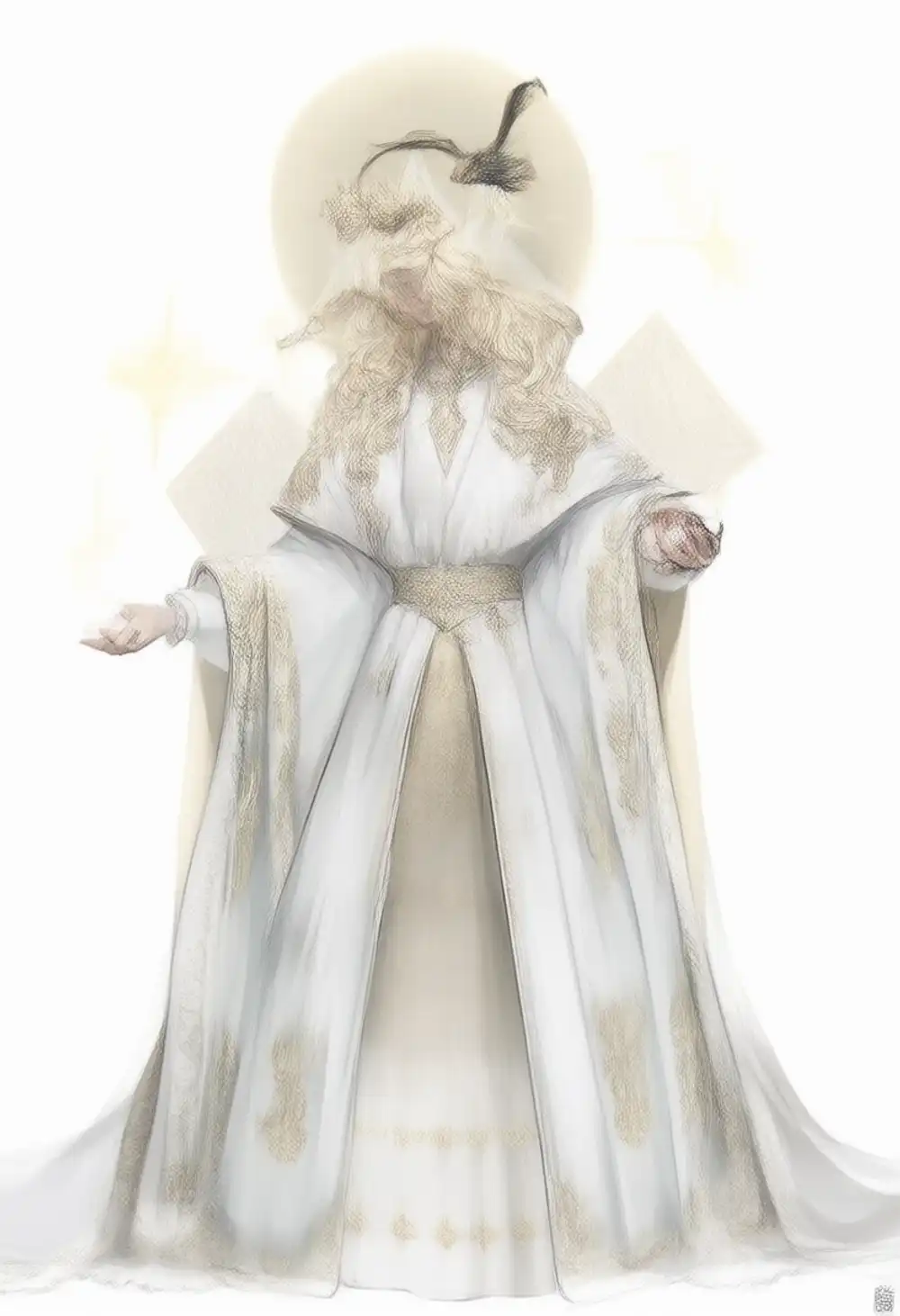
The 2.9B one is not a picture.
It’s a washed-out, low-contrast image where you can barely make out a figure in a white robe with blonde hair, the face is mush, and the lines are doubled like a pencil sketch.
It looks like a half-denoised in-between step, not pure noise.
ComfyUI’s console showed zero lora key not loaded lines when loading the LoRA. All 1016 keys matched the 40-block model and were added to blocks 0 through 27 as is.
My LoRAs as is
Now the main event, the 4-character LoRA and the pair LoRA. I loaded them on 2.9B with the key names untouched. Light prompt and full prompt, 3 seeds each.
Zero load warnings for either. All 948 keys in kohya format (840 DiT, 108 LLMAdapter) matched.
Light prompt (Kana, trigger only)
Here are the three from Anima-Base v1.0.



All three are Kana in her uniform with every identifying key, side ponytail, ahoge, blue scrunchie, so 3/3. Time 242.9 to 244.6 seconds.
Here are the three with the LoRA loaded on 2.9B as is.


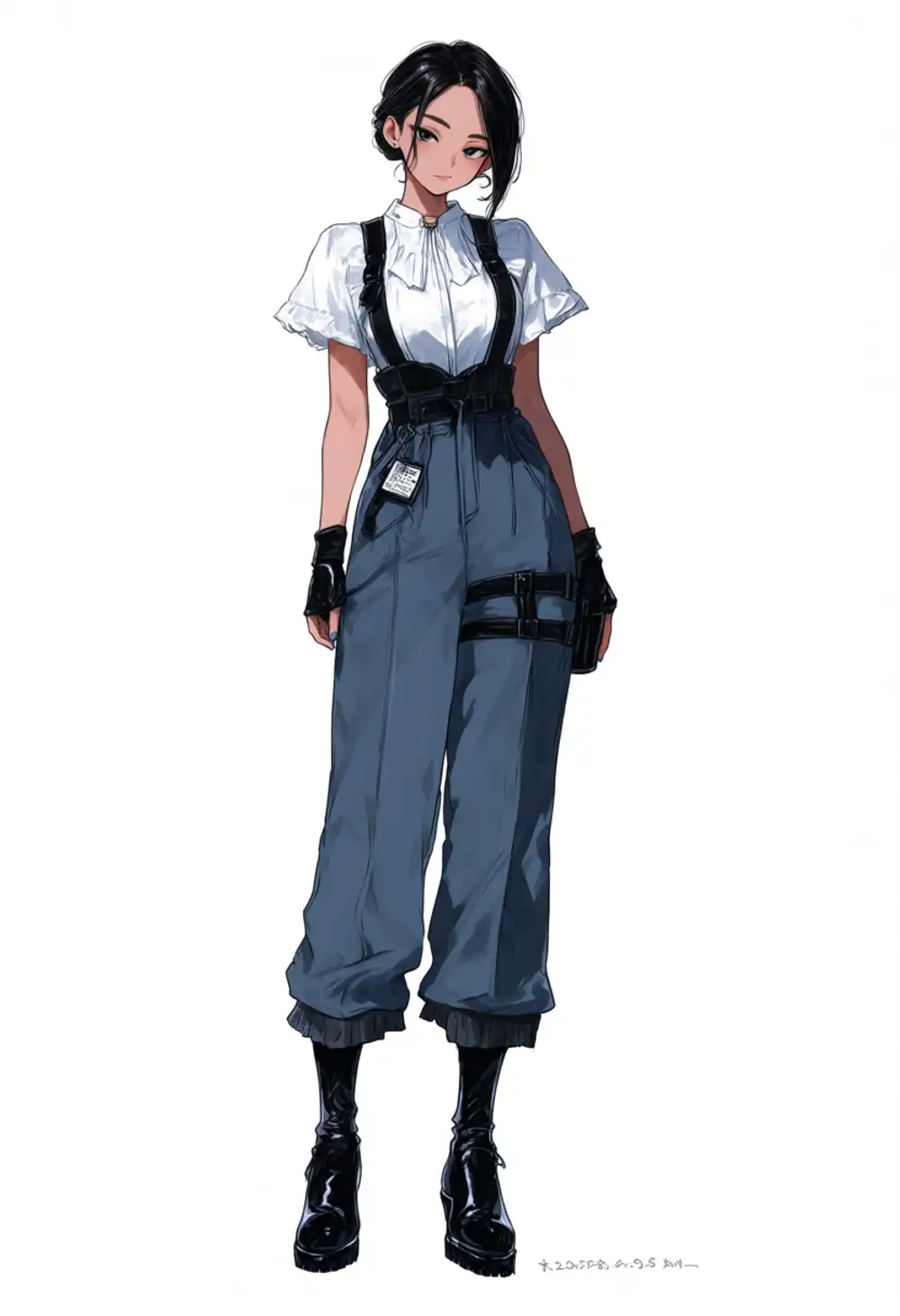
0/3. Time 347.3 to 351.1 seconds.
Seed 42 is a girl with short black hair and blue eyes in a fur-trimmed hoodie doing a double peace sign, seed 1234 has long blonde hair with a black headband and green eyes, seed 9999 has black hair tied low and wide pants with suspenders.
The only identifying key anywhere is the ahoge on 1234, and the three are all different characters.
The pictures aren’t broken. Each is a perfectly normal single full-body standing shot, with none of the style runaway that turned RDBT into beast ears and a uniform in the 6-derivative post. It’s just not Kana.
Is this stranger the product of deltas landing on the wrong layers, or is it just what plain 2.9B draws for this prompt? I gave the same prompt and seeds to 2.9B with the LoRA removed. Time 345.4 seconds, so the LoRA makes no difference to generation time.


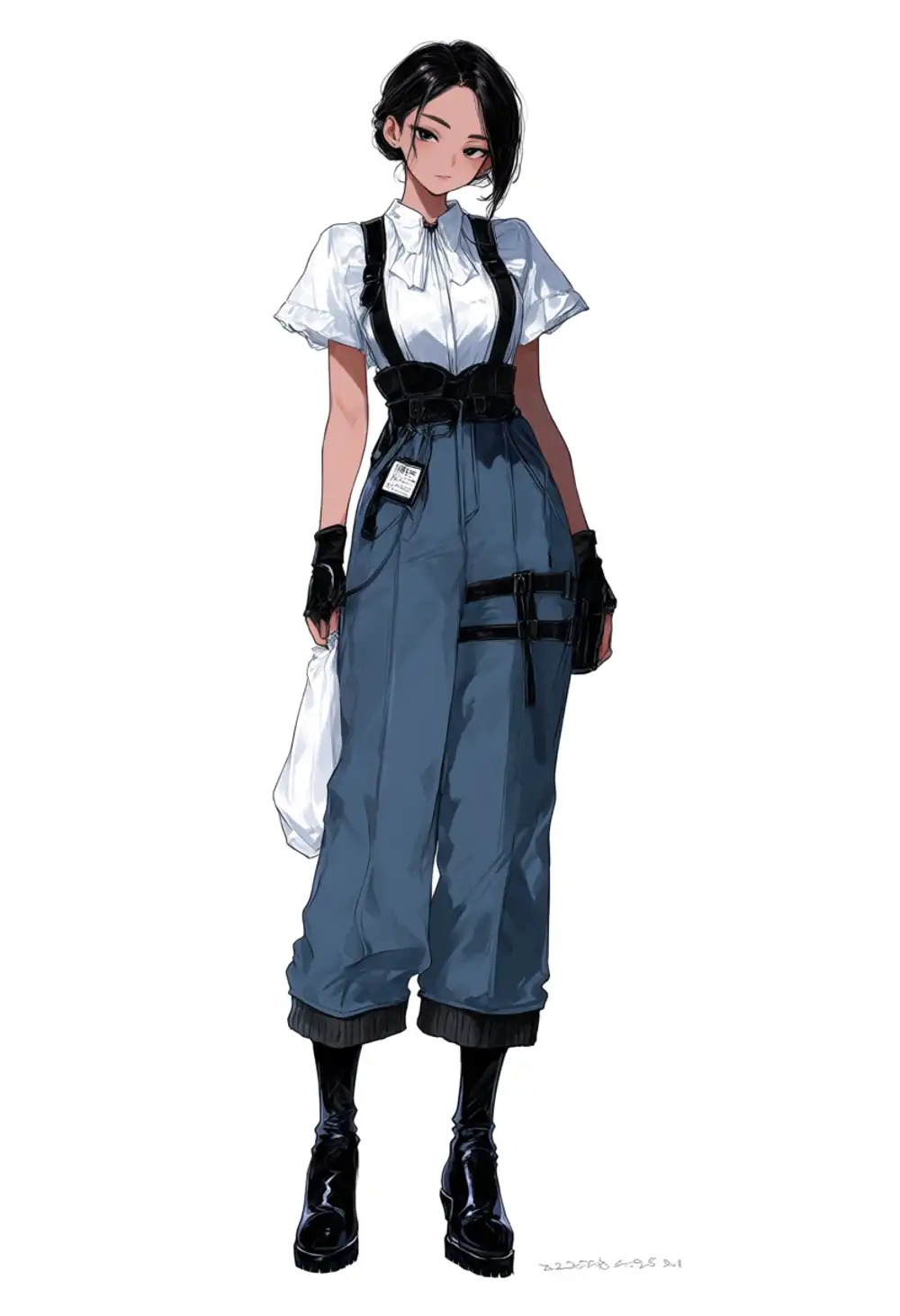
Seeds 42 and 9999 came out almost identical to the LoRA-loaded output. 42 has the same double peace sign, blue hoodie, and black shorts; 9999 has the same hair, clothes, fingerless gloves, and thigh holster, the only difference being whether she’s carrying a bag.
1234 has the same composition and style, with the headband, eye color, and small items different.
In other words, the deltas that landed on the shifted layers barely change the plain output. The stranger from the as-is load was just plain 2.9B, for which the trigger kanachan means nothing.
By the way, on seed 42 the hoodie had “KANACHAN” printed across the chest. It drew the unknown trigger word as text.
Full prompt (four-girl lineup)
Here are the three from Anima-Base v1.0.
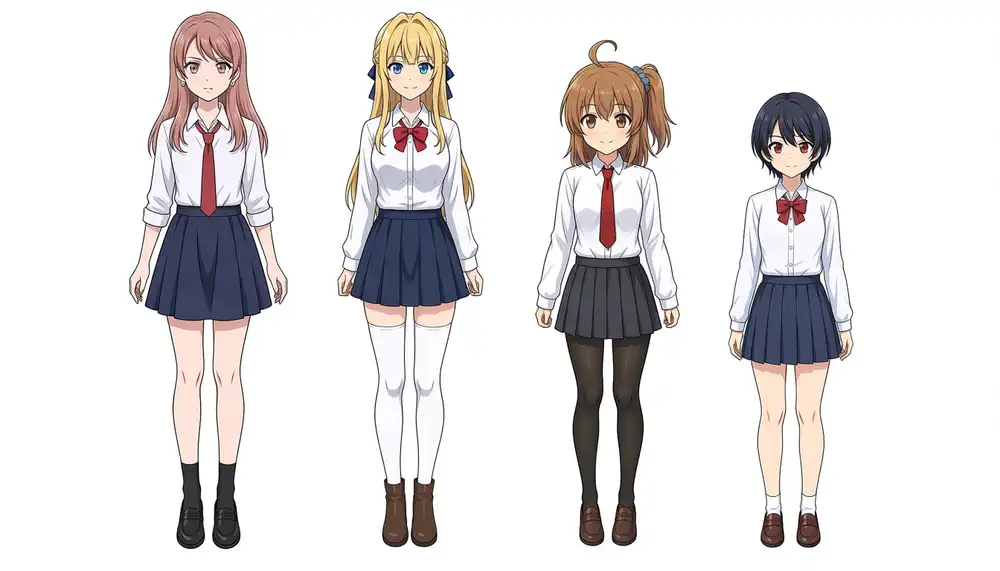
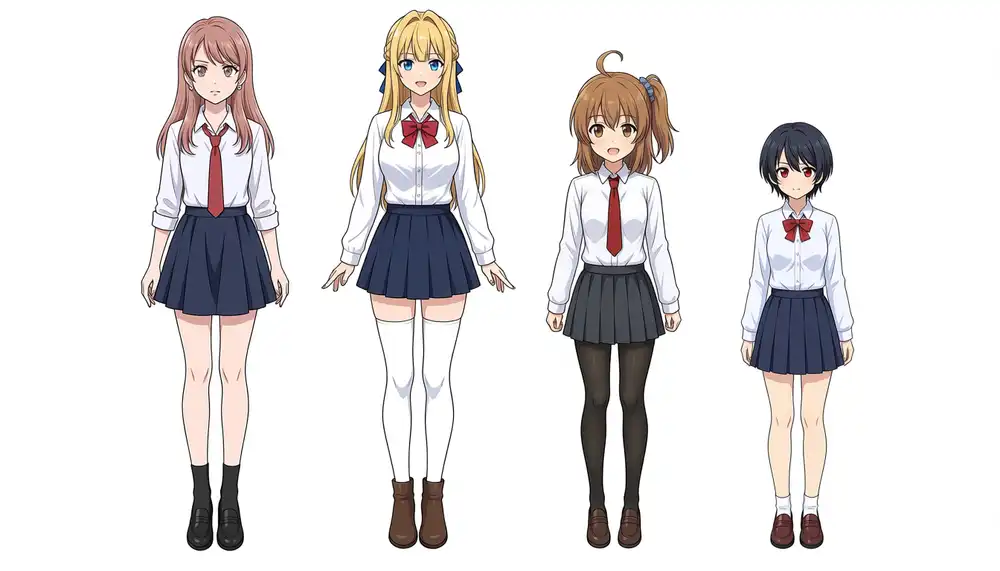
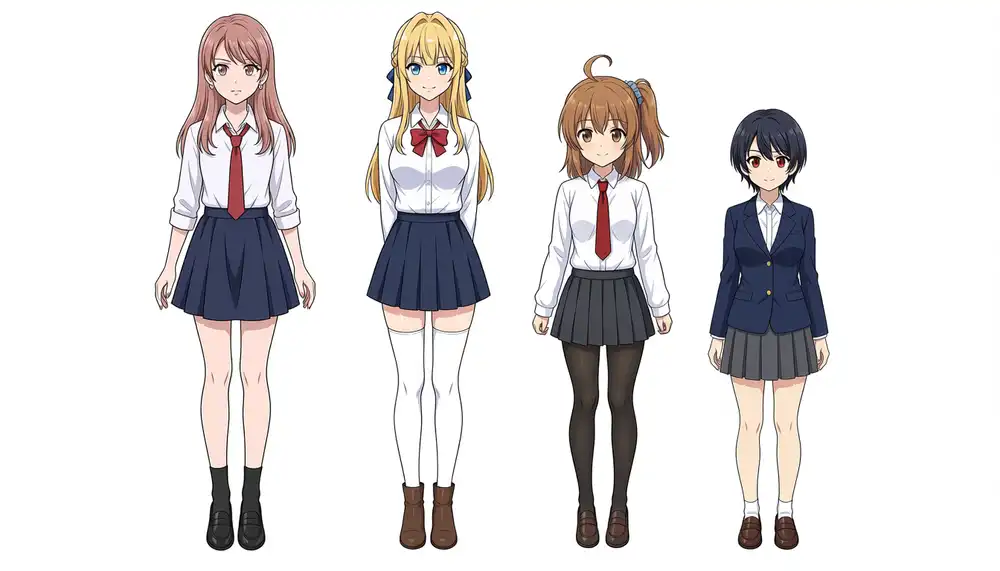
All three have four people, zero color mixing, and the height order Kurara = Kei > Kana > Koharu, exactly the pass criteria from the 4-character LoRA post. Time 244.6 to 252.6 seconds.
Here are the three with the LoRA loaded on 2.9B as is.
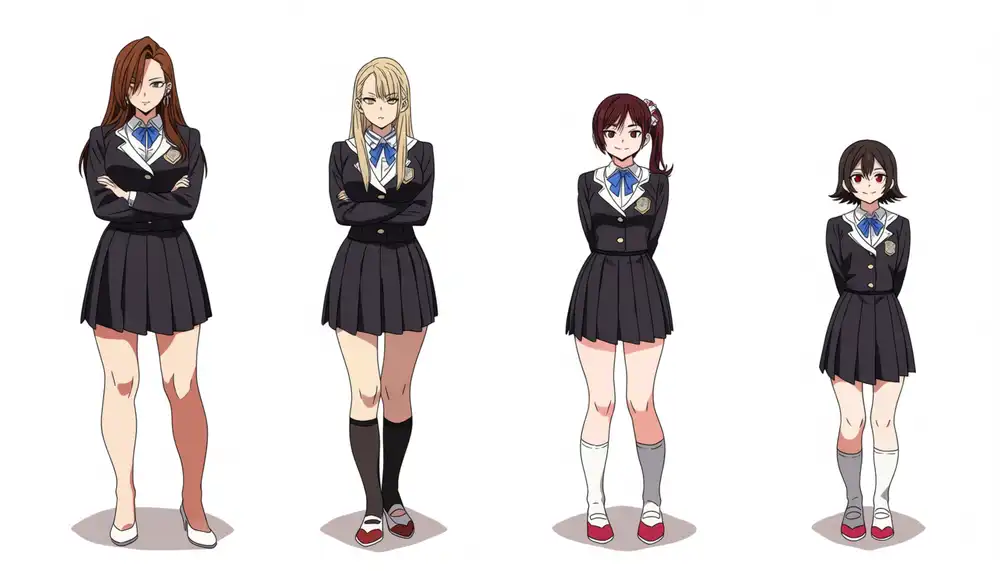
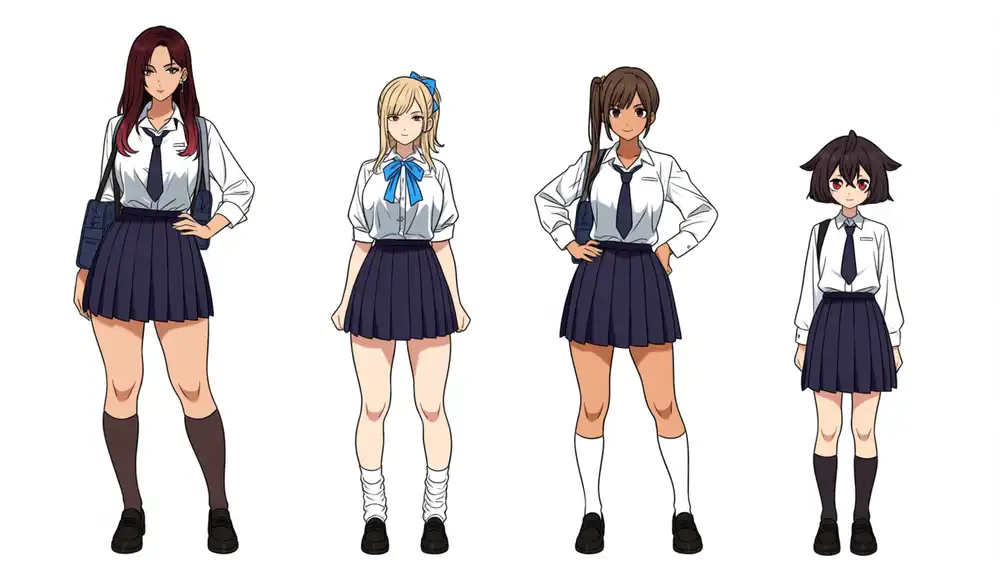
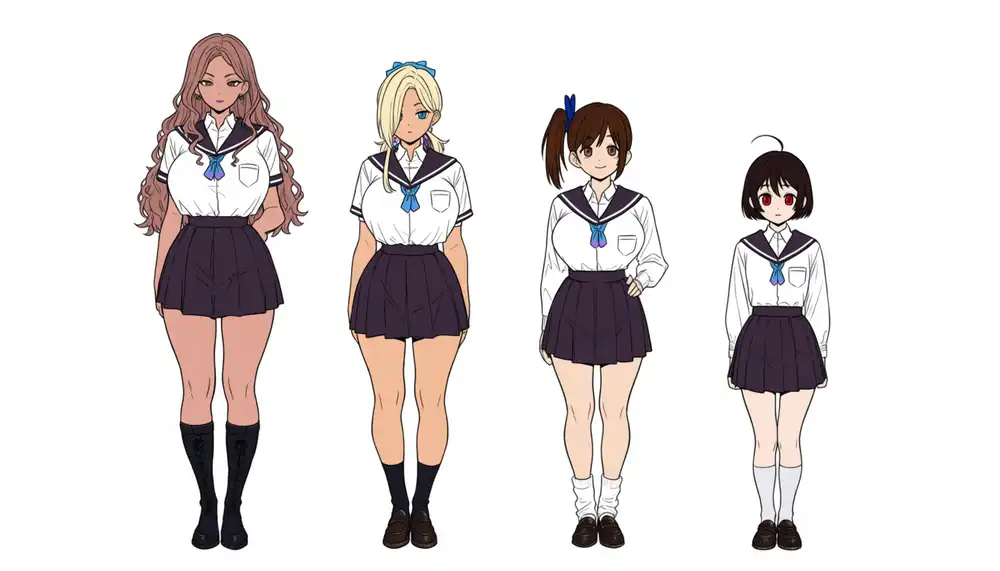
Four people in all three, and the anchors in the prompt landed in the positions I specified. Time 347.4 to 349.5 seconds.
Second from left blonde, third with a side ponytail, far right with short black hair and red eyes, that mapping is intact.
But none of the four is the real character. The faces and the proportions are different, everyone is tall and long-legged in a gekiga-leaning body type, Kana’s brown hair drifts toward dark red, the side ponytail ends up on the viewer’s left, and Kurara and Kei get tanned skin.
No ahoge, no blue scrunchie, the uniforms turn into whatever 2.9B felt like, black blazers and sailor collars, and the height order became a staircase stepping down from left to right.
Attribute bleed between neighbors isn’t noticeable.
This is exactly what I wrote in the module-split post: even plain Anima puts the attributes in the right positions, but the people stay strangers.
Pair LoRA (Kei and Kana, two standing)
I used keikana-animabase-v2_epoch140 with the prompt format from the 2-character LoRA v2 post, left and right positions and each character’s traits written as natural sentences, plus “they are two different girls”. 832×1216, seed 42.
| Model | Time |
|---|---|
| Anima-Base v1.0 | 249.0s |
| Anima-2.9B | 347.4s |


v1.0 has Kei on the left and Kana on the right, both the real ones.
2.9B also produced two girls standing with no fusion and no attribute bleed, but neither is the real character.
The left one is blonde with blunt bangs and blue eyes, but the hair is a short bun with no intake and no blue ribbon, and the right one is a brunette with a low side ponytail on the viewer’s left, no ahoge, no scrunchie. The body types are different too.
LoRAs with renumbered blocks
So what happens if the numbers are renumbered? I opened the LoRA safetensors, remapped the block numbers in the DiT-side key names using the table above, left the LLMAdapter side alone, and saved it back out.
Then I loaded the renumbered LoRAs on 2.9B with the same settings.
The actual keys look like this.
The 4-character LoRA and the pair LoRA are kohya format, with DiT keys like lora_unet_blocks_12_self_attn_q_proj.lora_down.weight using underscores, and LLMAdapter keys starting with lora_unet_llm_adapter_blocks_0_.
The Turbo LoRA is PEFT format, diffusion_model.blocks.12.self_attn.q_proj.lora_A.weight, with LLMAdapter keys starting with diffusion_model.llm_adapter.blocks.0..
I built the mapping from insertion_positions in expand_manifest.json and rewrote only the number right after lora_unet_blocks_ and diffusion_model.blocks..
| LoRA | All keys | Renumbered | Untouched |
|---|---|---|---|
anima-4char-v1_epoch100 | 948 | 840 (28 blocks × 30) | LLMAdapter 108 |
keikana-animabase-v2_epoch140 | 948 | 840 | LLMAdapter 108 |
anima-turbo-lora-v0.1 | 1016 | 896 (28 blocks × 32) | LLMAdapter 120 |
Zero load warnings for the three renumbered files as well.
Light prompt (Kana, renumbered)
Time 344.9 to 352.9 seconds.



Kana showed up, 3/3.
All three match the v1.0 output for the same seed in composition and face, and the only differences are small clothing items. On seed 42 the navy blazer became a raglan shirt with blue sleeves, and on 1234 and 9999 the fingerless gloves from v1.0 are gone.
The difference between the short-black-haired stranger from the as-is load and Kana from the renumbered load is nothing but the numbers in the key names of the same file.
Full prompt (four-girl lineup, renumbered)
Time 347.4 to 349.4 seconds.
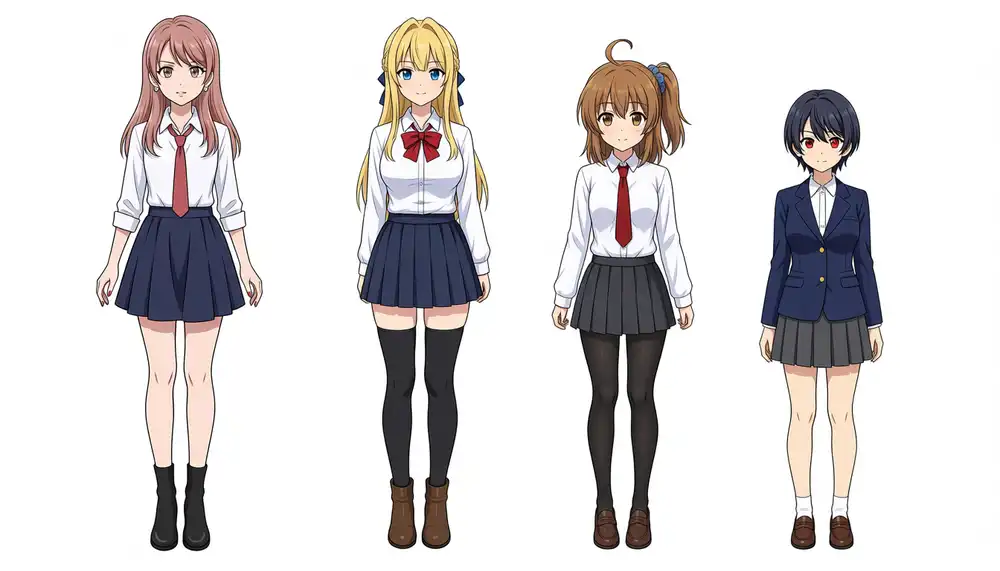
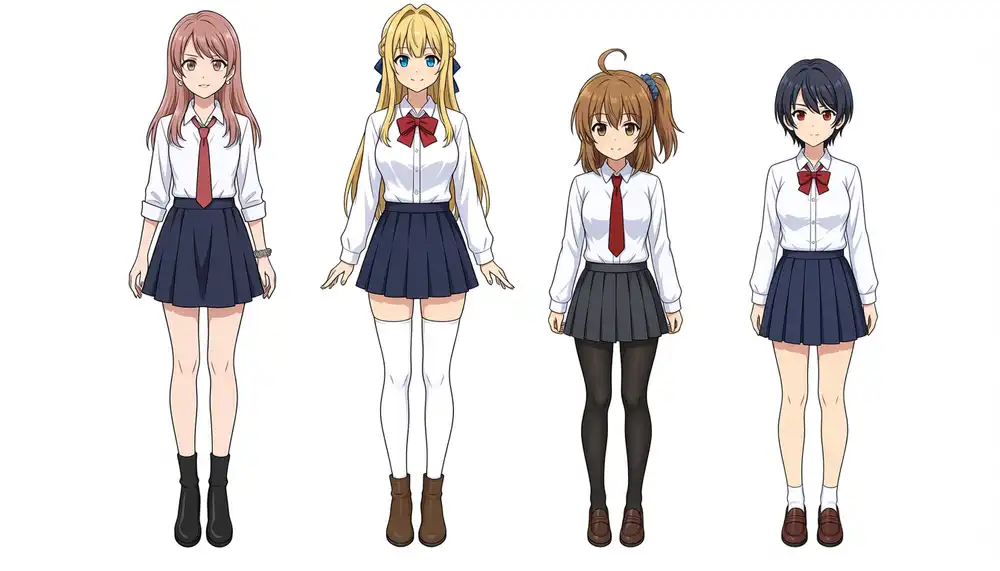
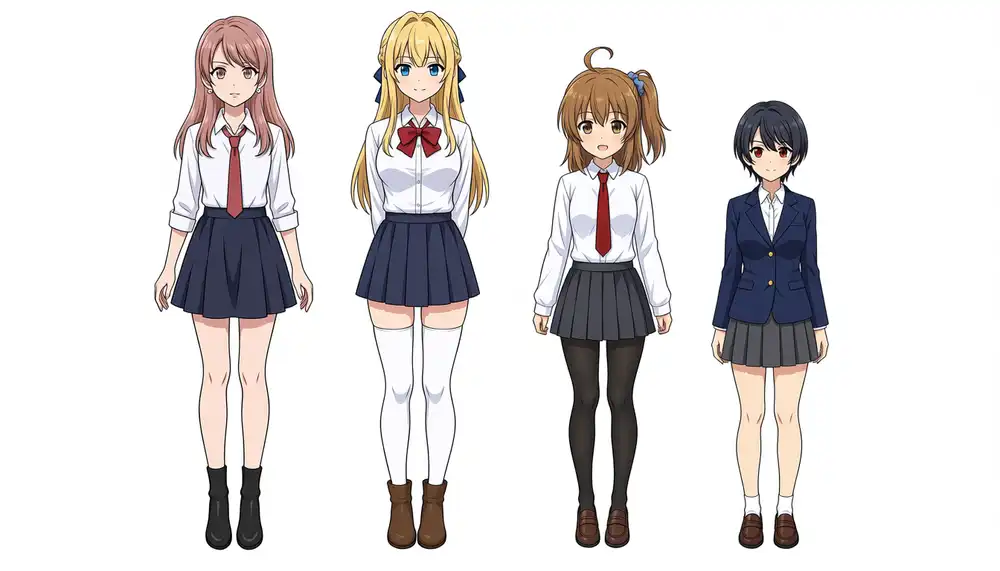
3/3, with four people, zero color mixing, and the height order Kurara = Kei > Kana > Koharu all back.
Same lineup, poses, and faces as v1.0 on the same seeds, and only three things differ: Kei’s knee socks went from white to black, Kurara’s shoes from loafers to short boots, and Koharu is wearing a blazer.
Pair LoRA (renumbered)
| Model | Time |
|---|---|
| Anima-Base v1.0 (repeated) | 249.0s |
| Anima-2.9B | 349.4s |

Kei on the left, Kana on the right, both the real ones. Compared with v1.0, Kei’s skirt went from brown plaid to navy pleats.
Turbo LoRA (renumbered)
| Model | Time (8 steps) |
|---|---|
| Anima-Base v1.0 (repeated) | 40.2s |
| Anima-2.9B | 56.2s |
Same time as the as-is load.

This one is a proper picture. The composition is nearly the same as v1.0 with Turbo on the same seed, down to the teal lining and the gems. The 2.9B side has more gold ornament and a signature-like string of characters in the bottom right.
Does the int8_convrot build run on a Mac
The author also ships an int8_convrot build.
In the post running the Anima-Turbo INT8ConvRot build on M1 Max, MPS had no int8×int8 matmul, and the only ways to run it were a CPU fallback or a dequantize patch.
If the 2.9B quantized build uses the same format the result shouldn’t change, so I only checked whether it loads and, if so, how long generation takes.
Same result.
Inside the file, every layer’s comfy_quant metadata is {"format": "int8_tensorwise", "convrot": true, "convrot_groupsize": 256}, and the 16 linear layers in all 40 blocks (q/k/v/output_proj of self_attn and cross_attn, layer1/2 of mlp, and the adaLN projections) hold torch.int8 weights with a per-row float32 scale. That’s 640 layers, and the LLMAdapter and the input/output layers are not quantized.
ComfyUI v0.33.3 prints Found quantization metadata version 1 and Detected mixed precision quantization, the load goes through, and it puts 2939MB on MPS versus 5572MB for the bf16 build.
Then the first matmul in KSampler throws NotImplementedError: The operator 'aten::_int_mm' is not currently implemented for the MPS device and it stops.
It stops in the same place as before, _handle_int8_linear_tensorwise in comfy_kitchen/tensor/int8.py going into fast_int8_mm in backends/eager/quantization.py, which calls torch._int_mm. comfy-kitchen is up to 0.2.31, but backends/ still only has cuda, eager, hip, and triton, and there is still no MPS-specific backend. On MPS the eager implementation is simply what gets used.
The dequantize patch from the previous post (three branches that call dequantize() on the weight and then hand it to the plain linear / mm / addmm when the device is MPS) applied to the same functions in 0.2.31 and it ran.
| Build | Loaded on MPS | Time (28 steps, seed 42) |
|---|---|---|
| bf16 | 5572MB | 353.4s |
| int8_convrot + dequantize patch | 2939MB | 363.5s |

The output is almost identical to the bf16 build, with the puff of the sleeves and the placement of the embroidery a little different.
It’s about 3% slower, which is the same thing the previous post found, the dequantize-patched build being slower than the unquantized one. No speedup, just the MPS footprint going from 5572MB to 2939MB.