Qwen-Rapid-AIO-NSFW (Phr00t) on RunPod needs 32GB VRAM: RTX 4090 fails to load, RTX 5090 works
 Contents
I wanted to generate 3-view reference sheets for a 3D model base mesh, so I tried running the NSFW variant of Qwen-Image-Edit (Phr00t AIO) on RunPod. This comes after checking local specs and putting together a setup guide — this time was the first real run. Things went sideways: RTX 4090 (24GB) didn’t work, and I finally got it running on RTX 5090 (32GB).
What I Tried Today
Failure on RTX 4090 (24GB VRAM)
Environment
- RunPod RTX 4090 (24GB VRAM)
- Template: runpod/comfyui:latest
- ComfyUI path:
/workspace/runpod-slim/ComfyUI/
Why It Failed
- Phr00t AIO NSFW v18.1 (28GB) doesn’t fit in 24GB VRAM
--lowvramoption didn’t help- FP8 version (20GB) requires VAE/Text Encoder separately, making the setup complex
Models I Tried
1. Phr00t AIO NSFW v18.1 (28GB)
- Path:
models/checkpoints/v18/Qwen-Rapid-AIO-NSFW-v18.1.safetensors - Result: Failed — 28GB doesn’t fit in 24GB VRAM, froze during load
--lowvramdidn’t help
2. 1038lab FP8 (20GB)
- Path:
models/checkpoints/fp8/Qwen-Image-Edit-2511-FP8_e4m3fn.safetensors - Result: VAE error — this file is diffusion model only; VAE/Text Encoder required separately
- Error:
ERROR: VAE is invalid: None
What I Learned
1. Model Configuration Differences
Phr00t AIO Version (All-In-One)
- VAE/CLIP integrated
- Self-contained in one file
- But 28GB doesn’t fit in 24GB VRAM
Official FP8 / 1038lab FP8
- Diffusion model only
- Requires separately:
- VAE:
qwen_image_vae.safetensors - Text Encoder:
qwen_2.5_vl_7b_fp8_scaled.safetensors
- VAE:
2. Required Custom Node
Standard CLIPTextEncode won’t work — you need TextEncodeQwenImageEditPlus.
This is Phr00t’s modified version of ComfyUI’s standard nodes_qwen.py. Install it with:
# Run from the ComfyUI directory
cd comfy_extras
wget https://huggingface.co/Phr00t/Qwen-Image-Edit-Rapid-AIO/resolve/main/fixed-textencode-node/nodes_qwen.py -O nodes_qwen.py
Source: https://huggingface.co/Phr00t/Qwen-Image-Edit-Rapid-AIO/tree/main/fixed-textencode-node
3. Workflow Differences
Standard SD/FLUX workflow (CheckpointLoader → LoRA → KSampler) doesn’t work. A Qwen-specific node setup is required.
Recommended Setup by VRAM Size
| VRAM | Recommended Setup | Notes |
|---|---|---|
| 12GB | GGUF Q2_K (7.4GB) | Lightest, quality somewhat reduced |
| 16GB | GGUF Q4_K_M (13.3GB) | Balanced, recommended |
| 24GB | GGUF Q5_K_M (15.1GB) or Official FP8 split setup | High quality |
| 32GB | Phr00t AIO NSFW (28GB) | Full size, best quality |
Options for RTX 4090 (24GB VRAM)
Option A: Use GGUF (Recommended)
Q4_K_M is about 13GB, fits comfortably in 24GB VRAM. NSFW-capable GGUF quantization.
Required custom node:
cd /workspace/ComfyUI/custom_nodes
git clone https://github.com/city96/ComfyUI-GGUF
pip install --upgrade gguf
Required files:
models/unet/
  └── Qwen-Rapid-AIO-NSFW-v18.1-Q4_K_M.gguf

models/text_encoders/
  └── Qwen2.5-VL-7B-Instruct-abliterated-Q4_K_M.gguf
  └── mmproj-xxx.gguf (must be in the same directory)

models/vae/
  └── pig_qwen_image_vae_fp32-f16.gguf
Download:
pip install huggingface_hub

# GGUF main model
cd /workspace/ComfyUI/models/unet
python3 -c "from huggingface_hub import hf_hub_download; hf_hub_download('Phil2Sat/Qwen-Image-Edit-Rapid-AIO-GGUF', 'Qwen-Rapid-AIO-NSFW-v18.1-Q4_K_M.gguf', local_dir='./')"

# Text Encoder (abliterated version)
cd /workspace/ComfyUI/models/text_encoders
python3 -c "from huggingface_hub import snapshot_download; snapshot_download('Phil2Sat/Qwen-Image-Edit-Rapid-AIO-GGUF', allow_patterns='Qwen2.5-VL-7B-Instruct-abliterated/*', local_dir='./')"

# VAE
cd /workspace/ComfyUI/models/vae
python3 -c "from huggingface_hub import hf_hub_download; hf_hub_download('calcuis/pig-vae', 'pig_qwen_image_vae_fp32-f16.gguf', local_dir='./')"
Download source: https://huggingface.co/Phil2Sat/Qwen-Image-Edit-Rapid-AIO-GGUF
Option B: Official FP8 Split Setup
SFW version. Loads VAE, Text Encoder, and Diffusion Model separately.
Required files:
models/diffusion_models/
  └── qwen_image_edit_fp8_e4m3fn.safetensors

models/vae/
  └── qwen_image_vae.safetensors

models/text_encoders/
  └── qwen_2.5_vl_7b_fp8_scaled.safetensors

models/loras/
  └── Qwen-Image-Lightning-4steps-V1.0.safetensors (optional, for 4-step generation)
Download:
pip install huggingface_hub

cd /workspace/ComfyUI/models

# Diffusion Model
python3 -c "from huggingface_hub import hf_hub_download; hf_hub_download('Comfy-Org/Qwen-Image-Edit_ComfyUI', 'qwen_image_edit_fp8_e4m3fn.safetensors', local_dir='./diffusion_models/')"

# VAE
python3 -c "from huggingface_hub import hf_hub_download; hf_hub_download('Comfy-Org/Qwen-Image_ComfyUI', 'qwen_image_vae.safetensors', local_dir='./vae/')"

# Text Encoder
python3 -c "from huggingface_hub import hf_hub_download; hf_hub_download('Comfy-Org/Qwen-Image_ComfyUI', 'qwen_2.5_vl_7b_fp8_scaled.safetensors', local_dir='./text_encoders/')"

# Lightning LoRA (optional)
python3 -c "from huggingface_hub import hf_hub_download; hf_hub_download('Comfy-Org/Qwen-Image-Edit_ComfyUI', 'Qwen-Image-Lightning-4steps-V1.0.safetensors', local_dir='./loras/')"
Download sources:
- https://huggingface.co/Comfy-Org/Qwen-Image_ComfyUI
- https://huggingface.co/Comfy-Org/Qwen-Image-Edit_ComfyUI
Workflow reference: https://docs.comfy.org/tutorials/image/qwen/qwen-image-edit
Reference Links
Workflows
- Phr00t official workflow: https://huggingface.co/Phr00t/Qwen-Image-Edit-Rapid-AIO/blob/main/Qwen-Rapid-AIO.json
- Civitai 3-view workflow: https://civitai.com/models/2061788/qwen-rapid-aio-three-view-workflow
- ComfyUI official tutorial: https://docs.comfy.org/tutorials/image/qwen/qwen-image-edit
Models
- Phr00t AIO: https://huggingface.co/Phr00t/Qwen-Image-Edit-Rapid-AIO
- Comfy-Org official: https://huggingface.co/Comfy-Org/Qwen-Image-Edit_ComfyUI
- GGUF version: https://huggingface.co/Phil2Sat/Qwen-Image-Edit-Rapid-AIO-GGUF
Custom Nodes
- ComfyUI-GGUF: https://github.com/city96/ComfyUI-GGUF
- Comfyui-QwenEditUtils: https://github.com/lrzjason/Comfyui-QwenEditUtils
- Phr00t modified node: https://huggingface.co/Phr00t/Qwen-Image-Edit-Rapid-AIO/tree/main/fixed-textencode-node
RunPod Operation Notes
Billing
- RTX 4090: $0.59–0.6/hr (as of January 2026)
- RTX 5090: $0.9/hr (as of January 2026)
- Volume retention (when stopped): $0.022/hr ($0.53/day, ~$16/month)
How to Stop a Pod
Update on April 5, 2026: I consolidated the detailed RunPod shutdown notes into Running Qwen-Image-Edit-2511 on RunPod. My current understanding is that the practical console actions are Stop and Terminate. At the API layer the operation appears as DELETE, and in the CLI it appears as runpodctl remove pod.
For a setup like this one, which uses a volume disk, the simple rule is Stop → Start for short-term reuse and Terminate → deploy a new Pod when moving to a different GPU. Pod migration is still beta, and after trying it two or three times myself, I would not recommend counting on it for recovery.
This Session’s Volume Contents
/workspace/runpod-slim/ComfyUI/models/
├── checkpoints/
│   ├── v18/Qwen-Rapid-AIO-NSFW-v18.1.safetensors (28GB)
│   └── fp8/Qwen-Image-Edit-2511-FP8_e4m3fn.safetensors (20GB)
└── loras/
    └── Multiple-Angles-LoRA/
Successful Run (Confirmed 2026/01/24)
Input image:

ComfyUI generation screen:
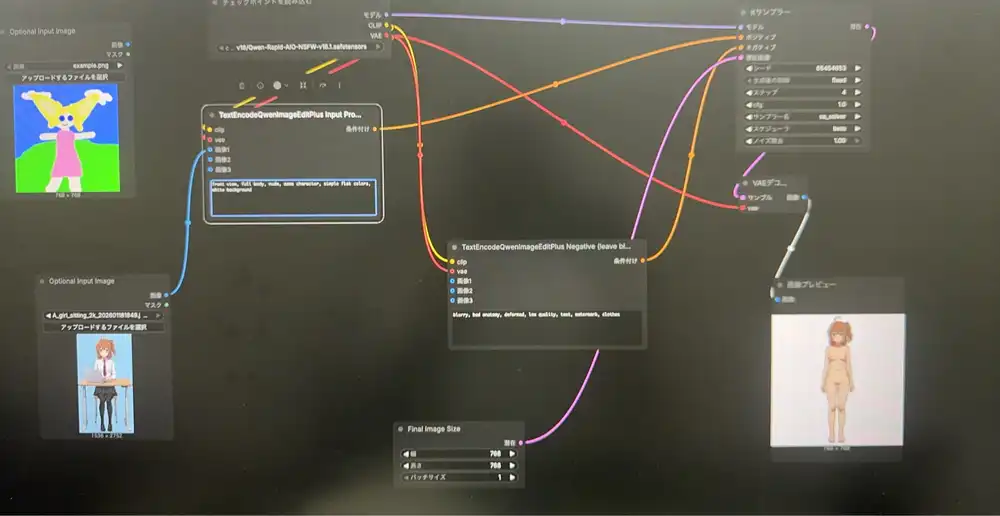
Environment
- GPU: RTX 5090 (32GB VRAM)
- Template: ashleykza/comfyui:cu128-py312-v0.10.0
- PyTorch: 2.9.1+cu128
- ComfyUI: 0.10.0
Model
- Phr00t AIO NSFW v18.1 (28GB)
- Path:
models/checkpoints/v18/Qwen-Rapid-AIO-NSFW-v18.1.safetensors
Workflow
- Phr00t official JSON: https://huggingface.co/Phr00t/Qwen-Image-Edit-Rapid-AIO/blob/main/Qwen-Rapid-AIO.json
- Drag and drop the JSON into ComfyUI
Settings
- steps: 4
- cfg: 1.0
- sampler: sa_solver
- scheduler: beta
- Output size: 768x768 (for testing; 1024 recommended for production)
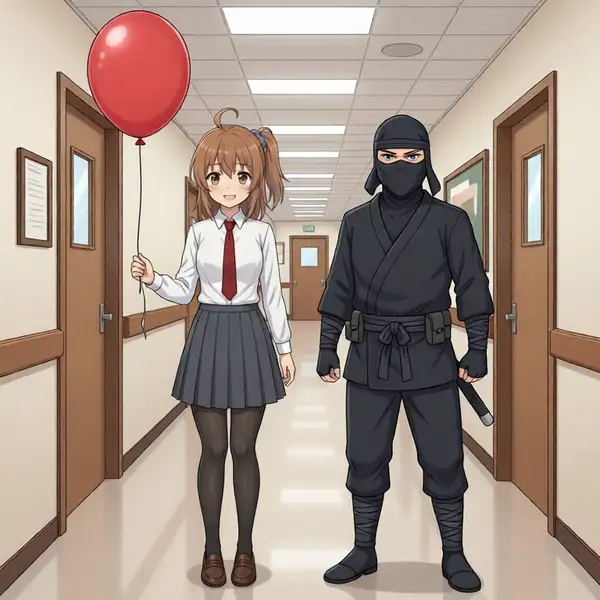
Default prompt output:
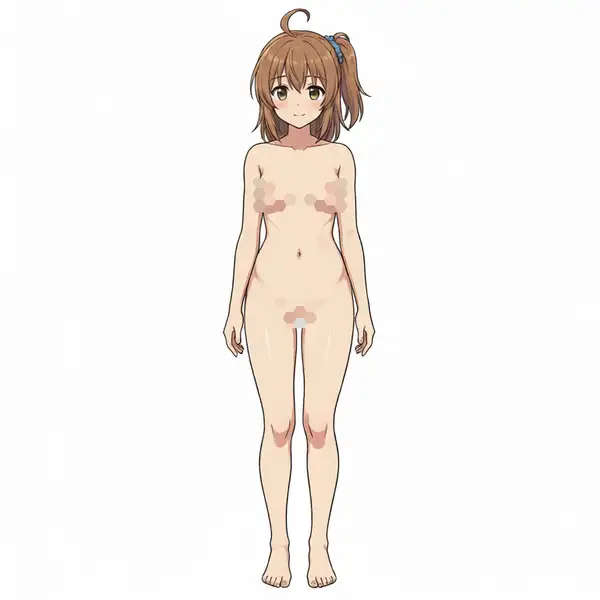
Prompt (for 3D Model Reference Sheet)
Positive:
front view, full body, nude, same character, simple flat colors, white backgroundNegative:
blurry, bad anatomy, deformed, low quality, text, watermark, clothesReference sheet prompt output (no mosaic in the actual output):
Generating a 3-View Sheet
- Generate separately for front view → side view → back view
- Use the same input image for all three
Generation Speed
- Blazing fast (4 steps in a few seconds)
Steps for RTX 5090 (32GB VRAM)
1. Create Pod
- GPU: RTX 5090 (32GB VRAM)
- Template: ashleykza/comfyui:cu128-py312-v0.10.0 (RTX 5090 compatible)
- Disk: default is fine
Note: RTX 5090 requires PyTorch 2.8+. Standard ComfyUI templates don’t support it.
2. Download Model (Web Terminal)
Open Web Terminal and run:
pip install huggingface_hub

cd /workspace/ComfyUI/models/checkpoints

python3 -c "from huggingface_hub import hf_hub_download; hf_hub_download('Phr00t/Qwen-Image-Edit-Rapid-AIO', 'v18/Qwen-Rapid-AIO-NSFW-v18.1.safetensors', local_dir='./')"
Note: 28GB, takes about 5 minutes.
3. Load Workflow
- Open in browser: https://huggingface.co/Phr00t/Qwen-Image-Edit-Rapid-AIO/blob/main/Qwen-Rapid-AIO.json
- Click “Download” to save locally
- Drag and drop the JSON file into ComfyUI (Port 3000)
4. Run
- Checkpoint: select
v18/Qwen-Rapid-AIO-NSFW-v18.1.safetensors - Upload an image
- Set prompt and run