Packaging the BERT + Qwen OCR Correction Pipeline as a Python Tool
 Contents
Background
In the previous article, I built a three-stage pipeline: BERT perplexity scan → Qwen 7B LLM judgment → escalation on disagreement. Running on an RTX 4060 Laptop with 8GB VRAM, it auto-processed 9 of 131 detected OCR errors and only escalated 5 to humans.
However, that experiment was a collection of WSL2 scripts that wouldn’t run elsewhere. BERT model loading, ollama API calls, and threshold tuning were scattered across different Jupyter notebooks with zero reusability.
I packaged it as a cross-platform Python tool where one installer sets everything up and double-clicking start.bat opens the web UI.
Why llama-server Instead of ollama
The previous iteration used Qwen 7B via ollama, but I switched the LLM backend to llama-server (llama.cpp) for the packaged version.
ollama keeps a GUI running in the background. This tool pipes pipeline output to a Gradio UI, so ollama’s chat interface is unnecessary — it’s just background noise.
More importantly: GPU offload control. llama-server lets you specify the number of layers to put in VRAM via --n-gpu-layers from the CLI. On a machine with 4GB VRAM, you might load only 20 layers to balance memory efficiency and speed — one command does it. ollama and LM Studio don’t offer this level of GPU control.
The tool design abstracts the LLM judgment component behind an OpenAI-compatible API. llama-server is the default, but you can switch to ollama, LM Studio, or a remote server by changing the LLM API URL field in the web UI or using --llm-api on the CLI.
Pipeline Overview
flowchart TD
    A[Input text] --> B[BERT perplexity scan]
    B --> C{Threshold check}
    C -->|probability < 1%| D[Extract suspicious tokens]
    C -->|probability >= 1%| E[AUTO-KEEP]
    D --> F[Filtering]
    F --> G{LLM enabled?}
    G -->|ON| H[LLM A/B judgment]
    G -->|OFF| I[Classify by BERT probability only]
    H --> J{Cross-check LLM vs BERT}
    J -->|LLM: FIX| K[AUTO-FIX]
    J -->|LLM: KEEP + BERT >= 50%| L[ESCALATE]
    J -->|LLM: KEEP + BERT < 50%| E

    style K fill:#4caf50,color:#fff
    style L fill:#ff9800,color:#fff
    style E fill:#9e9e9e,color:#fff
If llama-server isn’t running, the pipeline starts the process automatically and stops it on exit. No manual management needed.
From Installation to Running
Download the Source code (zip) from GitHub releases and extract, or git clone. Git speeds up installation but isn’t required.
Windows
Recommend installing Python from python.org in advance (check “Add python.exe to PATH”). If not installed, the installer tries to auto-install via winget.
Right-click install.ps1 in the extracted folder and “Run with PowerShell,” or from PowerShell:
powershell -ExecutionPolicy Bypass -File install.ps1Mac/Linux
bash install.shWhat the Installer Does Automatically
- Check Python 3.10+ (auto-install via winget on Windows if missing)
- Create venv + install PyTorch based on GPU detection
- Install package core + BERT dependencies + Gradio
- NDLOCR-Lite (clone via Git if available, otherwise auto-download GitHub source archive)
- llama-server binary (auto-download from latest llama.cpp release)
- Qwen3.5-4B Q4_K_M (~2.7GB, auto-download from HuggingFace)
Once done, double-click start.bat (Windows) or start.sh (Mac/Linux). The browser opens the web UI. llama-server startup and model loading are handled automatically by the pipeline.
For CLI usage, activate the venv first:
.venv/Scripts/activate   # Windows
source .venv/bin/activate # Mac/Linux
python -m ocr_corrector scan.jpg           # image input (default)
python -m ocr_corrector --text input.txt   # text input
python -m ocr_corrector --no-llm scan.jpg  # BERT only (faster)
Test Environment
| Item | Spec |
|---|---|
| GPU | NVIDIA GeForce RTX 3050 Ti Laptop (4GB VRAM) |
| RAM | 16GB |
| OS | Windows 11 |
| Python | 3.12.10 |
| PyTorch | 2.6.0+cu124 |
| BERT | cl-tohoku/bert-base-japanese-v3 |
| LLM | Qwen3.5-4B Q4_K_M / Qwen2.5-7B Q3_K_M (both CPU inference) |
Half the VRAM of the previous experiment environment (RTX 4060 Laptop 8GB + WSL2). BERT on GPU, LLM on CPU — bert-only configuration was auto-selected.
Testing with the Same OCR Data
I used the exact NDLOCR-Lite output from the 1963 National Diet Library manual from the previous article.
Input text:
(z)気送子送付管
気送子送付には、上記気送管にて送付するものと、空
気の圧縮を使用せず,直接落下させる装置の二通りがあ
る。後者の送付雪は出納台左側に設置されており.5
3.1の各層ステーションに直接落下するよう3本の管
が通じ投入ロのフタに層表示が記されている。取扱いに
当っては気送子投入優すみやかにフタを閉め速度を調整
Visible OCR errors (same as previous article):
- “送付雪” → should be “送付管”
- “投入優” → should be “投入後”
- “投入ロ” → should be “投入口” (katakana ロ → kanji 口)
BERT Scan Results
49 locations detected, 18 after filtering. Processing time: 1.87 seconds (BERT on GPU).
The previous article had 131 before filtering → 14 after. This run has more after filtering because filter conditions were relaxed slightly.
Qwen3.5-4B Judgment Results
The Thinking Mode Trap
On the first run, everything came back as KEEP. Qwen3.5 series has thinking (reasoning trace) enabled by default — even for short responses like A/B judgment, it runs a long internal reasoning pass. With llama-server’s OpenAI-compatible API, the thinking portion goes into the reasoning_content field, and content (the actual answer) becomes empty.
// Response with thinking enabled
{
  "message": {
    "content": "",                    // empty → judged as KEEP
    "reasoning_content": "Thinking Process:\n1. Analyze..."  // everything goes here
  }
}
Since content is empty and doesn’t contain “B”, everything becomes KEEP. The previous article’s Qwen2.5-7B via ollama worked because Qwen2.5 series doesn’t have thinking mode.
The OpenAI-compatible API’s enable_thinking: false parameter doesn’t disable thinking. It’s ignored by both llama-server and ollama. Each backend needs its own approach.
| Backend | How to disable thinking |
|---|---|
| llama-server | Pass --reasoning-budget 0 at startup |
| ollama | Pass "think": false via native API (/api/chat). Can’t disable via OpenAI-compatible API (/v1) |
Complaints about not being able to disable thinking in Qwen3.5 are common online. Many people hit the “sent enable_thinking but it didn’t work” pattern by only looking at the OpenAI-compatible API. Check each backend’s documentation.
Results After Disabling Thinking
18 locations judged in 82.6 seconds (CPU inference, ~4.6 seconds per item).
| OCR text | Correct | BERT candidate | 3.5-4B judgment | Final result |
|---|---|---|---|---|
| 投入優 | 後 | 後(73%) | FIX | AUTO-FIX. Correct |
| 投入ロ | 口 | 口(84%) | FIX | AUTO-FIX. Correct |
| 送付雪 | 管 | 真空(35%) | KEEP | AUTO-KEEP |
The two real errors were AUTO-FIXed. Same result as the previous run with Qwen2.5-7B Q4.
However, line-break false positive judgment wasn’t as accurate as 7B Q4:
| Line-break location | BERT candidate | Previous 2.5-7B Q4 | This 3.5-4B |
|---|---|---|---|
| ”管” → ”。“ | 99% | KEEP | FIX |
| ”空” → ”。“ | 93% | KEEP | KEEP |
| ”気” → “空気” | 78% | KEEP | FIX |
| ”,” → “に” | 80% | KEEP | FIX |
| ”あ” → “ある” | 87% | KEEP | FIX |
4B catches real errors but is weaker at correctly KEEPing line-break false positives compared to 7B. That said, with ESCALATE routing items to humans, the pipeline still doesn’t break.
Qwen3.5-9B Judgment Results
4B’s line-break accuracy was insufficient, so I also tried 9B. unsloth/Qwen3.5-9B-GGUF Q4_K_M (5.7GB).
18 locations judged in 118.3 seconds (CPU inference, 6.6 seconds per item).
| OCR text | Correct | BERT candidate | 9B judgment | Final result |
|---|---|---|---|---|
| 投入優 | 後 | 後(73%) | FIX | AUTO-FIX. Correct |
| 投入ロ | 口 | 口(84%) | FIX | AUTO-FIX. Correct |
| 送付雪 | 管 | 真空(35%) | KEEP | AUTO-KEEP |
Real errors fixed same as 4B. Line-break FP comparison:
| Line-break | BERT candidate | 3.5-4B | 3.5-9B | Previous 2.5-7B Q4 |
|---|---|---|---|---|
| ”管” → ”。“ | 99% | FIX | KEEP | KEEP |
| ”空” → ”。“ | 93% | KEEP | KEEP | KEEP |
| ”、” → “する” | 84% | KEEP | KEEP | KEEP |
| ”気” → “空気” | 78% | FIX | FIX | KEEP |
| ”,” → “に” | 80% | FIX | FIX | KEEP |
| ”あ” → “ある” | 87% | FIX | FIX | KEEP |
9B improved by one case over 4B (“管→。” now KEEP). But “気→空気”, ”,→に”, “あ→ある” couldn’t be improved even with more parameters. The core problem is context being cut by line breaks — more parameters have a ceiling here. The fact that the previous Qwen2.5-7B Q4 KEEPed all of them might reflect the difference between 2.5 and 3.5 model characteristics.
Comparing llama-server vs ollama, Thinking ON/OFF, and Full-Text Joining
To isolate whether line-break FP judgment was a model or backend issue, I tested Qwen3.5-4B under different conditions. ollama uses the native API (/api/chat). The OpenAI-compatible API (/v1/chat/completions) also can’t control thinking in ollama and produces empty responses.
| Condition | Error FIX | Line-break KEEP | Speed (18 items) |
|---|---|---|---|
| llama-server thinking OFF (line-by-line) | 2/2 | 1/6 | 82.6s |
| ollama think=false (line-by-line) | 2/2 | 2/6 | 48.8s |
| ollama think=true (line-by-line) | 0/2 | 6/6 | 128.4s |
| ollama think=false (full text) | 2/2 | 1/6 | 49.5s |
| ollama think=true (full text) | 0/2 | 6/6 | 126.2s |
Backend Differences
Even with the same model, same prompt, and thinking OFF, llama-server and ollama show different line-break KEEP results (1/6 vs 2/6). ollama KEEPs one more case. Quantization or sampling implementation differences seem to affect borderline A/B judgments. ollama is also faster (48.8s vs 82.6s) since it auto-uses GPU while llama-server runs CPU-only.
Thinking ON Behavior
With thinking ON, everything becomes KEEP. In ollama’s native API, reasoning traces go into the thinking field and content (the answer) is empty. Even looking at the end of the thinking, it shows “Constraint: Answer with…” mid-analysis — it never reaches a final A or B decision. num_predict: 64 doesn’t give thinking enough token budget to generate an answer before cutoff.
Getting answers with thinking ON would require dramatically increasing num_predict, but running hundreds of tokens of reasoning just to output a single character A/B judgment isn’t worth the cost.
Effect of Full-Text Joining
Changing line-level context (2 lines before/after) to full text joining didn’t improve results. Line-break KEEP actually got worse (2/6 → 1/6). Longer context seems to dilute LLM attention, making it harder to focus on the A/B difference. Line-level context is better.
Model Selection
| Model | Size | Error FIX | Line-break KEEP | CPU speed |
|---|---|---|---|---|
| Qwen3.5-4B Q4 (llama-server) | 2.7GB | 2/2 | 1/6 | 4.6s/item |
| Qwen3.5-4B Q4 (ollama) | 2.7GB | 2/2 | 2/6 | 2.7s/item |
| Qwen3.5-9B Q4 (llama-server) | 5.7GB | 2/2 | 2/6 | 6.6s/item |
| Qwen2.5-7B Q4 (previous ollama) | 4.7GB | 2/2 | 6/6 | ~4s/item |
With thinking OFF, Qwen3.5 series is weak at line-break FP judgment. The previous Qwen2.5-7B’s perfect 6/6 KEEP reflects 2.5 being optimized for straight responses without thinking. 3.5 series is trained with thinking in mind, so cutting it degrades reasoning quality.
With GPU with 6GB+ VRAM, you can put Qwen3.5-4B (2.7GB) and BERT (2.5GB) on GPU simultaneously for a both-gpu configuration. GPU inference would bring LLM judgment under 1 second per item.
Punctuation-Based Re-segmentation for Line-Break Issues
The root cause of line-break false positives is text being cut at physical newline positions in OCR output. When “空\n気” is split across two lines, BERT misidentifies the line-ending “空” as end-of-sentence.
As a fix, I added pre-processing that removes all newlines from input text and re-segments at punctuation (。、).
# Original line split (raw OCR output)
[0] 気送子送付には、上記気送管にて送付するものと、空   ← cuts here
[1] 気の圧縮を使用せず,直接落下させる装置の二通りがあ  ← "空気" split across lines

# Re-segmented at punctuation
[0] (z)気送子送付管気送子送付には、
[1] 上記気送管にて送付するものと、
[2] 空気の圧縮を使用せず,直接落下させる装置の二通りがある。  ← "空気" in one sentence
Results
| Metric | Line split (original) | Punctuation re-segment |
|---|---|---|
| BERT raw detections | 49 | 35 |
| After filtering | 18 | 13 |
| ”優→後” detection | 73% | 82% (improved) |
| “ロ→口” detection | 84% | 60% |
| Line-break FPs (“空→。” etc.) | 6 | 0 |
Line-break false positives eliminated entirely. BERT candidates reduced from 18 to 13, also reducing LLM judgment load. “優→後” BERT confidence improved from 73% to 82% — BERT’s probability estimation is more accurate when sentences aren’t cut mid-sentence.
“ロ→口” confidence dropped from 84% to 60% because punctuation re-segmentation produces longer sentences, increasing BERT token count. Longer sentences tend to reduce perplexity calculation accuracy, but 60% still exceeds the filter threshold (30%) so it’s still detected.
LLM judgment (ollama Qwen3.5-4B think=false) correctly FIXed both “優→後” and “ロ→口”. With punctuation re-segmentation, the structural problem of LLM incorrectly FIXing line-break FPs goes away even with 4B.
GPU Detection and Model Placement
Combinations for placing BERT and LLM (llama-server) on GPU vs CPU. The installer auto-selects based on VRAM capacity.
| Placement | BERT | LLM | Required VRAM | Selection condition |
|---|---|---|---|---|
both-gpu | GPU | GPU (--n-gpu-layers 99) | ~5GB+ | 6GB+ VRAM |
bert-only | GPU | CPU (--n-gpu-layers 0) | ~2.5GB | 3-6GB VRAM |
cpu-only | CPU | CPU | 0 | No GPU |
In this test environment (RTX 3050 Ti 4GB), bert-only was auto-selected. BERT scan benefits from GPU at 1.6 seconds. LLM runs CPU at 4.6 seconds per item, 82.6 seconds for 18 items. both-gpu would dramatically accelerate LLM judgment, but 4GB VRAM is too tight for BERT + LLM simultaneously. Qwen3.5-4B (2.7GB) + BERT (2.5GB) = 5.2GB, fitting on 6GB+ VRAM.
For Apple Silicon, the MPS backend is used with unified memory, so there’s no VRAM constraint. Both BERT and llama-server naturally run on GPU. both-gpu is auto-selected.
Apple Silicon Measurements
Testing with punctuation re-segmented data (13 items) on M1 Max (64GB).
| Step | Time |
|---|---|
| BERT scan (MPS) | 1.81s |
| LLM judgment (Metal, ngl=99) | 5.55s (0.43s/item) |
| Total | 7.37s |
The Windows test environment (RTX 3050 Ti 4GB, bert-only configuration) ran LLM on CPU at 4.6 seconds per item with the same 4B model. Apple Silicon’s unified memory lets both BERT and LLM run on GPU simultaneously, so the BERT/LLM simultaneous load problem that CUDA environments face doesn’t arise.
Tensor Offload Speed Optimization Attempt
llama.cpp has --override-tensor that distributes CPU/GPU assignment at the tensor level rather than layer level. The idea is to offload FFN tensors (large, processable on CPU) to CPU while keeping attention tensors (GPU-suited) on GPU, enabling --n-gpu-layers 99 (all layers on GPU) while fitting in VRAM. A Reddit report showed over 200% speed improvement.
Testing on RTX 3050 Ti (4GB):
| Setting | 4B (3-run avg) | 9B (3-run avg) |
|---|---|---|
| CPU only (ngl=0) | 3.1s/item | 3.7s/item |
| Layer offload (ngl=15) | - | 3.8s/item |
| Tensor offload (ngl=99, FFN→CPU) | 3.0s/item | 3.8s/item |
No meaningful difference. The reason is prompt brevity. A/B judgment is a task with tens of input tokens and 1 output token — GPU parallel computation provides minimal benefit. The Reddit results showing impact were for long prompts or long generation.
That said, this was llama-server tested in isolation. In the actual pipeline, BERT occupies 2.5GB of GPU memory, leaving even less VRAM for LLM. Unloading BERT before LLM inference and using tensor offload to put part of the 9B model on GPU could provide benefit for longer context processing.
ollama and LM Studio don’t support this tensor offload — another reason to choose llama-server.
Directory Structure
ocr-correction-pipeline/
├── pyproject.toml
├── install.sh / install.ps1
├── llm/                         # auto-placed by installer
│   ├── llama-server(.exe)
│   └── models/
│       └── Qwen3.5-4B-Q4_K_M.gguf
├── src/ocr_corrector/
│   ├── __main__.py              # CLI entry
│   ├── pipeline.py              # pipeline orchestrator
│   ├── bert_scanner.py          # BERT perplexity scan
│   ├── qwen_judge.py            # LLM judgment via OpenAI-compatible API
│   ├── escalation.py            # AUTO-FIX / ESCALATE / AUTO-KEEP
│   ├── llm_server.py            # llama-server auto start/stop
│   ├── gpu_detect.py            # GPU detection & placement config
│   ├── config.py                # configuration management
│   ├── ocr_frontend.py          # NDLOCR-Lite integration (optional)
│   └── webui.py                 # Gradio WebUI
└── tests/
llm/ and ndlocr-lite/ are outside git management — placed automatically by the installer. To swap models, just put a GGUF file in llm/models/. The pipeline auto-uses the first .gguf file it finds in the directory.
Gradio WebUI
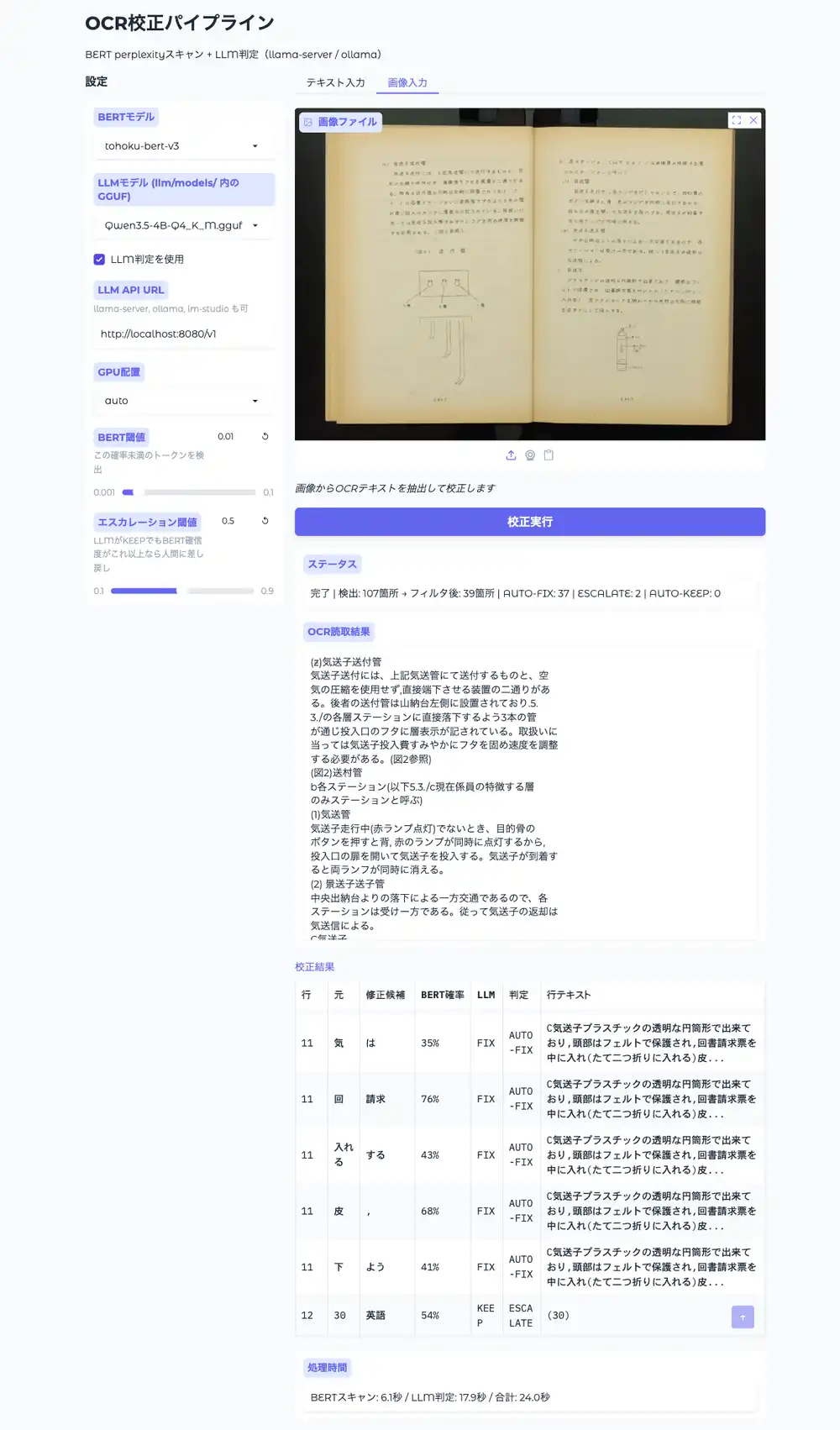
Double-clicking start.bat (Windows) or start.sh (Mac/Linux) opens the browser at http://localhost:7860. Gradio is installed by the installer.
The left panel lets you configure BERT model, LLM model (auto-detected GGUFs from llm/models/), LLM API URL, GPU placement, and thresholds. Input text or an image in the main area and run correction. Processing steps through OCR→BERT→LLM with progressive progress display; results table shows AUTO-FIX/ESCALATE/AUTO-KEEP. For image input, the OCR text is displayed first as soon as OCR completes.
The button is disabled during execution to prevent double-runs.
Text Input
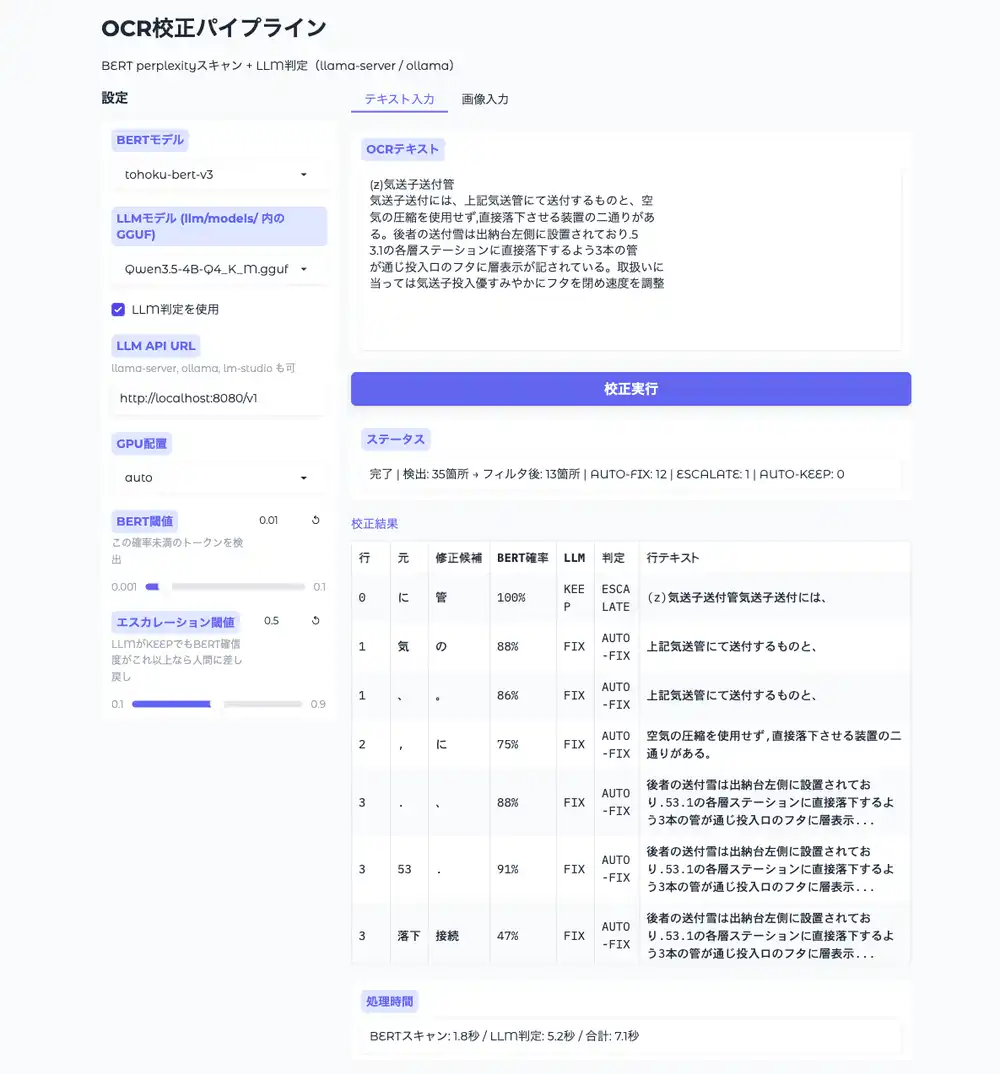
Image Input (NDLOCR-Lite integration)
Links
| Link | URL |
|---|---|
| GitHub | https://github.com/hide3tu/ocr-correction-pipeline |
| Releases (ZIP distribution) | https://github.com/hide3tu/ocr-correction-pipeline/releases |
Other articles in the NDLOCR series: