Rebuilding MOSS-Image Character LoRA Captions with Qwen4 on RunPod A40
 Contents
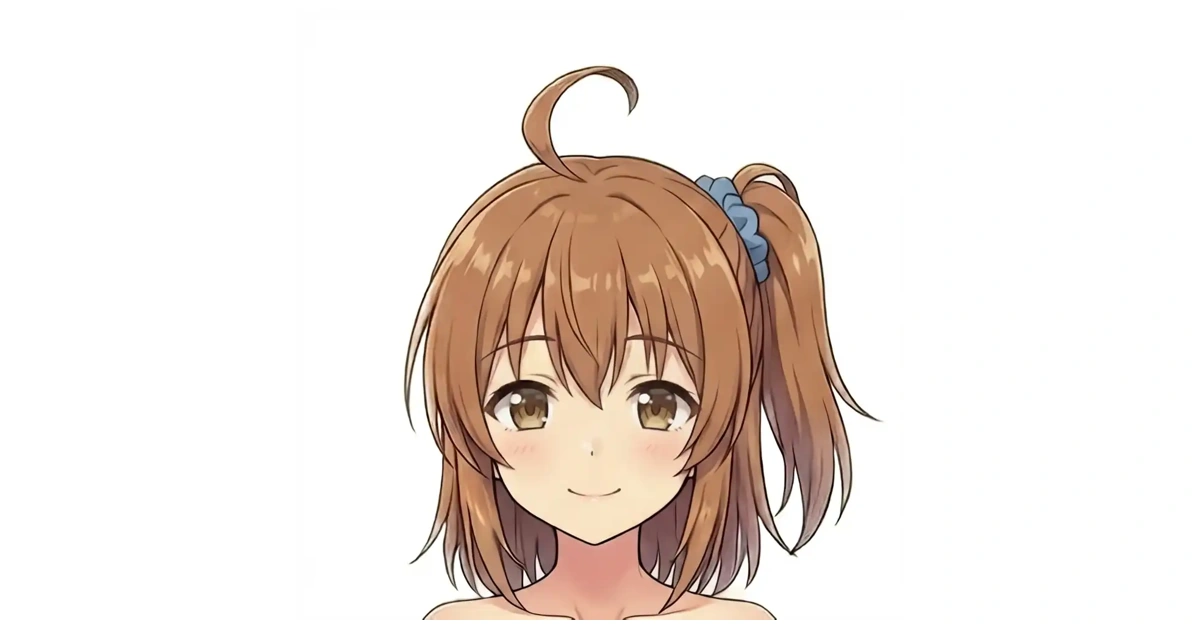
In my previous MOSS-Image character LoRA training run on EVO-X2 ROCm, training a lightweight character adapter (LoRA) for our original anime character Kana (kanachan) on the MOSS-Image image generation model up to 3,000 training steps produced her signature side ponytail (tied with a blue scrunchie on the image right) and curled ahoge, but her facial features, hair color, and body proportions still drifted from the training images.
I decided to revisit and rebuild the 70-image dataset and captions originally adapted from Anima using Qwen4 and Codex, then train on a RunPod A40 up to 5,000 steps to see how much closer character fidelity would get.
Test Setup and Dataset Background
Caption inspection and comparison image generation ran on my local PC, while the 5,000-step training run used a RunPod A40 (48GB). MOSS-Image has both a base pretrained model (Base, used for training and standard 50-step inference) and a supervised fine-tuned variant (SFT). I trained the LoRA on Base, while using SFT paired with a 4-step distillation LoRA locally for fast 4-step image previews.
| Environment / Tool | Role |
|---|---|
| Local Workstation | Qwen4 via Pi (an AI agent CLI harness, not a Raspberry Pi) for image inspection, and Codex for comparing against existing captions |
| Local Generator | stable-diffusion.cpp (sd.cpp) running MOSS-Image SFT + 4-step LoRA for fast test renders |
| RunPod A40 (48GB) | ai-toolkit (commit d6a18ad) for 1024px 5,000-step training on Base and intermediate 50-step samples |
The dataset has 70 images total: 58 original images plus 12 later additions. The natural-language captions from the previous article are v1, and the tag-plus-prose draft built at the end of that post (untrained, reserved for later tag experiments and used here only for word-count comparisons) is v2. Before starting, I copied all 70 images into a separate dataset directory without overwriting the original images, v1, or v2.
In my own usage, MOSS-Image reproduced side ponytails more consistently than any other model I tested locally. On the other hand, untying the hair via prompts rarely worked—unlike Anima, where removing hairstyle tags from the positive prompt and putting them in the negative prompt let the hair hang loose. When captions repeat an invariant trait across every training image, that trait can stay tied to the prompt phrasing rather than the character trigger word (kanachan). Rather than assuming any leftover hairstyle text in the captions was automatically wrong, I separated keeping her facial features and hair color from keeping hairstyle phrasing controllable per image.
Original Caption Bias and Sending Images to Qwen4
First, I counted how often specific terms appeared across the 70 captions in the original Anima set, v1, and v2 (counting at most once per image).
| Term | Original Anima | v1 | v2 |
|---|---|---|---|
young | 58 | 0 | 0 |
slender | 10 | 0 | 0 |
slim | 10 | 0 | 0 |
flat chest | 10 | 0 | 0 |
brown hair | 10 | 0 | 0 |
brown eyes | 10 | 0 | 0 |
side ponytail | 59 | 49 | 59 |
ahoge | 58 | 0 | 58 |
blue scrunchie | 58 | 46 | 58 |
Terms like young and body descriptors had already been stripped in v1 and v2, but detail levels still differed between the original 58 images and the 12 added images. For instance, kana_add01 and kana_add02 clearly wear black tights in the images, yet neither the original captions nor v1 mentioned them.
Next, I began sending images to “Qwen4 (Invite)” registered under the qwen-invite provider in my local Pi setup (configured model ID qwen-latest-series-invite-1102; whether this matches a public release ID is unverified). Sending the first image directly through Pi failed with Connection error.: read ECONNRESET, so I switched to sending HTTP requests directly from Python using Pi’s configured endpoint and model ID, which returned responses reliably.
However, sending the original PNG of kana_add03 caused Qwen4 to report the white background as black—even when re-asked solely about background color, it returned black with 1.0 confidence. Inspecting the pixels showed white corners and an alpha channel of 255 (fully opaque) across the entire image, ruling out transparency as the cause.
When I converted the same image to an RGB JPEG (original dimensions, quality 95) and re-sent it, Qwen4 correctly returned white. From there, I generated RGB JPEGs strictly for API input while leaving the original training PNGs untouched. Input image hashes, prompts, model IDs, response IDs, timestamps, and token counts were saved separately so model outputs never overwrote source data.
Rebuilding v3 Captions Across 70 Images
I prompted Qwen4 to return structured JSON splitting composition, pose, expression, clothing, background, hairstyle, hair color, eye color, and occluded areas, without providing any original captions or character info. Rather than processing all 70 at once, I tested an initial batch of 20 JPEGs (the 12 added images plus 8 diverse compositions). Background detection looked workable, so I sent the remaining 50 and retried the single HTTP 429 rate-limit failure to complete all 70.
Codex then reviewed contact sheets of all 70 images alongside full-resolution views of ambiguous cases, comparing Qwen4’s JSON candidates against the original tags, prose, v1, and v2.
Even with JPEGs, kana_0018 and kana_0031 still had their white backgrounds misread as black; why that recurred is unclear, so I corrected them after inspecting the source pixels, and adjusted kana_0059 from Qwen4’s “light blue” to teal to match the image. When I re-queried kana_0016, 0018, 0035, and 0026 on specific mismatched items, Qwen4 still misread white backgrounds as black or marked visible blue scrunchies as unknown, so I treated its outputs strictly as drafts and kept only what could be confirmed visually.
Rules for What Goes Into v3 Captions
Because kanachan is the trigger word used to invoke the LoRA rather than a visual trait Qwen4 could infer from pixels, Qwen4 was kept blind to the character name and the trigger prefix was prepended mechanically afterward.
| Element | Observation JSON | v3 Caption Rule |
|---|---|---|
| Trigger | Excluded from visual estimation | Begin every caption with Anime-style illustration of kanachan |
| Composition, pose, expression, clothing | Record visible elements | Describe only what is visible; do not invent hidden items like a necktie seen only from behind |
| Background | Save Qwen4 candidate and verify | State the verified color in one sentence |
| Hair and eye color | Record candidate when visible | Omit from every caption here; test after training whether the trigger alone binds colors |
| Face shape, age, body type | Do not guess unknown traits | Omit young, slender, slim, chest size, or numeric ages |
| Hairstyle and accessories | Record on-canvas position and visibility | Describe visible side ponytail, scrunchie, and ahoge; do not assume hidden hair ties |
| Quality, score, rating tags | Saved only for comparison | Omit masterpiece, best quality, score_7, safe, etc. |
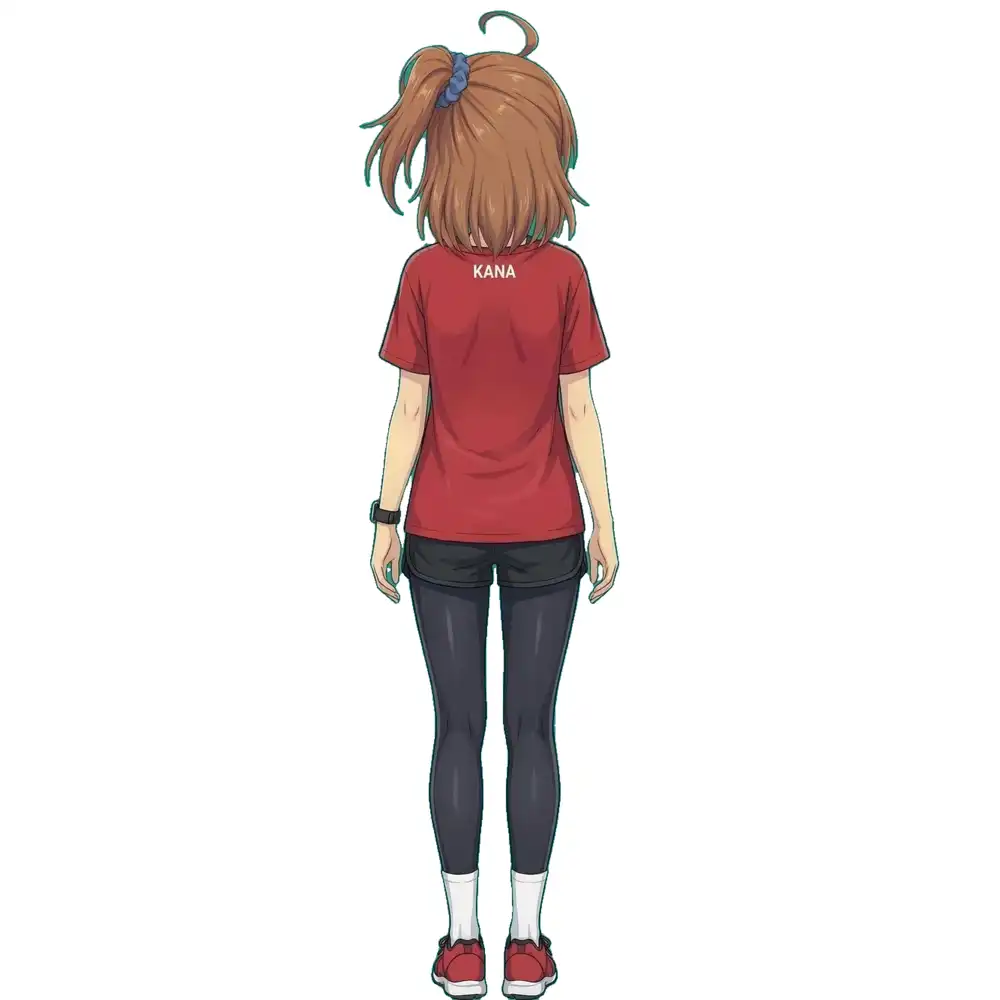
| In-image text | Verify exact characters | Transcribe legible text verbatim, e.g., KANA on the back of a shirt |
All 70 training images depict Kana with her hair tied up, meaning there are no untied-hair reference images in the dataset. Even so, I chose to describe hairstyles per image rather than forcing the name trigger alone to lock the side ponytail.
Visual Correction Examples
All three images below are original training images, not generated outputs.
| Image | Original / Qwen4 Candidate | Fix Applied in v3 |
|---|---|---|
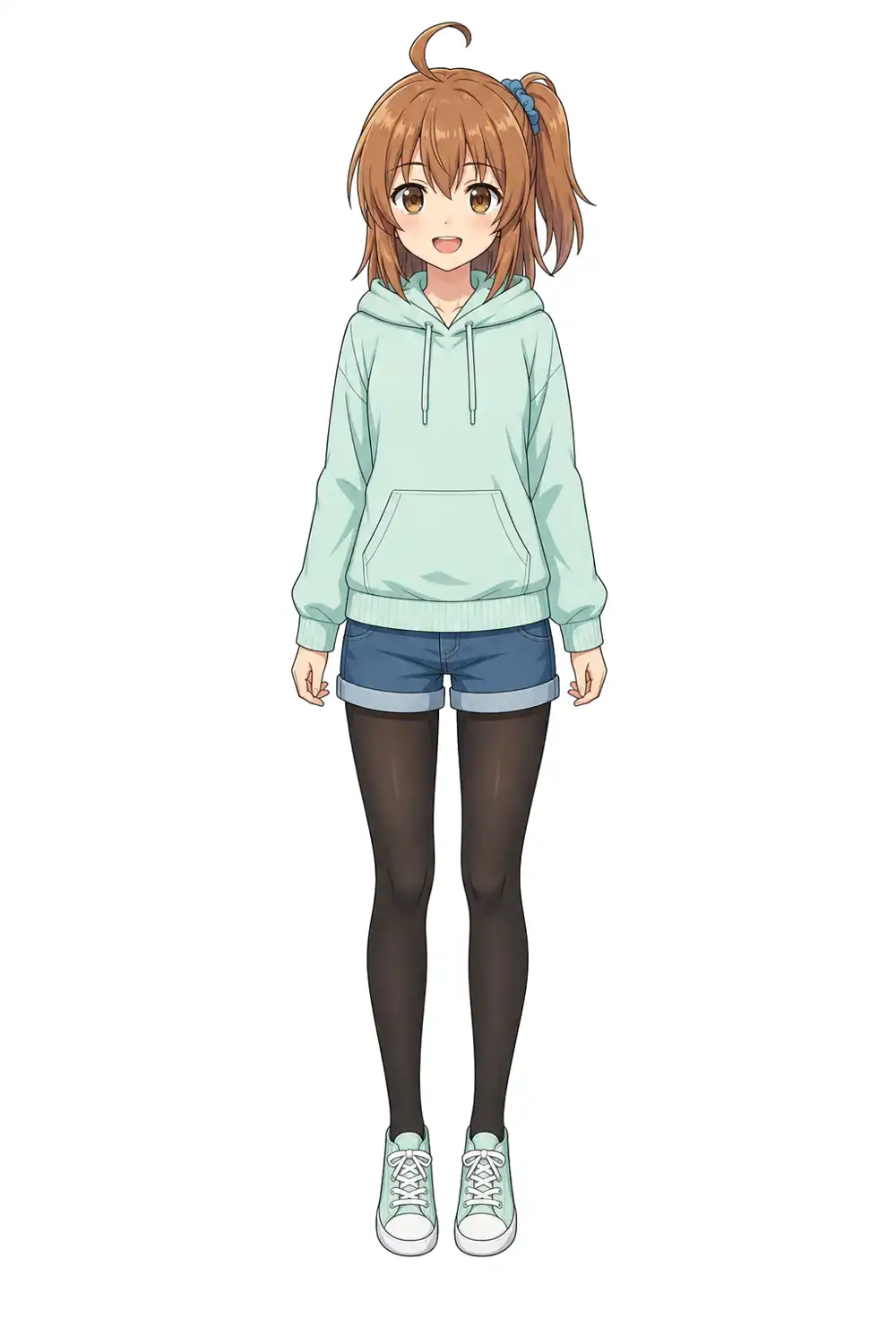
kana_add01 | Original and v1 omitted black tights and hairstyle details | Added black tights, visible side ponytail, blue scrunchie, and ahoge |
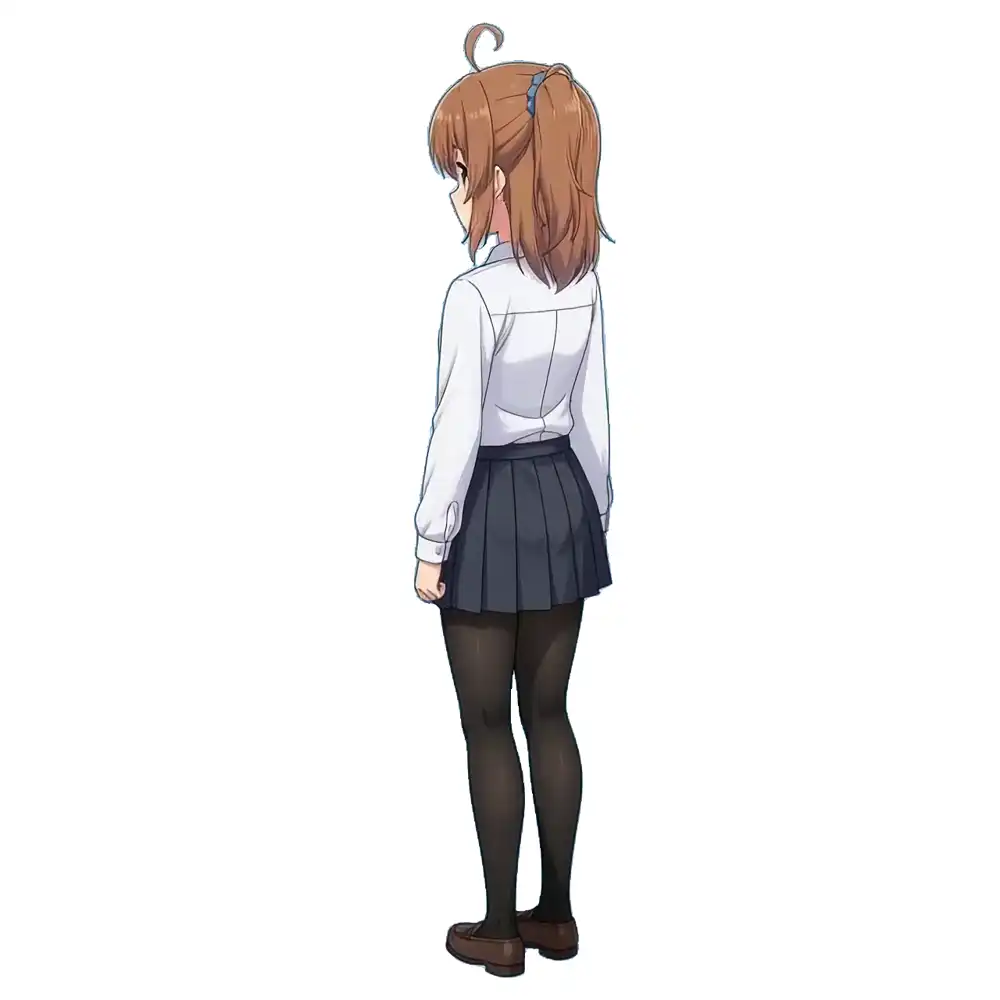
kana_0016 | Qwen4 called it a half-up style, and on re-check marked the hair tie unknown and background black | Described the ponytail and blue scrunchie on the image right from a rear three-quarter angle, corrected background to white, and omitted hidden necktie/expression |
kana_0043 | Qwen4 wrote only that white text appeared on the back | Zoomed in to transcribe KANA verbatim; omitted front facial features since it is a rear view |
kana_add01:
kana_0016:
kana_0043:
Here is kana_add01 in v1:
A full-body front view of a girl named kanachan standing and facing the viewer directly, wearing a mint green hoodie, denim shorts, and sneakers. She has a cheerful grin. Anime-style illustration with a plain white background.And the rebuilt v3 caption:
Anime-style illustration of kanachan standing full-body facing forward, arms relaxed at sides with fingers gently curled, smiling cheerfully with open mouth, wearing a mint green hooded sweatshirt with front pocket and drawstrings, cuffed blue denim shorts, black tights, and matching mint green sneakers with white laces. The background is plain white. A side ponytail on the image right is secured with a blue scrunchie. A curled ahoge rises from the crown.For the 5 profile/side-view images where hair-tie visibility differs, I individually noted whether the scrunchie was hidden or partially visible.
The completed v3 dataset consists of 70 PNGs and 70 TXT files, ranging from 39 to 110 words (mean 64.5). SHA-256 checksums matched all 70 original PNGs with zero resizing or JPEG conversion.
Comparing v1 and v3 with 100 Additional Steps
Before launching a full training run, I ran a 12-step smoke test on 8 representative images at 512px using local ROCm and ai-toolkit to verify data loading, caching, training, and checkpoint saving. The first run exited with code 143 before saving; re-running detached from the terminal completed in ~94.5 seconds with all 504 saved LoRA tensors finite and valid (meaning no NaN or Inf corruption).
To compare v1 (prose baseline) and v3 directly without running v2 yet, I started from the existing v1 3,000-step LoRA and trained 100 additional training steps on the same 70 images at 512px under each caption set. Both loaded only the LoRA weights with a freshly initialized optimizer (rank 16, alpha 16, AdamW, lr 1e-4, batch size 1, training seed 42, caption dropout 0—so captions are never dropped during training), reusing identical cached image latents (compressed image representations) and Flux2 VAE encodings across all 70 images.
| Condition | Additional Steps | Total Time (load + cache + save) |
|---|---|---|
| Baseline (before) | 0 | Reference baseline |
| v1 | 100 | 612.86 s |
| v3 | 100 | 544.59 s |
Both runs finished cleanly with all 504 tensors updated. Because v1 ran first, the runtime difference cannot be attributed to caption format alone.
Comparison images were rendered locally with sd.cpp on MOSS-Image SFT + 4-step LoRA at 768×768, Euler sampler with 4 denoising steps (inference steps, distinct from training steps), guidance scale (CFG) 1, sigmas 1, 0.910, 0.717, 0.024, 0, both LoRA weights at 1.0, empty negative prompt, and seeds 42 and 43.
Common base prompt:
Anime-style illustration of kanachan. A front-facing head-and-shoulders portrait, looking directly at the viewer with a gentle closed-mouth smile, wearing a plain white T-shirt. Plain light grey background.| Added Specification | Observed Output Difference (Seeds 42 & 43) |
|---|---|
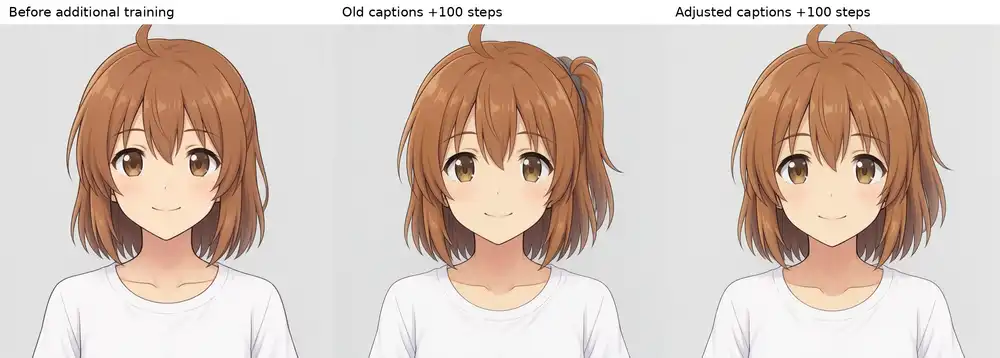
| Name only (no hairstyle text) | Baseline had loose hair; both v1 and v3 produced tied hair. The blue scrunchie appeared clearly in v1 seed 42, but was not visible in v3 |
Her hair is tied into a side ponytail on the right side of the image with a blue scrunchie. A curled ahoge rises from the crown. | All three produced the side ponytail, blue scrunchie, and ahoge |
Her hair hangs loose, worn down and fully untied, falling freely on both sides of her head. A curled ahoge rises from the crown. | All three rendered loose hair, though it grew down to chest length rather than matching Kana’s original shoulder length |
Each comparison strip below shows, from left to right: baseline, +100 steps (v1), and +100 steps (v3), ordered seed 42 then seed 43.
Name only, seed 42:
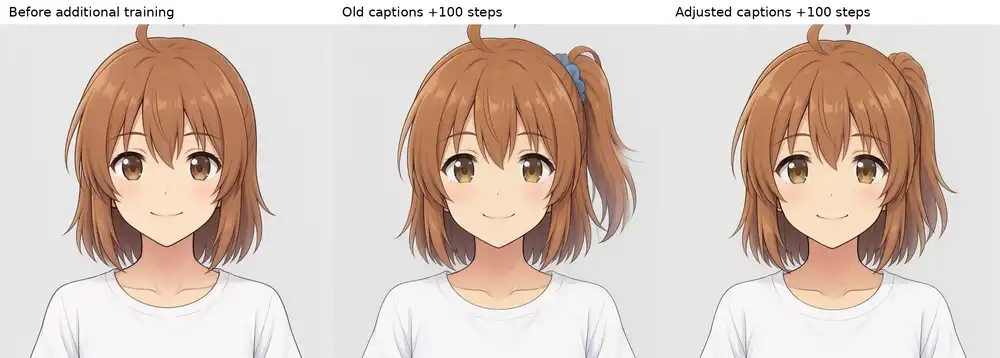
Name only, seed 43:
Side ponytail specified, seed 42:
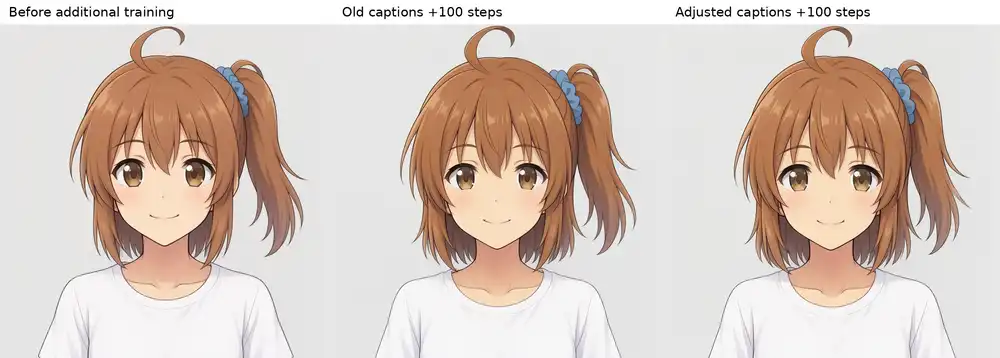
Side ponytail specified, seed 43:
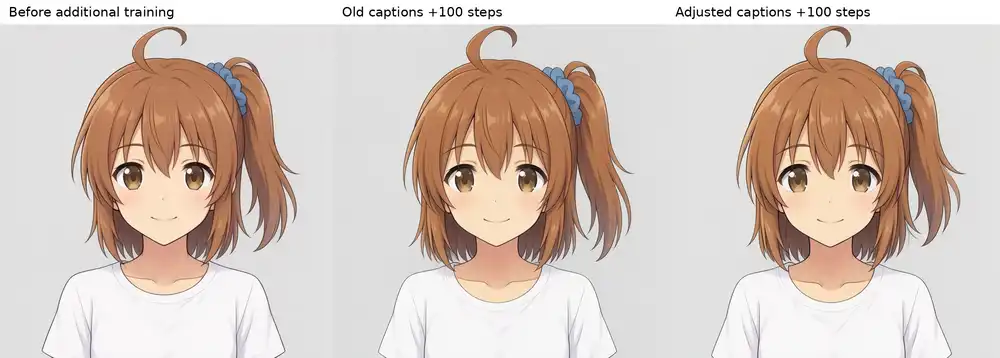
Loose hair specified, seed 42:
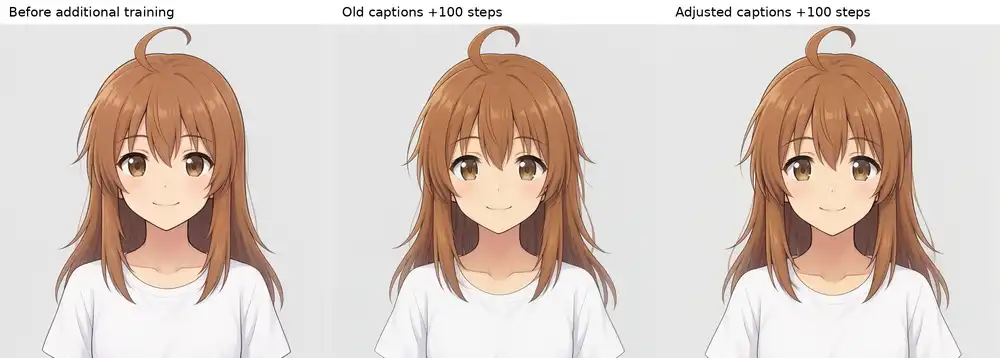
Loose hair specified, seed 43:
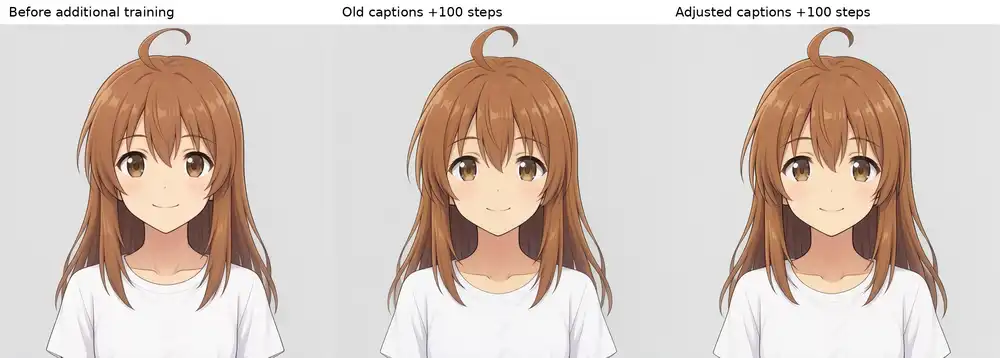
To check whether the loose-hair result came from the LoRA at all, I rendered the same loose-hair prompt without the character LoRA (seeds 42 and 43). Both still generated loose hair, confirming that untying hair here was not driven by the character LoRA.
Compared to the pre-update baseline, outputs moved closer to the character with better prompt adherence and fewer artifacts. However, since +100 steps with v1 showed similar gains, adding 100 steps onto an already 3,000-step v1 weight did not show a clear advantage for v3. I decided to train a fresh v3 LoRA from MOSS-Image Base instead.
Training up to 5,000 Steps on RunPod A40
Choosing a 48GB GPU and Environment
Iterating on 1024px runs on local ROCm takes too long per experiment, so I moved training to RunPod while keeping the unquantized ai-toolkit setup (low_vram: false, commit d6a18ad72da9abca3ffb67ea8e42c25764eee61a).
For reference, the sd-scripts MOSS-Image guide reports 15.3GB VRAM at startup, 13.2GB during training, and 17.2GB CPU RAM on an RTX PRO 6000 Blackwell (1024px, batch 1, rank 16, AdamW, gradient checkpointing, bf16 with cached latents and text embeddings). That guide also lists a 24GB setup, but it applies to a different trainer than our ai-toolkit config.
Checking ai-toolkit’s model placement and Qwen loader, and summing the parameter sizes of the text-only encoder and DiT weights from local file headers, those two models alone come to roughly 26.0GB before counting the VAE and runtime allocations. That rules out 24GB, and 32GB would require profiling every peak across startup, training, and sampling. With L40S unavailable, I chose an A40 48GB instance.
The Pod provisioned with 50GB host RAM, 9 vCPUs, and 200GB total disk at $0.59/hr for the GPU and $0.62/hr including disk (RunPod pricing also lists the A40 at $0.59/hr). The software stack inside the Pod was PyTorch 2.8.0+cu129, CUDA runtime 12.9, and driver 595.91.07 (CUDA 13.2 capable).
Dataset Transfer and 5,000-Step Run Log
I archived v3, the v1 comparison set, observation logs, baseline LoRA, pinned ai-toolkit, and run scripts (~441 MiB) to upload to the Pod, then downloaded the three model files (DiT, text encoder, VAE; 29,807,179,428 bytes total) on the Pod and verified their SHA-256 hashes.
| Training Parameter | Setting |
|---|---|
| Starting Weights | MOSS-Image Base (fresh LoRA, not resumed from v1) |
| Dataset | 70 v3 images, 1024px aspect-ratio buckets |
| LoRA | Rank 16, alpha 16, bf16, unquantized |
| Optimizer / Schedule | AdamW, lr 1e-4, batch size 1, training seed 42, dropout 0 |
| Memory | Gradient checkpointing, cached latents and text embeddings, frozen and unloaded text encoder |
| Checkpoints | Every 100 steps (rolling cap of 12 regular step saves) |
| Sample Prompts | Start + every 250 steps: name-only, side ponytail, and loose hair (the latter two both included ahoge phrasing) |
| Sample Generation | Base model, 768px, 50 steps, CFG 3, seed 42 fixed |
A 12-step pre-flight check finished cleanly in 202.23 seconds (training loop ~46 s, ~3.85 s/step), peaking at 25,549 MiB VRAM and ~26.4 GiB (27,702,648 KiB) CPU RSS with sample generation disabled.
I ran 2,000 steps first (peaking at 25,509 MiB VRAM), inspected samples, and extended in 1,000-step increments up to 5,000 steps while resuming both weights and optimizer state.
| Step Reached | Interval | Total Wall Time (load + samples + save) |
|---|---|---|
| 2000 | Base → 2000 | 9,037.52 s (~2h 30m 38s) |
| 3000 | 2000 → 3000 | 4,601.36 s (~1h 16m 41s) |
| 4000 | 3000 → 4000 | 4,617.40 s (~1h 16m 57s) |
| 5000 | 4000 → 5000 | 4,513.92 s (~1h 15m 14s) |
Regular samples took ~41 s per image (~2 minutes every 250 steps); additional angle tests in the next section are not included in these timings. Because ai-toolkit kept at most 12 regular checkpoints and overwrote the final milestone file under the same kana_runpod_qwen4.safetensors filename on each extension, I restored the backed-up 2000 and 3000 weights and copied 2000, 3000, 4000, and 5000 into a dedicated lora-milestones/ folder with step numbers (no checkpoints exist at 250-step midpoints such as 3750 or 4250).
Front, Full-Body, and Opposite-Side Samples
In the front-facing samples up to 2,000 steps, adding hairstyle prompts aligned face and hair color, whereas the name alone diverged. Because both the side-ponytail and loose-hair prompts had included the ahoge sentence, I isolated four prompt variants on the step-2,000 checkpoint (Base, 50 steps, seeds 42 and 43) to see what changed from the hairstyle words alone.
Left to right: name only, ahoge only, side ponytail + scrunchie only, and loose hair only (top row seed 42, bottom row seed 43):
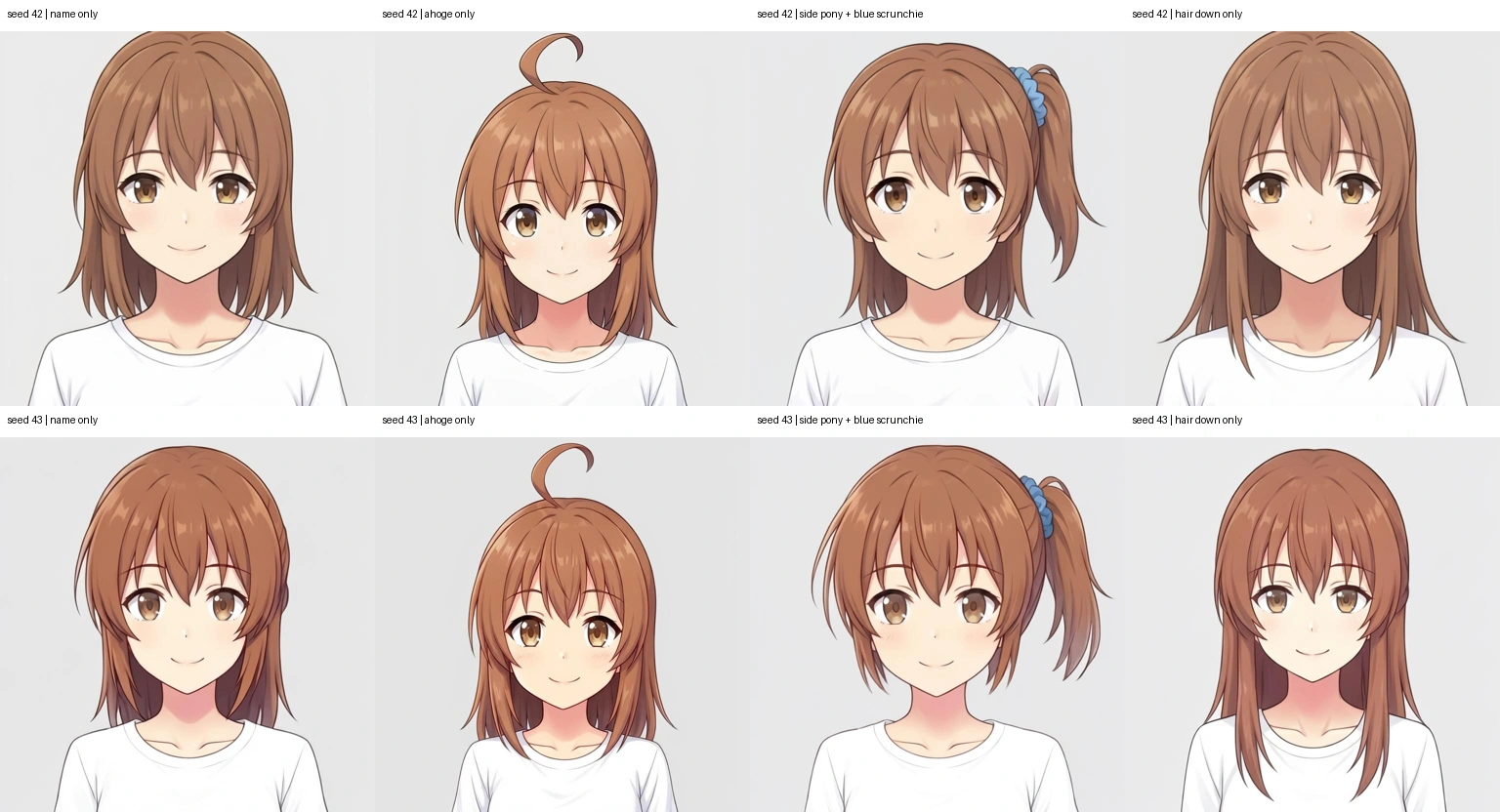
Even the ahoge prompt alone altered facial contours, eyes, and head placement, showing that hairstyle and ahoge phrasing affected traits beyond the hair itself.
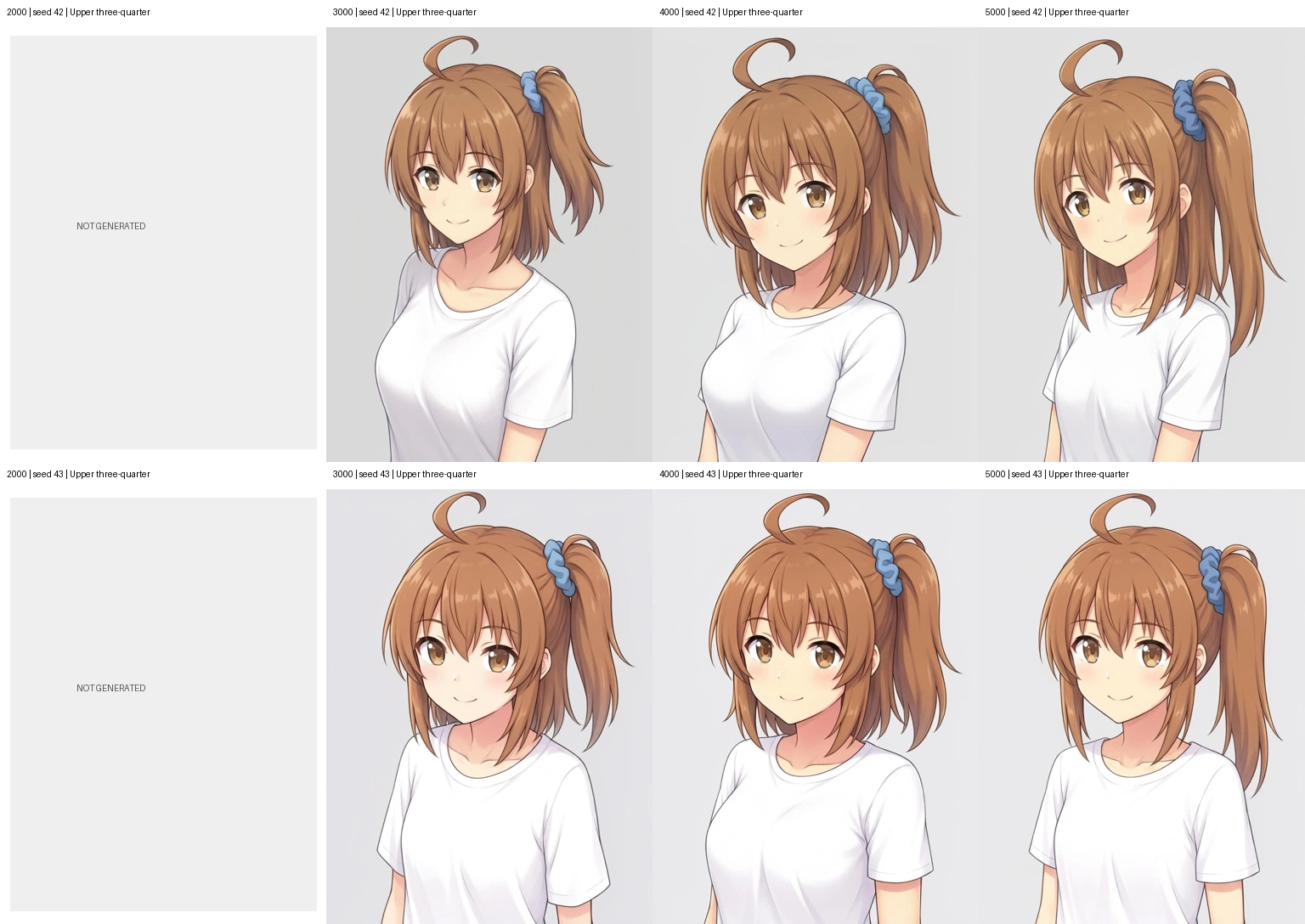
Since front portraits alone could not reveal full-body proportions or occluded angles, I rendered five compositions at steps 3000, 4000, and 5000 (Base, 50 steps, 768×1024, CFG 3, seeds 42 and 43). Prompts specified a white T-shirt (with navy skirt and white sneakers for full-body shots) plus the side ponytail, blue scrunchie, and curled ahoge.
Full comparison images across steps are collected on the angle-by-step comparison page (angle and opposite-side renders were not generated for step 2000; 3000, 4000, and 5000 have two seeds each).
Upper-body three-quarter view—left to right: 2000 (not generated), 3000, 4000, 5000 (top seed 42, bottom seed 43):
Because full-body head-to-body ratios looked off, I also rendered two matching front full-body images for step 2000. Below, bounding-box character heights are aligned from left to right (2000, 3000, 4000, 5000; top seed 42, bottom seed 43). Because the bounding box includes the ahoge and shoes, this is a visual alignment check rather than an exact anatomical measurement.
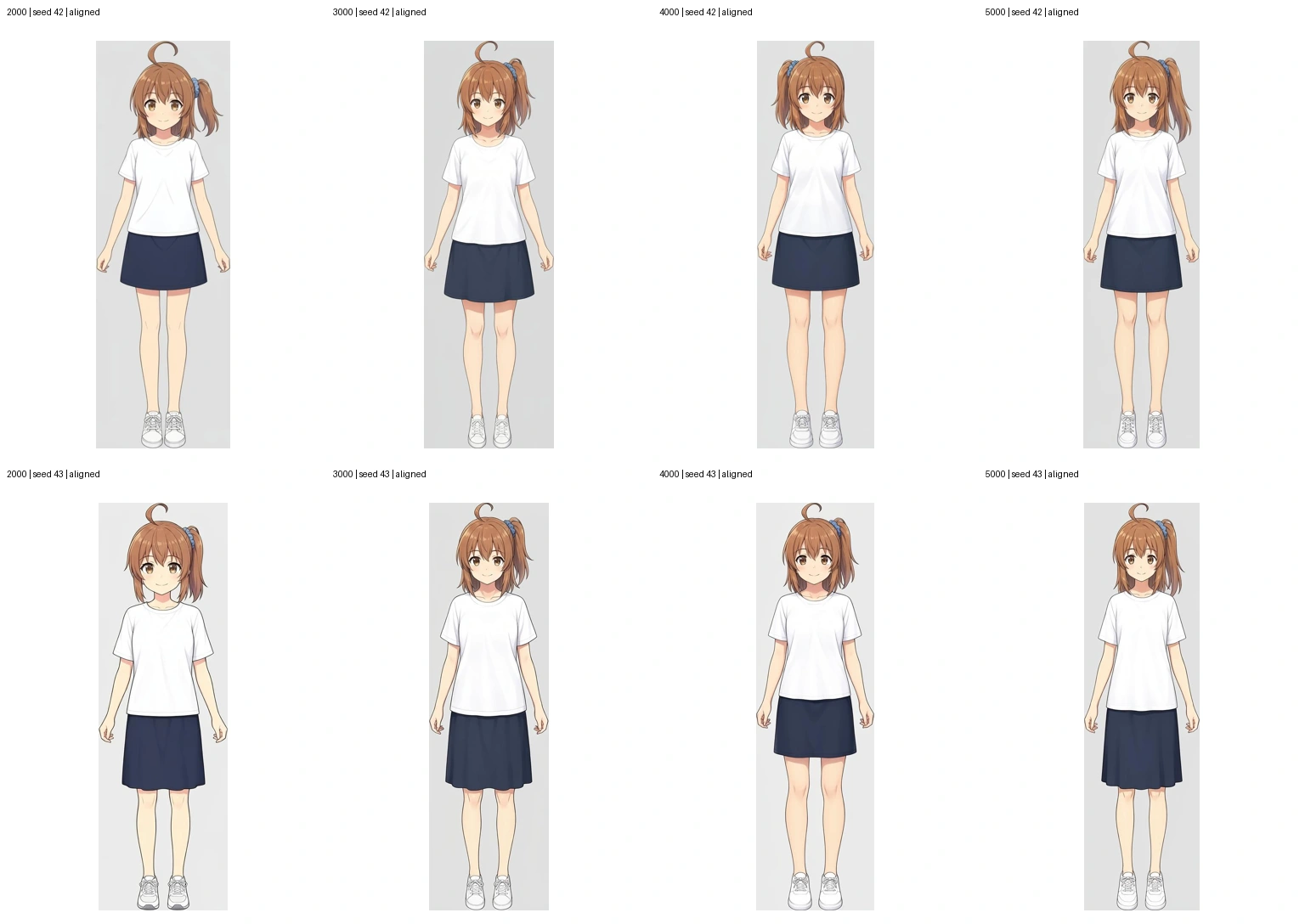
Results across the five compositions:
| Composition | Prompt Framing | Check Target | Observed Trend |
|---|---|---|---|
| Front full-body | Head to shoes, front view | Face, proportions, hairstyle | Heads looked smaller and bodies taller/slimmer in some 4000–5000 renders |
| Full-body three-quarter | 45° from scrunchie side | Full body and hair-tie placement | Tended to drift toward front-facing |
| Upper-body three-quarter | 45° from scrunchie side | Face and hairstyle alignment | Stable across 3000–5000 |
| Full-body opposite side | Camera opposite scrunchie, tie in back | Whether the hair tie stays occluded | Hair tie still rotated into the visible side |
| Upper-body opposite side | Same opposite-side framing | Whether the hidden tie stays hidden | Hair tie also appeared on the visible side |
Later steps produced smaller heads with elongated bodies, and opposite-side prompts still placed the hair tie in view, leaving no clear reason to extend to 6,000 steps.
Fine-Grained Local Comparison Around 3500–4000
Step 4000 initially looked promising, while 3000 felt slightly soft and 5000 lost hairstyle stability. Without training further, I re-evaluated saved checkpoints locally across narrower step intervals.
From here, rendering switched to local sd.cpp with MOSS-Image SFT + 4-step LoRA (768px, Euler 4 steps, CFG 1, sigmas 1, 0.910, 0.717, 0.024, 0, both LoRA weights at 1.0), using Qwen3.5-9B Q8_0 (8-bit quantized) as text encoder and the Flux2 VAE—different conditions from RunPod’s Base 50-step runs.
| Composition | Seed |
|---|---|
| Walking full-body three-quarter in a park | 173 |
| Seated knee-up three-quarter on a bench | 3187 |
| Low-angle full-body | 9124 |
| Over-the-shoulder look from the opposite side | 20261 |
| Lying on grass from above with loose hair | 86421 |
I first generated 15 images across 3500, 4000, and 4500 (483.65 s total, 32.24 s/image) and laid them out on the 3500 / 4000 / 4500 comparison page. Because 4000 and 4500 stretched overly tall and slim while 3500 kept shorter, more compact proportions, I dropped 4500 and narrowed the search toward 3500 by rendering 20 more images across the saved 3600, 3700, 3800, and 3900 weights (644.94 s total, 32.25 s/image). Placing those alongside the earlier 3500 and 4000 renders gives a 30-image grid on the 3600–3900 comparison page.
Below, rows follow the five compositions in the table above from top to bottom, and columns run left to right from 3500 to 4000 in 100-step increments:
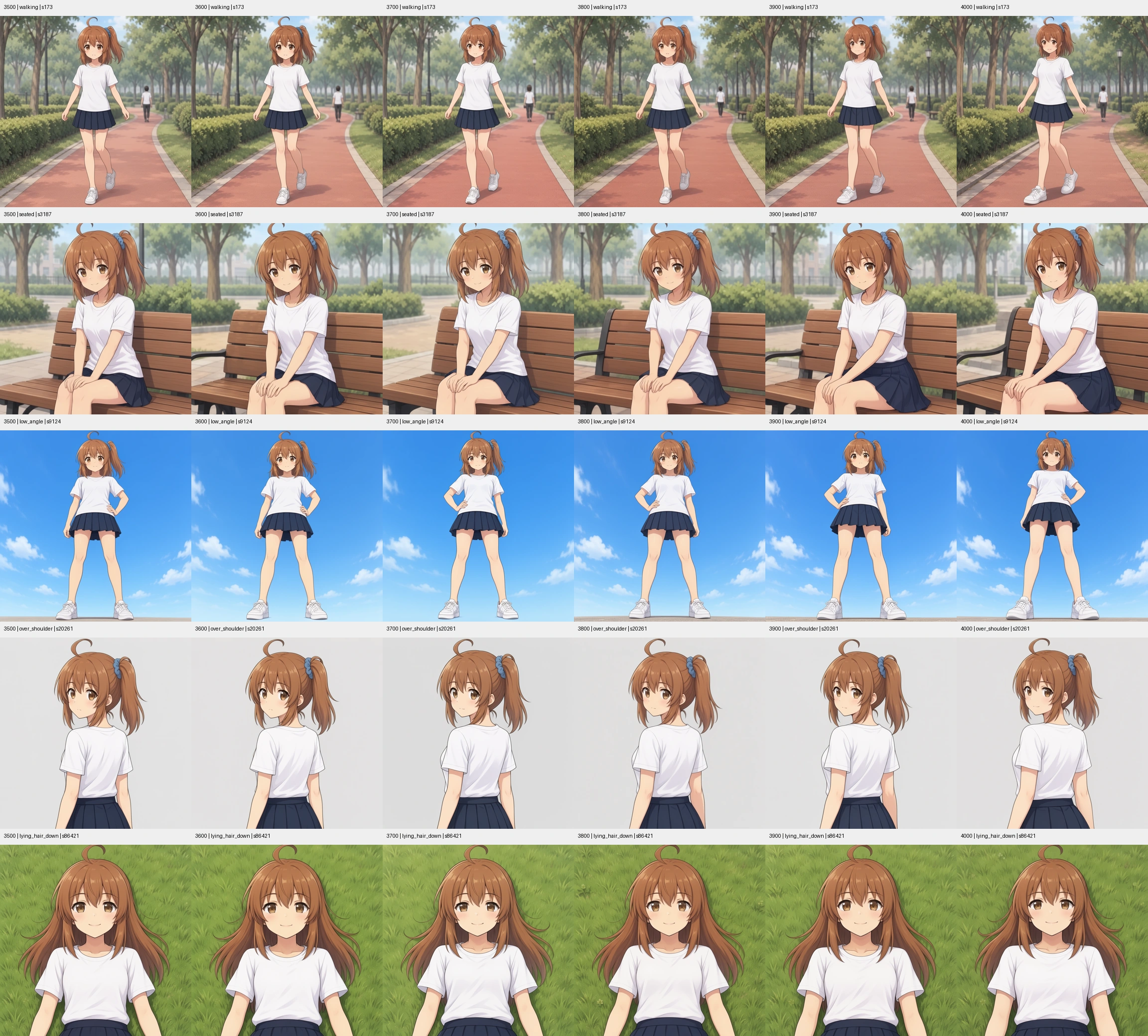
In walking and low-angle shots, 3600 stayed close to 3500 while 3900 leaned toward 4000. Steps 3700 and 3800 shifted poses and faces inconsistently across scenes. I narrowed the candidates to 3600 or 3700, though both still failed to hide the ponytail tie in the over-the-shoulder view.
Testing Explicit Left/Right Occlusion Prompts
Because Kana’s side ponytail sits on her anatomical left (image right when viewed from the front—hereafter, “image left/right” denotes canvas position while “her left/right” denotes Kana’s own body side), placing the camera on her anatomical right should hide the hair tie behind her head. Since relative phrasing (“opposite side of the scrunchie”) kept failing, I tested explicit anatomical left/right prompts locally on SFT + 4-step with steps 3600 and 3700.
Prompts explicitly fixed the ponytail to her anatomical left, placed the camera on her right showing her right cheek and ear with her nose pointing toward the right edge, and stated that the left-side tie was occluded behind her head while loose hair hung on the visible side. Alongside three camera angles, I tested a fourth variant (seed 89014) removing scrunchie color and ahoge descriptions to eliminate possible trigger terms.
| Prompt Variant | Seed | Outcome on 3600 & 3700 |
|---|---|---|
| Three-quarter view from her right | 50173 | Head turns, but the hair tie appears on the visible side |
| Strict right-side profile | 73251 | Turns to profile, but the blue scrunchie and tie remain visible |
| Rear three-quarter from behind-right | 75399 | Rear angle works, but the hair tie is still visible |
| Describe only visible loose hair; omit scrunchie color and ahoge | 89014 | Tie switches to a black band, but remains visible |
Left column is step 3600 and right column is step 3700, ordered top-to-bottom matching the table (full-resolution views and prompts on the hidden-side comparison page):
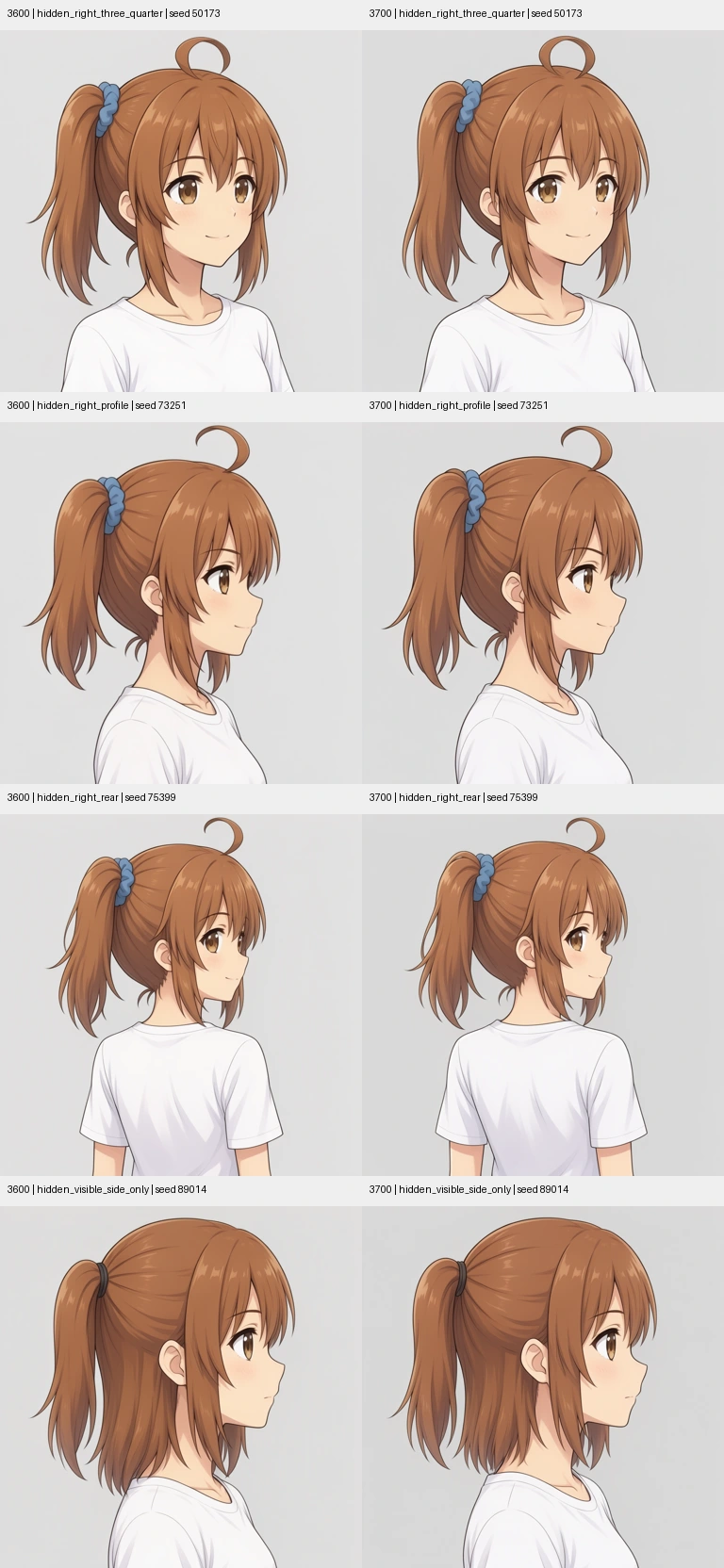
None of the eight renders occluded the hair tie behind her head, and there was no meaningful difference between 3600 and 3700. Since 5,000-step checkpoints had failed the same way, I went back to inspect v3 captions and training images, then ran an ablation without the character LoRA.
Isolating the Cause
Re-Inspecting v3 Captions and Source Images
Because pre-training edits focused on per-image corrections rather than cross-view occlusion phrasing, I counted how left/right and hidden ties were described across the 70 v3 captions.
| v3 Audit Item | Count |
|---|---|
Contains side ponytail | 66/70 |
| Explicitly states the hair tie is occluded | 1/70 |
Separate descriptions of nape or loose back hair (nape, back hair, bob, shoulder-length, etc.) | 0/70 |
Left/right positions were mostly written in canvas coordinates (on the image right, on the image left). Profiles where the tie is hidden (kana_0017, kana_0034) or barely visible behind the head (kana_0035) used phrases like ponytail or tied section instead of side ponytail.
Reviewing zoomed crops of all 9 side/rear training images alongside the full 70-image contact sheet confirmed both occluded and visible profiles existed with no obvious left-right contradictions. Back-hair appearance naturally shifts with viewing angle and framing, so minor visual differences alone do not indicate dataset inconsistency.
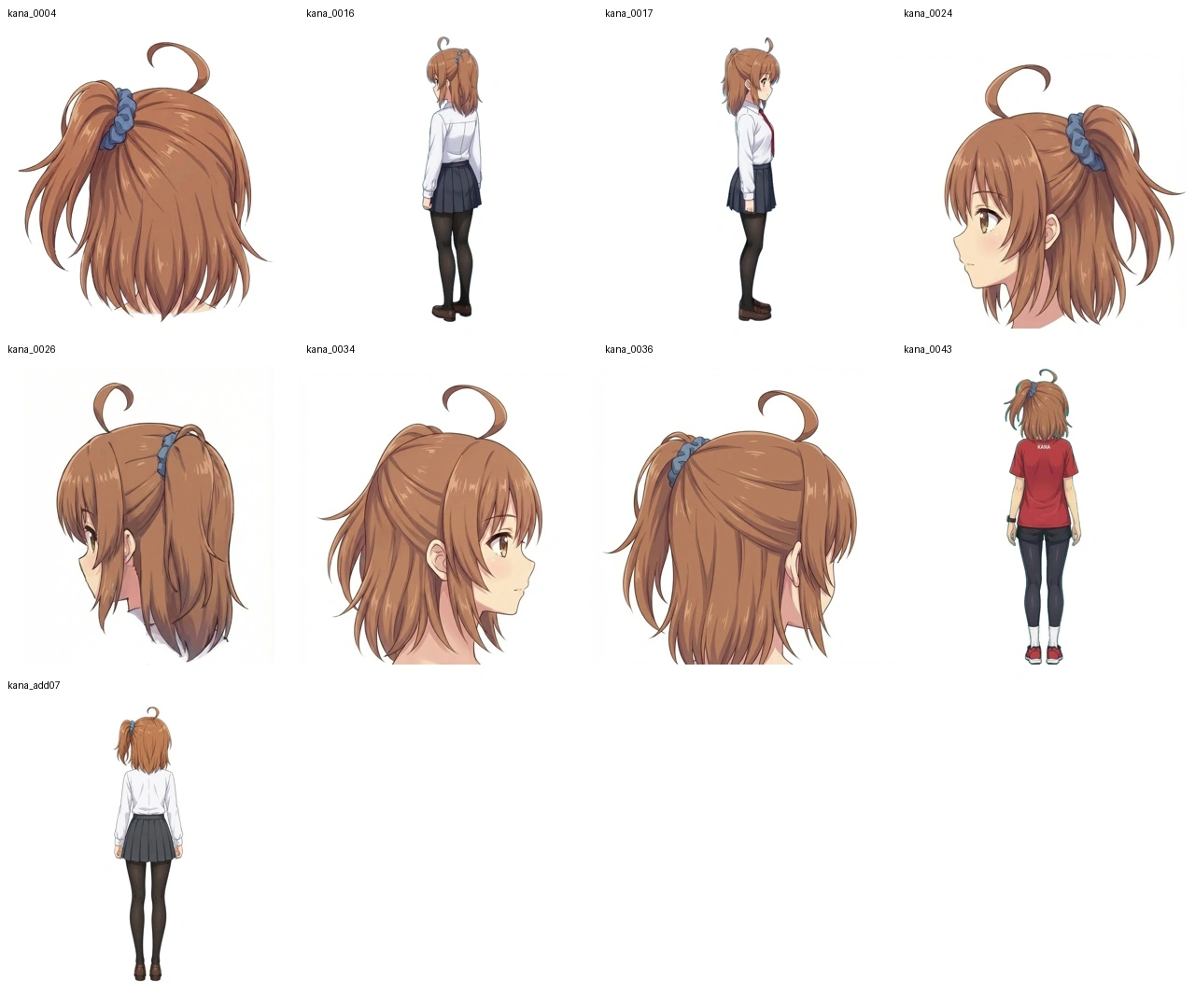
One caption (kana_0036) also had a broken sentence fragment (with expression and.) left over from editing, which I left unmodified for this isolation test. Per the official captioning guidelines, captions should describe only visible details, so guessing and inserting unseen hair ties across all images was avoided.
Removing the Character LoRA Under Identical Prompts and Seeds
To isolate whether the LoRA or captions caused the visible-tie error, I compared no character LoRA against step 3600 using identical prompts and seeds. First, on local SFT + 4-step (sd.cpp, Qwen3.5-9B Q8_0, Flux2 VAE, 768px, 4-step LoRA enabled in both conditions), I reused the four step-3600 renders from the previous section, generated matching no-LoRA renders, and added one positive control showing the left profile (seed 73251)—where the scrunchie is actually on the camera-facing side—to verify the prompt could render left/right orientation properly when visible.
| Condition & Prompt | Seed | No Character LoRA | Step 3600 LoRA |
|---|---|---|---|
| SFT + 4-step, hidden three-quarter | 50173 | Hair tie visible | Hair tie visible |
| SFT + 4-step, hidden right profile | 73251 | Hair tie visible | Hair tie visible |
| SFT + 4-step, hidden rear three-quarter | 75399 | Hair tie visible | Hair tie visible |
| SFT + 4-step, visible loose hair only | 89014 | Hair tie visible | Hair tie visible |
| SFT + 4-step, visible left profile (control) | 73251 | Valid visible side | Valid visible side |
| Base 50-step, hidden right profile | 73251 | Hair tie visible | Hair tie visible |
SFT + 4-step pairs below show no character LoRA on the left and step 3600 on the right, matching the first five rows top-to-bottom:
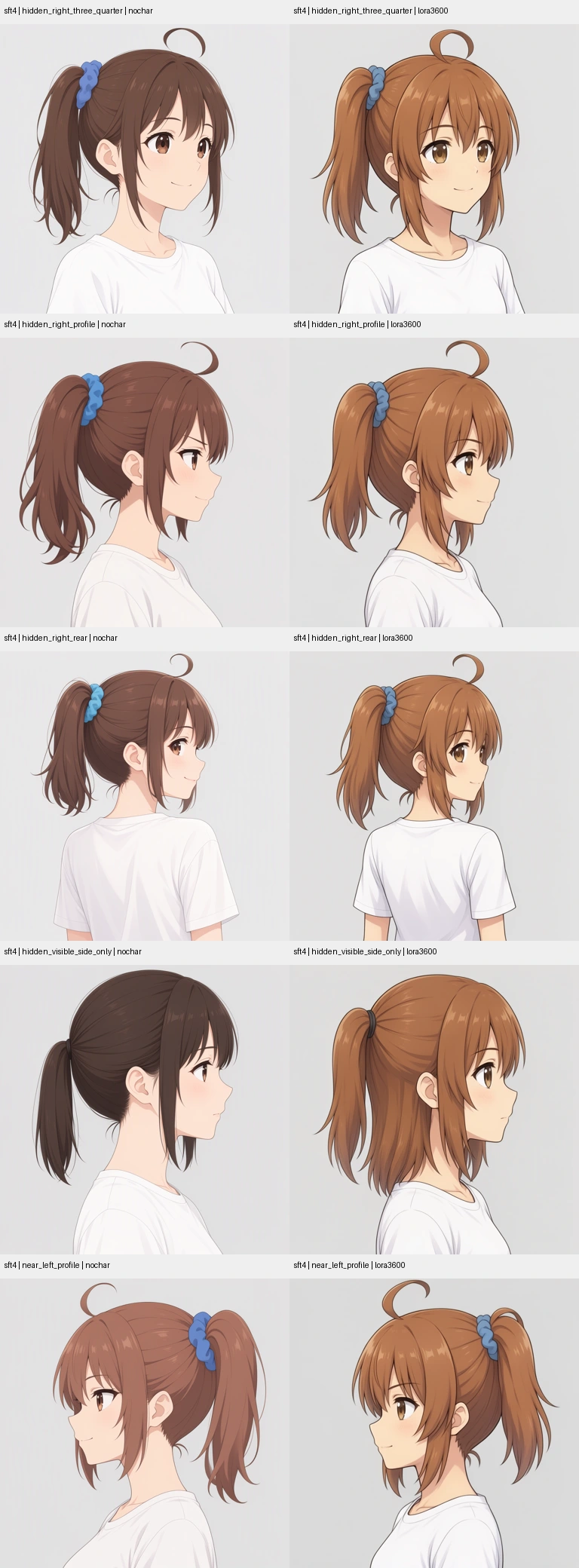
The left-profile control succeeded, yet all four occluded right-side tests still drew the hair tie even with no character LoRA loaded. To check whether the 4-step distillation LoRA or SFT tuning caused it, I also tested the hidden right profile (seed 73251) on plain Base at 50 steps (CFG 3, shift 5, no 4-step LoRA). Generation took 524.18 s without the character LoRA and 531.44 s with step 3600 (last row in the table above; full-res images and prompts are on the causal isolation page):
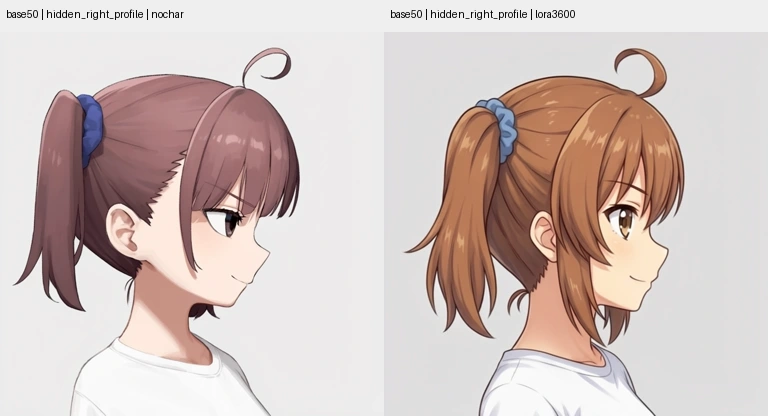
Because the exact same occlusion failure occurred on plain 50-step Base with neither the character LoRA nor the 4-step LoRA loaded, our training captions and 4-step distillation alone do not explain the error. Still, since these tests used sd.cpp with a Q8_0 text encoder and only one Base prompt/seed pair, the behavior cannot be generalized to every MOSS-Image implementation.
Differences in Back Hair
In the SFT ablation, removing the character LoRA pulled the hair into a single gathered bundle, whereas step 3600 rendered loose hair hanging from the nape. On the 50-step Base run with step 3600, however, that loose nape hair did not appear—showing that back-hair rendering shifts depending on the underlying model and sampling settings even with the same LoRA checkpoint.