Stacking a MOSS-Image Cel-Animation Style LoRA on a Character LoRA with sd.cpp
 Contents
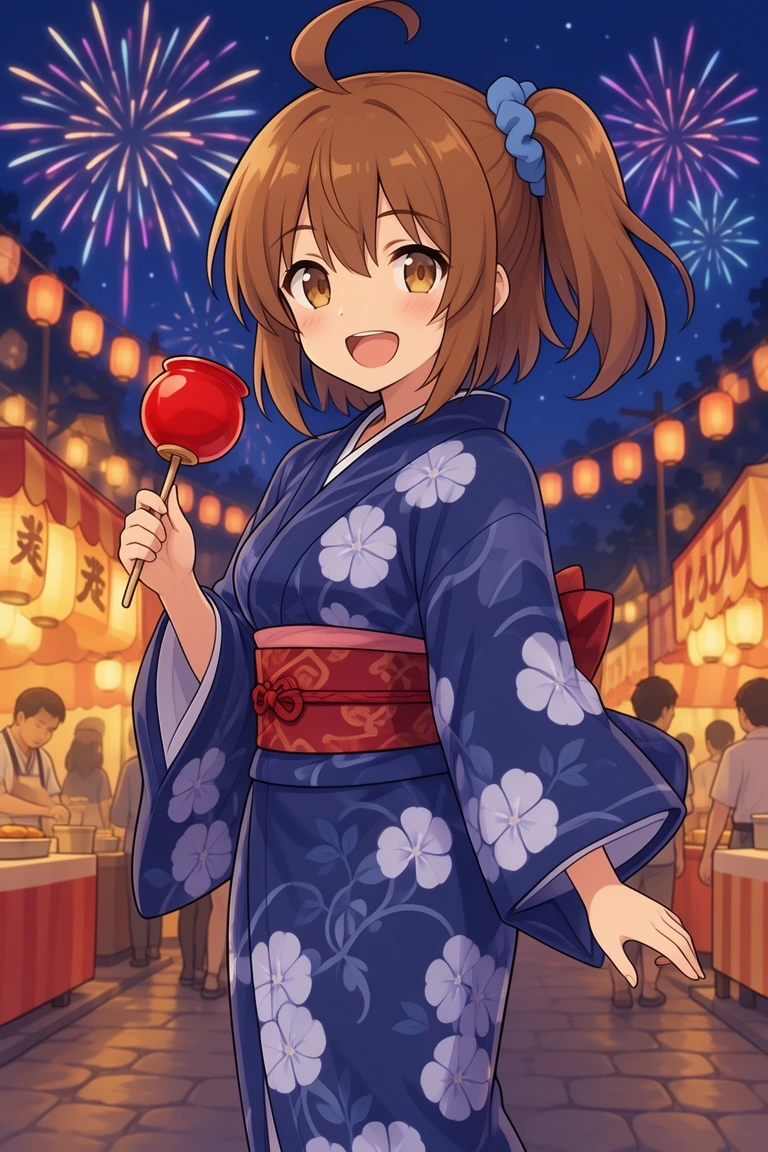
I found a style LoRA (a small add-on weight file applied on top of a base model) called “Cel-Animation Art Style” for the MOSS-Image image generation model on Civitai, so I tested stacking it with my custom character LoRA for Kana in stable-diffusion.cpp (sd.cpp, a local CLI inference engine that supports MOSS-Image alongside Stable Diffusion models) on a GMKtec EVO-X2. The sample images on the model page show deeply saturated colors and crisp, hard-edged shadows that look like frames from an anime.
I wanted to check whether Kana’s character traits survive when the character LoRA and style LoRA are stacked together, and how close the outputs get to the official samples.
Cel-Animation Art Style LoRA and Test Setup
All renders ran locally on a GMKtec EVO-X2, using the same base inference setup as in Training a MOSS-Image Character LoRA at 1024px with ROCm on EVO-X2. A 4-step distillation LoRA (which lets the model generate images in just 4 denoising steps) is always loaded across every run. Whenever a table or paragraph below says “No char/style LoRA,” neither the character LoRA nor the style LoRA is loaded, while the 4-step distillation LoRA remains active. LoRA “weight” (strength) works like a scaling slider for how strongly an adapter is applied: 1.0 is the default, 0.7 is weaker, and 1.3 is stronger. A seed fixes the starting noise so different LoRA settings can be compared on the same composition, and adding extra seeds checks how much results vary by chance.
| Item | Details |
|---|---|
| Machine | GMKtec EVO-X2 (Ryzen AI Max+ 395, Radeon 8060S) |
| Generator | sd-cli from stable-diffusion.cpp (master-b521db4, Vulkan build) |
| Base Model | MOSS-Image SFT (supervised fine-tuned variant) bf16 (16-bit floating point, moss_image_sft_bf16.safetensors) |
| Text Encoder | Qwen3.5-9B Q8_0 (8-bit quantized, GGUF format) |
| VAE (image-to-latent converter) | FLUX.2 VAE |
| Speedup LoRA | moss_image_sft_4step_v2.0, weight 1.0 |
| Sampler (denoising method) | euler, 4 inference steps, CFG (prompt-adherence scale) 1.0, sigmas (per-step noise levels) 1.0,0.910,0.717,0.024,0.0 |
| Resolution | 768×768 unless noted otherwise in a section |
| Kana LoRA | Trained for 3,600 training steps on a RunPod A40, rank 16 (the candidate checkpoint selected in Rebuilding MOSS-Image Character LoRA Captions with Qwen4 on RunPod A40) |
For the style adapter, I used v1.0 of Cel-Animation Art Style by WAI0731 (referred to as the Cel LoRA below).
| Item | Details | Source |
|---|---|---|
| File | style-moss-image-base-epoch-10.safetensors, 129,017,240 bytes, bf16 | Civitai |
| SHA-256 | 2E7CA7A9…04782B93 | Civitai API and local sha256sum |
| Published | October 21, 2026 | Civitai API |
| Trigger word | None required | Model card |
| Weight | Default (1.0) recommended | Model card |
| Recommended settings | CFG 1, 4–8 steps; compatible with speedup LoRAs | Model card |
| Training metadata | ai-toolkit 0.13.30, rank 32, alpha 32, lr 1e-4 (0.0001), 723 images, 10,000 steps | Safetensors metadata |
| Tensor count (weight blocks) | 328 | File header |
The model card states that it was trained on BASE and meant to be used on SFT (exact wording: It was trained on BASE using SFT). Running SFT with the 4-step LoRA matches the recommended setup.
How Cel LoRA Weight Changes the Output
First, I tested whether the Cel LoRA actually applies cleanly in sd.cpp, whether Kana’s traits remain recognizable when stacked with the Kana LoRA, and how the output shifts across different Cel LoRA weights. I kept the prompts identical across all conditions and varied only the LoRA combination and weights.
I used four scenes; the seated and walking prompts and seeds match the ones used when evaluating the 3,600-step Kana checkpoint. Every scene prepends Anime-style illustration of kanachan, wearing a plain white T-shirt and a navy skirt. and appends Her hair is tied into a side ponytail with a blue scrunchie. A curled ahoge rises from the crown. The only style phrase in the prompt is Anime-style illustration.
| Scene | Seed | Scene Prompt |
|---|---|---|
| Close-up | 73251 | Close-up portrait from the front, head and shoulders filling the frame, looking at the viewer with a gentle closed-mouth smile. Simple light grey background. |
| Seated | 3187 | Sitting on a wooden bench, knees together, both hands resting on her lap, viewed from a three-quarter angle. Framed from the knees up. Looking at the viewer with a gentle closed-mouth smile. Simple park background. |
| Walking | 173 | Full-body view, walking along a park path, one foot stepping forward and arms swinging naturally, viewed from a three-quarter angle at eye level. White sneakers. Soft daylight. |
| Cafe | 42 | Upper-body view, sitting at a wooden cafe table next to a large window, holding a white coffee cup with both hands and smiling softly at the viewer. Behind her is a small cafe interior with wooden chairs, shelves, and hanging lamps. Daylight comes from the window. |
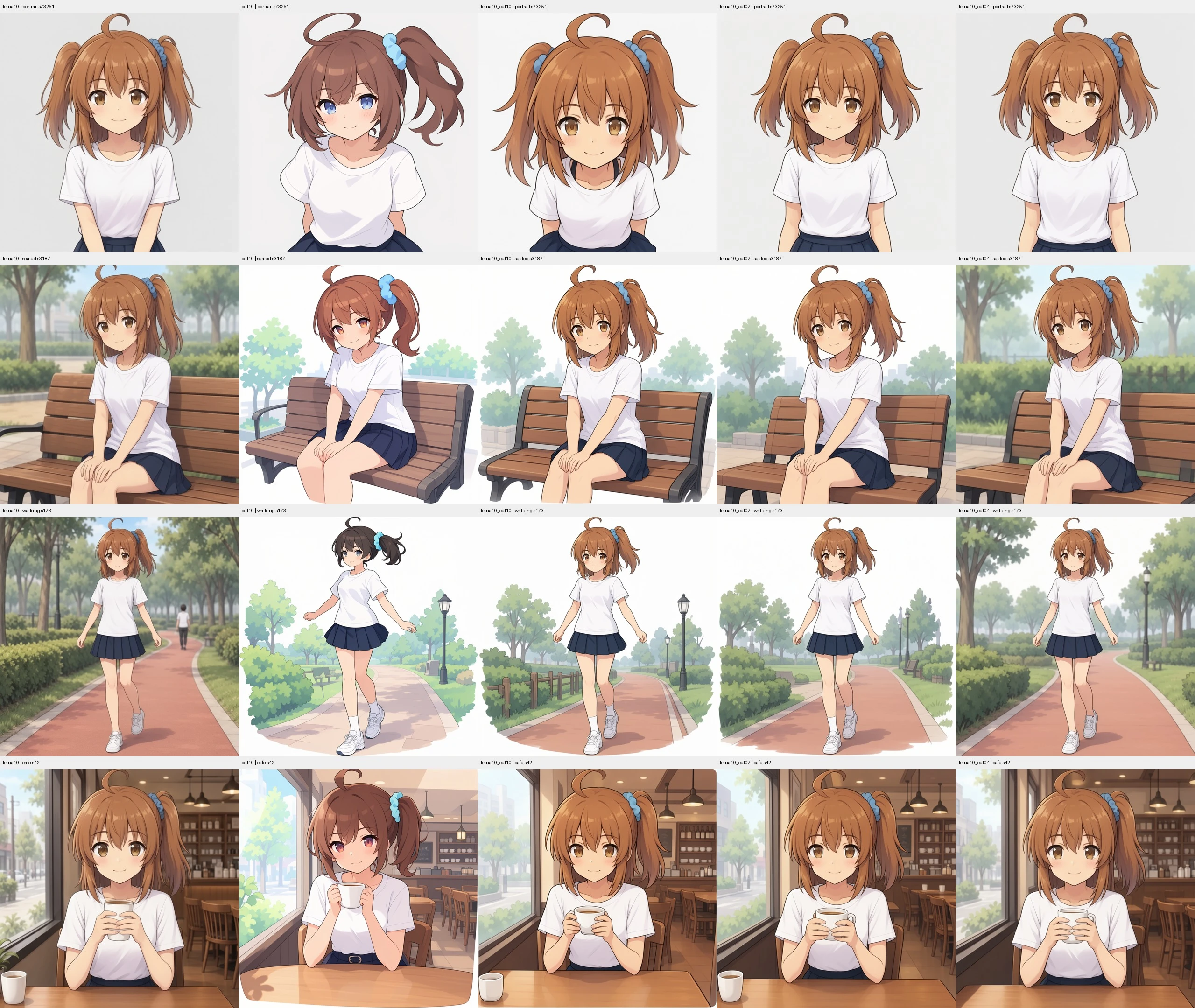
I generated all 4 scenes across the 5 conditions below. All 20 renders succeeded without error, and the logs confirmed that every weight tensor in each file loaded without missing layers: 328/328 for the Cel LoRA, 504/504 for the Kana LoRA, and 756/756 for the 4-step LoRA. Generation time per image (including model loading) was 31.4–32.1 seconds with 2 LoRAs total (counting the 4-step LoRA) and 34.3–35.2 seconds with 3 LoRAs.
| Column | Kana LoRA | Cel LoRA | Visual Result |
|---|---|---|---|
| 1 | 1.0 | None | Thin outlines, subtle gradients on the T-shirt, detailed background leaves and shelves |
| 2 | None | 1.0 | Thicker outlines and flat cel shading. Different character (different hair and eye color). Outdoor backgrounds fade to white around the edges like a cutout sticker |
| 3 | 1.0 | 1.0 | Keeps brown hair, ahoge, and blue-scrunchie side ponytail. Thicker lines, flatter shading, larger ahoge. Outdoor edges fade to white; cafe gets rounded white corners |
| 4 | 1.0 | 0.7 | Very similar style to Column 3. Outdoor white borders still appear, but the cafe corners stay square |
| 5 | 1.0 | 0.4 | Background detail reverts close to Column 1; character outlines stay slightly thicker than Column 1 |
Rows from top to bottom are Close-up, Seated, Walking, and Cafe; columns left to right follow the table order.
Next, I compared the cafe renders side by side with one of Kana’s training images (kana_0001). Top-left is the training image, top-right is Kana 1.0 only, bottom-left is Kana 1.0 + Cel 0.7, and bottom-right is Kana 1.0 + Cel 1.0.
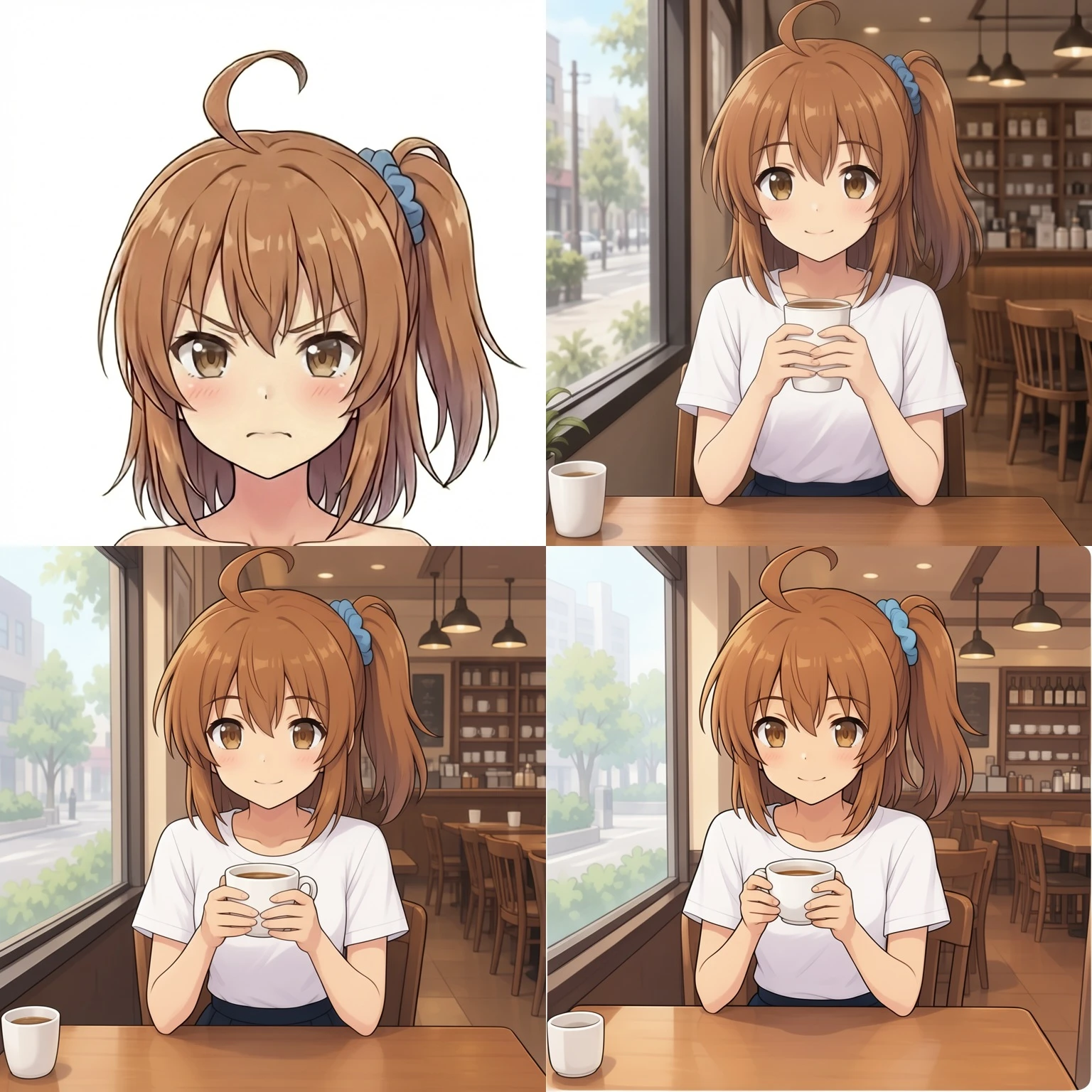
Both stacked outputs move closer to the training image in line weight, single-step flat shading, and the larger ahoge. At Cel 1.0, the hair color looks slightly more orange.
Meanwhile, the close-up portrait turned into twin tails even in Column 1 (Kana LoRA only). Since it already happened without the Cel LoRA, the Cel LoRA does not appear to be the cause (I isolate this later in the close-up section).
White Cutout Borders Around Outdoor Backgrounds
In the first grid, outdoor backgrounds faded to white around the edges at Cel 0.7 and above, but not at 0.4. I ran two follow-up checks to find the threshold and test whether a prompt addition could prevent the cutout effect. Each render took 34.0–35.0 seconds.
| What to Check | Condition | Scenes |
|---|---|---|
| Weight where white borders start | Kana 1.0 + Cel 0.5 and 0.6 | Seated, Walking (same seeds as first grid) |
| Whether a prompt addition prevents white borders | Kana 1.0 + Cel 0.7 and 1.0, appending The scenery extends to all four edges of the image as a full-bleed frame. | Seated, Walking, Cafe (same seeds as first grid) |
I also measured the white borders numerically alongside visual inspection. I defined “edge white %” as the share of pixels within an 8-pixel outer border whose RGB channels are all 245 or higher. Because a bright overcast sky can make the top edge white even without a cutout border, I used the bottom two corners (16×16-pixel squares where ground or floor should appear) as the indicator for whether the background was cut off.
White Borders Across Cel 0.4 to 1.0
Kana LoRA is fixed at 1.0. The “None,” 0.4, 0.7, and 1.0 rows reuse the images from the first grid, while 0.5 and 0.6 are newly generated.
| Cel LoRA | Seated (Edge White) | Seated (Bottom Corners) | Walking (Edge White) | Walking (Bottom Corners) |
|---|---|---|---|---|
| None | 0.0% | Not white | 0.0% | Not white |
| 0.4 | 0.0% | Not white | 15.0% | Not white |
| 0.5 | 20.9% | Not white | 19.4% | Not white |
| 0.6 | 33.4% | Not white | 30.1% | Not white |
| 0.7 | 46.0% | Not white | 93.6% | Both white |
| 1.0 | 91.1% | Both white | 94.9% | Both white |
The four newly generated images for 0.5 and 0.6: top row Seated, bottom row Walking; left is Cel 0.5, right is Cel 0.6.
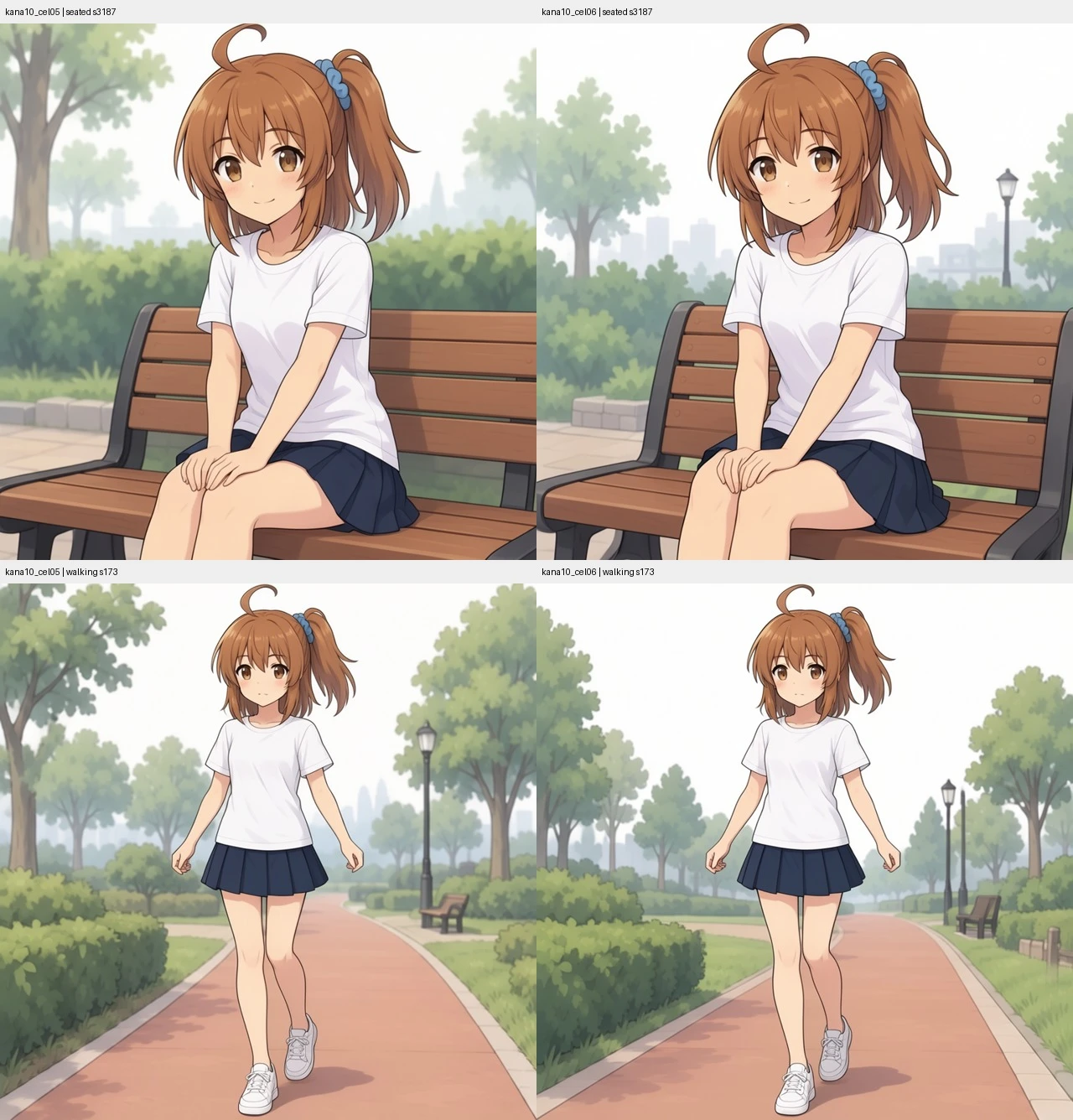
Up to 0.6, the ground extends all the way to the bottom edge with no cutout; the rise in edge white comes from the sky turning brighter. At 0.7, the result split by scene—Seated reached the bottom edge while Walking became a cutout—and at 1.0 both turned into cutouts.
Adding a Full-Bleed Prompt Instruction
I appended The scenery extends to all four edges of the image as a full-bleed frame. to the prompt while keeping Kana LoRA at 1.0.
| Cel LoRA | Scene | Without Line (Edge White / Bottom Corners) | With Line (Edge White / Bottom Corners) |
|---|---|---|---|
| 0.7 | Seated | 46.0% / Not white | 12.4% / Not white |
| 0.7 | Walking | 93.6% / Both white | 29.1% / Not white |
| 0.7 | Cafe | 0.1% / Not white | 0.5% / Not white |
| 1.0 | Seated | 91.1% / Both white | 38.4% / Both white |
| 1.0 | Walking | 94.9% / Both white | 92.6% / Both white |
| 1.0 | Cafe | 5.1% / Bottom-right half white | 6.2% / Not white |
The 6 renders with the full-bleed line added: top to bottom are Seated, Walking, and Cafe; left is Cel 0.7, right is Cel 1.0.
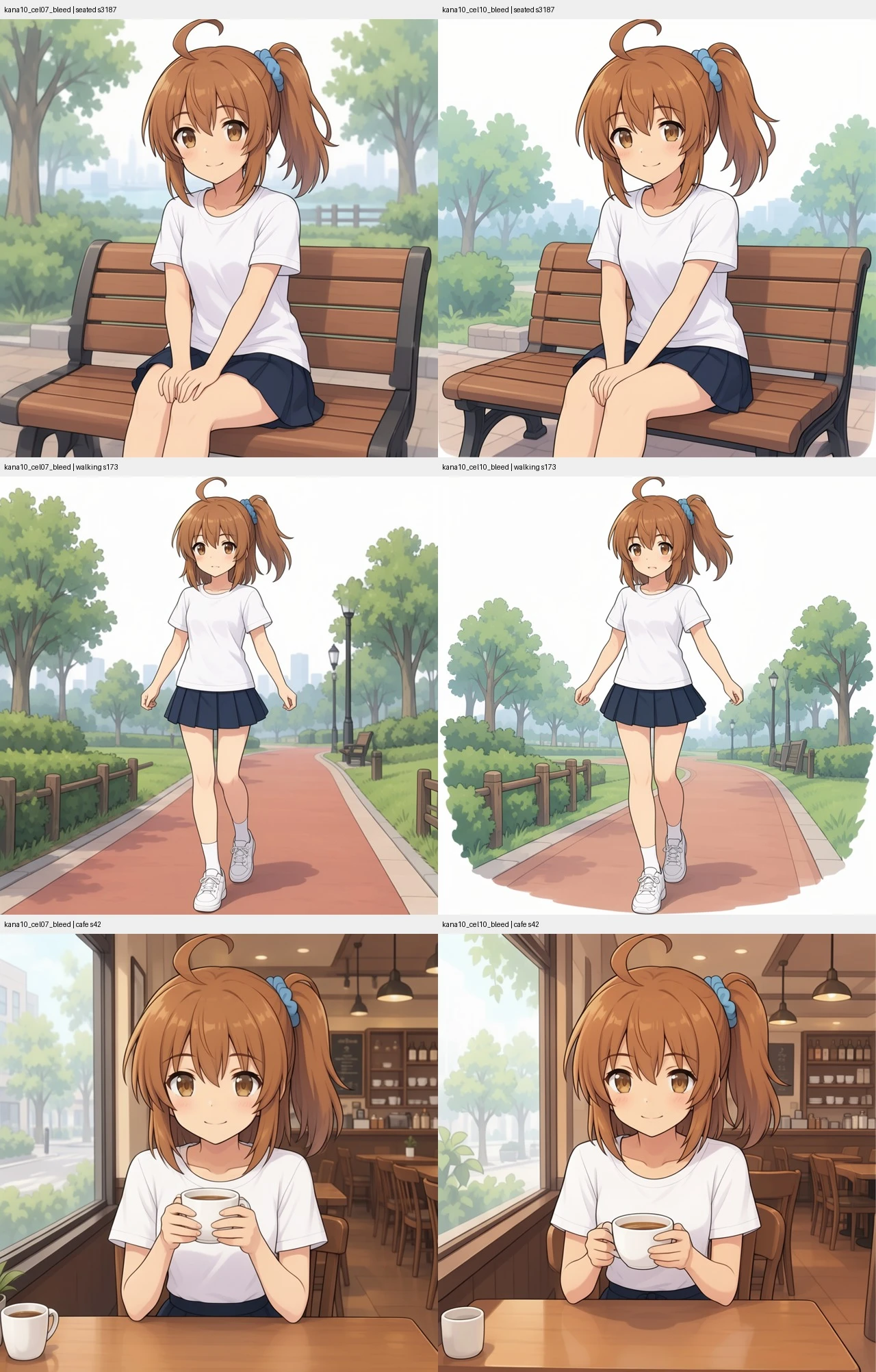
At Cel 0.7, adding the line eliminated the cutout on Walking so the path reached the bottom edge. At 1.0, Seated and Walking stayed cut out, though the cafe lost its rounded corners.
Checking Both Candidates Across 3 Seeds
I tested the two remaining candidates—Cel 0.6 without the line, and Cel 0.7 with the full-bleed line—alongside Kana-only across Seated, Walking, and Cafe using three fresh seeds (101, 202, 303).
Using the same bottom-corners check, Seated and Cafe had zero cutouts under every condition.
| Condition | Walking (out of 3) | Edge White Range Across All 3 Scenes |
|---|---|---|
| Kana only | 0 cutouts | 0.0–0.9% |
| Kana + Cel 0.6, no full-bleed line | 2 cutouts (seeds 202, 303) | 0.0–50.7% |
| Kana + Cel 0.7, with full-bleed line | 0 cutouts | 0.0–28.0% |
Rows from top to bottom are Seated, Walking, and Cafe for seeds 101, 202, and 303; columns follow the table order left to right.
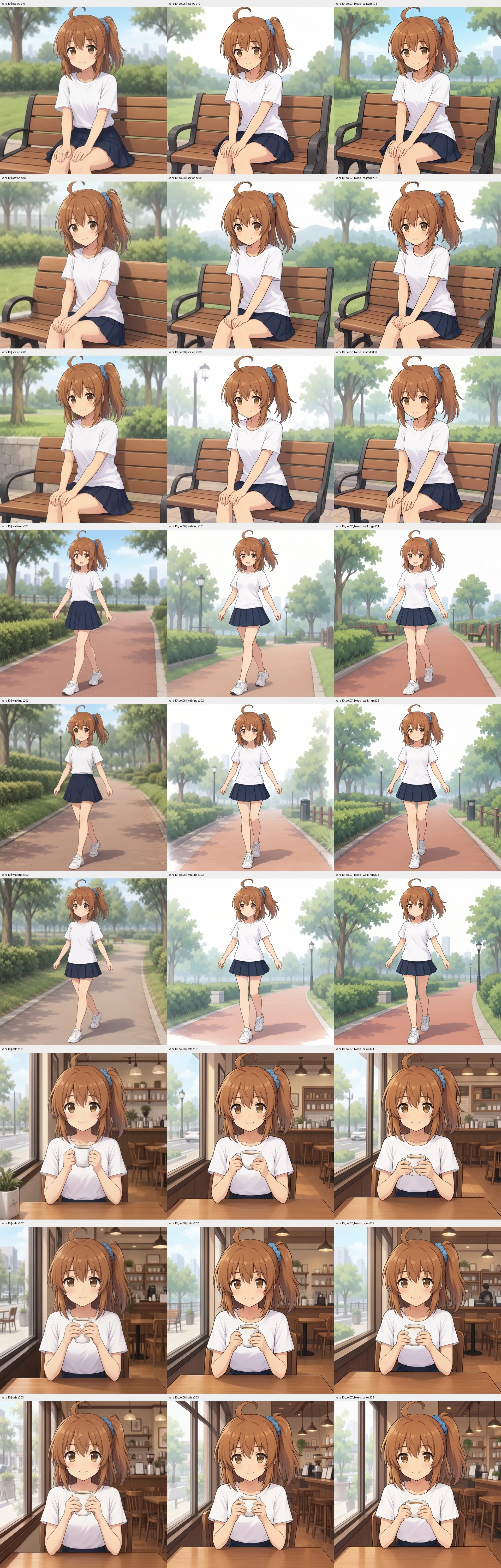
Although Cel 0.6 avoided cutouts on the first seed, 2 out of 3 new Walking seeds still faded out at the bottom, so lowering the weight to 0.6 alone is not enough.
By contrast, Cel 0.7 with the full-bleed instruction drew the ground and floor all the way to the bottom edge in all 9 images, even though the sky stayed pale in some frames. Kana’s brown hair, ahoge, and blue-scrunchie side ponytail appeared in all 18 Cel-stacked outputs.
Matching the Civitai Sample Workflow Settings
The sample images on the Civitai page have rich saturation, colored lighting from sunsets or blue skies, sharp shadow boundaries, and tilted camera angles. My outputs so far had pale colors, white skies, and flat daylight. Since the sample PNGs contained embedded ComfyUI workflows, I extracted the settings from two SFW sample images.
| Item | Civitai Samples | My Setup So Far |
|---|---|---|
| Model | moss_image_sft_bf16.safetensors | Same |
| Speedup LoRA | moss_image_sft_4step_v2.0, weight 1.0 | Same |
| Cel LoRA weight | 1.0 | 0.4–1.0 (0.6 and 0.7 were candidates for border control) |
| Inference steps | 8 | 4 |
| Sampler & scheduler (noise schedule) | euler, simple | euler, fixed sigmas |
| CFG | 1.0 | 1.0 |
| Resolution | 1024×1536 | 768×768 |
| Prompt format | One uses MOSS JSON format; one uses Danbooru-style English tags with quality tags | Short natural-language prose |
| Lighting & color cues | Tag sample includes sidelighting, lens flare, bloom, (warm color), (sunset), orange tint, depth of field, etc. | Soft daylight, Simple park background |
In the first grid, even the Cel-only column at 1.0 did not produce sample-like color and lighting, so stacking the Kana LoRA was not the only reason. I re-ran renders matching the sample parameters.
| # | Test | Settings |
|---|---|---|
| 1 | Use the sample’s tag prompt verbatim, removing only a stray literal <lora:…> line left inside the prompt text | Cel 1.0 only, 8 steps, simple, 1024×1536, seed 42 |
| 2 | Rewrite the same outfit, sunset, and tilted angle in natural prose matching Kana’s training captions | 8 steps, simple, 1024×1536, seed 42; 5 conditions: Kana only, Cel only, Kana 1.0 + Cel 1.0, Kana 1.0 + Cel 0.7, Kana 0.7 + Cel 1.0 |
| 3 | Re-run Test 2’s Kana 1.0 + Cel 1.0 at 4 steps | 4 steps, fixed sigmas, 1024×1536, seed 42 |
The fifth condition in Test 2 (Kana 0.7 + Cel 1.0) was included to see whether weakening the Kana LoRA pulls the colors closer to the Cel-only style. I took the outfit, expression, angle, background, and lighting from the sample’s tag list to write the Test 2 prose prompt:
Anime-style illustration of kanachan, wearing a white collared shirt with a loose red plaid bow tie, a beige knit vest, and a blue plaid pleated skirt. Cowboy shot from the side at a dutch angle. She turns to look at the viewer with a happy open-mouth smile and a head tilt, and her hair is blowing in the wind. She stands on a riverside promenade at sunset, with a city skyline across the water, a large setting sun, and orange clouds filling the sky. Strong warm sidelighting from the sunset, hard-edged cel shadows, lens flare and bloom, vivid saturated colors with an orange tint, and a blurred background with depth of field. Her hair is tied into a side ponytail with a blue scrunchie. A curled ahoge rises from the crown.Generation time per image was 177–191 seconds at 8 steps (1024×1536) and 106 seconds at 4 steps (1024×1536).
Verbatim Sample Tag Prompt
Cel LoRA 1.0 only, 8 steps, 1024×1536:
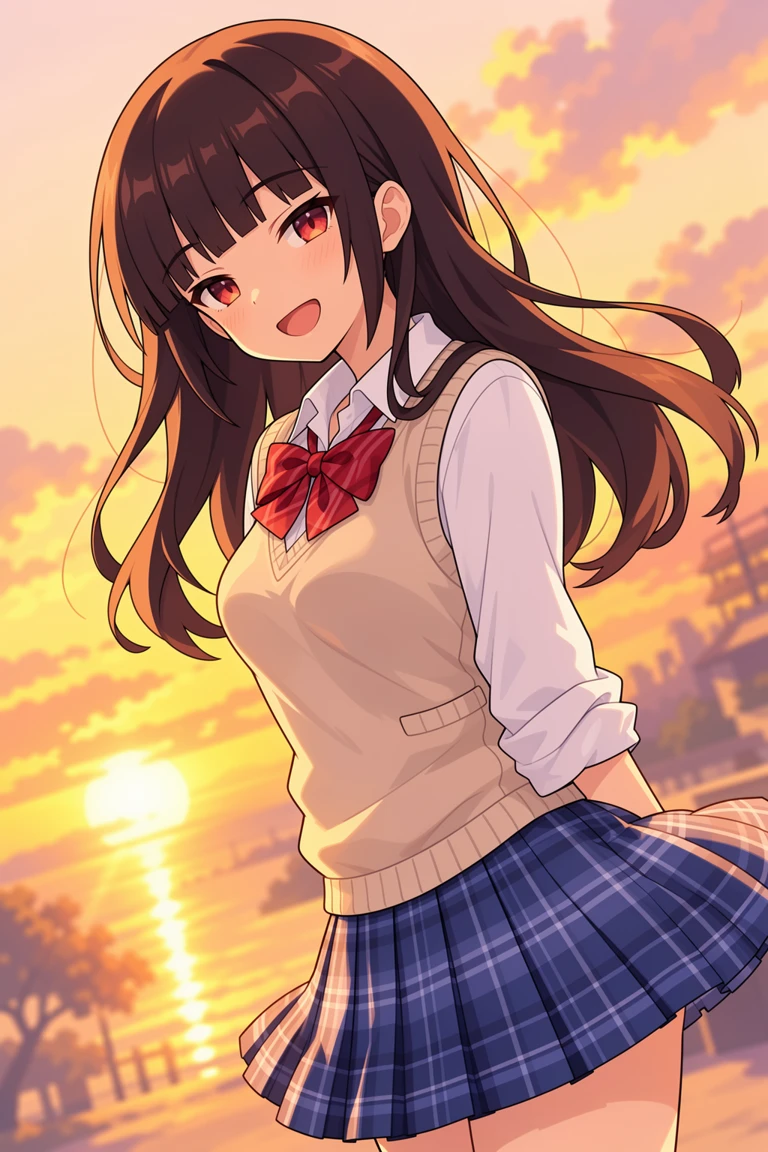
The seed and inference engine differ from the Civitai upload so the image is not identical, but the vivid colors and hard cel shadows appeared right away. This confirmed the local sd.cpp setup can reproduce the Cel LoRA’s look.
Comparing LoRA Weights on the Sunset Scene
I also measured color richness numerically by converting each image to HSV (Hue, Saturation, Value) and computing the mean saturation across all pixels (0 to 1; higher means more vivid) plus the share of pixels with saturation >= 0.5.
| Condition | Mean Saturation | Pixels with S >= 0.5 | Visual Result |
|---|---|---|---|
| Cel 1.0 only | 0.510 | 56.2% | Purple shadows, pink-to-orange sky, deep color, thick lines; different character with reddish-brown hair |
| Kana 1.0 only | 0.428 | 35.1% | Kana’s brown hair and side ponytail; muted brown/orange palette, thin lines |
| Kana 1.0 + Cel 1.0 | 0.441 | 44.0% | Thicker lines, but palette stays close to Kana-only with no purple shadows |
| Kana 1.0 + Cel 0.7 | 0.438 | 41.6% | Nearly identical to Cel 1.0 |
| Kana 0.7 + Cel 1.0 | 0.465 | 50.0% | Slightly richer hair and sky colors; keeps brown hair, ahoge, and blue scrunchie |
| Kana 1.0 + Cel 1.0 (4 steps) | 0.448 | — | Nearly identical look and saturation to 8 steps |
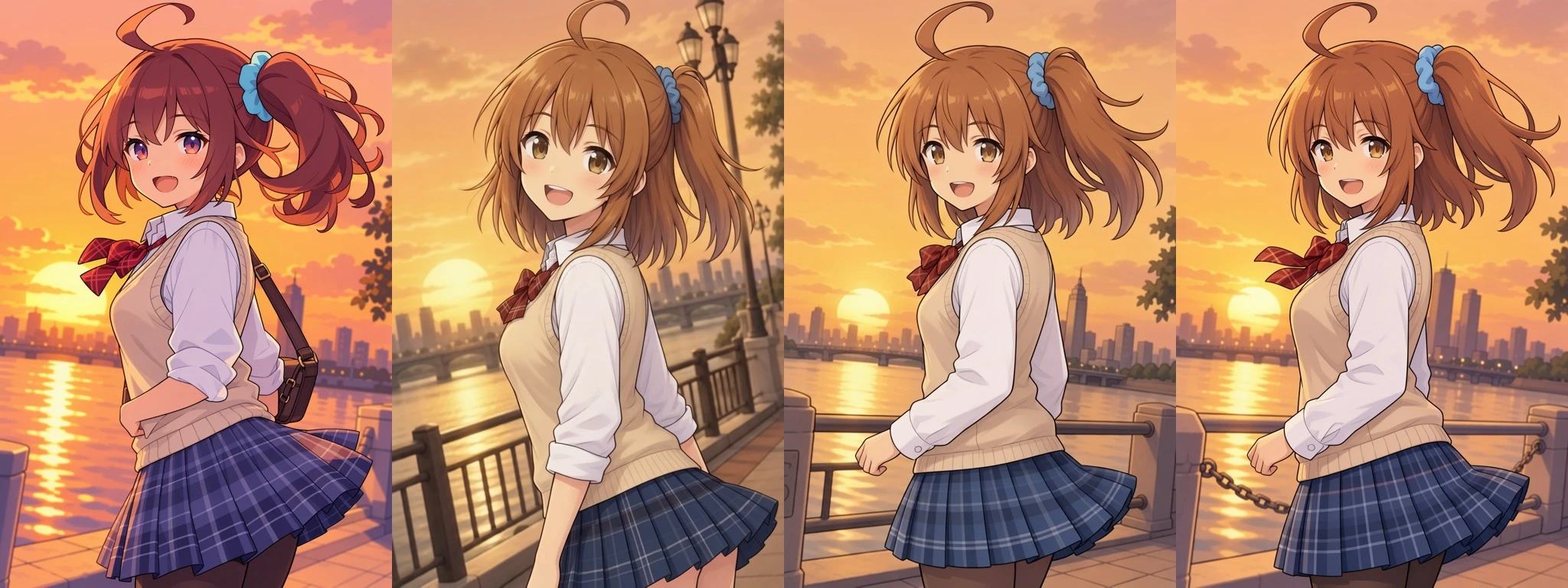
Left to right: Cel 1.0 only, Kana 1.0 only, Kana 1.0 + Cel 1.0, Kana 0.7 + Cel 1.0.
Left to right: Kana 1.0 + Cel 0.7, Kana 1.0 + Cel 1.0 (8 steps), and Kana 1.0 + Cel 1.0 (4 steps).
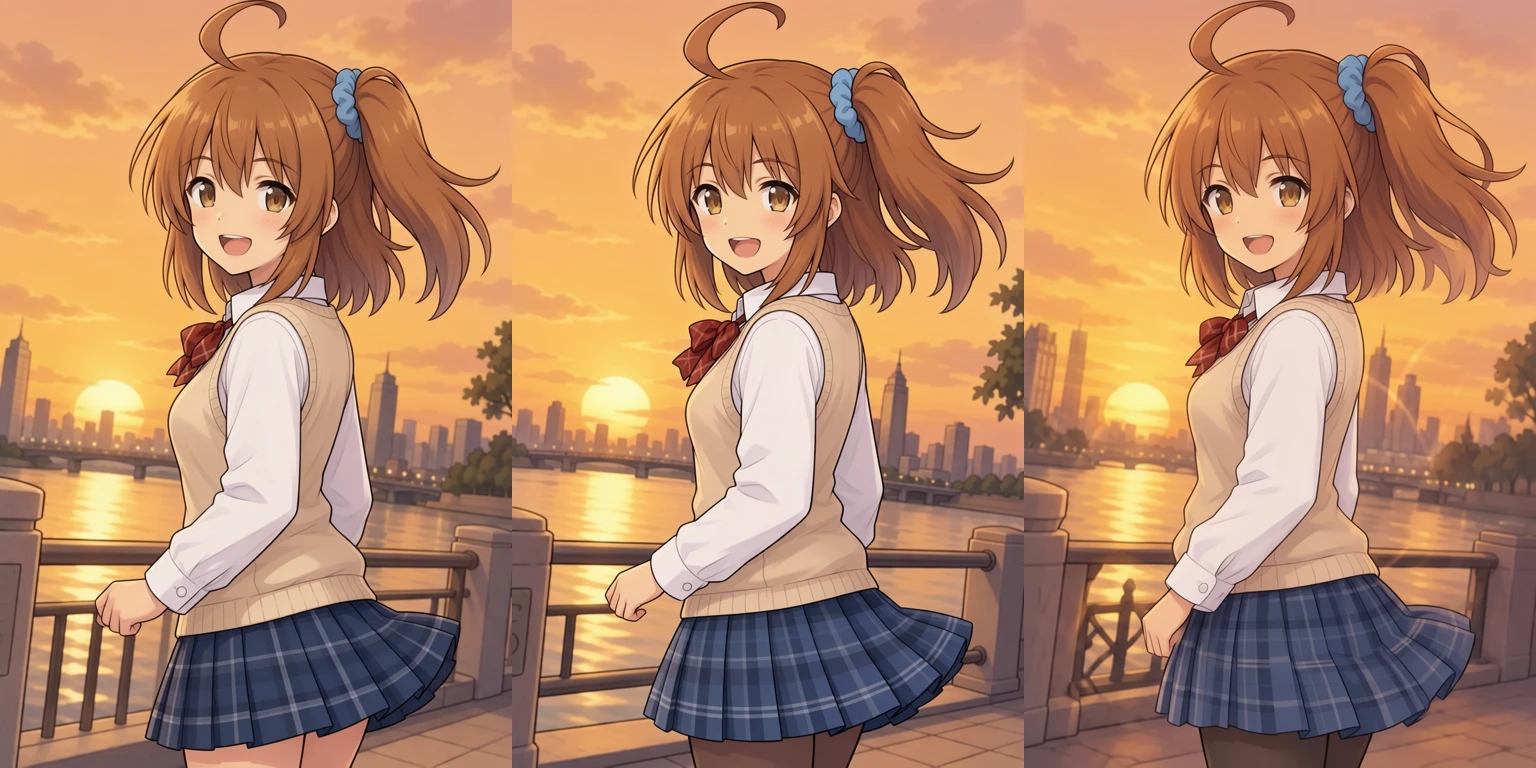
With Cel LoRA alone, even natural prose produced vivid colors. Once Kana LoRA was stacked at 1.0, mean saturation dropped to 0.441—close to Kana-only (0.428). Cel LoRA still changed line thickness, but color and shading were pulled toward the Kana LoRA. Lowering Kana LoRA to 0.7 lifted mean saturation to 0.465.
Notably, no white border cutouts occurred at Cel 1.0 in this sunset scene even without the full-bleed line. The earlier cutouts appear to have been triggered mainly by sparse background prompts like Simple park background.
Lowering Kana LoRA vs. Pushing Cel LoRA Past 1.0
Next, I tested whether lowering Kana LoRA below 0.7 brings colors even closer to Cel-only—and whether pushing Cel LoRA up to 1.3 boosts color—using the sunset scene at seed 42, 4 steps, and 768×1152. Because I dropped the resolution from 1024×1536, I re-rendered the two baseline conditions (Cel 1.0 only and Kana 1.0 + Cel 1.0) at 768×1152 as well. Each image took 61.9–67.9 seconds.
| Condition | Mean Saturation | Pixels with S >= 0.5 | Visual Result |
|---|---|---|---|
| Cel 1.0 only | 0.477 | 44.4% | Purple-to-orange sky, two-tier shadows on hair and clothes; different character with wavy reddish-brown hair |
| Kana 1.0 + Cel 1.0 | 0.413 | 33.5% | Brown and orange palette, weak shadow steps in hair |
| Kana 0.5 + Cel 1.0 | 0.458 | 44.0% | Purple sky returns, two-tier hair shadows; keeps brown hair, ahoge, and blue scrunchie, though hair darkens |
| Kana 0.3 + Cel 1.0 | 0.467 | 47.0% | Hair turns wavy and eyes shift reddish, drifting toward the Cel-only character |
| Kana 1.0 + Cel 1.3 | 0.397 | 31.5% | Colors do not get richer; stays close to Kana 1.0 + Cel 1.0 |
| Kana 0.7 + Cel 1.3 | 0.423 | 38.0% | Also does not increase saturation |
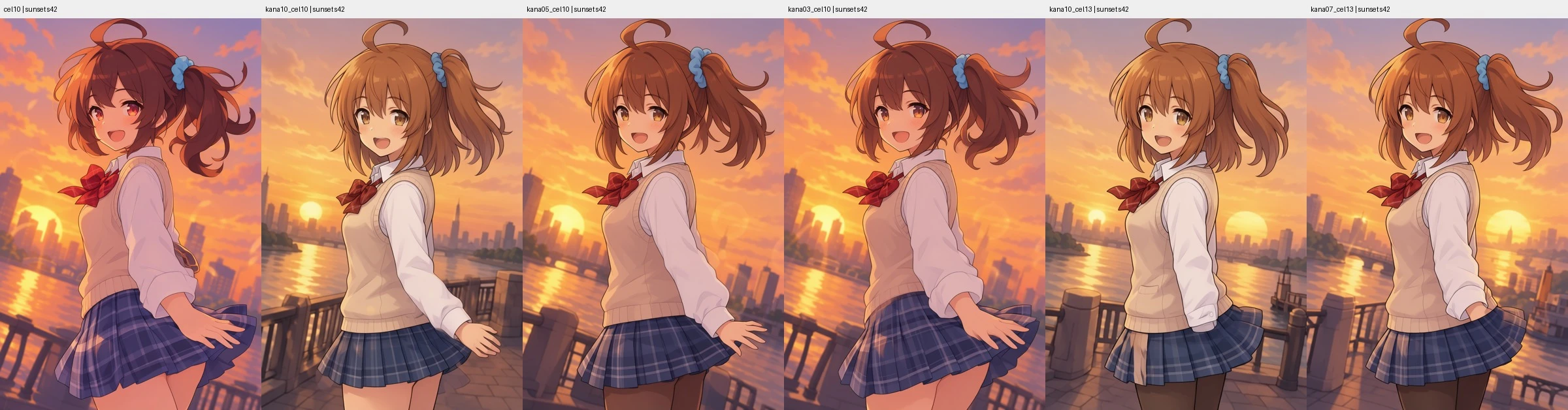
Left to right in table order:
Face crops from left to right: Kana 1.0 + Cel 1.0, Kana 0.5 + Cel 1.0, Kana 0.3 + Cel 1.0, and Cel 1.0 only.
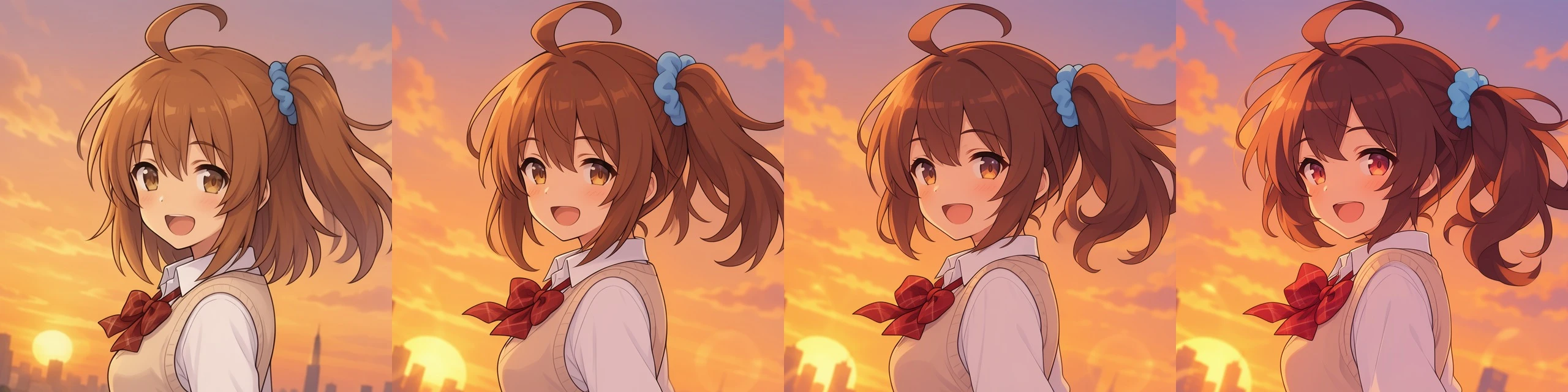
Pushing Cel LoRA to 1.3 did not raise saturation—at Kana 1.0 it actually fell from 0.413 to 0.397. Lowering Kana LoRA was what brought the colors closer to the sample. At Kana 0.5, the hairstyle and hair tie survived while sky colors and shading approached Cel-only; at 0.3, hair texture and eye color started drifting away from Kana.
Adding Explicit Hair Color to the Prompt
Since Kana 0.5 darkened her hair, I tested appending She has light chestnut-brown hair and olive-brown eyes. at Kana 0.5 + Cel 1.0 (sunset scene, seed 42). The first two rows reuse the renders above.
| Kana LoRA | Hair/Eye Color Line | Mean Saturation | Visual Result |
|---|---|---|---|
| 1.0 | No | 0.413 | Light brown hair |
| 0.5 | No | 0.458 | Dark brown hair |
| 0.5 | Yes | 0.454 | Lighter hair, but shifted toward orange; purple sky and sharp shadows remain |
Left to right in table order:
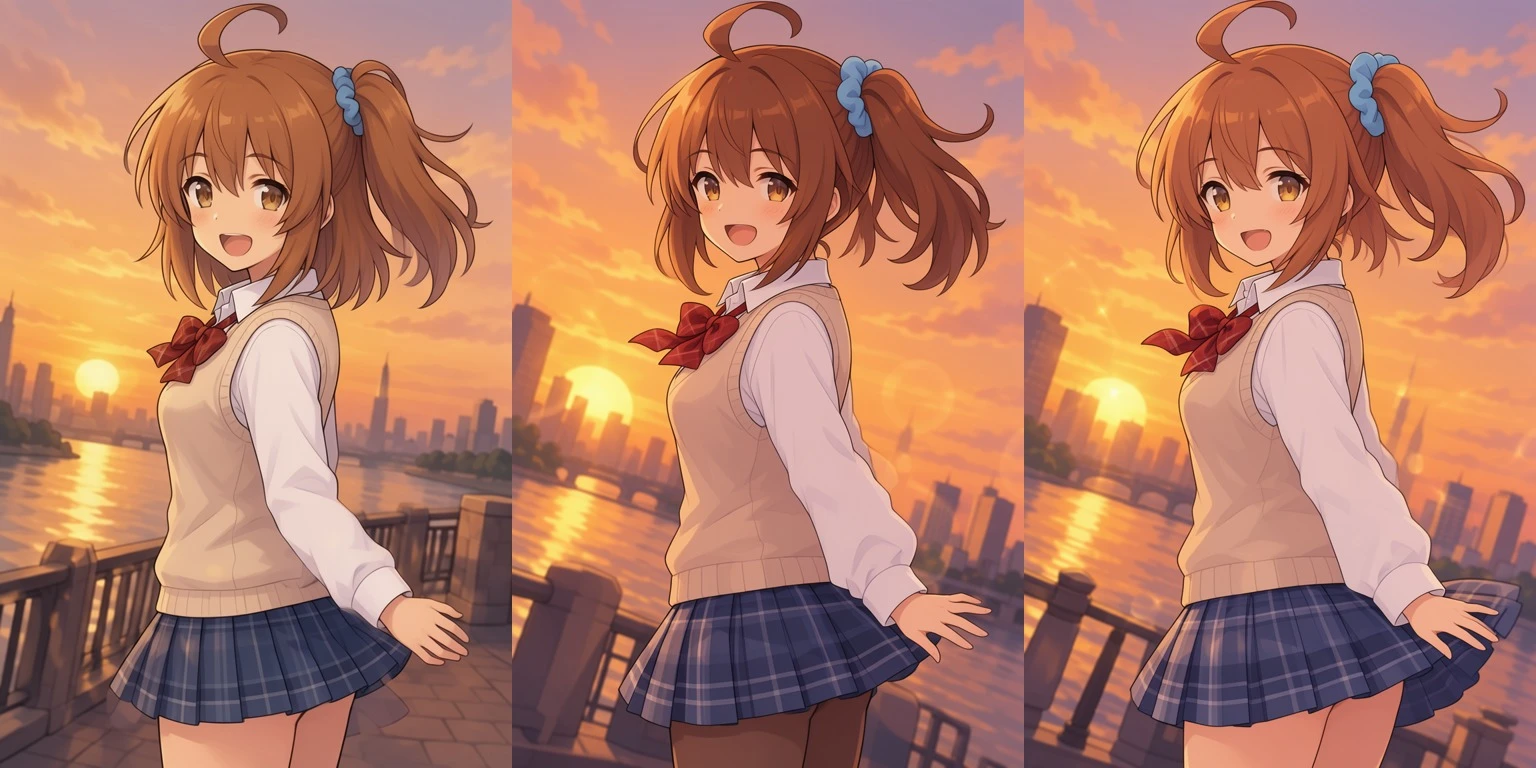
The hair brightened, but shifted to an orange tint rather than Kana 1.0’s brown. I checked seeds 101 and 202 with and without the color line as well.
| Seed | Hair/Eye Color Line | Mean Saturation | Visual Result |
|---|---|---|---|
| 101 | Yes | 0.481 | Bright orange-tinted brown |
| 202 | Yes | 0.514 | Bright orange-tinted brown |
| 101 | No | 0.482 | Dark brown |
| 202 | No | 0.517 | Dark brown |
Left to right: seeds 101 and 202 with the color line, then seeds 101 and 202 without it.
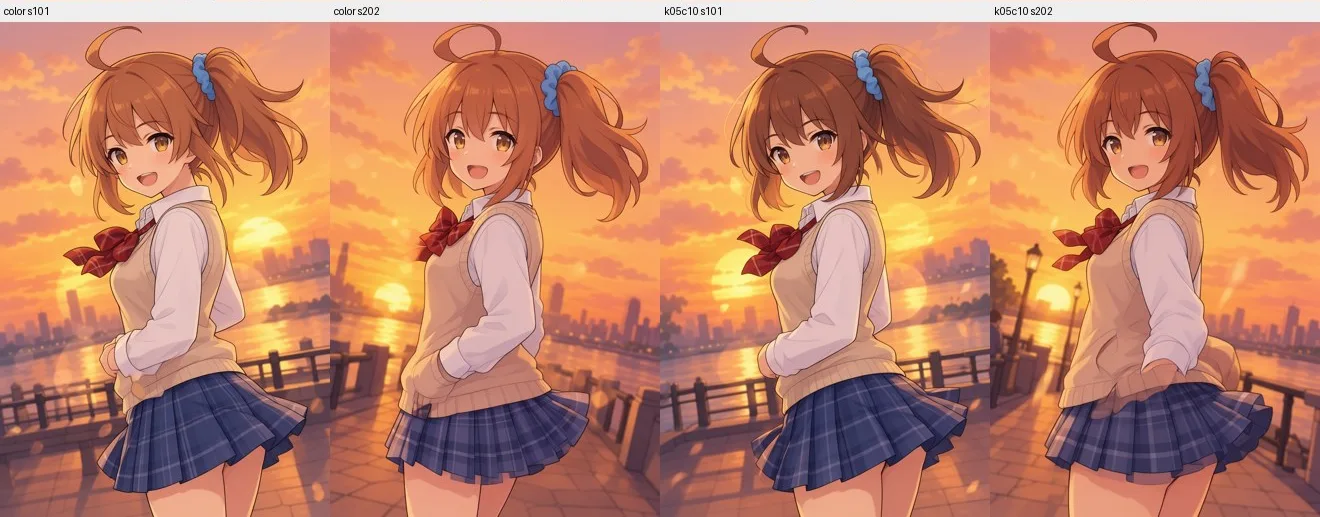
Across all three seeds, adding the color line lightened the hair toward orange while leaving mean saturation almost unchanged.
Measuring Saturation in Kana’s Training Dataset
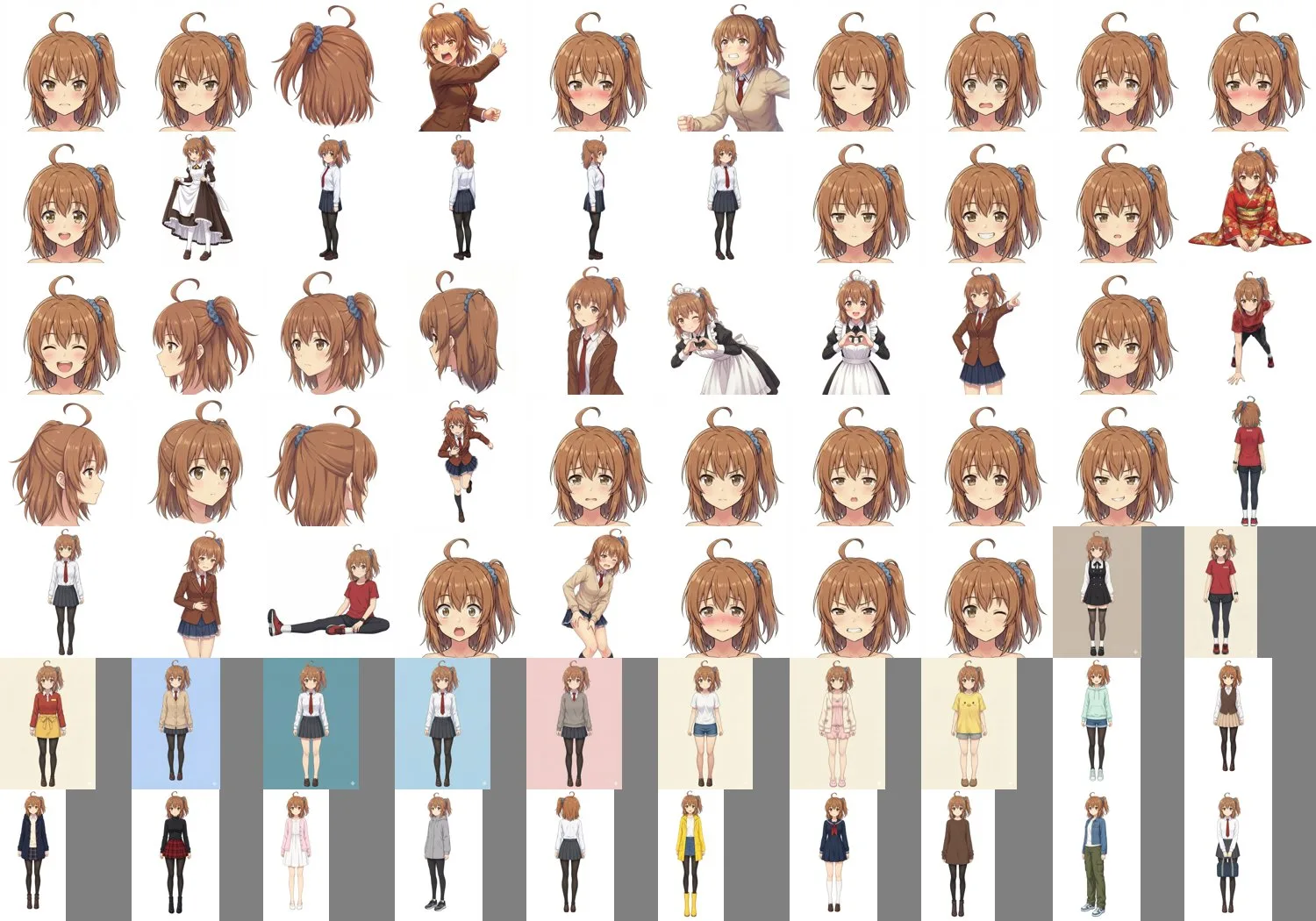
To find out why stronger Kana LoRA weights muted the colors, I ran the same HSV mean-saturation script over all 70 training images used for the Kana LoRA. The 70-image average was 0.133, and even the single most saturated image only reached 0.316. Moreover, 60 of the 70 images had at least 30% white pixels (RGB all >= 245, which have zero saturation and pull the average down)—mostly white-background portraits and standing sprites with soft gradient shading and no strongly lit scenes.
Kana LoRA Alone Across Weights
I rendered the sunset scene with no character/style LoRA and with Kana LoRA alone at 0.5, 0.7, and 1.0 (seed 42, 4 steps, 768×1152).
| Condition | Mean Saturation | Pixels with S >= 0.5 |
|---|---|---|
| No char/style LoRA | 0.553 | 60.7% |
| Cel 1.0 only (from previous section) | 0.477 | 44.4% |
| Kana 0.5 only | 0.479 | 46.7% |
| Kana 0.7 only | 0.456 | 43.7% |
| Kana 1.0 only | 0.427 | 38.0% |
Left to right: No char/style LoRA, Cel 1.0 only, Kana 0.5 only, Kana 0.7 only, Kana 1.0 only.
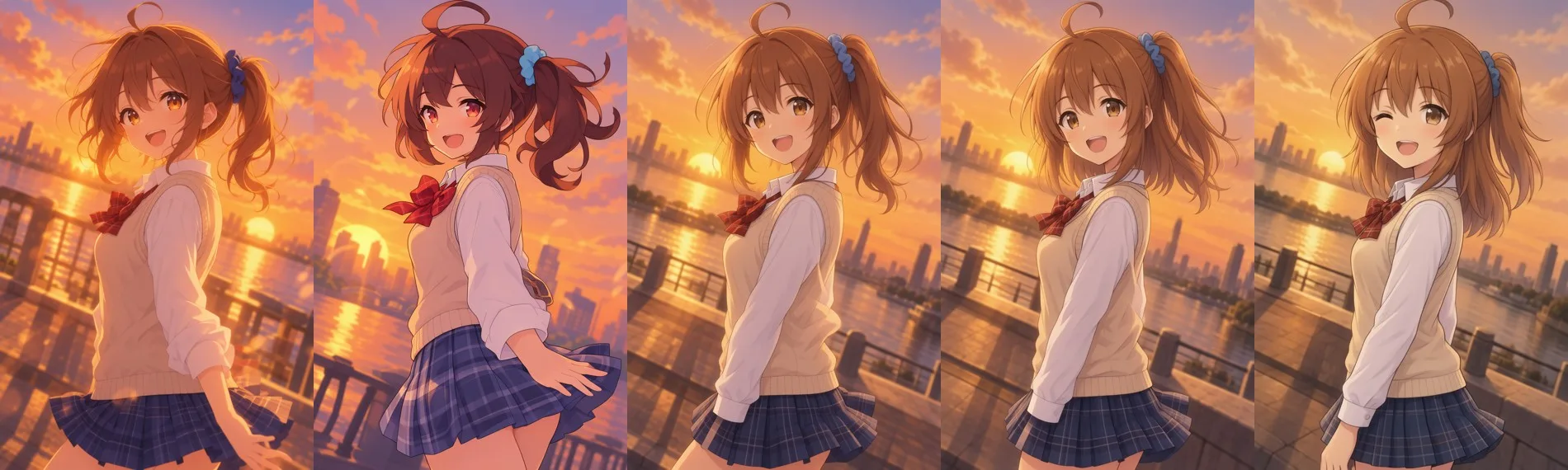
Higher Kana LoRA weights steadily lowered saturation and shifted the purple-and-orange sky toward brown. Combined with the low-saturation training set, the muted color palette looks like an effect of Kana’s training images.
Verifying Sunset Saturation Across 3 Seeds
I added seeds 101 and 202 and aligned all 8 conditions—including Kana 0.7 + Cel 1.0 at 768×1152—across 3 seeds. Values are mean HSV saturation.
| Condition | Seed 42 | Seed 101 | Seed 202 | 3-Seed Mean |
|---|---|---|---|---|
| No char/style LoRA | 0.553 | 0.455 | 0.549 | 0.519 |
| Cel 1.0 only | 0.477 | 0.498 | 0.541 | 0.505 |
| Kana 0.5 only | 0.479 | 0.450 | 0.498 | 0.476 |
| Kana 0.7 only | 0.456 | 0.437 | 0.480 | 0.458 |
| Kana 1.0 only | 0.427 | 0.426 | 0.441 | 0.431 |
| Kana 0.5 + Cel 1.0 | 0.458 | 0.482 | 0.517 | 0.486 |
| Kana 0.7 + Cel 1.0 | 0.435 | 0.475 | 0.505 | 0.471 |
| Kana 1.0 + Cel 1.0 | 0.413 | 0.457 | 0.459 | 0.443 |
Rows from top to bottom are seeds 42, 101, and 202; columns follow the table order left to right.
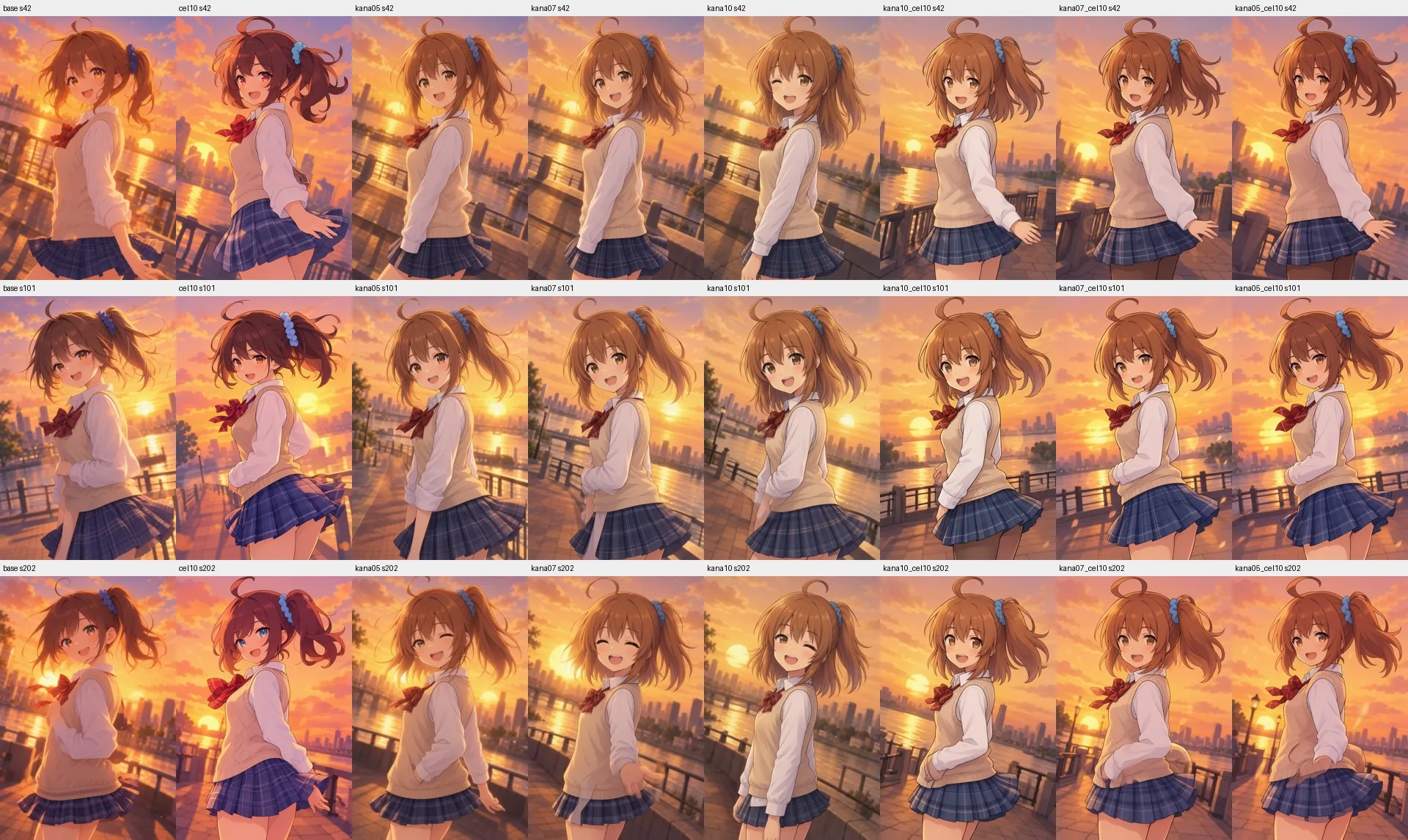
In all 3 seeds, stronger Kana weights lowered saturation both on their own and when stacked with Cel 1.0. Meanwhile, No char/style LoRA vs. Cel 1.0 only swapped places depending on the seed, so the Cel LoRA itself does not raise saturation—it changes line work, shadow steps, and eye/hair rendering. What looked like Cel colors returning when lowering Kana LoRA was simply less saturation dampening from the Kana LoRA.
Testing Earlier Kana LoRA Checkpoints
If longer training caused the color drop, earlier checkpoints might retain more saturation. Along with the 3,600-step baseline, I tested the 1,200-, 2,400-, and 4,900-step Kana checkpoints at weight 1.0 on the sunset scene (seed 42).
| Kana Training Steps | Kana Only (Mean Saturation) | Kana + Cel 1.0 (Mean Saturation) |
|---|---|---|
| 1,200 | 0.463 | 0.430 |
| 2,400 | 0.403 | 0.400 |
| 3,600 | 0.427 | 0.413 |
| 4,900 | 0.426 | 0.421 |
Top row is Kana only, bottom row is Kana + Cel 1.0; left to right are 1,200, 2,400, 3,600, and 4,900 steps.
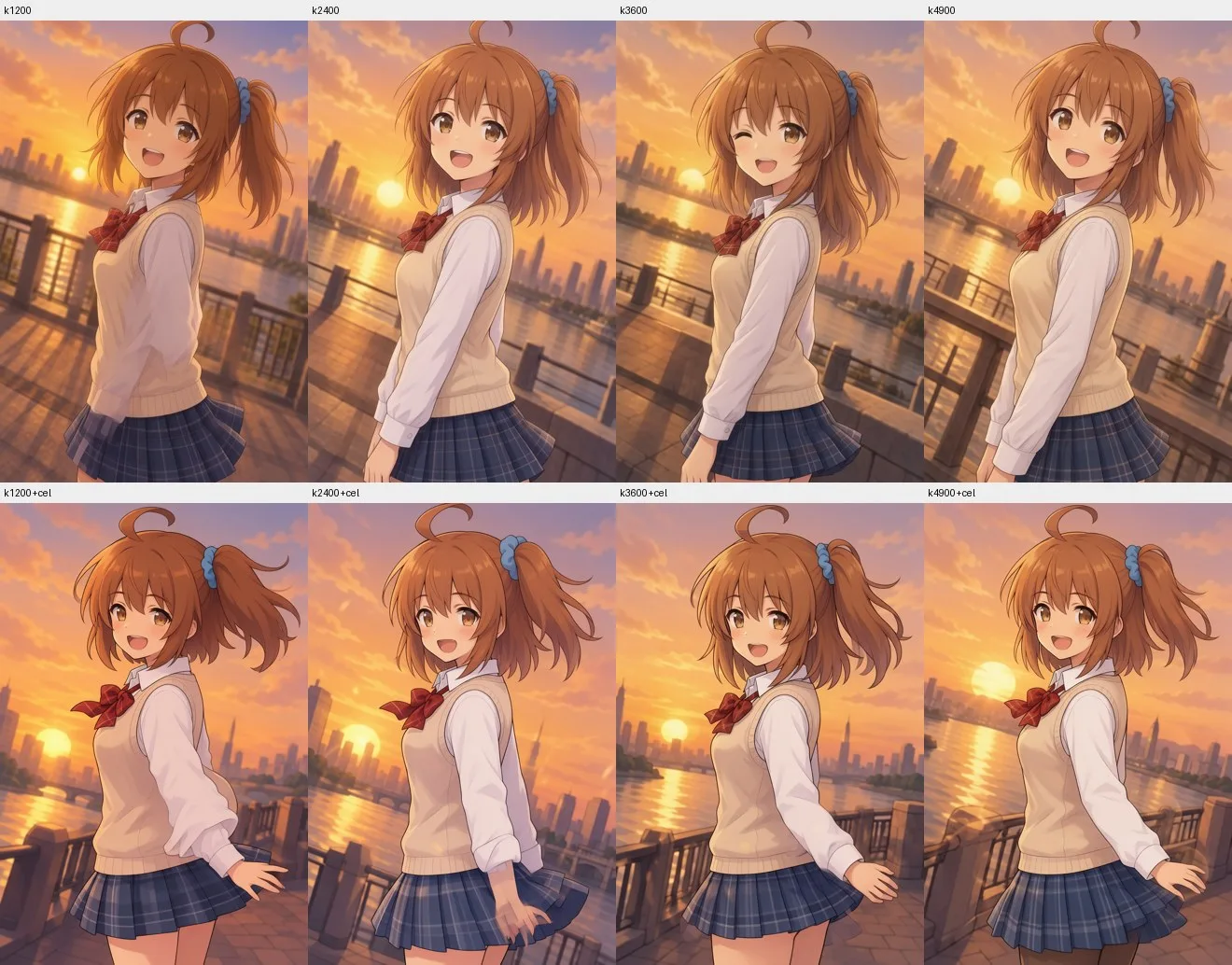
Switching checkpoints did not restore saturation: 1,200 steps scored highest, 2,400 dipped, and 3,600 rose slightly—with no monotonic trend, a spread within 0.06, and all well below No char/style LoRA (0.553).
Testing Four Different Outfits
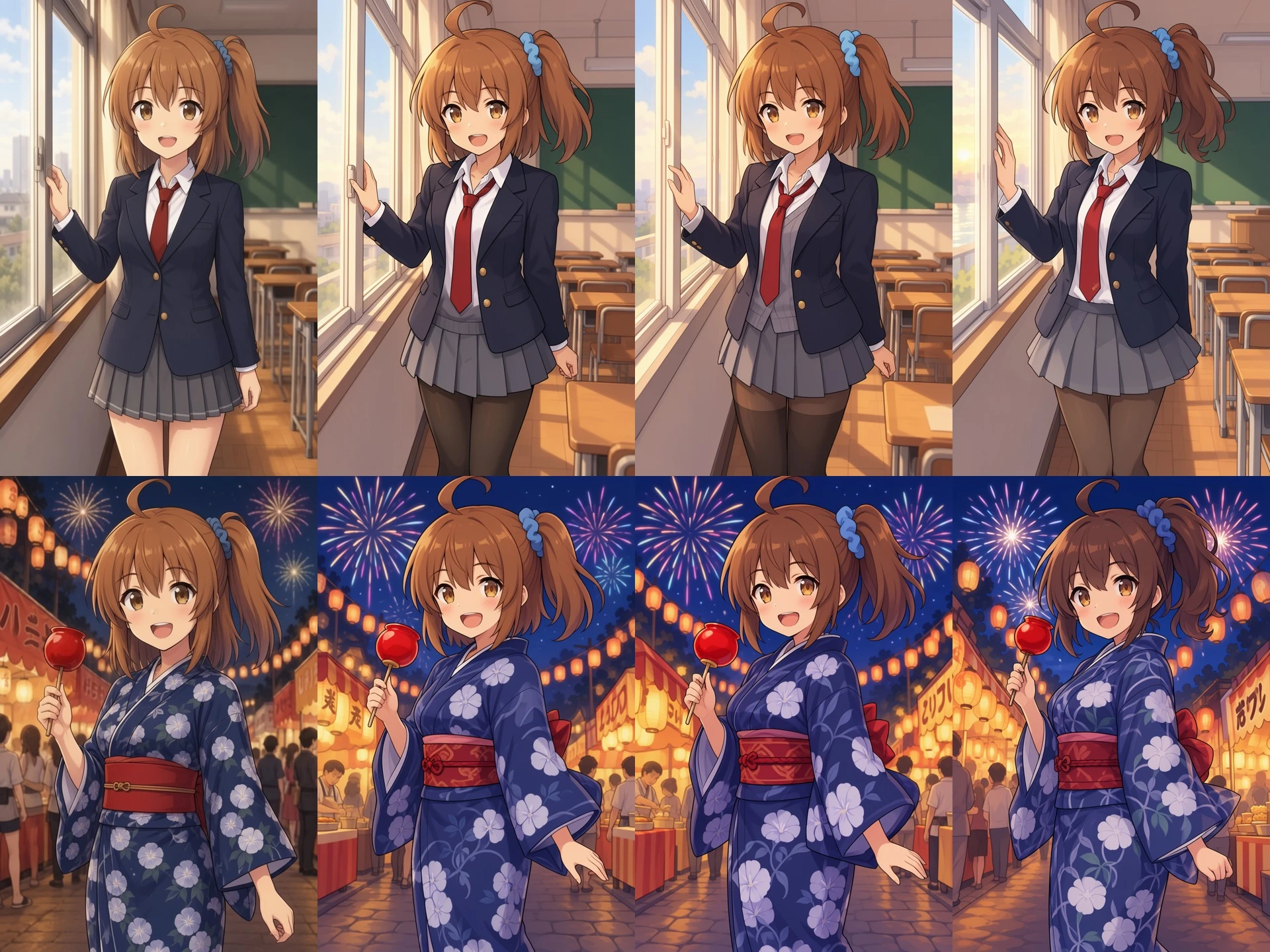
Next, I wrote detailed natural-language prompts with explicit scenery, lighting, and color cues for four outfits to check outfit separation and character consistency under the stacked LoRAs (4 steps, 768×1152).
| Outfit | Setting |
|---|---|
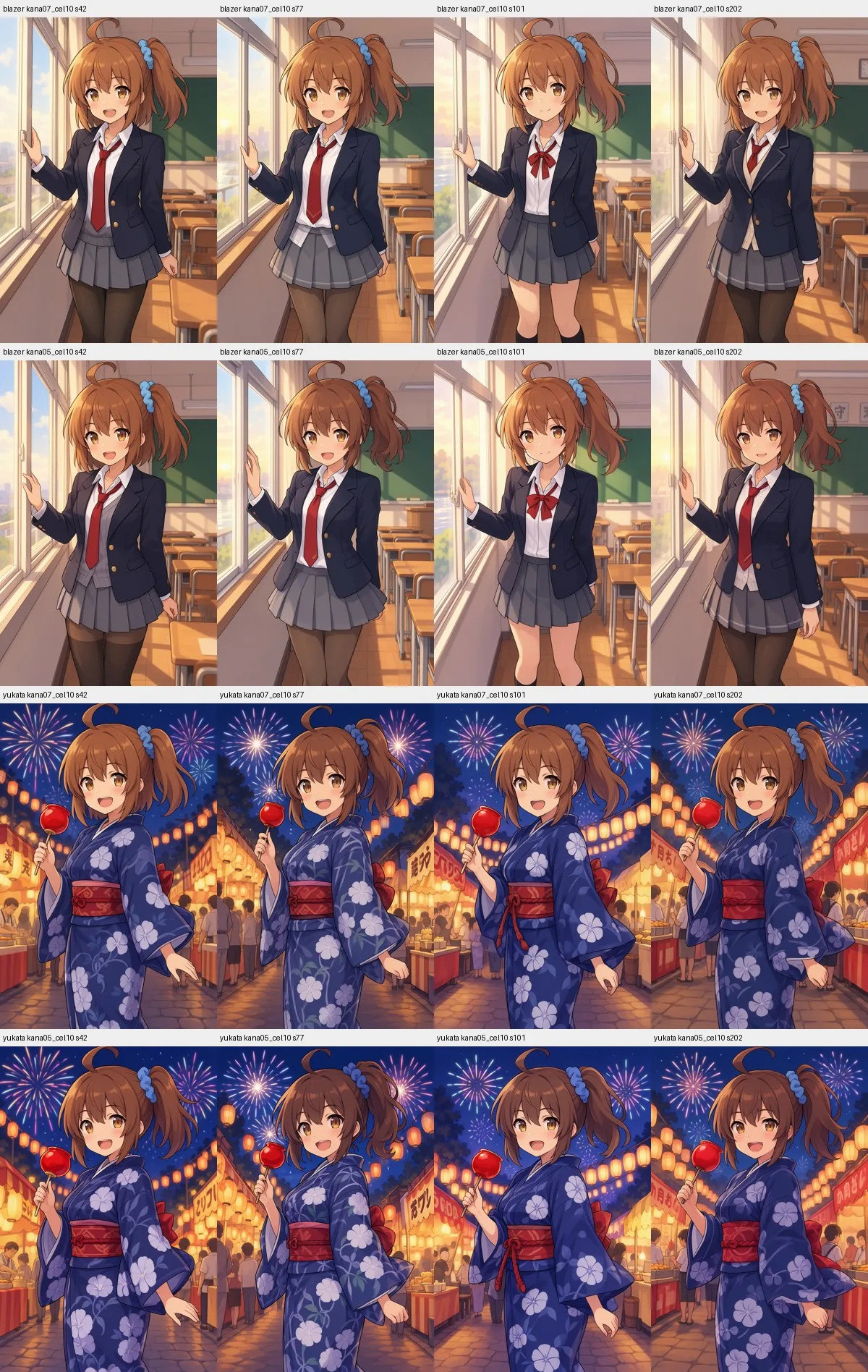
| Navy blazer, white shirt, red necktie, grey pleated skirt | Sunset classroom by the window |
| Navy yukata with morning-glory pattern, red obi, candied apple | Night summer festival street with stalls |
| Oversized yellow hoodie, black shorts, white sneakers | Daytime city intersection |
| Black maid dress, white frilly apron and headdress, silver tray with a parfait | Retro coffee shop |
I rendered Kana 1.0 only, Kana 0.7 + Cel 1.0, and Kana 0.5 + Cel 1.0 at seed 42, plus Kana 0.5 + Cel 1.0 at seed 77. Each image took 60.2–69.4 seconds.
| Outfit | Kana 1.0 Only (s42) | Kana 0.7 + Cel 1.0 (s42) | Kana 0.5 + Cel 1.0 (s42) | Kana 0.5 + Cel 1.0 (s77) |
|---|---|---|---|---|
| Blazer | Matches prompt | Added grey vest and black tights | Same vest and tights added | Tights added; ponytail tips curl |
| Yukata | Matches prompt (darker colors) | Matches prompt; deeper blue and fireworks | Matches prompt | Matches prompt; darker hair and wavy tips |
| Hoodie | Matches prompt | Added shoulder bag strap | Matches prompt | Matches prompt; winking expression |
| Maid | Matches prompt (1 tray, 1 parfait) | Lace-up cutout bodice; 2 trays, 2 parfaits | Lace-up cutout bodice; parfait in one hand, tray in the other | Cutout bodice with buttons; parfait in one hand, tray in the other |
Columns left to right follow the table order; top row is Blazer, bottom row is Yukata.
Same column order; top row is Hoodie, bottom row is Maid.
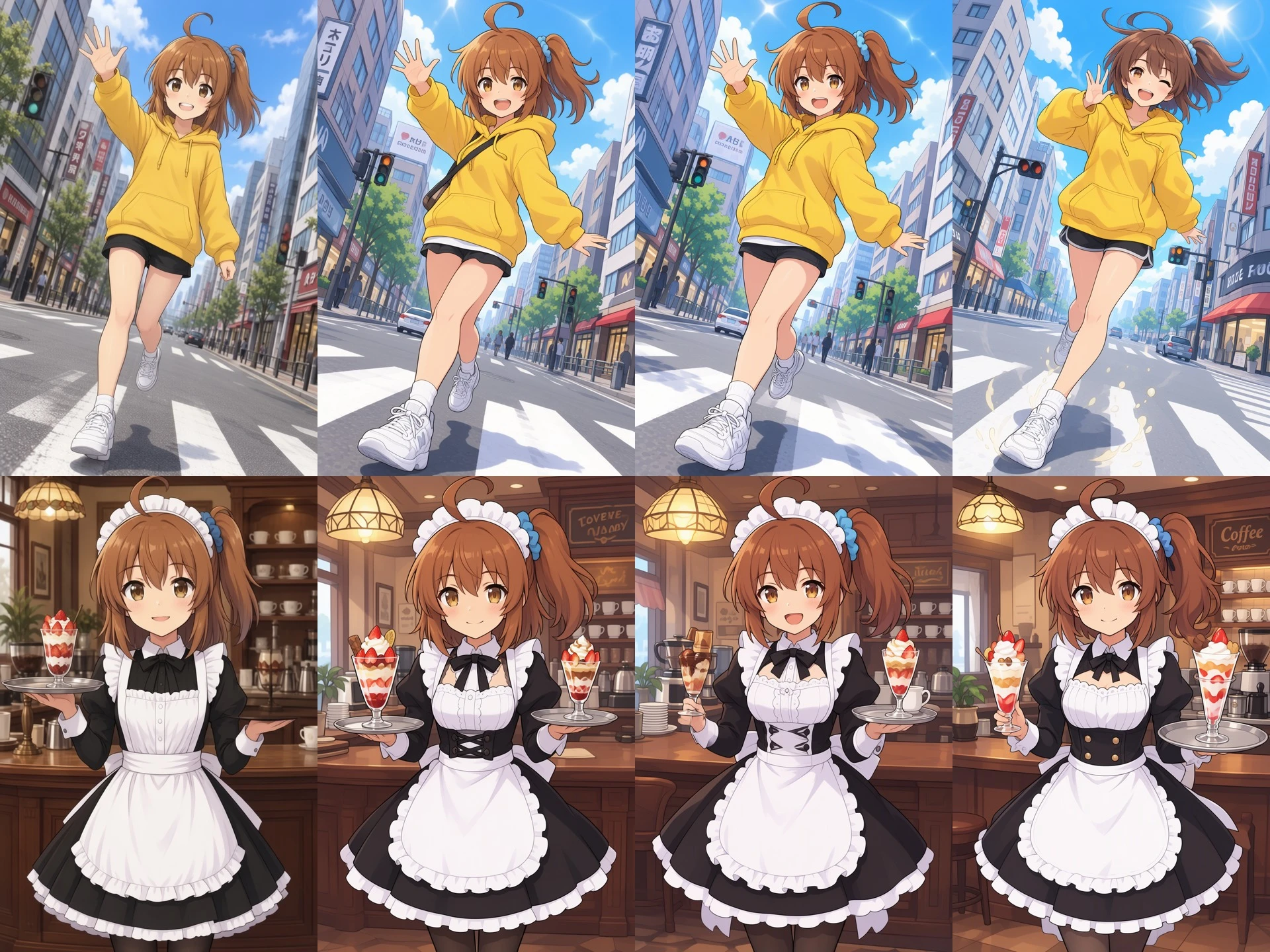
All 16 images separated the four outfits cleanly, kept Kana’s brown hair, ahoge, and blue-scrunchie side ponytail, and had zero white-border cutouts.
However, stacking the Cel LoRA occasionally introduced unprompted accessories or extra outfit trim, whereas the 4 Kana-only outputs did not.
Mean saturation for each outfit:
| Outfit | Kana 1.0 Only | Kana 0.7 + Cel 1.0 | Kana 0.5 + Cel 1.0 (s42) | Kana 0.5 + Cel 1.0 (s77) |
|---|---|---|---|---|
| Blazer | 0.292 | 0.326 | 0.340 | 0.312 |
| Yukata | 0.444 | 0.531 | 0.545 | 0.519 |
| Hoodie | 0.227 | 0.294 | 0.323 | 0.304 |
| Maid | 0.341 | 0.319 | 0.300 | 0.305 |
For Blazer, Yukata, and Hoodie, switching to Kana 0.7 + Cel 1.0 raised saturation, and dropping Kana to 0.5 raised it slightly more. Maid went the other way—probably because the Cel LoRA expanded the area of the white apron and frills, pulling down the whole-image saturation average.
Because Kana 0.5 darkened the hair and curled the ponytail tips at seed 77 (which did not happen at seed 42), I ran a 4-seed comparison to check seed-to-seed stability.
Comparing Kana 0.7 vs. Kana 0.5 Across 4 Seeds
I aligned Kana 0.7 + Cel 1.0 and Kana 0.5 + Cel 1.0 across four seeds (42, 77, 101, 202), giving 16 images per condition.
| Check | Kana 0.7 + Cel 1.0 (16 images) | Kana 0.5 + Cel 1.0 (16 images) |
|---|---|---|
| Brown hair, ahoge, blue-scrunchie side ponytail | 16/16 | 16/16 |
| Hair color | Light brown matching training set | Shifts to dark brown on Yukata and Hoodie |
| Prompted outfit | 16/16 | 16/16 |
| White cutout borders | 0/16 | 0/16 |
| Mean saturation range (Blazer / Yukata / Hoodie / Maid) | 0.31–0.33 / 0.50–0.54 / 0.27–0.32 / 0.30–0.34 | 0.31–0.34 / 0.52–0.55 / 0.29–0.33 / 0.29–0.32 |
Top rows are Kana 0.7 + Cel 1.0, bottom rows are Kana 0.5 + Cel 1.0, left to right seeds 42, 77, 101, 202 (Blazer and Yukata):
Same layout for Hoodie and Maid:
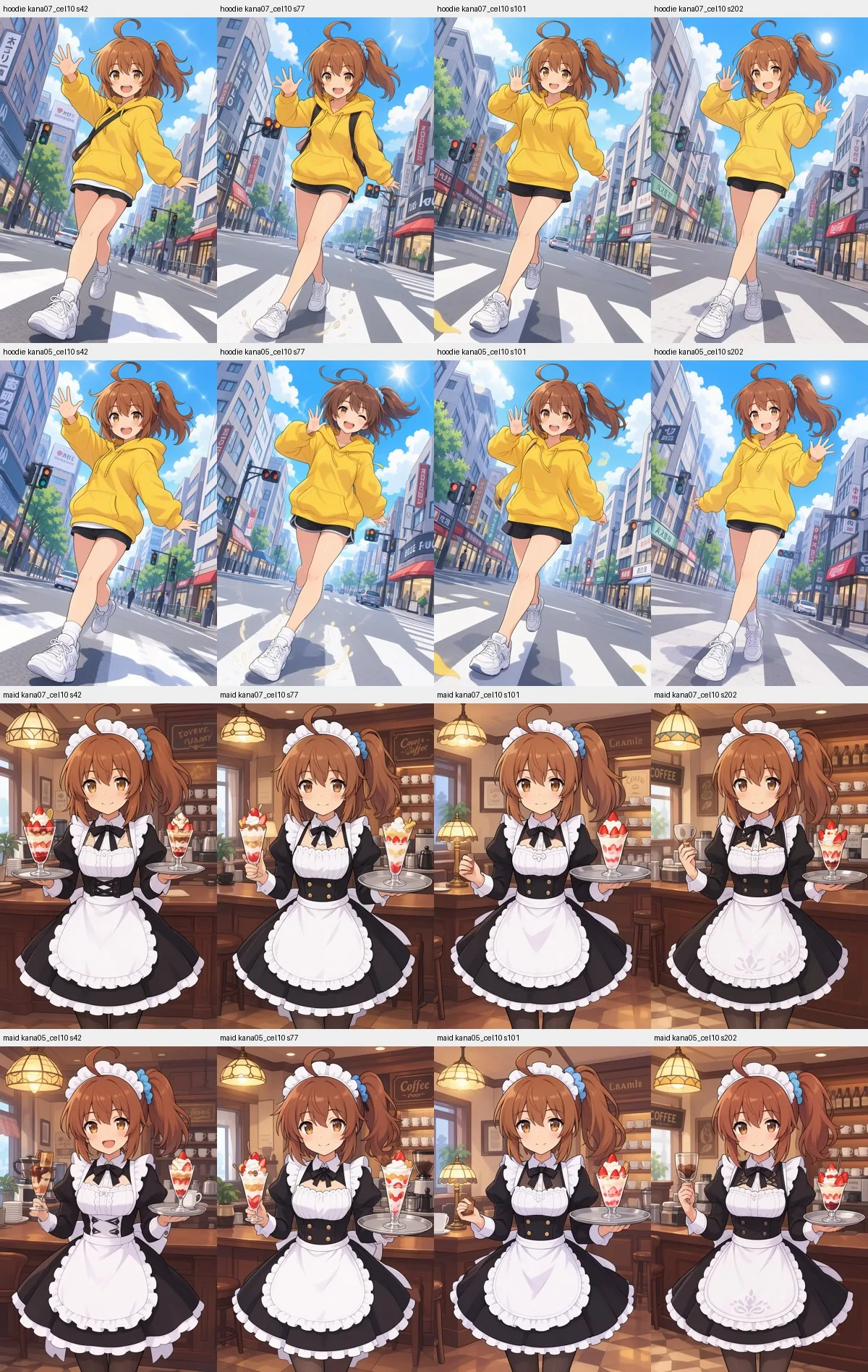
Composition stayed almost identical between the two weights, with the main difference showing up in hair color. Since mean saturation barely differed across all four scenes, there is little reason to drop to 0.5 for color—0.7 keeps Kana’s actual hair color and is easier to work with.
Unprompted additions persisted across seeds: Blazer added black tights in 3 of 4 seeds under both weights (likely reflecting many black-tights standing poses in the training set), and all 8 Maid renders turned into an open-chest decorative bodice, with 2 trays on seed 42 (Kana 0.7) and an extra glass or cup held separately from the tray in the other 7.
Isolating the Close-Up Twin-Tail Artifact
In the very first grid, the close-up portrait produced twin tails even with the Kana LoRA alone. I changed the hair wording, background, and lighting to isolate why.
Explicitly Specifying a Single Side Ponytail
Without mentioning left or right, I rewrote the hair description to explicitly state “one side only” while keeping the plain grey close-up background (768×768, 4 steps). I tested Kana 1.0 only and Kana 1.0 + Cel 0.6 (the weight that avoided cutouts earlier).
| Version | Hair Prompt |
|---|---|
| Original | Her hair is tied into a side ponytail with a blue scrunchie. A curled ahoge rises from the crown. |
| Revised | Her hair is tied into a single side ponytail on one side of her head only, with a blue scrunchie. The other side of her head has no ponytail, only loose hair. A curled ahoge rises from the crown. |
| Condition | Seed 73251 | Seed 101 | Seed 202 |
|---|---|---|---|
| Kana 1.0 only, revised hair prompt | Hair bundles on both sides | Bundles on both sides, 2 scrunchies | Hair bundles on both sides |
| Kana 1.0 + Cel 0.6, revised hair prompt | Hair bundles on both sides | Single side only | Single side only |
Left column is Kana 1.0 only, right column is Kana 1.0 + Cel 0.6; top to bottom are seeds 73251, 101, 202.
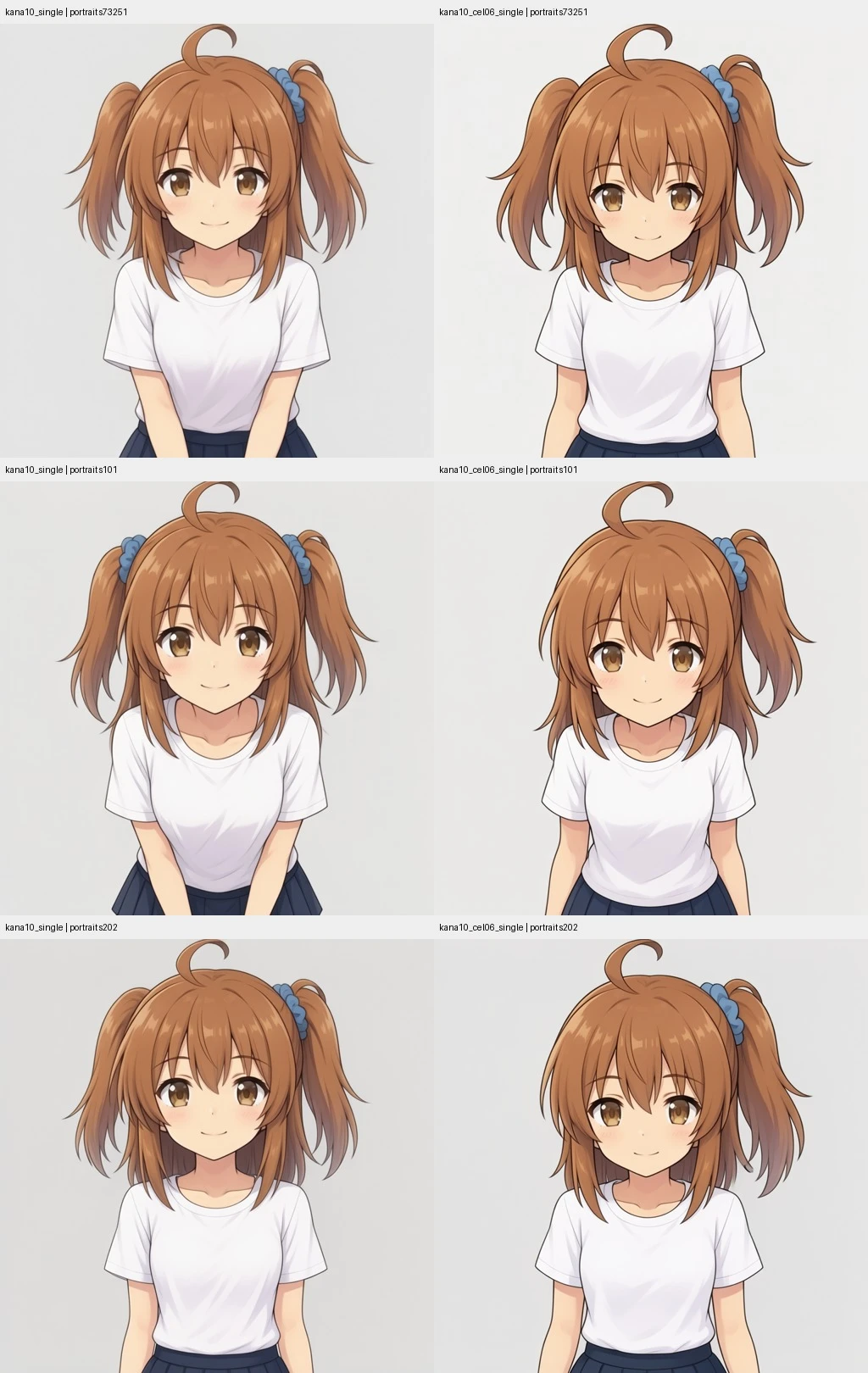
With Kana LoRA alone, all 3 seeds still produced twin tails despite the explicit wording. With Cel 0.6 added, 2 of 3 became single-sided, though 3 renders is too small to draw a firm conclusion. Since Seated, Walking, and Cafe all rendered a single side ponytail with the original hair wording, the close-up scene description itself looked more suspect than the hair wording.
Writing a Detailed Classroom Background and Lighting
So far, the close-up used Simple light grey background. I reverted to the original hair prompt and wrote a detailed sunset classroom background with window light, testing front and three-quarter angles across 3 seeds (73251, 101, 202) at 768×768, 4 steps, under Kana 1.0 only and Kana 0.7 + Cel 1.0.
| Condition | Front (3 seeds) | Three-Quarter (3 seeds) | Notes |
|---|---|---|---|
| Kana 1.0 only | 3/3 single side ponytail | 3/3 single side ponytail | No white border cutouts |
| Kana 0.7 + Cel 1.0 | 3/3 single side ponytail | 3/3 single side ponytail | Window side blows out; seed 73251 gets rounded white corners in both angles |
Top 3 rows are front view, bottom 3 rows are three-quarter view; left is Kana 1.0 only, right is Kana 0.7 + Cel 1.0.
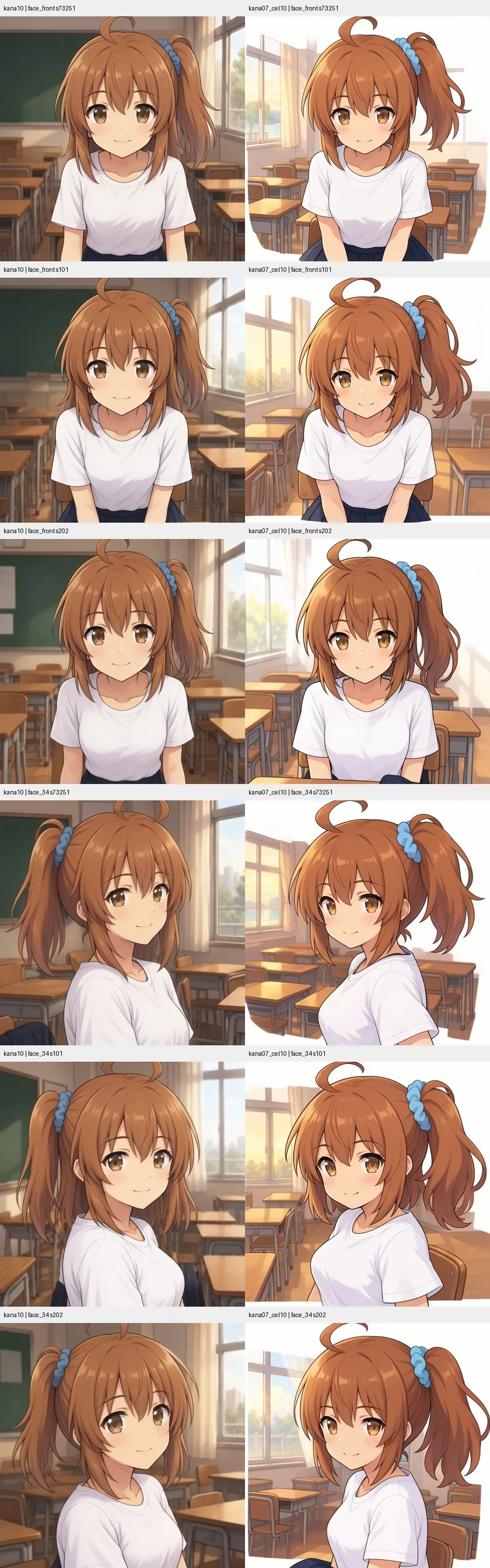
Whereas all 4 plain-background Kana-only renders (1 from the first grid plus 3 with the revised hair prompt) had twin tails, all 12 renders with the detailed classroom background and lighting produced a single side ponytail. However, in the 6 Kana 0.7 + Cel 1.0 renders, the window side blew out to white and both seed 73251 frames developed rounded white corners.
Varying Background, Lighting, and Kana Weight One at a Time
Because I had changed both background and lighting together, I isolated background, lighting cues, and Kana weight one variable at a time on the front close-up (seeds 73251, 101, 202).
For reference, the baseline (grey background, no lighting cue, Kana 1.0) had twin tails in 4 out of 4 earlier renders (1 original + 3 revised-hair).
| Background | Lighting Cue | LoRA | Twin-Tail Count |
|---|---|---|---|
| Grey background | Yes | Kana 1.0 | 1/3 (seed 73251) |
| Classroom | No | Kana 1.0 | 0/3 |
| Grey background | No | Kana 0.7 | 0/3 |
| Grey background | No | No char/style LoRA | 0/3 |
Rows from top to bottom follow the 4 conditions in the table; columns left to right are seeds 73251, 101, 202.
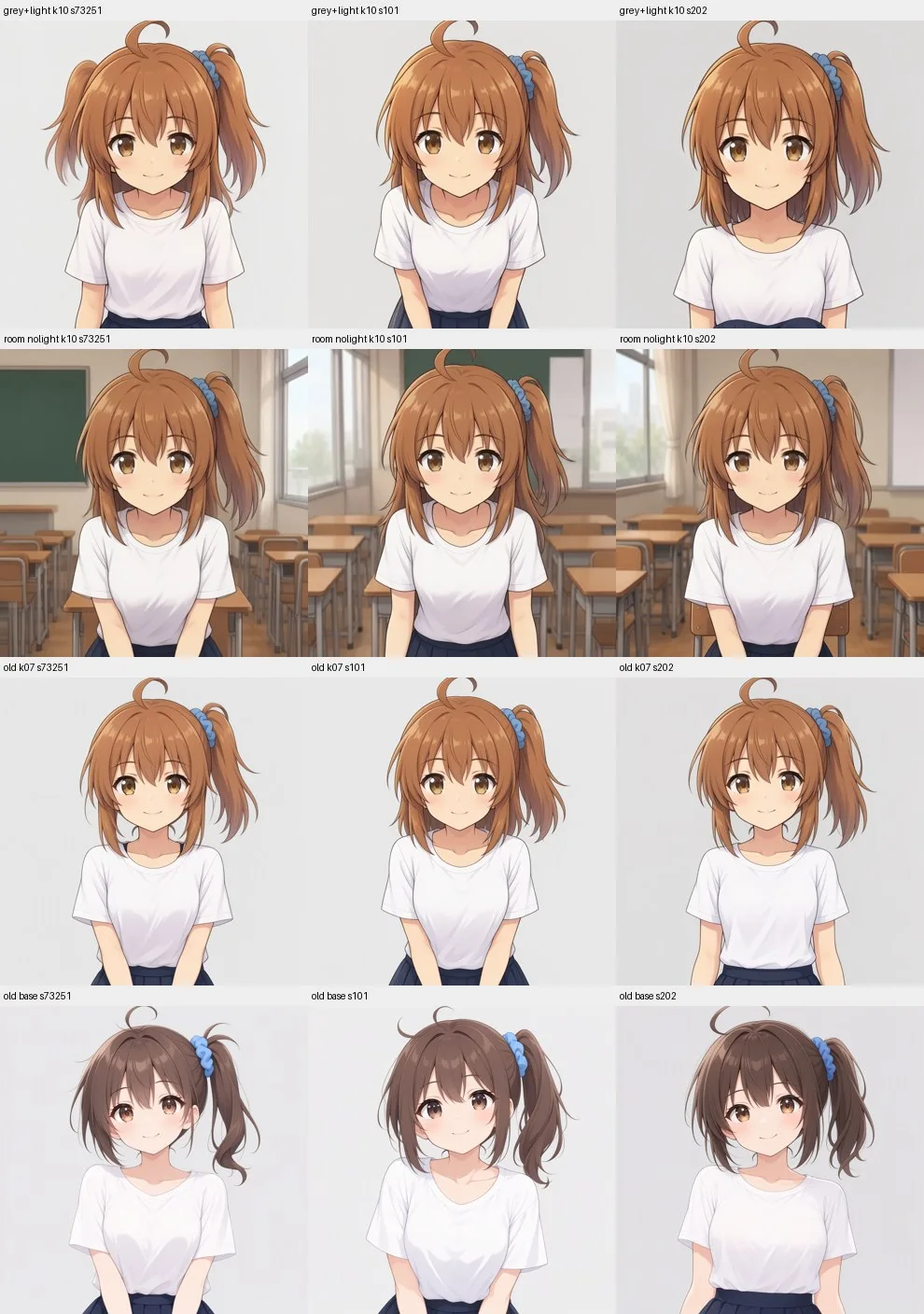
With no character or style LoRA, all 3 renders produced a single side ponytail, so this is not a base MOSS-Image quirk—it occurs specifically when Kana LoRA is at 1.0 on a plain background. Switching the background to a classroom or lowering Kana LoRA to 0.7 eliminated twin tails in all 3 seeds, while adding lighting cues alone still left 1/3 with twin tails.
Since Kana’s training dataset contains many plain-background close-ups, running Kana LoRA at 1.0 on a plain background likely over-triggers those training portraits and spreads hair symmetrically to both sides.
Fixing Close-Up Corner Cutouts with the Full-Bleed Line
Because seed 73251 developed rounded white corners in the classroom close-up, I appended The scenery extends to all four edges of the image as a full-bleed frame. to the front classroom close-up (seeds 73251, 101, 202).
| Kana LoRA | Cel LoRA | Frames with White Corners |
|---|---|---|
| 0.7 | 1.0 | 0/3 |
| 0.7 | 0.7 | 0/3 |
| 1.0 | 1.0 | 0/3 |
Rows follow the table order; columns left to right are seeds 73251, 101, 202.
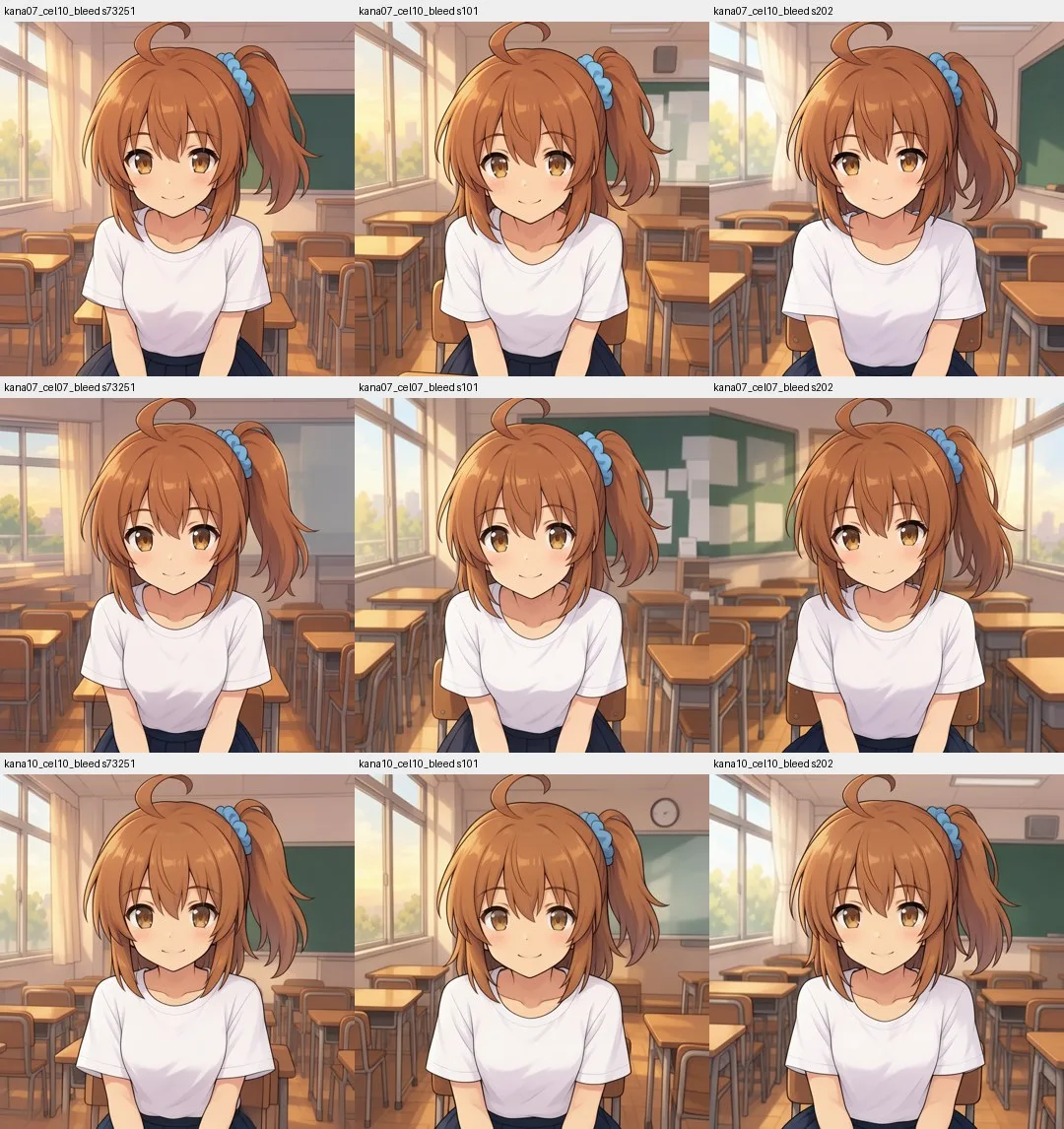
All 9 renders filled the frame to the edges and reduced the window blowout. While the full-bleed line could not stop Cel 1.0 cutouts on sparse outdoor prompts, it did stop them at Cel 1.0 on this detailed classroom close-up.
Testing Danbooru-Style Tag Prompts
I took the Civitai sample’s sunset tag prompt and swapped the hair and eye tags for Kana’s traits (kanachan, brown hair, side ponytail, blue scrunchie, ahoge, brown eyes), then rendered Kana 1.0 only and Kana 0.7 + Cel 1.0 (sunset scene, seed 42, 4 steps, 768×1152). Left is Kana 1.0 only, right is Kana 0.7 + Cel 1.0.
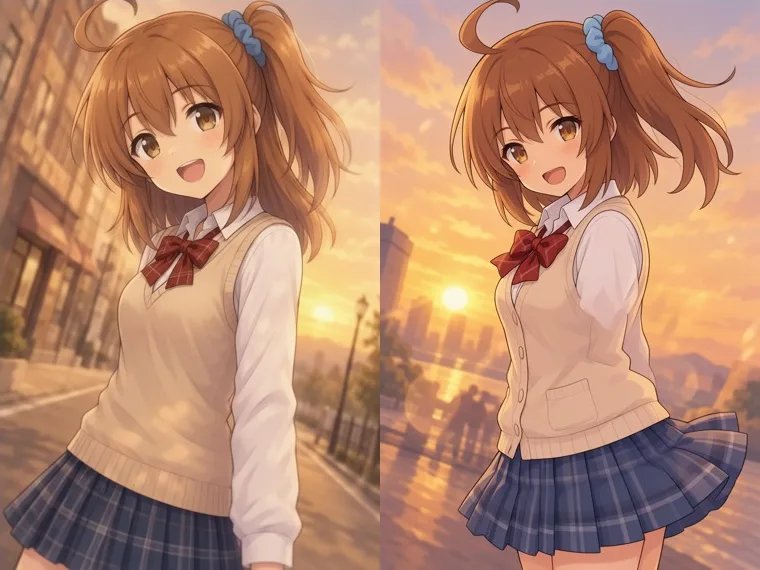
Both images reproduced Kana’s brown hair, ahoge, and blue-scrunchie side ponytail—showing that even though the Kana LoRA was trained on natural-language captions, it still responds to tag lists. I added seeds 101 and 202 to check consistency.
| Seed | Kana 1.0 Only (Mean Saturation) | Kana 0.7 + Cel 1.0 (Mean Saturation) |
|---|---|---|
| 42 | 0.413 | 0.408 |
| 101 | 0.377 | 0.408 |
| 202 | 0.408 | 0.420 |
Seeds 101 and 202: left to right are seed 101 (Kana 1.0 only, Kana 0.7 + Cel 1.0) and seed 202 (Kana 1.0 only, Kana 0.7 + Cel 1.0).
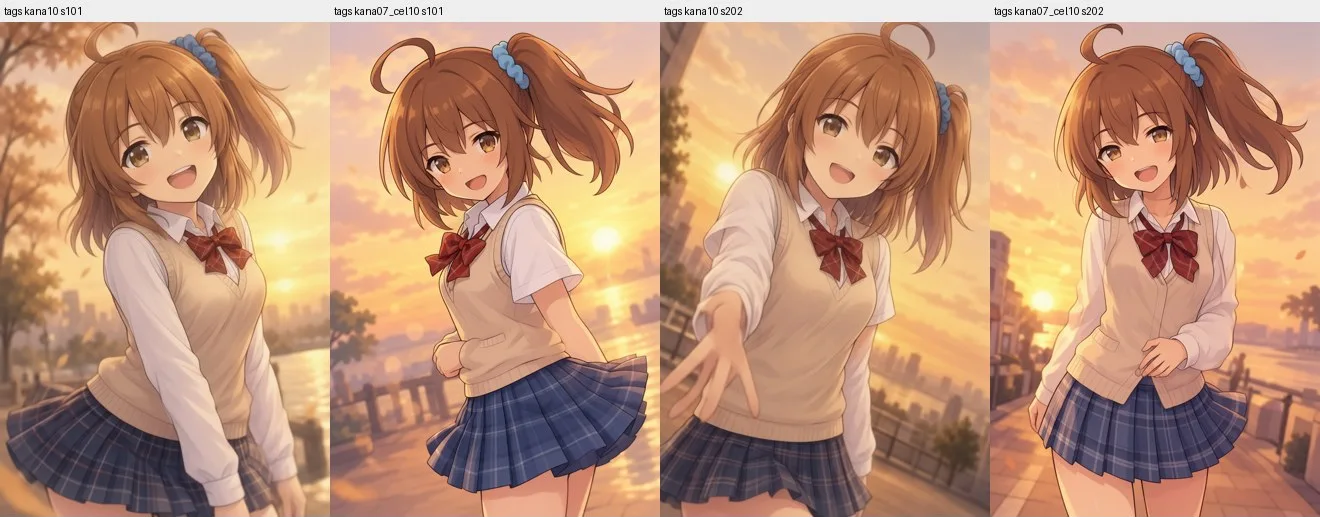
All 6 images kept Kana’s traits, but mean saturation was lower than the prose sunset renders (whose 3-seed means were 0.431 for Kana 1.0 only and 0.471 for Kana 0.7 + Cel 1.0). In addition, seed 202 (Kana 1.0 only) distorted the composition with an oversized foreground hand.
Testing MOSS JSON-Format Prompts
The second Civitai sample used MOSS’s structured JSON format, which splits the prompt into an overall scene description (summary) and per-subject descriptions with bounding boxes (items with caption and bbox). Because the text embedded in the sample PNG was missing its outer curly braces, I tested both valid JSON (with braces) and the brace-stripped text (referred to as “no braces” below).
I wrote the sunset scene using the sample’s centered coordinate space (±1024 vertically, ±672 horizontally):
{
  "summary": {
    "canvas": "single",
    "caption": "Anime-style illustration of kanachan standing on a riverside promenade at sunset, shot from the side at a dutch angle, with a city skyline across the water, a large setting sun, and orange clouds filling the sky, in vivid saturated colors with an orange tint."
  },
  "items": [
    {
      "label": "character",
      "caption": "kanachan with brown hair tied into a side ponytail with a blue scrunchie and a curled ahoge rising from the crown, wearing a white collared shirt with a loose red plaid bow tie, a beige knit vest, and a blue plaid pleated skirt, turning to look at the viewer with a happy open-mouth smile and a head tilt, her hair blowing in the wind, lit by strong warm sidelighting with hard-edged cel shadows.",
      "bbox": [-900, -450, 1024, 450]
    },
    {
      "label": "object",
      "caption": "A riverside promenade at sunset with a city skyline across the water, a large setting sun, orange clouds, lens flare and bloom, blurred with depth of field.",
      "bbox": [-1024, -672, 1024, 672]
    }
  ],
  "bbox_coord_space": "abs_centralized",
  "bbox_format": "yxyx"
}
I passed this minified onto a single line at seed 42, 4 steps, 768×1152.
| Format | Condition | Mean Saturation | Visual Result |
|---|---|---|---|
| With braces | Cel 1.0 only | 0.586 | Different character with reddish-brown hair |
| With braces | Kana 1.0 only | 0.498 | Twin tails with 2 scrunchies |
| With braces | Kana 0.7 + Cel 1.0 | 0.498 | Single side ponytail; brown hair, ahoge, blue scrunchie; black tights added |
| No braces | Cel 1.0 only | 0.567 | Different character with reddish-brown hair |
| No braces | Kana 1.0 only | 0.469 | Single side ponytail |
| No braces | Kana 0.7 + Cel 1.0 | 0.493 | Single side ponytail; brown hair, ahoge, blue scrunchie |
Top row is with braces, bottom row is no braces; left to right are Cel 1.0 only, Kana 1.0 only, and Kana 0.7 + Cel 1.0.
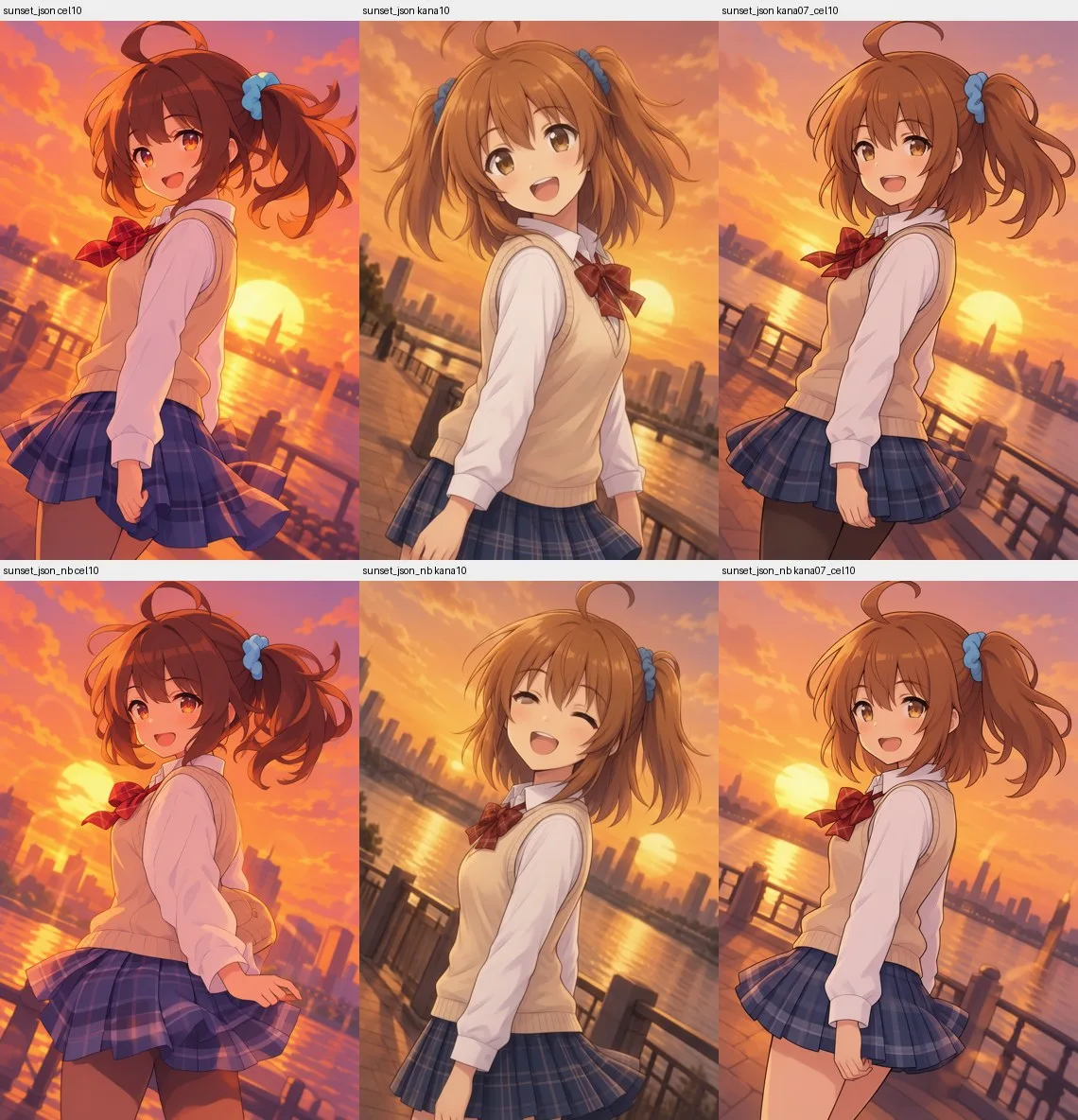
Kana rendered cleanly in JSON format as well, and all 6 images had higher saturation than the earlier prose prompt at the same seed (0.477 for Cel only, 0.427 for Kana 1.0 only, 0.435 for Kana 0.7 + Cel 1.0).
Flattening the Same JSON Text into Plain Prose
To check whether the saturation boost came from the JSON structure or simply from the wording, I concatenated the three captions from the JSON (summary, character, background) with spaces into plain prose and compared it against both JSON variants across seeds 42, 101, and 202. The table below also includes the earlier prose prompt as a baseline; values are 3-seed mean saturation with individual seeds (42, 101, 202) in parentheses.
| Format | Cel 1.0 Only | Kana 1.0 Only | Kana 0.7 + Cel 1.0 |
|---|---|---|---|
| Earlier prose prompt | 0.505 (0.477, 0.498, 0.541) | 0.431 (0.427, 0.426, 0.441) | 0.471 (0.435, 0.475, 0.505) |
| Flattened JSON captions (plain prose) | 0.588 (0.589, 0.563, 0.612) | 0.499 (0.496, 0.476, 0.524) | 0.530 (0.511, 0.534, 0.543) |
| JSON, with braces | 0.597 (0.586, 0.594, 0.613) | 0.482 (0.498, 0.445, 0.504) | 0.516 (0.498, 0.509, 0.540) |
| JSON, no braces | 0.592 (0.567, 0.577, 0.633) | 0.486 (0.469, 0.468, 0.522) | 0.522 (0.493, 0.513, 0.560) |
The 9 newly rendered Kana 0.7 + Cel 1.0 images: top row flattened prose, middle row JSON with braces, bottom row JSON without braces; left to right seeds 42, 101, 202.
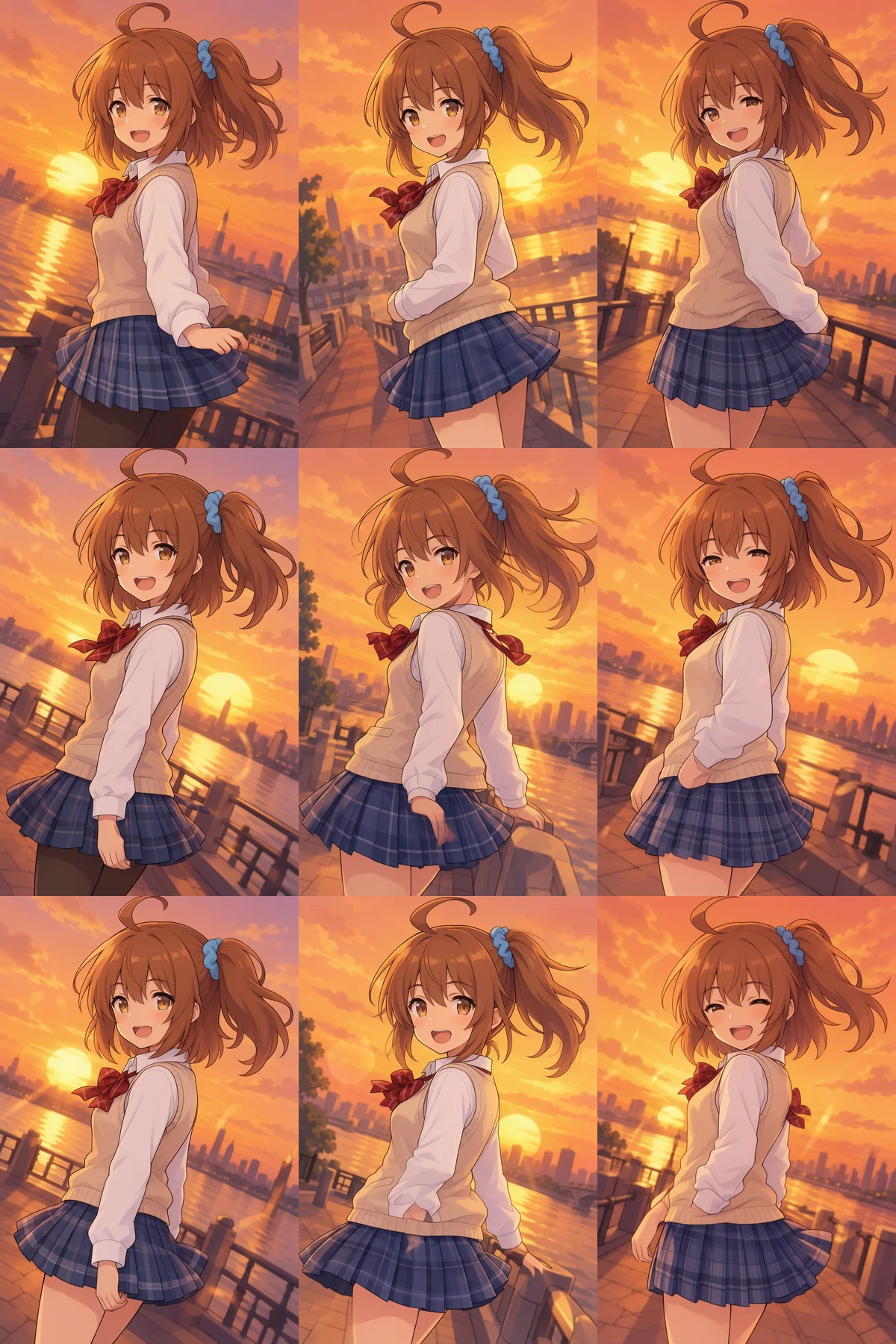
Given the same wording, plain prose and JSON yielded nearly identical saturation—0.05 to 0.09 higher than the earlier prose prompt across all three LoRA conditions. The saturation gain came from the wording itself (placing setting and color cues right at the front, and describing the sunset scene twice across summary and background) rather than JSON syntax. Even with this wording, the gap from stacking the Kana LoRA remained: ~0.59 for Cel only vs. 0.52–0.53 for Kana 0.7 + Cel 1.0 and 0.48–0.50 for Kana 1.0 only.
For Kana 0.7 + Cel 1.0, all 9 renders kept a single side ponytail along with Kana’s brown hair, ahoge, and blue scrunchie (black tights were added only in the two seed-42 frames). Under Kana 1.0 only, JSON with braces produced twin tails in 2 of 3 seeds, whereas flattened prose and brace-stripped JSON kept a single side ponytail in all 6 renders. Within these 3 seeds, omitting the curly braces avoided twin tails.
Skip Layer Guidance
Because the Civitai sample workflow also included SkipLayerGuidanceDiTSimple (a feature that skips specific DiT layers to steer output, set to layer 22), I tested sd.cpp’s --skip-layers [22] --slg-scale 2.5 on the sunset scene (seed 42, 4 steps, 768×1152) for both Cel 1.0 only and Kana 0.7 + Cel 1.0.
Both outputs were pixel-for-pixel identical to the baseline renders without those flags, so at CFG 1.0 and 4 steps in this setup the option had no effect. I have not checked whether ComfyUI’s node behaves differently from sd.cpp’s flags.
Running the Four Outfits at 8 Steps and 1024×1536
To check whether the remaining differences from the Civitai samples—step count and resolution—affect saturation or fine detail, I re-rendered the four outfits with Kana 0.7 + Cel 1.0 at 8 steps, simple scheduler, and 1024×1536 (seed 42; 187.6–191.9 seconds per image).
| Outfit | Mean Saturation (8 steps, 1024×1536) | Mean Saturation (4 steps, 768×1152) |
|---|---|---|
| Blazer | 0.325 | 0.326 |
| Yukata | 0.511 | 0.531 |
| Hoodie | 0.262 | 0.294 |
| Maid | 0.338 | 0.319 |
Left to right: Blazer, Yukata, Hoodie, Maid.
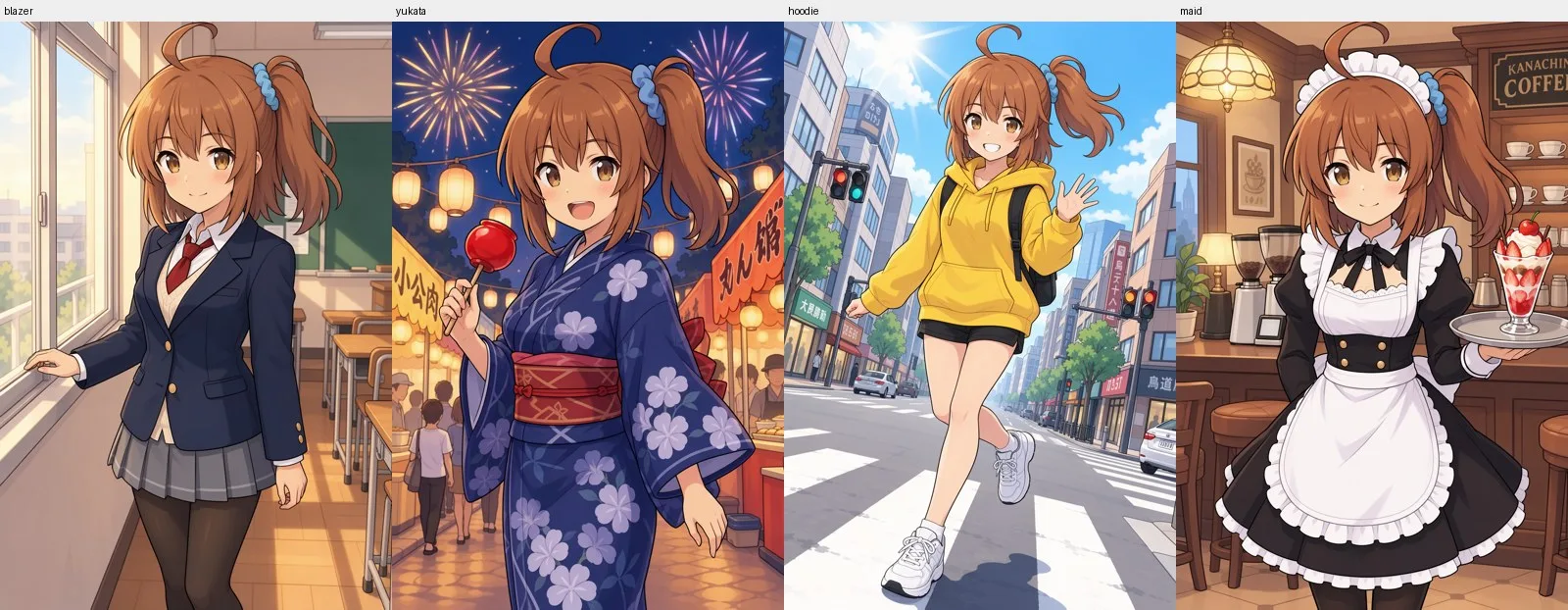
All four images preserved both Kana and the prompted outfits, with finer line work and sharper detail on signs and small props. Saturation stayed virtually unchanged from 4 steps, so raising steps and resolution did not make the colors richer.
Practical Settings by Goal
| Goal | Recommended Setup | Basis |
|---|---|---|
| Give Kana thicker lines and flat cel shading | Kana 1.0 + Cel 0.7–1.0 | “How Cel LoRA Weight Changes the Output” (color stays muted) |
| Get closer to sample colors and crisp shadow steps | Kana 0.7 + Cel 1.0 with explicit background, lighting direction, and color cues | “Testing Four Different Outfits” (16/16 across 4 outfits × 4 seeds kept Kana) |
| Prevent white cutout borders | Describe background and lighting in detail; on sparse backgrounds, append The scenery extends to all four edges of the image as a full-bleed frame. and cap Cel at 0.7 (works at 1.0 on detailed close-ups) | “White Cutout Borders” and “Isolating the Close-Up Twin-Tail Artifact” |
| Keep a single side ponytail in close-ups | Avoid plain backgrounds, or lower Kana LoRA to 0.7 if using a plain background | “Isolating the Close-Up Twin-Tail Artifact” |
| Push saturation higher | Lead the prompt with setting and color cues and reinforce the scenery in the background description; JSON syntax is unnecessary | “Testing MOSS JSON-Format Prompts” (3-seed mean rose from 0.471 to 0.530) |
| Add finer background and prop detail | 8 steps, simple scheduler, 1024×1536 (~190 s/image on EVO-X2) | “Running the Four Outfits at 8 Steps and 1024×1536” |
The muted colors compared to the Civitai samples point to the Kana LoRA’s mostly white-background, low-saturation training dataset rather than the Cel LoRA itself. Rewriting the prompt wording was the only change that raised saturation, though a gap remains whenever the Kana LoRA is applied.