Drawing a 4-Panel Manga Page With aibrush manga Using Claude Code, Codex, and Qwen4-Max
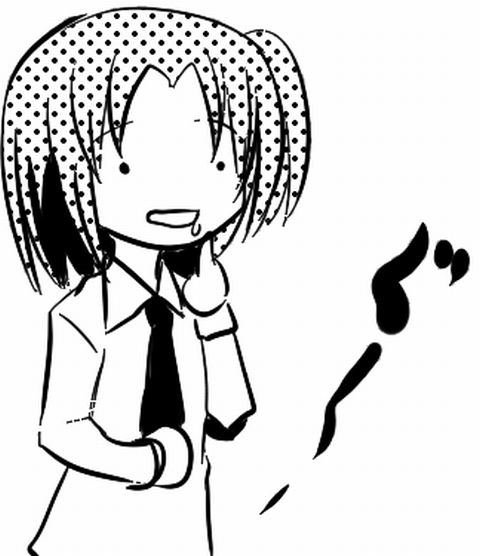 Contents
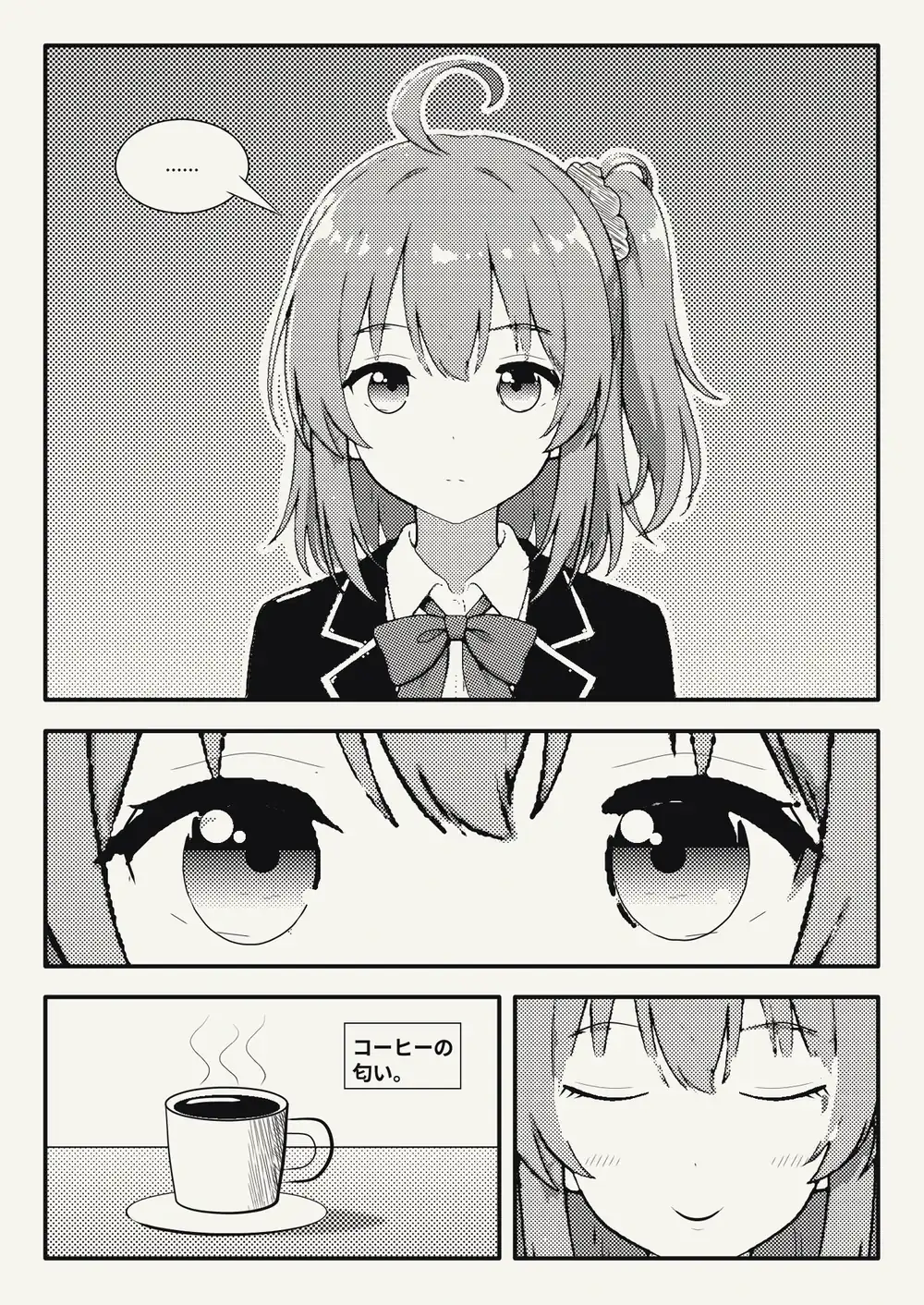
I came across aibrushmanga (the GitHub repository for the aibrush manga engine), which lets LLMs ink manga pages through Python code, so I had Claude Code (Fable 5.2) draw a full page with it. Instead of generating pixels directly like a diffusion model, the LLM writes a Python script, and the manga/ drawing library executes that script to lay down individual pen strokes and screentones (dot patterns used for shading in manga) on paper.
I first had Claude Code handle everything from reading the repository to revising the page and checking the rendered images, then ran the same 4-panel task on Qwen4-Max and Codex.
Test Environment
Because the engine runs purely as a Python drawing library rather than a neural image generator, all rendering ran on CPU without a GPU. Note that Claude Code and Codex ran as terminal agents capable of executing scripts themselves, whereas Qwen4-Max returned code over an API that my local runner executed.
| Item | Details |
|---|---|
| Machine / OS | GMKtec EVO-X2 (Linux 7.0.0-44, CPU only / no GPU) |
| Target commit | da82df5 (2026-11-27T17:46:48-07:00) |
| Python environment | Python 3.12 (uv), numpy 2.5.5, scipy 1.18.1, pillow 13.0.0, pytest 9.2.0 |
| Models compared | Claude Code (Fable 5.2), Qwen4-Max, Codex CLI 0.170.0 (gpt-6-luna, reasoning high) |
How aibrush manga Works
As checked on GitHub on November 28, 2026, mikemil828/aibrushmanga was created on November 25, 2026 (UTC) and had 34 stars at the time. It forks the oil-painting engine neokrasav4ik/aibrush, leaves the original oil module движок/ (named in Russian) untouched, and adds a new manga/ package. The repository is licensed under AGPL-3.0, the bundled Comic Neue font is under SIL OFL 1.1, and the example reference images remain all-rights-reserved by the author. Dependencies are Python 3.10+, NumPy, SciPy, and Pillow.
In code, you create a Sheet object representing the page and call methods such as stroke(...) for pen lines, tone(...) for screentones, and hatch(...) for parallel-line shading. Built-in nibs include G-pen, Saji-pen, Maru-pen, brush, and liner (uniform width), measured in millimeters with pressure and taper controlling stroke width. Helper functions are also included for focus lines, speed lines, panel layouts, borders, and captions.
Every drawing call is recorded in a JSONL (one JSON record per line) journal. Passing that journal to python -m manga.replay re-renders the exact same strokes at a different resolution.
The README strongly recommends supplying a reference image. The intended workflow takes figure shapes and regions from the reference while the LLM decides which pens, tones, and solid black fills to apply on top. Figures drawn purely from coordinates without a reference come out stiff and simplified (and are omitted from the examples), and real photographs are not supported yet.
At the top of the README, Claude Fable 5.2—who previously painted with the engine—left advice for the next model: “Don’t build a machine that paints the picture. Paint the picture yourself, and call on the machine only for what you’ve already decided.” It specifically warns that writing an automated diff-filling loop turns the result into a coloring-book fill.
Running the Official Samples
I cloned the repository and set up a Python 3.12 virtual environment with uv.
git clone --depth 1 https://github.com/mikemil828/aibrushmanga.git repo
uv venv --python 3.12 venv
uv pip install --python venv/bin/python -r repo/requirements.txt pytest
Before drawing anything custom, I ran the bundled test suite and examples once each to measure runtime and peak memory (maximum RSS via /usr/bin/time -v).
| Command | Result | Time | Peak Memory |
|---|---|---|---|
python -m pytest manga/tests -q | 61 passed, 1 skipped | 4.85s | Not measured |
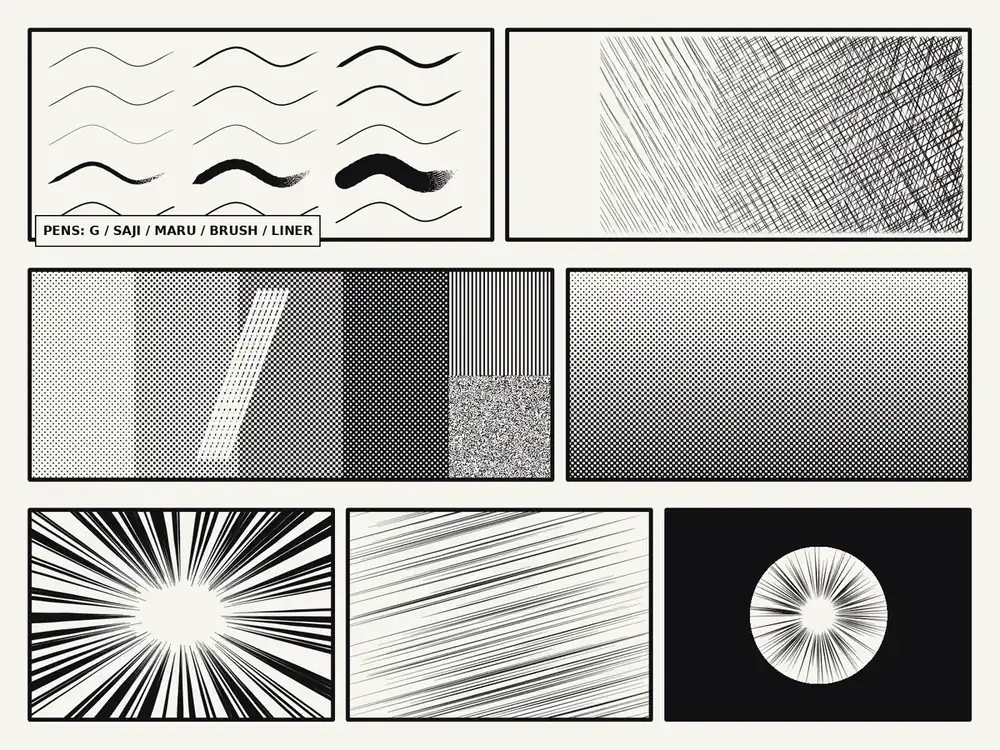
python manga/examples/sampler.py | 1600×1200px (1,526 strokes, 7 tones, 2 solid fills) | 3.9s | ~208MB |
python manga/examples/pool_page/run.py | 2056×2912px (B4, 8px/mm) 4-panel page | 25.8s | ~934MB |
Here is the sampler output.
The README estimates pool_page at “about 1 min”, but on the EVO-X2 it finished in about 26 seconds. run.py calls four preprocessing scripts to build region masks (black-and-white stencils for each area) from the reference image—taking about 1 second total—followed by page.py at 24 seconds. My custom page follows the same two-step pattern: build masks first, then ink the page.
Reference Image and 4-Panel Plan
For the reference, I used an 832×1024px bust-up illustration generated in my earlier ANIMA FLAT comparison post. Its flat colors, clear outlines, and white background make it well suited for color segmentation and line extraction.
I set the page to B5 (1456×2056px at 8px/mm) with four panels. Following the README’s workflow, Claude Code wrote down the plan at the top of the script—what the focal point is and which pen or tone goes on each part—before drawing a single line.
| Panel | Subject | Reference | Plan |
|---|---|---|---|
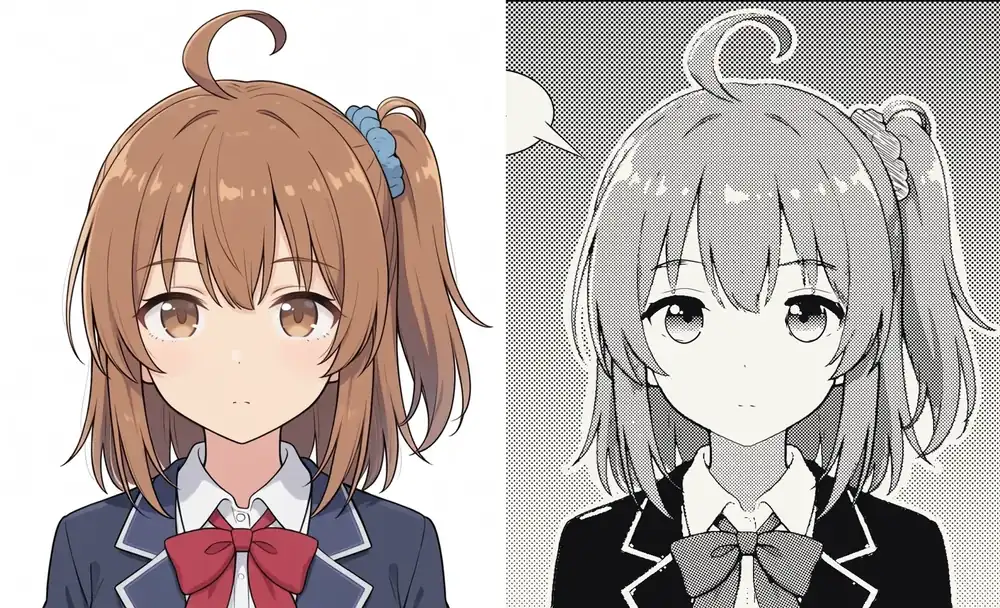
| 1 | Bust-up | Yes | Leave skin white paper. Use one light dot tone for hair with white paper highlights, and one step darker behind the neck. Solid black jacket, medium dot tone for the ribbon, Maru-pen hatching for the scrunchie. Top-dark gradient tone for the background with a white cutout around the figure |
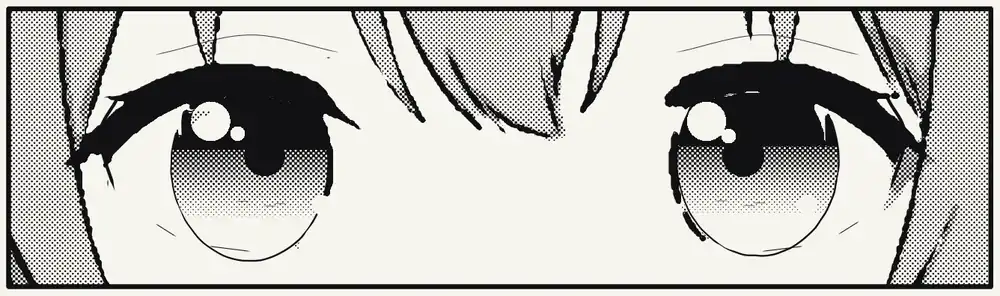
| 2 | Eye close-up | Yes (~3.3× zoom) | Reuse the same reference zoomed in to check how traced lines behave under magnification |
| 3 | Coffee cup | No | Specify every coordinate by hand to test the README’s claim that reference-free drawing looks stiff |
| 4 | Closed-eye smile | Yes (eyes/mouth removed) | Erase the reference eyes and mouth, then redraw them with face.closed_eye and face.closed_smile |
Main lines were extracted from the reference line art. Dark pixels are turned into a line mask and passed to ink_line_art, which thins the mask down to centerlines (skeletons), traces the paths, and converts the original line width into pen pressure—using a Maru-pen for thin lines and a G-pen for thicker ones.
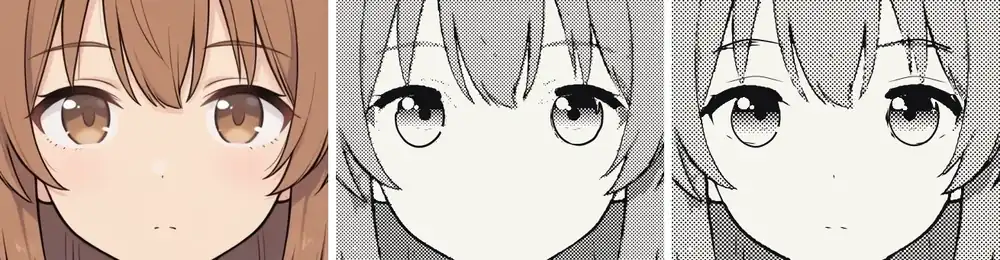
Eyes were not traced. Instead, Claude Code generated a 4× zoomed image with a coordinate grid overlay (tools.gridcrop), read the iris ellipse center and radius, pupil, and highlight positions as numbers, and rendered them with face.manga_iris—black under the upper lid, a tone fade below it, and white paper across most of the iris. This follows the README’s note that copying colored shading directly makes the output look traced.
Region masks for tones and solid fills were built by assigning each pixel in the reference image to its nearest representative color among background, line, hair, skin, jacket, trim, shirt, ribbon, scrunchie, and iris.
Claude Code’s Revision Process
After the initial pass, Claude Code revised the page three times. The initial pass drew only Panel 1, while Revisions 1 through 3 rendered the full page; after each run, Claude Code opened the output image, listed defects, and updated the script. Times below are the script’s reported rendering times.
| Pass | Time | Defects Found | Fixes Applied |
|---|---|---|---|
| Initial (Panel 1 only) | 2.1s | Nose, mouth, eyebrows, outer eye corner lines, and lower lashes vanished. A white halo appeared along the hair outline. Panel cut off at the collar, hiding the jacket | Placed missing facial parts by manual coordinates. Reclassified skin-colored pixels outside the face region as hair. Extended the panel vertically |
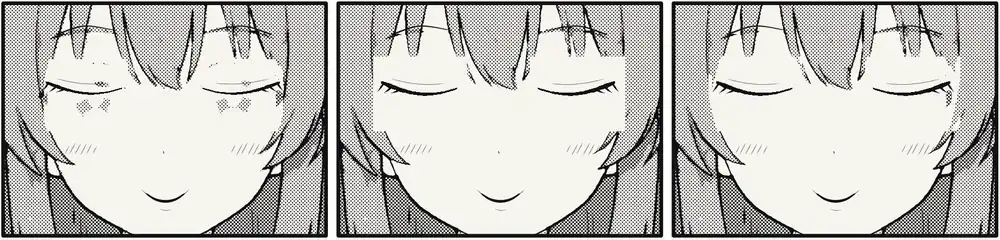
| Revision 1 | 6.6s | Iris and eyelid edges looked jagged in Panel 2. Upper-lid shadow meant for the sclera spilled onto skin outside the eyes. Eyelid crease turned into tone dots. Ghost dots from the original eyes remained in Panel 4 | Redrew the iris ellipse at page resolution instead of reference resolution. Restricted sclera detection to bright, low-redness pixels. Reassigned small hair-colored specks inside the face back to skin and drew eyelid creases by coordinates. Cleared tone in a rectangle around the eyes in Panel 4 |
| Revision 2 | 6.7s | Rectangular white cutout appeared in the bangs of Panel 4 (caused by the rectangular clearing in Revision 1) | Changed the tone-clearing region from a rectangle to ellipses around the irises |
The nose, mouth, and eyebrows vanished on the initial pass because they were drawn in a lighter brown than the main outlines and got classified into skin or hair during color segmentation. The README specifically advises storing features that cannot be separated by color as coordinate point data.
During Revision 1, zooming the reference image for the eye close-up (Panel 2) pushed the source origin into negative coordinates off the top/left edge, causing Frame.up—the method on the Frame class that maps reference crops to page coordinates—to raise a ValueError from an array shape mismatch. Claude Code worked around this by subclassing Frame and replacing up with a version that clips on all four sides.
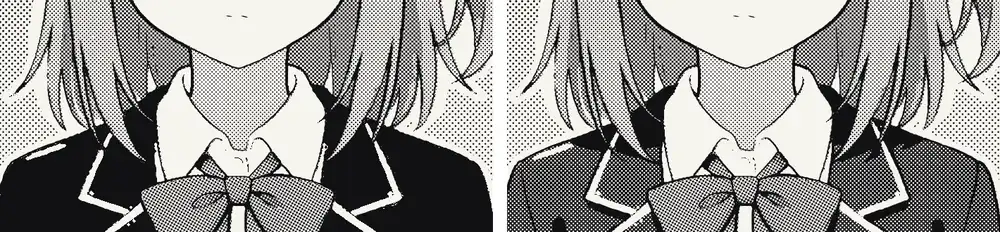
Also during Revision 1, Claude Code rendered both a solid black jacket and a 72% dot-tone jacket side by side. Left is solid black, right is 72% dot tone. Because the 72% tone was too close in value to the ribbon and weakened the boundary, Claude Code kept solid black.
Face progression from left to right: reference image, initial pass, and Revision 3.
Panel 4 across Revisions 1, 2, and 3 (left to right).
Claude Code’s Final Page
Here is the Revision 3 output. It contains 2,221 strokes, 19 tones, and 38 solid fills/white-outs, rendering in 6.7 seconds (7.1 seconds wall-clock for the process) with ~424MB peak memory. The script is 290 lines for the page plus 41 lines for color segmentation.
Reference image on the left, Panel 1 on the right.
Panel 2 zooms the same reference by about 3.3×. Because the irises are drawn from mathematical ellipses, their edges stay smooth, whereas the eyelashes and hair outlines are enlarged from the 832px-wide reference mask and show wavy edges.
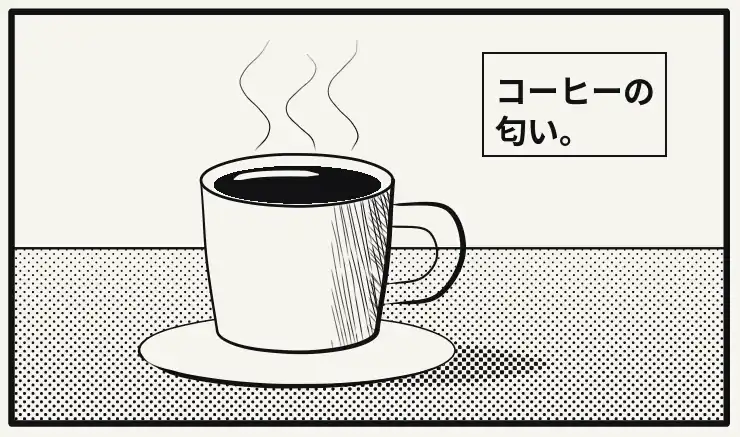
Panel 3 uses no reference at all—everything from the cup to the shadow is placed by coordinates. It reads as a coffee cup, but the form is visibly a raw assembly of ellipses and straight lines, matching the README’s warning that reference-free shapes look stiff and simplified. The function for this single panel alone takes 55 lines.
Remaining Defects in Claude Code’s Output
| Area | Remaining Defect |
|---|---|
| Panel 1 hair outline | White cutout halos also wrap around thin stray hairs from the reference, forming small white blobs in spots |
| Hair lines overall | Thicker and more uneven than the reference because brown lines were extracted with a brightness threshold |
| Panel 1 scrunchie | Hatched with a Maru-pen, but the pattern is hard to make out at full-page scale |
| Panel 2 eyelashes | Enlargement makes the edges wavy; the left iris edge where it meets the lash is also slightly uneven |
| Panel 3 | Simple saucer-and-cup perspective, with three uniform steam curves |
| Panel 4 | Closed eyes and mouth stay close to the function’s default shapes rather than matching the reference’s facial proportions |
| Speech balloon | Drawn manually from an ellipse and triangle; text reuses the horizontal caption helper (vertical text is not supported yet per the README) |
Under “What it can’t do yet,” the README notes that figures traced from a reference are a weak point because faces and hands tend to read as flat shapes rather than drawn anatomy. Since I chose a flat-shaded illustration with crisp outlines here, the line work came through cleanly.
2× and 600dpi Replay
I also tested re-rendering the page at higher resolutions from the recorded journal. The journal file is 2,295 lines (1.19MB), accompanied by 64 auxiliary PNGs (964KB total) storing masks and tone density maps.
Replay options (python -m manga.replay final.jsonl ...) | Output | Time | Peak Memory |
|---|---|---|---|
--scale 2 --out final_x2.png | 2912×4112px | 10.9s | ~1.03GB |
--dpi 600 --fit a4 --bw --out final_600dpi.png | 4299×6071px, 1-bit (pure black and white) | 18.8s | ~3.07GB |
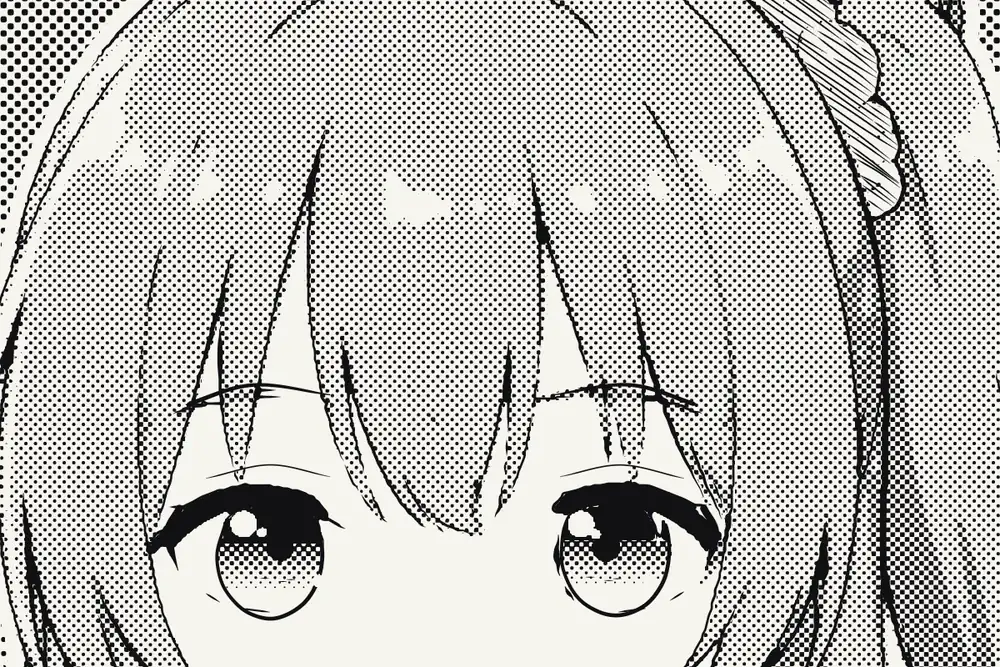
Here is a crop around the eyes and bangs from the 2× replay. Pen strokes are redrawn from the journal at double resolution with no upscaling blur, while the halftone dots keep the same screen frequency (dot spacing) and use more pixels per dot for smoother shapes.
Here is the print-oriented 600dpi (600 dots per inch) 1-bit output. Every halftone dot has an identical shape. According to the README, passing --dpi snaps each screen cell to whole pixels so laser printers do not produce woven moiré patterns.
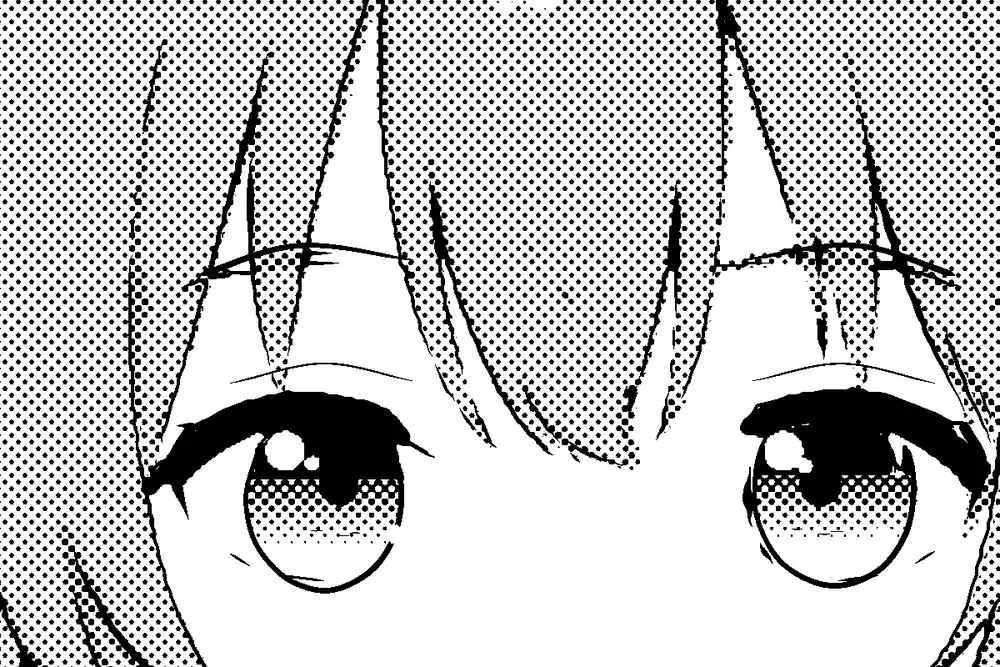
While pen strokes are replayed cleanly at higher resolution from the journal, the underlying masks are still stored at the reference image’s pixel resolution, so replay does not invent finer detail than the reference had. The wavy eyelash edge in Panel 2 remained visible in the 2× output.
Drawing the Same 4 Panels With Qwen4-Max
Next, I tested Qwen models through ModelScope’s OpenAI-compatible API endpoint on the same workflow.
Reading Facial Landmark Coordinates Only
Whenever the reference illustration changes, the coordinates that have to be re-measured are the iris, pupil, highlights, eyebrows, nose, and mouth. I sent the reference image to five Qwen models with instructions to return 832×1024px pixel coordinates as JSON, then measured the distance against Claude Code’s coordinates across 15 points (inner/outer eye corners, iris centers, pupils, eyebrow ends, nose, and mouth corners). For scale, the iris radius in this image is about 32px. Each model was run once.
| Model | Response Time | Median Diff vs. Claude Code | Max Diff |
|---|---|---|---|
| Qwen4-Max | 17.3s | 12px | 21px |
| Qwen3.8 Flash-Next | 22.9s | 13px | 67px (mouth position) |
| Qwen3.8-27B | 23.2s | 17px | 45px (eyebrow end) |
| Qwen3.8-Max | Failed: 403 (Access denied) | - | - |
| Qwen3.8-Omni-Flash | Failed: 504 (Timeout) | - | - |
I plugged the returned coordinates directly into Claude Code’s script to render the faces side by side: Claude Code (left), Qwen4-Max (center), and Qwen3.8 Flash-Next (right).
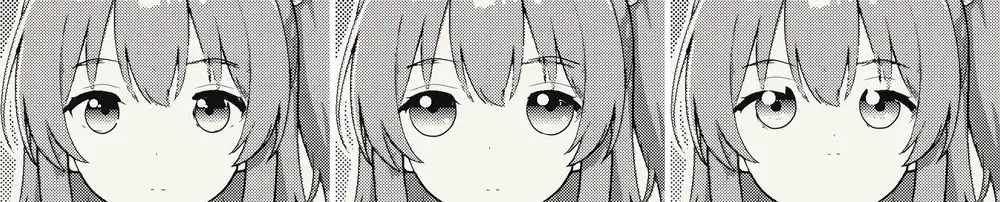
Qwen4-Max placed the nose, mouth, and eyebrows in nearly the same spots. Its iris radius came back as 44px compared to Claude Code’s 32px, making the eyes noticeably larger. Pupils sat at the iris center, and it picked up two of the three highlights in the original illustration. Outer eye corner lines and lower lashes were not included in the prompt, so they do not appear in the two Qwen renders.
Flash-Next placed the mouth right below the nose, breaking the face.
Writing the Full Page Script From Scratch
Taking Qwen4-Max—the most accurate model in the coordinate test—I asked it to write the full 4-panel B5 page script from scratch. I provided the full text of manga/README.md, function signatures and docstrings (~30KB), the reference image, and two zoomed grid-overlay images of the face and eyes, without sharing Claude Code’s script or color segmentation code.
My runner executed whatever script Qwen4-Max returned without edits and fed back either the rendered page image or the error traceback. I kept the same three visual revision passes as Claude Code and capped error-fix turns at six total.
| Turn | Result | API Latency | Summary |
|---|---|---|---|
| 0 | Error (243 lines) | 172s | Accessed nonexistent attribute fr.scale on Frame (actual name is s) |
| 1 | Error (242 lines) | 54s | Zoomed reference overflowed the page edge and hit the same Frame.up ValueError as Claude Code |
| 2 | Initial (266 lines) | 62s | Wrote a custom up workaround. All 4 panels rendered, but Panel 4’s eyes stayed open |
| 3 | Revision 1 (303 lines) | 138s | Added background tone, white cutout, and caption “放課後、ひと息。”. Panel 4 eyes closed, but rectangular white cutouts appeared around the eyes |
| 4 | Revision 2 (315 lines) | 136s | White cutouts shrank. Panel 2 still showed black rectangular frames around the eyelashes |
| 5 | Error (324 lines) | 112s | Passed a numeric array to mask & bitwise operation |
| 6 | Error (324 lines) | 73s | Passed a single number instead of a range to pressure in ink_outline (color-region contour helper) |
| 7 | Revision 3 (325 lines) | 60s | Hole-filling on the hair mask covered the entire face, applying hair tone over the face |
Across all 8 turns, API latency totaled 808 seconds (~13m 28s), using 341,541 input tokens and 78,859 output tokens. Local rendering itself took about 6 seconds per pass.
From left to right: Initial (Turn 2), Revision 1 (Turn 3), Revision 2 (Turn 4), and Revision 3 (Turn 7).
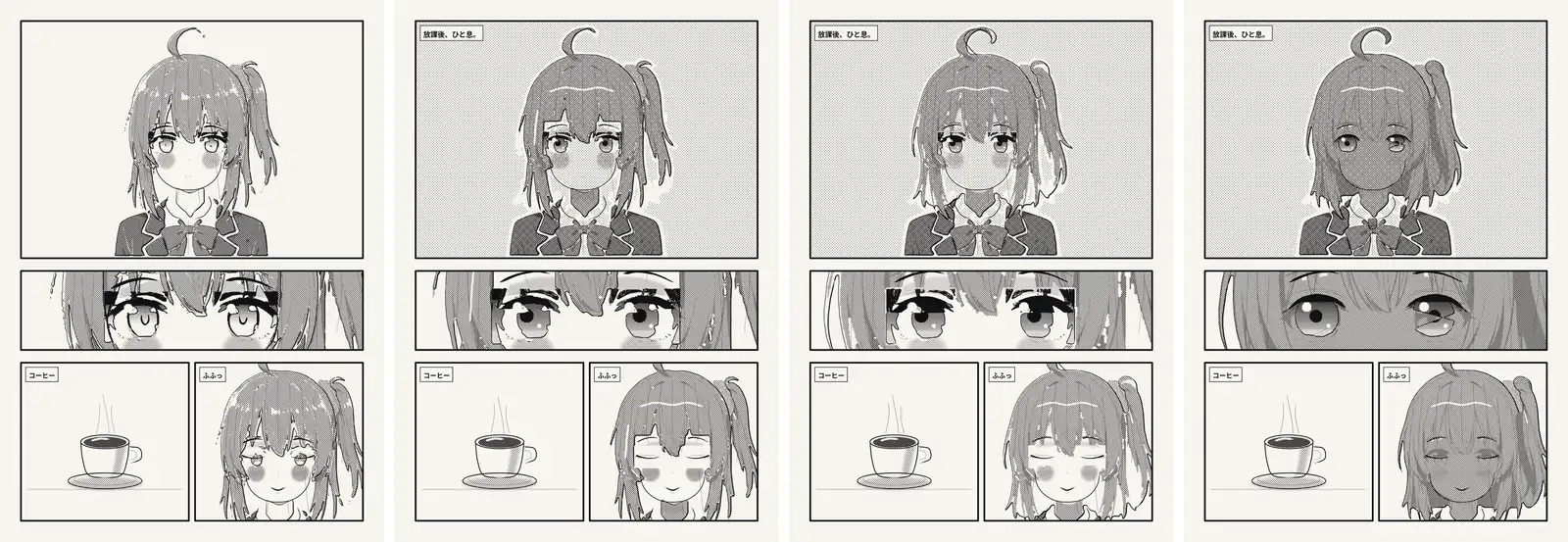
Revision 3 regressed because the plan at the top of the script specified filling holes in the hair mask to lay down a single tone, and filling enclosed gaps inside the hair silhouette ended up swallowing the face too. The right eye’s shape also broke.
Revision 2 (Turn 4) was the cleanest of the four passes.
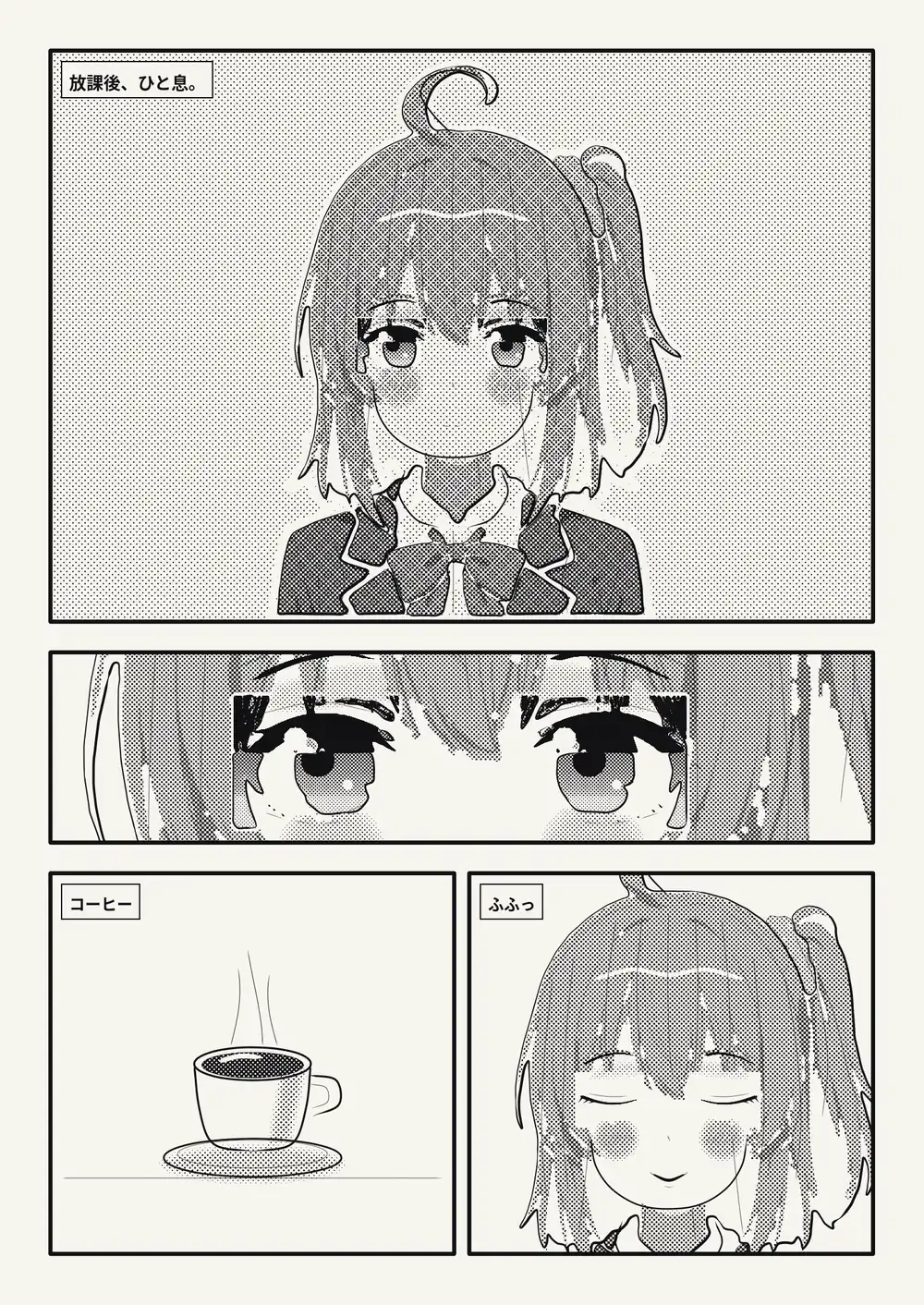
Qwen4-Max took a different implementation path from Claude Code. It never called ink_line_art to trace the reference line art; instead, it drew borders around color-segmented regions using prep.ink_outline, leaving the hair as flat tone shapes with outer contours and no inner hair strands. For the eyes, it wrote “treat eyes as data, not detection” in its plan and passed numerical coordinates to face.iris. Its reference-free coffee cup also came out comparable to Claude Code’s, complete with saucer, handle, steam, and shadow.
Drawing the Same 4 Panels With Codex
I ran the same 4-panel task on Codex CLI 0.170.0 (gpt-6-luna, reasoning high). Unlike Qwen4-Max, which only returned code over an API while my runner executed it, Codex is a terminal agent like Claude Code—it can run its own scripts, inspect rendered images, and crop them directly.
I placed a copy of manga/, the reference image, the two zoomed grid images, and the task prompt into a dedicated folder and launched Codex with --sandbox workspace-write so it could only write inside that folder. Claude Code’s and Qwen4-Max’s scripts lived in separate directories, and the prompt instructed Codex not to read them, to run three revision passes after the initial render, and to record the defects it spotted on each pass in a notes file.
Codex hit one pre-render error, passing a nonexistent crop= argument to Pillow’s Image.resize. Because it skipped Frame and wrote its own reference-cropping and coordinate-mapping helper, it never triggered the Frame.up bug that Claude Code and Qwen4-Max both hit.
| Pass | Lines | Defects Noted by Codex (Summary) | Actual Output Check |
|---|---|---|---|
| Initial | 125 | Face zoomed in too close, cutting off ahoge, ponytail, and ribbon. Small line-detection dots became black diamonds. Eye panel showed only the upper half. Japanese captions rendered as tofu characters (missing-glyph boxes) | Matched notes |
| Revision 1 | 137 | Full bust now fits. Overall image too faint. Eye panel has too much bangs and cuts off the lower iris | Panel 1 clean as line art; Panel 2 shows only vertical hair lines |
| Revision 2 | 139 | Eye panel broke into fragmented strokes because small-line cleanup was too aggressive on the zoomed crop | Panel 2 still only vertical hair lines |
| Revision 3 | 159 | Traced bangs crossed and tangled with the coordinate-drawn eyes, so cleared the panel to white and left only the coordinate-drawn eyes | Panel 2 shows generic eyes unrelated to the reference; Panel 4 lost the face outline |
From left to right: Initial, Revision 1, Revision 2, and Revision 3.
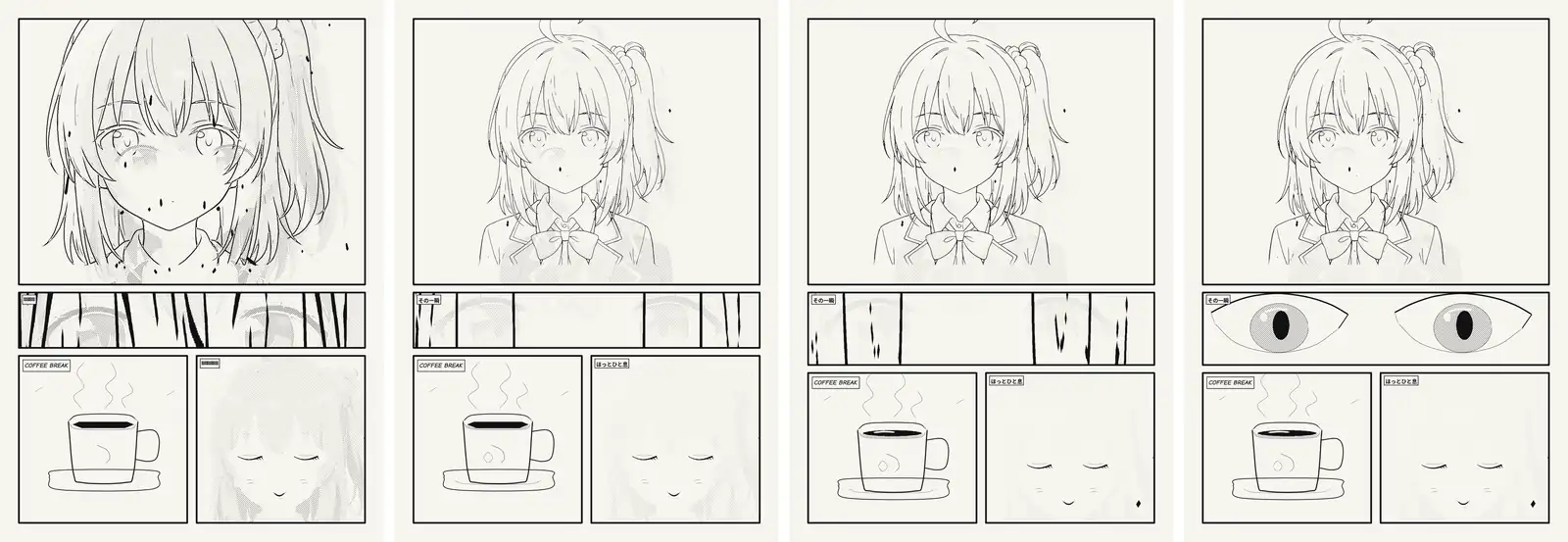
Here is Revision 3, which Codex itself judged as its best pass.
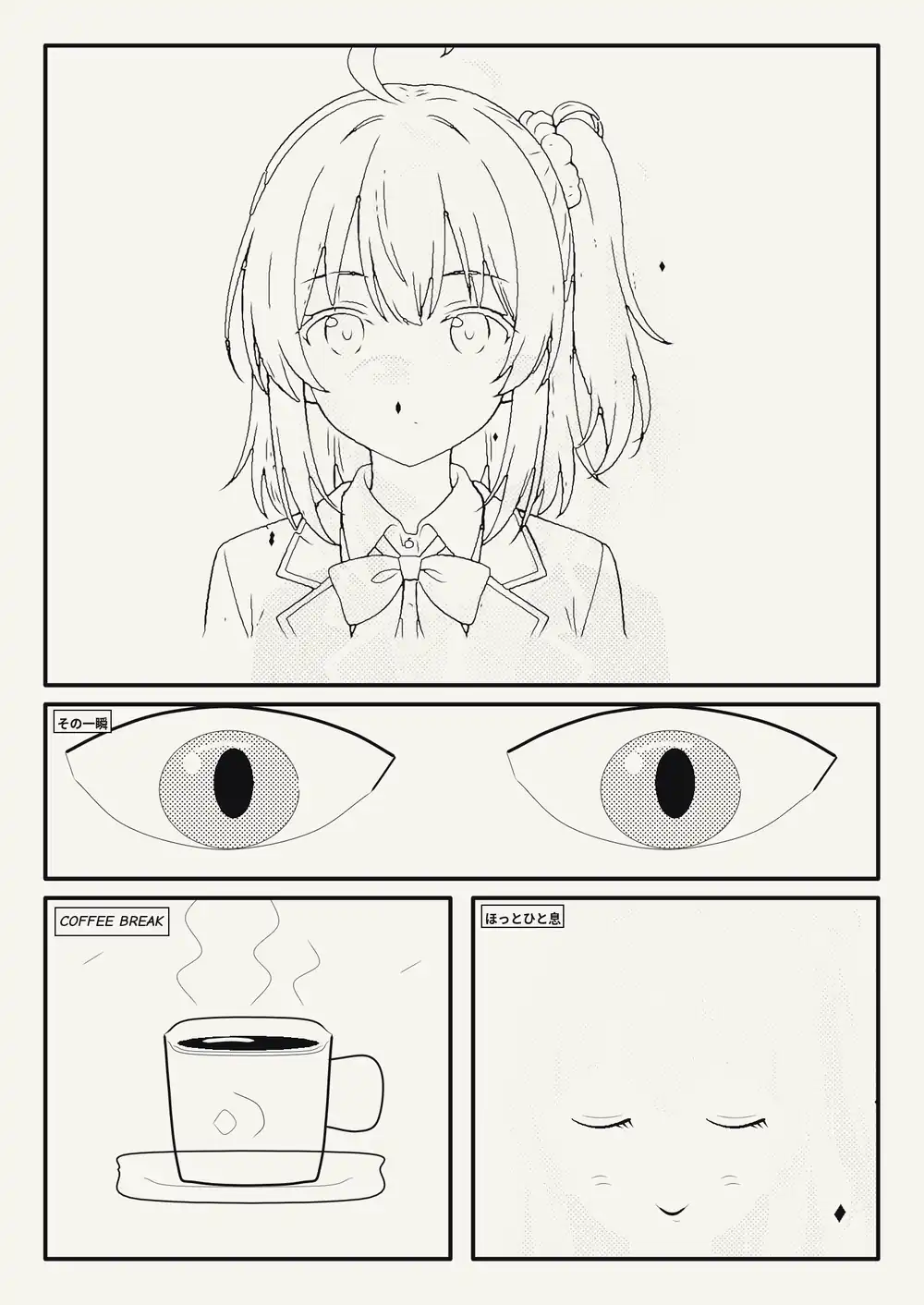
Codex extracted outlines with prep.xdog_lines (an edge-extraction line map) and inked them via ink_line_art. Panel 1’s line art is crisp and faithful to the reference. However, true to its plan—“keep tones minimal, solid black only on eyelashes and coffee”—hair, jacket, and ribbon all stayed white, making the page look closer to a clean line-art draft than a finished manga page.
In Panel 2, Codex failed three times in a row to align the zoomed reference and eventually gave up on the reference altogether, drawing plain oval eyes instead. In Panel 4, the face outline and hair almost completely disappeared, yet Codex’s notes kept describing it as “expression change is readable” without mentioning the missing outline. Across all four passes, its edits focused on line cleanup and never added tones or solid fills.
The run took 11 minutes 44 seconds from start to finish, consuming 6,383,681 input tokens (6,219,392 cached) and 30,784 output tokens. Checking the codex exec --json event log afterward confirmed no commands accessed outside the workspace folder; however, the log only recorded shell commands and file edits, with zero explicit image-open events. Given that its notes accurately caught visual issues like tofu glyphs, it appears to have inspected the outputs indirectly.
Side-by-Side Comparison of the Three Models
Each column reflects a single run per model; keep in mind that the differences reflect both the models and the workflow setup (terminal agents vs. API plus runner).
| Item | Claude Code (Fable 5.2) | Codex (gpt-6-luna) | Qwen4-Max |
|---|---|---|---|
| Workflow | Runs scripts and opens images directly | Runs scripts directly (image-open not logged) | Returns script via API; runner executes and returns images |
| Pre-render errors | 1 | 1 | 4 |
| Final script size | 290 lines + 41 lines segmentation | 159 lines | 325 lines |
| Line extraction | Dark-pixel mask → ink_line_art | xdog_lines → ink_line_art | Color-region contours → ink_outline |
| Eyes | Coordinates → manga_iris | Traced lines in Panel 1; custom ovals in Panel 2 | Coordinates → face.iris |
| Tones & solid blacks | Dot tone hair, solid black jacket | Barely used | Dot tones on hair/jacket/bg; covered face on Rev 3 |
| Eye close-up panel | Succeeded using zoomed reference | Abandoned reference | Succeeded with zoomed reference, but left black boxes |
| Closed-eye panel | Succeeded | Face outline vanished | Succeeded in Revisions 1 and 2 |
| Revision trajectory | Improved each pass; fixed Rev 1 white cutout in Rev 2 | Panel 1 improved; Panels 2 and 4 did not | Improved through Rev 2, regressed on Rev 3 |
Note that the Claude Code column reflects work and visual evaluation performed by Claude Code itself.
How It Differs From Image Generation
Rendering a full page takes about 7 seconds with no GPU and no model weights to download. Running the same script reproduces the exact same image, and changes like closing the eyes or switching the jacket to a screentone only took changing one argument.
At the same time, the underlying drawing still comes from the reference image. What Claude Code actually decided was where to leave white paper, where to lay black ink, which lines to switch to manual coordinates, and how to arrange the panels—not the anatomy or draftsmanship itself. Without a reference, the coffee cup in Panel 3 was about as far as coordinate-only drawing got in this test.
Honestly, not very practical.
Mostly feels like a way to burn extra Claude tokens.