ComfyUI + WAI-Illustrious on RTX 4060 Laptop (8GB VRAM): 1024x1024 in 15s, no --lowvram, LoRA still fits
 Contents
I tried running WAI-Illustrious (SDXL-based) on my laptop with an RTX 4060 Laptop / 8GB VRAM. I expected 8GB to be cutting it close, but it turns out 1024x1024 generation works fine without the lowvram flag, even with a LoRA loaded.
Environment
| Item | Spec |
|---|---|
| GPU | NVIDIA GeForce RTX 4060 Laptop (VRAM 8GB) |
| OS | Windows 11 Home |
| Driver | 576.02 |
| CUDA | 12.9 |
| ComfyUI | v0.15.0 (portable, CUDA 12.8 build) |
| Model | WAI-Illustrious SDXL v16.0 (6.5GB) |
Setup
Download the NVIDIA CUDA 12.8 build (ComfyUI_windows_portable_nvidia_cu128.7z) from ComfyUI Releases and extract it. It runs fine on CUDA 12.9 with the 12.8 build.
Extract to C:\works\ComfyUI_windows_portable\. Avoid spaces or non-ASCII characters in the path.
Download the checkpoint from Civitai — v16.0 (waiIllustriousSDXL_v160.safetensors, 6.5GB) — and place it in ComfyUI\models\checkpoints\.
run_nvidia_gpu.bat won’t work unless the current directory is ComfyUI_windows_portable\ (it uses relative paths internally). Either double-click it from Explorer or cd into the directory first.
Workflow
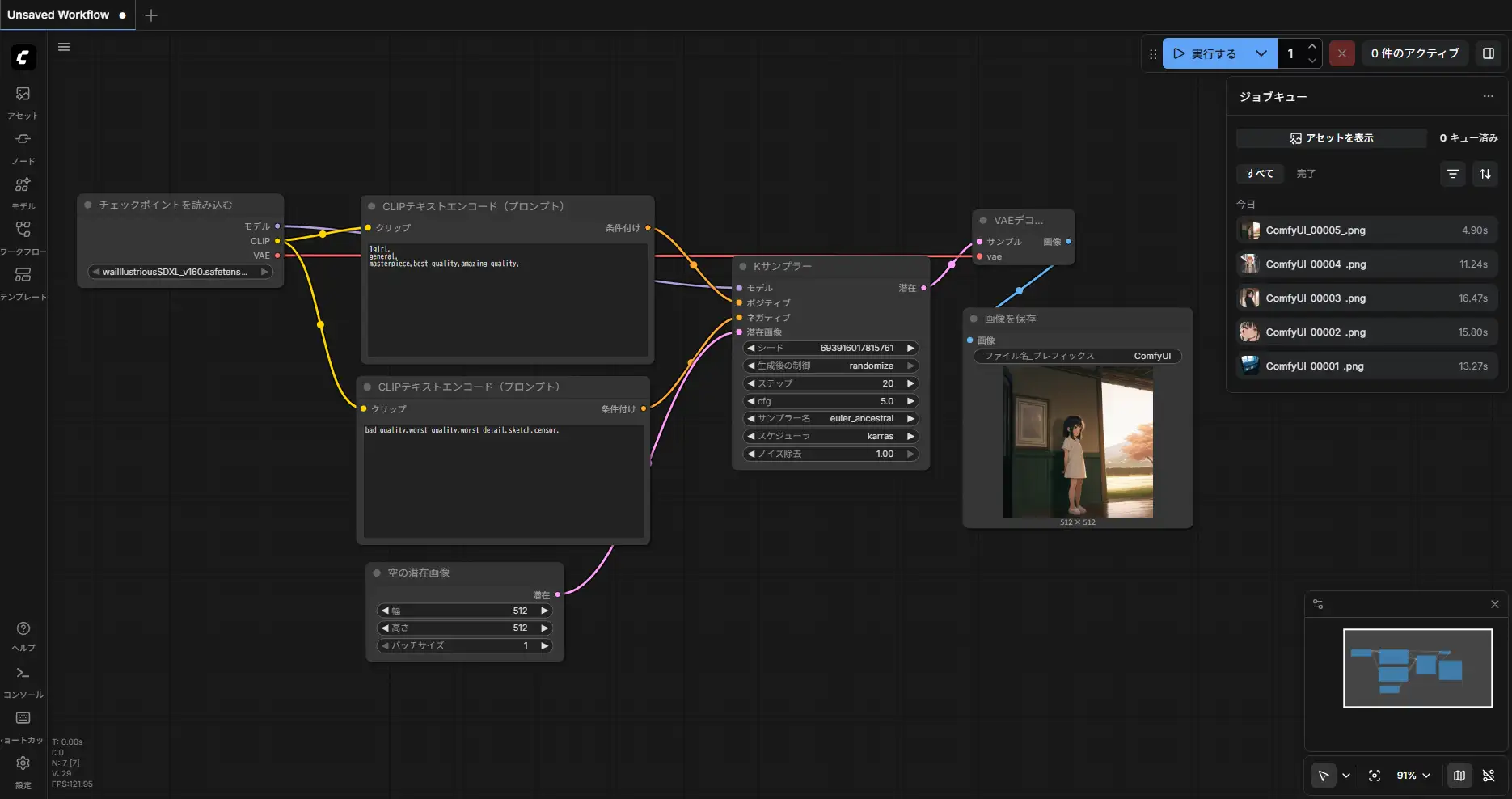
Basic setup: Checkpoint Loader -> CLIP Text Encoder -> KSampler -> VAE Decode -> Save.
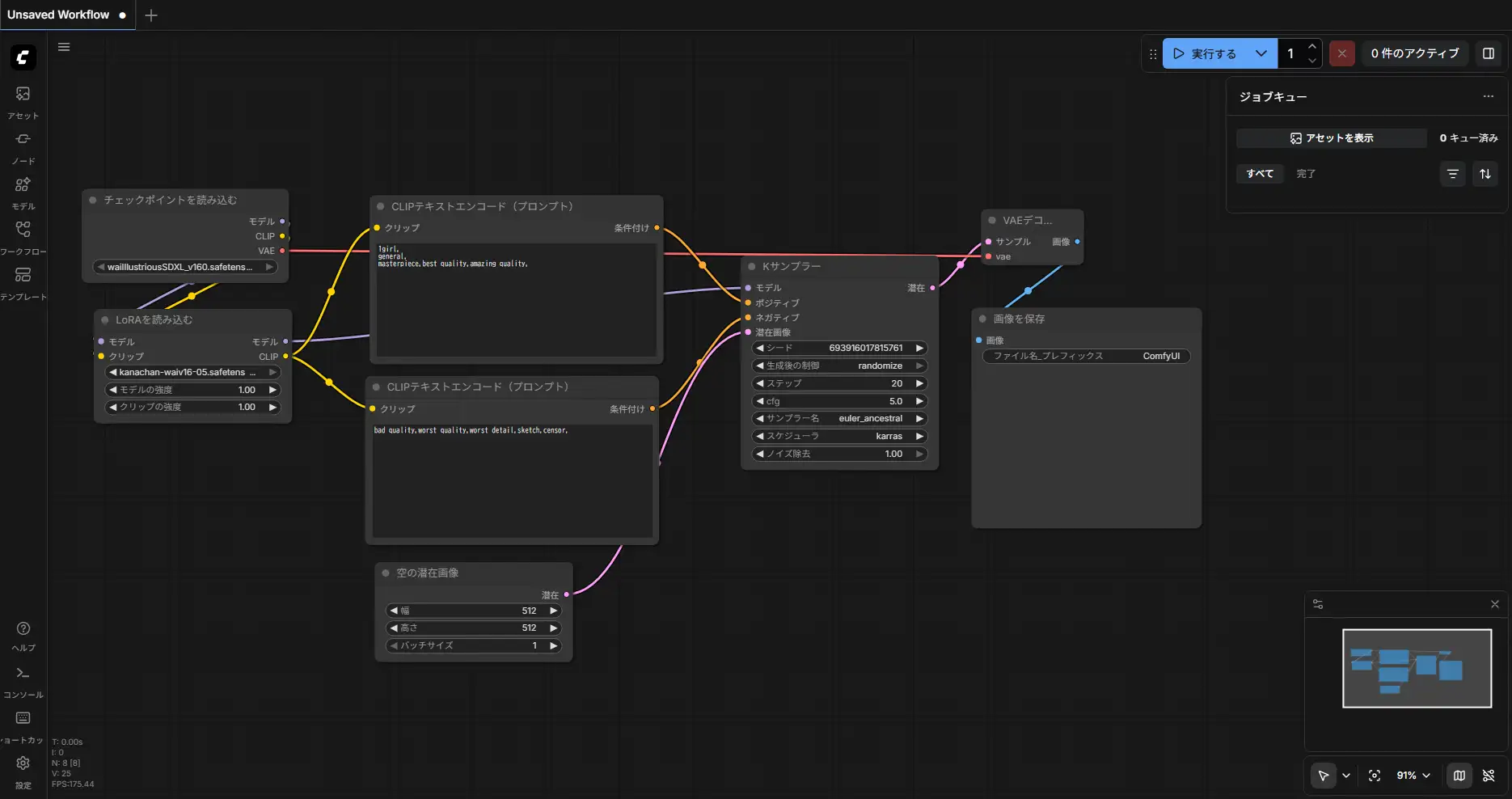
When using a LoRA, insert a LoRA Loader between the Checkpoint Loader and CLIP Encoder. This applies the LoRA to both the MODEL and CLIP outputs.
Benchmark
Common settings: euler_ancestral / Karras scheduler / CFG 5 / 20 steps / denoise 1.0
Positive: 1girl, general, masterpiece, best quality, amazing quality,
Negative: bad quality, worst quality, worst detail, sketch, censor,
Checkpoint Only
| Resolution | it/s | KSampler | Total | VRAM Peak |
|---|---|---|---|---|
| 512x512 | 5.90 | 3s | 4.90s | ~4.9GB |
| 768x768 | 2.45 | 8s | 11.24s | ~4.9GB |
| 1024x1024 | 1.47 | 13s | 15.81s | ~5.6GB |
All resolutions ran with full load: True (entire model loaded into VRAM). --lowvram was not needed.
1024x1024:


768x768:

512x512:

With LoRA
| Resolution | it/s | Total | Without LoRA |
|---|---|---|---|
| 512x512 | 5.83 | 5.98s | 4.90s |
| 768x768 | 2.82 | 7.99s | 11.24s |
| 1024x1024 | 1.63 | 15.62s | 15.81s |
The first LoRA load took 10.37s at 512x512, but once cached it dropped to 5.98s. The KSampler it/s is essentially the same — LoRA overhead is minimal.



Character LoRA Results
Generated with a custom character LoRA. The character’s features are captured well.
20 steps:

25 steps:

25 steps produces more stable linework and fewer finger artifacts.
Comparison with M1 Max
For reference, the same 1024x1024 generation takes about 40 seconds on an M1 Max (MPS backend). The RTX 4060 Laptop is 2.5x faster thanks to CUDA optimizations.
How VRAM Is Used
At idle (right after launching ComfyUI), VRAM usage is 91MiB. The model is loaded into VRAM only when the first generation request comes in.
The biggest VRAM consumer during generation is the KSampler. It runs the UNet forward pass at each step, so the SDXL UNet (~4.9GB) occupies VRAM throughout. CLIP text encoding finishes instantly, and VAE decode only runs once.
Auto-Unload After Generation
After generation completes, ComfyUI’s memory manager moves the UNet weights from VRAM to system RAM. For 1024x1024, about 3GB is freed and only 1.8GB remains in VRAM.
Unloaded partially: 3056.88 MB freed, 1840.21 MB remains loadedThis is intentional behavior, and it’s a lifesaver on 8GB. Here’s why:
- Reserves VRAM for the next operation: Frees up space for VAE decode, LoRA patching, etc.
- Prevents VRAM fragmentation: Keeping weights loaded continuously can fragment memory, making it impossible to allocate large contiguous blocks
- WDDM considerations: Laptop GPUs share VRAM with display output, so hogging too much can destabilize the system
The eviction target is system RAM, not disk. On the next generation, it only needs a RAM-to-VRAM transfer, which is faster than the initial disk-to-VRAM load. You can force the model to stay resident with --disable-smart-memory, but that’s not recommended on 8GB.
Is 8GB Enough?
WAI-Illustrious ran comfortably both standalone and with LoRA. I initially assumed “the SDXL UNet is 6.5GB so 8GB will be tight,” but peak usage topped out at 5.6GB in practice. fp16 inference and ComfyUI’s memory management make the difference.
Cases where you might run out of VRAM:
- ControlNet: ControlNet models add 1-2GB on top
- Multiple LoRAs: Each LoRA is small, but they add up
- High-res upscaling: 2048x2048 and above can cause VAE decode spikes
In those cases, launching with --lowvram can prevent OOM, but it swaps UNet parts between CPU and GPU so it’s slower.
I used to run a workflow on M1 Max where I’d generate at a smaller size, lock the seed, upscale with Hires, then fix faces with FaceDetailer. With the RTX 4060 Laptop, generating 1024x1024 directly takes just 15 seconds. The same thing on M1 Max takes 40 seconds. The CUDA environment also gets full access to ComfyUI custom nodes and the latest optimizations without waiting for MPS backend support.
The price difference between the two machines is about 100,000 yen (~$670). For image generation specifically, a Windows laptop with an RTX 4060 Laptop is hard to beat on value.