Comparing NDLOCR-Lite v2 and Qwen4 Max on Japanese Handwriting, Manga, and Dictionaries
 Contents
NDLOCR-Lite v2, the CPU-only OCR tool published by Japan’s National Diet Library (NDL), came out on November 24, 2026. It is built for digitized books and magazines, and I previously ran it on an iPhone in Running NDLOCR-Lite in an iOS Native App for On-Device OCR.
Version 2 adds stronger reading-accessibility features and PyPI installation support, following v1.2 (April 24, 2026), which improved handwritten text recognition.
Qwen4 Max, on the other hand, is a general-purpose vision-capable LLM called via API rather than a dedicated OCR model—it generates text from an image rather than running a fixed text-extraction pipeline. To see how far a local OCR tool and a cloud multimodal LLM differ in practice, I ran the same set of Japanese test images through both—covering printed horizontal and vertical text, tables, handwriting, manga speech bubbles, and text printed on a character’s T-shirt.
Test Environment
| Item | Details |
|---|---|
| Machine | M1 Max 64GB, macOS 27.0 |
| NDLOCR-Lite | v2.0.0 (commit ba8bb85, CPU execution) |
| NDLOCR-Lite CLI | ndlocr-lite with default options |
| Qwen4 Max | OpenAI-compatible API via ModelScope (Alibaba’s model hub and API platform), temperature 0, images sent as quality-95 RGB JPEG |
| Date & Runs | November 26, 2026, 5 runs per image for each model |
I installed NDLOCR-Lite from ndl-lab/ndlocr-lite (commit ba8bb85 from November 24, 2026) using uv pip install -e . inside a Python 3.12 virtual environment created with uv. I did not enable --enable-tcy, the option for tate-chu-yoko (setting two-digit numbers horizontally inside a single vertical-text character cell).
Setting temperature to 0 on Qwen4 Max is meant to minimize output randomness.
Sanity Check with the Bundled NDLOCR-Lite Sample
Before testing my own images, I ran the sample image bundled in the NDLOCR-Lite repository through both models. It is page 20 of the National Diet Library Monthly Bulletin No. 683 (March 2018), a vertical-text page.
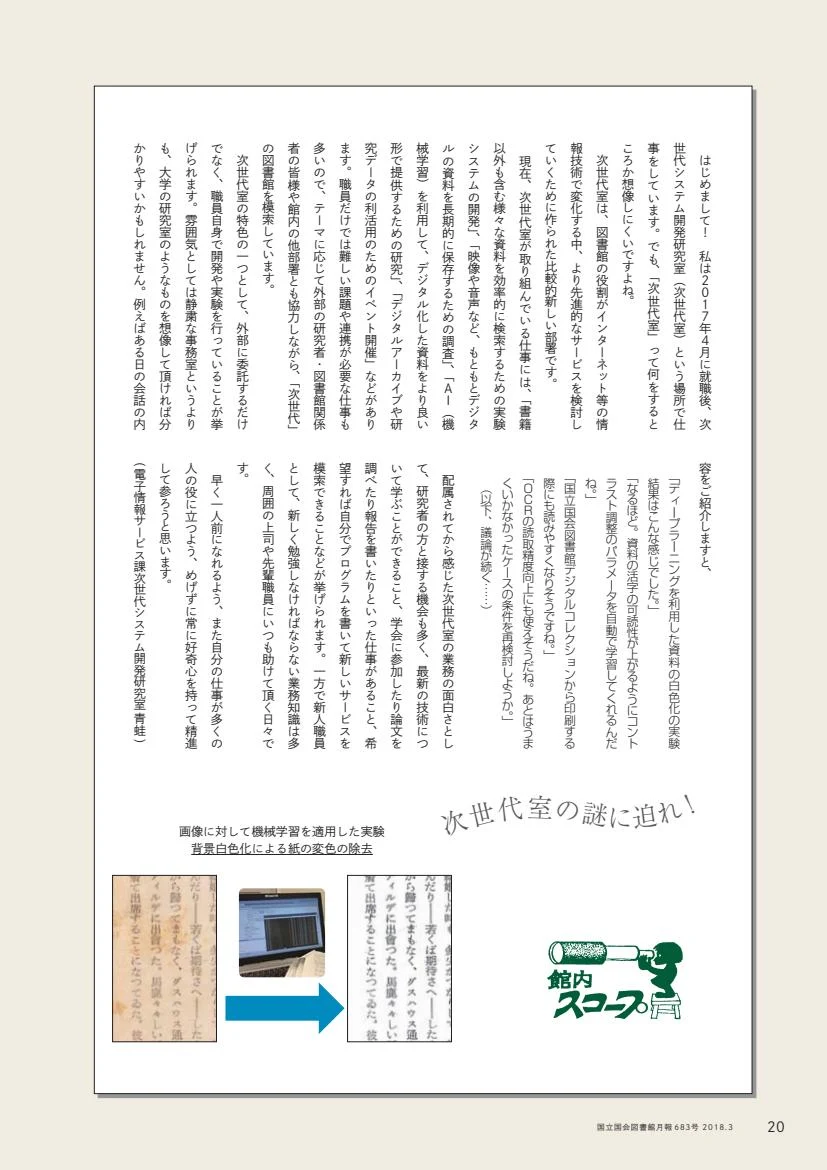
Source: “Kannai Scope: Uncovering the Mystery of the Next-Generation Systems Office!” National Diet Library Monthly Bulletin, No. 683, 2018, p. 20 (sample included in the NDLOCR-Lite README).
| NDLOCR-Lite v2 | Qwen4 Max | |
|---|---|---|
| Time | 0.97s for detection + recognition (10.07s total including model loading) | 40.15s |
| Memory | Peak RSS (maximum physical memory used) ~0.9GB | Not measured (API) |
| Tokens | - | 1,092 input (964 image), 3,293 output (2,597 internal reasoning) |
Comparing the outputs against the page, NDLOCR-Lite matched all four spots below exactly, while Qwen4 Max slipped into Simplified Chinese characters and even rewrote phrasing.
| Page Text (NDLOCR-Lite matched all) | Qwen4 Max |
|---|---|
| システムの開発 | システム的开发 (switched to Simplified Chinese characters and wording) |
| ディープラーニング | ディープリラーニング |
| 資料の白色化 | 資料の白化 |
| 変化する中、より先進的なサービスを検討し | 変化し、より先進的なサービスを構築し |
The last line is not just a misread character—it rewrote the sentence. Since this bundled sample has no official ground-truth text file, I created test images with known ground truth for the main comparison.
Evaluation Method
I sent the following Japanese instruction prompt along with each image to Qwen4 Max, matching NDLOCR-Lite’s output layout (one line per vertical column from right to left, and one line per table row):
この画像に写っている文字をすべて、そのまま書き起こしてください。
- 説明・要約・翻訳・補完はしない。読めない文字は〓にする
- 改行は画像の行(縦書きなら列)の区切りに合わせる
- 縦書きは右の列から順に、1列を1行として出力する
- 表は1行を1行とし、セルの区切りはタブにする
- 書き起こした文字以外は出力しない
(Summary of the prompt: transcribe all visible text verbatim without explanation, summary, translation, or completion; use 〓 for unreadable characters; match line/column breaks; output vertical text right-to-left, one column per line; output tables one row per line with tab-separated cells; output nothing except the transcribed text.)
For NDLOCR-Lite, I scored the .txt output file directly.
The primary metric is Character Error Rate (CER): the edit distance (insertions, deletions, and substitutions needed to turn the output into the ground truth) divided by the ground-truth character count. 0.000 is an exact match, and higher values mean more errors.
Before scoring, I stripped newlines, spaces, and tabs, and applied Unicode NFKC normalization so visually equivalent full-width and half-width characters (such as parentheses and alphanumerics) count as identical. Without NFKC normalization, NDLOCR-Lite outputting half-width () instead of full-width () gave the horizontal text image (01) a CER of 0.009.
Because CER depends on character order, images without a single fixed reading order—like tables or whiteboard diagrams—get high CER values even when every character is read accurately (for example, outputting BA for AB raises CER even though every character is present). I therefore also calculated order-independent metrics by treating the ground truth and output as multisets of characters and counting overlapping characters: recall (fraction of ground-truth characters present in the output) and precision (fraction of output characters present in the ground truth). Low recall indicates missed text, while low precision indicates hallucinated or extra characters.
Each image was run 5 times on both models. Because Qwen4 Max still varied across runs on some images even at temperature 0, I report the 5-run mean and min–max range.
Test Images
I prepared 11 test images.
| ID | Type | How It Was Made | Ground-Truth Chars |
|---|---|---|---|
| 01 | Standard horizontal text | Custom Japanese text rendered from HTML via headless Chrome | 216 |
| 02 | Vertical text | Same as above, with 11 set in tate-chu-yoko once | 121 |
| 03 | Table | Same as above, with grid lines | 134 |
| 04 | Decorative text | Same as above, with outlines, gradients, shadows, italics, etc. | 65 |
| 05 | Dictionary-style columns (custom) | Same as above, 3 columns | 370 |
| 05b | Real dictionary page | Cropped from a Sanseido sample PDF | 249 |
| 06 | Manga speech bubbles | Two generated character images from Kana LoRA arranged in 2 panels with overlaid bubbles | 40 |
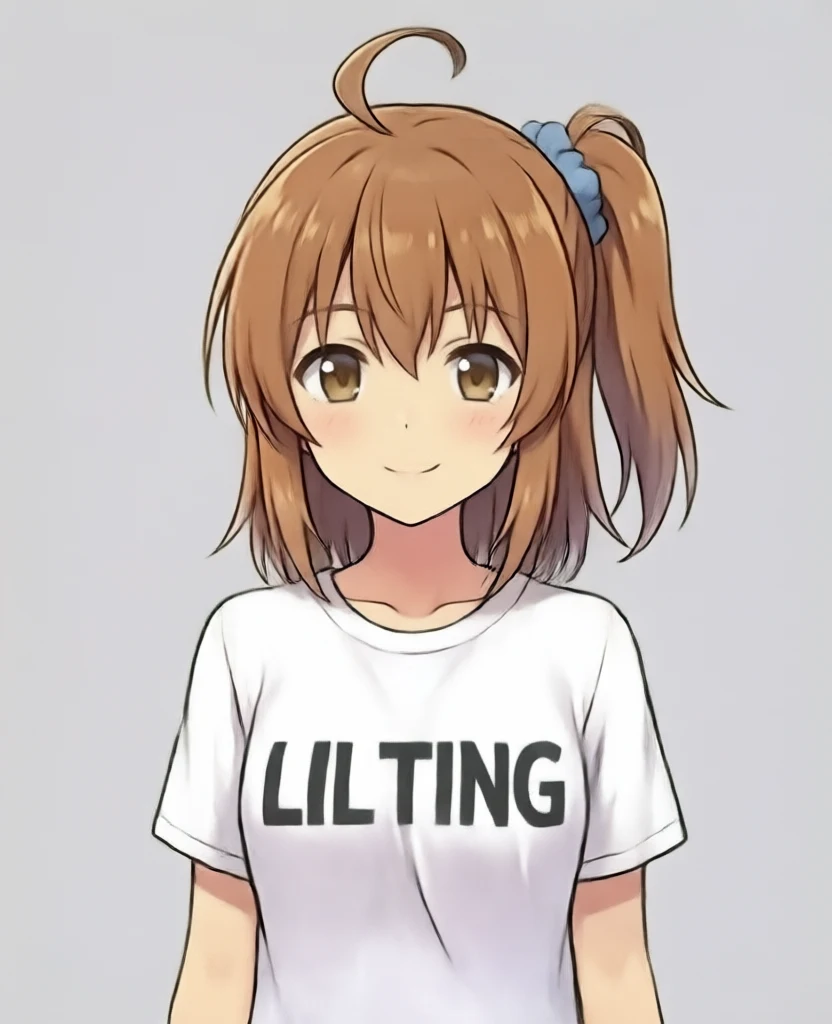
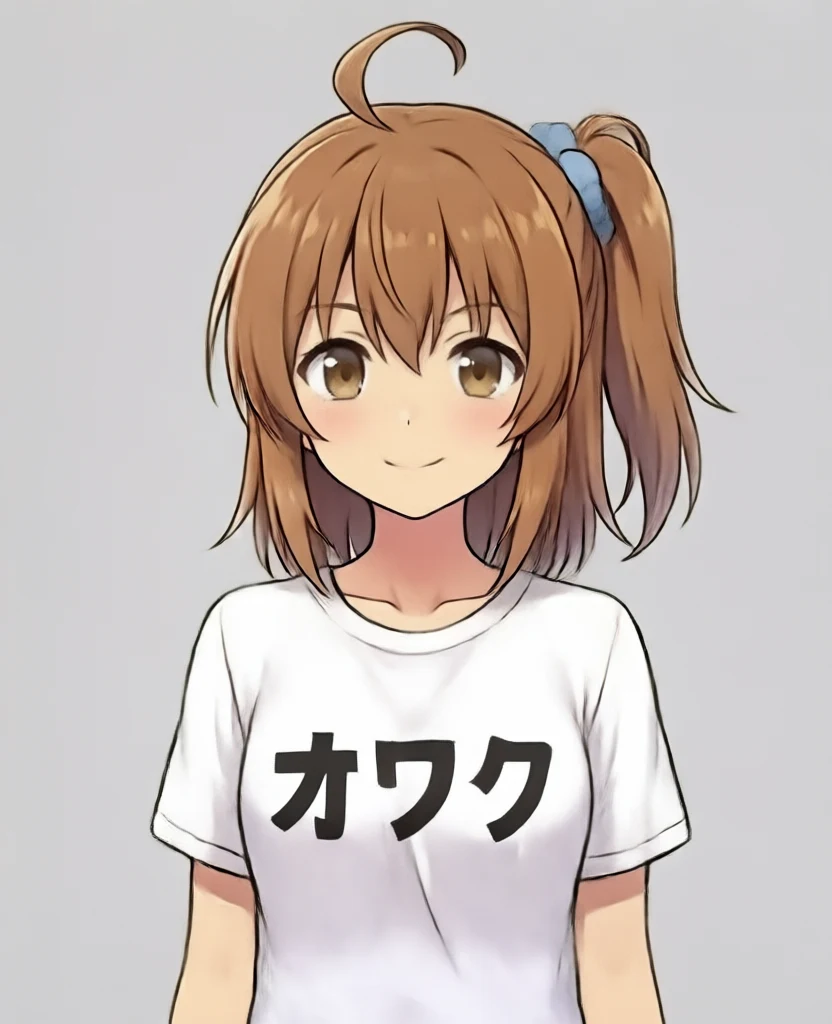
| 07a | Character T-shirt | Generated with Kana LoRA and Anima, including the T-shirt text | 7 |
| 07b | Character T-shirt | Same as above | 3 |
| 08 | Handwriting | Whiteboard photographed with an iPhone | 121 |
| 09 | Mixed vertical/horizontal/tilted manga panel | Image 07a tilted and overlaid with speech bubbles and sound effects | 40 |
The printed-text images (01–05) were rendered with headless Chrome (running Chrome without a visible UI) using --force-device-scale-factor=2 to export at 2× pixel density. The character illustrations for 06, 07a, and 07b were generated with the Anima image generation model and my custom character LoRA (Kana LoRA).
In the subsections below, each image is followed by its ground-truth text. Images and ground-truth texts for 05b (publisher copyright) and 08 (work meeting notes) are omitted.
01 Standard Horizontal Text
Custom Japanese passage set in 20px Hiragino Mincho, mixing digits, katakana, and quotation/parenthesis marks.
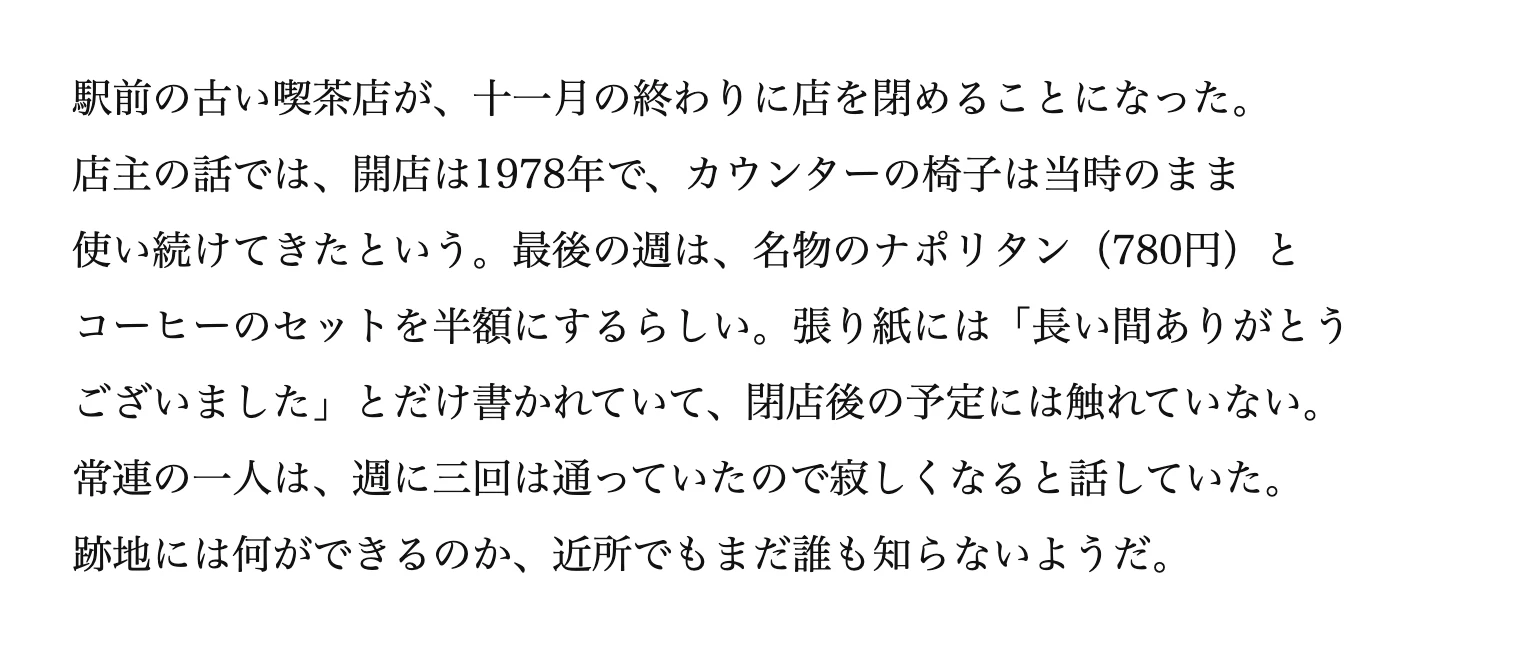
駅前の古い喫茶店が、十一月の終わりに店を閉めることになった。
店主の話では、開店は1978年で、カウンターの椅子は当時のまま
使い続けてきたという。最後の週は、名物のナポリタン(780円)と
コーヒーのセットを半額にするらしい。張り紙には「長い間ありがとう
ございました」とだけ書かれていて、閉店後の予定には触れていない。
常連の一人は、週に三回は通っていたので寂しくなると話していた。
跡地には何ができるのか、近所でもまだ誰も知らないようだ。
02 Vertical Text
Set in 24px Hiragino Mincho, with only the 11 in the sixth column formatted in tate-chu-yoko. Ground truth is ordered right-to-left, one column per line.
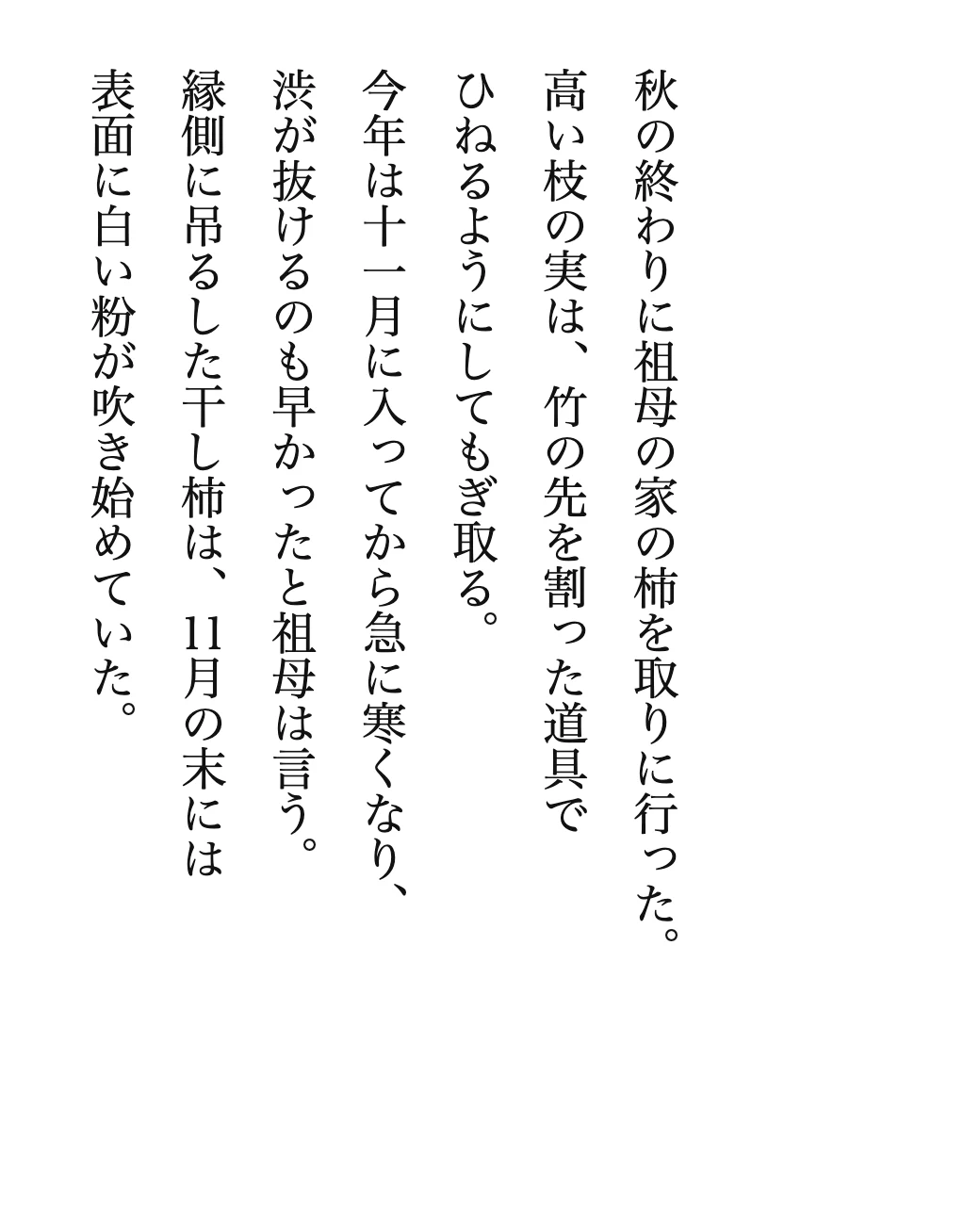
秋の終わりに祖母の家の柿を取りに行った。
高い枝の実は、竹の先を割った道具で
ひねるようにしてもぎ取る。
今年は十一月に入ってから急に寒くなり、
渋が抜けるのも早かったと祖母は言う。
縁側に吊るした干し柿は、11月の末には
表面に白い粉が吹き始めていた。
03 Table
A bordered table in Hiragino Kaku Gothic. Ground truth puts one row per line with tab-separated cells.
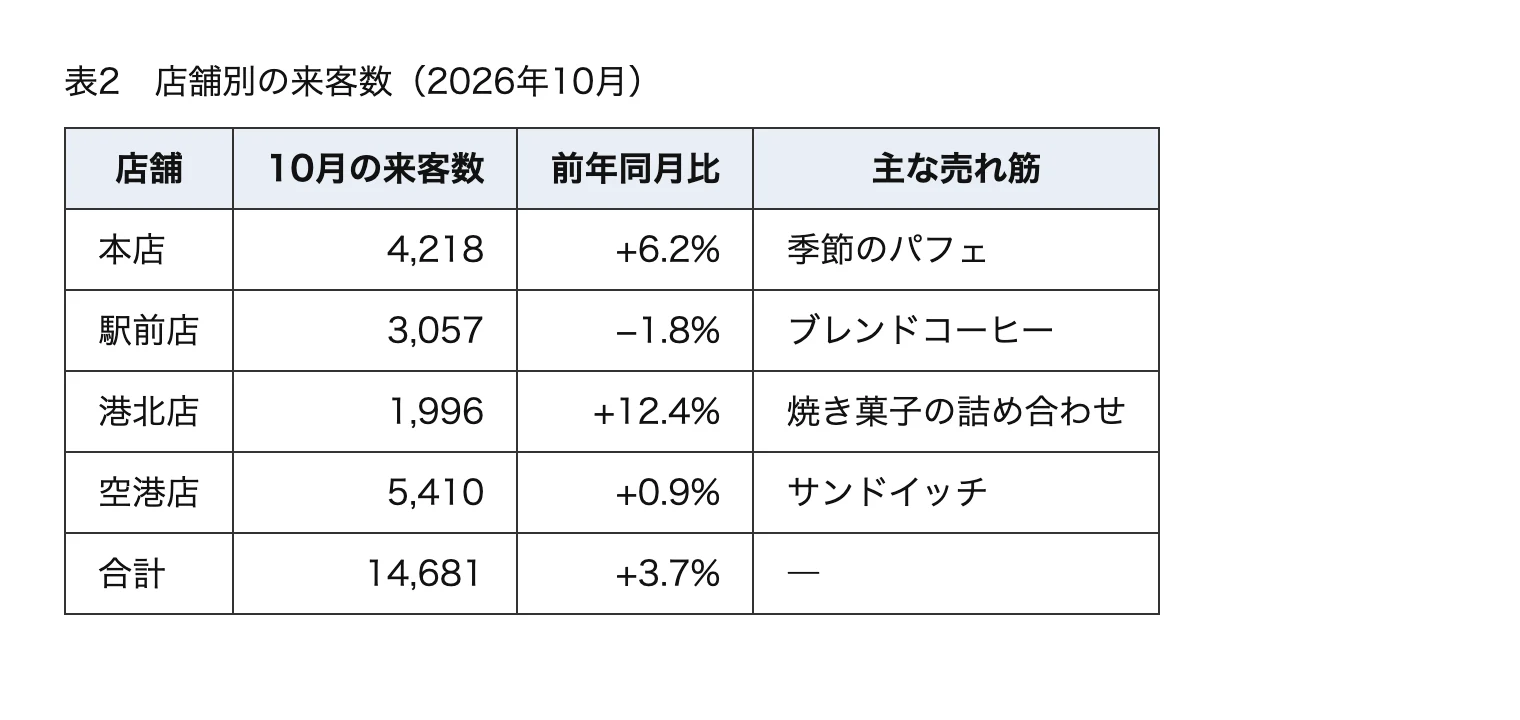
表2 店舗別の来客数(2026年10月)
店舗	10月の来客数	前年同月比	主な売れ筋
本店	4,218	+6.2%	季節のパフェ
駅前店	3,057	−1.8%	ブレンドコーヒー
港北店	1,996	+12.4%	焼き菓子の詰め合わせ
空港店	5,410	+0.9%	サンドイッチ
合計	14,681	+3.7%	―
04 Decorative Text
Six lines over a diagonal-stripe background mixing outlines, shadows, gradients, a handwritten-style font (Klee), and glow effects.
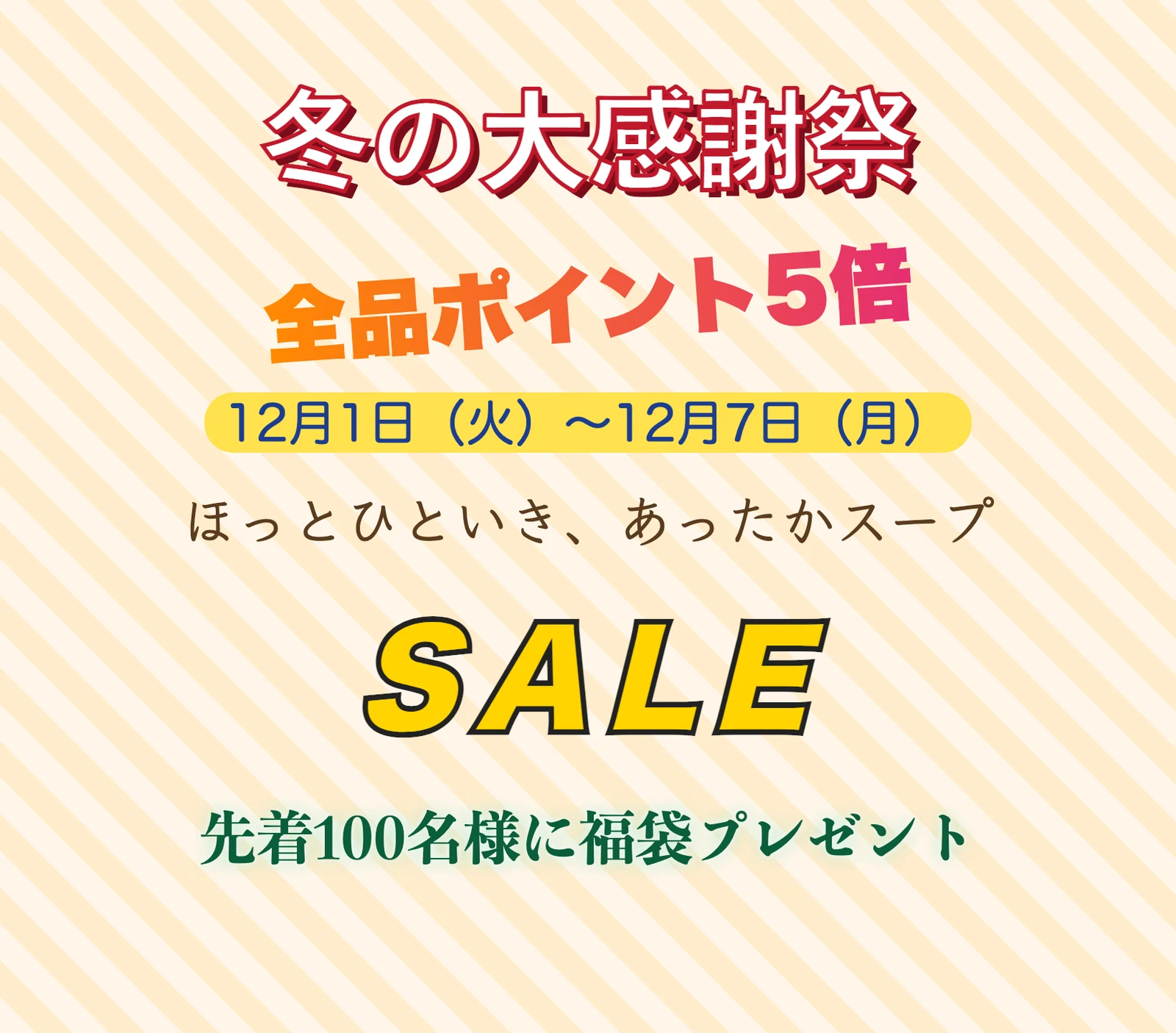
冬の大感謝祭
全品ポイント5倍
12月1日(火)〜12月7日(月)
ほっとひといき、あったかスープ
SALE
先着100名様に福袋プレゼント
05 Dictionary-Style Columns (Custom)
Three-column layout with bold Gothic headwords, 【】 kanji forms, 〔〕 part-of-speech tags, ①② sense numbers, and ▽ usage examples. Ground truth lists one entry per line from top to bottom of each column.
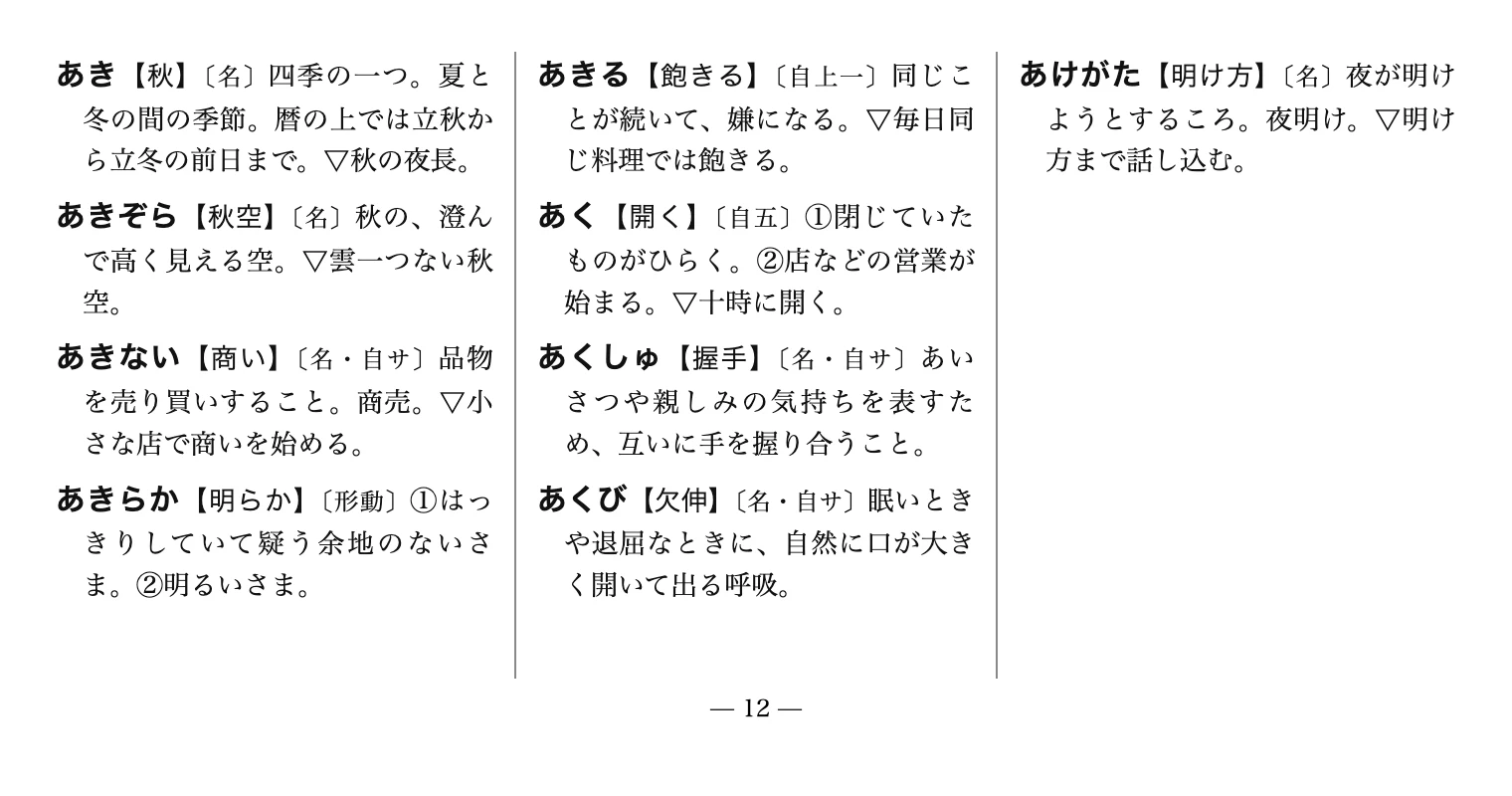
あき【秋】〔名〕四季の一つ。夏と冬の間の季節。暦の上では立秋から立冬の前日まで。▽秋の夜長。
あきぞら【秋空】〔名〕秋の、澄んで高く見える空。▽雲一つない秋空。
あきない【商い】〔名・自サ〕品物を売り買いすること。商売。▽小さな店で商いを始める。
あきらか【明らか】〔形動〕①はっきりしていて疑う余地のないさま。②明るいさま。
あきる【飽きる】〔自上一〕同じことが続いて、嫌になる。▽毎日同じ料理では飽きる。
あく【開く】〔自五〕①閉じていたものがひらく。②店などの営業が始まる。▽十時に開く。
あくしゅ【握手】〔名・自サ〕あいさつや親しみの気持ちを表すため、互いに手を握り合うこと。
あくび【欠伸】〔名・自サ〕眠いときや退屈なときに、自然に口が大きく開いて出る呼吸。
あけがた【明け方】〔名〕夜が明けようとするころ。夜明け。▽明け方まで話し込む。
— 12 —
05b Real Dictionary Page (Cropped from a Sanseido Sample PDF)
Because the custom 3-column page only used common symbols, I also tested a real publisher sample page. I skipped Taishukan’s Meikyo Kokugo Jiten 3rd Edition preview because its web viewer caps pages at 564×798 pixels (roughly 10 pixels per body character), and instead used the sample PDF linked from “Look Inside” on the Sanseido Gendai Shin Kokugo Jiten 6th Edition product page.
That PDF stores text as vectors (scalable curves rather than raster images). I rendered its first page (page number 38, running header “アマリリス▼あめ”) at 300 dpi and cropped 3 entries / 10 lines (360×645 pixels) from the top-right of the upper vertical tier: “アマリリス” (amaryllis), “あま・る【余る】”, and “アマルガム” (amalgam).
The cropped region contains bold headwords, angle brackets (〈名〉, 〈自動五段〉), square-bracket notes ([ ]), black circled numbers (❶–❹), a boxed seasonal-word marker (夏), and headword replacement dashes (―), chosen from an area without furigana (phonetic reading guides printed next to kanji).
The PDF did embed text data, but symbols such as brackets were garbled into unrelated kanji (漉, 腰, 宴) and furigana was interleaved mid-sentence. Since I could not use it directly, I zoomed in on the crop and transcribed the ground truth manually.
06 Manga Speech Bubbles
The character illustrations for 06, 07a, and 07b were generated with the following shared settings and base prompt (included for reproducibility; you can skim past the generation table if you are only interested in the OCR results):
| Item | Details |
|---|---|
| Base model | waiANIMA v1.0 |
| LoRA | Kana LoRA (150 epochs, model 1.0 / text encoder 0.8), Anima Turbo LoRA v0.1 (1.0 / 1.0) |
| Generation settings | Sampler er_sde, scheduler simple, 10 steps, CFG (prompt adherence) 1.0 |
| Size | 832×1024 |
masterpiece, best quality, safe, 1girl, solo, kanachan, side ponytail, ahoge, upper body, front view, standing, smile. Her side ponytail with a blue scrunchie is visible on the right side of the image. She is wearing a plain white t-shirt with large bold black text "<文字>" printed across the chest. simple light gray backgroundFor 06, I modified the pose and clothing in the base prompt to from side, facing left, talking, open mouth, surprised and white shirt, red necktie, added framing for left-side margin, and set the negative prompt to text, speech bubble to generate two surprised side-profile panels.
I arranged them into a 2-panel HTML layout and overlaid three vertical speech bubbles (Hiragino Mincho W6) and one narration box (Gothic). Ground-truth reading order is top panel to bottom panel, right to left within each panel.
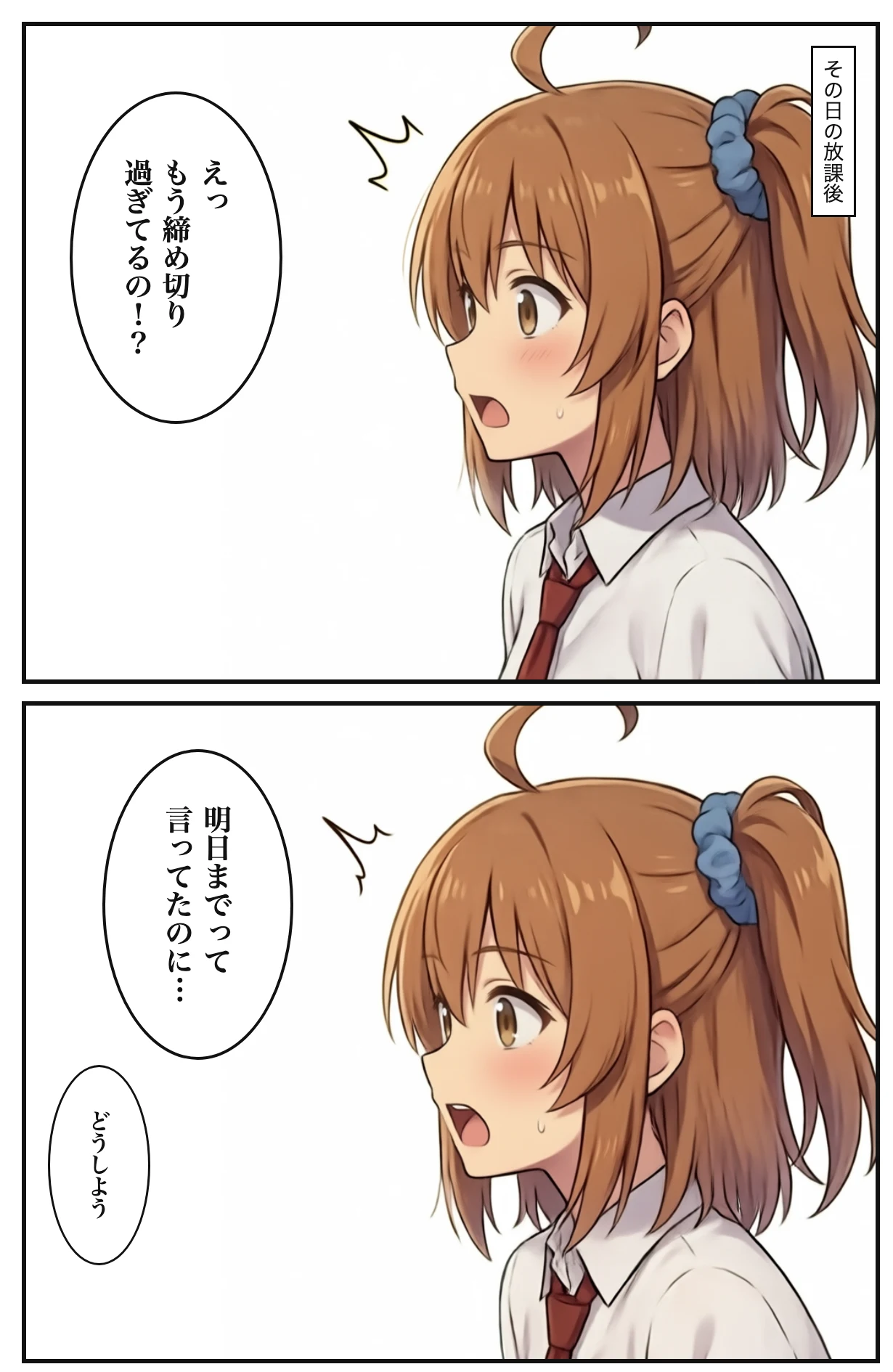
その日の放課後
えっ
もう締め切り
過ぎてるの!?
明日までって
言ってたのに…
どうしよう
07a & 07b Character T-Shirts
Compositing font text afterward would behave no differently from printed type, so I had Anima generate the T-shirt lettering itself by changing only <文字> in the shared base prompt above.
I tried three strings: LILTING, かな, and ねこ大好き. LILTING rendered cleanly, かな turned into katakana clearly readable as オワク, and ねこ大好き (seed 424203) produced three ambiguous shapes resembling 夫, メ, and 侑 that even a human could not reliably read. I dropped ねこ大好き from the test set and used the actually rendered text as the ground truth for the two kept images.
| ID | Prompted Text | Seed | Rendered Text (Ground Truth) |
|---|---|---|---|
| 07a | LILTING | 424201 | LILTING |
| 07b | かな | 424202 | オワク |
07a (LILTING)
07b (オワク)
08 Handwriting
An iPhone photo (2048×1536) of a whiteboard from a work meeting, drawn with blue and red markers as a diagram connecting boxed terms with arrows. Alongside larger words and boxes, there are smaller notes from the center toward the right and in the upper-right corner, plus faint erased traces of earlier writing. It also contains two hand-drawn lenticular brackets (【】) filled in with diagonal marker strokes.
Because the board contains work meeting notes, neither the photo nor the ground-truth text is published here. The ground truth has 22 lines and 121 characters, with those two shaded symbols counted as 【】. Since it is a diagram, there is no single canonical reading order.
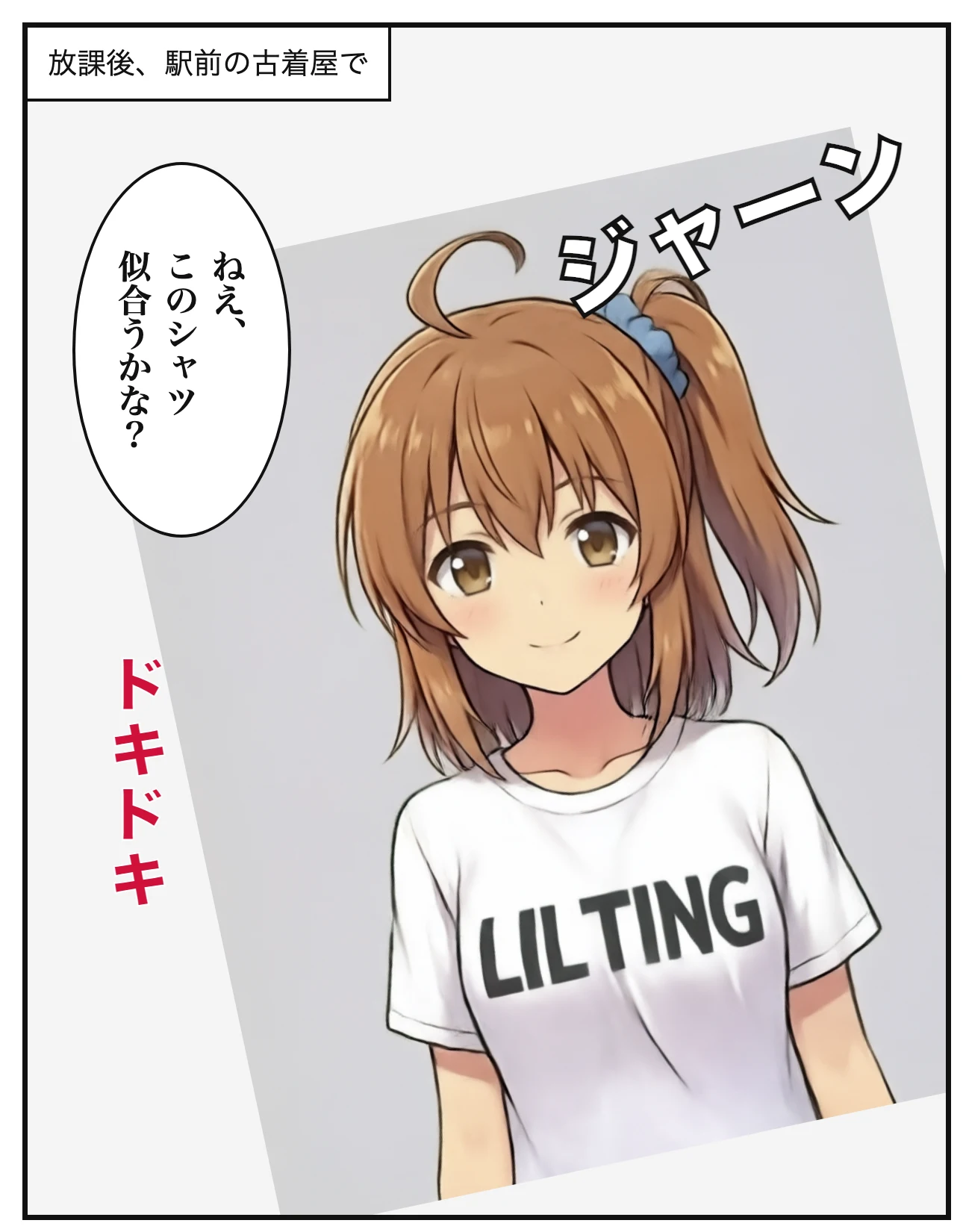
09 Mixed Vertical, Horizontal, and Tilted Manga Panel
I rotated image 07a by 12 degrees inside a single manga panel and overlaid a horizontal caption, a vertical speech bubble, a vertical sound effect, and a sound effect tilted 20 degrees upward to the right.
放課後、駅前の古着屋で
ねえ、
このシャツ
似合うかな?
ジャーン
ドキドキ
LILTING
Results
Lower CER (closer to 0.000) and higher recall/precision (closer to 1.000) indicate better accuracy; CER penalizes reading-order differences, while recall and precision ignore order. All CER values are computed after NFKC normalization. NDLOCR-Lite produced byte-identical output across all 5 runs on every image, so a single value is shown. For Qwen4 Max, CER shows the 5-run mean and min–max range, recall/precision are 5-run means, and “Unique Outputs” is how many distinct outputs appeared across the 5 runs.
| Image | NDLOCR CER | NDLOCR Recall/Prec | Qwen4 Max CER | Qwen4 Max Recall/Prec | Qwen4 Unique Outputs |
|---|---|---|---|---|---|
| 01 Horizontal | 0.000 | 1.000/1.000 | 0.000 | 1.000/1.000 | 1 |
| 02 Vertical | 0.000 | 1.000/1.000 | 0.000 | 1.000/1.000 | 1 |
| 03 Table | 0.761 | 0.985/0.985 | 0.003 (0.000–0.007) | 0.997/0.997 | 2 |
| 04 Decorative | 0.015 | 0.985/0.985 | 0.015 | 0.985/0.985 | 1 |
| 05 Dictionary (custom) | 0.011 | 0.989/1.000 | 0.002 (0.000–0.003) | 1.000/0.998 | 2 |
| 05b Dictionary (real) | 0.016 | 0.984/0.988 | 0.036 (0.024–0.044) | 0.980/0.982 | 5 |
| 06 Manga bubbles | 0.071 | 0.952/0.930 | 0.000 | 1.000/1.000 | 1 |
| 07a T-shirt (LILTING) | 0.000 | 1.000/1.000 | 0.000 | 1.000/1.000 | 1 |
| 07b T-shirt (オワク) | 0.000 | 1.000/1.000 | 0.000 | 1.000/1.000 | 1 |
| 08 Handwriting | 0.612 | 0.496/0.741 | 0.370 (0.190–0.421) | 0.964/0.975 | 5 |
| 09 Mixed panel | 0.200 | 0.800/0.970 | 0.200 | 1.000/1.000 | 1 |
Both models achieved exact matches on all 5 runs for 01 (horizontal), 02 (vertical), and the Anima-generated T-shirts (07a, 07b). NDLOCR-Lite also read the tate-chu-yoko 11 in 02 accurately without --enable-tcy.
Differences showed up on the remaining images in reading order, dense symbols, and handwriting.
Per-Image Error Breakdown
03 Table
NDLOCR-Lite’s high CER of 0.761 on 03 came from reading order: it output the table column by column—finishing the entire “店舗” column from top to bottom before moving to “10月の来客数”. Because the ground truth is ordered row by row, that reordering inflates edit distance, whereas order-independent recall and precision are both 0.985, showing almost every character was recognized.
According to the README, NDLOCR-Lite supports a table-structure model (TableCenterNet), but in the installed source code it is only invoked by the desktop GUI, not the CLI used here.
Qwen4 Max followed the prompt and output tab-separated rows. Three of five runs were exact matches; the other two substituted the final row’s horizontal bar ― (U+2015) with the visually similar em dash — (U+2014).
04 Decorative Text
Both models read all six lines despite outlines and gradients. The only error—identical across all 5 runs for both models—was outputting full-width tilde ~ (U+FF5E) instead of wave dash 〜 (U+301C).
They look nearly identical, but NFKC normalization converts full-width tilde to ASCII ~ while leaving wave dash unchanged, so it remained counted as a 1-character error.
05 & 05b Dictionaries
On the custom 3-column dictionary (05), NDLOCR-Lite’s only mistake was dropping the bottom page number — 12 —. Qwen4 Max got an exact match once, and in 4 of 5 runs inserted an extra と not present in the image, turning 夏と冬の間 into 夏と冬との間.
On the real Sanseido page (05b), NDLOCR-Lite made 4 errors: boxed 夏 became ■, ❶ became 1, the headword dash ― became -, and one middle dot ・ was dropped.
Qwen4 Max, meanwhile, accumulated errors where symbols were dense:
| Qwen4 Max Error | Out of 5 Runs |
|---|---|
Shifted line-end black circled numbers down by one line (placing ❷ after the next line instead of のこる。, and ❸ one line further) | 5 |
Corrupted brackets around 身に―(=自分のねうち以上の) (inserted closing quotes 」 around ❸, wrapped the note in [ ] 3 times, and dropped (=自分の completely 2 times) | 5 |
Added primary stress marks ˈ not printed on the page to amaryllis and amalgam | 3 |
Output angle brackets 〈名〉 as tortoise-shell brackets 〔〕 | 3 |
The custom layout only used common symbols (【】〔〕①②▽), whereas the real dictionary page mixes many symbol types and frequently places them at line endings.
06 & 09 Manga Panels
On 06 (speech bubbles), NDLOCR-Lite misread the small sokuon っ (the small double-consonant kana) as full-size つ twice (えつ, 言つてた) and hallucinated a stray single-character line ス. Qwen4 Max matched the ground truth exactly on all 5 runs.
On 09 (mixed orientations), NDLOCR-Lite read the caption, speech bubble, and vertical ドキドキ correctly, but misread the 20°-tilted ジャーン as ジャーク and missed the 12°-tilted T-shirt text LILTING entirely.
Qwen4 Max produced the exact same output on all 5 runs with every character right. Its 0.200 CER came solely from outputting ジャーン before the speech bubble, while both recall and precision were 1.000.
Since both models read the upright T-shirt in 07a without trouble, NDLOCR-Lite dropping LILTING in 09 appears to be related to the rotation.
08 Handwriting
On the whiteboard photo (08), NDLOCR-Lite had a recall of 0.496, capturing only about half the text. Out of 22 ground-truth lines it output 12, missing most of the smaller notes from the center toward the right side of the diagram.
Within the lines it did output, it misread the kanji 名 as katakana タ and turned lowercase Latin letters into symbols. It also produced one extra line at the top that was not part of the current notes, likely picked up from erased marker traces.
Qwen4 Max reached 0.964 recall and 0.975 precision, recovering nearly all 22 lines, with minor errors recurring in the same spots across runs:
| Qwen4 Max Error | Out of 5 Runs |
|---|---|
Failed to output the hand-drawn shaded brackets 【】 (omitted 3 times, 図 図 once, 〓 〓 once) | 5 |
Output the period . in ID. as a comma , | 5 |
Output arrow symbols → not written as text (diagram arrows were excluded from ground truth) | 4 |
Dropped the I in ID, outputting D | 3 |
Misread katakana サブ as サシ or サン | 2 |
Qwen4 Max’s CER varied widely from 0.190 to 0.421, but recall (0.959–0.975) and precision (0.959–0.992) stayed almost flat. The characters it recognized barely changed from run to run; only the order in which it listed the upper-right notes and arrow-connected terms shifted.
Speed and Output Stability
NDLOCR-Lite took 0.46–0.66s per image for detection and recognition. When processing 9 images in a single batch (01–08 excluding 05b: 01, 02, 03, 04, 05, 06, 07a, 07b, and 08), the full process including model loading finished in 8.1s.
Qwen4 Max averaged 6.1–30.2s per image. The slowest single run was 106.3s on 02 (vertical text), though its output matched the other four runs. Excluding that outlier, single-run latency stayed between 4.6s and 22.9s.
Internal reasoning tokens varied widely by image, from 13–20 on decorative text (04) up to 442–784 on the real dictionary page (05b).
Comparing the 5 runs per image for Qwen4 Max, 4 of the 11 images still showed run-to-run differences at temperature 0. The table and custom dictionary differed by a single character, while the real dictionary page (05b) and handwriting photo (08) varied slightly on every run.