StackChan Face with Qwen-Image 2.1: 5 Emotions and Lip Sync on M5Stack CoreS3
 Contents
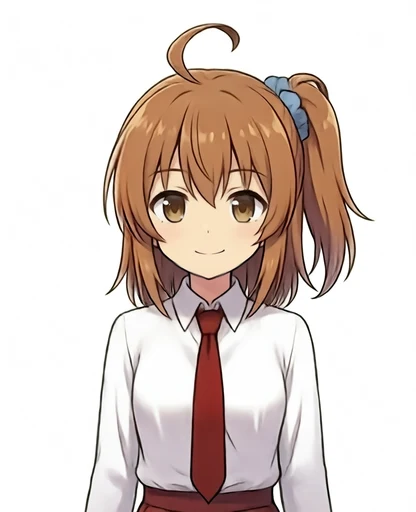
Update (2026-09-25): Integrated the face with head-touch voice chat, false-trigger filtering, and lip sync → StackChan Body Voice Chat on CoreS3: Head Tap, Ghost ASR Fix, Lip Sync
The face I previously added to the CoreS3 in the lip sync article placed a 128x128 pixel art sprite in the center of the 320x240 screen, switching the mouth across three stages.
Now that I have mounted the CoreS3 into a StackChan Body, which includes neck servos and a capacitive head touch pad, I tried replacing the face with illustration art of Kana-chan and filling the entire screen.
Test Environment
| Item | Details |
|---|---|
| Hardware | M5Stack CoreS3 (mounted on StackChan Body) |
| Base Illustration | Local ComfyUI (M1 Max 64GB), WAI-Anima + Kana-chan LoRA + Turbo LoRA |
| Diff Generation | ModelScope API-Inference with Qwen-Image 2.1 (edit mode) |
| Compositing & Resizing | Python (Pillow, NumPy) |
| Flashing | Arduino CLI (board identifier esp32:esp32:m5stack_cores3) |
| Libraries | M5Unified (official M5Stack display/touch library), StackChan-BSP (servo and touch support for StackChan Body) |
Base Illustration
Using the same model and LoRA as in the article redrawing the monochrome icon in Anima style, I generated a stylized, chibi-style upper body facing forward at 832x1024.
In the prompt, the weight for chibi controlled how heavily deformed the character was. At 1.0 it looked too extreme, so I tested lower weights of 0.8, 0.7, and 0.6, settling on 0.7 with seed 424247 for a neutral expression.
I then edited this neutral face into a smile using Qwen-Image 2.1, pasting only the mouth region back onto the neutral face.
All subsequent facial differences are built on top of this smiling base image.
Generating Eye and Mouth Diffs with Qwen-Image 2.1
Starting from the smiling base image, I generated edits using three seeds (801 to 803) for each diff.
The prompt instructions specified only the parts to change, keeping everything else untouched.
| Diff | Instruction Content | Seed Used |
|---|---|---|
| Half-closed eyes | Eyelids half-closed midway through a blink | 801 |
| Closed eyes | Completely closed eyes during a blink | 803 |
| Half-open mouth | Small open mouth mid-speech | 801 |
| Wide-open mouth | Wide open mouth while speaking | Not used (used 803 from half-open) |
For half-closed eyes, seeds 802 and 803 ended up winking with only one eye closed.
For the wide-open mouth, all three seeds produced mouths that opened too wide, so I repurposed seed 803 from the half-open set, which had opened somewhat wider.
The edited images also slightly altered eye details that were not part of the instructions.
Instead of using the full edited image directly, I only composited the eye and mouth bounding boxes onto the base, keeping the hair, body, and outline pixels identical across all frames.

Adjusting the Eye Diff Bounding Box
Initially, the bottom edge of the eye bounding box reached down to the cheeks. In the half-closed eye diff (801), the cheeks had a blush, causing the cheek color to flicker with every blink when composited.
When I raised the bottom edge to exclude the cheeks, the original open eye from the base image faintly showed through beneath the closed eyelids.
To fix this, for the bottom few dozen pixels of the eye box, I took only darker pixels (eyelash lines and pupils) from the diff image, leaving bright skin pixels untouched from the base image.
This eliminated both the see-through eye beneath the closed lids and the cheek color shift.
API Upload Latency
With the ModelScope API, reference images can be sent as Base64 data URLs without hosting them at public URLs.
However, generation initially took 3 to 5 minutes per image.
The reference PNG converted to Base64 was about 1 MB.
When I tested the upload transfer time alone by posting to the API without auth headers, it took 13 seconds (about 66 KB/s), and a second run dropped to 6 KB/s before stalling.
Sending the same payload to a Google endpoint took only 0.2 seconds (about 4.8 MB/s), suggesting that upstream throughput to ModelScope was throttled from this environment.
Since the diffs only touch the eye and mouth bounding boxes and are composited onto the original PNG base, I converted the reference images to JPEG (quality 95), reducing the size to about 206 KB.
Response times improved to 30 to 80 seconds per image.
Timing Verification with WebP Animations

For blinking, I held the open eyes for 1.4 seconds, followed by half-closed for 60 ms, closed for 90 ms, and half-closed for 60 ms before returning to open.

For speech, one mouth cycle comprised closed for 120 ms, half-open for 120 ms, wide-open for 180 ms, and half-open for 120 ms, with blinks layered on top.
Cropping the Face to Fill the Screen
The initial crop prepared for StackChan was a square 240x240 cut around the face, which left 40 px white margins on both sides of the 4:3 display.
To fill the entire screen with the face, I allowed the top of the head and the chin to be cropped out.
I cropped a 4:3 area directly from the 832x1024 source image and scaled it down to 320x240.
Centering the crop on the midpoint between the eyes and mouth, I tested several crop widths on the hardware to find the right balance.
| Position | Crop | Result |
|---|---|---|
| Top-left | Original 240x240 asset | White margins on left and right (not tested on hardware) |
| Top-right | 440 px width on source image | Verified on hardware; decided eyes and mouth should be slightly larger |
| Bottom-left | 340 px width on source image | Top of head and chin mostly cropped out; narrowed slightly more |
| Bottom-right | 300 px width on source image | Eye region fills screen width edge-to-edge; final choice |
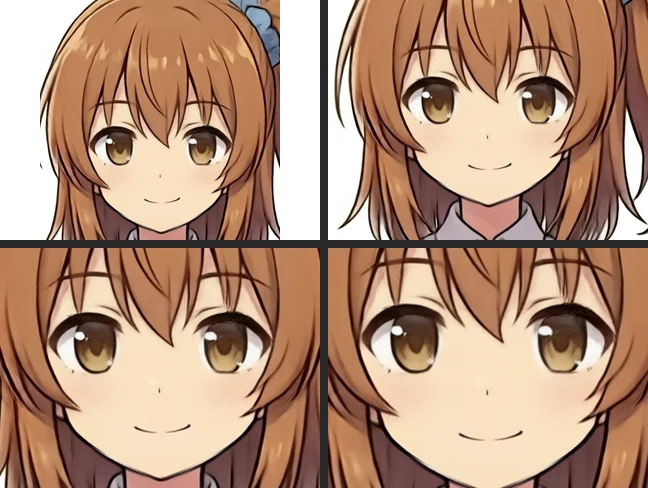
Narrowing the crop width enlarged the facial features accordingly: the eye region expanded from 219x114 px in the 440 px crop to 320x155 px in the 300 px crop.
Splitting Eyes and Mouth into Dedicated Sprites
As with the previous pixel art implementation, PNGs are embedded into flash memory.
At boot, they are unpacked into off-screen canvas buffers (M5Canvas sprites) and pushed to the display via pushSprite().
While the previous 128x128 sprite fit in internal RAM, 320x240 at 16 bits per pixel (2 bytes/pixel) requires 150 KB per frame, so I allocated them in the CoreS3’s 8 MB PSRAM (external RAM).
Storing all 9 combinations (3 eye states x 3 mouth states) as standalone PNGs in flash consumed about 1.07 MB even with the 440 px crop.
To minimize flash footprint against the partition limit (3 MB for this board profile), I separated the images into a single base frame, three eye parts, and three mouth parts instead of storing nine full frames.
After drawing the base frame once at boot, updates only overwrite the rectangular bounding boxes for the eyes and mouth.
The eye and mouth bounding boxes are split so they do not overlap by even a single pixel row.
In the final 300 px crop, the eye region occupies y=0 to 154 (full width of 320 px), while the mouth region occupies y=155 to 239 and x=75 to 244.
Comparing the recomposed images against the fully baked 9 frames, the 440 px version showed differences of up to 21 levels (out of 256).
The discrepancy appeared along the boundary row and was likely due to downsampling interpolation, so I left it as is.
| Crop Variant | Total PNG Size | Full Program Size Flashed |
|---|---|---|
| 440 px, 9 full frames | 1,068,909 bytes | Not flashed |
| 440 px, base + 6 parts | 272,647 bytes | 787,135 bytes |
| 300 px, base + 6 parts | 351,864 bytes | 894,043 bytes |
Unpacking and blitting times were measured on the initial 440 px build (the 300 px build was measured later with the 5-emotion set).
| Metric | Measured on 440 px Build |
|---|---|
| Boot unpacking time | 249 ms |
| Free PSRAM after unpacking | ~7.8 MB |
| Eye part (219x114 px) blit time | ~11 ms max |
Hardware Blinking Test
Blinking ran continuously in the background, while lip sync started on a screen tap and stopped on another tap.
The video below shows the 300 px build blinking without touching the screen or head touch pad.
Adding Five Emotions


With only a smile available initially, I created four additional emotions: Joy, Anger, Sorrow, and Fun.
Because emotional changes affect the entire face from eyebrows to mouth, I generated edits for each emotion using three seeds starting from the smiling base, and composited the full-face region back onto the smile base as the foundation for each emotion.
| Emotion | Prompt Content | Seed Used |
|---|---|---|
| Joy | Eyes opened wide and sparkling, closed mouth smiling broadly | 902 |
| Anger | Eyebrows furrowed low, glaring forward, closed mouth pouting | 902 |
| Sorrow | Inner eyebrows raised, slightly teary-eyed, mouth corners downturned | 902 |
| Fun | Eyes bright and open, grinning with teeth showing | 901 |
Because mouth shapes differ across emotions, I generated half-open and wide-open variations for each emotion using three seeds each.
Reusing the Smile Blink on Anger Erased the Eyebrows
Initially, I tried reusing the closed and half-closed eye diffs from the smiling expression.
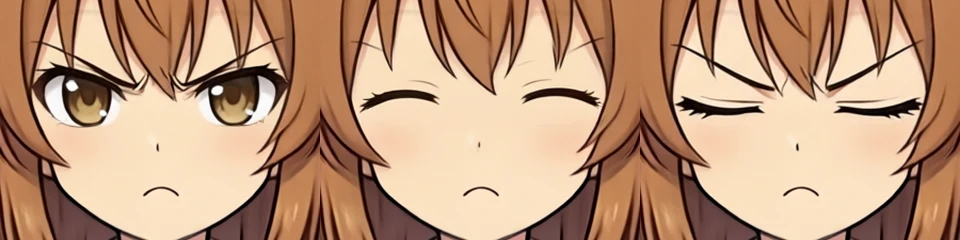
I composited only the eye region excluding the eyebrows, but in the angry face the eyebrows were pulled down close to the eyes and fell inside the bounding box, which erased the angry eyebrows during blinks.
I regenerated the closed and half-closed eye diffs for all four emotions with prompt instructions to preserve the eyebrows.
The regenerated closed-eye diffs kept the angry eyebrows intact throughout the blink animation.
Across the emotion bases (12 calls), mouth variations (24 calls), and regenerated eye variations (24 calls), this required 60 API calls.
Seam Color Discrepancies Between Eye and Mouth Regions
When reassembling the 9 frames per emotion into base and part sprites, the recomposed frames initially differed from the baked frames by up to 82 levels.
Inspecting the affected pixels showed that the bottom edge of the eye diff and the blur feathering on the mouth diff slightly crossed the y=155 seam line.
By restricting eye diff pixels to strictly above the seam and mouth diff pixels to strictly below it, the maximum discrepancy dropped to 2 to 6 levels across all emotions.
Final Emotion Sprites
With the 320x240 crop matching the hardware display, I assembled eye and mouth diffs for each emotion. From top to bottom: Joy, Anger, Sorrow, and Fun. From left to right: neutral open eyes with closed mouth, half-closed eyes, closed eyes, half-open mouth, and wide-open mouth.
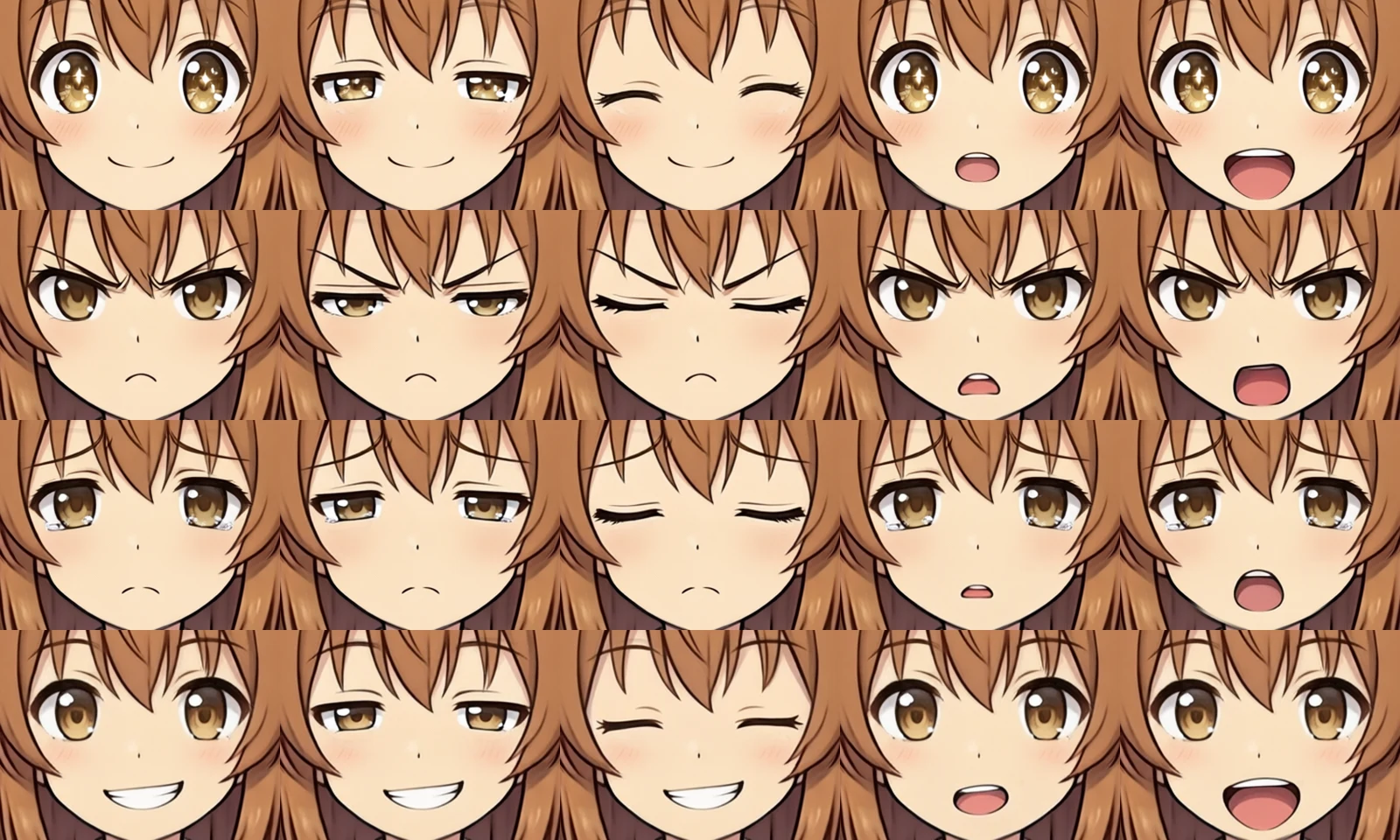
Animations showing concurrent blinking and lip sync from top to bottom: Joy, Anger, Sorrow, and Fun.
Emotion Switching via Head Touch


On the hardware, tapping the capacitive touch pad on top of the StackChan Body cycles through expressions in sequence: Smile -> Joy -> Anger -> Sorrow -> Fun.
Following the method from the head touch test article, taps are detected by confirming there is no stroking motion across pads and the finger releases within 0.8 seconds.
The initial build crashed and entered a reboot loop immediately upon boot.
The serial monitor reported an exception address near 0x74, pointing to an invalid memory read near a null pointer.
When instantiating the emotion sprites in an array, the target canvas display had not been configured; updating the code to specify the target display in pushSprite() resolved the issue and allowed it to boot normally.
| Crop Variant | Total PNG Size | Full Program Size Flashed |
|---|---|---|
| 300 px, 5 emotions (base + 6 parts each) | 2,004,583 bytes | 2,568,959 bytes (81% of the 3 MB app partition) |
| Metric | Measured on 5-Emotion Build |
|---|---|
| Boot unpacking time (5 emotions) | 2,076 ms |
| Free PSRAM after unpacking | 5,471 KB |
| Emotion switch time (redraw base + eyes/mouth) | ~63 ms |
| Eye part (320x155 px) blit time | ~29 ms max |
Screen tap lip sync remains active in this build.
The video below shows cycling through all expressions from Smile to Fun via head taps. The mouth remains closed while blinking runs continuously.