MiniMax H3 Pruned GGUF on EVO-X2: Q4_K Audio-Video Generation on Radeon 8060S
 Contents
I tested MiniMax H3, an open-weights model that generates synchronized video and audio, on my GMKtec EVO-X2 mini PC—a machine I typically reserve for local LLMs.
Pruned and quantized GGUF weights are distributed by Unsloth, which can be executed locally using the ROCm build of stable-diffusion.cpp.
For this test, I chose the 4-bit Q4_K quantization format and used the Kana standing illustration previously created in Qwen-Image 2.1. I tested text-only generation, single-image-to-video (I2VA), and dual-reference generation (Ref2VA).
Verification Environment
| Item | Details |
|---|---|
| Hardware | GMKtec EVO-X2 (Ryzen AI Max+ 395, Radeon 8060S / gfx1151) |
| Memory | 64GB (48GB allocated to VRAM in BIOS; reported as 55,160 MiB in ROCm) |
| OS | Windows 11 Pro 26200, GPU Driver 32.0.31041.1004 |
| Runtime | stable-diffusion.cpp master-929-3f8527a (official win-rocm-7.14.0-x64 release) |
| HIP Runtime | Reused DLLs from local llama.cpp HIP build (C:\llama-hip-b1328) |
| Model Weights | Unsloth/MiniMax-H3-GGUF: fl2va_pruned-Q4_K (11.4GB), ref2va_pruned-Q4_K (11.4GB) |
| Text Encoder | qwen3vl_32b_minimax_h3-Q4_K_M (18.2GB) from the same repository |
| VAE | Comfy-Org/MiniMax-H3: minimax_h3_video_vae_fp16 (5.2GB), minimax_h3_audio_vae_fp32 (0.6GB) |
| Common Settings | CFG 1.0, seed 42, --rng cpu, --diffusion-fa. 4 steps for text-only, 8 steps for character generation |
MiniMax H3 and Pruned GGUF
The MiniMax H3 release includes two separate diffusion model checkpoints depending on the conditioning inputs:
In addition to the main diffusion model, the pipeline requires a text encoder (Qwen3-VL-32B adapted for H3) that translates prompts and reference images into model conditioning, as well as video and audio VAEs that encode/decode between pixel/audio space and latent representations.
| Model | Input Modalities |
|---|---|
| fl2va | Text, plus initial and/or final keyframes (0 to 2 images) |
| ref2va | Text, plus reference images, video, and audio |
Unsloth’s repository provides pruned and quantized versions ranging from Q2_K to Q8_0 for both models.
The table below lists file sizes for fl2va:
| Quantization | fl2va_pruned | Recommended Text Encoder |
|---|---|---|
| Q2_K | 6.72GB | Q2_K_M (13.1GB) |
| UD-Q2_K_XL | 8.06GB | Q2_K_M |
| Q3_K | 8.76GB | Q4_K_M (18.2GB) |
| UD-Q3_K_XL | 9.56GB | Q4_K_M |
| Q4_K | 11.42GB | Q4_K_M |
| Q5_0 | 13.92GB | Q4_K_M |
| Q6_K | 16.59GB | Q4_K_M |
| Q8_0 | 21.44GB | Q4_K_M |
In Comfy-Org’s repository, the full unpruned BF16 model is 66.3GB, while the pruned BF16 model is 40.2GB.
The 11.42GB Q4_K file is roughly 28% of the pruned BF16 size. These are disk sizes, not total memory consumption during inference.
For this test, I used Q4_K for the diffusion model and Q4_K_M for the text encoder.
Unsloth’s README suggests several flags:
| Flag | Purpose |
|---|---|
--mode vid_gen | Required; without this, it defaults to image generation and aborts |
--cfg-scale 1.0 | H3 is a distilled model and does not use CFG guidance; leaving it at default 7.0 fails |
--backend te=cpu | Keeps the text encoder in CPU RAM to conserve GPU memory |
Because 48GB was allocated to VRAM on this EVO-X2, only 15.6 GiB of system RAM was available to Windows.
Since the Q4_K_M text encoder file alone is 18.2GB, it could not fit in system RAM. I omitted --backend te=cpu and loaded all model weights directly into VRAM.
The model is distributed under the MiniMax H3 Community License Agreement.
Running the ROCm Build of stable-diffusion.cpp
The release includes both Vulkan and Windows ROCm binaries.
ROCm is AMD’s GPU computing platform, which uses the HIP runtime.
The Vulkan build launched directly and recognized the Radeon 8060S.
The ROCm release package contained only sd-cli.exe, sd-server.exe, and a 1GB stable-diffusion.dll. Launching it immediately resulted in an error stating that stable-diffusion.dll could not be loaded.
The distribution package lacked the necessary HIP runtime dependencies (such as amdhip64_7.dll).
Adding the local llama.cpp HIP build directory to the system PATH resolved the missing dependencies, and the tool detected the GPU:
set PATH=C:\llama-hip-b1328;%PATH%
sd-cli.exe --list-devices
ggml_cuda_init: found 1 ROCm devices (Total VRAM: 55160 MiB):
Device 0: AMD Radeon(TM) 8060S Graphics, gfx1151 (0x1151), VMM: no, Wave Size: 32, VRAM: 55160 MiB
ROCm0 AMD Radeon(TM) 8060S Graphicsggml_cuda_init appears in the log because ggml uses CUDA naming conventions internally even when targeting ROCm/HIP.
All subsequent generations were run using this ROCm build.
Stopping Background LLM Services to Free VRAM
On this EVO-X2, a llama-server instance serving Qwen3.8-27B (Q6_K) runs continuously, occupying around 22GB.
Because H3 requires approximately 34GB for model weights alone, I shut down the background LLM service prior to testing.
Text-to-Video Generation
First, I tested text-to-video using the prompt from the official README example:
a red fox trotting through falling snow, cinematicsd-cli.exe --mode vid_gen ^
--diffusion-model minimax_h3_fl2va_pruned-Q4_K.gguf ^
--llm qwen3vl_32b_minimax_h3-Q4_K_M.gguf ^
--vae minimax_h3_video_vae_fp16.safetensors ^
--audio-vae minimax_h3_audio_vae_fp32.safetensors ^
--prompt "a red fox trotting through falling snow, cinematic" ^
--width 640 --height 384 --video-frames 25 --steps 4 --cfg-scale 1.0 ^
--diffusion-fa --vae-tiling --rng cpu -s 42 ^
--output out.webmThe initialization log confirmed that all weights were placed in VRAM:
total params memory size = 33909.96MB (VRAM 33909.96MB, RAM 0.00MB): text_encoders 17375.93MB(VRAM), diffusion_model 10975.93MB(VRAM), vae 5558.10MB(VRAM)Although 25 frames were requested, the output video contained 39 frames.
According to the documentation, the frame count is automatically rounded up to 17 * n + 5. Following 25, the next valid value is 39 (17 * 2 + 5).
The framerate is locked at 24 fps; custom values are overridden.
| Pipeline Phase | Execution Time |
|---|---|
| Prompt Processing | 9.91s |
| Diffusion Generation (4 steps, ~10s/step) | 45.88s |
| Audio Decoding | 1.02s |
| Video Decoding | 30.27s |
| Total | 87.12s |
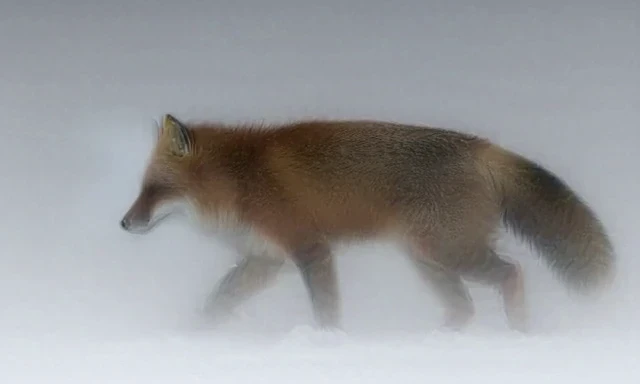
The output WebM included a 32kHz stereo audio track, with an average volume of -56.5 dB and peak of -43.3 dB (relative to 0 dBFS). When listening, no distinct environmental sound was audible.
Using a Character Illustration as the Initial Frame
Next, I used the front-facing standing illustration of Kana from the Qwen-Image 2.1 tests as the initial frame.
This workflow is I2VA (Image-to-Video-and-Audio).
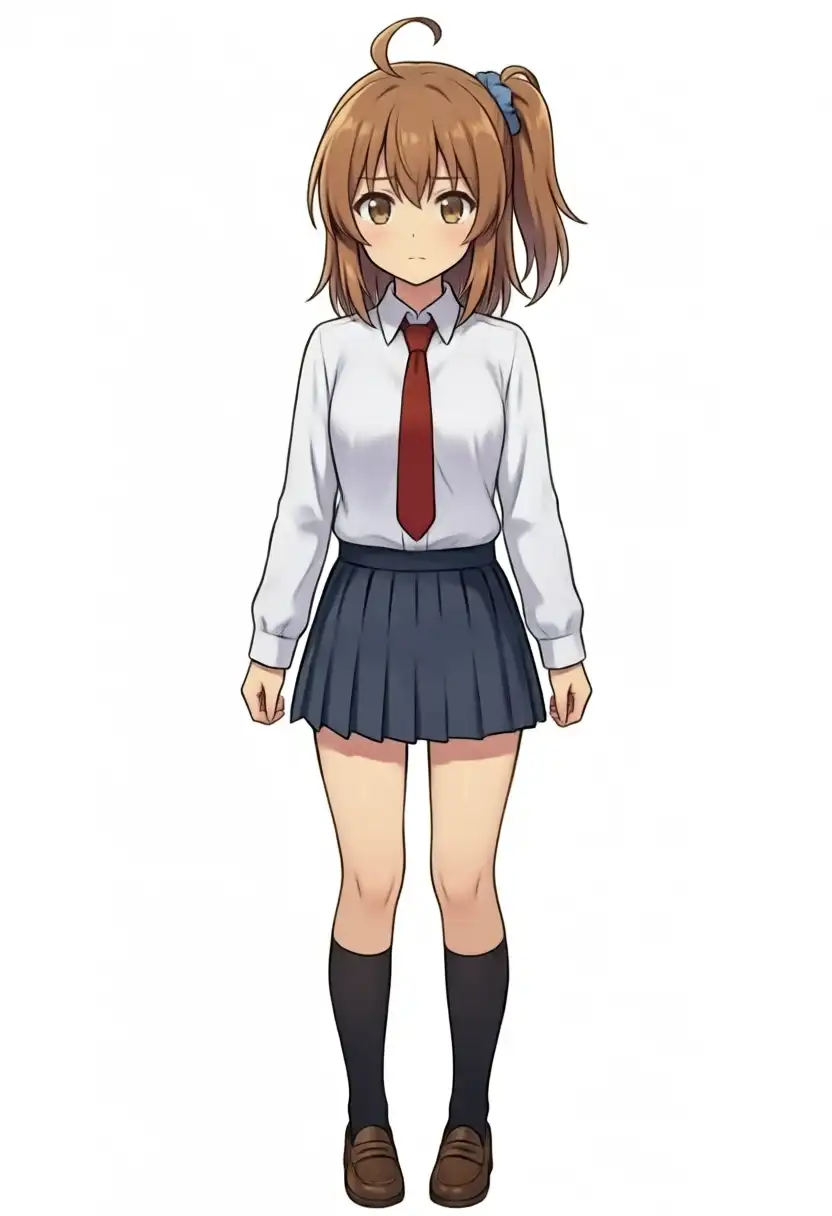
The prompt instructed Kana to smile, wave her right hand, tilt her head, and speak in Japanese:
Anime style animation. The girl with brown side ponytail and blue scrunchie smiles brightly, raises her right hand and waves at the viewer, then tilts her head cutely. Her hair and skirt sway gently. Static camera, clean white background, consistent character design. She says cheerfully in Japanese: "やっほー、かなだよ!"The 832x1216 source image was scaled to 416x608, and produced 56 frames (~2.3s) at 8 steps.
Crash During VAE Encoding with Tiling
Initially, when using --vae-tiling, execution halted without an error message on the 2nd of 6 tiles during VAE encoding of the input image.
Removing --vae-tiling allowed the process to complete successfully.
Output Video: Kana
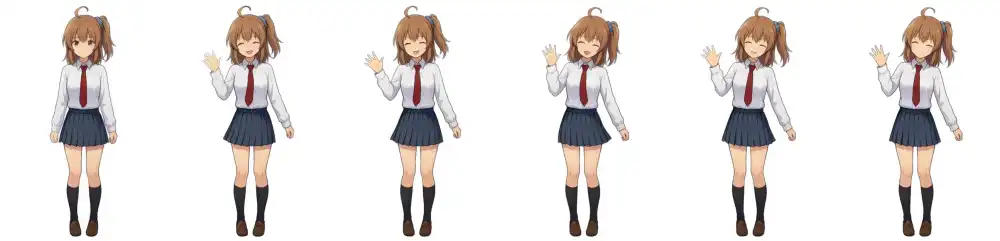
Starting from a neutral expression at frame 0, Kana smiled with an open mouth by frame 11, and raised and waved her right hand across the remaining frames.
Key character details—the side ponytail, blue scrunchie, red necktie, navy skirt, and black socks—remained consistent.
While head-tilting was subtle across the 6 sampled frames, examining crops at 3-frame intervals confirmed a slight head tilt after 1.25s.

Green borders indicate timestamps where pYIN detected voiced segments.
The mouth opened during voiced intervals (0.38–1.00s and 1.25–1.75s) and closed into a smile after 1.88s. While the general timing of speech and mouth movement aligned, precise lip-sync was imperfect.
Transcribing the audio with Whisper (large-v3-turbo) produced:
| Intended Speech | Whisper Transcription |
|---|---|
| やっほー、かなだよ! | ヤッホー!カナダよ! |
Listening confirmed the spoken phrase “Yahho, Kana da yo-”, with the final syllable drawn out.
Conditioning on Two Reference Images
To generate a scene with two distinct characters, I switched to the ref2va checkpoint.
In stable-diffusion.cpp, multiple reference images can be provided by repeating the -r flag. This mode cannot be combined with first/last keyframe conditioning.
The second character was extracted from the dual illustration used in the Qwen-Image 2.1 inpainting tests.
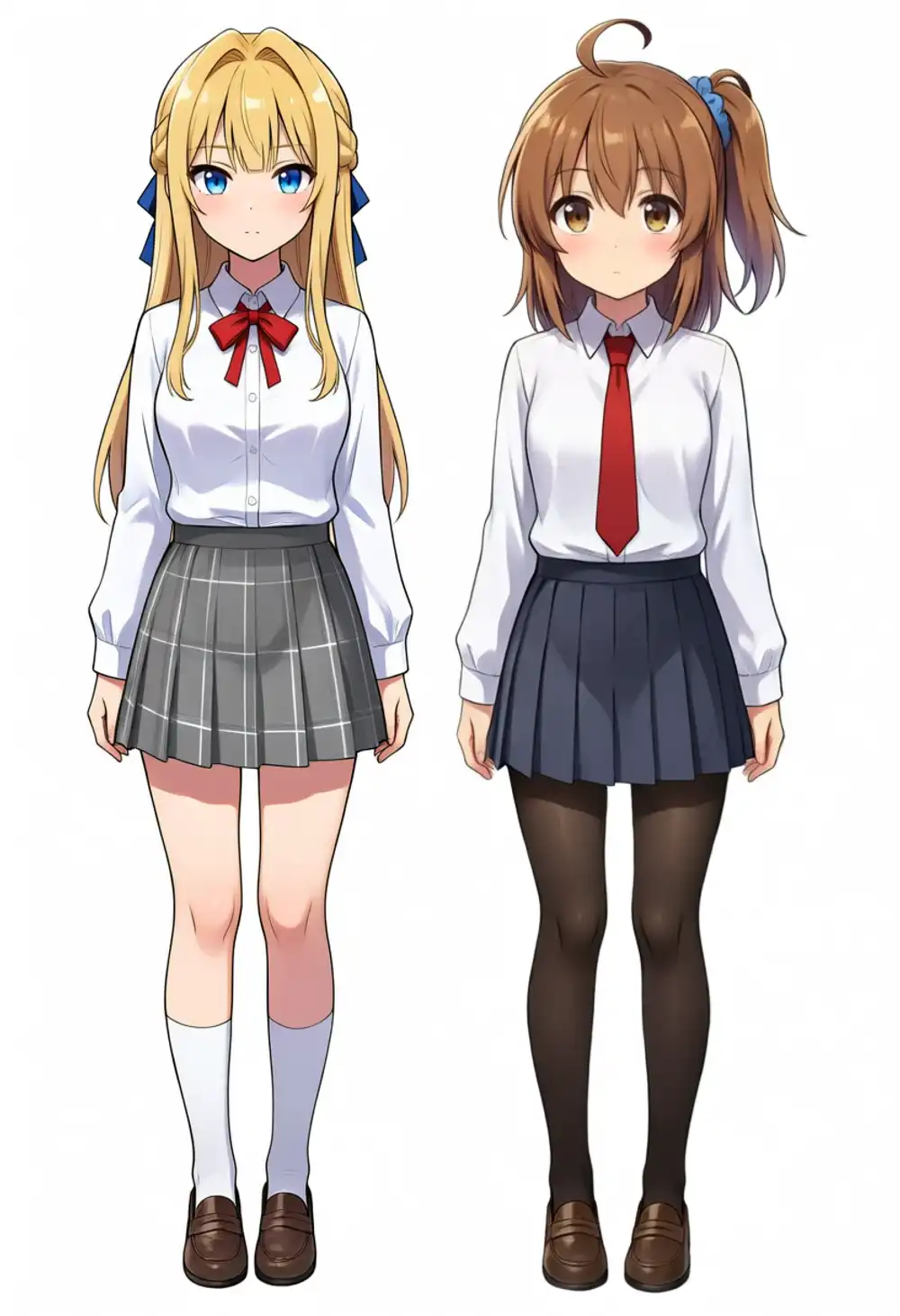
The prompt referenced the images as <Picture 1> and <Picture 2>:
Anime style animation. Use the girl from <Picture 1> (brown side ponytail with a blue scrunchie, red necktie, navy skirt, black socks) and the girl from <Picture 2> (long blonde hair with blue ribbons, blue eyes, red bow, grey plaid skirt, white socks). Keep both characters' appearance and identity consistent with the references. The two girls walk side by side along a sunny school hallway toward the camera, chatting happily. The brown-haired girl on the left turns to her friend and laughs, the blonde girl on the right smiles and nods. Medium shot, slow tracking camera, soft daylight. The brown-haired girl says in Japanese: "ねえ、今日の帰りクレープ食べに行こうよ!" and the blonde girl answers: "いいね、行こう!"Crash During Multi-Reference VAE Encoding
Providing the images at their original resolutions (832x1216 and 500x1462) caused execution to stop silently after printing progress for 6 VAE tiles.
Downscaling them to 320x464 and 224x640 (below the 640x384 canvas area) did not resolve the crash.
Verbose logging revealed that execution halted immediately after HIP graph initialization during the 2nd VAE tile:
  |=========================>                        | 2/4 - 4.76it/s
[VERBOSE] ggml - ggml_backend_cuda_graph_compute: CUDA graph warmup complete
Disabling HIP graph recording resolved the crash completely:
set GGML_CUDA_DISABLE_GRAPHS=1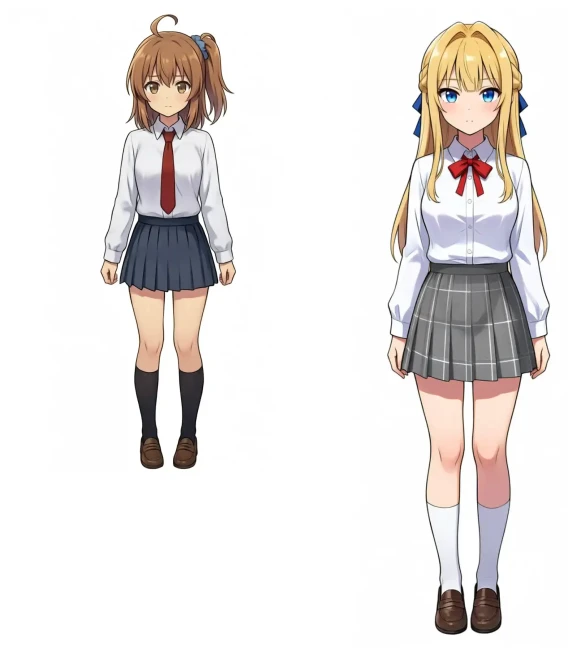
Crash Reproduction and Workaround Validation
To clarify the crash behavior, I ran 11 test iterations under identical settings (seed 42, 8 steps, 56 frames):
| Input Condition | HIP Graphs Enabled | HIP Graphs Disabled |
|---|---|---|
Single image, --vae-tiling enabled | 2 succeeded, 1 crashed | 1 succeeded |
| 2 reference images, full size (832x1216, 500x1462) | 3 crashed | 1 succeeded |
| 2 reference images, downscaled (320x464, 224x640) | 2 succeeded, 1 crashed | 1 succeeded |
All 5 crashes returned exit code 0xC00000FD (Stack Overflow) during VAE encoding right after CUDA graph warmup complete.
In the 4 successful runs with HIP graphs enabled, graph warmup completed later during VAE decoding rather than encoding.
With HIP graphs disabled (GGML_CUDA_DISABLE_GRAPHS=1), all runs completed without downscaling reference images.
Comparing decoded video and audio streams between graph-enabled and graph-disabled runs yielded identical SHA-256 hashes; disabling HIP graphs did not change the output content.
Output Video: Dual Dialogue
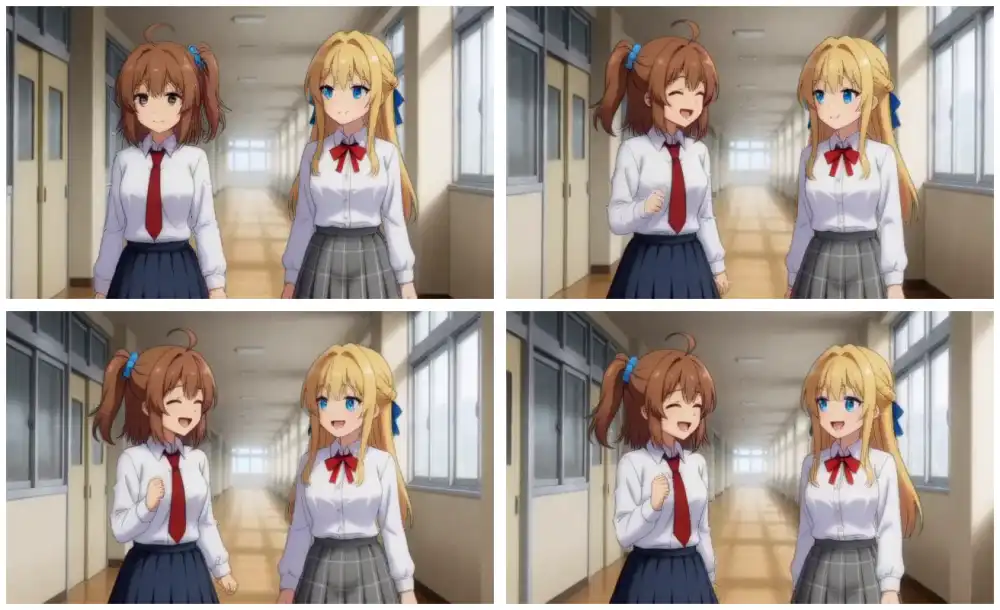
Character positioning remained consistent. Hair colors, ribbons, neckties, and skirt patterns were distinctly preserved. Kana turned toward the blonde girl, who smiled back, though forward walking motion was minimal.
Side Ponytail Consistency
In Kana’s reference image, her side ponytail sits on her left (viewer’s right).
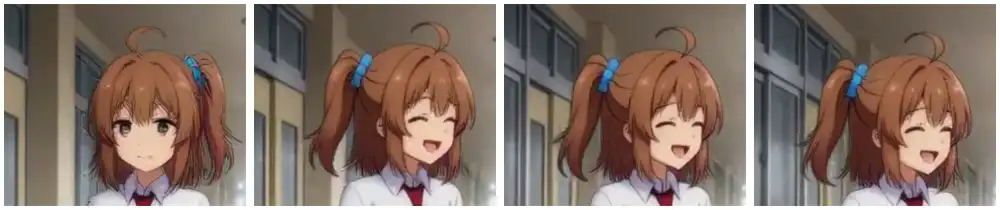
While correctly positioned at frame 0, once Kana turned toward the right at frame 18, the ponytail shifted to the left of the screen (viewer’s left).
When viewing the video, turning sideways caused the hairstyle to morph toward a rear ponytail.
Dialogue Exceeded 2.3s Duration
| Intended Speech | Whisper Transcription |
|---|---|
| ねえ、今日の帰りクレープ食べに行こうよ! / いいね、行こう! | ねえ今日の帰りクレープの |
At 56 frames (~2.3s), two full dialogue lines did not fit. The transcription cut off mid-sentence during Kana’s line, and the second character’s response was not spoken.
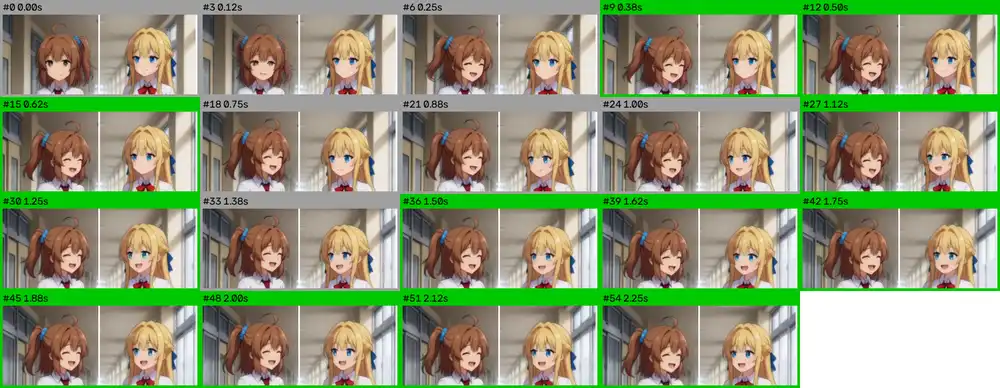
Examining mouth movements showed Kana’s mouth open from 0.38s onward, while the blonde girl opened her mouth around 1.25s.
Generation Time and Memory Usage
| Test Case | Model | Dimensions | Frames | Steps | Diffusion Time | Video Decode | Total Time |
|---|---|---|---|---|---|---|---|
| Fox (Text only) | fl2va | 640x384 | 39 | 4 | 45.88s | 30.27s | 87.12s |
| Kana (1 initial frame) | fl2va | 416x608 | 56 | 8 | 152.68s | 33.66s | 199.87s |
| Duo (2 reference images) | ref2va | 640x384 | 56 | 8 | 155.99s | 34.56s | 205.38s |
Generating 56 frames at 8 steps took approximately 19 seconds per diffusion step.
Log outputs showed VRAM allocation for weights: 10,976MB for the diffusion model, 17,376MB for the text encoder, and 5,558MB for the VAE (totaling 33,910MB). Peak dedicated GPU memory usage reached 35.3–36.9 GiB across successful runs.
Total execution time for a 2.3-second video was approximately 3.5 minutes on the Radeon 8060S.