Qwen-MM-Plugins core in Claude Code and Codex, PDF/video/STL with no API key
 Contents
I installed the core capability of QwenLM’s Qwen-MM-Plugins into both Claude Code and Codex on a 16GB M4 Mac mini and had them read an image, a PDF, an SVG, a CSV, an STL and a video with no API key.
Installing took two commands on each side, but both harnesses stalled on the very first tool call, for different reasons.
Qwen-MM-Plugins adds image, video and document reading to coding agents like Claude Code and Codex as a pair of a Skill and an MCP server.
There are eight capabilities. core is the one that, in the default native-image mode, needs no API key and reads or renders local files, crops images and draws annotations.
Despite the Qwen in the name, core itself does not call any Qwen model under the default QWEN_MM_NATIVE_MODE=1.
It is really a set of renderers that hand image blocks back to whatever model is driving the harness (Claude in Claude Code, GPT in Codex).
This Mac mini has 16GB of memory, so Qwen3.8-27B does not fit, and the api capability needs a DashScope key.
So I limited the test to core, which runs without any key.
Test environment
| Item | Detail |
|---|---|
| Machine | M4 Mac mini, 16GB |
| Claude Code | 2.1.239 |
| Codex CLI | 0.149.0 (model gpt-5.6) |
| uv | 0.9.21 (uvx launches the MCP server) |
| Qwen-MM-Plugins | distribution_version 1.0.7, core 1.0.4 (main as of August 21, 2026) |
| Scope | core only. api requires a DashScope key for the VL/Omni models, which I do not have |
| ffmpeg | Not installed beforehand; added 9.0.1 with brew install ffmpeg |
| Inputs | An Anima-2.9B sample image, the Comic Market 108 venue map PDF (4 pages), a Lagrange-point SVG from an earlier post, a hand-made 8-row CSV, a hand-made square-pyramid STL, and a 12-second video generated with ffmpeg |
What is in Qwen-MM-Plugins
The README table, copied as is.
Eight capabilities, each an independent Skill plus an MCP server where needed. edu-agent is Skill-only.
| Capability | Use | Main requirements |
|---|---|---|
core | Read images and video; render documents, code, data and 3D | No API key. ffmpeg for video/audio |
api | Qwen VL/Omni for image understanding, OCR, grounding (object localization), ASR, segmentation | DashScope |
search | Web search, page extraction, reverse image search | Serper / Exa / Tavily key |
video-memory | Build hierarchical memory for long-video question answering | DashScope, ffmpeg |
video-edit | Image, video and audio generation and editing | DashScope, ffmpeg, Node/Chromium |
blender | Model, texture, light and render in Blender | Blender |
freecad | Parametric CAD, STEP/STL, FEM | FreeCAD |
edu-agent | Create Chinese math/science explainer videos | Skill only. Node/Chromium, ffmpeg. DashScope for narrated video |
The core MCP server exposes seven tools.
read_image, read_video, media_info and visualize read; crop, draw_bbox and save_view write image files out.
visualize dispatches on file extension: pypdfium2 for PDF, resvg for SVG, pandas plus matplotlib for CSV/XLSX, and for 3D it tries Blender, then pyrender, then matplotlib.
The return value is an MCP image block, and with the default QWEN_MM_NATIVE_MODE=1 the image goes straight back to the model.
If the host model is text-only, QWEN_MM_NATIVE_MODE=0 returns a caption written by a VL model through DashScope (default qwen3.7-plus) in place of the image block. That path needs an API key.
Installing into Claude Code
The README points at a curl | bash interactive installer, but the cookbook lists Claude Code’s native plugin commands, so I used those.
claude plugin marketplace add https://github.com/QwenLM/Qwen-MM-Plugins.git
claude plugin install qwen-mm-plugins-core@qwen-mm-plugins
Adding the marketplace took 35 seconds, installing the plugin 4.6 seconds.
Three places were written: enabledPlugins and extraKnownMarketplaces in ~/.claude/settings.json, ~/.claude/plugins/marketplaces/qwen-mm-plugins/ (a clone of the repo, 70MB), and ~/.claude/plugins/cache/qwen-mm-plugins/qwen-mm-plugins-core/1.0.4/ (SKILL.md plus the MCP definition, 188KB).
claude plugin details reports an always-on cost of about 91 tokens and about 1.8k tokens when the Skill is used.
The MCP server itself does not exist yet at this point.
The MCP definition, uvx --from "qwen-mm-plugins[core] @ git+https://github.com/QwenLM/Qwen-MM-Plugins.git@qwen-mm-plugins-core-v1.0.4" qwen-mm-plugins-core, fetches the Python packages on first launch.
Launching it first with --check-system took 126 seconds to download and unpack 75 packages.
About 1GB landed in the uv cache: playwright (132MB), z3-solver (102MB), scipy, pandas, pyogrio, shapely, openai and friends. Later launches take 0.9 seconds.
--check-system lists the system-side tools that are missing.
  ✗ read_video / media_info (video & audio) [core]
      needs: ffmpeg or ffprobe
  ✗ visualize: 3D best-quality render (Blender; else falls back to matplotlib) [viz]
      needs: blender
  ✗ visualize: Office / DrawIO (LibreOffice) [viz]
      needs: libreoffice or soffice
  ✗ visualize: LaTeX (.tex) [system]
      needs: pdflatex
  ✗ visualize: HTML screenshot (Playwright browser) [viz]
      needs: playwright chromium
  ✗ DASHSCOPE_API_KEY not set — run `qwen-mm-plugins-core --setup`
This Mac mini had no ffmpeg, so I ran brew install ffmpeg.
I did not install Blender, LibreOffice, TeX or Chromium, so Office documents, HTML and LaTeX rendering are out of scope this time.
The last line about the DashScope key does not matter in the default QWEN_MM_NATIVE_MODE=1 I used, but the check prints it anyway.
The tool names get a plugin_ prefix
Start a fresh Claude Code session and the MCP server shows up as plugin:qwen-mm-plugins-core:qwen-mm-plugins-core with status connected.
The tools are named like mcp__plugin_qwen-mm-plugins-core_qwen-mm-plugins-core__read_image.
That differs from the mcp__qwen-mm-plugins-core__* the cookbook gives as the permission example.
That form is what you get when the server is registered directly with claude mcp add; installed as a plugin, plugin_ and the plugin name are inserted in front of the server name.
I did not know this at first, so I ran three headless claude -p jobs (image, PDF, SVG) with the cookbook names in --allowedTools.
All three stopped the moment the model called the tool, with “requested permissions but you haven’t granted it yet”, and the model replied “please grant it in an interactive session” and gave up.
Rewriting --allowedTools to mcp__plugin_qwen-mm-plugins-core_qwen-mm-plugins-core__read_image made them go through.
One more thing: Claude Code treats this server’s tools as deferred, and the model loaded the schema with ToolSearch every time before calling.
One prompt took 3 to 5 turns (ToolSearch, tool call, answer) and 20 to 45 seconds.
Image, PDF, SVG
From here on I added --disallowedTools Read,Bash so the model could not fall back to the built-in Read for images, and let it read with the core tools only.
The image is preview_2.9b_00001_.png, one of the samples on the Anima-2.9B model card: four women in black dresses at a bar with a night view. I downscaled it to 900×675.
read_image returned a JPEG resized 675x900 → 672x896.
Claude picked up the hair colors of all four (red, pink, wine red, blue), the kinds of black dresses, and even the halos and horns.
budget has three levels, small / normal / large, and rounds the pixel count to the grid the model splits an image into (the patch grid).
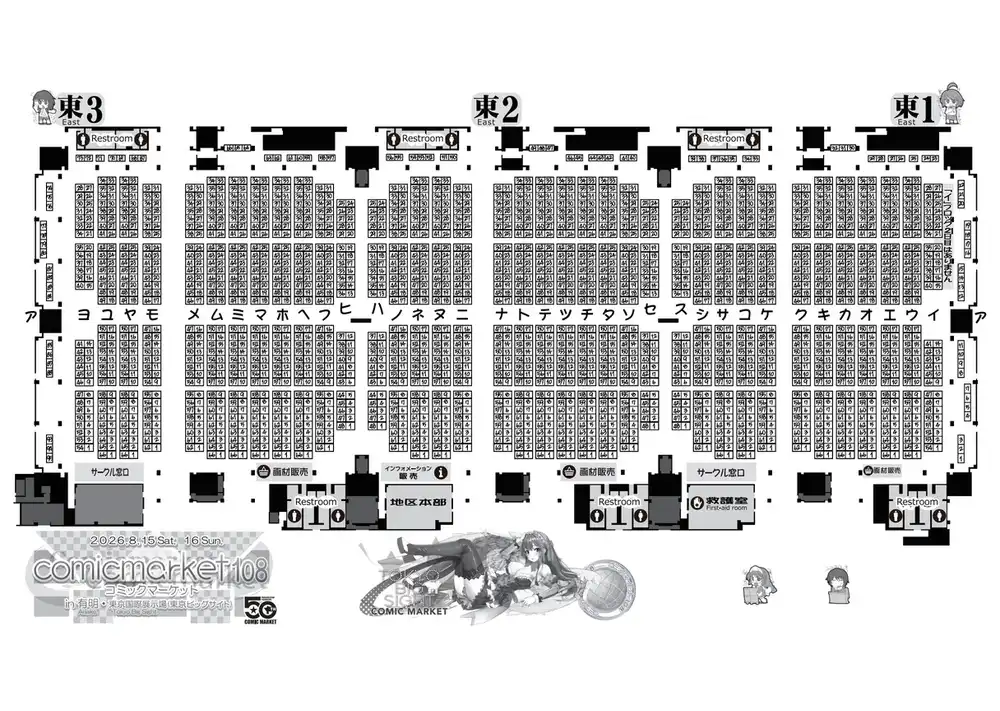
For the PDF, visualize with pages: "1-2" returned [PDF Start], Total pages: 4 | Showing pages: 1-2, then for each page [Page 1 View] 1216x1728 (HxW) followed by an image block, then [PDF End].
It is the Comic Market 108 venue map, and Claude read the dates, the hall names, the katakana block labels, the “not present on day 2” notes, and the overall layout map on page 2.
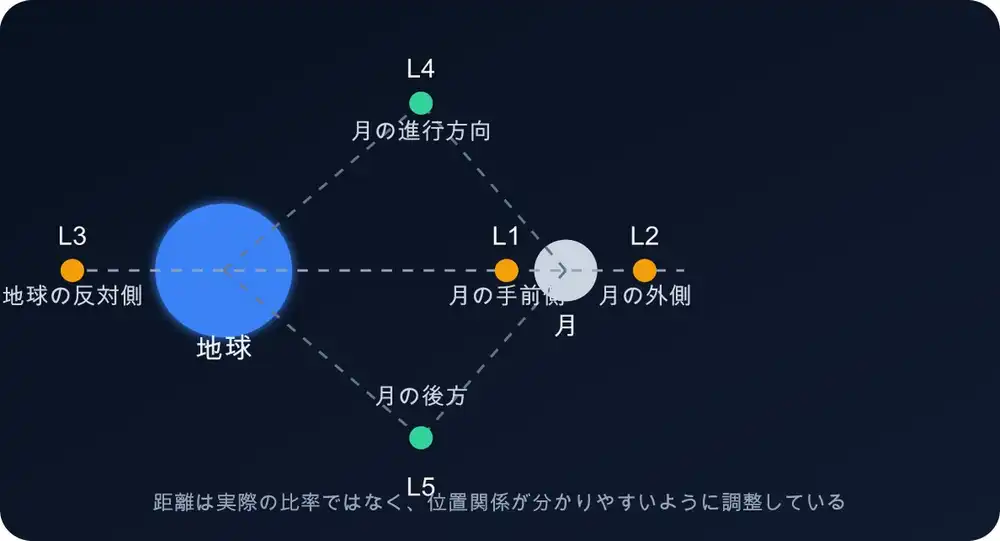
For the SVG, the first read_image call failed with cannot identify image file.
PIL cannot open SVG; visualize dispatches .svg to resvg instead.
Claude saw the error, switched to visualize on its own, and from the [SVG View] 640x1184 (HxW) image read the positions of Earth, the Moon and L1 through L5, the Japanese labels, and the note at the bottom.
Reading the SVG source as text would probably give the same answer, but that was forbidden by the prompt, so it was recognizing the picture.
CSV and STL
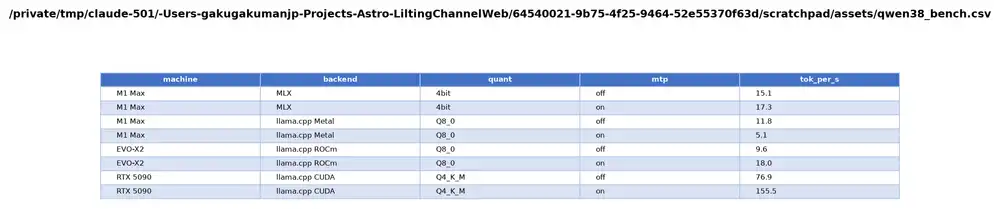
For CSV, visualize returns two things: the table as Markdown text, and an image of the table drawn with matplotlib.
SKILL.md says “Text table + chart image”, but the image that came back was just the table rendered as a picture.
renderers/data.py in the source has nothing but a table-drawing function either.
Claude got the numeric trend from the table text and reported that the image was “a picture of the table, not a chart”.
For STL, with no Blender present it fell back to pyrender and returned three 1216×1216 views: Perspective (elevation 30°, azimuth 45°), Front (0°, 0°) and Top (90°, 0°).
The title carried the vertex and face counts, 5 vertices, 6 faces.
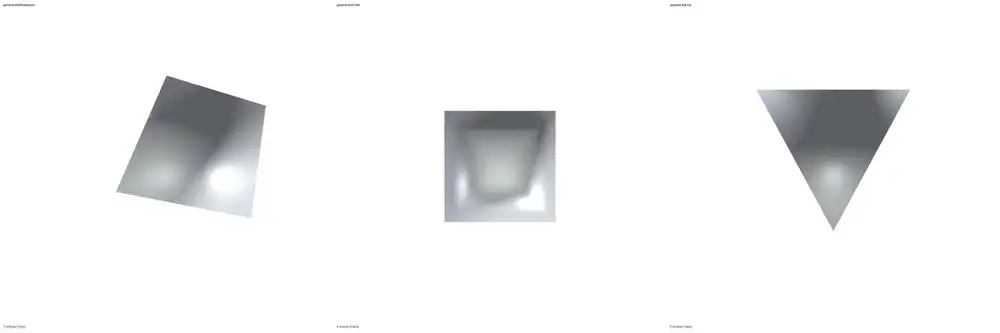
My STL is a square pyramid with Z up, but the Front view is a square seen from the apex, and the Top view is a triangle seen from the side.
The camera placement in model3d.py is y = distance * sin(elev), so elevation is taken along the Y axis, meaning a Y-up world.
An STL built Z-up therefore has Front and Top swapped.
Claude noticed the same thing, said “Front and Top look swapped from what you’d expect”, and still identified a square pyramid from 5 vertices and 6 faces.
The view label “pyramid.stl — Perspective” came out with a tofu box (a missing-glyph square) where the em dash should be. The font used for rendering apparently lacks an em dash glyph.
Video
With ffmpeg I made a 12-second clip: the first 6 seconds are the moving testsrc2 test pattern, the last 6 seconds are static smptebars color bars, and the audio is a 440Hz sine followed by an 880Hz sine.
media_info runs ffprobe and returns the container, duration, bitrate, and per-stream codec, resolution, fps, and audio sample rate and channel count.
read_video at fps=1 returned 12 frames as 672×384 JPEGs, each preceded by a timestamp like <0.0s>.

From the 12 frames at 1fps Claude guessed the cut was between 5.4 and 6.5 seconds, re-read the range on its own with start_time: 5.4, end_time: 6.6, fps: 10 (11 frames), and answered that it is a hard cut at 6.0 seconds.
SKILL.md says to skim at 1fps and then go back over the interesting range at 2fps with a large budget, and the model did exactly that.
It ran media_info, then read_video twice, then answered, in 39 seconds.
Installing into Codex and the approval policy
Codex CLI 0.149.0 also has a plugin marketplace, and the same repository works as is.
codex plugin marketplace add https://github.com/QwenLM/Qwen-MM-Plugins.git
codex plugin add qwen-mm-plugins-core@qwen-mm-plugins
Adding the marketplace took 32 seconds, the install 2.3 seconds.
[marketplaces.qwen-mm-plugins] and [plugins."qwen-mm-plugins-core@qwen-mm-plugins"] were appended to ~/.codex/config.toml, and codex plugin list showed all eight capabilities with only core as installed, enabled.
With codex exec I used a different sample than for Claude Code: preview_2.9b_00003_.png, a blonde woman sitting under an autumn tree, also downscaled to 675×900.
gpt-5.6 first read SKILL.md with sed, then called read_image.
Under the default codex exec, though, that call failed with MCP tool call requires approval, but approval policy is never.
Codex treats MCP tool calls as needing approval, and the default policy for exec rejects instead of asking.
Adding --approve-for-me or --dangerously-bypass-approvals-and-sandbox let it through.
Either way read_image returned two blocks, text and image, and gpt-5.6 answered with silver-white hair, a white, black and gold qipao-style outfit, and a sunset with autumn leaves in the background.
Harnesses that need manual setup, like pi
The installer supports Claude Code, CodeBuddy, Codex, Qoder, OpenClaw, Qwen Code and Gemini CLI; pi, opencode, Hermes Agent, DeepSeek Harness and QwenPaw are manual.
For pi the documented steps are to copy the Skill directory, install the community adapter with pi install npm:pi-mcp-adapter, and add the server to ~/.config/mcp/mcp.json.
That reminded me of something. On another PC I once hooked pi up to Qwen3.8, pointed it at an image file and told it to read it, and it could not.
Yet when I had it build a website it was looking at screen captures, which was puzzling.
Qwen3.8-27B does take image input, so I think the problem was not the model but that pi had no mechanism to send a local image file to the model as an image block.
Captures were visible because the browser tools return images; reading a file by path had no equivalent.
read_image in core is what adds that, and on paper it can be attached to pi too.
Connecting a text-only model
core returns image blocks, so if the caller cannot take images, QWEN_MM_NATIVE_MODE=1 is a dead end.
That is what QWEN_MM_NATIVE_MODE=0 is for: instead of the image, a caption written by a VL model through DashScope comes back in the same place.
The configuration docs spell out that in this mode the tool result images, including local files and desktop screenshots, are sent to the configured VL endpoint, so only use it with data you are fine sharing.
If captioning fails, a Visual content unavailable text block is inserted; it neither leaks base64 nor silently drops the image.
If you are serving an image-capable model like a local Qwen3.8-27B behind an OpenAI-compatible endpoint, NATIVE_MODE=1 works as long as the calling harness forwards MCP image blocks into the model API’s image input and the endpoint accepts that format.
The manual setup guide gives real examples where that is not the case: DeepSeek Harness discards image blocks, and Hermes Agent does not send pixels to the provider, so even an image-capable model may never see the image.
If that is your situation, point DASHSCOPE_BASE_URL and QWEN_MM_API_VL_MODEL at your own endpoint and model, put a non-empty placeholder in DASHSCOPE_API_KEY even if no auth is needed, and set NATIVE_MODE=0.
Incidentally, per pyproject.toml, the dependencies of core are mcp, anyio, pillow and openai plus the visualization extras (pypdfium2, resvg-py, pandas, trimesh, pyrender, playwright and so on). Not a single package with Qwen or DashScope in its name. openai is there for the text-only caption mode.