Fixing Health Record Counting, Sticky Notifications, Stale Photo Context, and Classifier Latency in Kana
 Contents
On November 14, 2026, I fixed four bugs and UI issues that came up after I started using my self-hosted chat gateway “Kana” daily. They covered missing step counts and exercise logs, a Google auth notification banner that stayed stuck on screen, and old meal photos leaking into replies for newly uploaded images.
Kana is a personal browser-based chat app running continuously on my Mac, built so the chat model can access my local data and tools. The browser acts as the UI, a local Python server handles intake and storage, Qwen handles conversation and tool calls (such as saving records, searching the web, or launching background workers like Codex) via Pi (the software runtime connecting the model to tools), and records are saved to a local SQLite database on an HDD.
The health-record feature was added in the update section of my post on interest suggestions and Twilog context, and image handling builds on the earlier post on smalltalk, image generation, and task handoffs.
Kanji Step Counts Were Missing From Graphs
Step counts reported in chat were saved as records, yet they did not show up in the healthcare view’s graphs or averages. Checking the stored rows showed that step counts written in Japanese kanji remained only in the text field, with value set to null and the unit field empty.
When saving a health record, Kana runs a check to verify that the numeric value is grounded in the user’s message. Because that check only matched Arabic numerals, kanji step counts were never stored as numbers and stayed text-only.
I added a parser to the save check that extracts explicit integer step counts written in kanji, full-width digits, or comma-separated digits. If a message contains a single clear step-count candidate, Kana now stores the numeric value and the unit (“steps”) even when the model only passes the text.
| Example Input (Synthetic Test Values) | Parsed Value |
|---|---|
| 一万五千五十歩 (kanji for 15,050 steps) | 15,050 steps |
| 1万5千50歩 (mixed full-width digits and kanji) | 15,050 steps |
| 15,050歩 | 15,050 steps |
| Ranges, vague phrases like “a few thousand steps”, or unknown values | Not converted to a single fixed number |
Days with no report and days explicitly reported as 0 steps remain distinct. Because step counts are often reported multiple times during the day, reports without an explicit cumulative/incremental scope are treated as running totals for that day so they are not double-counted.
For existing data, I corrected the one stored record whose step count had not been saved numerically, using the original message.
Exercise Was Aggregated Only by Duration
My exercise logs mixed rep-based workouts and time-based workouts, but the summary only tracked total exercise duration. Rep-based entries stayed in the text field while only timed entries were added to the total. Some older logs also combined multiple exercises into one text record, leaving even explicitly stated durations as value: null.
I added an activity field to exercise records. Quantities are stored with value and unit: counts use reps, and durations use seconds (s), minutes (min), or hours (h). Each activity is saved as its own record, and if a message containing multiple quantities is about to be saved as plain text only, the tool returns an instruction to split and save each activity separately. Reps are never estimated or converted into time.
I also renamed the UI section from “Exercise Time” to “Exercise — By Activity”, showing daily entries and period totals per activity-and-unit pair. Multiple reports on the same day are handled as follows:
| Report Type | Aggregation Rule |
|---|---|
| Individual reports for the same activity | Summed |
| Daily total or running total | Replaces earlier totals for that day |
| Reps across different activities | Never combined |
| Unclear whether a total overlaps with individual reports | Left undetermined |
I corrected three existing records and added one missing activity record for an older entry that had merged multiple activities into one.
The screenshot below shows the updated healthcare screen using synthetic test data (“12 squats, 45-second plank”).
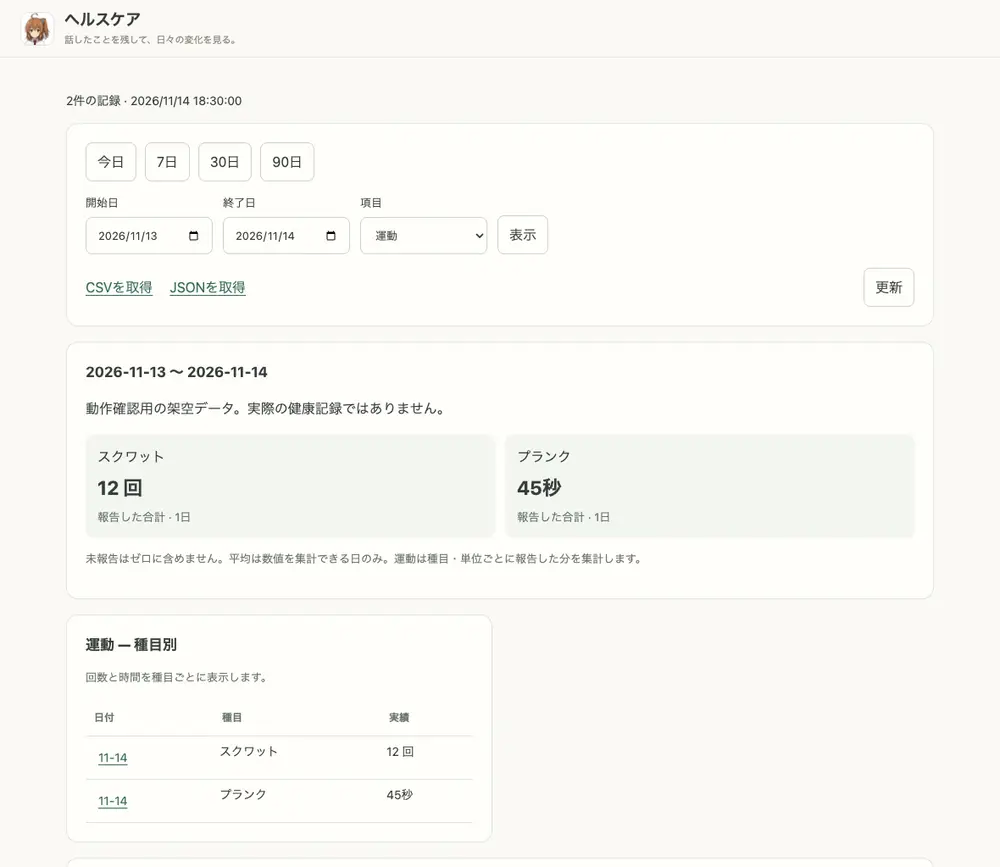
The 45-second plank is tracked as the hold time for that specific activity rather than being mixed into an overall exercise duration.
A Successful Auth Check Banner Stayed on Screen
A banner announcing that a Google authentication check had succeeded kept appearing at the top of the chat screen.
The day before, at 17:00 on November 13, I had run a “7-day check” for Google auth, and both token refresh and connections to three services succeeded. However, the chat header read that saved status on every render and had no condition to hide a successful result, so the banner remained visible.
I updated the display condition so the header only shows an alert banner when the latest completed check failed. Successful results stay out of the chat header and remain only in the settings screen history.
Old Meal Photos Leaked Into Replies for New Photos
When I sent a street photo, Kana’s reply mixed in details from a meal photo I had sent earlier. Replies to shared photos and locations also tended to add unsolicited guesses about the place or local temperature.
To answer follow-up questions like “what was in that photo earlier?”, Kana fetches up to 10 attachments linked to the last four user turns. The bug was that it re-injected those older images and their OCR text into normal chat prompts without distinguishing them from the current turn’s attachments.
I added a current_attachment flag to the attachment metadata (Files.context) passed to the conversation, along with source_turn_id and source_received_at to identify the originating message and timestamp. If the same file is attached again, Kana selects the newest source turn while preserving the order of the current turn’s attachments.
With that metadata in place, I split what gets injected automatically into Qwen’s normal chat input:
| Item | Current Attachment | Past Attachment |
|---|---|---|
| Automatically included in chat input | Text, OCR, and image | Only file ID / location and source turn / timestamp |
| When full content is needed | Already in the prompt | Loaded on demand via the existing attachment_read tool |
This stops older images from being sent automatically when they are not needed, while still letting Kana inspect an earlier photo when asked. I also added the current/past flag and source timestamp to the attachment list stored in the intent-classification log. Normal chat history continues to work as before.
To curb the extra guesses, I also updated the prompt instructions so Kana does not bring up unrelated meals, unsolicited weather checks, or unverified locations and temperatures. Because this part is prompt-based, it cannot guarantee that the model will never misread or guess.
Verification of the Four Fixes
For health records, I ran 17 related tests and verified through the actual API, Pi, and Qwen that “12 squats and 45-second plank” saved as separate numeric records. In the browser at both desktop width and 390px width, per-activity entries and edit history rendered without horizontal overflow.
For notifications, I verified in the browser that the success banner stays hidden, the failure banner appears when expected, and the settings history remains intact.
For attachments, I ran four related tests plus a synthetic conversation against an isolated test SQLite database using the production Qwen and classification pipeline. A turn with a new image sent only that one image and excluded past OCR text; asking about an earlier photo afterward triggered attachment_read to inspect the original image, which I confirmed in both the structured event logs and the outbound request payload. All four fixes were then deployed to my running instance.
Update (November 14, 2026)
Right after those four fixes, I added a doujin (independent fan-made publication) event checklist to Kana. It tracks 25 circles (exhibiting creator groups) I selected across two Japanese doujin conventions: 24 for GSF04 and 1 for SSF11.
Previously I kept this list in CSV files and notes compiled from official circle lists, X posts, and menu images. I moved it into a dedicated page accessible from Kana’s menu.
Saving Checkmarks and Querying From Kana
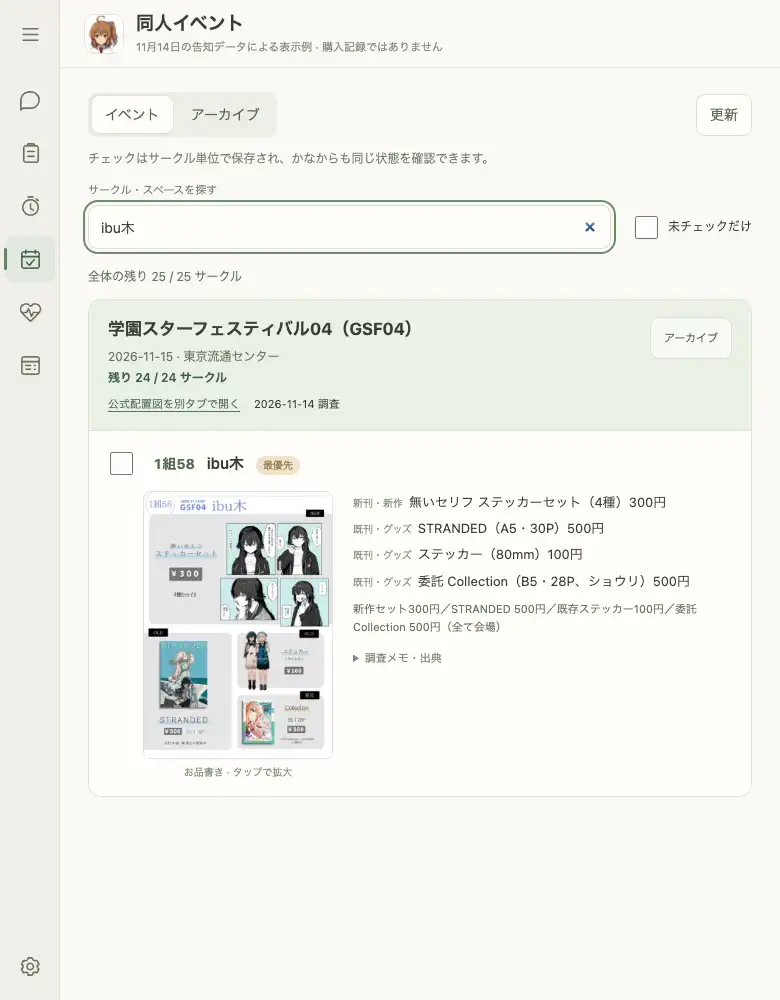
Each entry displays the event name, booth code (the circle’s table/space number at the venue), circle name, new/existing items, and venue prices. Unknown prices, planned releases, and mail-order prices are kept as-is without guessing.
Checkmarks are saved per circle, and a row gets struck through only after the save succeeds. I also added an unchecked-only filter, search by circle name or booth code, and per-event archiving that preserves check state if restored.
Check state is stored in the same SQLite database on the HDD as health records, tied to my main conversation ID. Opening Kana from another PC or browser shows the same state, with auto-refresh every 20 seconds plus manual reload. Saves compare version numbers so concurrent edits from another window are caught as conflicts.
I gave Kana a read-only event_checklist tool so asking “where is left?” or “remaining GSF04 circles” reads the database and returns the remaining count and booth codes. Checked items are treated simply as checked, not assumed to be confirmed purchases or visits.
Promo Images and Venue Maps
I reused the X promo images gathered during my research, attaching one image to each of the 22 circles where a current event image was found (mostly item menus, plus two book covers or set cards). The other three show “no current promo image confirmed” instead of falling back to older event images.
To keep the list light on mobile, the list lazy-loads small thumbnails as they approach the viewport and fetches the full-size image from Kana’s server only when tapped, alongside a link to the original X post. For the same reason, venue maps are linked as official PDFs opening in a new tab instead of being embedded inline.
Below is an example of searching for a circle in the live list using public November 14 promo data.
Page Transition Loading Overlay
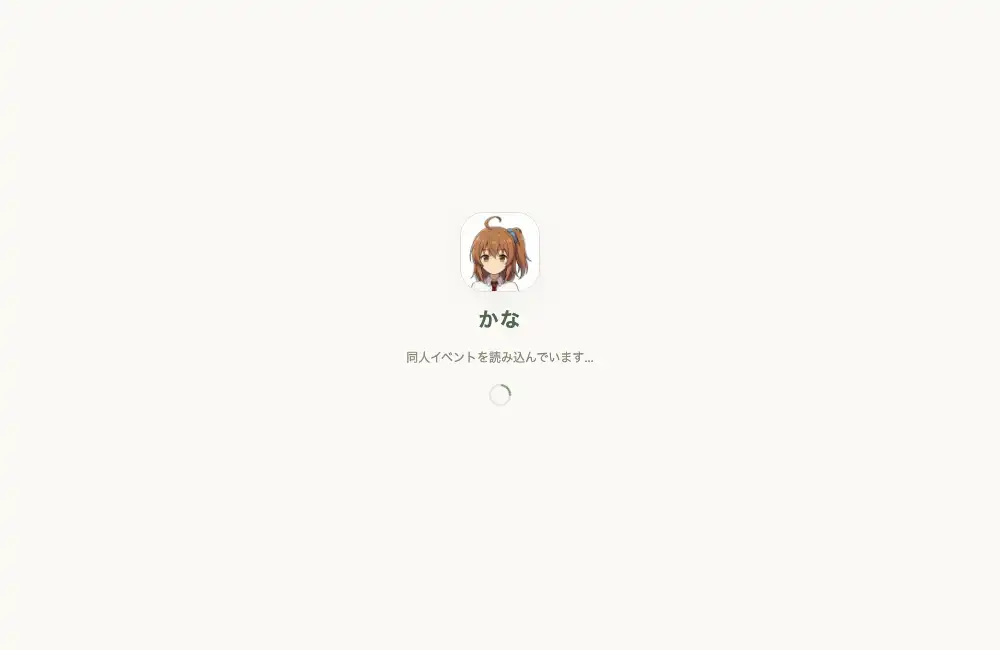
Kana has six pages: Chat, Tasks & Schedules, Doujin Events, Healthcare, Blog DEV (for local blog preview), and Settings. I added a loading overlay with Kana’s icon and the destination page name when switching between them.
The overlay’s show/hide rules are:
| Condition | Loading Overlay Behavior |
|---|---|
| Initial data fetch on the destination page succeeds or fails | Dismiss |
| Blog DEV when a preview is available | Wait until the preview finishes loading |
| Navigating to Chat | Dismiss once history renders; do not wait for background attachment uploads |
| Load finishes in under ~120ms | Do not show |
| In-page links, new-tab clicks, or external links | Do not show |
| Browser back/forward, canceled navigation, or canceling an unsaved-settings prompt | Dismiss |
| Load does not finish within 12 seconds | Dismiss to avoid blocking UI (not treated as a successful fetch) |
Showing an overlay for near-instant transitions causes flicker, so anything under ~120ms skips it with no artificial minimum duration. On the other end, the 12-second timeout ensures a stuck request never locks out the UI.
Below is an example captured in an isolated test environment with an artificially delayed API response while navigating to the Doujin Events page.
Verification of the Checklist and Loading Overlay
I ran four related tests covering checklist persistence, conflict detection, archive restoration, per-conversation isolation, the 25-circle dataset, and HTTP update protection. In Chrome at 390px width with a test database, I confirmed persistence across reloads, cross-browser sync, strikethroughs, filtering, search, archive restoration, and no horizontal overflow.
To test chat queries, I ran them through production Pi and Qwen with only the secondary verifier model (described below) disabled for the isolated test. With one circle marked checked in a synthetic state, Kana reported 23 remaining GSF04 circles and confirmed that circle as checked.
In the browser, I confirmed all 22 thumbnails loaded, expanded to full size, linked to their source posts, and returned control after pressing Escape. All 25 circles and 22 images also rendered on the live page.
For page transitions, I delayed mock API responses to test showing and dismissing across all six pages, along with fast responses, periodic refresh overlap, browser history navigation, API failures, and canceled transitions. After deploying to the live instance, switching from Doujin Events to Tasks & Schedules and back kept all 25 circles and 22 images intact.
Update (November 15, 2026)
On November 15, I reworked Kana’s intake classification. First I fixed an issue where explicit requests to delegate web research to Codex were blocked at intake; then I experimentally swapped the verification model on my Mac to cut classification wait times.
To prevent misclassifications from triggering background tasks automatically, Kana classifies every incoming message in two stages. First, Qwen makes a provisional intent/domain classification: intents include read (information lookup) and execute (performing work), while domains include web, general (general topics or standalone work), and task (checking or managing already-queued tasks).
Alongside a rule-based check and a local embedding model (which maps text to vectors to suggest likely intents), a second verification model independently checks Qwen’s provisional classification. If Qwen and the verifier disagree, Kana refuses to queue the message as a task.
Codex Research Delegation Was Blocked at Intake
Even when I explicitly asked Kana to have Codex research something, intake rejected it. Qwen classified the message as execute/web, while the verifier corrected it to read/web, causing a mismatch that blocked execution.
On top of that, Kana’s normal task intake assumed implementation work tied to my blog repository; there was no path for handing standalone web research to Codex without a repository.
I added a dedicated delegate_research path. It keeps the classification as read, web, and immediate timing, while the server’s intake layer verifies that I explicitly requested delegation and named the target agent. If Qwen’s provisional label is off, Kana corrects it within the same turn so I do not have to rephrase with a magic phrase.
Short follow-up instructions inherit the research topic from the previous turn, and progress appears on the existing Tasks page and in notifications. Codex launches in read-only mode (it does not edit repositories or local code—it only reads web pages and saves a sourced report.md), while Qwen stays available for normal chat.
For now, only Codex is wired to this path; asking for Claude or Antigravity (AGY) will not silently fall back to Codex. I also fixed URL logging when Codex opens multiple pages in one call so all fetched URLs in the result array are recorded as read, while URLs that only appeared in search snippets are not.
I tested this in a synthetic conversation through Pi and Qwen, confirming Codex launched, fetched official docs, saved the report, and sent a completion notification. In a real license-research run afterward, Codex launched and saved a report in about 120 seconds, then stopped in a “needs review” state without asserting a license because it could not fetch the target distribution page or API.
Classification Wait Times
Previously, after Qwen’s provisional classification, Kana launched Luna via CLI to verify the label before Qwen could continue with tool calls or a reply. Across the 40 most recent saved Luna verifications, total classification verification time (including CLI startup and network latency) had a median of 7.77 seconds (range: 6.00 to 10.57 seconds).
Because this classifier also determines whether a message is ordinary chat, skipping classification for normal chat is not an option. Rather than just swapping to another CLI such as Claude, Codex, or AGY, I looked for a model that returns choices directly without generating prose.
Checking ModelScope and Finding THX-02
Listing models on ModelScope’s international API with my existing key returned 36 models, with no dedicated classifier or usable embedding candidate. Sending embeddings requests to Qwen3-Embedding-8B and BGE-M3 returned HTTP 400 (Invalid model id)—being listed in the catalog did not mean the endpoint supported them.
That led me to THX-02, which uses HAL-X’s own HTTPS API rather than ModelScope’s common endpoint. According to the THX-02 API reference, it picks from supplied options and returns per-option probabilities; single-choice questions use the choice format. Setting think: false skips chain-of-thought generation and classifies directly. Each question counts as one decision, and keyless anonymous usage is capped at 60 decisions per minute per IP.
Experimentally Switching Only the Verifier to THX-02
On my Mac, I experimentally switched only the verifier from Luna to THX-02. Qwen’s provisional classification and replies on Pi, the rule-based check, the local embedding helper, other uses of Luna, and the worker agents all remained unchanged.
I replaced the Luna CLI invocation with a single HTTPS API call bundling five questions: four for intent, domain, timing, and readiness (whether it can run immediately), plus one asking how many requests are in the message. Requests use think: false and tta: 1 (tta sets how many option permutations are evaluated; 1 evaluates once).
On response, Kana checks the types, probabilities, model name, presence of all five answers, and that both output_tokens and thoughts are 0 (confirming no extra text or reasoning was generated), then maps the result into the existing verdict schema. Qwen still writes the chat reply.
If confidence is low, the request count mismatches, the verdict disagrees with Qwen, or the network call fails, Kana does not authorize a task and keeps all existing intake gates. Timeout is 10 seconds, and errors or HTTP 429 (rate limit) do not automatically fall back to another model.
Because a single-request message sends 5 questions (5 decisions), the anonymous 60 decisions/minute cap works out to roughly 12 messages per minute. Payloads are limited to the current input and necessary recent context—credentials, GPS coordinates, raw images, and the full database are never sent.
Misclassifications and Fixes During THX-02 Testing
To test the switch, I prepared an 8-message suite covering four categories (2 each): normal chat / quantity questions, web search, smalltalk, and new task intake.
The first run scored 7/8: a request for a new standalone HTML prototype was misclassified as the task domain (which is reserved for checking or managing already-queued tasks, not creating new standalone ones). I sharpened the definitions so standalone new prototypes map to general, while task covers status, artifacts, and cancellation of existing queued tasks.
The second run scored 6/8. A general-knowledge quantity question was labeled as smalltalk, and in the following step Qwen invented a grounding ID (an ID referencing which piece of context supported the verdict) that had never been supplied, which triggered the validator’s unknown-ID rejection and caused storage to fail.
In response, I explicitly classified factual, quantity, unit, definition, and calculation questions as read. I also constrained the output schema so only real grounding IDs are valid choices, allowing Qwen up to two in-turn retries on schema errors while keeping the check that rejects unknown IDs.
For single-request turns, Kana also hides Qwen’s provisional label from THX-02 so the verifier judges independently from the raw message and context.
Classification Latency Across the 8 Test Conversations
After those fixes, I ran all 8 test conversations sequentially against an isolated SQLite database and temporary HDD folder using real Pi, Qwen, and THX-02. Ground-truth labels were kept strictly on the test harness side. All 8 (2 per category) succeeded in both classification and reply persistence.
| Category | Median Classification Time | Median Total Reply Time |
|---|---|---|
| Normal chat / quantity questions | 1.48s | 9.08s |
| Web search (returning official URLs) | 1.68s | 28.64s |
| Smalltalk replies | 1.47s | 6.98s |
| New task intake | 1.49s | 15.60s |
Across all 8 runs, median classification time was 1.48 seconds (range: 1.45 to 1.85 seconds). This is not a pure model-speed benchmark against Luna’s 40-run median of 7.77 seconds, because the inputs differed and removing CLI startup plus trimming prompt size also contributed. The 1.48s figure covers verification only, not full reply time.
For the two new-task cases, I verified each created an isolated prototype folder and intake ID up to the queued state without launching the implementation CLI. The other six cases created zero stray tasks, schedules, or publications.
I also ran 33 related tests and verified in the actual Pi extension that invalid grounding IDs are corrected internally and that read verdicts never authorize task execution.
Viewing Classification Records in the UI
In Kana’s chat UI, expanding “Classification rationale” on any reply with a saved verdict shows how that message was classified. After switching the verifier to THX-02, the verifier line displays thx-02.
The screenshot below shows the synthetic test turn “How many are in a dozen?” and its saved reply re-rendered in Kana’s chat UI.
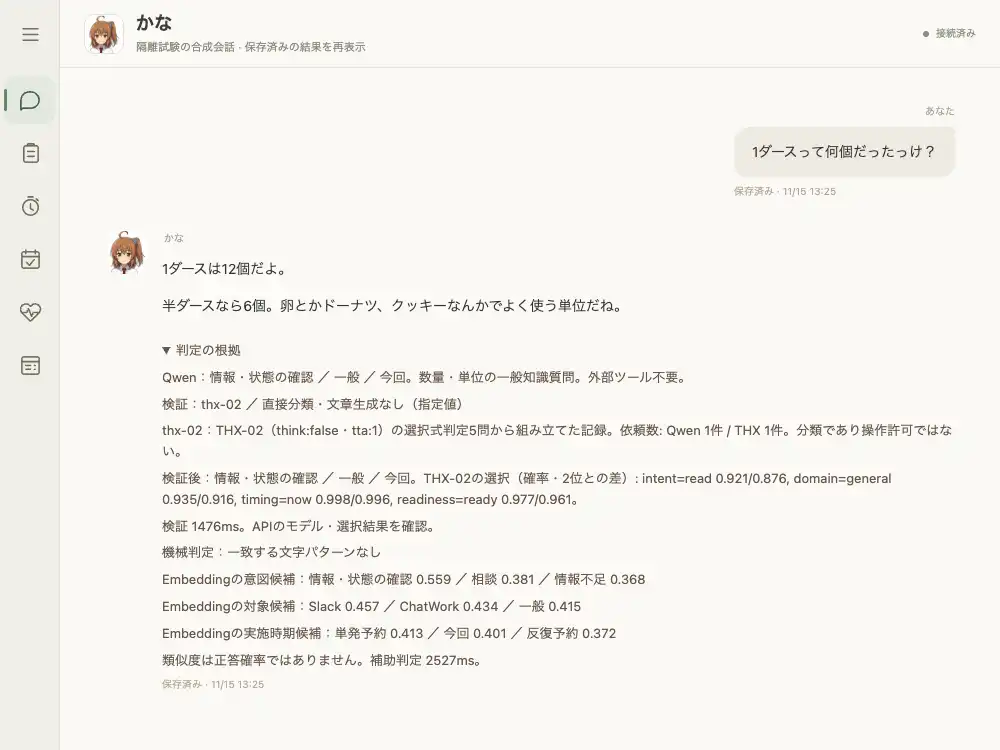
The UI separates the requested settings (labeled as configured values) from the line confirming the actual model name and choices returned by the API. The displayed 1476ms is the stored verification time (1475.5ms) rounded for display, measuring only the API verification step for that single turn.
Deploying to the Live Instance and Real Smalltalk
I deployed the changes to my running instance with the experimental THX-02 verifier enabled.
In two short real-world back-and-forth exchanges about seasonal wardrobe changes, classification took about 2.3 seconds, while total reply times were 10.3 seconds and 13.8 seconds. The wait for Luna is gone, though the time spent on Qwen’s text generation, tool calls, and web search remains.