The Technical Architecture of Kana Chat
 Contents

I want to use AI agents daily, but browser-automation tools carry a real risk of account bans. Stealing API keys or passing OAuth tokens through unofficial channels is out of the question. So why not just use the official CLIs that each company ships? That’s where Kana Chat started.
It uses the authentication flows of official CLIs like Claude Code, Codex, and Gemini CLI as-is. Because it runs on the user’s existing subscriptions, there’s no risk of terms-of-service violations. What it does is act as a frontend wrapper around those CLIs — it has nothing to do with authentication.
Intended Use Case
Fire off a task, walk away, and get notified when it’s done. Fire-and-forget. It doesn’t assume you’re always sitting in front of your device.
Having Codex and Claude loop back and forth to run tasks continuously is technically possible, but I’m not designing for fully autonomous, endless operation. Letting something run autonomously requires handing over shell access, API tokens, passwords — all of which connect directly to personal data leaks or a compromised PC. Technically fascinating, but the mental barrier to doing this in your own environment is high. So instead, tasks are scoped to discrete units, and a tool approval gate restricts destructive operations.
How Is This Different From Using CLIs Directly?
Orchestrating Claude Code or Codex directly covers nearly the same ground. Kana Chat adds two things on top of that:
- Per-task session isolation: Each job launches the CLI in its own dedicated tmux window. Context from one task can’t leak into another.
- Eliminating context pollution: Casual chat, lookups, and status checks create noise that shouldn’t reach the agent’s execution plan. Claude Code’s Plan mode can clear context, but it wipes everything including useful history. Kana Chat keeps conversation history in an external SQLite database and generates a clean prompt at task submission time — avoiding that problem while preserving what matters.
System Architecture
flowchart TB
    A["iPhone Browser<br/>WebSocket + HTTP"]
    B["FastAPI (:8000)<br/>Task management / WS / Static files"]
    C1["Claude Code"]
    C2["Codex"]
    C3["Gemini CLI"]

    A -- "Tailscale VPN" --> B
    B -- "tmux session control" --> C1
    B -- "tmux session control" --> C2
    B -- "tmux session control" --> C3
iPhone and Mac are connected directly over Tailscale. No ports are exposed to the internet — FastAPI is accessed directly within the VPN. Each CLI uses whatever authentication the user already has set up.
What Each Layer Does
Frontend (HTML SPA)
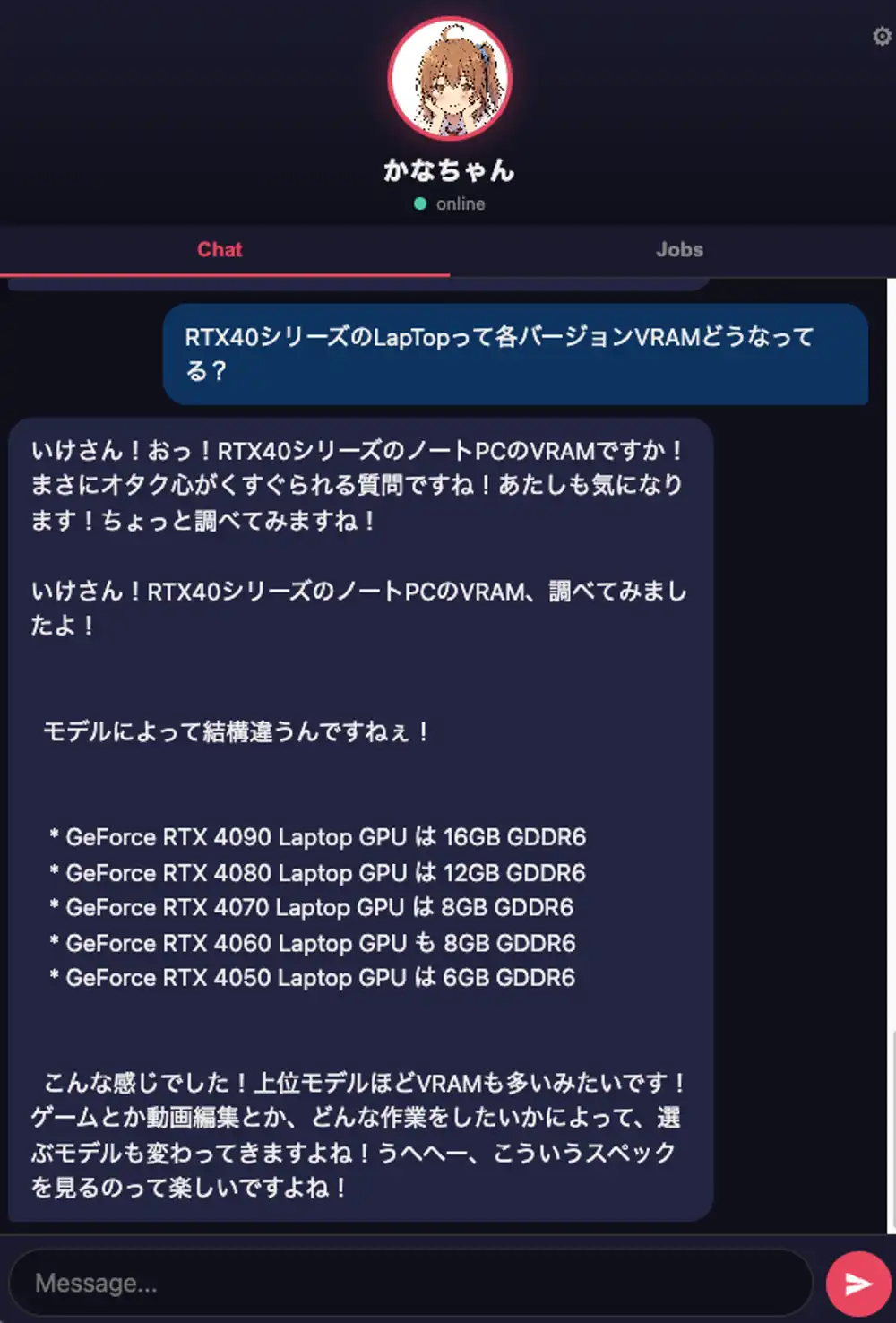
Chat UI and job dashboard. Receives streaming output over WebSocket.
FastAPI Backend
Handles message send/receive, job CRUD, and WebSocket stream delivery. Sessions, jobs, and TODOs are persisted in SQLite. Intent classification uses Haiku to route between chat and status queries.
tmux Bridge
This is the core of Kana Chat. CLI TUI output is read via tmux pane capture, stripped of ANSI escape sequences, soft-wrap expanded, and converted to plain text. User messages are injected with tmux send-keys. Rather than treating the CLI as an API, it relays whatever appears on the terminal as-is.
This means it doesn’t depend on any CLI’s internal protocol or output format. CLI version upgrades that change internal APIs don’t affect anything here.
CLI Workers
Claude Code, Codex, and Gemini CLI are launched directly in tmux windows.
- Full mode: Codex decomposes the task, multiple Claude workers execute in parallel, then a review step runs
- Simple mode: A single Claude worker executes directly
Each job gets its own window and follows a read-instruction → execute → write-results flow.
Conversation History Management
Conversation history is managed independently from the CLI’s context. In addition to persistent logs, there’s a quickly-readable file format.
- SQLite (
conversations): Master log — all messages stored with session IDs state/recent.md: Recent conversation log. Keeps the latest 40 messages across sessions, updated on every send/receivestate/summary.md: Topic summary. Extracts topics from user messages at regular intervals and keeps a running list
Heartbeats, job creation, and CLI session recovery just read these files directly — no need to query SQLite every time.
Heartbeat (Automatic Task Suggestions)
Periodically scans conversation history and uses Haiku to extract “things you might want to do or are struggling with,” then surfaces them as task suggestions.
- Fetch recent conversation messages
- Send to Haiku and extract task candidates (up to 3)
- Check for duplicates against running and completed jobs (Haiku decides)
- Register only new tasks as pending jobs and notify the frontend via WebSocket
The user approves suggestions before they enter the job pipeline. They’re just suggestions — nothing runs automatically.
Tool Approval Gate
Automatically approves or rejects tool-use requests from the CLI.
- Allowed: web_search, curl, and other read-only operations
- Rejected: rm, mkdir, git, bash execution, and other destructive operations
This is where the fear of autonomous execution gets addressed. Reads pass through automatically; writes and executions get stopped at the gate. This way, fire-and-forget usage can’t cause catastrophic accidents.
Meanwhile, I keep wondering why everyone is throwing full permissions at OpenClaw and letting it run wild. Even experts have gotten burned doing that — so what happens to everyone else? And stealing Antigravity’s OAuth tokens to hit private APIs is just obviously wrong. That’s exactly how you get banned. Using AI as an excuse doesn’t make it less like theft.

All images on this page were generated using my own Kana-chan LoRA (Illustrious-based).
Related Articles
- Production Deletion, Context Loss, Usage Exhaustion — Three Ways AI Coding Tools Break
- Memory Injection Attacks on AI Agents and Automated Smart Contract Exploitation
- How the Cline AI Bot Was Weaponized in a Supply Chain Attack: The Full Story of “Clinejection”
- npm Supply Chain Worm “SANDWORM_MODE”
- The Next Form of AI Agent Orchestration: Claws and Cord