SoftEther VPN サーバーの構築メモ
 目次
目次
ShadowSocks、V2Ray に続いて、実は SoftEther VPN も立ててた。というかこっちが本命だった。当時のメモが出てきたのでまとめておく。
SoftEther VPN とは
SoftEther VPN は筑波大学発のオープンソース VPN ソフトウェア。複数のプロトコル(SSL-VPN、L2TP/IPsec、OpenVPN、MS-SSTP など)をサポートし、高速かつ柔軟な VPN 環境を構築できる。
ShadowSocks / V2Ray との違い:
- ShadowSocks / V2Ray: プロキシ。特定アプリだけ経由させる
- SoftEther VPN: 本物の VPN。全トラフィックをトンネル経由にする
GUIの管理ツール(VPN Server Manager)があるので、設定が比較的わかりやすい。
サーバー構築手順
CentOS 7 での手順。
依存パッケージのインストール
mkdir -p /usr/local/src/yum/21.softether_server
cd /usr/local/src/yum/21.softether_server
yum --enablerepo=epel --downloadonly --downloaddir=./ install gcc gcc-c++ glibc make binutils zlib openssl readline ncurses zlib-devel openssl-devel readline-devel ncurses-devel psmisc
yum localinstall *.rpm
SoftEther VPN Server のダウンロードとビルド
公式サイトから最新版を確認: http://jp.softether-download.com/files/softether/
wget http://jp.softether-download.com/files/softether/v4.25-9656-rtm-2018.01.15-tree/Linux/SoftEther_VPN_Server/64bit_-_Intel_x64_or_AMD64/softether-vpnserver-v4.25-9656-rtm-2018.01.15-linux-x64-64bit.tar.gz

tar xvfz softether-vpnserver-v4.25-9656-rtm-2018.01.15-linux-x64-64bit.tar.gz
cd vpnserver
make
# 1 → 1 → 1 で進める

cd ..
mv vpnserver /usr/local/
cd /usr/local/vpnserver/
自動起動スクリプトの作成
/etc/init.d/vpnserver を作成:
#!/bin/sh
# chkconfig: 2345 99 01
# description: SoftEther VPN Server
DAEMON=/usr/local/vpnserver/vpnserver
LOCK=/var/lock/subsys/vpnserver
test -x $DAEMON || exit 0
case "$1" in
start)
$DAEMON start
touch $LOCK
;;
stop)
$DAEMON stop
rm $LOCK
;;
restart)
$DAEMON stop
sleep 3
$DAEMON start
;;
*)
echo "Usage: $0 {start|stop|restart}"
exit 1
esac
exit 0
chmod 755 /etc/init.d/vpnserver
/sbin/chkconfig --add vpnserver
/etc/init.d/vpnserver startカーネルパラメータの設定(IPsec用)
/etc/sysctl.d/60-ipsec.conf を作成:
net.ipv4.ip_forward = 1
net.ipv4.conf.all.accept_redirects = 0
net.ipv4.conf.all.rp_filter = 0
net.ipv4.conf.all.send_redirects = 0
net.ipv4.conf.default.accept_redirects = 0
net.ipv4.conf.default.rp_filter = 0
net.ipv4.conf.default.send_redirects = 0
net.ipv4.conf.eth0.accept_redirects = 0
net.ipv4.conf.eth0.rp_filter = 0
net.ipv4.conf.eth0.send_redirects = 0
net.ipv4.conf.lo.accept_redirects = 0
net.ipv4.conf.lo.rp_filter = 0
net.ipv4.conf.lo.send_redirects = 0
設定を反映:
sysctl -p /etc/sysctl.d/60-ipsec.confファイアウォールの設定
firewalld を使う場合、VPNサービス用のポートを開ける。
/etc/firewalld/services/vpnserver.xml を作成:
<?xml version="1.0" encoding="utf-8"?>
<service>
  <short>VPN</short>
  <description>SoftEther VPN Server</description>
  <port protocol="tcp" port="443"/>
  <port protocol="tcp" port="992"/>
  <port protocol="tcp" port="1194"/>
  <port protocol="tcp" port="5555"/>
  <port protocol="udp" port="1194"/>
  <port protocol="udp" port="500"/>
  <port protocol="udp" port="4500"/>
</service>
firewall-cmd --add-service=vpnserver --zone=public --permanent
firewall-cmd --add-service=ipsec --zone=public --permanent
firewall-cmd --reloadまたは firewalld を無効化(当時はこっちでやってた):
systemctl stop firewalld
systemctl disable firewalld
GUI設定(VPN Server Manager)
サーバー構築後、Windows の VPN Server Manager から接続して設定を行う。
SecureNAT の設定
物理的なブリッジを作らず、SoftEther 内で NAT と DHCP を完結させる構成。サーバー側でルーティング設定が不要なので楽。
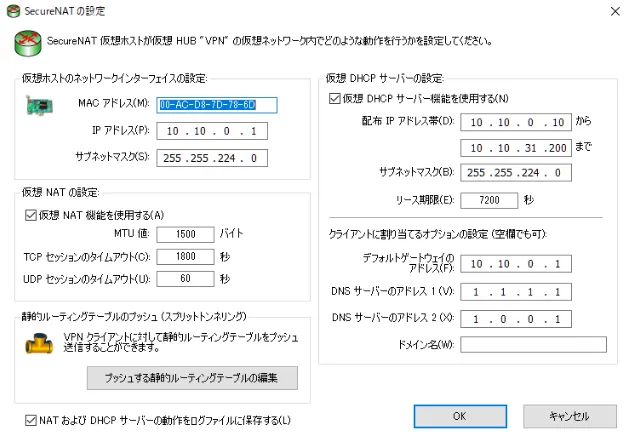
仮想ホスト(NAT ゲートウェイ)
- IP アドレス:
10.10.0.1 - サブネットマスク:
255.255.224.0(/19)
仮想 DHCP サーバー
- 配布範囲:
10.10.0.10〜10.10.31.200 - リース期限: 7200秒(2時間)
- DNS:
1.1.1.1,1.0.0.1(Cloudflare DNS)
グループのセキュリティポリシー
サービス提供用に制限を設定。

主な設定
- TCP コネクション数の最大値: 32個
- 通信タイムアウト時間: 20秒
- ユーザーはパスワードを変更できない: 有効
- 多重ログイン制限数: 3個
- VPN Client を一定時間で自動切断: 7200秒(2時間)
ユーザー管理(vpncmd)
GUI でも設定できるが、大量のユーザーを管理する場合は vpncmd でスクリプトを流し込む方が効率的。
# ユーザー作成スクリプトを取得して実行
wget -O accounts https://example.com/api/get/accounts/1
/usr/local/vpnserver/vpncmd /server localhost:5555 /in:accounts
スクリプトの中身は以下のような形式:
Hub VPN
UserCreate user001 /GROUP:none /REALNAME:none /NOTE:none
UserPasswordSet user001 /PASSWORD:password001
UserCreate user002 /GROUP:none /REALNAME:none /NOTE:none
UserPasswordSet user002 /PASSWORD:password002
2025年現在の推奨設定
当時の設定で動いていたが、今ならこうした方がいいっぽい。
暗号化方式の変更
SoftEther のデフォルトは AES128-SHA だが、現在は AES256-GCM-SHA384 を推奨。TLS 1.3 ベースのより安全な暗号スイート。
VPN Server Manager → サーバー設定 → 暗号化と通信 で変更可能。
認証方式
パスワード認証より 証明書ベース認証 を推奨。特にサービス提供用途では。
L2TP/IPsec について
2024年に Microsoft が L2TP/IPsec を非推奨にした。今から構築するなら SSL-VPN(SoftEther 独自プロトコル)か OpenVPN プロトコルを優先した方がいい。
セキュリティ監査
SoftEther は 2017年に一度監査を受けているが、それ以降の監査は行われていない。セキュリティ重視の環境では WireGuard など他の選択肢も検討の価値あり。
→ 続き: WireGuard VPN サーバーの構築メモ
→ まとめ: 対中国通信 VPN規格によるつながりやすさの比較